1
Chapter 5 - Error Correction, Data Compression, and Speed Conversion
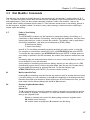
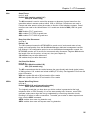
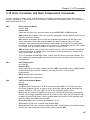
5.12.1 Baud Adjust ($BA)
In typical operations, the MT2834MR6 will do one of two things regarding speed. It will automatically match
the speed of its RS-232 interface and phone line transmissions to that of the terminal or computer to which it
is connected as soon as it receives its first AT command. Or, in autoanswer mode, it will match its RS-232
and transmission speeds to that of the originating modem that called it. This is typical of many dial-up
modems, and it is referred to variously as auto-speed or baud adjust. Multi-Tech uses the term baud adjust.
When you enable speed conversion, the modem does not adjust its speed at the RS-232 serial port, even if
the modem does adjust its line transmission speed. To turn baud adjust off and speed conversion on, type
AT$BA0 (where the 0 is a zero).
Note: Even though baud adjust sounds like it should mean the same thing as speed conversion, it actually
means the opposite.
a.
Turning baud adjust off turns speed conversion on.
b.
Turning baud adjust on turns speed conversion off.
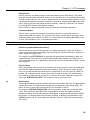
To turn baud adjust on and speed conversion off, type AT$BA1 and press ENTER. The modem will now
match its RS-232 speed to that of the computer, and will adjust its speed to any changes in the computer’s
speed in the originate mode, or to the speed of the originating modem when it’s in the answer mode. With
baud adjust on, the speed at which the modem communicates over the phone line is always the same as the
speed at which it communicates via its RS-232 serial port.
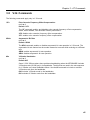
5.12.2 Modem Baud Rate ($MB)
The $MB command presets the MT2834MR6’s transmission rate for originate operations, i.e., the speed of
the modem’s transmissions over the telephone lines when originating a call. With speed conversion, this
transmission speed can be a different rate than the serial port speed.
When the MT2834MR6 receives a call from another modem, it automatically switches its phone line
transmission rate to match the calling modem. However, if the MT2834MR6 originates a call to another
modem that is unable to connect at the speed of the MT2834MR6, the MT2834MR6 will automatically drop to
a lower speed in an attempt to match the speed of that modem. For example, if the MT2834MR6 is set for
28,800 bps and calls another modem that has a top speed of 9600 bps, it will drop to 9600 bps.
When baud adjust is on ($BA1), speed conversion is off, as we discussed earlier. In that case, the $MB
command is ignored, since it is part of speed conversion.
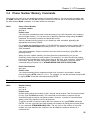
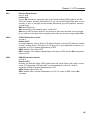
To set the Modem Baud Rate, type AT$MBn, where n is the desired rate.
AT$MB75
AT$MB1200
AT$MB4800
AT$MB14400
AT$MB19200
AT$MB33600
ITU-T V.23
AT$MB300
1200 bps
AT$MB2400
4800 bps
AT$MB9600
14,400 bps
AT$MB16800
19,200 bps
AT$MB28800
33,600 bps (factory default)
300 bps
2400 bps
9600 bps
16,800 bps
28,800 bps
76