1
!
6
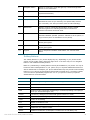
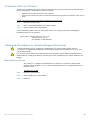
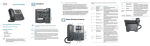
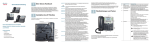
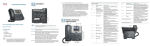
Navigation button
Press an arrow key to scroll left, right, up, or down through items
shown on the LCD screen.
7
Messages button
Press to access voice mail (must be set up by your phone
system administrator).
8
Hold button
Press to place a call on hold.
9
Setup button
Press to access a menu to configure features and
preferences (such as your directory and speed dials), access
your call history, and set up functions (such as call forwarding).
10
Mute button
Press to mute or unmute the phone. When phone is muted,
the button glows red. A flashing mute button indicates the
network connection cannot be found.
11
Volume button
Press + to increase the volume and - to lower the volume of the
handset, headset, speaker (when the handset is off the phone, or
ringer volume (when the handset is on the phone).
12
Headset button
Push to turn the headset on or off. When the headset is on, the
button glows green.
13
Speaker button
Push to turn the speaker on or off. When the speaker is on, the
button glows green.
14
Keypad
Use to dial phone numbers, enter letters, and choose menu
items.
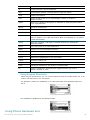
Softkey Buttons
The softkey buttons on your phone display may vary depending on your phone model
and the phone system setup. Press the Right Arrow or Left Arrow keys on the navigation
button to view additional softkey buttons.
Below is a partial listing of softkey buttons that may be available on your phone. You may not
have all of these softkey buttons on your phone, and you may have additional buttons that
are not listed here. For example, your phone administrator may also provide custom softkey
buttons on your phone, such as buttons that provide a speed dial to a company number,
or that access a specialized program that runs on your phone. Contact your phone
administrator for more information.
Button
Function
<< or >>
Move left or right through an entry without deleting characters.
activ
Activates screen saver mode.
add
Add an entry.
bXfer
Performs a blind call transfer (transferring a call without speaking to the party to
whom you are transferring the call.)
cancel
Cancels any changes you have made (press before ok or save).
cfwd
Forwards all calls coming to your phone to a specified number.
-cfwd
Clears call forwarding.
conf
Initiates a conference call.
confLx
Conferences active lines on the phone together.
delChr
Deletes the last number or letter.
delete
Deletes an entire item (for example, a number from the Call History list).
"#$%!&'()$!*+%!,(#-+!./0&1!./2&!34)!./5&!!
!
!
!
7!