1
Registering the Repeater
The repeater can be registered to a base station in two ways: Auto Registration and Manual
Registration. Before registering the repeater, you need to enable the repeater mode on the base
station. For more information on how to enable the repeater mode, refer to W52P IP DECT Phone
User Guide.
Note: Auto Registration cannot be performed if the repeater is already registered to another base station. In this
case, de-register the repeater before attempting auto registration. For more
information about the de-registration, refer to ”De-registration”.
Auto Registration
Using the auto registration method, the repeater can be registered to a base station easily.
To register a repeater automatically:
1. Switch off the repeater (disconnect the power adapter).
2. Set the base station in registration mode.
Long press the paging key on the base station till the first LED flashes.
3. Switch on the repeater (connect the power adapter).
The status LED on the repeater flashes. After a short while, the status LED stays illuminated indicating
that registration is completed and the repeater is ready for use.
Note: If the registration is not successful, the status LED will flash continuously. In this case, repeat the
procedures.
4. Registration of handset.
If the password of the base station has been changed, reset it to “0000”. You must re-register the
handset even if the handset used was already registered to the base station. Now the status LED fast
flashes without interruptions.
5. Assign a repeater number.
You must now assign a repeater number to the repeater (choose from 2 to 7, for up to 6 repeaters):
a) Dial out “#*9” using the handset. The status LED stays illuminated.
b) Press a number between 2 and 7. When the repeater has accepted the chosen
number, the status LED will flash a corresponding number of times.
c) Accept the registration by pressing the * key and then the on-hook key.
The repeater is now automatically restarted: the status LED goes off for 2 seconds, flashes for a brief
moment and then stays illuminated.
The registration of the repeater is completed. You can now disconnect the power adapter and move
the repeater to the selected location (disconnecting the power will not clear the registration).
Note: Each number can be only assigned once when using more than one repeater on a base
station.
De-registration
If you want to register the repeater to another base station using the auto registration method,
de-register the repeater beforehand as described below:
Manual Registration
1. Switch off the repeater (disconnect the power adapter).
The repeater, base station and handset must be accessible before performing the registration. If you
2. Switch it on for 1 to 5 seconds and switch it off again.
want to register more than one repeater, the registration must be performed separately for each
3. Switch it on for 25 to 35 seconds and switch it off again.
repeater.
Now the repeater is ready for a new registration.
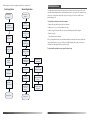
To register a repeater manually:
1. Set the repeater in registration mode.
Switch on the repeater for 1-5 seconds and then switch it off. Switch it on once more
and leave it there.
The status LED on the repeater flashes slowly.
You now have five minutes to complete the registration. If the registration is not completed within
this period, you must start over again.
2. Set the base station in registration mode.
Long press the paging key on the base station till the first LED flashes.
3. The status LED on the repeater flashes.
If the LED flashes fast without interruptions, go to step 5. If the LED flashes fast with interruptions, go
to step 4.
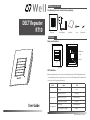
DECT Repeater RT10 User Guide
Placement
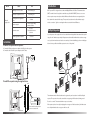
To achieve optimum performance for the repeater, it is important to find a good location.
Here are a few tips for placing the repeaters:
Choose a rasied position for both the base station and repeater wherever possible.
When positing the repeater, avoid obstacles that can interfere with radio transmission such as thick
wall and mental structures that may be in the coverage area between the base station and repeater.
Avoid interference from other electrical appliances such as micro-wave ovens, Hi-Fi equipment,
computers etc.
Keep a minimum of 10 meters between multiple repeaters to avoid coverage areas overlap.
Note: The status LED remains illuminated after the repeater has been switched on. If the LED
flashes, the repeater is far away from the base station or reception is hindered by obstacles.