1
Using Your Radio
NOTE: By default, when you change to channel 16, the radio automatically
boosts the power to 25 Watts. Be sure to change the power back to 1 Watt if
you are not making an emergency transmission.
Some channels limit the power of transmission to 1 Watt so that there is less
interference between boaters attempting to use the channel at the same
time. If you switch to one of these channels, the radio changes back to 1 Watt
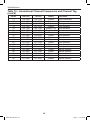
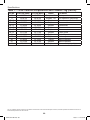
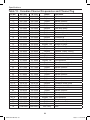
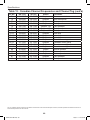
automatically. See the channel list on page 57 for a list of power-restricted
channels.
Choosing Triple Watch or Dual Watch
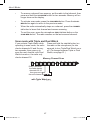
In Triple Watch mode, the radio briefly checks channels 16 and 9 every two
seconds. In Dual Watch mode, the radio checks channel 16 only. Generally,
Triple Watch is used in areas where channel 9 is used as a hailing frequency,
while Dual Watch is used in areas where channel 16 is used for distress and
hailing. Your radio comes set to use Triple Watch; if you want to use Dual
Watch instead, you will have to select it in the setup:
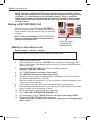
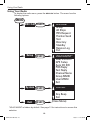
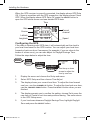
MENU
Setup
SELECT
Dual/TriWatch
Dual/TriWatch Dual Watch
Triple Watch
SELECT
[Exit]
88
1.
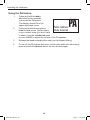
Press the MENU-PA button to display the menu.
2.
Select Setup and then Dual/Tri Watch.
3.
Highlight Dual Watch and press the SELECT button. The radio activates the new setting and returns to the Setup menu.
4.
To reactive Triple Watch, repeat the procedure described above, but
choose Triple Watch in step 3.
21
UM425 VHF OM.indd 21
28/9/11 11:55:16 AM