1
20-Inch B&W Monitor
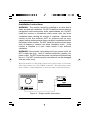
If the monitor will be used in a well lit area, set the DC REST (DC
Restoration) switch to the ON position. Set it to the OFF position if the
monitor is used in a low light situation.
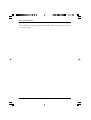
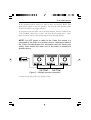
If you plan to loop the video out to another monitor, connect a cable to the
Video Out BNC and route it to the Video In of the second monitor. Up to
three monitors can be connected using the loop-through feature.
NOTE: Do NOT attach a cable to the Video Out unless it is
connected to the Video In of another device. Attaching a cable to
the Video Out deactivates the termination and will cause poor
quality video unless the other end of the cable is attached to
another device.
Figure 5 – Multiple monitor connection
Connect the power cord to the power outlet.
AMM20
5