1
SET-UP SYSTEM VOLUME AND LEVELS
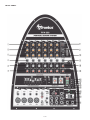
To set system volume and operating levels, be sure to follow these simple set-up guidelines:
I. First, slowly raise the large Left and Right Master volume controls to their 12 o’clock notched
positions.
2. Use a microphone (or other source) in the same position as it will be used on stage and in the
manner in which it will be used for the event. Slowly bring up the appropriate channel input level
control listening for the onset of feedback or howling or until the required level is reached. Have a
helper walk the audience area to make sure coverage and levels are sufficient for your needs. The
system’s overall volume can be raised simply by rotating the Left and Right Master volume controls
to the desired level.
3. Consider the application and needs of the event and set the System EQ control appropriately. This
is best achieved by playing recorded material of the same type as your show program, or by having
an assistant speak into the microphone while you listen in the audience area.
For public address (spoken voice), it is advisable to rotate the System EQ sticks up to enhance the
mid and high frequencies, and limit the low frequency content. For large outdoor spaces this will
also give the maximum headroom and output capability. Carefully consider the individual event’s
needs and set your control for the maximum effect.
POWER TOWER
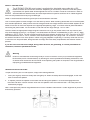
In setting up the system, the PPA-300 mixing console should ideally be placed where system performance can be
evaluated by the operator. If no ongoing adjustments will be necessary, the mixer may be placed conveniently and
where the cable lengths allow.
Take care to place the Power Tower where the cables will not trip anyone. All cables should be carefully secured.
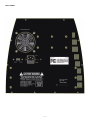
The storage compartment in the rear of the Tower can hold cables, microphones and other system parts. To open
simply slide the catch upwards and pull open.
The main (AC) fuse holder is under the IEC (power cord) socket on the right rear of the Tower. To change a fuse,
remove the IEC plug and, using an appropriate tool pull out the fuse holder. Note there is a spare fuse in the fuse
holder; the PPA-300 utilizes a T6A 250V fuse. Only replace fuses with one of an identical value and size.
–9–