1
LEON-G100/G200 - System Integration Manual
Preface
u-blox Technical Documentation
As part of our commitment to customer support, u-blox maintains an extensive volume of technical
documentation for our products. In addition to our product-specific technical data sheets, the following manuals
are available to assist u-blox customers in product design and development.
AT Commands Manual: This document provides the description of the supported AT commands by the LEON
GSM/GPRS Voice and Data Modules to verify all implemented functionalities.
System Integration Manual: This Manual provides hardware design instructions and information on how to
set up production and final product tests.
Application Note: document provides general design instructions and information that applies to all u-blox
Wireless modules. See Section Related documents for a list of Application Notes related to your Wireless
Module.
How to use this Manual
The LEON-G100/G200 System Integration Manual provides the necessary information to successfully design in
and configure these u-blox wireless modules. For navigating this document please note the following:
This manual has a modular structure. It is not necessary to read it from the beginning to the end. To help in
finding needed information, a brief section overview is provided below:
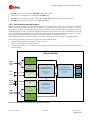
1. System description: This chapter introduces the basics of function and architecture of the wireless modules.
This manual has a modular structure. It is not necessary to read it from the beginning to the end.
The following symbols are used to highlight important information within the manual:
An index finger points out key information pertaining to module integration and performance.
A warning symbol indicates actions that could negatively impact or damage the module.
Questions
If you have any questions about u-blox Wireless Integration, please:
Read this manual carefully.
Contact our information service on the homepage http://www.u-blox.com
Read the questions and answers on our FAQ database on the homepage http://www.u-blox.com
Technical Support
Worldwide Web
Our website (www.u-blox.com) is a rich pool of information. Product information, technical documents and
helpful FAQ can be accessed 24h a day.
By E-mail
If you have technical problems or cannot find the required information in the provided documents, contact the
nearest of the Technical Support offices by email. Use our service pool email addresses rather than any personal
email address of our staff. This makes sure that your request is processed as soon as possible. You will find the
contact details at the end of the document.
Helpful Information when Contacting Technical Support
When contacting Technical Support please have the following information ready:
Module type (e.g. LEON-G100) and firmware version
Module configuration
GSM.G1-HW-09002-C
Preliminary
Preface
Page 3 of 75