1
Set-up
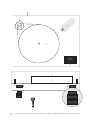
The deck is supplied partially disassembled and carefully packaged for safe transport. Carefully remove all
parts from the transport packaging.
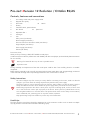
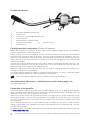
Screw the four feet (7) onto the threaded bolts located on the underside of the plinth. Make sure the surface
you wish to use the turntable on is level (use a spirit level) before placing the turntable on it.
Carefully place the platter bearing housing over the bearing axle. Put the record weight on the platter and
level the plinth using the spirit level (6a) and the adjustable feet (7).
To adjust the feet, hold (A) and turn (B). Turning (B) clockwise decreases the height, turning anticlockwise
increases the height of the feet.
Fit the drive belt (3) around the platter (4) and the smaller diameter part of the motor pulley (2).
Avoid getting sweat or grease on the belt as these will deteriorate the performance and reduce the belt's
lifespan. Use absorbent kitchen paper to remove any oil or grease from the outer edge of the hub and the belt.
Put the pulley cover on its rests.
Please note: We recommend to use the record player without a mat on the platter.
Fitting the lid
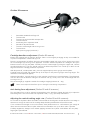
Fit the lid (dust cover 9) carefully over the hinge prongs and adjust the screws (8) until the lid stays open
where you want it to without being too stiff to open or close.
Mains power connection
The turntable is supplied with a power supply suitable for your country's mains supply. Check the label before
connecting to ensure compliance with the mains rating in your house.
Connect the low voltage plug from the power supply to the socket (1) on the rear of the record player before
connecting the power supply to the mains.
Starting the motor, Stand By
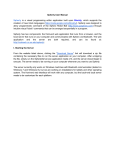
Pressing the button Speed Change will switch on the player from stand by. Press and hold the push button
Speed Change to put the unit into stand by.
Changing replay speed
The belt must be on the smaller (50Hz models) larger (60Hz models) diameter part of the motor pulley.
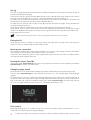
Press the button Speed Change to switch between 33 and 45 r.p.m.. The selected speed will be displayed
digitally.
To replay records at 78 r.p.m. perform the following steps: Remove the pulley cover. Using the tool (3a), fit
the belt (3) around the larger (50Hz models, for 60Hz models the smaller diameter has to be used) diameter
step of the pulley (2). Start the turntable by pressing the button Speed Change and switch the speed to
45 r.p.m., the platter will then revolve at 78 r.p.m.. The display still shows 45 r.p.m..
-
45.0
Speed Change
+
Pitch control
Repeatedly pressing the + or - buttons increases or decreases the replay speed in twenty steps of 0,1 r.p.m.
respectively. The adjusted speed is displayed digitally.
4
© Audio Trade GmbH · Pro-Ject Xtension 12 Evolution / Xtension Ortofon RS-309D/AS-309S · Revision 2012.8.1