1
•
up within a network. Or this may happen if the
01X was last running on a different clock setting.
If this happens follow these simple steps:
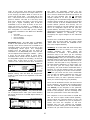
On the front panel of the 01X –
To start the mLAN Driver:
Press START> mLAN TOOLS> mLAN Start
It will take a few seconds to launch.
AUTO CONNECTOR
•
•
•
•
•
AUTO CONNECTOR is used
when you are using a
single connected device in a scenario where you
are using just an 01X <->
computer, for example.
We will open it here just
because we can learn
some interesting things
from it.
•
•
This will configure the 01X as the “Master Clock”
running at 44.1kHz.
LAUNCH the DIGITAL PATCHBAY
You would use the DIGITAL PATCHBAY in a
system setup where more than one mLAN device
is being connected.
Right Click on the mLAN Manager icon in the
System Tray and select “AUTO CONNECTOR”.
Making the initial settings:
•
•
•
•
•
•
•
Press UTILITY
Press Knob 3 W.CLK
Press Knob 1 ENABLE
Press Knob 8 YES
If necessary, DISPLAY DOWN to page 2/2 and set
the Clock to “INTERNAL” and “44.1kHz”
Press [SHIFT] + [BACK UP]
Click OK on the computer.
•
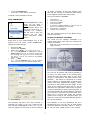
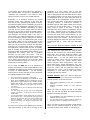
Model Name 01X
Sampling Rate 44.1kHz
Master Clock = 01X * *(see Troubleshooting for details)
PC -> 01X 16 channels + 2 CH Monitor (17&18)
Please note: [There are 16 channels coming from
the computer back to the 01X via the mLAN cable
plus the 17th and 18th arrive direct to the STEREO
monitor bus.]
ASIO ____ ASIO
PC <- 01X 24 channels [There are 24 channels
going from the 01X to the computer DIRECT OUT]
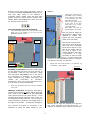
Right click on the mLAN Manager icon and select the
Graphic Patchbay
You may not be familiar with what a patchbay is
or does in an audio studio. In the analog world,
literally the input and output jacks of every piece
of gear is connected to the patch points in the
patchbay – this makes it convenient to re-patch
when necessary to accommodate a specific goal.
Usually filled with spaghetti-like cabling, routing
this input to that output and that output to this
input. In the analog world there was no way to
memorize the connections made during a session
except by attempting to write it down on paper. In
the digital domain the Digital Patchbay will allow
you not only to memorize for instant recall but it
allows you to connect gear within the network
without ever having to pull a physical cable. You
define the connections between NODES (devices)
here in this patchbay.
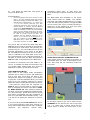
Click CONNECT
The Patchbay is not only educational but on a
fundamental level is at the core of what makes
mLAN the powerful innovation that it is. There is
an icon for each mLAN device in the network -
The computer will take a few more seconds to
negotiate the setup. If you get a warning that
says activate WORDCLOCK on the 01X - do so.
This may happen the first time an 01X is powered
3