1
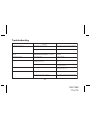
Troubleshooting
FA U LT
S ystem does not turn on
P R OB A B L E
C AU SE
R E ME D Y
Recei ver power i s set to off
Turn Recei ver power on usi ng the Recei ver
P ower on/off button
B atteri es not i nstalled or i nstalled i ncorrectly
Install batteri es observi ng correct polari ty
JS IR-900B does not operate usi ng
batteri es
A s long as the A C power connector i s
attached to the rear panel of the JS IR900B
battery operati on i s di sabled
Remove power connector from rear panel of
JS IR900B
Intermi ttent operati on
Low battery level
Replace batteri es
A NTE NNA E RROR message
S atelli te antenna not connected to
JS IR900B rear panel
C onnect satelli te antenna toJS IR900B rear
panel
Recei ver not fi rmly seated i n cradle
P ress fi rmly down on the S huttle to ensure
that the connector i s fi rmly mated to the
B oom B ox connector
A C QUIRING S IGNA L message
C heck for obstacles over or around antenna
C hange locati on to eli mi nate nearby
obstacles (bri dges, etc.)
No sound from JS IR900B speakers
Headphones i nstalled
Remove headphones
Incorrent mode (source) selecti on
P ress MOD E pushbutton for desi red audi o
si gnal (S atelli teRadi o or A UX i nput)
-11-
128-7369
11 of 12