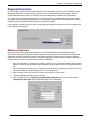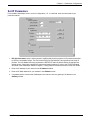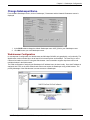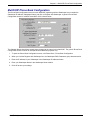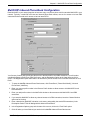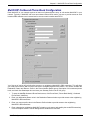
1
MVP100GK User Guide User Guide Gatekeeper MVP100GK S000353B Revision B This publication may not be reproduced, in whole or in part, without prior expressed written permission from MultiTech Systems, Inc. All rights reserved. Copyright © 2004 by Multi-Tech Systems, Inc. Multi-Tech Systems, Inc. makes no representations or warranty with respect to the contents hereof and specifically disclaims any implied warranties of merchantability or fitness for any particular purpose. Furthermore, Multi-Tech Systems, Inc. reserves the right to revise this publication and to make changes from time to time in the content hereof without obligation of Multi-Tech Systems, Inc. to notify any person or organization of such revisions or changes. Record of Revisions Revision A B Date 08/01/04 09/20/04 Description Manual released. Manual updated to include new 25 user license and version 8.06.A7 software. Patents This device covered by one or more of the following patents: 6,031,867; 6,012,113; 6,009,082; 5,864,560; 5,815,503; 5,812,534; 5,790,532; 5,764,628; 5,764,627; 5,754,589; 5,724,356; 5,673,268; 5,673,257; 5,628,030; 5,619,508; 5,617,423; 5,600,649; 5,592,586; 5,577,041; 5,574,725; 5,559,793; 5,546,448; 5,546,395; 5,535,204; 5,500,859; 5,471,470; 5,463,616; 5,453,986; 5,452,289; 5,450,425; 5,309,562; 5,301,274 Trademarks Trademarks of Multi-Tech Systems, Inc.: Multi-Tech, and Multi-Tech logo. Windows is a registered trademark of Microsoft Corporation in the United States and other countries. All products or technologies are the trademarks or registered trademarks of their respective holders. Technical Support Country France: India: U.K.: U.S. and Canada: Rest of the World: By Email [email protected] [email protected] [email protected] [email protected] [email protected] World Headquarters Multi-Tech Systems, Inc. 2205 Woodale Drive Mounds View, Minnesota 55112 (763) 785-3500 or (800) 328-9717 Fax 763-785-9874 Internet Address: http://www.multitech.com By Phone (33) 1-64 61 09 81 91 (124) 6340778 (44) 118 959 7774 (800) 972-2439 (763) 717-5863 Contents CHAPTER 1 - INTRODUCTION AND DESCRIPTION.............................................................. 4 Gatekeeper Basics......................................................................................................................................................................4 Features ......................................................................................................................................................................................6 Front Panel.................................................................................................................................................................................7 Back Panel ..................................................................................................................................................................................8 Specifications..............................................................................................................................................................................8 CHAPTER 2 - INSTALLATION................................................................................................. 9 Safety Warnings.........................................................................................................................................................................9 Safety Recommendations for Rack Installations ....................................................................................................................9 Cabling......................................................................................................................................................................................10 Loading Gatekeeper Software ................................................................................................................................................12 Gatekeeper Configuration ......................................................................................................................................................16 CHAPTER 3 – GATEKEEPER FUNCTIONALITY .................................................................. 27 Getting Started.........................................................................................................................................................................27 VOIP Network Example .........................................................................................................................................................29 CHAPTER 4 - GATEKEEPER PROTOCOLS........................................................................ 51 CHAPTER 5 – GATEKEEPER SOFTWARE .......................................................................... 53 Configuration ...........................................................................................................................................................................54 Statistics....................................................................................................................................................................................61 Connection................................................................................................................................................................................63 GateKeeper...............................................................................................................................................................................64 Software User License Agreement .........................................................................................................................................83 CHAPTER 6 - WARRANTY, SERVICE, AND TECH SUPPORT ............................................ 84 Repair Procedures for U.S. and Canadian Customers.........................................................................................................84 Technical Support....................................................................................................................................................................85 Regulatory Information ..........................................................................................................................................................85 FCC Declaration ......................................................................................................................................................................86 INDEX...................................................................................................................................... 88 Chapter 1 – Introduction and Description Chapter 1 - Introduction and Description Welcome to Multi-Tech’s new MultiVOIP™ Gatekeeper, Model MVP100GK, a turnkey hardware and software solution that enables network managers and intranet managers to define and control how H.323 voice traffic is managed over IP networks. The Gatekeeper is a complementary product to the MultiVOIP family. The Gatekeeper is an industry-standard mechanism for call control and routing, basic telephony services, H.323 bandwidth usage control, total network usage control, and overall system administration and security policies. It includes fast, easy-to-use interfaces that network managers can use to modify or update zone configurations when an individual on the network needs additional services. And, it provides call centers with the capability to perform needs-based call routing as well as providing a variety of other automatic call distribution features. Figure 1-1. Gatekeeper Gatekeeper facilitates interoperability between PBX dial plans and IP-based terminals. With it, call centers can route call on the basis of need and implement other automatic call distribution features, as well. Gatekeeper Basics Gatekeepers are optional within H.323 networks. However, when they are present, gateways (voip units) and other network endpoint devices (like terminals and Multipoint Control Units used in conferences) must use Gatekeeper services. There are four functions that H.323 Gatekeepers must provide to the network and many other functions, both standard and proprietary, that the Gatekeeper may offer to network participants. Mandatory Gatekeeper Functions The mandatory Gatekeeper functions are address translation, admission control, bandwidth control, and zone management. Address Translation The Gatekeeper supports aliases, such as conventional E.164 phone numbers, for each endpoint registered within the zone. Users call each other within a zone by simply dialing a number or string of characters instead of an IP address. This function is particularly important when a phone on the circuit-switched network tries to call a phone connected to a gateway on an IP network. Admission Control The Gatekeeper determines which network participants can and cannot make calls, according to established network permissions and rules. The Gatekeeper controls admission using H.225 “RAS” messages (Registration, Admission, Status). Multi-Tech Systems, Inc. MultiVOIP Gatekeeper User Guide 4 Chapter 1 – Introduction and Description Bandwidth Control With the Gatekeeper, the network administrator can specify bandwidth limitations within a Gatekeeper’s zone and can specify a bandwidth limit for gateway endpoints. The Gatekeeper controls bandwidth using H.225 RAS messages. A Gatekeeper may determine there is no bandwidth available for a call or no additional bandwidth available for an ongoing call requesting an increase. Dynamic (situation-dependent) changes in bandwidth allocation are typically called “bandwidth management,” which is considered an optional Gatekeeper function. Zone Management The Gatekeeper allows or disallows call traffic within the Gatekeeper’s zone, depending upon established permissions. The zone might be defined geographically (such as different branch locations), by physical network connections (a range of IP addresses may comprise a zone, as may a subnet on a particular floor of a building), or by a functional (organizational) paradigm. Optional Gatekeeper Functions The Gatekeeper supports the three main optional Gatekeeper functions: call control signaling, call authorization, and bandwidth management. Call Control Signaling The Gatekeeper can, in “routed” mode, act as an intermediary for H.225 call-control signals between two endpoints participating in a call. In “direct” mode, this function is turned off and the endpoints exchange H.225 call-control messages directly. Call Authorization The Gatekeeper can be programmed to restrict access (admission and registration) according to criteria set by the user. Bandwidth Management This is essentially dynamic bandwidth control (see “Bandwidth Control” section above). Multi-Tech Systems, Inc. MultiVOIP Gatekeeper User Guide 5 Chapter 1 – Introduction and Description Features • H.323 Version 2 compliance • Admissions control determines whether H.323 devices are allowed to access resources (make calls) • Address translation routes calls across your network • Bandwidth control monitors and controls H.323 bandwidth usage to provide superior QoS • Zone control and managemnt provides all defined call control services to all registered endpoints in the gatekeeper’s zone • Bandwidth management controls and limits the number of H.323 devices that are allowed to simultaneously use the network • Call routing allows you to direct calls to specified groups of gateways • Call authorization/access authorizes or rejects a given call based on type of service, gateway restrictions or lack of available bandwidth • Support for Zone Prefix 1 and 2 where we accept calls from neighbouring gatekeepers (Inter Zone Calls) using these two zone prefixes • Intra-zone security mechanism to control calling activity within a zone using PBX-like prefix dialing • Support for non-RAS endpoints such as Microsoft NetMetting Multi-Tech Systems, Inc. MultiVOIP Gatekeeper User Guide 6 Chapter 1 – Introduction and Description Front Panel The front panel has 4 front panel LEDs that provide operating status. The Front Panel Figure 1-2. Front Panel Front Panel LED Descriptions LED Power Indicates the presence of power. Boot After power up, the Boot LED will be on briefly while the Gatekeeper is booting. It lights whenever the Gatekeeper is booting or downloading a set of configuration data. LED Description of Ethernet LEDs LNK The LINK (LNK) LED indicates link integrity for the Ethernet port. When the LNK LED is on, the Ethernet link is valid. When the LNK LED is blinking, the Ethernet link is active. FDX The Full DupleX (FDX) LED indicates either 10Mbps, 100Mbps, or a collision has occurred on the Ethernet link. When the FDX LED is off, the Ethernet link is responding at 10Mbps. When the FDX LED is on, the link is responding at 100Mbps. When the FDX LED is blinking, a collision has occurred. Multi-Tech Systems, Inc. MultiVOIP Gatekeeper User Guide 7 Chapter 1 – Introduction and Description Back Panel The Gatekeeper back panel has a power plug, power switch, Command Port (RS232) for configuration, an Ethernet jack (RJ45) for connection to your network, and a Command Modem for remote configuration. Back panel The back panel components are described in detail in the Cabling Procedure section in Chapter 2 of this manual. Specifications The Gatekeeper conforms to the following technical specifications. • 10/100Mb EtherNet network • Power requirement: 100-240V; 1.2 – 0.6V • Frequency: 50-60 Hz • Power Consumption: 27 Watts • 1.75 inches high x 17.4 inches wide x 8.75 inches deep (4.5cm H x 44.2cm W x 22.2cm D) • 7.1 lbs (3.2 kg) Multi-Tech Systems, Inc. MultiVOIP Gatekeeper User Guide 8 Chapter 2 – Installation Chapter 2 - Installation This chapter explains how to set up and connect cables for the Gatekeeper. This product includes the Windows operating system and Gatekeeper software, and is ready to be connected to an Ethernet concentrator. Safety Warnings 1. 2. 3. 4. 5. Use this product only with UL- and CUL-listed computers. To reduce the risk of fire, use only 26 AWG or larger telephone wiring. Never install telephone wiring during a lightning storm. Never install a telephone jack in a wet location unless the jack is specifically designed for wet locations. Never touch uninsulated telephone wires or terminals unless the telephone line has been disconnected at the network interface. 6. Use caution when installing or modifying telephone lines. 7. Avoid using a telephone during an electrical storm; there is a risk of electrical shock from lightning. 8. Do not use a telephone in the vicinity of a gas leak. Caution: Danger of explosion if battery is incorrectly replaced. A lithium battery on the Gatekeeper board provides backup power for the time-keeping capability. The battery has an estimated life expectancy of ten years. Contact Multi-Tech if you suspect a failed battery. If date and time is incorrect after having the unit powered off, it may be due to a weak battery or incorrect setup. Caution: The Ethernet ports are not designed to be connected to a Public Telecommunication Network. Safety Recommendations for Rack Installations • Ensure proper installation of the Gatekeeper in a closed or multi-unit enclosure by following the recommended installation as defined by the enclosure manufacturer. Do not place the Gatekeeper directly on top of other equipment or place other equipment directly on top of the Gatekeeper. • If installing the Gatekeeper in a closed or multi-unit enclosure, ensure adequate airflow within the rack so that the maximum recommended ambient temperature is not exceeded. • Ensure that the Gatekeeper is properly connected to earth ground via a grounded power cord. If a power strip is used, ensure that the power strip provides adequate grounding of the attached apparatus. • Ensure that the main supply circuit is capable of handling the load of the Gatekeeper. Refer to the power label on the equipment for load requirements. • Maximum ambient temperature for the Gatekeeper is 40 degrees Celsius (104° F). This equipment should only be installed by properly qualified service personnel. • Connect like circuits. In other words, connect SELV (Secondary Extra Low Voltage) circuits to SELV circuits and TN (Telecommunications Network) circuits to TN circuits. Multi-Tech Systems, Inc. MultiVOIP Gatekeeper User Guide 9 Chapter 2 – Installation Unpacking Check the items on the Gatekeeper shipping list to ensure that you have received the correct options and accessories. Unpack the unit and inspect it for visible shipping damage. If damage is observed, do not power-on the unit; contact Multi-Tech's Tech Support for advice. If no damage is observed, place the Gatekeeper in its final location. Cabling Cabling your Gatekeeper entails making the proper connections for power, command port, and Ethernet network. Figure 2-1 shows the back panel connectors and the associated cable connections. The following procedure details the steps necessary for cabling your Gatekeeper. 1. Connect the power cord to a live AC outlet, then connect it to the Gatekeeper’s power receptacle shown at top right in Figure 2-1. Figure 2-1. Cabling 2. Connect the Gatekeeper to the PC (the computer that will hold the Gatekeeper software) using the RJ-45 to DB9 (female) cable provided with your unit. Plug the RJ-45 end of the cable into the Command port of the Gatekeeper and connect the other end (the DB9 connector) to the PC serial port you are using (typically COM1 or COM2). 3. Connect a network cable to the Ethernet connector on the back of the Gatekeeper. Connect the other end of the cable to your network. 4. If you intend to configure the Gatekeeper remotely using the Gatekeeper Windows GUI, connect an RJ-11 phone cable between the Command Modem connector (at the rear of the Gatekeeper) and a receptacle served by a telco POTS line. See Figure 2-2 Multi-Tech Systems, Inc. MultiVOIP Gatekeeper User Guide 10 Chapter 2 – Installation The Command Modem is built into the Gatekeeper unit. To configure the Gatekeeper remotely using its Windows GUI, you must call into the Gatekeeper’s Command Modem. Once a connection is made, the configuration process is identical to local configuration with the Windows GUI. Figure 2-2. GND & Remote Config Modem Connections 5. Ensure that the unit is properly connected to earth ground by verifying that it is reliably grounded when mounted within a rack. This can be accomplished by connecting a grounding wire between the chassis grounding screw (see Figure 3-9) and a metallic object that will provide an electrical ground. 6. Turn on power to the Gatekeeper by setting the power switch on the right side panel to the ON position. Wait for the Boot LED on the Gatekeeper to go off before proceeding. This may take a couple of minutes. Proceed to Loading Gatekeeper Software section. Multi-Tech Systems, Inc. MultiVOIP Gatekeeper User Guide 11 Chapter 2 – Installation Loading Gatekeeper Software The software loading procedure does not present every screen or option in the loading process. It is assumed that someone with a thorough knowledge of Windows and the software loading process is performing the installation. The MultiVOIP Gatekeeper software and User Guide are contained on the Gatekeeper product CD. Because the CD is auto-detectable, it will start up automatically when you insert it into your CD-ROM drive. When you have finished loading your Gatekeeper software, you can view and print the User Guide by clicking on the View Manuals icon. 1. Be sure that your Gatekeeper has been properly cabled and that the power is turned on. 2. Insert the Gatekeeper CD into your CD-ROM drive. The CD should start automatically. It may take 10 to 20 seconds for the MultiVOIP Gatekeeper MVP100GK AutoRun screen to display. If the AutoRun screen does not display automatically, click My Computer, then right click the CD ROM drive icon, click Open, and then click the Autorun icon. 3. When the AutoRun screen appears, click the Install Software icon. Multi-Tech Systems, Inc. MultiVOIP Gatekeeper User Guide 12 Chapter 2 – Installation 4. A ‘Thank you for choosing..’ screen appears. Press Enter or click Next to continue. 5. Follow the on-screen instructions to install your Gatekeeper software. The first screen asks you to choose the folder location of the files of the Gatekeeper software. Choose a location and click Next. Multi-Tech Systems, Inc. MultiVOIP Gatekeeper User Guide 13 Chapter 2 – Installation 6. At the next screen, you must select a program folder location for the Gatekeeper software program icon. Click Next. Transient progress screens will appear while files are being copied. 7. On the next screen you can select the COM port that the command PC will use when communicating with the Gatekeeper unit. After software installation, the COM port can be re-set in the Gatekeeper Software (from the sidebar menu, select Connection | Settings to access the COM Port Setup screen or use the keyboard shortcut Ctrl + G). Multi-Tech Systems, Inc. MultiVOIP Gatekeeper User Guide 14 Chapter 2 – Installation NOTE: If the COM port setting made here conflicts with the actual COM port resources available in the command PC, this error message will appear when the Gatekeeper program is launched. If this occurs, you must reset the COM port. To change the COM port setting, use the COM Port Setup dialog box, which is accessible via the keyboard shortcut Ctrl + G or by going to the Connection pull-down menu and choosing “Settings.” In the “Select Port” field, select a COM port that is available on the PC. (If no COM ports are currently available, reallocate COM port resources in the computer’s MS Windows operating system to make one available.) 8. A completion screen will appear. Click Finish. When setup of the Gatekeeper software is complete, you will be prompted to run the Gatekeeper software to configure the VOIP. Software installation is complete at this point. Multi-Tech Systems, Inc. MultiVOIP Gatekeeper User Guide 15 Chapter 2 - Gatekeeper Configuratrion Gatekeeper Configuration Three methods of configuring a Gatekeeper can be used; 1) Local configuration, 2) Remote configuration through the command modem, or 3) Web-browser configuration. Also determining the configuration method is where the Gatekeeper network is located. If the Gatekeeper’s network is within the contential United States, the Gatekeeper can be configured either using local configuration, where a PC is connected to the Command Port on the Gatekeeper or remotely using the internal Command Modem connected to a dial up line and a remote PC connected to a dial up line. If the Gatekeeper’s network is outside the contential United States, then a minimual local configuration needs to be accomplished, that is the Regional Parameters have to be set for the internal Command Modem. Then the Gatekeeper could be shipped to its site, connected to its network, the internal Command Modem connected to a dial up line, and then the configuration process could be finished using remote configuration. Web-browser configuration can be used after the Gatekeeper’s IP address has been set. Gatekeeper local configuration begins with the following procedure. If you are remotely configuring the Gatekeeper through the command modem and the Gatekeeper’s network is within the contential US, you can skip to the Remote Configuration procedure. If the Gatekeeper’s network is outside the contential US, you will have to perform the local configuration procedure setting up the Regional Parameters and then you could proceed with Remote Configuration through the command modem. If you want to use the Web-browser for configuration, you will have to perform the local configuration setting up the Gatekeeper’s IP address. Then you can use the Webbrowser. 1. Start Gatekeeper Configuration Program. Launch the Gatekeeper program from the Windows Start | Programs | Gatekeeper X.XX (Version number) |Configuration and click . 2. The Gatekeeper main screen appears. If the main screen appears grayed out and seems inaccessible, verify command port connection. In the lower left corner of the screen, the connection status of the Gatekeeper will be displayed. The messages in the lower left corner will change as detection occurs. The message “Gatekeeper Found” confirms that the Gatekeeper is in contact with the Gatekeeper configuration program. Multi-Tech Systems, Inc. MultiVOIP Gatekeeper User Guide 16 Chapter 2 - Gatekeeper Configuratrion Regional Parameters If you are going to continue with the local configuration of the Gatekeeper and don’t plan to remotely access the Gatekeeper through the command modem, you do not have to consider the Regional Parameters. Skip the Regional Parameters and continue on with the setting of the Gatekeeper’s IP Address in the next section. If you would like to configure the Gatekeeper once it is connected into the network that it is going to be used in, you need to consider the Regional Parameters. If the Gatekeeper is being used in the United States, the default parameter setting, the Regional Parameter does not have to be changed. If the Gatekeeper is being used in any other country/region, the Regional Parameters have to be changed to that country/region’s requirements. Modem Configuration Before you can remotely configure the Gatekeeper, the Command Modem on the Gatekeeper has to be connected to a dial up line, the phone number of that dial up line has to be known by the person configuring the Gatekeeper remotely. The following modem configuration procedure provides you with the steps necessary to connect the command modem to a dial up line once the Gatekeeper is connected to its network, the Gatekeeper software loaded on the PC, and the dial up connection is established. 1. Once the Gatekeeper is connected to its network, connect an RJ-11 phone cable between the Command Modem connector on the back panel of the Gatekeeper and a telephone jack that is connected telephone line. 2. Find out the telephone number of this connection so that the person configuring the remote PC can enter this phone number into the Dial String on the Com Port Setup screen. 3. Now, all activity is from the remote PC. Connect the remote PC to a dial up line. 4. Load the Gatekeeper software on the remote PC. 5. From your desktop, click on StartProgramsMultiVOIP Gatekeeper x.xx (x.xx is version number) Configuration Port Setup and the COM Port Setup screen is displayed. Multi-Tech Systems, Inc. MultiVOIP Gatekeeper User Guide 17 Chapter 2 - Gatekeeper Configuratrion 6. Set the COM Port Setup Select Port and Baud Rate settings to match the communications port settings of your local PC. 7. Enter the Gatekeeper’s Command Modem phone number in the Dial String window of the Modem Setup preceeded by the AT dial command (atdt). 8. Click the OK button and the dialing sequence begins. The Reading Setup dialog box is displayed and then the main Gatekeeper screen is displayed. This is the main screen of the remote Gatekeeper. 9. Click on Configuration|IP and you are ready to move to setting the IP address of the Gatekeeper. Continue to the next section for setting the IP address. Multi-Tech Systems, Inc. MultiVOIP Gatekeeper User Guide 18 Chapter 2 - Gatekeeper Configuratrion Set IP Parameters From the Main Gatekeeper screen, click on Configuration|IP. In each field, enter the values that fit your particular network. 1. Diff Serv Parameters group’s values pertain to a differential prioritizing system for IP packets as handled by Diff Serv-compatible routers. The Call Control PHB (Per Hop Behavior) value prioritizes call setup IP packets. The Voip Media PHB value prioritizes the RTP/RTCP audio IP packets. Before changing these default values, consult with a qualified IP telecommunications engineer or refer to the TCP/IP standards described in the Gatekeeper Software Chapter 5, Configuration IP Parameters section of this User Guide. 2. Enter the IP address of your network in the IP Address window. 3. Enter the IP Mask address for your network in the IP Mask window. 4. If a gateway device connects the Gatekeeper to the Internet, enter the gateway’s IP address in the Gateway window. Multi-Tech Systems, Inc. MultiVOIP Gatekeeper User Guide 19 Chapter 2 - Gatekeeper Configuratrion Change Gatekeeper Name. From the Main Gatekeeper screen, click on Gatekeeper|Parameters and the Network Parameters screen is displayed 1. In the GK-ID window change the default Gatekeeper name -MVP_SGK to your Gatekeeper name. 2. Click OK to save your new Gatekeeper name. Web-browser Configuration In most aspects of configuration, the Web-browser and Windows GUI differ only graphically, not functionally. The Web-browser version number has to be at least 6 for Internet Explorer and Netscape. The Java Plug in on the CD has to be loaded on to the PC using the Web-browser. Java is needed to support drop-down menus and multiple windows in the Web-browser. The initial configuration of assigning the Gatekeeper’s IP address has to be done locally. Once the IP address is assigned, then a PC on the same network and sub-net can access the Gatekeeper using a Web-browser. The primary advantage of the Web-browser is remote access to a Gatekeeper. Multi-Tech Systems, Inc. MultiVOIP Gatekeeper User Guide 20 Chapter 2 - MultiVOIP Phone Book Configuration MultiVOIP Phone Book Configuration The Phone Book Configuration screen for each MultiVOIP registering with the Gatekeeper has to contain the Gatekeeper IP address, Gatekeeper Name, and click on Register with Gatekeeper. A generic Phone Book Configuration screen for a MVP410 and MVP 2410 is shown below. The Gateway Name should have already been changed to the name for this MultiVOIP. The generic Phone Book Configuration screen is shown for example and field definition purposes only. 1. To open the Phone Book Configuration screen, click Phone Book|Phone Book Configuration. 2. When you click the Register with Gatekeeper box, the Gatekeeper RAS Parameters group becomes active. 3. Enter the IP address of your Gatekeeper in the Gatekeeper IP Address window. 4. Enter your Gatekeeper Name in the Gatekeeper Name window. 5. Click OK to save your settings. Multi-Tech Systems, Inc. MultiVOIP Gatekeeper User Guide 21 Chapter 2 - MultiVOIP Phone Book Configuration MultiVOIP Inbound Phone Book Configuration Each MultiVOIP in your network requires at least one entry to receive a phone call from another MultiVOIP in your network. Typically, a multiVOIP will have two Inbound Phone Book entries; one set for access to its local PBX extensions and a second set for access to its local area PSTN. Your first set of entries will typically provide access to this MultiVOIP’s local PBX extensions. You will need to consider the Remove Prefix entry, Add Prefix entry, and the Registration Option at the lower left area of this screen. The Registration Option that needs to be checked to provide access to the local PBX extensions is Tech Prefix. 1. To open the Add/Edit Inbound Phone Book screen, click Phone Book|Phone Book Modify|Inbound Phone Book|Add Entry. 2. Enter your remove prefix number in the Remove Prefix window to allow access to this MultiVOIP’s local PBX extensions. 3. Enter your add prefix number in the Add Prefix window to allow access to this MultiVOIP’s local PBX extensions. 4. If you want this MultiVOIP to allow any channel access to its PBX extensions, leave the Channel Number option set for Hunting. 5. Enter a description (MultiVOIP’s location or site name, and possibly the words PBX extensions) in the Description window. This will distinguish this Inbound Phone Book. 6. In the Registration Options group at the bottom of the screen, click on the Tech Prefix option. 7. Click OK when you have finished your entries in this Add/Edit Inbound Phone Book screen. Multi-Tech Systems, Inc. MultiVOIP Gatekeeper User Guide 22 Chapter 2 - MultiVOIP Phone Book Configuration Your second set of entries in the Inbound Phone Book will typically provide access to this MultiVOIP’s local area PSTN. You will need to consider the Remove Prefix entry, Add Prefix entry, and the Registration Option at the lower left area of this screen. The Registration Option that needs to be checked to provide access to the local area PSTN is H323 ID. 8. Enter your remove prefix number in the Remove Prefix window to allow access to this MultiVOIP’s local area PSTN. 9. Enter your add prefix number in the Add Prefix window to allow access to this MultiVOIP’s local area PSTN. 10. If you want this MultiVOIP to allow any channel access to its local PSTN, leave the Channel Number option set for Hunting. 11. Enter a description (MultiVOIP’s location or site name, and possibly the words Area PSTN) in the Description window. This will distinguish this Inbound Phone Book. 12. In the Registration Options group at the bottom of the screen, click on the H323 ID option. 13. Click OK when you have finished your entries in this Add/Edit Inbound Phone Book screen. Multi-Tech Systems, Inc. MultiVOIP Gatekeeper User Guide 23 Chapter 2 - MultiVOIP Phone Book Configuration MultiVOIP Outbound Phone Book Configuration Each MultiVOIP in your network requires at least one Outbound phone entry to call another MultiVOIP in your network. Typically, a MultiVOIP will have two outbound Phone Book entries; one set to provide access to each locations PBX extensions and a second set for access to each locations area PSTN. Your first set of entries will typically allow access to a neighboring MultiVOIP’s PBX extensions. This will allow your local phone users to dial out of the local area to a neighboring MultiVOIP location. You need to consider the Destination Pattern and Remove Prefix in the Phone Number Details group, Description of this outbound phone book, and check Use Gatekeeper box and enter your Gateway Prefix in the H.323 group. 1. To open the Add/Edit Outbound Phone Book screen, click Phone Book|Phone Book Modify|Outbound Phone Book|Add Entry. 2. Enter your destination pattern value in the Destination Pattern window to provide access to the neighboring MultiVOIP’s PBX extensions. 3. Enter your remove prefix value in the Remove Prefix window to provide access to the neighboring MultiVOIP’s PBX extensions. 4. Enter a description (neighboring MultiVOIP’s location or site name, and possibly the words PBX extension) in the Description window. This will distinguish this Outbound Phone Book. Multi-Tech Systems, Inc. MultiVOIP Gatekeeper User Guide 24 Chapter 2 - MultiVOIP Phone Book Configuration 5. In the H.323 group, click on the Use Gatekeeper option box. 6. Enter your gateway prefix value in the Gateway Prefix window. 7. Click OK when you have finished your entries in this Add/Edit Outbound Phone Book screen. Your second set of entries will typically allow access to a neighboring MultiVOIP’s PSTN. This will allow your local phone users to dial out of the local area to a neighboring MultiVOIP location. You need to consider the Destination Pattern in the Phone Number Details group, Description of this outbound phone book, and check Use Gatekeeper box and enter your Gateway H.323 ID in the H.323 group. 8. To open the second the Add/Edit Outbound Phone Book screen, click Phone Book|Phone Book Modify|Outbound Phone Book|Add Entry. 9. Enter your destination pattern value in the Destination Pattern window to provide access to the neighboring MultiVOIP’s PSTN. 11. Enter a description (neighboring MultiVOIP’s location or site name, and possibly the words PSTN) in the Description window. This will distinguish this Outbound Phone Book. 12. In the H.323 group, click on the Use Gatekeeper option box. 13. Enter your Gateway H.323 ID value in the Gateway H.323 ID window. 14. Click OK when you have finished your entries in this Add/Edit Outbound Phone Book screen. Multi-Tech Systems, Inc. MultiVOIP Gatekeeper User Guide 25 Chapter 2 - Connectivity Test Connectivity Test When you have finished configuring your inbound and outbound phone books for your VOIP network, verify that your gateways are registered with the gatekeeper and then make a call to a VOIP in your network and verify that the Gatekeeper is conducting the call correctly. 1. From the Gatekeeper main screen, click on GateKeeper|Endpoints and verify that gateways are registered with the Gatekeeper. 2. From one of the gateways, dial another gateway in your network and verify that the call connected. From the Gatekeeper main screen, click GateKeeper|Calls and your call should be viewed in the Current Calls screen. Your Gatekeeper is operational. Multi-Tech Systems, Inc. MultiVOIP Gatekeeper User Guide 26 Chapter 3 – Gatekeeper Functionality Chapter 3 – Gatekeeper Functionality This chapter describes how to configure and manage the Gatekeeper software. With Gatekeeper functionality, network managers can define and control the flow of H.323 voice traffic across the IP network. In this chapter, we will present both a general description of how Gatekeepers work and very specific information on how MultiTech’s Gatekeeper unit operates. In cases where the actual Gatekeeper functionality implemented in the current software release differs from theoretically possible Gatekeeper functionality, the differences will be noted (i.e., we describe some Gatekeeper functionality that will only become available in a later software release and note all such cases). A Gatekeeper unit controls a “zone” on the IP network. (In fact, that is how a H.323 zone is defined; as the set of endpoints controlled by a Gatekeeper.) One Gatekeeper unit is needed to control a single zone. Network managers can configure, monitor, and manage the activity of registered network endpoints. They can set policies and control bandwidth usage, thus customizing their network for better advantage. Gatekeeper facilitates interoperability between PBX dial plans and IP-based terminals. With it, call centers can route calls on the basis of need and implement other automatic call distribution features, as well. Getting Started Gatekeeper units require configuration of their Gatekeeper parameters before they can control a group of voip gateways. Gatekeepers can be configured to enact a wide range of functionality, but they are primarily node points that direct and manage traffic to other endpoints. The essential question of “whose messages go where?” can be answered either by a Gatekeeper that acts as a coordinating node or clearinghouse for the system or by phonebooks coordinated among the set of peer endpoints (gateways) that make up the system. In its role as a node point, the Gatekeeper directs call traffic between pairs of endpoints engaged in the call. To facilitate this node-point control, all endpoints (voip gateways) must be registered with the Gatekeeper. This registration is done in the Gatekeeper | Existing Endpoints screen. The basic function of directing calls to specified endpoints is done differently in Gatekeeper-controlled systems than in systems controlled only by phonebooks. Phonebooks use “destination patterns” like area codes and local Multi-Tech Systems, Inc. MultiVOIP Gatekeeper User Guide 27 Chapter 3 – Gatekeeper Functionality prefixes to route calls to specific endpoints. When Gatekeepers perform this directive function, they do so by using “services,” which one configures in the Gatekeeper | Services screen. Suppose a voip system consists of three endpoints in three different cities all having different area codes. If this voip system were controlled only by phonebooks, three different destination patterns (at least) would be needed; if controlled by a Gatekeeper, three different services (at least) would be needed. Also, generally, it’s best to configure the Gatekeeper as fully as possible before configuring other gateways in the system. This is so because certain parameters that describe the Gatekeeper unit must be entered in the configuration screens of the ordinary voip gateway units. Furthermore and very importantly, several settings needed in the Gatekeeper | Existing Endpoints screen and in the Gatekeeper | Services screen must also be set in the Phonebook Configuration screen. Multi-Tech Systems, Inc. MultiVOIP Gatekeeper User Guide 28 Chapter 3 – Gatekeeper Functionality VOIP Network Example The present example shows a voip network with three gateways, and a Gatekeeper directing voip traffic. The network design gives phone users at each office toll-free access to both the company employee phones (most are on PBXs) at the remote sites as well as the local PSTNs surrounding the remote sites. To implement this network you should configure the voip gateways at the three sites and then configure the Gatekeeper. The top gateway is a T1 digital voip gateway (MVP2410) connected to a PBX at the company’s headquarters in “Mucksville.” Also, at the company’s headquarters is a Gatekeeper with a separate IP connection to the IP network for directing the voip traffic. The Gatekeeper should be configured after the voip gateways are configured. The second gateway, located in one of the company’s small sales offices in “Rootersville,” is a firstgeneration MultiTech gateway with two analog channels (MVP200), one serving an analog phone (via FXS interface) and the other giving access to its local area PSTN (via FXO interface). The third gateway is an analog model (MVP410) whose four channels are all connected (via FXO interface) to a PBX at a company’s factory site in “Compton.” To implement this network, lets start with the MultiVOIP gateway at the company’s headquarters. 1. MVP2410. For the MVP2410 at the company headquarters in Mucksville, we need to first configure its phonebook with the Gatekeeper in mind. We will presume here that technical configuration is already complete so that the MVP2410’s IP address and other technical configuration parameters have already been duly set. Mucksville -- company headquarters 9, xxx-xxx-xxxx Mucksville area PSTN PBX extensions 7000 – 7300 Mucksville -- company headquarters GateKeeper T1 H.323 ID = 79 (access to Channels 1-24 Mucksville PSTN) IP = 192.168.80.12 MVP2410 GW Prefix = 7 (access to Gateway Rootersville -- sales office PBX extensions) IP = 192.168.80.143 IP NETWORK IP = 192.168.80.8 Ch1 H.323 ID = 6 (access to Rootersville PSTN) MVP200 Ch2 H.323 ID = 6000 (access Gateway to analog phone) CH2 CH1 FXO FXS 6000 analog phone Rootersville area PSTN Compton -- factory MVP410 Gateway Channels 1-4 FXO IP = 192.168.80.9 GW Prefix = 5 (access to PBX extensions) H.323 ID = 59 (access to Compton PSTN) PBX Multi-Tech Systems, Inc. MultiVOIP Gatekeeper User Guide 29 Chapter 3 – Gatekeeper Functionality “Mucksville” MVP2410 Gateway Functions and Settings Function PhBk Config 1 Scn Settings Put MVP2410 under control of Gatekeeper Register with Gatekeeper Gatekeeper IP Address = 192.168.80.12 Gatekeeper Name:MVP_SGK Give remote users access to Mucksville office PBX extensions Give remote users access to Mucksville area PSTN Get access to Compton factory PBX extensions Get access to Compton area PSTN Inbound PhoneBook Screen Settings Phone User’s Actions -- -- Remove Prefix = 7; Add Prefix = 7 Description: Mucksville PBX Extensions H323 Register as: Tech Prefix Remove Prefix = 79; Add Prefix= 9 Description: Mucksville PSTN H323 Register as: H323 ID Outbound PhoneBook 3 Screen Settings Destination Pattern = 5 RemovePrefix = 5 Select “Use Gatekeeper” Gateway H.323ID = none Gateway Prefix = 5 Dial 4 digits beginning with “7” Destination Pattern = 59 RemovePrefix = none Select “Use Gatekeeper” Gateway H.323ID = 59 Gateway Prefix = none Dial “59” plus Compton local number Dial “79” plus Mucksville local number Dial 4 digits beginning with “5” Get access to Rootersville office phone -- Destination Pattern = 6000 RemovePrefix = none Select “Use Gatekeeper” Gateway H.323ID = 6000 Gateway Prefix = none Dial 6000. Get access to Rootersville area PSTN -- Destination Pattern = 6 RemovePrefix = none Select “Use Gatekeeper” Gateway H.323ID = 6 Gateway Prefix = none Dial “6”. Dial R’ville local phone number. 1. “PhoneBook Configuration screen settings” Multi-Tech Systems, Inc. MultiVOIP Gatekeeper User Guide 30 Chapter 3 – Gatekeeper Functionality 2. MVP2410. For the MVP2410 at Mucksville, we begin with the PhoneBook Configuration screen. Enter the Gateway Name: (e.g., sit name, in our Mucksville example is the site name and you have a MVP2410 at the site). Click on Register with Gatekeeper option and a check mark appears in the box. This turns on the Gatekeeper information. Mucksville MVP2410 MultiVOIP Enter the Gatekeeper IP Address, in our example the Gatekeeper is located with the MVP2410 at the company headquarter’s. The Gatekeeper has its own network link with an IP address of 192.168. 80.12. The Gatekeeper Name is the next entry; the Gatekeeper name can be customezed for your needs. The default name is MVP_SGK. Multi-Tech Systems, Inc. MultiVOIP Gatekeeper User Guide 31 Chapter 3 – Gatekeeper Functionality 3. MVP2410. The Inbound Phonebook of the MVP2410 requires two entries, one for access to Mucksville PBX extensions, another for access to the Mucksville area PSTN. Mucksville MVP2410 MultiVOIP The first entry in the Add/Edit Inbound Phone Book is to enter a 7 in the Remove Prefix window. Then enter a 7 in the Add Prefix window. The Channel Number can remain at the default of Hunting which enables the MVP2410 to direct the calls to any available channel. Now add a description for this Inbound Phone Book entry; the 7 provides access to the Mucksville PBX extensions in our example. The next Inbound Phone Book entry would be to define this entry in the Registration Options at the bottom of the Inbound Phone Book screen. Gateways can register with the Gatekeeper in one of three ways; E.164, Tech Prefix, or H323 ID. This Phone Book entry has to be register as Tech Prefix. Multi-Tech Systems, Inc. MultiVOIP Gatekeeper User Guide 32 Chapter 3 – Gatekeeper Functionality The second Inbound Phone Book entry allows access to the Mucksville area PSTN. To create this entry, click on the Add/Edit Inbound Phone Book and enter the following information as shown below. Mucksville MVP2410 MultiVOIP The first entry in the Add/Edit Inbound Phone Book is to enter a 79 in the Remove Prefix window. Then enter a 9 in the Add Prefix window. The Channel Number can remain at the default of Hunting which enables the MVP2410 to direct the calls to any available channel. Now add a description for this Inbound Phone Book entry; the 7 provides access to the Mucksville PSTN in our example. The next Inbound Phone Book entry would be to define this entry in the Registration Options at the bottom of the Inbound Phone Book screen. Gateways can register with the Gatekeeper in one of three ways; E.164, Tech Prefix, or H323 ID. This Phone Book entry has to be register as the H323 ID. Multi-Tech Systems, Inc. MultiVOIP Gatekeeper User Guide 33 Chapter 3 – Gatekeeper Functionality 4. MVP2410. Two outbound phonebook entries are to gain access to Compton’s PBX extensions and its local PSTN. To create each of these entries, you must click on “Add” at the Outbound PhoneBook screen and enter the details for each entry in a separate Add/Edit Outbound PhoneBook screen. Mucksville MVP2410G MultiVOIP: Adding Outbound Phonebook Entries gaining access to a remote site PBX … and … to a remote area PSTN Another two outbound phonebook entries are for Rootersville, one describing access to its local PSTN and the other describing access to its office phone. Mucksville MVP2410 MultiVOIP: Adding Outbound Phonebook Entries gaining access to a remote area PSTN … and … to a remote office phone Multi-Tech Systems, Inc. MultiVOIP Gatekeeper User Guide 34 Chapter 3 – Gatekeeper Functionality The four outbound entries for the Mucksville MVP 2410 are displayed in the Outbound Phone Book. Mucksville MVP2410 MultiVOIP 5. MVP2410. Save the MVP2410 PhoneBook Configuration (the Save Setup command is in the sidebar menu). Multi-Tech Systems, Inc. MultiVOIP Gatekeeper User Guide 35 Chapter 3 – Gatekeeper Functionality 6. MVP200. A summary of the required MVP200 phonebook configuration is shown below. (We are presuming that the MVP200’s IP address has been duly set in the IP Parameters screen and that its channels have been set in the Voice Channels screen as follows: Ch1 = FXO; CH2 = FXS.) Again, it is useful to begin the configuration process by listing the system functionality that this particular voip unit will have to perform. “Rootersville” MVP200 Gateway Functions & Settings Function Put MVP200 gateway under Gatekeeper control Allow remote users access to Rootersville office phone Allow remote users access to Rootersville area PSTN Get access to Compton factory PBX extensions Get access to Compton area PSTN Get access to Mucksville office PBX extensions Get access to Mucksville area PSTN Phonebook Directory DataBase screen settings Add/Edit PhoneBook Entries Phone User’s Actions Select “Gatekeeper” radio button. RAS Parameters IP Address = 192.168.80.12; Phone Number = 6000 Destination Details = 6000 IP Address = 192.168.80.8 Phone Number = 6000 Ch2 H.323 ID = 6000 Dial “6000” Phone Number =6 Destination Details =6 Phone Number =6 Ch1 H.323 ID = 6 Dial “6”. Dial local R’ville phone number. screen settings -- Dial 4 digits beginning with “5” These functions are provided by Gatekeeper within MVP_SGK. Dial “59” plus Compton local number Dial 4 digits beginning with “7” Dial “79” plus Mucksville local number Multi-Tech Systems, Inc. MultiVOIP Gatekeeper User Guide 36 Chapter 3 – Gatekeeper Functionality 7. MVP200. From the main Gatekeeper200 screen, select Phone Book. Rootersville MVP200 MultiVOIP 8. MVP200. In the Phone Directory Database screen, click on the “Gatekeeper” radio button to put the MVP200 under the control of the Gatekeeper. Under “RAS Parameters” in the IP Address field, enter the IP address of the gatekeeeper, 192.168.80.12. Then add the two required destination patterns: 6000 will direct calls to the analog phone in the Rootersville office; 6 will give remote users access to the Rootersville area PSTN (calls can be completed in a single dialing sequence). Rootersville MVP200 MultiVOIP 9. MVP200.When you have completed the configuration, click OK on the Phonebook Directory Database screen.Then go to the MultiVOIP 200 main screen and click on Download Setup to save the configuration. Multi-Tech Systems, Inc. MultiVOIP Gatekeeper User Guide 37 Chapter 3 – Gatekeeper Functionality 10. MVP410. For the MVP410 at Compton, we need first to configure its phonebook with the Gatekeeper configuration in mind. (We’ll presume that its technical configuration has already been completed. Its IP address would have been set in the Configuration | IP Parameters screen and its four channels would have been set to “FXO” in its Configuration | Interface screen. ) The required MVP410 phonebook configuration is shown below. “Compton” MVP410 Gateway Functions and Settings Function PhBk Config Scn Settings 1 Put MVP410 gateway under Gatekeeper control Register with Gatekeeper Gatekeeper IP Address = 192.168.80.12 Gatekeeper Name: MVP_SGK Give remote users access to Compton factory PBX extensions Give remote users access to Compton area PSTN Inbound PhoneBook Screen Settings Phone User’s Actions -- -- Remove Prefix = 5; Add Prefix = 5 Description: Compton PBX Extensions H323 Register as: Tech Prefix Remove Prefix = 59; Add Prefix= 9 Description: Compton PSTN H323 Register as: H323 ID Outbound PhoneBook Screen Settings Destination Pattern = 7 RemovePrefix = 7 Select “Use Gatekeeper” Gateway H.323ID = none Gateway Prefix = 7 Dial 4 digits beginning with “5” Dial “59” plus Compton local number Get access to Mucksville office PBX extensions -- Get access to Mucksville area PSTN -- Destination Pattern = 79 RemovePrefix = none Select “Use Gatekeeper” Gateway H.323ID = 79 Gateway Prefix = none Dial “79” plus Mucksville local number Get access to Rootersville office phone -- Destination Pattern = 6000 RemovePrefix = none Select “Use Gatekeeper” Gateway H.323ID = 6000 Gateway Prefix = none Dial 6000. Get access to Rootersville area PSTN -- Destination Pattern = 6 RemovePrefix = none Select “Use Gatekeeper” Gateway H.323ID = 6 Gateway Prefix = none Dial “6”; get second dial tone. Dial Hoot #. 1. “PhoneBook Configuration screen settings” Multi-Tech Systems, Inc. MultiVOIP Gatekeeper User Guide Dial 4 digits beginning with “7” 38 Chapter 3 – Gatekeeper Functionality 11. MVP410. We begin with the PhoneBook Configuration screen. Enter the Gateway Name: (e.g., site name, in our example Compton is the site name and you have a MVP410 at that site). Click on the Register with Gatekeeper option and a check mark appears in the box. This turns on the Gatekeeper information. Compton MVP410 MultiVOIP Enter the Gatekeeper IP Address, in our example the Gatekeeper is located at the company headquarter’s with an IP Address of 192.168.80.12. The Gatekeeper Name is the next entry; the Gatekeeper name can be customized for your needs. The default name is MVP_SGK. Multi-Tech Systems, Inc. MultiVOIP Gatekeeper User Guide 39 Chapter 3 – Gatekeeper Functionality 12. MVP410. The Inbound Phonebook of the MVP410 requires two entries, one for access to Compton PBX extensions, another for access to the Compton area PSTN. Compton MVP410 MultiVOIP The first entry in the Add/Edit Inbound Phone Book is to enter a 5 in the Remove Prefix window. Then enter a 5 in the Add Prefix window. The Channel Number can remain at the default of Hunting which enables MVP410 to direct the calls to any available channel. Now add a description for this Inbound Phone Book entry; the 5 provides access to the Compton PBX extensions in our example. The next Inbound Phone Book entry would be to define this entry in the Registration Options group at the bottom of the Inbound Phone Book screen. Gateways can register with the Gatekeeper in one of three ways; E.164, Tech Prefix, or H323 ID. This Phone Book entry has to be register as Tech Prefix. Multi-Tech Systems, Inc. MultiVOIP Gatekeeper User Guide 40 Chapter 3 – Gatekeeper Functionality The second Inbound Phone Book entry allows access to the Comptom Area PSTN. To create this entry, click on the Add/Edit Inbound Phone Book and enter the following information as shown below. Compton MVP410 MultiVOIP The first entry in this Add/Edit Inbound Phone Book is to enter a 59 in the Remove Prefix window. Then enter a 9 in the Add Prefix window. The Channel Number can remain at the default of Hunting which enables MVP410 to direct the calls to any available channel. Now add a description for this Inbound Phone Book entry; the 9 provides access to the Compton area PSTN in our example. The next Inbound Phone Book entry would be to define this entry in the Registration Options group at the bottom of the Inbound Phone Book screen. Gateways can register with the Gatekeeper in one of three ways; E.164, Tech Prefix, or H323 ID. This Phone Book entry has to be register as the H323 ID. Multi-Tech Systems, Inc. MultiVOIP Gatekeeper User Guide 41 Chapter 3 – Gatekeeper Functionality 13. MVP410. Two outbound phonebook entries are for Rootersville, one describing access to its local PSTN and the other describing access to its office phone. To create each of these entries, you must click on “Add” at the Outbound PhoneBook screen and enter the details for each entry in a separate Add/Edit Outbound PhoneBook screen. Compton MVP410 MultiVOIP: Adding Outbound Phonebook Entries gaining access to a remote area PSTN … and … to a remote office phone Another two outbound phonebook entries are for Mucksville for access to its PBX extensions and its local PSTN. Compton MVP410 MultiVOIP: Adding Outbound Phonebook Entries gaining access to a remote site PBX … and … to a remote area PSTN Multi-Tech Systems, Inc. MultiVOIP Gatekeeper User Guide 42 Chapter 3 – Gatekeeper Functionality The four outbound entries for the Compton MVP410 are displayed in the Outbound Phone Book. Compton MVP410 MultiVOIP 14. MVP410. Save the MVP410 PhoneBook Configuration (the Save Setup command is in the sidebar menu) before proceeding to Gatekeeper configuration. Click on Save & Reboot and then click OK on the screen that will appear directly thereafter. Multi-Tech Systems, Inc. MultiVOIP Gatekeeper User Guide 43 Chapter 3 – Gatekeeper Functionality 15. MVP100GK Gatekeeper Function. We will configure the Gatekeeper as summarized in the table below. It is useful to begin the configuration process by listing the functionality that you want to implement in your system. Gatekeeper Functions & Settings Function Activate Gatekeeper function GK Services Screen Settings -- Access to Compton factory PBX extensions -- Access to Compton area PSTN -- Access to Mucksville office PBX extensions -- Access to Mucksville area PSTN Access to Rootersville office phone Access to Rootersville area PSTN -- GK General Settings Screen Phone User’s Actions Reg Pol. = All Endpts -- Accepts Calls Y GK Active Y GK Service Properties Screen Settings “Allow as default to online endpoints” =Y Dial 4 digits beginning with “5” “Allow as public for Out-ofZone Endpoints” = Y “Allow as default to online endpoints” =Y “Allow as default to online endpoints” =Y Dial “59” plus Compton local number Dial 4 digits beginning with “7” “Allow as public for Out-ofZone Endpoints” = Y “Allow as default to online endpoints” =Y GK Defined Services Prefix = 6000 “Allow as default to online endpoints” GK Defined Services Prefix = 6 “Allow as default to online endpoints” Dial “79” plus Mucksville local number Dial 6000. =Y =Y Multi-Tech Systems, Inc. MultiVOIP Gatekeeper User Guide Dial “6”. Dial local R’ville number. 44 Chapter 3 – Gatekeeper Functionality 16. MVP100GK. Begin at the GK General Settings screen. The required settings are default values. Gatekeeper MVP100GK 17. MVP100GK. Adding “services” and “prefixes” in the Gatekeeper Services screen fulfills the same role as setting “destination patterns” in outbound phonebook screens. Even though they serve a function similar to destination patterns, the “service” and “prefix” Gatekeeper entries do not eliminate the need for phonebook destination patterns; nor do phonebook destination patterns eliminate the need for Gatekeeper services and prefixes. They all work together and all must be present for proper operation. (Note also that “Services” constitutes a wider category than we are discussing here. Generally, services can also be, essentially, features, like call forwarding.) Gatekeeper MVP100GK Multi-Tech Systems, Inc. MultiVOIP Gatekeeper User Guide 45 Chapter 3 – Gatekeeper Functionality To create each of the two required ‘GK-Defined-Services’, you must click on “Add” in the Gatekeeper Services screen and enter the details for each entry in a separate Service Properties screen, as shown below. Gatekeeper MVP100GK Multi-Tech Systems, Inc. MultiVOIP Gatekeeper User Guide 46 Chapter 3 – Gatekeeper Functionality To give network-wide access to the Mucksville office PBX extensions, the Gateway Prefix field of the MVP2410’s PhoneBook Configuration screen has already been set to 7 and this setting appears automatically in the V2 GW Prefix screen. (There is no need to add this item manually in the V2 GW Prefixes screen.) Similarly, to give network-wide access to the Compton factory PBX extensions, the Gateway Prefix of the Compton factory MVP410’s PhoneBook Configuration screen must be set to 5. When this setting has been made, and when that voip contacts the Gatekeeper, the setting will appear automatically in the V2 GW Prefix screen of the Gatekeeper. (Again, there is no need to add this item manually in the Services |V2 GW Prefixes screen pane.) The Service Properties screens for these two V2 GW Prefixes are shown below. Gatekeeper MVP100GK 18. MVP100GK. Save the MVP100GK Gatekeeper configuration (the Save Setup | Save GK Parameters command is in the sidebar menu). Multi-Tech Systems, Inc. MultiVOIP Gatekeeper User Guide 47 Chapter 3 – Gatekeeper Functionality 19. MVP100GK. The Gatekeeper Online Parameters screen (go to Gatekeeper | Endpoints and click the “Online Parameters” button) for the Mucksville MVP2410 shows a useful summary of system capabilities and denotes those that have been enabled for the MVP2410 in particular. Mucksville MVP2410 MultiVOIP: its Gatekeeper Online Parameters (as seen in the Gatekeeper’s software display) “allowed” services are system-wide … whereas … “supported” services are those that are active in that particular voip endpoint The Gatekeeper will route calls to an endpoint only if the service (dialing pattern) is supported by that endpoint. (Services may be “allowed” in the system but not “supported” by an endpoint.) “GK Allowed Services” are the set of all services (roughly the equivalent of destination patterns in phonebooks) used in the voip system that the Gatekeeper is overseeing. “GK Supported Services” are all services (destination patterns) that direct calls to the MVP2410 gateway. Multi-Tech Systems, Inc. MultiVOIP Gatekeeper User Guide 48 Chapter 3 – Gatekeeper Functionality 20. Calls. We will now consider examples of different types of voip calls that can be made within the system. We dial a sequence, complete the call, and then look at the Call Progress screen of the voip unit at which the call is completed. 21. MVP200. A call from the Rootersville office to its local PSTN can be dialed 67637175592. Rootersville MVP200 MultiVOIP 22. MVP410. A call from the Rootersville analog phone to a PBX extension at the Compton office can be dialed 5592. Compton MVP410G MultiVOIP Multi-Tech Systems, Inc. MultiVOIP Gatekeeper User Guide 49 Chapter 3 – Gatekeeper Functionality 23. MVP410. A call from the Rootersville analog phone to a Compton area PSTN number can be dialed 59 7637172522. Compton MVP410 MultiVOIP 24. MVP2410. A call from a Compton PBX user to a Mucksville area PSTN number can be dialed 796515551212. Mucksville MVP2410 MultiVOIP End of Example. Multi-Tech Systems, Inc. MultiVOIP Gatekeeper User Guide 50 Chapter 4 – Gatekeeper Protocols Chapter 4 - Gatekeeper Protocols H.323 is an umbrella standard that consists of many subordinate protocols. Three protocols, Q.931, H.225, and H.245, are particularly relevant to Gatekeepers. The Q.931 protocol pertains to the setup and teardown of call connections between network endpoints. The H.225 Call Signaling Protocol pertains to Registration, Admission, and Status (RAS). (Note that RAS in H.323 has nothing to do with the Remote Access Service that is used in ordinary TCP/IP networks.) H.323 RAS messages are concerned with general participation on the network (registration), specific involvement in particular calls between endpoints within and perhaps outside of the network zone (admission), and the status of endpoints (e.g., are they still “alive” or participating?). H.245 is the conference control protocol. It pertains to negotiation between endpoints to establish a compatible set of media capabilities. Because many user-settable parameters of the MultiTech Gatekeeper software refer directly or indirectly to the H.225 protocol, we present a summary of common H.225 messages below. Summary of H.323 RAS* Messages (Registration, Admission, & Status) of the H.225 Call Signaling Protocol In a Gatekeeper-controlled H.323 network, when call is made, the RAS channel between Gatekeeper and endpoint is the first logical channel opened. Admission Control Messages With an ARQ, an endpoint asks to participate in a phone call. The Gatekeeper can either grant the request (by sending an ACF message) or deny the request (by sending an ARJ message). When admission is granted, the endpoints participating in the call can exchange (H.225) call signaling messages directly between themselves. When the call is done, each endpoint, in turn, requests disengagement (DRQ) and is granted disengagement (DCF) by the Gatekeeper. ARQ Admission Request. ACF Admission Confirmation. ARJ Admission Rejection. DRQ Disengagement Request. DCF Disengagement Confirmation. Bandwidth Control Messages With a BRQ, an endpoint requests a certain amount of digital bandwidth for a call. If the Gatekeeper grants the request, it returns a BCF message. If the Gatekeeper denies the request, it returns a BRJ message, typically because all allocated data channels are in use. If a bandwidth request is rejected, it is possible for a call to be conducted * RAS in H.323 has nothing to do with the Remote Access Service that is used in ordinary TCP/IP networks. Multi-Tech Systems, Inc. MultiVOIP Gatekeeper User Guide 51 Chapter 4 – Gatekeeper Protocols Summary of H.225 RAS Messages (cont’d) BRQ Bandwidth Request BCF Bandwidth Confirmation BRJ Bandwidth Rejection Address Translation Messages for Out-of-Zone Calling An LRQ is a request message between two H.323 Gatekeepers to find the address of an H.323 endpoint. One Gatekeeper is requesting the address translation services of the other. If the request is granted, an LCF message is returned. If the request is denied, an LRJ message is returned. LRQ Location Request. LCF Location Confirmation. LRJ Location Request Rejection. Registration Control Messages With an RRQ, an endpoint asks to be a participant in the network zone controlled by the Gatekeeper. The Gatekeeper can either grant the request (by sending an RCF message ) or deny the request (by sending an RRJ message). If an endpoint’s registration with the Gatekeeper is temporary, its duration is specified in a TimeToLive field in the RCF message sent by the Gatekeeper. After the registration duration has elapsed, the Gatekeeper will send two IRQ messages (see “IRQ Interval” field in the Network Parameters screen) to see if the endpoint is still “alive.” If the endpoint responds with an IRR, the registration will be extended. If not, the Gatekeeper will send a URQ message to terminate the endpoint’s registration. Thereafter, the endpoint must re-register with a full RRQ. RRQ Registration Request. RCF Registration Confirmation. RRJ Registration Rejection. IRQ Information Request IRR Extend Registration Request. (aka “keep-alive” request) URQ Unregister Request. App URQ When registration has timed out, the user application must decide how to respond. Multi-Tech Systems, Inc. MultiVOIP Gatekeeper User Guide 52 Chapter 5 – Gatekeeper Software Chapter 5 – Gatekeeper Software This chapter describes each screen and its function in the Gatekeeper software. The Main screen below shows the break down of the Gatekeeper software; the Configuration section allows you to configure the IP address for the Gatekeeper, the Statistics, Save Setup, Connection controls the interface for the PC configuring the Gatekeeper, and the Gatekeeper section defines the Endpoints, Calls, Parameters, and services in which the Gatekeeper monitors call progress and bandwidth control. The main screen for the Gatekeeper is located at the Windows Start|Programs|Gatekeeper X.XX (Version Number) |Configuration. Multi-Tech Systems, Inc. MultiVOIP Gatekeeper User Guide 53 Chapter 5 – Gatekeeper Software Configuration The Configuration parameters allow you set IP parameters, define the country/region is which the Gatekeeper is operating in, view logs, and display system information. IP Parameters The IP parameters screen allows you to set the IP parameters for the Gatekeeper, set the Diff Serv Parameters, Frame Type, DNS, and FTP Server. The fields within the IP Parameters screen are defined in the table below. Multi-Tech Systems, Inc. MultiVOIP Gatekeeper User Guide 54 Chapter 5 – Gatekeeper Software IP Parameter Definitions Values Description Diff Serv PHB (Per Hop Behavior) values pertain to a differential prioritizing system for IP packets as handled by Diff Serv-compatible routers. There are 64 values, each with an elaborate technical description. These descriptions are found in TCP/IP standards RFC2474, RFC2597, and, for present purposes, in RFC3246, which describes the value 34 (34 decimal; 22 hex) for Assured Forwarding behavior (default for Call Control PHB) and the value 46 (46 decimal; 2E hexadecimal) for Expedited Forwarding behavior (default for Voip Media PHB). Before using values other than these default values of 34 and 46, consult these standards documents and/or a qualified IP telecommunications engineer. To disable Diff Serv, configure both fields to 0 decimal. The next page explains Diff Serv in the context of the IP datagram. 0 – 63 Value is used to prioritize call default = 34 setup IP packets. 0 – 63 Value is used to prioritize the RTP/RTCP audio IP packets. default = 46 Type II, Must be set to match network’s SNAP frame type. Default is Type II. Field Name Diff Serv Parameter fields Call Control PHB Voip Media PHB Frame Type The IP Datagram with Header, Its Type-of-Service Field, & DiffServ bits => 0 4 VERS HLEN 8 16 TYPE OF SERVICE IDENTIFICATION TIME TO LIVE 19 24 31 TOTAL LENGTH FLAGS PROTOCOL FRAGMENT OFFSET HEADER CHECKSUM SOURCE IP ADDRESS DESTINATION IP ADDRESS IP OPTIONS (if any) PADDING … end of header DATA … The TOS field consists of eight bits, of which only the first six are used. These six bits are called the “Differentiated Service Codepoint” or DSCP bits. Multi-Tech Systems, Inc. MultiVOIP Gatekeeper User Guide 55 Chapter 5 – Gatekeeper Software The Type of Service or “TOS” field 0 1 2 3 PRECEDENCE 4 D 5 T 6 R 7 unused The three precedence have eight values, 0-7, ranging from “normal” precedence (value of 0) to “network control” (value of 7). When set, the D bit requests low delay, the T bit requests high throughput, and the R bit requests high reliability. Routers that support DiffServ can examine the six DSCP bits and prioritize the packet based on the DSCP value. The Diff Serv Parameters fields in the IP Parameters screen allow you to configure the DSCP bits to values supported by the router. Specifically, the Voip Media PHB field relates to the prioritizing of audio packets (RTP and RTCP packets) and the Call Control PHB field relates to the prioritzing of non-audio packets (packets concerning call set-up and tear-down, Gatekeeper registration, etc.). The Call Control PHB parameter defaults to 34 decimal (22 hex; 100010 binary – consider vis-à-vis TOS field above) for Assured Forwarding behavior. The Voip Media PHB parameter defaults to the value 46 decimal (2E hex; 101110 binary – consider vis-à-vis TOS field above). To disable Diff Serv, configure both fields to 0 decimal. IP Parameter Definitions (cont’d) Field Name Values Description IP Parameter fields Dynamic Host Configuration Protocol Enable DHCP Y/N is a method for assigning IP address disabled by and other IP parameters to computers default on the IP network in a single message with great flexibility. IP addresses can be static or temporary depending on the needs of the computer. IP Address 4-places, 0-255 The unique LAN IP address assigned to the Gatekeeper. IP Mask 4-places, 0-255 Subnetwork address that allows for sharing of IP addresses within a LAN. Gateway 4-places, 0-255 The IP address of the device that connects your Gatekeeper to the Internet. DNS Parameter fields Enable DNS Y/N DNS Server IP Address 4-places, 0-255. Enables Domain Name Space/System function where computer names are resolved using a worldwide distributed database. IP address of specific DNS server to be used to resolve Internet computer names. FTP Parameter fields FTP Server Enable Y/N Gatekeeper unit has an FTP Server function so that firmware and other important operating software files can be transferred to the Gatekeeper via the network. Multi-Tech Systems, Inc. MultiVOIP Gatekeeper User Guide 56 Chapter 5 – Gatekeeper Software Regional The Regional Parameters screen allows you to configure the built-in Command Modem to be able to change the Gatekeeper’s paramaters remotely. Before the built in Command Modem can be used remotely, other than the United States (US), the country/region has to be set in this screen. The built-in command modem is a receive only modem, that is it has to be connected to a telco POTS line and a remote PC has to be configured to dial the PSTN number of the command modem. In order for the remote PC to be able to reconfigure the Gatekeeper, the Gatekeeper software would have to be loaded on the remote PC. If the Gatekeeper is located in other than the United States (US), the Regional Parameters would have to be changed before remote configuration can occur. To change the Regional Parameters, click on the Country Selection For BuiltIn Modem down arrow and then hold down on either the up or down arrow until you see the country/region of your choice. Click OK and the Command Modem is ready receive a call from the remote PC. Multi-Tech Systems, Inc. MultiVOIP Gatekeeper User Guide 57 Chapter 5 – Gatekeeper Software Logs The Configuration Logs screen allows you to display log messages via a PC connected to the Command Port on the Gatekeeper or enabling the SysLog Server. The log messages can be displayed from either the print console via the command port or via SysLog Server by enabling it and entering the IP address of the server. The default setting in the Console message Settings group and the default setting in the Console Messages Filter Settings screen allow you to print all console messages. To disable all messages, uncheck the Enable Console Messages check box. As long as the SysLog Server is not enabled, no messages are provided. To view messages from the print console, enable HyperTerminal from your Windows Program menu, make a phone call, and you will see the messages displayed as shown in the partial call setup message presented in the following example. Multi-Tech Systems, Inc. MultiVOIP Gatekeeper User Guide 58 Chapter 5 – Gatekeeper Software HyperTerminal Limited Call setup message [00111305] eventNewCall [00111305] < >| admission request (origin) from 192.168.1.8:16001. endpoint=65535 [00111310] < >| ARJ (reason = CallerNotRegistered) [00111320] <c:0 s:192.168.1.8:16009 s: d:0.0.0.0:0 d: >| clearing [00111520] [00111520] New message recv <- Registration Request from ip 192.168.1.8:16001 [00111560] New message sent -> Registration Confirm [00111560] No.|Type |RAS Add. |Call Signalling Add.|Phone |Terminal ID. [00111560] 0 |gateway |192.168.1.8:16001 |192.168.1.8:1720 |6000 |6000 [00111560] | |Trans. Name |Party Num. |EMail |URL [00111560] | | | | | A complete call message displayed in HyperTerminal may take up a full page. To display limited messages from the print console, the default Enable Console Messages box remains checked and then you have to click on the Filters button and highlight Gatekeeper in the Trace On for Functions in the Console Messages Filter Settings and click on the << button and the word Gatekeeper is move to the Trace Off of Functions window. To display similar messages from the SysLog Server, click on the Enable box in the Logs screen under the SysLog Server group. Enter the IP address of the server in the IP Address window. The default port for the Server is 514. If your server is using a different port number, enter the new port number in the Port window. Multi-Tech Systems, Inc. MultiVOIP Gatekeeper User Guide 59 Chapter 5 – Gatekeeper Software System Informtion The System Information screen displays the Gatekeeper boot,firmware and configuration version levels. Also, the MAC address and an uptime meter. The System Information screen is useful for determining the firmware and software levels used on the Gatekeeper during a tech support call to ensure that you are both talking about the same software or firmware version. Multi-Tech Systems, Inc. MultiVOIP Gatekeeper User Guide 60 Chapter 5 – Gatekeeper Software Statistics The displayed statistics parameters provide various transmitted and received packets totals, IP Statistics The IP Statistics screen displays the Gatekeeper IP Address, various transmitted and received packets and packets received with errors. Multi-Tech Systems, Inc. MultiVOIP Gatekeeper User Guide 61 Chapter 5 – Gatekeeper Software Link Management The Statistics Link Management screen provides useful information to troubleshoot a faulty Ethernet link. Link Management allows you to ping a remote system by entering the IP address of the remote unit in the IP Address to Ping. The Link Status window displays the results of the ping. Each ping test sends a user configurable number of pings to the remote unit. Configure the Time Interval between Tests to the number of minutes (0-30) to wait between each ping test. If this field is set to 0, only one ping test is performed. The Ping Size in Bytes and Response Timeout values can be changed to accommodate various packet sizes or Timeout values can be changed to accommodate various packet sizes or network delay conditions. The results are displayed under Link Status and consists of IP Adress, No of Pings Sent, No of Pings Received, Round Trip Delay (Min/Max/Avg), and last error. You can compare the number of pings sent/received and Round Trip Delay to determine the condition of the network between the two units. Ping tests are disconnected when you exit the Link Management screen. Multi-Tech Systems, Inc. MultiVOIP Gatekeeper User Guide 62 Chapter 5 – Gatekeeper Software Connection The Connection group allows you to connect, disconnect, and set up the command port parameters. The connection group can also be used to remotely reconfigure the Gatekeeper using the command modem port on the back of the unit. Modem Configuration Modem configuration allows you to view and change the configuration of a remote Gatekeeper. Before modem configuration can be initiated, the remote Gatekeeper has to be configured for the country/region that the Gatekeeper is operating in. The country/region has to be set in the Gatekeeper locally. The command modem in the Gatekeeper has to be connected to a PSTN line and the telephone number of that connection has to be known by the person configuring the PC. The local PC needs to be connected to a dial-up line and the Gatekeeper software be loaded on the local PC. From your desktop, click StartProgramsMultiVOIP Gatekeeper x.xx (x.xx is the version number)Configuration Port Setup and the COM Port Setup screen is displayed. The Select Port and Baud Rate settings have to match the communications port requirements on your local PC. The only change in the Modem Setup group should be the Dial String has to be given an AT command for dialing (atdt) plus the phone number of the remote Gatekeeper. When you click on the OK button, the dialing sequence begins. The Reading Setup dialog box is displayed and then the main Gatekeeper screen is displayed. This is the main screen of the remote Gatekeeper. Now, you can change any of the configuration parameters of the remote Gatekeeper. When you are finished, click Save and Reboot to update the configuration of the remote Gatekeeper. Multi-Tech Systems, Inc. MultiVOIP Gatekeeper User Guide 63 Chapter 5 – Gatekeeper Software GateKeeper The Gatekeeper group defines registration of endpoints, current calls, and call details. The GK (GateKeeper) General Settings screen is accessable by clicking on the Gatekeeper bar at the top of the main Gatekeeper screen or clicking on the word GateKeeper in the pull down menu. General Settings The Gatekeeper General Settings screen can be accessed by clicking on GateKeeper in the status bar at the top of the main Gatekeeper screen or by clicking on the word GateKeeper in the pull down menu at the left of the screen. You will not see General Settings if you expand the GateKeeper pull down. The fields in the General Settings screen are described in the table below. Field Name Values Registration Policy No Y/N Endpoints GK General Settings Definitions Description When selected, sets a policy whereby the Gatekeeper accepts no registrations. Predefined Endpoints Y/N When selected, sets a strict zone policy, in which the Gatekeeper accepts only registrations that arrive from predefined endpoints. A strict zone policy controls network resources and services more tightly than an open zone policy. All Endpoints Y/N When selected, sets an open zone policy, in which the Gatekeeper accepts any legal registration. Under this policy, the Gatekeeper can operate in “plug-and-play” mode. Multi-Tech Systems, Inc. MultiVOIP Gatekeeper User Guide 64 Chapter 5 – Gatekeeper Software Activity Configuration Accepts Calls Y/N When checked, the voip unit will accept calls. GK Active Y/N When checked, the voip unit’s Gatekeeper function is active. Debug Level 0-100 The higher the value, the greater the details in Syslog or Console reports. Buttons Memory Settings Launches secondary screen on Memory issues. (See next table.) Click on the Memory Setting button to access the Memory screen. GK General Settings Definitions (cont’d) Field Name Values Description GK Memory Values Maximum 25 The maximum number of concurrent calls. Calls Maximum Registrations 250 Maximum number of endpoints that can be registered on the Gatekeeper-controlled Multi-Tech Systems, Inc. MultiVOIP Gatekeeper User Guide 65 Chapter 5 – Gatekeeper Software network. GK General Settings Definitions (cont’d) Field Name Values Description In H.323, RAS parameters pertain to Registration, RAS Parameters Admission, and Status in the H.225 Call Signaling Protocol. Response TO The timeout (in seconds) before re-transmission of a RAS message that had previously fetched no response. RAS Port The RAS port for Gatekeeper communication with endpoints. Default value = 1719 Q.931 Parameters In H.323, Q.931 parameters are those that pertain to the set-up and tear- down of connections between H.323 endpoints. Response TO (sec) The timeout (in seconds) waiting for the TCP reply. Connect TO (sec) The timeout (in seconds) waiting for the Connect message of a call. Q.931 Signaling Port Logical port through which Q.931 protocol messages are handled. Default value = 1721 Buttons Default Invokes default values for all parameters on the GK General Settings screen. Multi-Tech Systems, Inc. MultiVOIP Gatekeeper User Guide 66 Chapter 5 – Gatekeeper Software Endpoints The existing endpoints screen shows the registered endpoints with the Gatekeeper. The existing endpoint parameter fields are described in the table below. About Registration. When an endpoint registers with the Gatekeeper, the endpoint is activated. That is, it becomes an acknowledged participant on the network (or on a particular zone of a network). Registration tells the Gatekeeper that the endpoint is active and ready to receive calls. An endpoint’s registration can be static (essentially permanent) or dynamic (timed or conditional). Field Name Type Existing Endpoints Parameter Definitions Values Description Gatekeeper, The endpoint type . When an endpoint attempts to Gateway, register with the Gatekeeper, the Gatekeeper MCU, compares the endpoint type with the predefined Terminal, or value. If the Gatekeeper detects a discrepancy, the Undefined. registration is not accepted. If you are not sure of the endpoint type, select Undefined, which allows any endpoint of any type to register with the Gatekeeper. (Multipoint Control Units, MCUs, are used to facilitate conference calls.) Online + or [blank] When “+” appears, the endpoint’s registration is dynamic or “online.” PreDef + or [blank] When “+” appears, the endpoint’s registration is static or “predefined.” Multi-Tech Systems, Inc. MultiVOIP Gatekeeper User Guide 67 Chapter 5 – Gatekeeper Software Existing Endpoints Parameter Definitions (cont’d) Field Name Registration IP Values n.n.n.n 0-255 Description The RAS address and RAS port of the endpoint. Name The H.323 ID alias of the endpoint. Phone The e164 alias number (conventional PSTN phone number)of the endpoint. Other Aliases Additional aliases for the endpoint: URL, e-mail address, transport address, party.address, or private network number (per ISO/IEC 11571). Alias addresses must be unique within a zone. Gatekeepers themselves cannot have aliases. Msg LRQ, RRQ, URQ, or AppURQ The type of message sent by the endpoint when the mode for processing registration is manual. This can be an LRQ, RRQ, URQ, or AppURQ (which is a URQ sent by the Gatekeeper).).). TTL seconds The time remaining in seconds before the TimeToLive timer expires. If the endpoint fails to reregister within this time, the endpoint is unregistered. Add Command Buttons -- Opens an empty Predefined Properties dialog box where you can predefine a new registration. Unregister -- Sends a URQ message to the selected endpoint, deleting the online (or dynamic) registration properties and unregistering the endpoint. Unregister All -- Sends a URQ to all the online endpoints in order to unregister them. Disconnect Endpoint -- Disconnects all calls with which the endpoint is involved. Delete -- Deletes the endpoint from the Gatekeeper database. A URQ will not be sent to the endpoint. Del Pre-def -- Deletes the predefined (static) properties of the endpoint. Online Properties -- Opens the Online properties screen or the selected endpoint whereupon are shown details of that endpoint’s configuration. Multi-Tech Systems, Inc. MultiVOIP Gatekeeper User Guide 68 Chapter 5 – Gatekeeper Software Calls The current calls are displayed in the Current Calls screen with the originating IP address, the originating alias name, and the destination IP address. The details of a current call can be viewed by clicking on the Call Details button. The current calls are displayed in the following screens and described in the tables below. The Calls window displays a list of all the calls currently taking place and the basic details of the calls: Field Name No ORIG IP Values numeric n.n.n.n 0-255 ORIG ALIAS DEST IP Current Calls Field Definitions Description Number. A sequential number for identification in the list. Originating IP Address. IP Address of endpoint originating the call. Originating Alias. The first alias given by the call’s origin. The H.323 ID alias of the endpoint originating the call. n.n.n.n 0-255 Destination IP Address. The IP Address of the endpoint completing the call. Disconnect Call (button) Disconnects the selected call. Disconnect All (button) Causes all current calls to disconnect. Call Details Launches Call Details screen that presents technical particulars of an ongoing call. Multi-Tech Systems, Inc. MultiVOIP Gatekeeper User Guide 69 Chapter 5 – Gatekeeper Software Call Details A Call Details screen for a call in progress can be launched either by clicking on the “Call Details” button for a selected call in the Current Calls screen, or by double-clicking on a selected call listed in the Current Calls screen. The Call Details screen contains general information about the call, as well as details about the call’s source endpoint and destination endpoint. Clicking on an inprogress call, or using the “Call Details” button, yields full details about the call The Call Details screen consists of three panes: Call General Info, Destination Info, and Source Info. We describe the fields for each of these panes in a separate table below. Multi-Tech Systems, Inc. MultiVOIP Gatekeeper User Guide 70 Chapter 5 – Gatekeeper Software Field Name Values Call General Info Call No. Cid Sum Call ID Sum Call Model direct OR routed Call Details Field Definitions Description Call Number. Accession number identifying a call in progress. The conference ID number (CID) is a unique non-zero value created by the calling endpoint and passed in various H.225.0 messages. The CID identifies the conference with which the message is associated. Therefore, messages from all endpoints participating in the same conference will have the same CID. The call ID number is a globally unique non-zero value created by the calling endpoint and passed in various H.225.0 messages. The Call ID identifies the call with which the message is associated. Indicates whether the call is direct or routed. . For direct-mode calls, the Gatekeeper gives each endpoint involved in the call the destination address of the other and establishes a common callsignaling channel for them to use during the call. Then the two endpoints conduct the call without further Gatekeeper involvement. For routed-mode calls, the Gatekeeper establishes a connection between the two endpoints but keeps itself involved in call signaling for the duration of the call. In routed mode, the Gatekeeper keeps a call-signaling channel open for the entire duration of the call. As a call-management service, the Gatekeeper can change the routing of the call (by line hunting) while the calls is in progress. If the Gatekeeper is to implement supplementary (H.450) services, it must operate in routed mode. Total BW Conf. Goal State The total amount of bandwidth used by the call. The type of conference request: create, invite or join. The last reported state of the call. Reason The reason associated with the last state of the call. Multi-Tech Systems, Inc. MultiVOIP Gatekeeper User Guide 71 Chapter 5 – Gatekeeper Software Field Name Values Call Details Field Definitions Description Source Info fields Names Phone Numbers Other Aliases: Email OtherAliases: Trans. Name Other Aliases: URL Call Signaling IP Req. Bandwidth App. Bandwidth The H.323 alias name(s) for the originating endpoint. The e164 alias phone number(s) of the originating endpoint. An e-mail address of the originating endpoint. Transport Name. An alias of the originating endpoint consisting of an IP address and port number. A Internet-type address of the originating endpoint. The call signaling transport address of the originating endpoint. Requested Bandwidth. The bandwidth requested by the calling endpoint for this call. Approved Bandwidth. The bandwidth the Gatekeeper made available to the calling endpoint. Multi-Tech Systems, Inc. MultiVOIP Gatekeeper User Guide 72 Chapter 5 – Gatekeeper Software Call Details Field Definitions Field Name Values Description Destination Info fields Names The H.323 alias name used to make the call. Phone Numbers The e164 alias phone number used to make the call. Other Aliases: Email An e-mail address used to make the call. OtherAliases: Trans. Name A transport name alias used to make the call, consisting of an IP address and port number. Other Aliases: URL A URL alias used to make the call. Call Signaling IP The call signaling transport address of the called endpoint. Reg. Bandwidth Requested Bandwidth. The bandwidth the called endpoint requested for the call, as it appears in the ARQ/BRQ messages. App. Bandwidth Approved Bandwidth. The bandwidth the Gatekeeper made available to the called endpoint for the call. Additional Phone Numbers These allow calling with more than one B-channel. Remote Extension Phone This is the phone number of the called endpoint on the remote LAN. It is used for calls between multiple gateways. Remote Extension Name This is the identifier (name) of the called endpoint on the remote LAN. It is used for calls between multiple gateways. Multi-Tech Systems, Inc. MultiVOIP Gatekeeper User Guide 73 Chapter 5 – Gatekeeper Software Parameters The network parameters screen shows the status and current network information and each field is described in the table below. Network Parameter Definitions Field Name Values Description Use Update button to refresh the Status Information fields. Status Information number Ongoing Calls The number of current calls with the Gatekeeper. Currently Registered number The number of endpoints registered with the Gatekeeper. Current BW Usage number The current bandwidth usage of the ongoing calls in Kbps. Multi-Tech Systems, Inc. MultiVOIP Gatekeeper User Guide 74 Chapter 5 – Gatekeeper Software Network Parameter Definitions (cont’d) Field Name Values Configuration Options Alias Giving Y/N Pre-Granted ARQ PreGrant ALL Y/N Line Hunting Information Call to Out-ofY/N Service Supplier Description When an endpoint sends an RRQ message, the Gatekeeper uses the additional aliases that were predefined for the endpoint as online aliases. This enables the Gatekeeper to assign terminal alias names through which the terminal can be accessed by others. The following are two examples of how this option can be used: • Example of Alias Giving for a Terminal. To make a terminal accessible by dialing 100, add the alias 100 to the terminal’s predefined information, and select the Alias Giving option. When the terminal sends an RRQ message, the 100 alias becomes a dynamic (online) alias, and all calls to 100 will be directed to the terminal. • Example of Alias Giving for Gateways. To make all Gateways supply Service 80, add Service 80 to the Service Table, add the 80 alias as predefined information to all registered gateways, and select the Alias Giving option. When the gateways register, they will support Service 80. Select to cause the Gatekeeper to send a pregranted ARQ permission in the RCF message for each endpoint that wishes to register. The pregranted ARQ permission is given to both makeCall and answerCall with routed mode. When an endpoint receives the permission, it may start the call with a Setup message or directly answer the call with a Connect message. “Y” enables the sending of RAI messages. In a normal scenario, the Gatekeeper will hunt among all the available endpoints that have been registered using the same tech-prefix. Each endpoint can inform the Gatekeeper about its resource availability using an RAI (Resource Available Indication) message. Upon receiving an RAI message from an endpoint, the Gatekeeper would consider that endpoint as an Outof-Service Supplier. The ‘Almost Out of Resources’ configuration would allow the Gatekeeper to hunt such Out-of-Service Supplier endpoints for routing the calls. Remove H.245 Addr in Call Hunt Y/N When selected, the Gatekeeper will not convey in its outgoing setup message the H.245 address received in an incoming setup message. This prevents H.323 terminals from establishing a channel for a call only to refuse the call later. Service Y/N When “Y” is selected, the Gatekeeper will perform a Priority Based Line Hunting among those destinations registered using the same tech-prefix. Configurable Properties Multi-Tech Systems, Inc. MultiVOIP Gatekeeper User Guide 75 Chapter 5 – Gatekeeper Software Network Parameter Definitions (cont’d) Field Name Values Call Proceeding Description This parameter group pertains to the Gatekeeper’s handling of Q.931 “call-proceeding” messages. Send Immediately Y/N Immediate return of call-proceeding message to originating endpoint. When selected, the Gatekeeper will send the Q.931 call –proceeding message to the originating endpoint immediately after receiving that endpoint’s call setup request. With H.245 Addr Y/N When enabled, Gatekeeper supplementary services will remove the H.245 address from the outgoing setup in order to prevent early H.245 establishment to the call’s destination. This destination can be changed during Forward on Busy or during Forward on No Response (CFNR). After Overlapped Sending Y/N Delayed return of call-proceeding message to originating endpoint. When selected (in routed mode), the Gatekeeper will send a Q.931 call-proceeding message to the originating endpoint after it receives a return callproceeding message back from the destination endpoint. Call Mode Direct Mode Routed Mode Sets the call mode to direct. In this mode, terminals send ARQ messages to the Gatekeeper, but pass the call signaling and media control signaling directly between them. Sets the call mode to routed. In this mode, terminals pass admission requests and call signaling through the Gatekeeper. Media control information is sent directly between the terminals. Note: Though direct calls consume fewer Gatekeeper resources, call control is better for indirect (or routed) calls. Configuration Parameters Max Number of 10 Calls The maximum number of concurrent calls allowed in the zone. Max Total BW (KBps) The amount of bandwidth in Kbps that call traffic can consume at any given time. Registration TO (hrs) Registration Timeout. Sets the number of hours of inactivity after which the dynamic registration of a terminal expires. Only the dynamic (online) properties will be unregistered. If the endpoint is also static (predefined), the static properties remain valid. Multi-Tech Systems, Inc. MultiVOIP Gatekeeper User Guide 76 Chapter 5 – Gatekeeper Software Network Parameter Definitions (cont’d) Field Name Values Configuration Parameters IRQ Interval (sec) Call IRQ Interval Description The interval, in seconds, between IRQ messages sent by the Gatekeeper. IRQ messages are sent to all online endpoints registered as dynamic in order to verify that the endpoints are online. The number you set determines the delay between two IRQ messages to the same endpoint. Choosing the desired delay should take into account the following factors: • IRQ messages add to the traffic already present over the network, and the shorter the delay, the more IRQ messages are sent. However, the longer the delay, the longer it takes for the Gatekeeper to detect dynamic registrations that have ceased to be online. • The delay parameter relates to the interval between two IRQ messages per one endpoint, so the actual number of the IRQ messages the Gatekeeper creates during this interval should be multiplied by the number of endpoints registered dynamically. • To disable the IRQ polling, set this value to zero. • The effective IRQ interval cannot fall below three times the RAS timeout. • IRQ messages will not be sent at a rate exceeding 20 per second. The interval, in seconds, between IRQ messages sent by the Gatekeeper to query the status of calls. IRQ messages are sent to all online endpoints registered as dynamic and having ongoing calls in order to verify that the calls are still ongoing. The number you set determines the delay between two IRQ messages to the same endpoint regarding the same call. Choosing the desired delay should take into account the following factors: • IRQ messages add to the traffic already present over the network, and the shorter the delay, the more IRQ messages are sent. However, the longer the delay, the longer it takes for the Gatekeeper to detect calls that are stale. • The delay parameter relates to the interval between two IRQ messages per one call, so the actual number of the IRQ messages the Gatekeeper creates during this interval should be multiplied by the number of ongoing calls registered dynamically. • To disable the IRQ polling, set this value to zero. The effective IRQ interval cannot fall below three times the RAS timeout. IRQ messages will not be sent at a rate exceeding 20 per second. Multi-Tech Systems, Inc. MultiVOIP Gatekeeper User Guide 77 Chapter 5 – Gatekeeper Software Network Parameter Definitions (cont’d) Field Name Values Configuration Parameters GK-ID Update (button) -- Description The name of the Gatekeeper. The terminals identify the Gatekeeper by this name during the discovery process. The Gatekeeper responds only to Discovery requests that either contain a matching Gatekeeper identifier or have no Gatekeeper identifier. Click to update information in the “Status Information” fields of the Network Parameters screen. Multi-Tech Systems, Inc. MultiVOIP Gatekeeper User Guide 78 Chapter 5 – Gatekeeper Software Services The GK (Gatekeeper) Defined Services fields are described in the table below. Services Screen Definitions Field Name Values Description GK Defined Services A prefix that identifies the service. Prefix Description Default Public A description of the service that is accessible by dialing the prefix. See “GK Defined Service Types” section on following pages. For any GK-defined service being used, the user must select either “Default” or “Public.” When Default is selected, the service is accessible to all endpoints that are not predefined in the zone. For any GK-defined service being used, the user must select either “Default” or “Public.” When Public is selected, the service is accessible to all endpoints that are not part of the zone. Multi-Tech Systems, Inc. MultiVOIP Gatekeeper User Guide 79 Chapter 5 – Gatekeeper Software Services Screen Definitions (cont’d) Field Name Values Description H.323 Version 2 enables the gateway to specify prefixes that V2 GW Prefixes Prefix Description Default Public V2 GW Prefixes Dynamic Y/N Buttons the user should dial before the WAN number in order to make a call using a certain medium. E.g., the user could dial the prefix 3 for voice calls or 77 for H.320 video calls. The prefixes are defined in the RRQ message at registration. Prefix can be any H.323 alias, including an H.323 ID & mail address. When a terminal places a LAN to WAN call, it should add one of the prefixes to the dialed number. The Gatekeeper identifies the prefix & routes the call to the appropriate gateway. If more than one gateway supplies the same prefix, line hunting is possible between the gateways. Identifies the service. The prefix can be a numeric code, alphanumeric string, name, or phone number that the user dials. Per H.323 Vers. 2, prefixes can also be of URL and email type. Also for H.323 Vers. 2, the type must precede the prefix. For example, TEL: 3 or NAME: John. A description of the service that is accessible by dialing the prefix. Select to make the service accessible to all endpoints that are not predefined in the zone. Select to make the service accessible to all endpoints that are not part of the zone. Indicates whether the service is static (essentially permanent) or timed & conditional (dynamic). This field indicates whether the service has been added manually (non-dynamically; field value =N) or dynamically (field value = Y) as part of registration from endpoints. These buttons allow you add, edit, or delete a selected service or prefix. Multi-Tech Systems, Inc. MultiVOIP Gatekeeper User Guide 80 Chapter 5 – Gatekeeper Software GK Defined Service Types You can either define your own Gatekeeper services, or use any of the built-in services, which are predefined internally and supported by the Gatekeeper. Example of a Gatekeeper Service You can define a service named TECHSUPP and register five different terminals that provide technical support. Any call directed to TECHSUPP can connect to one of the five terminals. To do so: 1. Add a service with a prefix TECHSUPP. 2. Make sure the terminals register with the additional alias TECHSUPP. 3. When a call for TECHSUPP arrives, the Gatekeeper automatically routes the call to one of terminals that provides the TECHSUPP Service. Endpoints must be registered with the service name to receive calls for the service. This is achieved using one of the following methods: • The endpoint is pre-configured using its own configuration. Then, using RAS messages, the endpoint is registered with a name or a phone number identical to the service prefix. • The service prefix is predefined for the endpoint, using the configuration application of the Gatekeeper as an ID or phone number, and the Alias Giving option is activated. See the description of the Alias Giving option in the Network Parameters window section. Service Types: Zone Prefixes (1 and 2) Gatekeeper can operate in multiple zones. You can define one or two prefixes for a zone by entering the prefix for the services. The zone prefix functions in the same way as a telephone area code. When one of the zone prefixes is defined, no calls from other zones can reach this zone, unless preceded by the prefix. If an endpoint in a zone dials a zone prefix before its number, and the Gatekeeper cannot resolve it in its zone, the Gatekeeper attempts to locate and route the call to a Neighbor Gatekeeper with the same prefix. For such calls, the Gatekeeper strips the zone prefix and then applies the destination location mechanism to route the call to its final destination. Multi-Tech Systems, Inc. MultiVOIP Gatekeeper User Guide 81 Chapter 5 – Gatekeeper Software You can use the zone prefix to devise a dialing plan in a multi-zone environment. If zone prefixes are not defined, the zone accepts the following calls: • Calls prefixed to a service defined in the zone and allowed as default. • Calls to on-line terminals in the zone. • Calls to terminals marked as Forward in the zone. Example of comparing Zone prefix use when using Zone prefixes • Zone A has a 01 prefix. In this zone, the phone number of user A1 is 123 and the phone number of user A2 is 456. The Gateway service has a prefix of 8. • Zone B has a 02 prefix. In this zone, the phone number of user B1 is 123 and the phone number of user B2 is 456. The Gateway number is 555444 and the Gateway service has a prefix of 9. • A1 calls A2 by dialing 456. • A1 calls using zone A Gateway 8555444. • A1 calls B1 by dialing 02123. Note: The call is completed only if the Gateway service is allowed as default in Zone B. Service Types: Forward This call-forwarding feature is non-contingent, i.e., it forwards all calls for a selected station to another destination. Multi-Tech Systems, Inc. MultiVOIP Gatekeeper User Guide 82 Chapter 5 – Gatekeeper Software Software User License Agreement The MultiVOIP Gatekeeper software is licensed by Multi-Tech Systems, Inc., to the original end-user purchaser of the product, hereafter referred to as “Licensee.” The License includes the distribution disc, other accompanying programs, and the documentation. The MultiVOIP Gatekeeper software, hereafter referred to as “Software,” consists of the computer program files included on the original distribution disc. Licensee agrees that by purchase and/or use of the Software, he hereby accepts and agrees to the terms of this License Agreement. In consideration of mutual covenants contained herein, and other good and valuable considerations, the receipt and sufficiency of which is acknowledged, Multi-Tech Systems, Inc. does hereby grant to the Licensee a non-transferable and non-exclusive license to use the Software and accompanying documentation on the following conditions and terms: The software is furnished to the Licensee for execution and use on a single computer system only and may be copied (with the inclusion of the Multi-Tech Systems, Inc. copyright notice) only for use on that computer system. The Licensee hereby agrees not to provide or otherwise make available any portion of this software in any form to any third party without the prior express written approval of Multi-Tech Systems, Inc. Licensee is hereby informed that this Software contains confidential proprietary and valuable trade secrets developed by or licensed to Multi-Tech Systems, Inc. and agrees that sole ownership shall remain with Multi-Tech Systems, Inc. The Software is copyrighted. Except as provided herein, the Software and documentation supplied under this agreement may not be copied, reproduced, published, licensed, sub-licensed, distributed, transferred, or made available in any form, in whole or in part, to others, without expressed written permission of Multi-Tech Systems, Inc. Copies of the Software may be made to replace worn or deteriorated copies for archival or backup procedures. Licensee agrees to implement sufficient security measures to protect Multi-Tech Systems, Inc. proprietary interests and not to allow the use, copying or transfer by any means, other than in accordance with this agreement. Licensee agrees that any breach of this agreement will be damaging to Multi-Tech Systems, Inc. Licensee agrees that all warranties, implied or otherwise, with regard to this Software, including all warranties of merchantability and fitness for any particular purpose are expressly waived, and no liability shall extend to any damages, including consequential damages, whether known to Multi-Tech Systems, Inc. It is hereby expressly agreed that Licensee’s remedy is limited to replacement or refund of the license fee, at the option of Multi-Tech Systems, Inc., for defective distribution media. There is no warranty for misused materials. This package contains a compact disc. Neither this software nor the accompanying documentation may be modified or translated without the written permission of Multi-Tech Systems, Inc. This agreement shall be governed by the laws of the State of Minnesota. The terms and conditions of this agreement shall prevail regardless of the terms of any other submitted by the Licensee. This agreement supersedes any proposal or prior agreement. Licensee further agrees that this License Agreement is the complete and exclusive statement of Agreement, oral, written, or any other communications between Multi-Tech Systems, Inc. and Licensee relating to the subject matter of this agreement. This agreement is not assignable without written permission of an authorized agent of Multi-Tech Systems, Inc. Multi-Tech Systems, Inc. MultiVOIP Gatekeeper User Guide 83 Chapter 6 – Warranty, Service, and Tech Support Chapter 6 - Warranty, Service, and Tech Support Multi-Tech Systems, Inc. (“MTS”) warrants that its products will be free from defects in material or workmanship for a period of two years from the date of purchase, or if proof of purchase is not provided, two years from date of shipment. MTS MAKES NO OTHER WARRANTY, EXPRESSED OR IMPLIED, AND ALL IMPLIED WARRANTIES OF MERCHANTABILITY AND FITNESS FOR A PARTICULAR PURPOSE ARE HEREBY DISCLAIMED. This warranty does not apply to any products which have been damaged by lightning storms, water, or power surges or which have been neglected, altered, abused, used for a purpose other than the one for which they were manufactured, repaired by the customer or any party without MTS’s written authorization, or used in any manner inconsistent with MTS’s instructions. MTS’s entire obligation under this warranty shall be limited (at MTS’s option) to repair or replacement of any products which prove to be defective within the warranty period, or, at MTS’s option, issuance of a refund of the purchase price. Defective products must be returned by Customer to MTS’s factory—transportation prepaid. MTS WILL NOT BE LIABLE FOR CONSEQUENTIAL DAMAGES AND UNDER NO CIRCUMSTANCES WILL ITS LIABILITY EXCEED THE PURCHASE PRICE FOR DEFECTIVE PRODUCTS. Repair Procedures for U.S. and Canadian Customers In the event that service is required, products may be shipped, freight prepaid, to our Mounds View, Minnesota factory: Multi-Tech Systems, Inc. 2205 Woodale Drive Mounds View, MN 55112 Attn: Repairs, Serial # ________________ A Returned Materials Authorization (RMA) is not required. Return shipping charges (surface) will be paid by MTS. Please include, inside the shipping box, a description of the problem, a return shipping address (it must be a street address, not a P.O. Box number), your telephone number, and if the product is out of warranty, a check or purchase order for repair charges. For out-of-warranty repair charges, go to www. multitech.com/documents/warranties Extended two-year overnight replacement service agreements are available for selected products. Please call MTS at (888) 288-5470, extension 5308, or visit our web site at www.multitech.com/programs/orc for details on rates and coverages. Please direct your questions regarding technical matters, product configuration, verification that the product is defective, etc., to our Technical Support department at (800) 972-2439 or email [email protected]. Please direct your questions regarding repair expediting, receiving, shipping, billing, etc., to our Repair Accounting department at (800) 328-9717 or (763) 717-5631, or email [email protected]. Repairs for damages caused by lightning storms, water, power surges, incorrect installation, physical abuse, or used-caused damages are billed on a time-plus-materials basis. Multi-Tech Systems, Inc. MultiVOIP Gatekeeper User Guide 84 Chapter 6 – Warranty, Service, and Tech Support Technical Support Multi-Tech Systems has an excellent staff of technical support personnel available to help you get the most out of your Multi-Tech product. If you have any questions about the operation of this unit, or experience difficulty during installation you can contact Tech Support via the following: Contacting Technical Support Country France By E-mail [email protected] India support@ multitechindia.com support@ multitech.co.uk tsupport@ multitech.com support@ multitech.com U.K. U.S. & Canada Rest of World By telephone (33) 1-64 61 09 81 (91) 124-340778 (44) 118 959 7774 (800) 972-2439 (763) 785-3500 Internet: http://www.multitech.com/ _forms/email_tech_support.htm Please have your product information available, including model and serial number. Regulatory Information EMC, Safety, and R&TTE Directive Compliance The CE mark is affixed to this product to confirm compliance with the following European Community Directives: Council Directive 89/336/EEC of 3 May 1989 on the approximation of the laws of Member States relating to electromagnetic compatibility, and Council Directive 73/23/EEC of 19 February 1973 on the harmonization of the laws of Member States relating to electrical equipment designed for use within certain voltage limits, and Council Directive 1999/5/EC of 9 March 1999 on radio equipment and telecommunications terminal equipment and the mutual recognition of their conformity. Multi-Tech Systems, Inc. MultiVOIP Gatekeeper User Guide 85 Chapter 6 – Warranty, Service, and Tech Support FCC Declaration NOTE: This equipment has been tested and found to comply with the limits for a Class A digital device, pursuant to Part 15 of the FCC Rules. These limits are designed to provide reasonable protection against harmful interference when the equipment is operated in a commercial environment. This equipment generates, uses and can radiate radio frequency energy, and if not installed and used in accordance with the instructions, may cause harmful interference to radio communications. Operation of this equipment in a residential area is likely to cause harmful interference in which case the user will be required to correct the interference at his own expense. This device complies with Part 15 of the FCC rules. Operation is subject to the following two conditions: (1) This device may not cause harmful interference. (2) This device must accept any interference that may cause undesired operation. Warning: Changes or modifications to this unit not expressly approved by the party responsible for compliance could void the user’s authority to operate the equipment. Industry Canada This Class A digital apparatus meets all requirements of the Canadian Interference-Causing Equipment Regulations. Cet appareil numérique de la classe A respecte toutes les exigences du Reglement Canadien sur le matériel brouilleur. FCC Part 68 Telecom 1. This equipment complies with part 68 of the Federal Communications Commission Rules. On the outside surface of this equipment is a label that contains, among other information, the FCC registration number. This information must be provided to the telephone company. 2. As indicated below, the suitable jack (Universal Service Order Code connecting arrangement) for this equipment is shown. If applicable, the facility interface codes (FIC) and service order codes (SOC) are shown. 3. An FCC compliant telephone cord and modular plug is provided with this equipment. This equipment is designed to be connected to the telephone network or premises wiring using a compatible modular jack that is Part 68 compliant. See installation instructions for details. 4. If this equipment causes harm to the telephone network, the telephone company will notify you in advance that temporary discontinuance of service may be required. If advance notice is not practical, the telephone company will notify the customer as soon as possible. 5. The telephone company may make changes in its facilities, equipment, operation, or procedures that could affect the operation of the equipment. If this happens, the telephone company will provide advance notice to allow you to make necessary modifications to maintain uninterrupted service. 6. If trouble is experienced with this equipment (the model of which is indicated below), please contact Multi-Tech Systems, Inc. at the address shown below for details of how to have repairs made. If the equipment is causing harm to the network, the telephone company may request you to remove the equipment form t network until the problem is resolved. 7. No repairs are to be made by you. Repairs are to be made only by Multi-Tech Systems or its licensees. Unauthorized repairs void registration and warranty. Multi-Tech Systems, Inc. MultiVOIP Gatekeeper User Guide 86 Chapter 6 – Warranty, Service, and Tech Support 8. Manufacturer: Trade name: Model number: FCC registration number: Modular jack (USOC): Service center in USA: Multi-Tech Systems, Inc. Gatekeeper MVP100GK US: AU7DDNAN46050 RJ-48C Multi-Tech Systems, Inc. 2205 Woodale Drive Mounds View, MN 55112 Tel: (763) 785-3500 FAX: (763) 785-9874 Canadian Limitations Notice Notice: The Industry Canada label identifies certified equipment. This certification means that the equipment meets certain telecommunications network protective, operational and safety requirements. The Department does not guarantee the equipment will operate to the user’s satisfaction. Before installing this equipment, users should ensure that it is permissible to be connected to the facilities of the local telecommunications company. The equipment must also be installed using an acceptable method of connection. The customer should be aware that compliance with the above conditions may not prevent degradation of service in some situations. Repairs to certified equipment should be made by an authorized Canadian maintenance facility designated by the supplier. Any repairs or alterations made by the user to this equipment, or equipment malfunctions, may give the telecommunications company cause to request the user to disconnect the equipment. Users should ensure for their own protection that the electrical ground connections of the power utility, telephone lines and internal metallic water pipe system, if present, are connected together. This precaution may be particularly important in rural areas. Caution: Users should not attempt to make such connections themselves, but should contact the appropriate electric inspection authority, or electrician, as appropriate. Multi-Tech Systems, Inc. MultiVOIP Gatekeeper User Guide 87 Index Index BRQ Bandwidth Request messages (H.225) ........................... 52 1 10/100Mb PCI EtherNet NIC .................................................. 8 100-120/220-240V................................................................... 8 5 50-60 Hz .................................................................................. 8 A Accepts Calls option (General Settings screen) ..................... 65 accessing Call Details screen ................................................. 70 ACF Admission Confirmation messages (H.225).................. 51 Add endpoints command ....................................................... 68 Additional Phone Numbers field (Call Details, Destination Info)................................................................................... 73 address translation.................................................................... 4 address translation messages (H.225) LCF ................................................................................... 52 LRJ .................................................................................... 52 LRQ................................................................................... 52 admission control..................................................................... 4 admission control messages (H.225) ACF ................................................................................... 51 ARJ.................................................................................... 51 ARQ .................................................................................. 51 DCF ................................................................................... 51 DRQ .................................................................................. 51 Alias Giving field (Network Parameters)............................... 75 alias giving, description ......................................................... 75 Alias Giving, example ........................................................... 81 alias giving, examples............................................................ 75 aliases..................................................................................... 72 All endpoints option (General Settings screen)...................... 64 App. (approved) Bandwidth................................................... 73 App. (approved) Bandwidth field (Call Details, Source Info) 72 ARJ Admission Rejection messages (H.225)......................... 51 ARQ Admission Request messages (H.225).......................... 51 B bandwidth ........................................................................ 72, 76 bandwidth control .................................................................... 5 bandwidth control messages (H.225) BCF ................................................................................... 52 BRJ.................................................................................... 52 BRQ................................................................................... 52 bandwidth management ........................................................... 5 with gatekeeper.................................................................... 5 bandwidth management, versus control ................................... 5 bandwidth usage control .......................................................... 4 bandwidth, requested/approved.............................................. 73 BCF Bandwidth Confirmation messages (H.225).................... 52 BRJ Bandwidth Rejection messages (H.225) .......................... 52 C call authorization...................................................................... 5 Call Control PHB field........................................................... 55 call control signaling................................................................ 5 Call Details (Destination Info) screen fields Additional Phone Numbers ............................................... 73 App. Bandwidth................................................................. 73 Names................................................................................ 73 Other Aliases Email............................................................................. 73 Trans. Name.................................................................. 73 URL .............................................................................. 73 Phone Numbers ................................................................. 73 Remote Extension Name ................................................... 73 Remote Extension Phone................................................... 73 Req. Bandwidth ................................................................. 73 Call Details (Source Info) screen fields App. Bandwidth................................................................. 72 Call Signallng IP ............................................................... 72 Names................................................................................ 72 Other Aliases Trans. Name.................................................................. 72 Phone Numbers ................................................................. 72 Req. Bandwidth ................................................................. 72 Call Details button (Current Calls) ........................................ 69 Call Details button Current Calls screen)............................... 69 Call Details gatekeeper (Source Info) screen fields Other Aliases Email............................................................................. 72 URL .............................................................................. 72 Call Details gatekeeper screen fields Call No. ............................................................................. 71 Call Details screen fields Call ID Sum....................................................................... 71 Call Model......................................................................... 71 Cid Sum............................................................................. 71 Conf. (conference)Goal ..................................................... 71 Reason ............................................................................... 71 State................................................................................... 71 Total BW ........................................................................... 71 Call Details screen, accessing ................................................ 70 Call ID Sum field (Call Details) ............................................ 71 call IRQ interval .................................................................... 77 Call IRQ Interval field (Network Parameters) ................. 77, 78 Call Model field (Call Details)............................................... 71 Call Models field (Call Details) ............................................. 71 call modes .............................................................................. 76 Call No. field (Call Details) ................................................... 71 Call Number (Call Details) .................................................... 71 Call Proceeding fields (Network Parameters) ........................ 76 call setup ................................................................................ 51 Call Signaling IP field (Call Details, Source Info)................. 72 call tear-down ........................................................................ 51 Canadian Class A requirements ............................................. 86 Multi-Tech Systems, Inc. MultiVOIP Gatekeeper User Guide 88 Index Canadian Limitations Notice (regulatory).............................. 87 Cid Sum field (Call Details)................................................... 71 COM Port Setup screen ......................................................... 14 concurrent calls maximum number.............................................................. 76 concurrent calls supported ..................................................... 65 Conf. (conference) Goal field (Call Details) .......................... 71 Conf. Goal field (Call Details) ............................................... 71 conference media compatibility H.225 ................................................................................. 51 Configuration Options field ................................................... 75 Configuration Options field (Network Parameters) ............... 75 Configuration Parameters fields (Network Parameters)... 77, 78 conflicts COM port .......................................................................... 15 Connect TO field (GK General Settings, Q.931 Parameters). 66 contacting technical support................................................... 85 Current Bandwidth Usage field.............................................. 74 Current Bandwidth Usage field (Network Parameters).......... 74 Current Calls fields Call Details (button) .......................................................... 69 DEST IP ............................................................................ 69 Disconnect All (button) ..................................................... 69 Disconnect Call (button).................................................... 69 No (number) ...................................................................... 69 ORIG ALIAS .................................................................... 69 ORIG IP............................................................................. 69 Currently Registered field...................................................... 74 Currently Registered field (Network Parameters) .................. 74 e164 aliases............................................................................ 73 EMC, Safety, R&TTE Directive Compliance........................ 85 Enable DNS field ................................................................... 56 endpoint types........................................................................ 67 endpoint types,....................................................................... 67 Endpoints fields Msg.................................................................................... 68 error message COM port conflict ............................................................. 15 European Community Directives........................................... 85 Existing Endpoints fields Msg.................................................................................... 68 Existing Endpoints screen commands Add.................................................................................... 68 Del Pre-def ........................................................................ 68 Delete ................................................................................ 68 Disconnect......................................................................... 68 Unregister .......................................................................... 68 Unregister All .................................................................... 68 F factory repair for customers U.S. & Canada .......................... 84 FCC Declaration .................................................................... 86 FCC Part 68 Telecom rules.................................................... 86 FCC registration number........................................................ 87 FCC rules, Part 15.................................................................. 86 Forward, gatekeeper defined service...................................... 82 Front Panel............................................................................... 7 FTP Server Enable field......................................................... 56 D DCF Disengagement Confirmation messages (H.225) ............ 51 Debug Level (General Settings screen).................................. 65 Default button (Memory screen)............................................ 66 Default field (Services, GK Defined)..................................... 79 Default field (Services, V2 GW Prefixes).............................. 80 defined services...................................................................... 81 Delete endpoints command.................................................... 68 Delete Predefined endpoints command (Del Pre-def)............ 68 Description field (Services, GK Defined) .............................. 79 Description field (Services, V2 GW Prefixes) ....................... 80 DEST IP field (Current Calls screen)..................................... 69 DEST IP field (Current Calls)................................................ 69 DiffServ and IP datagram ...................................................... 55 DiffServ PHB, Per Hop Behavior, value................................ 55 direct call mode...................................................................... 76 Direct Mode option (Network Parameters) ............................ 76 Direct Mode option (Network Parameters, Call Mode) ......... 76 direct mode, call control signaling ........................................... 5 direct-mode calls.................................................................... 71 Disconnect All button (Current Calls screen) ........................ 69 Disconnect All button (Current Calls) ................................... 69 Disconnect Call button (Current Calls screen)....................... 69 Disconnect Call button (Current Calls) .................................. 69 Disconnect endpoints command gatekeeper.......................................................................... 68 DNS Server IP Address ......................................................... 56 DRQ Disengagement Request messages (H.225).................... 51 dynamic endpoint registration................................................ 77 Dynamic field (Services, V2 GW Prefixes) ........................... 80 G Gatekeeper ............................................................................... 4 gatekeeper bandwidth management ......................................... 5 Gatekeeper Basics.................................................................... 4 gatekeeper defined services, built-in Forward ............................................................................. 82 Zone Prefixes 1 and 2 ........................................................ 81 gatekeeper functionality......................................................... 27 gatekeeper functions optional................................................................................ 5 gatekeeper functions, mandatory ............................................. 4 gatekeeper protocols .............................................................. 51 gatekeeper service (user defined), example ........................... 81 Gatekeeper software program icon location........................................................ 14 gatekeeper software license ................................................... 83 Gateway, IP Parameters, field................................................ 56 gateway-supported services ................................................... 80 GK (gatekeeper) General Settings screen .............................. 64 GK (General Settings fields ................................................... 66 GK (General Settings screen fields Debug Level ...................................................................... 65 GK Active option (General Settings screen).......................... 65 GK Defined Service Types .................................................... 81 GK General Settings fields .............................................. 64, 65 GK General Settings screen fields Activity Configuration....................................................... 65 Memory Settings (button).................................................. 65 Registration Policy ............................................................ 64 GK identifier ......................................................................... 78 E E.164 phone numbers............................................................... 4 Multi-Tech Systems, Inc. MultiVOIP Gatekeeper User Guide 89 Index H H.225 protocol ....................................................................... 51 H.225 RAS messages............................................................... 5 H.245 conference media compatibility......................................... 51 H.320 ..................................................................................... 80 H.323 ....................................................................................... 4 H.323 aliases.............................................................. 72, 73, 80 H.323 protocols...................................................................... 51 I Industry Canada requirements................................................ 86 IP Address field ..................................................................... 56 IP Mask field.......................................................................... 56 IP Parameter fields Enable DHCP .................................................................... 56 IRQ Information Request messages (H.225) ........................... 52 IRQ interval ........................................................................... 77 IRQ Interval field (Network Parameters)............................... 77 IRQ polling ............................................................................ 77 IRR Extend Registration Request messages (H.225) ............... 52 L LCF Location Confirmation messages (H.225) ....................... 52 license, gatekeeper software .................................................. 83 limitations notice (regulatory), Canadian............................... 87 limited warranty ..................................................................... 84 LRJ Location Request Rejection messages (H.225) ................ 52 LRQ Location Request messages (gatekeeper, H.225) .......... 68 LRQ Location Request messages (H.225)............................... 52 M Max Number of Calls field (Network Parameters) ................ 76 Max Total BW field (Network Parameters) ........................... 76 Maximum Calls field (General Settings, Memory) ................ 65 maximum number of concurrent calls.................................... 76 Memory (General Settings) screen fields GK Memory Values .......................................................... 65 Maximum Calls ................................................................. 65 Maximum Registrations .................................................... 65 Q.931 Parameters .............................................................. 66 RAS Parameters ................................................................ 66 RAS Port ........................................................................... 66 Response TO (time-out, RAS)........................................... 66 Memory secondary screen ..................................................... 65 Memory Settings button (General Settings screen)................ 65 MultiVOIP 200 ........................................................................ 4 MultiVOIP GateKeeper ........................................................... 4 MVPGK1................................................................................. 4 N Name field ............................................................................. 68 Name field (Existing Endpoints)............................................ 68 Names field (Call Details, Destination Info).......................... 73 Names field (Call Details, Source Info) ................................. 72 neighboring zones .................................................................... 5 Network Parameters (gatekeeper) screen fields Configuration Parameters .................................................. 77 Network Parameters screen Update button .................................................................. 78 Network Parameters screen fields After Overlapped Sending (Call Proceeding option) ......... 76 Alias Giving ...................................................................... 75 Call IRQ Interval.............................................................. 78 Call Proceeding ................................................................. 76 Call to Out-of-Service Supplier ......................................... 75 Configuration Parameters .................................................. 78 Current BW Usage ............................................................ 74 Currently Registered.......................................................... 74 Direct Mode (Call Mode option) ....................................... 76 IRQ Interval....................................................................... 77 Max Number of Calls ........................................................ 76 Max Total BW (Kbps)....................................................... 76 Ongoing Calls.................................................................... 74 Registration TO (time-out) ................................................ 76 Remove H.245 Addr in Call Hunt (Line Hunting Information) .................................................................. 75 Routed Mode (Call Mode option)...................................... 76 Send Immediately (Call Proceeding option)...................... 76 Service Configurable Properties (Line Hunting Information) ...................................................................................... 75 With H.245 Addr (Call Proceeding option)....................... 76 No (number) field (Current Calls screen) .............................. 69 No endpoints option (General Settings screen) ...................... 64 No. (number) field (Current Calls)......................................... 69 O Ongoing Calls field................................................................ 74 Ongoing Calls field (Network Parameters) ............................ 74 Online field ............................................................................ 67 Online field (Existing Endpoints) .......................................... 67 ORIG ALIAS field (Current Calls screen)............................. 69 ORIG ALIAS field (Current Calls)........................................ 69 ORIG IP field (Current Calls screen)..................................... 69 ORIG IP field (Current Calls)................................................ 69 Other Aliases Email field (Call Details, Destination Info)....................... 73 Email field (Call Details, Source Info) .............................. 72 Trans (transport) Name field (Call Details, Source Info) .. 72 Trans Name field (Call Details, Source Info) .................... 72 Trans. (transport) Name field (Call Details, Destination Info) .............................................................................. 73 URL field (Call Details, Destination Info) ........................ 73 URL field (Call Details, Source Info)................................ 72 Other Aliases field ................................................................. 68 Other Aliases field (Existing Endpoints) ............................... 68 overall system administration .................................................. 4 P packet priority and DiffServ .................................................. 55 Phone field ............................................................................. 68 Phone field (Existing Endpoints ............................................ 68 Phone Numbers field (Call Details, Destination Info) ........... 73 Phone Numbers field (Call Details, Source Info)................... 72 polling, IRQ ........................................................................... 77 PreDef field............................................................................ 67 PreDef field (Existing Endpoints).......................................... 67 Predefined endpoints option (General Settings screen).......... 64 Prefix field (Services, GK Defined)....................................... 79 Prefix field (Services, V2 GW Prefixes)................................ 80 prefixes .................................................................................. 80 pregranted ARQ permissions ................................................. 75 protocols Multi-Tech Systems, Inc. MultiVOIP Gatekeeper User Guide 90 Index gatekeeper.......................................................................... 51 Public field (Services, GK Defined) ...................................... 79 Public field (Services, V2 GW Prefixes) ............................... 80 Q Q.931 Parameters fields Connect TO (time-out) ...................................................... 66 Q.931 Signaling Port ......................................................... 66 Response TO (time-out) .................................................... 66 Q.931 Signaling Port field (Memory screen) ......................... 66 R Rack Installation ...................................................................... 9 RAS (H.323) vs TCP/IP RAS ................................................. 51 RAS Parameters fields Memory screen) ................................ 66 RAS Port field Memory screen)............................................. 66 RCF messages........................................................................ 75 RCF Registration Confirmation messages (H.225).................. 52 Reason field (Call Details)..................................................... 71 registration ............................................................................. 67 timeout............................................................................... 76 registration control messages (H.225) IRQ (Information Request)................................................ 52 IRR (Extend Registration Request) ................................... 52 RCF (Registration Confirmation) ...................................... 52 RRJ (Registration Rejection)............................................. 52 RRQ (Registration Request) .............................................. 52 URQ (Unregister Request) ................................................ 52 registration description........................................................... 67 Registration IP field ............................................................... 68 Registration IP field (Existing Endpoints) ............................. 68 registration of endpoints dynamic .......................................... 77 Registration Policy field (General Settings screen)................ 64 Registration TO (time-out) field (Network Parameters) ....... 76 Registration TO (time-out) field (Network Parameters.......... 76 registration with gatekeeper ................................................... 67 Remote Extension Name field (Call Details, Destination Info) ........................................................................................... 73 Remote Extension Phone field (Call Details, Destination Info) ........................................................................................... 73 Remove H.245 Addr in Call Hunt field (Network Parameters) ........................................................................................... 75 repair procedures for customers U.S. & Canada .................... 84 Req. (requested) Bandwidth............................................. 72, 73 Response TO field (GK General Settings, Q.931 Parameters) ........................................................................................... 66 Response TO field (GK General Settings, RAS Parameters). 66 routed call mode..................................................................... 76 routed mode (call control signaling) ........................................ 5 Routed Mode option (Network Parameters) .......................... 76 Routed Mode option (Network Parameters, Call Mode)........ 76 routed-mode calls................................................................... 71 RRJ Registration Rejection messages (H.225) ........................ 52 RRQ messages ....................................................................... 75 RRQ Registration Request messages (H.225) ................... 52, 68 S Safety ....................................................................................... 9 security policies ....................................................................... 4 Send Immediately option (Network Parameters) ................... 76 Send Immediately option (Network Parameters, Call Proceeding)........................................................................ 76 Service Configurable Properties field (Network Parameters) 75 Services screen....................................................................... 79 Services screen fields Default (GK Defined Services) ......................................... 79 Default (Services, V2 GW Prefixes).................................. 80 Description (GK Defined Services)................................... 79 Description (Services, V2 GW Prefixes) ........................... 80 Dynamic (Services, V2 GW Prefixes)............................... 80 Prefix (GK Defined Services)............................................ 79 Prefix (Services, V2 GW Prefixes).................................... 80 Public (GK Defined Services) ........................................... 79 Public (Services, V2 GW Prefixes) ................................... 80 V2 GW Prefixes ................................................................ 80 software license, gatekeeper .................................................. 83 software loading..................................................................... 12 software version numbers ...................................................... 13 State field (Call Details)......................................................... 71 Status Information fields........................................................ 74 Status Information fields (Network Parameters).................... 74 support, technical ................................................................... 85 T technical support .................................................................... 85 Time To Live (TTL) timer field............................................. 68 TimeToLive (RCF message) details about....................................................................... 52 Total BW field (Call Details)................................................. 71 total network usage control ...................................................... 4 transport name alias ......................................................... 72, 73 TTL........................................................................................ 68 Type field............................................................................... 67 Type field (Existing Endpoints) ............................................. 67 Type-of-Service IP header Field & DiffServ ......................... 55 U Unpacking.............................................................................. 10 Unregister All endpoints command ....................................... 68 Unregister endpoints command ............................................. 68 URQ Unregister Request messages (H.225)...................... 52, 68 V V2 GW Prefixes fields ........................................................... 80 version numbers..................................................................... 13 VOIP, example network......................................................... 29 W warranty ................................................................................. 84 With H.245 Addr option (Network Parameters) .................... 76 With H.245 Addr option (Network Parameters, Call Proceeding)........................................................................ 76 Z zone management .................................................................... 5 Zone Prefixes 1& 2 gatekeeper defined services ................... 81 zone prefixes, example........................................................... 82 zones ........................................................................................ 5 zones, definition..................................................................... 27 Multi-Tech Systems, Inc. MultiVOIP Gatekeeper User Guide 91