1
PTBurn SDK
3.3.19
Page 22 of 53
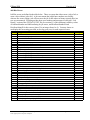
LoadDiscDriveX
This is the drive that is processing the disc
3.4 System Section
3.4.1 SystemDesc
String that describes the system (e.g. Disc Publisher DVDR)
3.4.2 SystemStatus
String that gives general system status of the software and robotics (e.g. Offline, System OK,
Out of Discs, Ink Low, …).
If the PTBurn software application is not running then this value will always be set to “Offline”.
If this key is anything except “Offline” then the software is running.
If the software is running but the printer is offline (user pressed the power button) then the
SystemStatus will be “Printer Offline”. For this error, and other system errors, the
SysErrorNumber key can be queried. See more information for SysErrorNumber below.
3.4.3 SystemDrives
Integer value that tells how many drives are managed by the robotics. (for the Disc Publisher
this will be 1).
3.4.4 GoodDiscsLife
Integer value that tells how many discs have been successfully completed in the life of this
system (value is stored on the computer – not within the robotics).
3.4.5 BadDiscsLife
Integer value that tells how many discs have been rejected because of failure during the life of
this system (value is stored on the computer – not within the robotics).
3.4.6 GoodDiscsLaunch
Integer value that tells how many discs have been successfully completed since the PTBurn
application was launched.
3.4.7 BadDiscsLaunch
Integer value that tells how many discs have been rejected because of failure since the PTBurn
application was launched.
3.4.8 ServerTime
Current time obtained by the PTBurn application on the server (computer on which PTBurn is
running).
Format is:
MM/DD/YYYY hh:mm:ss XX
where XX is either AM or PM.
© 2005, Primera Technology, Inc. Primera is a registered trademark and Bravo is a trademark of Primera Technology, Inc. All other trademarks
are the property of their respective companies.