1
man_S18xx_uk.qxd
G
11-01-2008
11:46
Pagina 113
ADJUSTING AIR FLOW DIRECTION
•
Adjust the air flow direction properly otherwise, it might cause discomfort
or cause uneven room temperatures.
•
Adjust the horizontal louver using button h on the remote controller.
•
Adjust the vertical louver manually.
Adjusting the horizontal Air Flow Direction (up - down)
The air conditioner automatically adjusts the horizontal air flow direction in accorAu
to
On
SET
T EM
Mo
TI M
E
Sl
R
Sw
Hr
.
T IM
ER
Ai
Hr
.
Ti
Ti
me
me
rO
f
rD
i
re
cti
/O
ff
P
Fa
ON
Off
ee
de
n
p
ing
on
rO
n
f
dance with the operating mode.
To set the horizontal air flow direction
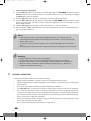
Perform this function while the unit is in operation. Keep pressing the AIR DIRECTION button h on the remote controller to move the louver to the desired direction.
Lever
•
Adjust the horizontal air flow direction to the desired direction.
•
In subsequent operations, the horizontal air flow is automatically set in the
direction to which you adjusted the louver by pressing the AIR DIRECTION
button.
To set the vertical air flow direction (left - right)
Adjust the vertical louver manually using the lever on the left or right side of the
vertical louver arm (depending on model). When the air conditioner is in opera-
G
tion and the vertical louver is in a specific position, move the lever at left (or right,
depending on model) end of the air outlet to the desired position.
G
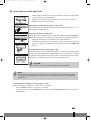
CAUTION!
Take care, do not touch the fan behind the vertical louvers!
NOTE!
All the pictures in this manual and on the gift box are for explanation and indication purpose
only. They may be slightly different from the air conditioner you purchased. The actual shape
shall prevail.
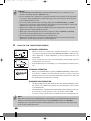
To automatically swing the air flow direction (up - down)
Perform this function while the air conditioner is in operation.
•
Press the SWING g button on the remote controller.
•
To stop the function, press the SWING button g again. Press AIR DIRECTION h button to lock louver in
desired position.
4
113