1
1201K
1
2
1
3
2
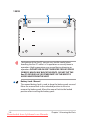
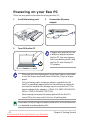
The bottom of the Eee PC can get very hot. Be careful when
handling the Eee PC while it is in operation or recently been in
operation. High temperatures are normal during charging or
operation. DO NOT USE ON SOFT SURFACES SUCH AS SOFAS
OR BEDS, WHICH MAY BLOCK THE VENTS. DO NOT PUT THE
Eee PC ON YOUR LAP OR OTHER PARTS OF THE BODY TO
AVOID INJURY FROM THE HEAT.
1
Battery Lock - Manual
The manual battery lock is used to keep the battery pack secured.
Move the manual lock to the unlocked position to insert or
remove the battery pack. Move the manual lock to the locked
position after inserting the battery pack.
1-6
Downloaded from LpManual.com Manuals
Chapter 1: Knowing the Parts