1
Connections
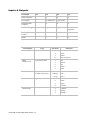
DMX
Two or four DMX outputs are available from the USB
Console, depending upon the model. The actual number
of DMX channels available to you will depend on the
type of dongle you have purchased (e.g. 128, 512, 2048,
etc)
USB to host
One Type B
USB outputs
Type A, quantity depends on the USB Console
LTC
You can use SMPTE Timecode as a trigger input.
Information on using timecode is included in the Vista
software manual
(S1 and S3
only)
MIDI
(S1 and S3
only)
Desklamp
Standard MIDI IN, OUT and THRU connectors are
available, but MIDI is not currently implemented in the
Vista software
Connect a standard gooseneck desklamp (not supplied)
About the Vista dongle
The dongle is a USB device that the Vista software requires to enable
output through either the computer’s Ethernet connection or the console’s
DMX outputs. Vista T4 and T2 products are factory fitted with a dongle,
while an E2 does not require one.
Normally your supplier will fit the dongle to the USB Console when you
buy it, but if it hasn’t been fitted you can either:
•
plug the dongle into any available USB port on the computer or the
rear panel of the console, or
•
have your dealer fit the dongle to the internal USB port on the USB
Console (S3 and S1 only). If you choose this option we recommend that
you get it done by a qualified service person. If you are qualified to do
this yourself, contact Jands for a technical note.
Jands USB Console Setup Guide Version 1.0