1
Advanced Printer Driver Ver.4
Install Manual
Overview
An overview of the APD and the description of
operating environment.
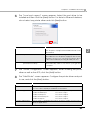
Installation and Setup
Descriptions from installation of the APD to
making prints with the TM printer.
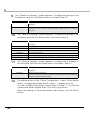
Silent Installation
Descriptions of the silent install.
M00002104
Rev. F
Cautions
• No part of this document may be reproduced, stored in a retrieval system, or transmitted in any form
or by any means, electronic, mechanical, photocopying, recording, or otherwise, without the prior
written permission of Seiko Epson Corporation.
• The contents of this document are subject to change without notice. Please contact us for the latest
information.
• While every precaution has taken in the preparation of this document, Seiko Epson Corporation
assumes no responsibility for errors or omissions.
• Neither is any liability assumed for damages resulting from the use of the information contained
herein.
• Neither Seiko Epson Corporation nor its affiliates shall be liable to the purchaser of this product or third
parties for damages, losses, costs, or expenses incurred by the purchaser or third parties as a result of:
accident, misuse, or abuse of this product or unauthorized modifications, repairs, or alterations to this
product, or (excluding the U.S.) failure to strictly comply with Seiko Epson Corporation’s operating
and maintenance instructions.
• Seiko Epson Corporation shall not be liable against any damages or problems arising from the use of
any options or any consumable products other than those designated as Original EPSON Products or
EPSON Approved Products by Seiko Epson Corporation.
Trademarks
EPSON® and ESC/POS® are registered trademarks of Seiko Epson Corporation in the U.S. and other
countries.
MS-DOS®, Microsoft®, Win32®, Windows®, Windows Vista®, Visual Studio®, Visual Basic®, Visual C++®,
and Visual C#® are either registered trademarks or trademarks of Microsoft Corporation in the United
States and other countries.
ESC/POS® Command System
EPSON has been taking industry’s initiatives with its own POS printer command system (ESC/POS).
ESC/POS has a large number of commands including patented ones. Its high scalability enables users
to build versatile POS systems. The system is compatible with all types of EPSON POS printers (excluding
the TM-C100) and displays. Moreover, its flexibility makes it easy to upgrade the future. The functionality
and the user-friendliness is valued around the world.
2
For Safety
Key to Symbols
The symbols in this manual are identified by their level of importance, as defined below. Read
the following carefully before handling the product.
Provides information that must be observed to avoid damage to your equipment or a
malfunction.
Provides important information and useful tips.
Restriction of Use
When this product is used for applications requiring high reliability/safety such as
transportation devices related to aviation, rail, marine, automotive etc.; disaster prevention
devices; various safety devices etc; or functional/precision devices etc, you should use this
product only after giving consideration to including fail-safes and redundancies into your
design to maintain safety and total system reliability. Because this product was not intended for
use in applications requiring extremely high reliability/safety such as aerospace equipment,
main communication equipment, nuclear power control equipment, or medical equipment
related to direct medical care etc, please make your own judgment on this product’s suitability
after a full evaluation.
3
About this Manual
Aim of the Manual
This manual is aimed to provide the necessary information to install the EPSON TM printer
driver and Customer display (Advanced Printer Driver).
Manual Content
The manual is made up of the following sections:
4
Chapter 1
Overview
Chapter 2
Installation and Setup
Chapter 3
Silent Installation
Contents
■ For Safety...............................................................................................................................3
Key to Symbols ....................................................................................................................................... 3
■ Restriction of Use ..................................................................................................................3
■ About this Manual ................................................................................................................4
Aim of the Manual................................................................................................................................. 4
Manual Content .................................................................................................................................... 4
■ Contents ................................................................................................................................5
Overview ........................................................................................7
■ Introduction ...........................................................................................................................7
Package organization........................................................................................................................... 7
Manual organization ............................................................................................................................. 8
■ Operating Environment ........................................................................................................9
Computer ............................................................................................................................................... 9
OS ............................................................................................................................................................ 9
.NET Framework Version ........................................................................................................................ 9
Interface ............................................................................................................................................... 10
Application........................................................................................................................................... 10
■ Supported Models ..............................................................................................................10
■ Connection Pattern ............................................................................................................11
Connecting cable............................................................................................................................... 12
■ Restrictions ..........................................................................................................................13
■ Manuals/Sample Programs ...............................................................................................14
Installation............................................................................................................................................. 14
Uninstallation ........................................................................................................................................ 15
Installation and Setup..................................................................17
Notes on upgrading from APD 2.xx, 3.xx........................................................................................... 17
■ Installation methods ...........................................................................................................17
■ Standard Install ...................................................................................................................18
Installation Flow.................................................................................................................................... 18
Installation............................................................................................................................................. 18
Connecting the TM Printer.................................................................................................................. 24
Print Test Page ...................................................................................................................................... 26
■ Uninstallation.......................................................................................................................27
5
■ When connecting Customer Display to TM printer ......................................................... 29
Installation Flow ....................................................................................................................................29
Installation when using pass-through connection............................................................................29
Installation when using Y-connection ................................................................................................33
Connecting the devices .....................................................................................................................37
Test print/display ...................................................................................................................................38
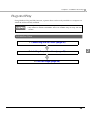
■ Plug and Play...................................................................................................................... 39
Installation Flow ....................................................................................................................................39
Connecting the TM Printer ..................................................................................................................40
Installing the printer driver ...................................................................................................................40
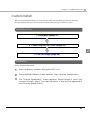
■ Custom Install ..................................................................................................................... 41
Installation Flow ....................................................................................................................................41
Installation .............................................................................................................................................41
■ Shared Printer ..................................................................................................................... 46
Installation .............................................................................................................................................46
Uninstallation.........................................................................................................................................49
■ Maintenance after Installing the APD .............................................................................. 51
Adding the printer driver .....................................................................................................................51
Uninstalling the printer driver...............................................................................................................54
Replacing a printer ..............................................................................................................................55
Changing the port settings of the TM printer ....................................................................................56
Silent Installation ..........................................................................57
■ What Is a Silent Installation?.............................................................................................. 57
Flow of the Silent Installation ...............................................................................................................58
■ Setting the APD Environment To Be Copied..................................................................... 58
APD Setting ...........................................................................................................................................58
■ Creating a Package or Script file ..................................................................................... 60
■ Executing the Silent Installation ........................................................................................ 63
How to execute the Silent Installation................................................................................................63
Checking the Installation Result .........................................................................................................64
Command Options ..............................................................................................................................64
6
Chapter 1 Overview
Overview
Introduction
Advanced Printer Driver (hereafter called APD) is a Windows printer driver for EPSON TM
printers and Customer Displays. You can display the Customer Display using the same
operation as printing.
APD can monitor the status of the TM printer with Status API for use of POS embedded.
However, the Customer Display is not supported.
The APD environment that is already set up can be restored (silent install) on another computer.
The printers locally connected to the computers can be used as shared printers (Point & Print), by
using network function of the OS.
Screens in Windows Vista are used for the descriptions in this manual.
Package organization
The APD consists of the following packages.
APD installer (APD_4xxE.exe)
A package to install the APD.
Manual/Sample installer (APDMANE_x.exe)
A package to install APD manuals (PDF) and sample programs using the APD.
7
1
Manual organization
Install Manual
This manual. Descriptions of the procedures from installing the APD to performing test print,
adding printer drivers, and the silent install which is an automated APD installation.
TM Printer Manual
Descriptions of how to use the APD and its functions.
Printer Specification
Descriptions of the specifications of each printer driver.
TM-C100 Manual
Descriptions of how to use the TM-C100 printer driver and its functions.
Customer Display Manual
Descriptions of how to use the Customer Display printer driver and its functions.
Status API Manual
Descriptions of how to get the status of the TM printer from the user application by using the
Status API.
Devmode API / PRINTERINFO Manual
Descriptions of how to configure some printer functions on your application using the Devmode
API. Explanations about PrinterInfo, which is one of the Windows functions, are also provided.
8
Chapter 1 Overview
Operating Environment
Computer
Any PC/AT compatible machine running any of the following Windows systems.
OS
• Microsoft Windows Vista SP1 (32bit) English version
• Microsoft Windows XP Professional SP3 (32bit) English version
1
• Microsoft Windows XP Embedded SP2 English version
The following components are required.
Volume Shadow Copy Service
System Restore Core
OLE Dialog Interfaces
Local Printing Support
Task Scheduler
(Required for USB driver installation)
Primitive: DbgHelp
(Required for USB driver installation)
Communications Port
(If the Computer has no serial or parallel port, one of them
must be installed manually.)
Primitive: Winhlp32
Required for help file browsing)
After installing the components listed above, perform a dependency check for the components
using the utility of the Windows XP Embedded (Target Designer). For more details, ask your
OS distributors.
OSs other than those listed above are not supported. Also, it cannot be used in the
Terminal Server environment.
.NET Framework Version
For .NET environment, use in the following environment.
• .NET Framework 2.0 or later.
• For Windows Vista, .NET Framework 3.0 or later is installed.
9
Interface
The following interfaces are supported with the APD.
Interface
Descriptions
Parallel
-
Serial
-
USB
USB 2.0 compliant
(Full-Speed 12 Mbps operation. High-Speed operation is not possible.)
Ethernet
10/100 Base-T
(To configure the settings of IP Address, see the UB-E02 Technical
Reference Guide.)
Wireless LAN
IEEE 802.11b
(To configure the settings of IP Address, see the UB-R02 Technical
Reference Guide.)
Interfaces only for the Customer Display or Drawer can be mounted on some TM printer
models.
For information on the interfaces available on your TM printers, ask your sales representative.
Application
The APD supports direct printing from the Windows applications. No programming is required
for printing directly from commercial applications, such as word processing or spread sheet.
When you want to receive TM printer statuses such as paper out errors at your application, use
the Status API. In this case, you need to develop the applications to incorporate the monitoring
function.
Supported Models
APD 4.xx supports the following models.
DM-D10X/20X
10
DM-D110/210
DM-D500
TM-C100
TM-H5000II
TM-H5200
TM-H6000II
TM-H6000III
TM-J2100
TM-J7100
TM-J7600/7500
TM-L60II
TM-L90
TM-L90 Peeler
TM-P60
TM-P60 Peeler
TM-T58
TM-T70
TM-T88III
TM-T88IV
TM-T90
TM-U120
TM-U220
TM-U230
TM-U295
TM-U950
BA-T500
TM-U375
TM-U590
TM-U675
EU-T300
EU-T400
EU-T500
Chapter 1 Overview
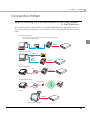
Connection Pattern
When connecting the Customer Displays or the Cash Drawers
to the TM printers.
The connection patterns shown below are available depending on the TM printer interface.
For the pass-through connection or Y-connection, be sure to install the drivers in the correct
order.
Pass-through connection
When using this connection method, first install the Customer Display driver.
Then, install the TM printer driver.
1
Modular
Serial
Serial
Stand-alone connection
Serial
Serial
Parallel
USB
Ethernet
Modular
Ethernet connection
Hub
Modular
Ethernet
Wireless LAN connection
Hub
Access Point
Ethernet
IR-700
Modular
Internal serial connection
11
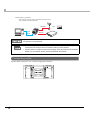
Internal serial connection
Pass-through (Y) connection
When using this connection method, first install the TM printer driver.
Then, install the Customer Display driver.
Modular
USB
Serial
OR
Modular
If you use a connection with interface conversion connector or interface expanded board,
the operation is not guaranteed.
• Select the appropriate connection patterns for each TM printer model (interface
specification) and configure the communication settings of each interface.
• Use DIP switch to configure communication settings of the TM printer and the Customer
Display. For more details, see the manuals bundled with the products.
Connecting cable
For the Serial connection, use a cable configured as follows.
12
Chapter 1 Overview
Restrictions
• The APD cannot coexist with OPOS on a computer at the same time.
• When using the printer driver for EPSON Terminal Printers (laser printer, ink-jet printer and
others) or EPSON printer window together with the APD, installation and uninstallation must
be performed in the following order:
[Installation]
1. EPSON Terminal Printer driver
2. APD
[Uninstallation]
1. APD
1
2. EPSON Terminal Printer driver
If you want to overwrite the EPSON Terminal Printer driver after the APD is installed, uninstall
the APD first and then overwrite the EPSON Terminal Printer driver.
• For a USB connection, the printer driver can be installed by Plug and Play after installing the
APD; however, the printer driver cannot be added when the TM printer is offline (cover open,
paper out, and so on.) When the printer recovers from the offline status, it will be added.
• The maximum number of printers that can be connected simultaneously through a USB
connection is 8.
• When a Parallel interface TM printer is connected to Windows XP, a Plug and Play request
window pops up and "EPSON TM-P2.01" is added in Other devices of the Device manager. Do
not perform [Uninstall] or [Update Driver Software] for this device. When a Parallel interface
TM printer is connected to the computer prior to the driver installation, the computer detects
"EPSON TM-P2.01", but you should not uninstall or update, just click [Cancel]. (It is added to
Other device in the Device manager, and deleted when the driver is installed.)
When you connect a TM printer with parallel interface before installing the driver, "EPSONP2.01" is detected. In such case, just click "Cancel" and not select "Uninstall" or "Update Driver
Software". (It is added to "Other device" in the Device manager, however, automatically
deleted after the driver is installed.)
13
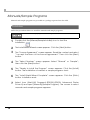
Manuals/Sample Programs
Manuals and sample programs are provided in a package separate from the APD.
Installation
Follow the procedures below to install the manuals and sample programs.
Install manuals/sample programs after installing the APD.
1
2
3
4
5
6
7
14
Double click the [Manual/Sample Installer] icon to start the
installation.
The Install Shield Wizard screen appears. Click the [Next] button.
The “License Agreement” screen appears. Read the content and select
“I accept the terms of the license agreement.” Then click the [Next]
button.
The “Select Features” screen appears. Select “Manual” or “Sample”;
then click the [Next] button.”
The “Ready to install the Program” screen appears. Click the [Install]
button. The installation of manuals or sample programs starts.
The “Install Shield Wizard Complete” screen appears. Click the [Finish]
button. Installation ends.
Select from [Start]-[All Programs]-[EPSON]-[EPSON Advanced Printer
Driver 4] and open [Manual]/[Sample Program]. The screen to select
manuals and sample programs appears.
Chapter 1 Overview
Uninstallation
Follow the procedures below to uninstall manuals and sample programs.
Uninstall manuals/sample programs before uninstalling the APD.
1
2
3
4
Select from [Start]-[Control Panel] and open [Uninstall a program].
The “Program and Features“ screen appears. Click the [EPSON APD4
Sample&Manual] button.
The uninstallation confirmation screen appears. Click the [Yes] button.
Manuals and sample programs are uninstalled.
Click the [Finish] button. Installation ends.
15
1
16
Chapter 2 Installation and Setup
Installation and Setup
This chapter describes the procedures from the installation to execution of test print.
The uninstallation procedure (page 27) and various maintenance procedures after installation
(page 51) are also provided.
• Install with Administrator privileges.
• Do not connect the TM printer, until installation of the APD completes.
• Close all running applications before the installation.
Notes on upgrading from APD 2.xx, 3.xx
APD 2.xx or 3.xx needs to be uninstalled in order to install APD 4.xx. Keep in mind the following
points.
• When you install APD 4.xx to a computer on which APD 2.xx or 3.xx has been installed, the
previous version is automatically uninstalled before the installation of APD 4.xx.
• Some printers do not support APD 4.xx. Make sure that your printer supports APD 4.xx. If
you are using such printer and install APD 4.xx, the printer becomes unusable on your system.
Installation methods
The following methods are available to install the APD.
• Standard Installation
page 18
This is a standard method to install the APD.
Use this method also when you connect the Customer Display with the stand-alone
connection.
• Installation when connecting Customer Display to TM printer
page 29
When you make pass-through or Y-connection (page 11) to use one port for your TM
printer and Customer Display, their drivers should be installed in the specified order.
• Plug and Play
page 39
TM printer with USB interface can be added as a printer device on a computer on which the
APD is already installed (standard or custom install).
• Custom installation
page 41
This allows you to select specific functions and port drivers to install the APD.
• Installation for sharing the printer
page 46
This method installs a printer to be shared (Point & Print).
• Silent installation
page 57
This allows you to copy the APD environment to other computers.
17
2
Standard Install
This is a standard method to install the APD. Under normal conditions, use this method.
Installation Flow
1. Installation (page 18)
2. Connecting the TM Printer (page 24)
3. Print Test Page (page 26)
Installation
Follow the procedure below.
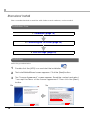
1
Double click the [APD] icon and start the installation.
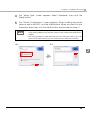
2
The Install ShieldWizard screen appears. Click the [Next] button.
3
2>
18
The “License Agreement” screen appears. Read the content and select
"I accept the terms of the license agreement". Then click the [Next]
button.
3>
Chapter 2 Installation and Setup
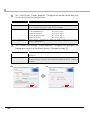
4
5
The “Setup Type” screen appears. Select "Standard", then click the
[Next] button.
The “Printer Configuration” screen appears. When installing the printer
driver as well as the APD, click the [Add] button. When you want to install
the printer driver later, click the [Next] button and proceed to Step 11.
• For the USB interface, installing the printer driver at Step 5 is not necessary, the printer
driver will be installed by Plug and Play function of the computer after APD driver is
installed.
• Click the [Copy] button to install more than one of the same printer driver. Up to 100
drivers can be copied. However, you can connect and use a maximum of 8 printers.
4>
5>
2
19
6
The “Add Printer” screen appears. Configure the printer driver and port
to use, and click the [Next] button.
Setting
Select driver
Select the printer driver to be installed.
Printer name
The printer driver name. This is changeable.
Do not use Unicode/2-byte characters for the name.
Port Type
Set as Default Printer
7
6>
20
Description
Select the type of interface to connect the computer and printer.
Create a Parallel port:
Proceed to Step 7.
Create a Serial port:
Proceed to Step 8.
Create an Ethernet port:
Proceed to Step 9.
Create a USB port:
Proceed to Step 10.
Check when configuring the printer as that normally used from the
Windows applications.
The “Parallel Port Settings” screen appears. Configure the settings of the
Parallel port and click the [Next] button. Proceed to Step 10.
Setting
Description
Printer name
The printer name you entered at Step 6 is displayed. This cannot be
changed.
LPT Port
Specify the number of parallel port used for connecting the printer.
Usually, the port number is automatically displayed and no setting is
required.
7>
Chapter 2 Installation and Setup
8
The “Serial Port Settings” screen appears. Configure the settings of the
Serial port and click the [Next] button. Proceed to Step 10.
Setting
Description
Printer name
The printer name you entered at Step 6 is displayed. This cannot be
changed.
COM Port
Specify the number of serial port used for connecting the printer.
Baud Rate
Specify the baud rate.
Data Bits
Specify the data bits.
Stop Bits
Specify the stop bits.
Flow Control
Parity
9
2
Specify the method of data flow between the computer and the printer.
Specify the parity.
The “Ethernet Settings” screen appears. Configure the IP Address of the
TM printer and click the [Next] button. Proceed to Step 10.
Setting
Description
Printer name
The printer name you entered at Step 6 is displayed. This cannot be
changed.
IP address
Enter the printer IP address.
To find the information about IP Address of the TM printer, see the Technical
Reference Guide of each TM printer.
21
10
The display returns to the “Printer Configuration” screen. All the printer
drivers, configured between Step 6 to Step 9, appear in the list.
To install multiple printer drivers, repeat Step 5 to Step 9. To install the
same printer driver multiple times, click the [Copy] button.
For the following installation combinations, select the setting of the first
printer driver for the “Port Type” of the “Add Printer” screen (page 20)
at Step 6 when you install the second or later printer drivers (example:
“Share with EPSON TM-H6000III Receipt”).
•Using both the Receipt driver and Slip driver for a hybrid printer
•Using peeler paper on one label printer and using full-label paper on another
label printer
•Making multiple different print settings on multiple printer drivers
(Example: using two drivers, specify portrait receipt printing on one driver and
specify landscape receipt printing on another driver)
When the settings of the printer drivers are finished, click the [Next]
button.
11
10 >
22
The “Start Copying Files” screen appears. See "Current Settings" to
confirm the installation settings and then click the [Next] button.
11 >
Chapter 2 Installation and Setup
12
13
12 >
14
The APD is installed.
The “InstallShield Wizard Complete” screen appears. Click the [Finish]
button to finish installation.
13 >
When printer drivers are added at Step 5, confirm that the printer
drivers are installed in [Hardware and Sound] - [Printers] from [Start] [Control Panel]. When you have not added printer drivers at Step 5,
no printer drivers are displayed in the [Printers].
The location for printer drivers differs depending on the OS.
• Windows Vista
[Start] - [Control Panel] - [Hardware and Sound] - [Printers]
• Windows XP
[Start] - [Control Panel] - [Printers and Faxes]
23
2
Connecting the TM Printer
Before connecting the TM printer, set the Handshaking setting of the printer to "Receive buffer
full".
Connect the TM printer. For information on how to connect the TM printer and configure the
DIPSW, see the User's Manual supplied with the TM printer or the Technical Reference Guide.
• The maximum number of printers that can be simultaneously connected to multiple
computers is 8.
• Turn off the power of the TM printer and wait for more than 5 seconds before turning on
the power.
Parallel (LPT) connection
When the printer is connected, the "New Hardware Detected. EPSON TM-P2.01" screen appears
then the "Found New Hardware Wizard" screen. In this case, perform the following steps.
1
Click the [Next] button to search for the driver.
2
The driver is found and installed.
Serial (COM) connection
When using the serial connection, make sure the printer settings match the printer driver port
settings (BaudRate/DataBits/Parity/StopBits/FlowControl).
Ethernet (10/100 Base-T) connection
When using Ethernet connection, check the IP address setting. To configure the IP address, use
the Epson TM Netwingconfig Utility. For details, see the "UB-E02 Technical Reference Guide."
Wireless LAN (IEEE 802.11b) connection
When using wireless LAN connection, check the IP address setting. To configure the IP address,
use the Epson TM Netwingconfig Utility. Also check the security measures and location
sufficiently. For details, see the "UB-R02 Technical Reference Guide."
24
Chapter 2 Installation and Setup
USB connection
Do not connect the TM printer to the computer before installing the APD. In case you connect the
TM printer first, delete the port drivers and reinstall the printer drivers without connecting the
TM printer.
USB device requirements
• Maximum USB cable length is 5m, and 5 cascaded hubs maximum.
• Use the USB cable and the USB hubs compliant with USB2.0 specification (12Mbps).
For USB power saving, see the C:\Program Files\EPSON\EPSON Advanced Printer Driver
4\TMUSB\readme_e.txt generated after the APD installation.
2
25
Print Test Page
After installing the APD, execute test print to check if the APD is properly installed and work
normally.
Perform Print Test Page in the following procedures.
1
2
Open the Printers screen from [Start] - [Control Panel]. Right click the
printer driver you have installed and select [Properties].
The Properties screen of the printer appears. Click the [Print Test Page]
button to start test printing.
• Print Test Page of the APD does not print all the data, unlike normal Print Test Page
does.
• The Print Test Page prints characters and images as an image. The data volume is large
for serial connection and may take longer to print compared with other interfaces.
3
26
The following screen appears. If the test print was output correctly, click
the [OK] button. If the test print was not output correctly, click the
[Troubleshoot...] button and perform troubleshooting in accordance
with the Windows message.
Chapter 2 Installation and Setup
Uninstallation
Uninstall everything related to APD (port drivers, printer drivers, and so on).
The APD has the silent uninstallation function that enables you to uninstall without
displaying any screens. For more details, see "/uninstall : Silent Uninstallation" on page 65.
Do not uninstall printer drivers directly from [Start] - [Control Panel] - [Hardware and Sound]
- [Printers]. Even if the icon (the printer driver) disappeared from the screen, APD is not
uninstalled. To uninstall the printer driver, see "Uninstalling the printer driver" on page 54.
Follow the procedure below to uninstall the APD.
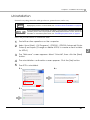
1
2
3
4
5
End all the other operations on the computer.
Select from [Start] - [All Programs] - [EPSON] - [EPSON Advanced Printer
Driver 4] and open [Change or delete APD4, or create a silent installer
for APD4.]
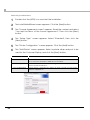
The “Welcome” screen appears. Select "Uninstall", then click the [Next]
button.
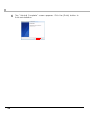
The uninstallation confirmation screen appears. Click the [Yes] button.
The APD is uninstalled.
3>
4>
5>
27
2
6
28
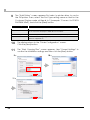
The “Uninstall Complete” screen appears. Click the [Finish] button to
finish uninstallation.
Chapter 2 Installation and Setup
When connecting Customer Display
to TM printer
This section explains how to install the APD when connecting a Customer Display to a TM
printer.
Installation Flow
1. Installation when using pass-through connection (page 29)
Installation when using Y-connection (page 33)
2
2. Connecting the devices (page 37)
3. Test print/display (page 38)
Installation when using pass-through connection
Modular
Serial
Serial
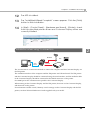
The pass-through connection is a connection method to connect the computer and the TM
printer via the Customer Display.
The serial interface must be used and the communication settings on each of the three devices
must be the same. For information on DIP switch / Memory switch settings on the Customer
Display and the TM printer, see the User's Manual supplied with the TM printer or the Technical
Reference Guide.
29
Follow the procedure below.
1
Double click the [APD] icon and start the installation.
2
The Install ShieldWizard screen appears. Click the [Next] button.
3
4
5
6
The “License Agreement screen” appears. Read the content and select
"I accept the terms of the license agreement". Then click the [Next]
button.
The “Setup Type” screen appears. Select "Standard", then click the
[Next] button.
The “Printer Configuration” screen appears. Click the [Add] button.
The “Add Printer” screen appears. Select a printer driver and port to be
used for the Customer Display, and click the [Next] button.
Setting
Description
Select driver
Select the printer driver for the Customer Display.
Printer name
The name of the driver for the Customer Display.
Do not use Unicode/2-byte characters for the name.
Port Type
Select an interface to use for connecting the Customer Display.
Select "Create a Serial port".
Set as Default Printer
30
Check when configuring the printer as that normally used from the
Windows applications.
Chapter 2 Installation and Setup
7
The “Serial Port Settings” screen appears. Configure the settings of the
Serial port and click the [Next] button.
Setting
Description
Printer name
The printer name you entered at Step 6 is displayed. This cannot be
changed.
COM Port
Specify the number of serial port used for connecting the printer.
Baud Rate
Specify the baud rate.
Data Bits
Specify the data bits.
Stop Bits
Specify the stop bits.
Flow Control
Parity
8
Specify the method of data flow between the computer and the printer.
Specify the parity.
The display returns to the “Printer Configuration” screen. Click the [Add]
button to add a printer driver for the TM printer.
7>
8>
2
31
9
The “Add Printer” screen appears.First select a printer driver to use for
the TM printer. Then, select the Port Type setting same as that for the
Customer Display made at Step 6 to 7 (example: "Connect to EPSON
DM-D50X 32x4"), and click the [Next] button.
Setting
Select driver
Select the printer driver to be installed.
Printer name
The printer driver name. This is changeable.
Do not use Unicode/2-byte characters for the name.
Port Type
Set as Default Printer
10
11
9>
11 >
32
Description
Select the type of interface to connect the computer and printer.
Check when configuring the printer as that normally used from the
Windows applications.
The display returns to the “Printer Configuration” screen.
Click the [Next] button.
The “Start Copying Files” screen appears. See "Current Settings" to
confirm the installation settings and then click the [Next] button.
10 >
Chapter 2 Installation and Setup
12
13
14
The APD is installed.
The “InstallShield Wizard Complete” screen appears. Click the [Finish]
button to finish installation.
In [Start] - [Control Panel] - [Hardware and Sound] - [Printers], check
that the specified printer driver and Customer Display driver are
correctly installed.
Installation when using Y-connection
Modular
USB
Serial
2
OR
Modular
The Y-connection is a connection method to connect the computer and the Customer Display via
the TM printer.
The available interfaces of the computer and the TM printer are USB and serial. The TM printer
and the Customer Display should be connected using the serial interface, and the modular cable
of the Customer Display should be connected to the DM-D connector on the printer.
Set 19200 bps for the communication speed for the Customer Display.
When turning on the Customer Display and the TM printer, first turn on the Customer Display,
and then turn on the printer.
For information on DIP switch / Memory switch settings on the Customer Display and the TM
printer, see their Technical Reference Guide supplied with your model.
33
Follow the procedure below.
1
Double click the [APD] icon and start the installation.
2
The Install ShieldWizard screen appears. Click the [Next] button.
3
4
5
6
The “License Agreement” screen appears. Read the content and select
"I accept the terms of the license agreement". Then click the [Next]
button.
The “Setup Type” screen appears. Select "Standard", then click the
[Next] button.
The “Printer Configuration” screen appears. Click the [Add] button.
The “Add Printer” screen appears. Select a printer driver and port to be
used for the TM printer, and click the [Next] button.
Setting
Select driver
Select the printer driver to be installed.
Printer name
The printer driver name. This is changeable.
Do not use Unicode/2-byte characters for the name.
Port Type
Set as Default Printer
34
Description
Select the type of interface to connect the computer and printer.
Create a Serial port:
Proceed to Step 7.
Create a USB port:
Proceed to Step 8.
Check when configuring the printer as that normally used from the
Windows applications.
Chapter 2 Installation and Setup
7
The “Serial Port Settings” screen appears. Configure the settings of the
Serial port and click the [Next] button.
Setting
Description
Printer name
The printer name you entered at Step 6 is displayed. This cannot be
changed.
COM Port
Specify the number of serial port used for connecting the printer.
Baud Rate
Specify the baud rate.
Data Bits
Specify the data bits.
Stop Bits
Specify the stop bits.
Flow Control
Parity
8
9
Specify the method of data flow between the computer and the printer.
Specify the parity.
The display returns to the “Printer Configuration” screen. Click the [Add]
button to add a printer driver for the Customer Display.
The “Add Printer” screen appears. First select a printer driver to use for
the Customer Display. Then, select the Port Type setting same as that for
the TM printer made at Step 6 to 7 (example: "Connect to EPSON TMH6000III Receipt"), and click the [Next] button.
Setting
Description
Select driver
Select the printer driver for the Customer Display.
Printer name
The name of the driver for the Customer Display.
Do not use Unicode/2-byte characters for the name.
Port Type
Set as Default Printer
8>
Select an interface to use for connecting the Customer Display.
Select the printer driver for the Customer Display.
9>
35
2
10
11
The display returns to the “Printer Configuration” screen.
Click the [Next] button.
The “Start Copying Files” screen appears. See "Current Settings" to
confirm the installation settings and then click the [Next] button.
10 >
12
13
14
36
11 >
The APD is installed.
The “InstallShield Wizard Complete” screen appears. Click the [Finish]
button to finish installation.
In [Start] - [Control Panel] - [Hardware and Sound] - [Printers], check
that the specified printer driver and Customer Display driver are
correctly installed.
Chapter 2 Installation and Setup
Connecting the devices
Confirm the following before connecting devices (TM printer, Customer Display)
• Set the Handshaking setting of the printer to "Receive buffer full".
• Configure the DIPSW when you connect the DM-D500 with the Y-connection.
Connect the TM printer. For information on how to connect the TM printer and configure the
DIPSW, see the User's Manual supplied with the TM printer or the Technical Reference Guide.
• The maximum number of printers that can be simultaneously connected to multiple
computers is 8.
• Turn off the power of the TM printer and wait for more than 5 seconds before turning on
the power.
Serial (COM) connection
When using the serial connection, make sure the printer settings match the printer driver port
settings (BaudRate/DataBits/Parity/StopBits/FlowControl).
USB connection
Do not connect the TM printer to the computer before installing the APD. In case you connect the
TM printer first, delete the port drivers and reinstall the printer drivers without connecting the
TM printer.
USB device requirements
• Maximum USB cable length is 5m, and 5 cascaded hubs maximum.
• Use the USB cable and the USB hubs compliant with USB2.0 specification (12Mbps).
For USB power saving, see the C:\Program Files\EPSON\EPSON Advanced Printer Driver
4\TMUSB\readme_e.txt generated after the APD installation.
37
2
Test print/display
Use the following print and display tests to check if the APD is properly installed and functions
normally.
TM printer
For TM printers, use the preset test print function to make a test print on the printers.
(For details, see "Print Test Page" on page 26.)
Customer Display
For Customer Displays, use the preset test print function of the printer driver to send text data to
the Customer Displays.
Follow the procedure below.
1
2
3
4
38
Select from [Start] - [Control Panel] - [Hardware and Sound] and open
[Printers] and then right click the target printer driver and select [Printing
Preferences...].
The Printing Preference screen appears. Select the [Font] tab.
Enter text data in the Test Data box to be displayed on the Customer
Display, and click the [Run] button.
The text data entered in Step 3 will be displayed on the Customer
Display when the APD has been properly installed.
Chapter 2 Installation and Setup
Plug and Play
Using Windows Plug and Play function, a printer driver can be easily installed on a computer on
which the APD is already installed.
• The Plug and Play function is available only for the TM printer with the USB interface.
• Slip Rotate for EPSON TM-H6000III cannot be installed using the Plug and Play
function.
Installation Flow
1. Connecting the TM Printer (page 40)
2
2. Installing the printer driver (page 40)
3. Print Test Page (page 26)
39
Connecting the TM Printer
Connect the TM printer following the procedure below.
1
Check that “Receive buffer full” is set as a busy condition of the printer.
2
Connect the TM printer.
• If you inadvertently connect the TM printer to the computer before installing the APD,
delete the corresponding port driver and then, without connecting the TM printer,
reinstall the printer driver.
• For information on how to connect the TM printer and check the DIP switch setting, see
the User's Manual supplied with the TM printer or the Technical Reference Guide.
• The maximum number of printers that can be simultaneously connected to multiple
computers is 8.
• Turn off the power of the TM printer and wait for more than 5 seconds before turning on
the power.
• USB device requirements
∗ Maximum USB cable length is 5m, and 5 cascaded hubs maximum.
∗ Use the USB cable and the USB hubs compliant with USB2.0 specification (12Mbps).
For details, see the C:\Program Files\EPSON\EPSON Advanced Printer Driver 4\TMUSB
\readme_e.txt generated after the APD installation.
Installing the printer driver
The printer driver is automatically installed when the connected printer is turned on.
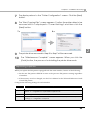
The following message appears in the lower right of the computer screen.
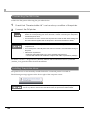
The printer driver cannot be added when the TM printer is offline (cover open, paper out,
and so on.) When it recovers from the offline status, the printer driver will be added.
40
Chapter 2 Installation and Setup
Custom Install
The custom installation allows you to install the APD with specified port drivers and tools.
Use this method when you do not want to install unnecessary port drivers or tools.
Installation Flow
1. Installation (page 41)
2. Connecting the TM Printer (page 24)
2
3. Print Test Page (page 26)
Installation
Follow the procedure below.
1
Start installing by double clicking the APD icon.
2
The InstallShield Wizard screen appears. Then click the [Next] button.
3
The “License Agreement” screen appears. Read through it and if you
accept its terms, select "I accept the terms of the license agreement"
and click the [Next] button.
41
4
5
The “Setup Type” screen appears. Then select "Custom" and click the
[Next] button.
The “Select Features” screen appears. Select the features of the APD
you want to install, and then click the [Next] button. The following
features are available.
Features
Description
TMFLogo
Installs the TMF logo tool that allows you to save bitmapped
images to the TM printer.
Status API .NET
Devmode API .NET
Supports Devmode API in .NET environment.
Add a shortcut to the Start menu.
Shortcut icon to the APD will be added in the Start menu.
Default setting : checked
Create a silent installation script.
Creates a script file for the silent install. For more details, see
"Silent Installation" on page 57.
Default setting : unchecked
4>
42
Supports Status API in .NET environment.
5>
Chapter 2 Installation and Setup
6
The “Local port support” screen appears. Select the port driver to be
installed and then click the [Next] button. For Serial or Ethernet interface,
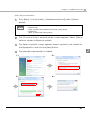
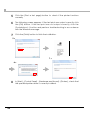
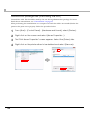
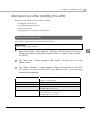
do not select any printer driver and click [Next] button.
Item
Description
Install the EPSON parallel port driver.
When this is checked, EPSON Parallel Port Driver for
the TM printer equipped with Parallel interface will
be installed.
Automatically install detected USB devices.
When this is checked, the Plug and Play function will
be enabled for the TM printer equipped with the USB
interface. If this is not checked, the printer driver
cannot be installed by the Plug and Play function.
Launch StatusViewer on login.
(TM-C100 is needed)
When this is checked, the Status Viewer
automatically starts to run when you login the
computer.
7
8
The “Printer Configuration” screen appears. When installing the printer
driver as well as the APD, click the [Add] button.
The “Add Printer” screen appears. Configure the printer driver and port
to use, and click the [Next] button.
Setting
Description
Select driver
Select the printer driver to be installed.
Printer name
The printer driver name. This is changeable.
Do not use Unicode/2-byte characters for the name.
Port Type
Set as Default Printer
Select the type of interface to connect the computer and printer.
Create a Parallel port:
Proceed to Step 9.
Create a Serial port:
Proceed to Step 10.
Create an Ethernet port:
Proceed to Step 11.
Create a USB port:
Proceed to Step 12.
Check when configuring the printer as that normally used from the
Windows applications.
43
2
9
10
The “Parallel Port Settings” screen appears. Configure the settings of the
Parallel port and click the [Next] button. Proceed to Step 12.
Setting
Description
Printer name
The printer name you entered at Step 8 is displayed. This cannot be
changed.
LPT Port
Specify the number of parallel port used for connecting the printer.
Usually, the port number is automatically displayed and no setting is
required.
The “Serial Port Settings” screen appears. Configure the settings of the
Serial port and click the [Next] button. Proceed to Step 12.
Setting
Description
Printer name
The printer name you entered at Step 8 is displayed. This cannot be
changed.
COM Port
Specify the number of serial port used for connecting the printer.
Baud Rate
Specify the baud rate.
Data Bits
Specify the data bits.
Stop Bits
Specify the stop bits.
Flow Control
Parity
11
12
44
Specify the method of data flow between the computer and the printer.
Specify the parity.
The “Ethernet Settings” screen appears. Configure the IP Address of
the TM printer and click the [Next] button. Proceed to Step 12.
Setting
Description
Printer name
The printer name you entered at Step 8 is displayed. This cannot be
changed.
IP address
Enter the printer IP address.
To find the information about IP Address of the TM printer, see the Technical
Reference Guide of each TM printer.
The display returns to the “Printer Configuration” screen. All the printer
drivers, configured between Step 8 to Step 11, appear in the list.
To install multiple printer drivers, repeat Step 7 to Step 11. To install the
same printer driver multiple times, click the [Copy] button.
When the settings of the printer drivers are finished, click the [Next]
button.
Chapter 2 Installation and Setup
13
14
15
The “Start Copying Files” screen appears. See "Current Settings" to
confirm the settings to be installed and then click the [Next] button.
The APD is installed.
The “InstallShield Wizard Complete” screen appears. When you click
the [Finish] button, the installation ends.
45
2
Shared Printer
The APD4.xx allows you to share the TM printer with multiple users. This section explains how
to install the APD on the computer that uses the printer shared on a network. The uninstallation
procedure is also provided.
Installation
Before installing the printer to be shared, check the followings.
• Confirm that the printer is set to “Share the printer” on the computer that the printer to be
shared is connected with the local connection.
• Confirm that Client for Microsoft Networks is installed on the computer that the printer to
be shared is connected with the local connection and computer that the APD is installed.
When multiple users on a single computer use the shared printer, the printer driver should
be installed for each user account.
46
Chapter 2 Installation and Setup
Follow the procedure below.
1
From [Start] - [Control Panel] - [Hardware and Sound], select [Add a
printer].
The path varies from OS to OS. See the following.
• Windows Vista
[Start] - [Control Panel] - [Hardware and Sound] - [Add a printer]
• Windows XP
[Start] - [Control Panel] - [Add a printer]
2
3
4
The "Choose a local or network printer" screen appears. Select [Add a
network, wireless or Bluetooth printer].
The "Select a printer" screen appears. Select a printer to be shared on
the displayed list, and click the [Next] button.
2
The selected shared printer is installed.
1>
2>
3>
4>
47
5
Click the [Print a test page] button to check if the printer functions
normally.
6
The following screen appears. If the test print was output correctly, click
the [OK] button. If the test print was not output correctly, click the
[Troubleshoot...] button and perform troubleshooting in accordance
with the Windows message.
7
Click the [Finish] button to finish the installation.
5>
7>
6>
8
48
In [Start] - [Control Panel] - [Hardware and Sound] - [Printers], check that
the specified printer driver is correctly installed.
Chapter 2 Installation and Setup
Uninstallation
Uninstalling the shared printer requires two steps; first by the computer user and the second by
the user having administrator privilege.
1. User (deleting the printer) (page 49)
2. Administrator privilege user (uninstalling the APD) (page 50)
User (deleting the printer)
Delete the printer driver on the computer. This should be made by each of the users. Follow the
procedure below.
1
From [Start] - [Control Panel] - [Hardware and Sound], select [Printers].
2
Right click on the printer driver to be deleted and select [Delete].
49
2
Administrator privilege user (uninstalling the APD)
Uninstall the APD. This should be made by the user having administrator privilege. For more
details about uninstallation, see "Uninstallation" on page 27.
When performing the uninstallation on a computer on which the APD is not installed, delete the
printer in the print server property. Follow the procedure below.
50
1
From [Start] - [Control Panel] - [Hardware and Sound], select [Printers].
2
Right click on the screen and select [Server Properties...].
3
The "Print Server Properties" screen appears. Select the [Drivers] tab.
4
Right click on the printer driver to be deleted and select [Remove].
Chapter 2 Installation and Setup
Maintenance after Installing the APD
Maintenance procedures after the APD is installed.
• Adding the printer driver
• Uninstalling the printer driver
• Replacing a printer
• Changing the port settings of the TM printer
Adding the printer driver
Follow the procedures below to install the printer driver.
You cannot add the printer drivers directly from [Start] - [Control Panel] - [Hardware and
Sound] - [Printers].
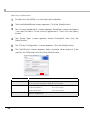
1
2
3
Select from [Start] - [All Programs] - [EPSON] - [EPSON Advanced Printer
Driver 4] and open [Change or delete APD4, or create a silent installer
for APD4.]
The “Welcome” screen appears. Then select "Custom" and click the
[Next] button.
The “Select Features” screen appears. Select the features of the APD
you want to install, and then click the [Next] button. The following
features are available.
Features
Description
TMfLogo
Installs the TMF logo tool that allows you to save bitmapped
images to the TM printer.
Status API .NET
Devmode API .NET
Supports Status API in .NET environment.
Supports Devmode API in .NET environment.
Create shortcut on Start menu.
Shortcut icon to the APD will be added in the Start menu.
Default setting : checked
Create a silent install script.
Creates a script file for the silent install. For more details, see
"Silent Installation" on page 57.
Default setting : unchecked
51
2
4
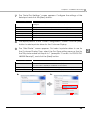
The “Local Port Support” screen appears. Select the port driver to be
installed and then click the [Next] button. For Serial or Ethernet interface,
do not select any printer driver and click [Next] button.
Item
Description
Install EPSON parallel port driver.
When this is checked, EPSON Parallel Port Driver for
the TM printer equipped with Parallel interface will
be installed.
Automatically install detected USB devices.
When this is checked, the Plug and Play function will
be enabled for the TM printer equipped with the USB
interface. If this is not checked, the printer driver
cannot be installed by the Plug and Play function.
Launch StatusViewer on login.
(TM-C100 is needed)
When this is checked, the Status Viewer
automatically starts to run when you login the
computer.
5
6
The “Printer Configuration” screen appears. When installing the printer
driver as well as the APD, click the [Add] button.
The Add Printer screen appears. Configure the printer driver and port to
use, and click the [Next] button.
Setting
Select driver
Select the printer driver to be installed.
Printer name
The printer driver name. This is changeable.
Do not use Unicode/2-byte characters for the name.
Communication
Set as Default Printer
7
52
Description
Select the type of interface to connect the computer and printer.
Create a Parallel port:
Proceed to Step 7.
Create a Serial port:
Proceed to Step 8
Create an Ethernet port:
Proceed to Step 9.
Create a USB port:
Proceed to Step 10.
Check when configuring the printer as that normally used from the
Windows applications.
The “Parallel Port Settings” screen appears. Configure the settings of the
Parallel port and click the [Next] button. Proceed to Step 10.
Setting
Description
Printer name
The printer name you entered at Step 6 is displayed. This cannot be
changed.
LPT Port
Specify the number of parallel port used for connecting the printer.
Usually, the port number is automatically displayed and no setting is
required.
Chapter 2 Installation and Setup
8
The “Serial Port Settings” screen appears. Configure the settings of the
Serial port and click the [Next] button. Proceed to Step 10.
Setting
Description
Printer name
The printer name you entered at Step 6 is displayed. This cannot be
changed.
COM Port
Specify the number of serial port used for connecting the printer.
Baud Rate
Specify the baud rate.
Data Bits
Specify the data bits.
Stop Bits
Specify the stop bits.
Flow Control
Parity
9
10
11
12
13
Specify the method of data flow between the computer and the printer.
Specify the parity.
The “Ethernet Settings” screen appears. Configure the IP Address of the
TM printer and click the [Next] button. Proceed to Step 10.
Setting
Description
Printer name
The printer name you entered at Step 6 is displayed. This cannot be
changed.
IP address
Enter the printer IP address.
To find the information about IP Address of the TM printer, see the
Technical Reference Guide of each TM printer.
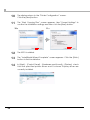
The display returns to the “Printer Configuration” screen. All the printer
drivers, configured between Step 6 to Step 9, appear in the list.
To install multiple printer drivers, repeat Step 5 to Step 9. To install the
same printer driver multiple times, click the [Copy] button.
When the settings of the printer drivers are finished, click the [Next]
button.
The “Start Copying Files” screen appears. Confirm the printer driver to
be installed which is displayed in "Current Settings" and then click the
[Next] button.
The printer driver added in the list at Step 10 is installed.
The “Maintenance Complete” screen appears. When you click the
[Finish] button, the process of installing the printer driver ends.
53
2
Uninstalling the printer driver
Follow the procedures below to uninstall the printer driver.
1
2
Select from [Start] - [All Programs] - [EPSON] - [EPSON Advanced Printer
Driver 4] and open [Change or delete APD4, or create a silent installer
for APD4.]
The “Welcome” screen appears. Then select "Custom" and click the
[Next] button.
3
The “Select Features” screen appears. Click the [Next] button.
4
The “Local Port Support” screen appears. Click the [Next] button.
5
6
The “Printer Configuration” screen appears. Select the printer diver from
the list which you want to remove, and click the [Delete] button.
A screen appears to confirm the remove action. Click the [Yes] button.
5>
6>
54
Chapter 2 Installation and Setup
7
The display returns to the “Printer Configuration” screen. Click the [Next]
button.
8
The “Start Copying Files” screen appears. Confirm the printer driver to be
removed which is displayed in "Current Settings" and then click the
[Next] button.
7>
9
8>
2
The printer driver removed in Step 5 to Step7 will be removed.
10
The “Maintenance Complete” screen appears. When you click the
[Finish] button, the process of uninstalling the printer driver ends.
Replacing a printer
When you replace the TM printers equipped with the same interface, beware of the following.
• Set the new TM printer’s DIPSW as same as the previous TM printer’s settings regardless
of interface.
• If the memory switch is changed, see the User's Manual or the Technical Reference Guide
of each TM printer.
Configure the following settings for each interface.
Interface
Parallel
Serial
USB
Ethernet
Description
No configuration is required after replacement.
With the DIPSW settings, if the settings of the Serial connection is same as previous TM
printer, no configuration is required after replacement.
No configuration is required after replacement.
When the new TM printer's IP Address is set as same as the previous TM printer's
settings, no configuration is required.
55
Changing the port settings of the TM printer
See the procedure below to change the port settings of the TM printer, such as changing serial
settings of the serial connection, changing the IP Address of the TM printer connected by
Ethernet, and so on. The port settings of the Epson port will be changed in this procedures.
1
2
3
Select from [Start] - [Control Panel] - [Hardware and Sound] and open
[Printers] and then right click the target printer driver and select
[Properties].
The property screen of the TM printer appears. Select the [Ports] tab and
then click the [Configure Port...] button.
The Configure Port screen appears. Then change the settings and click
the [OK] button.
3>
2>
Serial
Ethernet
4
56
The display returns to the Properties screen. When you click the [OK]
button, the changes you made becomes effective.
Chapter 3 Silent Installation
Silent Installation
This chapter describes the procedures for the Silent Installation.
What Is a Silent Installation?
The silent installation is a method that copies the existing APD setup environment to other
computers without user operation. There are the following two methods.
❏ Using a silent installation package (*.exe)
Create the silent installation package on the copy source computer.
• Executing this file on another computer enables you to install the minimum environment
for operating the APD from all the environment of the copy source computer.
• When the silent installation is executed with this file, you cannot create the silent
installation package or the script file for the silent installation, or add another printer.
❏ Using a script file (*.inf) for the silent installation
Create the script file for the silent installation on the copy source computer.
• Executing this file and the APD file (APD_4xxE.exe) on another computer enables you to
install the complete APD environment of the copy source computer.
• In the environment in which the silent installation is executed with this file, you can create
the silent installation package or the script file for the silent installation, and you can also
add another printer.
With this function, you can incorporate the APD installation into a batch file, a recovery disc for
the OS, and an installer of an application.
Also, you can add the command options for the silent installation to enable the following
functions.
• Notification when completing the installation
• Restart setting after completing the installation
• Upgrade installation settings
• Installing without displaying screens.
• To use the silent installation, Internet Explorer version 4.0 or later is required.
• When APD3 or APD4 have been already installed in the target computers, uninstall
those before the silent installation.
This method is useful especially in the following cases:
• You can make the same setting to multiple computers easily.
• Even computers with no displays can be set up.
• In case of printing trouble, the APD environment of the computer with an error can be recreated on another
computer by using the script file for the silent installation of that computer, and it improves the service and
maintenance function. (In the environment in which the silent installation is executed with the silent
installation package, the script file for the silent installation cannot be created.)
57
3
Flow of the Silent Installation
The flow of the silent installation is described below.
Copy source computer
1. APD environment setting to copy (page 58)
APD initial settings/System settings/User settings
2. Creating a package (page 60)
2. Creating a script file (page 60)
Copy destination computer
3. Executing the silent installation (page 63)
(Adding command options)
Setting the APD Environment To Be Copied
Create the APD environment for the silent installation on the copy source computer.
Following APD environment to be copied can be selected.
• APD initial setting
This is the setting when installing the APD.
• System setting
This is the system setting for the printer.
• User setting
This is the user setting for the printer. The same setting as that of the copy source computer.
APD Setting
When copying the user setting or system setting of the printer, see the “TM/BA/EU Printer
Manual” to make settings.
Making the system setting
Select [Start] - [Control Panel] - [Hardware and Sound] - [Printers], right-click the printer, and select
[Properties] - [Advanced] - [Printing Defaults] to make settings.
58
Chapter 3 Silent Installation
Making the user setting
Select [Start] - [Control Panel] - [Hardware and Sound] - [Printers], right-click the printer, and select
[Properties] - [General] - [Printing Preferences] to make settings.
Location of the printer driver is different depending on the OS. See the following:
• Windows Vista
[Start] - [Control Panel] - [Hardware and Sound] - [Printers]
• Windows XP
[Start] - [Control Panel] - [Printers and Faxes]
3
59
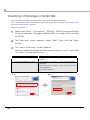
Creating a Package or Script file
Create the silent installation package or the script file for the silent installation.
First, confirm which APD environment to copy on the copy source computer. (See"Setting the APD
Environment To Be Copied" on page 58)
Follow the steps below.
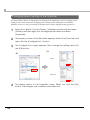
1
Select from [Start] - [All Programs] - [EPSON] - [EPSON Advanced Printer
Driver 4] and open [Change or delete APD4, or create a silent installer
for APD4.]
2
The "Welcome" screen appears. Select "Silent", then click the [Next]
button.
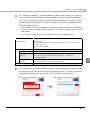
3
The “Select a file name“ screen appears.
Specify a destination folder and file name, and specify which type of file
to create. Click the [Next] button.
Setting
Location to save the file and file name
Create silent installation package
Description
Specify a destination and a file name for the file to be
created.
• Check when you want to create a silent installation
package.
• Uncheck when you want to create a script file for the
silent installation.
(Checked by default.)
2>
60
3>
Chapter 3 Silent Installation
4
The “Silent Installation” screen appears. Select the setting you want to
copy from [Printer Configuration], and select the printer to be installed.
If you do not want to select all the printers installed in the copy source
computer with the APD, uncheck [Include all currently installed printers].
Click the [Next] button.
• The setting in [Printer Configuration] is the default value for the copy destination
printer. When installing multiple printers, you cannot change each printer
individually.
• Go to Step 7 when you check [Include all currently installed printers].
Setting
Include all currently
installed printers
Description
If checked, all the APD printers installed in the copy source computer
are selected.
If unchecked, each APD printer installed in the copy source computer
can be selected.
(Checked by default.)
Printer Configuration
Use Printer Defaults
Setting when the APD is installed is used.
Current System
Settings
System settings of the printer
You can check them by selecting [Properties] - [Advanced]
- [Printing Defaults].
Current User
Settings
User Settings of the printer
You can check them by selecting [Properties].
Local Port Information
5
Select the printer setting that you want to copy.
3
Not available.
“Printer Selection” screen appears. Select the printer driver you want to copy.
To change the printer name, click the [Rename] button. If you do not want to
change the printer name, go to step 7 by clicking the [Next] button.
4>
5>
61
6
7
The "Rename Printer" screen appears. Change the printer driver name,
and click the [Next] button.
The “Start Creating Silent Installation Script File” screen appears. Make
sure that the file information displayed in “Current Settings” is correct
and click the [Next] button to create the silent installation package or
the script file for the silent installation.
6>
8
62
7>
The “Maintenance Complete” screen appears. Click the [Finish] button.
The silent installation package or the script file for the silent installation
has been created in the destination folder specified in Step 3.
Chapter 3 Silent Installation
Executing the Silent Installation
You can execute the silent installation using the following methods.
• Execute the silent installation package on the copy destination computer.
• Copy the script file for the silent installation and the APD file, and execute a command from
the command prompt.
• Develop a batch file or an application for the APD installation, and execute it.
How to execute the Silent Installation
Following the procedures below to execute the silent installation.
Installing using the silent installation package
Copy the silent installation package to the copy destination computer, and execute the following
command.
>[Package File Name(specified with the full path)]
Ex:
D:\APD>Apd4Silent.exe
3
When checking the result of silent installation using a package file, check that the specified
printer driver is correctly installed in [Start] - [Control Panel] - [Hardware and Sound] [Printers].
Installing using the script file for the silent installation
Copy the script file for the silent installation and the APD file, and execute the following
command.
>[APD_4xxE.exe (specified with the full path)]
[/s /f1 "Apd4Silent.inf (specified with the full path)"]
Ex:
D:\APD>APD_400E.exe /s /f1"D:\APD\Apd4Silent.inf"
63
Checking the Installation Result
The silent installation results of the silent installation package/script file for the silent installation
can be checked in the “Result Code” of “setup.log” which is created in the same location as that
of the package or the file.
The contents of “Result Code” are as follows.
Result Code
Description
0
Completed successfully
-3
The APD has already been installed.
2
The files needed for silent installation could not be found.
1151
The OS does not support the APD.
1223
The silent installation was cancelled by the user.
Command Options
The command options of the silent installation and how to make settings are described below.
You can use the command options in combination.
/s /f1 : Silent installation using the script file
Using this command option enables you to execute the silent installation using the script file for
the silent installation.
For more details, see "Installing using the script file for the silent installation" on page 63.
/s /a : Upgrade
Using this command option enables you to upgrade the APD. Printers not supported by the
APD4 are deleted.
Example
D:\APD4\APD_406E.exe /s /a
64
Chapter 3 Silent Installation
/uninstall : Silent Uninstallation
Using this command option enables you to uninstall using the command line.
Example
D:\APD4\APD_400E.exe /s /uninstall
When “/s” is not attached, the uninstallation screen is displayed.
/d : Display the silent installation result in a dialog
Using this command option enables you to display the silent installation result in a dialog when
the installation is completed.
Example
Package File
D:\APD4\Apd4Silent.exe /d
Script File
D:\APD4\APD_400E.exe /s /f1”D:\APD4\Apd4Silent.inf” /d
3
/w /m :
Display a window message of the silent installation completion
Adding the Windows handle and message ID to the command enables you to display a window
message of the silent installation completion.
Example
In the example below, Windows handle is 0x6789abc, and message ID is 0x0501
Package File
D:\APD4\Apd4Silent.exe /w6789abc /m0501
Script File
D:\APD4\APD_400E.exe /s /f1”D:\APD4\Apd4Silent.inf” /w6789abc /m0501
65
/r : Restart setting after the installation
Using this command option enables you to make the restart setting of OS after the silent installation is
completed.
Example when you want to restart
Package File
D:\APD4\Apd4Silent.exe /rY
Script File
D:\APD4\APD_400E.exe /s /f1”D:\APD4\Apd4Silent.inf” /rY
Example when you do not want to restart
Package File
D:\APD4\Apd4Silent.exe /rN
Script File
D:\APD4\APD_400E.exe /s /f1”D:\APD4\Apd4Silent.inf” /rN
/l : Specify the install log file
Using this command option enables you to specify the output destination of the installation log
(Apd4Setup.log). Normally this is output in the Windows folder.
Example
Package File
D:\APD4\Apd4Silent.exe /l”D:\APD4\log.txt”
Script File
D:\APD4\APD_400E.exe /s /f1”D:\APD4\Apd4Silent.inf”
/l”D:\APD4\log.txt”
66