1
Mediant 2000
7.
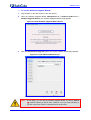
In the ‘Subnet’ field, enter the subnet mask (in dotted-decimal notation) that you want
to assign to the device. Ensure that the subnet mask is valid, otherwise, the device
may not function.
8.
In the ‘Gateway’ field, enter the IP address of the default gateway (if any).
9.
Click Apply to save the new client.
10. Click OK; the ‘Client Configuration’ screen closes.
11. Physically reset the device using the hardware reset button (or power down and then
power up the device). This causes the device to use BootP; the device changes its
network parameters to the values provided by BootP.
12. Repeat steps 2 through 11 for the device's second module (if used).
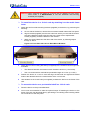
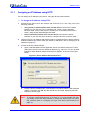
Figure 3-2: BootP Client Configuration Screen
Installation Manual
26
Document #: LTRT-70113