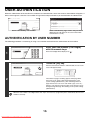
1
AUTHENTICATION BY LOGIN NAME / PASSWORD
The following procedure is used to log in using a login name and password received from the administrator of the
machine or the administrator of the LDAP server.
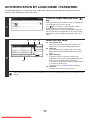
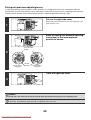
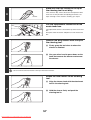
Touch the [Login Name] key or the
key.
Please enter your login name /
password.
User Authentication
OK
Login Name
If the [Login Name] key is touched, a screen for selecting the
user name appears. Go to the next step.
If the
key is touched, [---] (the registration number
display) appears in the 2-line message display.
Use the numeric keys to enter your registration number that
has been stored in "User Registration" in the system settings
(administrator). After entering the registration number, go to
step 3.
User Name
Password
1
Auth to:
Login Locally
(A)
(C)
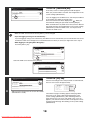
Please select a user
to be logged in.
Back
User 0001
User 0002
User 0003
User 0004
User 0005
User 0006
User 0007
User 0008
All Users
ABCD
Select your user name.
(D)
EFGHI
JKLMN
Admin Login
1
25
OPQRST UVWXYZ
2
(B)
Direct Entry
ABC
User
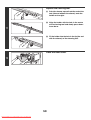
(A) User selection keys
Touch your user name that has been stored in "User
Registration" in the system settings (administrator).
(B) Index tabs
All users appear on the [All Users] tab. Touch a tab to
display the users whose leading initials match the tab
index.
(C) [Direct Entry] key
Use this key if you have not been stored in "User
Registration" in the system settings (administrator) and
have only been stored for LDAP authentication.
A text entry screen will appear. Enter your login name that
is stored on the LDAP server.
To enter text, see "6. ENTERING TEXT" (page 66).
(D) [Back] key
Touch this key to return to the login screen.
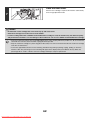
LDAP authentication can be used when the administrator of the server provides LDAP service on the LAN (local area
network).
17
Downloaded From ManualsPrinter.com Manuals