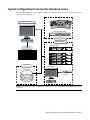
1
4 Connect your audio hardware devices. To avoid system instability, make sure you connect your audio
hardware as illustrated for your configuration. See Audio Wiring on page 32.
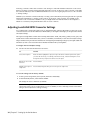
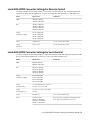
5 Configure the Lucid converter for remote or local control. See Configuring the Lucid ADA 88192
Converter on page 33.
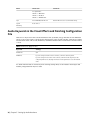
6 Set the appropriate keywords in the software initialisation file. See Audio Keywords in the Visual Effects
and Finishing Configuration File on page 36.
Audio Hardware Components
Discreet Native Audio uses the following hardware components, shipped with your system.
Lucid Converter ADA 88192
devices.
Converts signals between the workstation and all digital or analog audio I/O
AJA Balanced Audio breakout box and AJA OEM-2K board The Balanced Audio breakout box is the audio
component of the AJA breakout box. It provides connections for audio I/O. This breakout box connects to
the AJA OEM-2K board on your workstation. The OEM-2K board provides real-time input and output of
uncompressed SD and HD video signals as well as audio data at 24-bit resolution. The OEM-2K board handles
balanced AES/EBU audio signals from the Balanced Audio breakout box. The OEM-2K board supports
embedded audio up to 8 track.
Audio Wiring
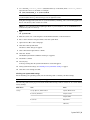
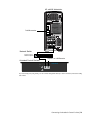
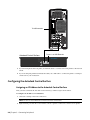
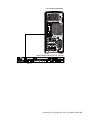
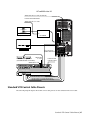
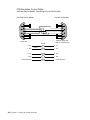
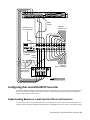
To connect the Discreet Native Audio hardware components to the AJA breakout box, refer to the following
diagram.
32 | Chapter 5 Setting Up Audio Hardware