1
Contents
Mounting the Switch ..................................................................................................... 2-13
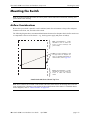
Airflow Considerations .......................................................................................... 2-13
Installation Options ................................................................................................ 2-14
Installing the Switch on a Tabletop or Bench ................................................. 2-14
Rack-Mounting the Switch ..............................................................................2-14
Rack Mounting Stacked Configurations ......................................................... 2-16
Power Cords .................................................................................................................. 2-17
Grounding the Chassis .................................................................................................. 2-17
Back Up Power Supply ................................................................................................. 2-18
Power Supply Redundancy .................................................................................... 2-18
Redundant AC Circuit Recommendation ........................................................ 2-19
Installing a Back Up Power Supply .......................................................................2-20
Removing a Back Up Power Supply ...................................................................... 2-22
Blank Cover Panel Requirement ............................................................................ 2-23
Viewing Primary and Back Up Power Supply Status ............................................ 2-23
Viewing Power Supply Status for Stacked Configurations ................................... 2-24
A Slot Number is Specified ............................................................................. 2-24
No Slot Number is Specified ........................................................................... 2-24
Gigabit Ethernet Uplink Modules ................................................................................. 2-25
OS6600-GNI-U2 .................................................................................................... 2-25
OS6600-GNI-C2 .................................................................................................... 2-27
Stacking Module .................................................................................................... 2-28
Installing Uplink and Stacking Modules .......................................................................2-29
Removing Uplink and Stacking Modules ..................................................................... 2-31
Blank Cover Panel Requirement ............................................................................ 2-32
Mini Gigabit Interface Converters (MiniGBICs) .......................................................... 2-33
MiniGBIC Specifications ....................................................................................... 2-34
Installing MiniGBICs .................................................................................................... 2-35
Removing MiniGBICs .................................................................................................. 2-36
100 Mbps SFPs (OS6600-U24) .................................................................................... 2-37
100 Mbps SFP Specifications ............................................................................ 2-38
Installing SFPs (OS6600-U24) ..................................................................................... 2-40
Removing SFPs (OS6600-U24) .................................................................................... 2-41
Temperature Management ............................................................................................ 2-42
Viewing Chassis Temperature Status ..................................................................... 2-42
Viewing Temperature Status for Stacked Configurations ...................................... 2-43
A Slot Number is Specified ............................................................................. 2-43
No Slot Number is Specified ........................................................................... 2-43
Temperature Errors ................................................................................................ 2-44
Warning Threshold .......................................................................................... 2-44
Danger Threshold ............................................................................................ 2-44
Viewing Fan Status ................................................................................................ 2-45
Viewing Fan Status for Stacked Configurations .................................................... 2-45
A Slot Number is Specified ............................................................................. 2-45
No Slot Number is Specified ........................................................................... 2-46
iv
OmniSwitch 6600 Series Hardware Users Guide
April 2004