1
OPERATING CONTROLS
j
f
e
b
a
b
h
d
c
g
c
d
h
OPERATING CONTROLS
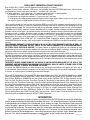
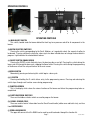
(a) MAIN ON/OFF SWITCH
This switch, located under the brewer behind the front leg, turns power on and off to all components in the
brewer.
(b) BATCH SELECTOR SWITCHES
Pressing the switch corresponding to the Small, Medium, or Large batch selects the amount of coffee to
be brewed. Pressing a different switch after a brew cycle has been initiated does not change the brew batch in
progress. Light indicates the selected batch to brew.
(c) ON/OFF SWITCH (ENABLE BREW)
Pressing the ON/OFF switch alternately turns the brewing side on and off. Pressing this switch during the
brew cycle will interrupt the brew cycle, stopping the flow of water. Pressing this switch during the programming
of the brewer will exit the setup and return to the main screen.
(d) BREW SWITCH
Momentarily pressing and releasing this switch begins a brew cycle.
(e) ® SWITCH
Pressing and holding the ® switch allows entry to the programming menus. Pressing and releasing the
switch steps through each function screen during programming.
(f) FUNCTION SCREEN
This is the display which shows the various functions of the brewer and allows the programming to be accomplished.
(g) FUNCTION SCREEN SWITCHES
These are the hidden switches which are used to program the brewer.
(h) FUNNEL SENSING COILS
These are used to "receive" information from the Smart Funnel handle (coffee name and batch size), and also
from RECIPE CARDS.
(j) SCROLL BACKWARDS
The upper left corner of the B in BUNN can be used to scroll backwards through the function list.
Page 7
35058.2 022410