1
DOCUMENT MANAGEMENT
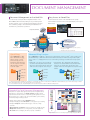
Document Management on the Hard Disk
Easy Access to Stored Files
You can save processed job data in designated folders on the
MX-3100N’s built-in hard disk, making it easy to instantly recall
saved documents or jobs for printing and sending at a later time.
This contributes greatly to efficient sharing and distribution of
information in your business operations.
Documents that are stored on the hard disk can be quickly
searched and accessed from the control panel display or through a
Web browser.
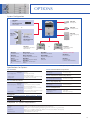
Copy
Scan
Fax/Internet Fax*
Paper documents
Search results
Web access screen
Print**
PC-Fax*
PC-Internet Fax*
Send
Quick File Folder
To e-mail or FTP
Fax or Internet Fax*
Reuse
Main Folder
Print Out
Custom Folder
Electronic files created on a PC
* These functions require their respective option(s).
See page 5 for details.
** Print data cannot be retransmitted.
Quick Filing
Advanced Filing Function
Up to 1,700 pages or 1,000
files*1 that have been copied,
printed, scanned, or faxed*2
can be stored by job on the
hard disk in a Quick File Folder.
You can easily reuse saved data
without having to reload or
rescan the original.
Up to 5,500 pages or 3,000 files*1 that have been copied, printed, scanned, or faxed*2 can be stored by job on
the hard disk in up to 1,000 folders with customised names and locations. Enhanced security features require
users to enter a 5- to 8-digit password to access secure folders, protecting your sensitive data. Storage options
include:
Quick File
Folder
SCAN data
s-AIN&OLDERn9OUCANSTOREPROCESSEDFILESBY
user name in the main public folder and share
them across the workgroup. Any file name and
a PIN code can be assigned to each saved job.
Main
Folder
COPY data
s#USTOM&OLDER5PTOPRIVATEFOLDERSNAMEDAS
desired) can be created within the Custom Folder. When
saving a file in a private folder, any file name can be
assigned. A PIN code can be applied to both private folders
and files.
SCAN data
Custom
Folder
SCAN data
1
Private
COPY data
COPY data
2
PRINT data
PRINT data
FAX data
FAX data
PRINT data
3
FAX data
*1: Measured using Sharp’s standard chart (A4 with 6% coverage, B/W). The Quick File Folder shares the HDD with the Job Build function; up to 12GB of data storage is available
when using both functions. The storage capacity will be less for colour pages.
*2: For fax and Internet fax jobs, only transmitted data (not received faxes) can be saved in the Document Filing function.
Search
Sharpdesk for Total Document Management
Sharpdesk is an original Sharp application that provides integrated desktop
management of documents in over 200 file formats, including scanned
paper-based documents and those created with popular applications such as
Word. It allows you to organise, edit, search, and distribute your documents,
all with simple drag-and-drop operation.
s)NTUITIVEDESKTOPDISPLAYFEATURESthumbnail viewing
Edit
Print
PC-Fax
Word
E-mail
View
Excel
PowerPoint®
Store
OCR
ICT*
Compose
s3HARPDESK)MAGINGPROVIDESannotation tools for paper-free proofreading
s3HARPDESKComposer combines different types of files into a single
document
sOptical character recognition converts documents into editable text files
sOutput zone distributes files to e-mail, printers, and other applications
sFile search allows searching by file name, keyword, or thumbnail
PDF
Scanned
image
etc.
Search screen
* Image Compression Tool for converting images into high-compression PDF files
7