1
TING
SUPERB PRINT QUALITY
Improved Imaging System
Copy
Print
Sharp thoroughly revamped its imaging process for the
MX-3100N; now a high-performance processor, a new developer,
and the newly developed high grade toner combine to provide
breathtaking image quality. The smaller particle size of the newly
developed high grade toner and the developer allows for reduced
graininess and clear reproduction of fine lines and halftone colours.
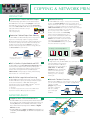
True 1,200 x 1,200-dpi Printing
Print
The MX-3100N’s print engine provides razor-sharp 1,200-dpi
printing—without sacrificing output speed—for ultra-clear image
quality. Fine lines and small text come out crisper and easier to
read.
600DPI
1200DPI
Easy, High-Quality Copying
Copy
Due to the fact that the MX-3100N features third-generation
Sharp Auto Colour Mode, anyone—with just a push of the start
button—can easily and automatically make copies that are faithful
to the original. Here is how it works. Auto Colour Selection
automatically determines whether a page is colour or B/W and
selects the appropriate copy mode for that page. Auto Colour
Mode analyses the contents of each page, distinguishing between
different components, such as photos and text. This is what allows
the MX-3100N to print out maps with crisp, clear text and to
automatically remove the background colour on newspaper and
magazine copies for clearer output. When copying in B/W,
multi-level error diffusion technology provides dramatically
smoother gradation in photos and subtle greyscale images.
Third-generation (3G) Sharp Auto Colour Mode
Windmills of the Netherlands
For centuries, the Dutch used windmills
to mill corn into flour, drain water from
the land, cut timber into boards, and
carry out various other industrial tasks.
At one time, over 9,000 windmills dotted
the Dutch countryside. And, although
that number has dwindled down to just
over a thousand, many people still
associate the Netherlands with its
majestic windmills.
TEXT
Text comes out
crisp and clear
Windmills of the Netherlands
PHOTO
To harness the power of the wind, the
Dutch built a variety of windmills, with the name of each type determined by the
construction, appearance, or function of the mill. These mills sported a somewhat primitive
design that used canvas sails and that, unlike their more automated British counterparts,
had to be turned by hand to face the wind.
Auto recognition
For centuries, the Dutch used windmills
to mill corn into flour, drain water from
the land, cut timber into boards, and
carry out various other industrial tasks.
At one time, over 9,000 windmills dotted
the Dutch countryside. And, although
that number has dwindled down to just
over a thousand, many people still
associate the Netherlands with its
majestic windmills.
To harness the power of the wind, the
Dutch built a variety of windmills, with the name of each type determined by the
construction, appearance, or function of the mill. These mills sported a somewhat primitive
design that used canvas sails and that, unlike their more automated British counterparts,
had to be turned by hand to face the wind.
VERSATILE
USB Memory Direct Print
Print
One of the two USB ports on the MX-3100N is located at the front
of the MFP beneath the control panel.
It comes in handy when printing data
directly from USB memory devices—an
indispensable function for users who
are in a hurry or who want quick
machine access without a PC.
Versatile Paper Handling
Copy
Print
The MX-3100N accommodates a wide range of paper sizes, from
A5R to A3 wide. You can do A3 full-bleed printing onto
A3-wide paper, without loss of image area. And thanks to its
tandem printing method, it can handle heavy paper stock up to
256 g/m2, overhead transparencies, and other types of paper,
further expanding the range of printing applications.
Image Editing Functions
Copy
The MX-3100N includes colourful editing functions made possible
by digital technology.
sMulti-Page Enlargement divides an image onto separate
sheets for making posters up to A0 x 2 in size.
sImage Repeat places multiple copies of an image onto a single
sheet.
sMirror Image makes a reverse image of the original.
sXY Zoom adjusts the horizontal and vertical ratios independently.
sB/W Reverse reverses the black and white of an image.
Please see specifications for a list of available convenient functions.
Various Copy/Print Applications
Copy
Print
Copy & Print
sTab Copy/Print can copy or print directly onto tabs on
document separators and insert them into assigned positions.
sMulti-Shot copying and N-up printing
sPamphlet Style copying/printing
sCover/transparency insertion
Print
sPDF/TIFF/JPEG/XPS Direct Print prints PDF, TIFF, JPEG, or XPS
files without using the printer driver or opening applications.
Note: Direct PDF printing requires optional MX-PKX1, and direct XPS printing
requires optional MX-PUX1 and MX-ARSMX3. Direct printing may not support all
PDF, TIFF, JPEG, and XPS formats.
sCarbon Copy Print mode automatically outputs multiple
printouts of the same data on plain and/or coloured paper;
convenient for invoices and purchase orders.
sForm Overlay can store office document formatting such as
letterheads and overlay contents in colour, eliminating the
need for pre-printed paper.
sBarcode font compatibility (with optional AR-PF1 Barcode Font Kit)
Copy
sBook Copy is convenient for compiling copies of a book or
bound originals into pamphlet format.
sCard Shot enables one-touch copying of both sides of a card
(credit cards, ID cards, etc.) onto a single page.
sColour Stamp labels your copies with page
numbers, the date or text such as “Urgent”
in up to four different colours.
abcdefghijklmnop
May/12/2006
CONFIDENTIAL
DO NOT COPY
19.3%
sMixed Size Original Copy mode
automatically distinguishes documents of
mixed sizes* (such as A3/B4, B4/A4, etc.) fed
through the RSPF and chooses the
appropriate paper.
36.2%
12.6%
31.9%
Total 2,012.8
URGENT
billion yen
CONFIDENTIAL
ABCDEFGHIJKL
P.1
* Some restrictions apply when combining paper sizes of different format series.
4