1
Configuring the SPA22
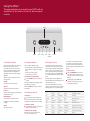
This page explains how to use the SPA22 menus to configure
the operation of your SPA22.
Using the menus
Input settings
HDMI settings
Audio settings
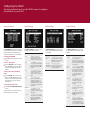
The MAIN MENU gives access to a series
of menus which allow you to customize
different aspects of the operation of
the SPA22 using the on-screen display.
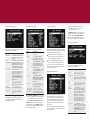
The INPUT SETTINGS menu allows you to
configure any of the 15 inputs:
The HDMI SETTINGS menu allows you to
specify how the HDMI audio channels
are handled:
The AUDIO SETTINGS menu allows you
to specify options affecting all audio
outputs:
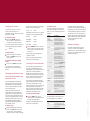
To display the MAIN MENU
•
Description
STATUS
ENABLED or DISABLED to
specify whether the source
can be selected from the
front panel or remote control.
Press @ on the front panel or remote
control.
To select a menu option
•
Option
Use the SELECTOR on the front panel
or the A or V buttons on the remote
control to step between the menu
options.
ALIAS
AUDIO
The audio input used for the
source: ANALOG 1 to ANALOG
10, EXT 7.1, DIGITAL 1 to
DIGITAL 7, HDMI 1 to HDMI 3, or
NONE.
VIDEO
The video input used for
the source: COMPOSITE 1 to
COMPOSITE 4, S-VIDEO 1 to
S-VIDEO 3, COMPONENT 1 to
COMPONENT 3, HDMI 1 to HDMI
3, HD BYPASS 1 to HD BYPASS
3, or NONE.
To change the currently highlighted
option
•
Use the VOLUME control on the front
panel or the < and > buttons on the
remote control to step between the
alternative values for the current
menu option.
To exit from the current menu
•
Press @ on���������������������������
the front panel or remote
control��.
Press SELECT to edit the name
of the source. Use A and V to
select a character, then < or
> to edit it. Finally press @
to finish.
OFFSET
Exiting from the main menu returns to
normal operation of the SPA22.
2CH MODE
Press < or > to vary the
sensitivity of the source
between -12.0dB to +12.0dB in
0.5dB steps.
The default surround mode for
two-channel sources: BYPASS,
STEREO, PLIIX MOVIE, PLIIX
MUSIC, NEO6 CINEMA, NEO6
MUSIC, or PARTY.
Option
Description
Option
Description
HDMI AUDIO
OUT
Set to TV if you want to pass
the HDMI audio to the TV, or
SPA22 if you want the SPA22
to process the audio.
AV DELAY
HDMI INPUT 1
HDMI INPUT 2
HDMI INPUT 3
Allows you to specify a
default source to be used
if there is no signal on the
specified HDMI input.
Can be adjusted between
0ms and 140ms to
compensate for processing
delay in some video displays.
Choose the setting that gives
correct lipsync.
INTERNAL
AMP
The normal setting is FRONT.
Can be set to BACK to change
the front power amplifier to
operate with the Surround
Back channels, if you prefer
to use a separate power
amplifier with the front
channels.
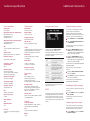
LATE NIGHT
Set to ON to apply dynamic
range compression to
the audio, to reduce loud
transients for late night
listening.
LFE LEVEL
Can be adjusted between
0.0dB and -10.0dB to reduce
the LFE level.
DOUBLE
BASS
Set to ON to copy the bass
from speakers specified as
LARGE and send this to the
subwoofer.
ADC GAIN
Allows you to adjust the
threshold for automatically
setting the ADC input level.
Can be adjusted between
12.0dB (more dynamic range)
and -12.0dB (more headroom).