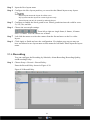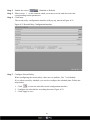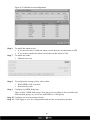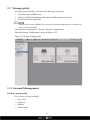
1
Network Video recorder
US E R MAN UAL
PLUG & PLAY
VHDIPL
About this document
Purpose
This document is for the VHDIPL, including the product features, hardware installation,
network access, network configuration, daily maintenance, and troubleshooting.
Intended Audience
This document is intended for:
!
!
!
Technical Support Engineer
Maintenance Engineer
End User
Symbol Conventions
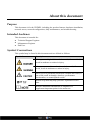
This symbol may be found in this document and are defined as follows:
Symbol
description
Alerts you to a high risk hazard that could, if not avoided,
result in moderate or minor in injury.
Alerts you to a medium or low hazard that could, if not
avoid, result in moderate or minor in injury.
Alerts you to a potentially hazardous situation that could, if
not avoid, result in damage, data loss, performance
deterioration, or unanticipated results.
Provide a tip that may help you solve a problem or save
time.
Provides additional information to emphasize or
supplement important points in the main text.
i
Contents
About this document .................................................................................................... i 1 Preface ......................................................................................................................... 1 1.1 Important note...................................................................................................................1 1.2 Check the installation environment ..................................................................................2 2 Specification .............................................................................................................. 3 3 VHDIPL Networking solutions ............................................................................. 5 4 Installation ................................................................................................................. 6 4.1 Days recorded ...................................................................................................................6 4.2 Front panel description .....................................................................................................7 4.3 Rear panel description ......................................................................................................8 4.4 First boot ...........................................................................................................................9 4.5 Shutdown ........................................................................................................................10 4.6 Displayer resolution adjustment .....................................................................................11 4.7 Add network cameras .....................................................................................................13 4.8 Login ...............................................................................................................................13 5 Quick configuration ............................................................................................... 15 6 Live video ................................................................................................................. 20 7 Playback .................................................................................................................... 24 7.1 Recording playback ........................................................................................................24 7.2 Recording backup ...........................................................................................................25 8 Alarm searching ...................................................................................................... 29 9 Setup .......................................................................................................................... 31 9.1 VHDIPL setup ................................................................................................................31 9.2 Camera management ......................................................................................................44 10 Web Browser Access for VHDIPL ..................................................................... 45 10.1 Login .............................................................................................................................45 10.2 Operation Read .............................................................................................................46 10.3 Live video .....................................................................................................................48 10.4 Playback........................................................................................................................49 10.5 Alarm search .................................................................................................................51 ii
10.6 VHDIPL setup ..............................................................................................................51 10.7 Network camera setup ..................................................................................................52 11 HD-IP Access for VHDIPL .................................................................................. 53 11.1 Start and run..................................................................................................................53 11.2 Login .............................................................................................................................53 11.3 System main interface ..................................................................................................54 11.4 VHDIPL management ..................................................................................................54 11.5 Playback........................................................................................................................62 12 HD-IP Lite App ................................................................................................... 675
12.1 HD-IP Lite Android Device………………………………………………………......65
12.2 HD-IP Lite iOS Device…………………………………………...…………………..66
13 F.A.Q ........................................................................................................................ 67
iii
1 Preface
1.1 Important note
Thank you for choosing the Concept Pro VHDIPL Network Video Recorder
(NVR). Please read this user manual carefully before installing the VHDIPL.
!
!
!
Never open or disassemble the device unless it is by a qualified or professional
person, as this product maybe damaged or cause electric shock.
Video data loss caused by installation, configuration, improper operations, and hard
disk error is not the responsibility of the manufacturer.
Warranty will be void if the “void if broken” sticker is broken.
1
1.2 Check the installation environment
Installation environment
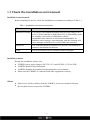
Before installing the device, check the installation environment according to Table 1-1
Table -1 Installation environment check items
Check item
standard
Moisture-resistant
The relative environment humidity must be in the range of 0%
to 95%. If the humidity is higher than 95%, a dehumidifier must
be installed, such as an air conditioner with the
dehumidification function or a dedicated dehumidifier. In
addition, water seepage, water dropping, and dew forming will
cause damage and will not be covered under the warranty.
Dustproof
The VHDIPL should be installed in a dust free environment to
minimise mechanical breakdown.
Light
The device must be not be installed in direct sunlight.
Installation notice
During the installation, please note:
!
!
!
!
VHDIPL power input voltage is DC12V (±5%) and DC48V (±5%) for POE.
VHDIPL should be kept horizontal.
VHDIPL shouldn't be installed in high temperature environments.
Make sure the VHDIPL is connected with other equipment correctly.
Others
!
!
Please use a soft dry cloth to clean the VHDIPL, do not use chemical solvents.
Do not place items on top of the VHDIPL.
2
2 Specification
System
CPU
SOC (System-on-chip)
Operating system
Embedded Linux 2.6
Embedded CMS system, user friendly interface, easy to use;
Quick configuration and simple
Features
operation.
Plug-and-play, auto detection and schedule setup .
Real-time fault alarm mechanism for timely reporting of hard disks, networks, fault
information. Embedded Web Server using Flash technology to support common
browsers with real-time monitoring and playback.
Video
Record Info
Ability to decode
1080p: average bitrate 6 Mbps. Up to 4 Channel
Using 2 x 3TB, 4-channel 1080p can record 30 days.
H.264 (ISO / IEC 14496-10) high profile 4.2
Can decode max of 1080p video streaming
Single screen: 1 x 1080p/720p/D1 with tour
Real-time video
Quad display of 1080p/720p/D1 resolutions
Split screen 1/4/ D1 resolutions
Output
DVI-I interface supplied with DVI to VGA converter and DVI to HDMI converter.
Storage
HDD
Two internal-removable hard disk drives, maximum 2 x 3TB hard disk drive supported
Audio
3
In / Out
3.5mm linear audio output
Audio formats
G711_A,G711_U
Network
Transmission control
Embedded network bandwidth adaptive flow control technology.
Interface
1 RJ45 10M/100M network port and 4 RJ45 10M/100M ports with POE
Web
Webserver supported with Flash technology for popular browsers in real-time
monitoring, video playback, and system configuration.
Network protocol
RTP/RTCP, TCP/UDP, HTTP, DHCP, DNS Client, RTMP for Flash Video
Characteristic
Temperature
Ambient temperature: 0°C - 45°C, using industrial grade microprocessor, intelligent
heating and cooling
Humidity
00% to 95%
Power consumption
Low-power design, motherboard max power consumption 8W; with 2 3TB hard disk
increases 40W power consumption.
Power input
AC100-240V/1.5A
/50- 60HZ Input ,Output DC48V/1.04A ;
AC100-240V/1.5A
/50- 60HZ Input ,Output DC12V/5A
Size
Chassis:220mm x 150mm x 100mm(L x W x H)
Weight
4Kg / 8.8lb No HDD installed.
USB
2x USB2.0 interface, respectively as a backup and USB mouse.
4
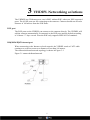
3 VHDIPL Networking solutions
The VHDIPL has 5 Ethernet ports, one is RJ45 without POE, others are POE supported
ports. The 4 POE ports are for connecting to the cameras. Cameras should not exceed a
distance of 100 metres from the POE Ports.
POE port
The POE ports on the VHDIPL can connect to the cameras directly. The VHDIPL will
add the cameras automatically if connected to the POE ports and the default recording
is 24 hours * 7 days a week. Note the POE only supports IEEE 802.3af standard .
10M/100M RJ45 Internet port
When connecting to the Internet or local network, the VHDIPL needs a CAT5 cable
running to a switch or router at a distance of less than 100 metres.
The camera dedicated network topology is shown in Figure 3-1
Figure 3-1 camera dedicated network
5
4 Installation
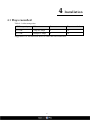
4.1 Days recorded
Table 4-1 video storage time
HDD capacity
Video stream
Cameras
Days recorded
2 x 3TB
720p at 6 Mbps
4
30
2 x 3TB
1080p at 6 Mbps
4
30
Suggestion: Use two hard disk dives to reduce the risk of data loss.
6
4.2 Front panel description
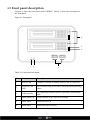
Figure 4-1 shows the front panel of the VHDIPL. Table 4-1 shows the description of
the front panel.
Figure 4-1 Front panel
6
5
4
1 2
3
Table 4-1 Front panel description
No.
Name
Description
1
Power LED
VHDIPL is turned on and the power LED is a solid red
2
Network LAN
LED
LAN normal solid green status, data transmitting flashing
status
3
USB interface
For connecting external mouse, keyboard, USB memory
stick
4
HDD data LED
HDD read and write, blue LED flashing
5
HDD status
Solid blue lit LED
6
HDD Rack
Where the HDD is stored
7
4.3 Rear panel description
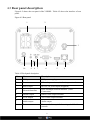
Figure 4-2 shows the rear panel of the VHDIPL. Table 4-2 shows the interface of rear
panel.
Figure 4-2 Rear panel
2
1
3
10
9
8
7
6
5
4
Table 4-2 Real panel description
No.
Name
Description
1
POE port
POE power supply port
2
Fan
When the power is on, the fan is operational
3
Power Input
DC12V,5A power input (Supplied)
Network Interface
RJ45 100Mbps network interface. (LAN
Connection)
5
HDMI Output
HDMI video output terminal
6
VGA Output
VGA video output terminal
7
Audio output
Audio output
8
Reset
Restores the factory default settings, hold for 5
seconds
4
8
No.
Name
Description
9
Ground connect
Ground connect
10
DC48V Power
interface
DC48V.1.04A power input (Supplied)
4.4 First boot
!
Make sure that the VHDIPL has the correct amount of power.
If you want to use POE power supply, please plug in the DC48V power adapter,
supplied with the VHDIPL.
Once the VHDIPL starts and after the self test, (which takes about 2 minutes) the
results are displayed on the screen shown in figure 4-3.
Figure 4-3 Device power on
If an error occurs while the VHDIPL is in self-test, this mode will stay in the lower
right of the screen, you can choose to continue or shutdown. If you choose to continue,
the device will continue to start, until the device login screen is shown.
9
If the HDD fails testing the reasons may include the following:
!
Unformatted new hard disk, go to quick configure to format the hard disk drive.
!
Formatted hard disk drive, the VHDIPL supported file systems do not match.
!
Hard disk drive is damaged.
4.5 Shutdown
!
Shutdown process, the system prompts are off, do not cut off the power
!
Do not remove the power cables while the VHDIPL is still on.
!
If the device is logged into the main interface, you can click the top right
button and this will bring up the shutdown interface, shown in figure 4-4.
10
Figure 4-4 Shutdown interface
4.6 Displayer resolution adjustment
The VHDIPL will support resolutions with VGA 1024*768, VGA 1280*1024, VGA
1600*1200, HDMI 720P, HDMI 1080P, you can select the correct resolution according
your monitor.
When using VGA we advise to set it to 1024*768 or VGA 1280*1024. When using HDMI
input we advise to use HDMI 1080P.
Adjustment Steps:
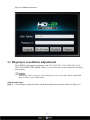
Step 1 Click change on login interface and find the adjustment interface shown in figure 4-5.
11
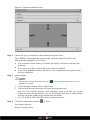
Figure 4-5 Adjustment Monitor Setup
Step 2
Choose the type of resolution in the resolution drop-down box.
The VHDIPL will automatically switch to the selected resolution and show the
following dialog options Yes or Cancel.
If no selection is made within 10 seconds, the display will return to the previous
resolution.
! If you select Yes then it will switch to the selected resolution.
! If you select cancel the display will not save the configuration and go back to the
previous resolution.
Adjust display.
!
Step 3
If the monitor does not show the full screen (
adjustment is needed.
does not appear at the corners) screen
1. Click Adjustment button at lower right corner.
2. In the step of the drop-down box to choose the adjustment step.
Step size: The moving distance when adjusting screen each time, the greater
number the more moving distance, you can select larger step sizes to adjust quicker,
and then select the smaller step to adjust more accurately.
3. Use UP, DOWN, LEFT, RIGHT button to adjust the screen.
Step 4
Click the configuration interface
to close.
Exit display interface
Back to Login interface
12
4.7 Adding Network Cameras
The VHDIPL allows you to connect a maximum of 4 network cameras. The total
recording bit rate is 24 Mbps and live video total bit rate is also 24 Mbps.
!
The VHDIPL will support a maximum of 4 cameras at 1080p resolution with
average bit rate is 6 Mbps network camera. If the total baud rate is more than 24
Mbps it may cause the VHDIPL to lose video.
!
For detailed specifications please refer to chapter 2 Specifications.
Add Network camera
Method 1: Add the camera manually.
We can discover network cameras by an IP broadcast, IP segment search, and static IP
search. Network cameras have to be on the same IP range ad have to be on the same subnet
mask
Method 2: Add camera by POE ports.
Cameras will be detected and added automatically
4.8 Login
Login to the VHDIPL using the following steps:
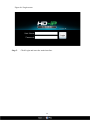
Step 1 In the login screen shown in figure 4-6, enter a user name (default is admin), password
(default is admin).
13
Figure 4-6 Login screen
Step 2
Click Login and enter the main interface.
14
5 Quick configuration
To quickly configure, use the quick configuration interface of the VHDIPL. It
provides:
The network configuration, disk management, date and time configuration, search
network cameras, video configuration, camera network configuration stream
configuration and motion detection configuration. Enter the quick configuration
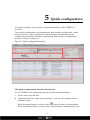
interface, as shown in figure 4-7
Figure 4-7 Quick Configuration Interface
The quick configuration interface description.
Area 1: VHDIPL basic information and time synchronization functions.
•
Set the name, date and time.
!
Synchronize the time of the network cameras. You can select manual mode or
automatic mode.
When the manual mode is selected, click
button for time synchronization.
When synchronize mode is selected, time will synchronize automatically by the
15
VHDIPL, this means all cameras will have internal times to match the VHDIPL
time.
Area 2:Managing camera certification accounts.
The certification accounts used to log on to the network cameras. Only certified
network cameras can be added to VHDIPL system.
!
System cameras will have a default user account: admin and default password:
admin. Click
!
Click
to add a network camera certification account.
to select account to be deleted from the list.
Area 3:VHDIPL network configuration.
!
VHDIPL factory default IP address: 192.168.0.120
!
The basic network configuration can configure the IP address, subnet mask, default
gateway, DNS address and other parameters. Real-time display of the network
connection status and speed.
Area 4:Hard disk management.
!
Formating the hard disk will cause video loss, please use this feature with caution.
!
Always use the software function when removing hard drives and ensure that the
power is off.
Hard disk management:
!
!
!
!
!
To format the hard disk, click the format button, a pop-up prompts, click format. A
3TB HDD takes about 10 minutes to format.
Load or unload HDD. Do not pull out the hard disk unless you have click on
unload first.
To modify hard disk group, add disk 1 to disk group 1 and disk 2 to disk group 2,
or add disk 1 and disk 2 to disk group 1.
To view the status of the disk it will say one of the following; normal, abnormal,
unformatted drive or does not exist.
View the disk space and the total space.
Area 5:Select Network Camera
VHDIPL will automatically search for the network cameras.
!
When the number of network cameras is no greater than 4 units, the VHDIPL will
automatically add them to the management list.
16
The VHDIPL is capable of detecting and recording up to 16 cameras however for maximum
performance we only recommend and support the VHDIPL a 4 camera device.
If more than 4 cameras are detected they will be displayed as per figure 4.8. From here
you must select the 4 cameras that you require.
Figure 4-8 Device Discovery Tips
Click the Apply button to complete the network camera selection.
Area 5:Search cameras, delete cameras.
To manually search for a camera, click on search camera and the search camera
interface will pop up shown in Figure 4-9
17
Figure 4-9 Camera Search Interface
Click the button
To remove the camera in the camera list, click the check box
and then click delete to remove, shown in figure 4.7.
, select the camera
Area 6:Configuring the network cameras.
To view the status of the network camera, set the name of the network cameras, IP
address, video strategy, stream parameters, and motion detection parameters.
!
View the status of network cameras: online, not online, account errors.
1. To preview real time video click
.
2. Modify the name of the network camera.
Enter the desired name of the device.
• Modify the IP address of the network camera.
1. Click the camera to modify the IP address, network cameras IP Settings, a dialog
box pops up.
2. Set the network camera IP specific operation methods and procedures, see chapter
9.1.4.
• Set the device stream.
4. Click stream information to pop-up the stream configuration dialog box shown in
figure 4-10.
18
Figure 4-10 Stream Quick Configurations
5. Click the Apply button to set the current parameters to the devices.
!
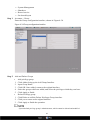
Set to detect motion detection alarm, shown in figure 4.7.
1. Click motion detection, and the motion detection alarm dialog pops up.
2. If you want to turn on the motion detection alarm, you must set the arming time
and detection area.
19
6 Live video
To input the username (default is admin) and password (default is admin), click login.
Enter the live video interface, shown in figure 4-11.
Figure 4-11 Live Video Interface
In the live video interface, you can select the cameras from the left list to view live
video. You are also able to do the below operations:
3.
4.
5.
6.
7.
8.
9.
10.
Live video
Alarm log tracking
Monitor the recording status
PTZ Control
Audio
Full screen automatically
Video mark
Sensor configuration
Decoding ability
This system decoding ability is 4 channels 1080p.
20
Intelligent adaptive mechanism of stream frame rates
This system provides the intelligent adaptive mechanism of stream frame rates.
When you are selecting the camera to watch in live video, the system will select the
suitable stream according to system’s own decoding ability and live video windows. It
will always ensure the system works with the best performance.
To change the streams manually, right click the screen to access the menu, then you
will be able to see all the available streams in the current camera. After the streams are
switched at the bottom line of the live video window the stream information will
appear.
Live video interface introduction as figure 4-11 (above).
Table 4-3 Live video interface introduction
Items
Name
Content
1
Top menu
Click Live Video, Playback, Alarm Search and Quick Setup to enter the
interface.
Click
2
Channel Layout
icon to check the HDD information.
Click
icon to enter the recording backup interface.
Click
icon to lock the interface.
Select which display layout you would like from the available selection.
After selecting the layout mode, move the individual camera from the left
list to the position on the layout screen you want it to appear in. Click the
save button to save the layout.
There are two options “Shared layout” and “My layout”, this also supports
“Cycle” mode, we can configure this in Setup > VHDIPL Setup > Live
Video Setup > Layouts.
3
Camera List
The camera list shows every camera that has been assigned to the VHDIPL.
means normal,
means offline,
means unverified (username or
password is not correct).
4
Alarm
information
This area displays the alarm information including motion detection and I/O
alarm. This will only display the last 20 alarms. Click
to clear the
information.
5
Bottom menu
By clicking
,
icons, the layout list, alarm list and alarm
and
information will be hidden or viewed.
Play live video button.
Close live video button.
Click to select the PTZ control menu.
Click to display the following.
: Selects Full Screen Video Playback
21
Items
Name
Content
: Automatic Full Screen control
6
Live video
Right mouse click on the live display will allow the changing of some
display information. Start the audio, bookmark the current video footage for
ease of finding later, change the video stream and access the sensor
configuration set up menu of the camera being viewed.
: Mark/Tag, press this button during live video and the recording will be
highlighted in “yellow” and make it easier to find the footage at a later date.
Return to full screen automatically
Click
to enable the return to full screen function, and set the time delay. When
this function is enabled, it will go to the full screen mode immediately. When it is in
full screen mode, move the mouse to the bottom line it will activate the tool bar, click
the icon
full screen.
to can exit the full screen mode. Click
to manually return to the
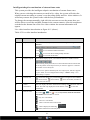
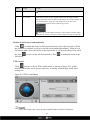
PTZ control
Click
button to call the PTZ control menu, as shown in figure 4-12. In this
interface adjust pan, zoom, preset, trajectory, scanning, infrared light, north, timer
settings etc.
Figure 4-12 PTZ Control Menu
PTZ Control menu only can be operated with IPS Dome and Ext PTZ platform.
22
Click
button to close the PTZ configuration menu.
Click
button to exit the PTZ control menu.
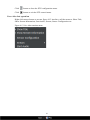
Live video fast operation
Right click mouse button to actvate figure 4-13 interface, call the menu to: Show Title,
Show Stream Information, Start Audio, Stream, Sensor Configuration etc.
Figure 4-13 Live video monitor menu
23
7 Playback
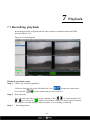
7.1 Recording playback
Recording playback will playback the video which is recorded to the local HDD,
shown in figure 4-14.
Figure 4-14 Local playback
Playback operations steps.
Step 1 Choose the camera to playback.
Click one from the list on the left hand side, icon
been selected,
Step 2
means this camera has
means camera has not been selected.
Date selection.
You can select the date period on the calendar. Click
,
to switch month, click
Means selected date. When it is marked green it means
、
to switch year.
this day has recorded footage, otherwise there is no recording on that day.
Step 3
Recording shown.
24
After selecting the device and date, at the bottom area of the live video, it will display
the recording status. The scale on the time axis shows the recording time period, blue
means the current playback video time. The playback video will be displayed above the
time axis, blue means retain video, red means alarm video, yellow means label video,
green means normal video.
Input the time, then click
, the
playback video will jump to the pointed time.
: After the time zone, you can select the time interval:
15 minutes, 30 minutes, 1 hour, 4 hours, 8 hours, 12 hours, 1 day.
When 1 hour is selected, then the time period between the two blue lines is 1 hour.
Step 4
Playing recorded footage
After selecting the camera and date, to start playing the recorded footage, click
Figure 4-15 Control Tool Bar
From left to right are: play, pause, rewind 10 seconds, single frame playing, rewind,
fast forward and full screen button.
During the playback, you can try to move the mouse to control the playback processes, click
to switch to the full screen mode.
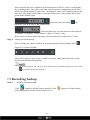
7.2 Recording backup
Step 1
Configure the backup path.
Click
button to call the backup interface, click
path configuration interface show in figure 4-16.
25
button to call the backup
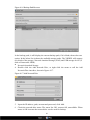
Figure 4-16 Backup Path Browser
In the backup path, it will display the current backup path, if it is blank, then select one
option. In the below list it shows the available storage paths. The VHDIPL will support
two kinds of the storage: Network Attached Storage (NAS) and USB storage device (U
disk or Removable HDD).
!
Network Attached Storage
4. Double click the Add Network Disc, or right click the menu to call the Add
Network Disc interface, shown in figure 4-17.
Figure 4-17 Add Network Disc
5. Input the IP address, path, account and password, click Add.
6. Check the network disc status. The status list: OK, connect fail, unavailable. When
status is OK it means the network disc can be used for backup.
26
7. Double click the network disc path list, select the backup path, click ok button save
and exit.
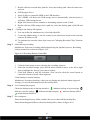
!
Step 2
USB Storage device
1. Insert U disk or removable HDD to the USB interface.
2. The VHDIPL will detect the USB storage device automatically, after detection, it
will show USB storage device.
3. Right click menu to select unmount or formatting options on the U disk.
4. Double click the USB storage device path list, select the backup path, click OK and
exit.
Configure the backup file options.
8. You can define the maximum size of an individual file.
9. Create the subdirectories, it can be created by the directories based on the network
cameras IP address or ID.
Step 3
10. To combine the recorded video clips ensure the "Merging Recorded Clips" function
is ON.
Select backup recording
Method one: Select the recording and backup during the playback process. Recording
backup control bar as shown in figure 4-18:
Figure 4-18 Recording Backup Control Bar
1. Click the Start button to start selecting the recording segment.
2. Select the recorded footage, press the left mouse button to move to the left or right
side to highlight the footage you want to backup.
3. Click Stop button to stop the selection, (You can also click the cancel button to
cancel the current selected video segment).
Click backup to start the backup.
Method two: In alarm searching, when you are playing the playback alarm triggered
footage, you can click backup to make the backup files.
Step 4
View backup file progress
Check the backup status in backup interface,
indicates backup is in processing,
indicates wait for backup,
indicates backup stopped,
indicates backup failed,
means backup finished.
Step 5
On a computer
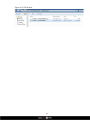
Enter the backup directory folder, enables the user to check all the backup files.
Enter the backup path folder to check the backup files, shown in figure 4-19.
27
Figure 4-19 File Search
28
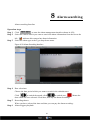
8 Alarm searching
Alarm searching Interface
Operation steps
Step 1
Step 2
Click
to enter the alarm management interface shown in 4-20.
elect the camera which you want to search the alarm information from the list on the
Select
Step 3
left.
indicates this camera has alarm information.
Select the alarm type at the Type drop-down menu.
Figure 4-20 Alarm Searching Interface.
Step 4
Date selections.
Choose the date period which you want to search in the calendar area.
Click
,
to switch the month, click
,
to switch year,
date which has been selected. If red then, that day has alarm recordings.
Step 5
Means the
Recording shown.
When you have selected the time and date you can pay the alarm recording..
Step 6
Alarm triggers playback.
29
Select the alarm trigger recording files, click
Step 7
button to start playing.
Alarm recording backup
Select the recorded files and click backup button to create backup files.
30
9 Setup
Setup includes the VHDIPL setup and the camera setup.
9.1 VHDIPL setup
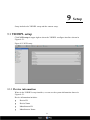
Click NVR setup in upper right to show the VHDIPL configure interface shown in
Figure 4-21.
Figure 4-21 NVR setup
9.1.1 Device information
When in the VHDIPL setup interface, we can see the system information shown in
Figure 4-21.
Device information includes:
•
Device ID
•
Device Name
•
Manufacturer ID
•
Manufacturer Name
31
•
Hardware Version
•
Software Version
•
Channel Quantity
•
Disk Quantity
!
Only the device name can be edited, other parameters can’t be edited.
9.1.2 Device Management
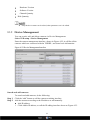
You can search, add, and delete cameras via Device Management.
Select NVR setup > Device Management
Enter the camera management interface, shown in Figure 4-22; it will list all the
cameras which are connected with the VHDIPL, and some basic information.
Figure 4-22 Device Management Interface
Search and add cameras.
To search and add cameras, do the following:
Step 1
Step 2
Click the “add” button to call the camera searching interface.
Add the cameras according to the IP address or add manually.
• Add IP address
1. Click Add in IP address, to call the IP adding interface shown as Figure 4-23.
32
Figure 4-23 Add IP section.
2. Input the Begin IP address and End IP address and Port number.
3. Click Apply to finish the operation.
4. The system will search the IP cameras in the IP segment and it will show the results
as shown in Figure 4-23.
11. Add manually
1. Click
button, to add cameras, shown in Figure 4-24.
Figure 4-24 Add cameras manually
2. Input the IP address and Port number.
3. Click OK button to finish the operation.
4. If such camera is available, then the adding result will be displayed below.
Step 3
Click
button to call the interface shown in Figure 4-25.
33
Figure 4-25 Add Camera Management
Step 4
Select the cameras which you want to add from the left hand side, then click
to add them to the VHDIPL.
Press
to cancel the adding operation.
Click OK button to finish the operation.
34
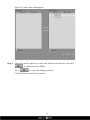
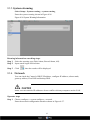
9.1.3 System alarming
Select Setup > System warning > system warning
Enter the system warning shown in Figure 4-26.
Figure 4-26 System Warning Information.
Warning information searching steps.
Step 1 Select the warning type (Disk Alarm, Record Alarm, All).
Step 2 Input search begin and end time.
Step 3
Click
, then the results will be displayed.
9.1.4 Network
You can check the Camera’s DHCP IP address, configure IP address, subnet mask,
gateway address, First DNS and backup DNS.
Make sure the camera's IP addresses do not conflict with any computers on the LAN.
Operates steps
Step 1 Choose configure > system configure > network
Enter the network configuration interface shown in Figure 4-27.
35
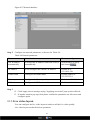
Figure 4-27 Network Interface
Step 2
Configure the network parameters, reference the Table 4-4.
Table 4-4 Network parameters
Items
Introduction
How to configure
Get IP address
automatically
It will get the IP address from DHCP server
automatically.
Switch DHCP to on by
this button
.
IP Address
It can configure the camera's IP address.
Default IP is
192.168.0.120
Subnet mask
Configure the subnet mask
Default address is
255.255.255.0
Gateway
Configure the Gateway address
Default is 192.168.0.1
DNS
Configure the DNS server address
Default is 192.168.0.1
Step 3
12. Click Apply, then a message saying "Applying succeeded" pops up then click ok.
13. If another window pop ups, then please confirm the parameters are all correct and
configure again.
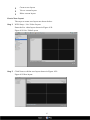
9.1.5 Live video layout
You can configure the live video layout in order to call the live video quickly.
Live video layout can do the below operations:
36
•
Create a new layout
•
View a current layout
•
Edit a current layout
Create New layout
The steps to create new layout are shown below:
Step 1
NVR Setup > Live Video Layout
Enter the live video layout shown in Figure 4-28.
Figure 4-28 Live Video Layout
Step 2
Click New to call the new layout shown in Figure 4-29.
Figure 4-29 New layout
37
Step 3
Step 4
Input the New layout name
Configure the New layout position, you can select the Shared layout or my layout.
Shared layout means the layout for all the users.
My layout means the layout for current login user only.
Shared layout can only be created by authorized users.
Step 5
Step 6
Configure to enable the wheel guard or not. Wheel guard time interval could be set as
5s, 10s, 30s, and 60s.
Choose the screen split settings.
From left to right are single frame, 4 frames, 6 frames
and 1+5 frames. You can choose one of them.
Step 7
Step 8
Left click the mouse to select the camera from the list and move to the live video
layout.
Click Apply to finish and save the configuration. If a window pops up you may not
have not entered a new layout name as this cannot be left blank. Please input the layout
name.
9.1.6 Recording
You can configure the Recording by Schedule, Alarm Recording, Recording Quality,
and Recording Policy.
Step 1
Choose Setup > Record > Record Policy.
Enter the Record Policy shown in Figure 4-30.
Figure 4-30 Record Policy
38
Step 2
Step 3
Step 4
Enable the record
(Enabled as Default)
Please select √ on the cameras which you want to record, and also select the
corresponding stream parameters.
Click more
The record policy configuration interface will pop up, shown in Figure 4-31.
Figure 4-31 Record Policy Configuration Interface.
Step 5
Configure Record Policy
When configuring the record policy, there are two policies, 24 x 7 or Schedule.
If you select record by schedule, you need to configure the schedule plan. Follow the
steps below.
1. Click
to enter the schedule record configuration interface.
2. Configure the schedule for recording shown as Figure 4-32.
3. Click Apply to save.
39
Figure 4-32 Schedule record configuration
Step 6
Step 7
Step 8
Step 9
To enable the alarm record
• If you do not want to enable the alarm record, then just set the button to OFF.
• If you want to enable the alarm record, then set the button to ON.
To enable the audio
• Slide the bar to on.
To configure the storage policy, select either:
• When HDD is full, overwrite.
• Retention day time.
Configure the HDD disk group.
There will be 2 HDD disk groups. You can set the recording to be recorded to the
different disk groups or you can set both HDDs to 1 disk group.
Step 10 Configure the record streams bit rates.
Step 11 Click Apply to save the configurations and exit the record policy interface.
40
9.1.7 Storage policy
In storage policy interface, you can do the following operations:
•
•
•
Check the current HDD status.
Check the HDD information details include: HDD capacity, free space.
Unload and format operations.
When you first use the VHDIPL you will need to format the HDD otherwise recording will
not be written to the HDD.
Select System configuration > Record > Storage Configuration.
Enter the Storage Configuration, shown in Figure 4-33.
Figure 4-33 Storage Configurations
9.1.8 Account Management
Privilege group setting
User’s basic privilege includes:
•
•
•
•
Live video
Playback
Backup
Alarm search
41
Step 1
• System Management
• Shutdown
• Record service
• Set shared layout
Accounts > Group
Enter the Group configuration interface, shown in Figure 4-34.
Figure 4-34 Group configuration interface
Step 2
Add and Delete Groups
•
Add privilege group.
1. Click Add to bring up the Add Group Interface.
2. Input Group Name.
3. Click OK. Once added, return to the original interface.
4. Select the groups which are added, and select the privileges which they can have.
5. Click Apply to finish.
•
Delete Privilege group.
1. Click Delete to call the Delete Privileges Group interface.
2. Click yes to return to the original interface.
3. Click Apply to finish the operation.
System default privilege group is Administrators, which cannot be deleted and modified.
42
User setting
You can add and delete users. The users which have the privilege of system
configuration can unlock the system, it may be locked by inputting an incorrect
password more than 3 times.
Step 1
System configuration > Account > User
Enter the user interface shown in Figure 4-35.
Step 2
Add and delete user.
•
Add user
1. Click add to call the add user interface.
2. Input the user name.
3. Click OK.
Finish the adding user, return to the previous interface.
Figure 4-35 User configurations
4. Configure the user password and privilege group.
5. Click Apply to finish the user adding configuration.
•
Delete user.
1. Click delete to call the delete user interface.
2. Click yes to return the previous interface.
3. Click Apply once finished.
43
Unlock the locked user
When logged on to the system, if the user inputs the wrong password more than 3 times,
then the system will lock the user, but only the administrator can unlock the user.
9.1.9 Date and Time Configuration
You can set the Date and Time and also the Date and Time format of VHDIPL.
Step 1
Setup > System Configuration > Date and Time,
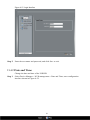
Enter the date and time shown in Figure 4-36.
Figure 4-36 Date and Time configuration
Step 2
Step 3
Input the correct time.
Choose the date and time format which you want to use.
9.2 Camera management
In the camera management interface you can configure the parameters of the cameras
which have been added to the VHDIPL.
It is the same to configure the device from the VHDIPL and from the WEB. Please see
the VIPC-MB720 or VIPC-MD720 User Manual.
44
10
Web Browser Access for VHDIPL
VHDIPL Web Server, built-in flash technology supports IE, Chrome, Firefox, Safari
and other popular browsers. It can be quickly be configured through the Web. Live
preview, video playback, alarm retrieval, VHDIPL configuration, camera configuration
and other operations can be configured through a web browser.
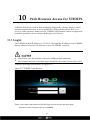
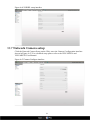
10.1 Login
The VHDIPL default IP address is: 192.168.1.120. Input the IP address of the VHDIPL
into the address bar of the web browser to view the VHDIPL remotely.
!
Please make sure the network is correctly configured and connected.
!
The computer must have the flash player installed before main system can be used.
VHDIPL Web login screen shows in Figure 4-37.
Figure 4-37 VHDIPL Login interface
Enter a user name and password into the login screen to enter the main page
Default user name and passwords are both admin
45
Administrator user ID: admin, administrator password: admin. User names and passwords
are case-sensitive. Please modify the password after the first login. After three failed
attempts of inputting the incorrect password the user will be locked, and will no longer be
able to continue to log in until the administrator can unlock the user.
10.2 Operation Read
10.2.1 Player
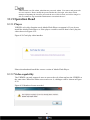
VHDIPL web video function needs Adobe Flash Player to support it. If you do not
install the Adobe Flash Player or if the player version is too low then it can’t play the
video shown in Figure 4-38.
Figure 4-38 Can’t play video interface
Please download and install the correct version of Adobe Flash Player.
10.2.2 Video capability
The VHDIPL can only support 4 users to access the web client and use the VHDIPL at
the same time. When the online users reach over 4, a dialogue will be shown as Figure
4-39.
Figure 4-39 Number of users exceeded
46
VHDIPL web will only support 16 channels live video and 4 channel playback for one
user login (maximum ability), with other users it will only support 1 channel Live
video and 1 channel playback (minimum ability).
The first login user will be the maximum ability user. Other users are the minimum
ability users, when the maximum ability user logs out then the next user login will be
the maximum ability user.
The VHDIPL will adjust the video ability according the user login, when user logs in
the bottom of the screen will show a message shown in Figure 4-40.
Figure 4-40 User Video Ability Information Interface
Click the online users on the web and it will enter the online users interface, from there
you can see all the online user’s video ability. Shown as Figure 4-41.
Figure 4-41 Online Users
Click Refresh to update the information.
If the maximum ability user logs out, the online user’s interface changes and can be set,
shown in Figure 4-42. Then other users can set their video ability.
47
Figure 4-42 Set User Video Ability
If other users are set to a maximum ability the interface will go back to Figure 4-42 and
you can’t set the ability anymore. If a setting failed then a failed message will be
displayed.
10.3 Live Video
After login via the Web, you can see the live video by selecting the cameras shown in
Figure 4-43.
Figure 4-43 Live video
48
10.4 Playback
You can play back the video by the playback interface.
Operation Steps
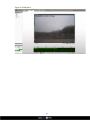
Step 1 Click Playback to enter the playback interface shown in Figure 4-44.
Step 2 Select the camera to playback.
Click the camera list,
not chosen.
Step 3
means device was chosen,
means device was
Select date.
Check the date on the calendar
,
change month, ,
change year.
This
means the date is chosen. If the date with green colour it means this day has recorded
video.
Step 4
Video play
After the time and date has been selected you can then play the video. The scale on
the time axis showing the recording time period, blue marked line means the current
playback video time. The playback video will be displayed above the time axis, blue
marked means retain video, red marked means alarm video, yellow means label video,
green means normal video.
Step 5
Video play
Click
to play video shown in the control bar of Figure 4-44.
Play, Stop, Fast Forward, Rewind
49
Figure 4-44 Playback
50
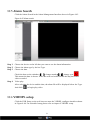
10.5 Alarm Search
Click the Alarm Search in the Alarm Management Interface shown in Figure 4-45.
Figure 4-45 Alarm search
Step 1
Step 2
Step 3
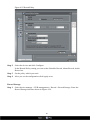
Choose the device on the left that you want to see the alarm information.
Choose the alarm type by the bar Type.
Choose the date.
Check the date on the calendar
,
change month, ,
change year.
This means the date is chosen. If the date with red colour means this day has alarm
video recorded.
Step 4
Video play.
After selecting the device and the date, the alarm file will be displayed below the Type.
And click
to begin play video.
10.6 VHDIPL setup
Click the NVR Setup on the web browser enter the VHDIPL configure interface shown
in Figure 4-46. For a detailed setup please refer to chapter 9 VHDIPL setup.
51
Figure 4-46 VHDIPL setup interface
10.7 Network Camera setup
Click the Network Camera Setup on the Web, enter the Camera Configuration interface
shown in Figure 4-47. For a detailed setup please refer to the VIPC-MD720 and
VIPC-MB720 User Manual.
Figure 4-47 Camera Configure interface
52
11 HD-IP Access for VHDIPL
Operation condition
Please install HD-IP client from the USB stick provided. The HD-IP client installation
methods will be in the "Network Video Management System manual”
11.1 Start and Run
If you have installed HD-IP please run it by this icon
to the Login interface.
11.2 Login
When the Login interface pops up, enter default user name: admin, default password:
admin shown in Figure 4-48
Figure 4-48 Login interface
53
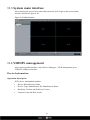
11.3 System main interface
After entering the correct user name and password, click Login to the system main
interface shown in Figure 4-49.
Figure 4-49 Main Interface
11.4 VHDIPL management
After entering main interface, select Device Manager > NVR management go to
VHDIPL configure interface.
Device Information
Operation description
NVR device information includes:
•
•
•
•
Device ID and Device Name
Device Type, Manufacturer ID, Manufacturer Name
Hardware Version and Software Version
Camera Count and Disk Count
54
!
Only the Device Name can be edited, other parameters can’t be edited.
Operation Steps
Step 1 Select Device Manager > NVR management > Device Info
The VHDIPL information is shown in Figure 4-50.
Figure 4-50 Device info interface
Step 2
Set Device Name, Enter the name and click Set.
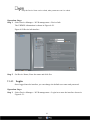
11.4.1 Login
Once logged into the interface you can change the default user name and password.
Operation Steps
Step 1 Select Device Manager > NVR management > Login in to enter the interface shown in
Figure 4-51.
55
Figure 4-51 Login Interface
Step 2
Enter the user name and password, and click Save to exit.
11.4.2 Date and Time
Change the date and time of the VHDIPL
Step 1
Select Device Manager > NVR management > Date and Time, enter configuration
interface shown in Figure 4-52.
56
Figure 4-52 Date and Time Settings
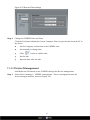
Step 2
Change the VHDIPL Date and Time
Click the Set button behind the Current Computer Time to sync the time from the PC to
the device.
•
Set the Computer current time to the VHDIPL time.
•
Set manually to change time.
•
Click
•
Set the date.
•
Input the time after the date.
button to call the date.
11.4.3 Device Management
Add/Delete the IP cameras to the VHDIPL through the Device management.
Step 1
Select Device manager > VHDIPL management > Device management enter the
device manager interface shown in Figure 4-53.
57
Figure 4-53 Device Management
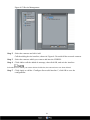
Step 2
Select the cameras and click Add.
Step 3
Select the cameras which you want to add into the VHDIPL.
Step 4
Click Add to call the added ok message, then click OK, and exit the interface.
Call the adding device interface, shown in Figure 4-54 to add all the network cameras.
Select the devices which you want to delete click delete, the cameras have now been deleted.
Step 5
Click Apply to call the “Configure Successful interface”, click OK to save the
configuration.
58
Figure 4-54 Add Device
11.4.4 VHDIPL Record
VHDIPL can set the Record Policy and Record Storage.
Record Policy
Step 1 Select Device Manager > NVR management > Record > Record Policy and enter the
Record Policy interface shown in Figure 4-55.
59
Figure 4-55 Record Policy
Step 2
Select the device and click Configure.
In the Record Policy setting you can set the Schedule Record, Alarm Record, Audio
Record etc.
Step 3
Set the policy which you need.
Step 4
After you set the configuration click Apply to set.
Record Storage
Step 1 Select device manager > NVR management > Record > Record Storage. Enter the
Record Storage interface shown in Figure 4-56.
60
Figure 4-56 Record Storage
Step 2
Select the Hard Disk and click Modify enter the path setting interface shown in Figure
4-57.
Figure 4-57 Hard Disk Setting
61
Step 3
Select Enable.
Step 4
Select the Disk Group ID.
Step 5
Input the Usable Space.
Step 6
Click Modify to save the configuration and exit the interface.
Step 7
Select the file system.
Step 8
Click disk format to format the disk. Confirmation will be required, if yes, then it will
start to format.
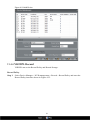
11.4.5 VHDIPL Monitor
VHDIPL rear panel has a VGA output and a HDMI output interface you can adjust the
monitor type shown in Figure 4-58.
Figure 4-58 Monitor Configure
After changing the configuration, the VHDIPL will restart automatically.
11.5 Playback
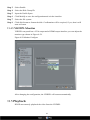
HD-IP can remotely playback the video from the VHDIPL.
62
11.5.1 Video Search and playback
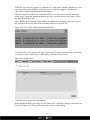
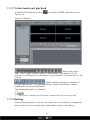
In HD-IP click Playback then click
Figure 4-59.
to enter the VHDIPL playback shown in
Figure 4-59 Playback
Means: Play, Pause,
Stop, back 1 frame, forward 1 frame, 1/2 fast forward, ! fast forward, 1/8 fast
forward, 1/16 fast forward, 2 x fast forward, 4 x fast forward, 8 x fast forward, 16 x fast
forward.
Means: amplification, narrow, reduction, 10
seconds amplification, 30 second amplification, 1 minute amplification, 5 minute
amplification, 10 minute amplification.
The maximum playback is 16 channels.
Green colour is schedule record, red colour is alarm record. Grey colour is no video.
11.5.2 Backup
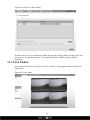
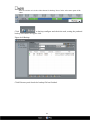
Enter the Backup interface, select the video that needs to be backed up by dragging the
mouse on the time axis and right click, click backup to start the video backup.
63
Blue file on time axis is the video chosen for backup. Press Ctrl to select more parts of the
video.
Click
to backup configure and check the task, setting the path and
backup size shown in Figure 4-60.
Figure 4-60 Backup
Click Directory and check the backup file has finished.
64
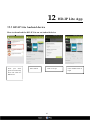
12 HD-IP Lite App
12.1 HD-IP Lite Android device
How to download the HD-IP Lite on an Android device
From your smart
phone access the Play
Store and search for
HD-IP Lite.
Select Install
Click on Accept
65
Once installed click on
Open
12.2 HD-IP Lite iOS Device
How to download the HD-IP Lite on an iOS device
From your smart phone
access the App Store
and search for HD-IP
Lite.
Click on Free then
Install to install the
app, you may need to
enter
your
apple
account details.
Once installed click on
Open
For more information about the HD-IP Lite app, please see the HD-IP Lite Quick
Start Guide.
66
13 F.A.Q
1. Why does the device’s self-test interface not
move?
Method One: Check the VHDIPL is equipped with a HDD.
Method Two: Check the VHDIPL’s HDDs are detected.
Method Three: Check the VHDIPL’s HDDs has not been damaged.
2. Why is the interface display incomplete or
location offset?
Method One: Automatically adjust the display function.
Method Two: In the login screen, select the adjustment, enter the display adjustment
interface.
3. Why can’t the monitor see the image?
Method One: Check the power for the monitor.
Method Two: Check the cable from the monitor to the VHDIPL.
Method Three: Please restart the VHDIPL.
4. Why can I search the network camera, but I am
unable to connect to them?
Please make sure the network cameras and the VHDIPL are in the same subnet.
67