1
Database Toolbox™
User's Guide
R2015a
How to Contact MathWorks
Latest news:
www.mathworks.com
Sales and services:
www.mathworks.com/sales_and_services
User community:
www.mathworks.com/matlabcentral
Technical support:
www.mathworks.com/support/contact_us
Phone:
508-647-7000
The MathWorks, Inc.
3 Apple Hill Drive
Natick, MA 01760-2098
Database Toolbox™ User's Guide
© COPYRIGHT 1998–2015 by The MathWorks, Inc.
The software described in this document is furnished under a license agreement. The software may be used
or copied only under the terms of the license agreement. No part of this manual may be photocopied or
reproduced in any form without prior written consent from The MathWorks, Inc.
FEDERAL ACQUISITION: This provision applies to all acquisitions of the Program and Documentation
by, for, or through the federal government of the United States. By accepting delivery of the Program
or Documentation, the government hereby agrees that this software or documentation qualifies as
commercial computer software or commercial computer software documentation as such terms are used
or defined in FAR 12.212, DFARS Part 227.72, and DFARS 252.227-7014. Accordingly, the terms and
conditions of this Agreement and only those rights specified in this Agreement, shall pertain to and
govern the use, modification, reproduction, release, performance, display, and disclosure of the Program
and Documentation by the federal government (or other entity acquiring for or through the federal
government) and shall supersede any conflicting contractual terms or conditions. If this License fails
to meet the government's needs or is inconsistent in any respect with federal procurement law, the
government agrees to return the Program and Documentation, unused, to The MathWorks, Inc.
Trademarks
MATLAB and Simulink are registered trademarks of The MathWorks, Inc. See
www.mathworks.com/trademarks for a list of additional trademarks. Other product or brand
names may be trademarks or registered trademarks of their respective holders.
Patents
MathWorks products are protected by one or more U.S. patents. Please see
www.mathworks.com/patents for more information.
Revision History
May 1998
July 1998
Online only
December 1999
Online only
June 2001
July 2002
November 2002
June 2004
October 2004
March 2005
September 2005
March 2006
September 2006
October 2006
March 2007
September 2007
March 2008
October 2008
March 2009
September 2009
March 2010
September 2010
reApril 2011
September 2011
March 2012
September 2012
March 2013
September 2013
March 2014
October 2014
March 2015
Online Only
First Printing
June 1999
Second printing
September 2000
Third printing
Online only
Fourth printing
Fifth printing
Online only
Online only
Online only
Online only
Online only
Sixth printing
Online only
Seventh printing
Online only
Online only
Online only
Online only
Online only
Online only
Online only
Online only
Online only
Online only
Online only
Online only
Online only
Online only
Online only
New for Version 1 for MATLAB® 5.2
For Version 1
Revised for Version 2 (Release 11)
For Version 2 (Release 11)
Revised for Version 2.1 (Release 12)
Revised for Version 2.2 (Release 12.1)
Revised for Version 2.2.1 (Release 13)
Version 2.2.1
Revised for Version 3.0 (Release 14)
Revised for Version 3.1 (Release 14SP1)
Revised for Version 3.0.2 (Release 14SP2)
Revised for Version 3.1 (Release 14SP3)
Revised for Version 3.1.1 (Release 2006a)
Revised for Version 3.2 (Release 2006b)
Revised for Version 3.2 (Release 2006b)
Revised for Version 3.3 (Release 2007a)
Revised for Version 3.4 (Release 2007b)
Revised for Version 3.4.1 (Release 2008a)
Revised for Version 3.5 (Release 2008b)
Revised for Version 3.5.1 (Release 2009a)
Revised for Version 3.6 (Release 2009b)
Revised for Version 3.7 (Release 2010a)
Revised for Version 3.8 (Release 2010b)
Revised for Version 3.9 (Release 2011a)
Revised for Version 3.10 (Release 2011b)
Revised for Version 3.11 (Release 2012a)
Revised for Version 4.0 (Release 2012b)
Revised for Version 4.1 (Release 2013a)
Revised for Version 5.0 (Release 2013b)
Revised for Version 5.1 (Release 2014a)
Revised for Version 5.2 (Release 2014b)
Revised for Version 5.2.1 (Release 2015a)
Contents
1
2
Before You Begin
Database Toolbox Product Description . . . . . . . . . . . . . . . . .
Key Features . . . . . . . . . . . . . . . . . . . . . . . . . . . . . . . . . . . . .
1-2
1-2
Working with Databases . . . . . . . . . . . . . . . . . . . . . . . . . . . . . .
Connecting to Databases . . . . . . . . . . . . . . . . . . . . . . . . . . . .
Platform Support . . . . . . . . . . . . . . . . . . . . . . . . . . . . . . . . .
Database Support . . . . . . . . . . . . . . . . . . . . . . . . . . . . . . . . .
Driver Support . . . . . . . . . . . . . . . . . . . . . . . . . . . . . . . . . . .
Structured Query Language (SQL) . . . . . . . . . . . . . . . . . . . .
1-3
1-3
1-3
1-3
1-4
1-5
Data Type Support . . . . . . . . . . . . . . . . . . . . . . . . . . . . . . . . . .
1-6
Data Retrieval Restrictions . . . . . . . . . . . . . . . . . . . . . . . . . . .
Spaces in Table Names or Column Names . . . . . . . . . . . . . .
Quotation Marks in Table Names or Column Names . . . . . . .
Reserved Words in Column Names . . . . . . . . . . . . . . . . . . . .
1-8
1-8
1-8
1-8
Creating and Running SQL Queries . . . . . . . . . . . . . . . . . . . .
1-9
Getting Started with Database Toolbox
Working with a Database and MATLAB . . . . . . . . . . . . . . . . .
2-3
Connection Options . . . . . . . . . . . . . . . . . . . . . . . . . . . . . . . . . .
Creating or Connecting to a Data Source . . . . . . . . . . . . . . .
Defining Operating System Authentication . . . . . . . . . . . . . .
Connection Options . . . . . . . . . . . . . . . . . . . . . . . . . . . . . . . .
Working with Multiple Databases . . . . . . . . . . . . . . . . . . . . .
2-6
2-6
2-6
2-6
2-8
v
vi
Contents
Initial Setup Requirements . . . . . . . . . . . . . . . . . . . . . . . . . . .
2-9
Choosing Between ODBC and JDBC Drivers . . . . . . . . . . . .
Defining Database Drivers . . . . . . . . . . . . . . . . . . . . . . . . .
Deciding Between ODBC and JDBC Drivers . . . . . . . . . . . .
2-10
2-10
2-10
Configuring a Driver and Data Source . . . . . . . . . . . . . . . . .
2-13
Microsoft Access ODBC for Windows . . . . . . . . . . . . . . . . . .
Step 1. Check the 32-bit and 64-bit compatibility. . . . . . . . .
Step 2. Verify the driver installation. . . . . . . . . . . . . . . . . .
Step 3. Set up the data source using Database Explorer. . . .
Step 4. Connect using Database Explorer or the command
line. . . . . . . . . . . . . . . . . . . . . . . . . . . . . . . . . . . . . . . . . .
2-15
2-15
2-16
2-16
Microsoft SQL Server ODBC for Windows . . . . . . . . . . . . . .
Step 1. Check the 32-bit and 64-bit compatibility. . . . . . . . .
Step 2. Verify the driver installation. . . . . . . . . . . . . . . . . .
Step 3. Set up the data source using Database Explorer. . . .
Step 4. Connect using Database Explorer or the command
line. . . . . . . . . . . . . . . . . . . . . . . . . . . . . . . . . . . . . . . . . .
2-23
2-23
2-24
2-24
Microsoft SQL Server JDBC for Windows . . . . . . . . . . . . . .
Step 1. Verify the driver installation. . . . . . . . . . . . . . . . . .
Step 2. Verify the port number. . . . . . . . . . . . . . . . . . . . . . .
Step 3. Set up the operating system authentication. . . . . . .
Step 4. Add the JDBC driver to the MATLAB static Java class
path. . . . . . . . . . . . . . . . . . . . . . . . . . . . . . . . . . . . . . . . .
Step 5. Set up the data source using Database Explorer. . . .
Step 6. Connect using Database Explorer or the command
line. . . . . . . . . . . . . . . . . . . . . . . . . . . . . . . . . . . . . . . . . .
2-33
2-33
2-33
2-36
Oracle ODBC for Windows . . . . . . . . . . . . . . . . . . . . . . . . . . .
Step 1. Check the 32-bit and 64-bit compatibility. . . . . . . . .
Step 2. Verify the driver installation. . . . . . . . . . . . . . . . . .
Step 3. Set up the data source using the ODBC Data Source
Administrator. . . . . . . . . . . . . . . . . . . . . . . . . . . . . . . . . .
Step 4. Connect using the native ODBC connection command
line. . . . . . . . . . . . . . . . . . . . . . . . . . . . . . . . . . . . . . . . . .
2-44
2-44
2-45
Oracle JDBC for Windows . . . . . . . . . . . . . . . . . . . . . . . . . . .
Step 1. Verify the driver installation. . . . . . . . . . . . . . . . . .
Step 2. Set up the operating system authentication. . . . . . .
2-48
2-48
2-48
2-19
2-29
2-37
2-38
2-40
2-45
2-47
Step 3. Add the JDBC driver to the MATLAB static Java class
path. . . . . . . . . . . . . . . . . . . . . . . . . . . . . . . . . . . . . . . . .
Step 4. Set up the data source using Database Explorer. . . .
Step 5. Connect using Database Explorer or the command
line. . . . . . . . . . . . . . . . . . . . . . . . . . . . . . . . . . . . . . . . . .
2-49
2-49
2-52
MySQL ODBC for Windows . . . . . . . . . . . . . . . . . . . . . . . . . .
Step 1. Check the 32-bit and 64-bit compatibility. . . . . . . . .
Step 2. Verify the driver installation. . . . . . . . . . . . . . . . . .
Step 3. Set up the data source using Database Explorer. . . .
Step 4. Connect using Database Explorer or the command
line. . . . . . . . . . . . . . . . . . . . . . . . . . . . . . . . . . . . . . . . . .
2-57
2-57
2-58
2-58
MySQL JDBC for Windows . . . . . . . . . . . . . . . . . . . . . . . . . . .
Step 1. Verify the driver installation. . . . . . . . . . . . . . . . . .
Step 2. Add the JDBC driver to the MATLAB static Java class
path. . . . . . . . . . . . . . . . . . . . . . . . . . . . . . . . . . . . . . . . .
Step 3. Set up the data source using Database Explorer. . . .
Step 4. Connect using Database Explorer or the command
line. . . . . . . . . . . . . . . . . . . . . . . . . . . . . . . . . . . . . . . . . .
2-63
2-63
PostgreSQL ODBC for Windows . . . . . . . . . . . . . . . . . . . . . .
Step 1. Check the 32-bit and 64-bit compatibility. . . . . . . . .
Step 2. Verify the driver installation. . . . . . . . . . . . . . . . . .
Step 3. Set up the data source using Database Explorer. . . .
Step 4. Connect using Database Explorer or the command
line. . . . . . . . . . . . . . . . . . . . . . . . . . . . . . . . . . . . . . . . . .
2-69
2-69
2-70
2-70
PostgreSQL JDBC for Windows . . . . . . . . . . . . . . . . . . . . . . .
Step 1. Verify the driver installation. . . . . . . . . . . . . . . . . .
Step 2. Add the JDBC driver to the MATLAB static Java class
path. . . . . . . . . . . . . . . . . . . . . . . . . . . . . . . . . . . . . . . . .
Step 3. Set up the data source using Database Explorer. . . .
Step 4. Connect using Database Explorer or the command
line. . . . . . . . . . . . . . . . . . . . . . . . . . . . . . . . . . . . . . . . . .
2-76
2-76
SQLite JDBC for Windows . . . . . . . . . . . . . . . . . . . . . . . . . . .
Step 1. Verify the driver installation. . . . . . . . . . . . . . . . . .
Step 2. Add the JDBC driver to the MATLAB static Java class
path. . . . . . . . . . . . . . . . . . . . . . . . . . . . . . . . . . . . . . . . .
Step 3. Set up the data source using Database Explorer. . . .
Step 4. Connect using Database Explorer or the command
line. . . . . . . . . . . . . . . . . . . . . . . . . . . . . . . . . . . . . . . . . .
2-82
2-82
2-60
2-63
2-64
2-66
2-73
2-76
2-77
2-79
2-82
2-83
2-85
vii
Sybase ODBC for Windows . . . . . . . . . . . . . . . . . . . . . . . . . . .
Step 1. Check the 32-bit and 64-bit compatibility. . . . . . . . .
Step 2. Verify the driver installation. . . . . . . . . . . . . . . . . .
Step 3. Set up the data source using Database Explorer. . . .
Step 4. Connect using Database Explorer or the command
line. . . . . . . . . . . . . . . . . . . . . . . . . . . . . . . . . . . . . . . . . .
2-89
2-89
2-90
2-90
2-94
Sybase JDBC for Windows . . . . . . . . . . . . . . . . . . . . . . . . . . .
2-97
Step 1. Verify the driver installation. . . . . . . . . . . . . . . . . .
2-97
Step 2. Add the JDBC driver to the MATLAB static Java class
path. . . . . . . . . . . . . . . . . . . . . . . . . . . . . . . . . . . . . . . . .
2-97
Step 3. Set up the data source using Database Explorer. . . .
2-98
Step 4. Connect using Database Explorer or the command
line. . . . . . . . . . . . . . . . . . . . . . . . . . . . . . . . . . . . . . . . .
2-100
Microsoft SQL Server JDBC for Mac OS X . . . . . . . . . . . . .
Step 1. Verify the driver installation. . . . . . . . . . . . . . . . .
Step 2. Add the JDBC driver to the MATLAB static Java class
path. . . . . . . . . . . . . . . . . . . . . . . . . . . . . . . . . . . . . . . .
Step 3. Set up the data source using Database Explorer. . .
Step 4. Connect using Database Explorer or the command
line. . . . . . . . . . . . . . . . . . . . . . . . . . . . . . . . . . . . . . . . .
2-104
2-104
Microsoft SQL Server JDBC for Linux . . . . . . . . . . . . . . . .
Step 1. Verify the driver installation. . . . . . . . . . . . . . . . .
Step 2. Add the JDBC driver to the MATLAB static Java class
path. . . . . . . . . . . . . . . . . . . . . . . . . . . . . . . . . . . . . . . .
Step 3. Set up the data source using Database Explorer. . .
Step 4. Connect using Database Explorer or the command
line. . . . . . . . . . . . . . . . . . . . . . . . . . . . . . . . . . . . . . . . .
2-111
2-111
Oracle JDBC for Mac OS X . . . . . . . . . . . . . . . . . . . . . . . . . .
Step 1. Verify the driver installation. . . . . . . . . . . . . . . . .
Step 2. Add the JDBC driver to the MATLAB static Java class
path. . . . . . . . . . . . . . . . . . . . . . . . . . . . . . . . . . . . . . . .
Step 3. Set up the data source using Database Explorer. . .
Step 4. Connect using Database Explorer or the command
line. . . . . . . . . . . . . . . . . . . . . . . . . . . . . . . . . . . . . . . . .
2-104
2-105
2-107
2-111
2-112
2-114
2-118
2-118
2-118
2-119
2-121
Oracle JDBC for Linux . . . . . . . . . . . . . . . . . . . . . . . . . . . . .
2-125
Step 1. Verify the driver installation. . . . . . . . . . . . . . . . .
2-125
Step 2. Add the JDBC driver to the MATLAB static Java class
path. . . . . . . . . . . . . . . . . . . . . . . . . . . . . . . . . . . . . . . .
2-125
viii
Contents
Step 3. Set up the data source using Database Explorer. . .
Step 4. Connect using Database Explorer or the command
line. . . . . . . . . . . . . . . . . . . . . . . . . . . . . . . . . . . . . . . . .
MySQL JDBC for Mac OS X . . . . . . . . . . . . . . . . . . . . . . . . .
Step 1. Verify the driver installation. . . . . . . . . . . . . . . . .
Step 2. Add the JDBC driver to the MATLAB static Java class
path. . . . . . . . . . . . . . . . . . . . . . . . . . . . . . . . . . . . . . . .
Step 3. Set up the data source using Database Explorer. . .
Step 4. Connect using Database Explorer or the command
line. . . . . . . . . . . . . . . . . . . . . . . . . . . . . . . . . . . . . . . . .
MySQL JDBC for Linux . . . . . . . . . . . . . . . . . . . . . . . . . . . .
Step 1. Verify the driver installation. . . . . . . . . . . . . . . . .
Step 2. Add the JDBC driver to the MATLAB static Java class
path. . . . . . . . . . . . . . . . . . . . . . . . . . . . . . . . . . . . . . . .
Step 3. Set up the data source using Database Explorer. . .
Step 4. Connect using Database Explorer or the command
line. . . . . . . . . . . . . . . . . . . . . . . . . . . . . . . . . . . . . . . . .
PostgreSQL JDBC for Mac OS X . . . . . . . . . . . . . . . . . . . . .
Step 1. Verify the driver installation. . . . . . . . . . . . . . . . .
Step 2. Add the JDBC driver to the MATLAB static Java class
path. . . . . . . . . . . . . . . . . . . . . . . . . . . . . . . . . . . . . . . .
Step 3. Set up the data source using Database Explorer. . .
Step 4. Connect using Database Explorer or the command
line. . . . . . . . . . . . . . . . . . . . . . . . . . . . . . . . . . . . . . . . .
PostgreSQL JDBC for Linux . . . . . . . . . . . . . . . . . . . . . . . .
Step 1. Verify the driver installation. . . . . . . . . . . . . . . . .
Step 2. Add the JDBC driver to the MATLAB static Java class
path. . . . . . . . . . . . . . . . . . . . . . . . . . . . . . . . . . . . . . . .
Step 3. Set up the data source using Database Explorer. . .
Step 4. Connect using Database Explorer or the command
line. . . . . . . . . . . . . . . . . . . . . . . . . . . . . . . . . . . . . . . . .
SQLite JDBC for Mac OS X . . . . . . . . . . . . . . . . . . . . . . . . .
Step 1. Verify the driver installation. . . . . . . . . . . . . . . . .
Step 2. Add the JDBC driver to the MATLAB static Java class
path. . . . . . . . . . . . . . . . . . . . . . . . . . . . . . . . . . . . . . . .
Step 3. Set up the data source using Database Explorer. . .
Step 4. Connect using Database Explorer or the command
line. . . . . . . . . . . . . . . . . . . . . . . . . . . . . . . . . . . . . . . . .
2-126
2-128
2-132
2-132
2-132
2-133
2-135
2-139
2-139
2-139
2-140
2-142
2-146
2-146
2-146
2-147
2-149
2-153
2-153
2-153
2-154
2-156
2-160
2-160
2-160
2-161
2-163
ix
SQLite JDBC for Linux . . . . . . . . . . . . . . . . . . . . . . . . . . . . .
Step 1. Verify the driver installation. . . . . . . . . . . . . . . . .
Step 2. Add the JDBC driver to the MATLAB static Java class
path. . . . . . . . . . . . . . . . . . . . . . . . . . . . . . . . . . . . . . . .
Step 3. Set up the data source using Database Explorer. . .
Step 4. Connect using Database Explorer or the command
line. . . . . . . . . . . . . . . . . . . . . . . . . . . . . . . . . . . . . . . . .
Sybase JDBC for Mac OS X . . . . . . . . . . . . . . . . . . . . . . . . .
Step 1. Verify the driver installation. . . . . . . . . . . . . . . . .
Step 2. Add the JDBC driver to the MATLAB static Java class
path. . . . . . . . . . . . . . . . . . . . . . . . . . . . . . . . . . . . . . . .
Step 3. Set up the data source using Database Explorer. . .
Step 4. Connect using Database Explorer or the command
line. . . . . . . . . . . . . . . . . . . . . . . . . . . . . . . . . . . . . . . . .
Sybase JDBC for Linux . . . . . . . . . . . . . . . . . . . . . . . . . . . . .
Step 1. Verify the driver installation. . . . . . . . . . . . . . . . .
Step 2. Add the JDBC driver to the MATLAB static Java class
path. . . . . . . . . . . . . . . . . . . . . . . . . . . . . . . . . . . . . . . .
Step 3. Set up the data source using Database Explorer. . .
Step 4. Connect using Database Explorer or the command
line. . . . . . . . . . . . . . . . . . . . . . . . . . . . . . . . . . . . . . . . .
x
Contents
2-167
2-167
2-167
2-168
2-170
2-174
2-174
2-174
2-175
2-177
2-181
2-181
2-181
2-182
2-184
Other ODBC- or JDBC-Compliant Databases . . . . . . . . . . .
ODBC-Compliant Databases . . . . . . . . . . . . . . . . . . . . . . .
JDBC-Compliant Databases . . . . . . . . . . . . . . . . . . . . . . .
2-188
2-188
2-188
Connecting to a Database . . . . . . . . . . . . . . . . . . . . . . . . . . .
Connection Options . . . . . . . . . . . . . . . . . . . . . . . . . . . . . .
Microsoft Access . . . . . . . . . . . . . . . . . . . . . . . . . . . . . . . .
Microsoft SQL Server . . . . . . . . . . . . . . . . . . . . . . . . . . . .
Oracle . . . . . . . . . . . . . . . . . . . . . . . . . . . . . . . . . . . . . . . .
MySQL . . . . . . . . . . . . . . . . . . . . . . . . . . . . . . . . . . . . . . .
PostgreSQL . . . . . . . . . . . . . . . . . . . . . . . . . . . . . . . . . . . .
SQLite . . . . . . . . . . . . . . . . . . . . . . . . . . . . . . . . . . . . . . . .
Sybase . . . . . . . . . . . . . . . . . . . . . . . . . . . . . . . . . . . . . . . .
Other ODBC- or JDBC-Compliant Databases . . . . . . . . . .
2-191
2-191
2-191
2-191
2-192
2-192
2-192
2-193
2-193
2-193
Selecting Data . . . . . . . . . . . . . . . . . . . . . . . . . . . . . . . . . . . .
Use Database Explorer to Select Data . . . . . . . . . . . . . . . .
Use the Command Line to Select Data . . . . . . . . . . . . . . .
Working with Custom Data Types . . . . . . . . . . . . . . . . . . .
2-195
2-195
2-195
2-195
3
Running SQL Queries Saved in Scripts or Files . . . . . . . . .
2-196
Inserting Data Using the Command Line . . . . . . . . . . . . . .
2-197
Working with Large Data Sets . . . . . . . . . . . . . . . . . . . . . . .
Connect to a Database with Maximum Performance . . . . .
Import Large Data Sets into MATLAB . . . . . . . . . . . . . . .
Export Large Data Sets from MATLAB . . . . . . . . . . . . . . .
Access Data Stored in a Database Using a
DatabaseDatastore . . . . . . . . . . . . . . . . . . . . . . . . . . . .
2-198
2-198
2-198
2-199
Deploying a Database Application with MATLAB Compiler
Create and Deploy a Database Application . . . . . . . . . . . .
About Driver Configurations . . . . . . . . . . . . . . . . . . . . . . .
2-200
2-200
2-200
2-199
Working with Data Sources
Setting Up ODBC Data Sources . . . . . . . . . . . . . . . . . . . . . . . .
3-2
Setting Up JDBC Data Sources . . . . . . . . . . . . . . . . . . . . . . . .
3-3
Accessing Existing JDBC Data Sources . . . . . . . . . . . . . . . . .
3-4
Modifying Existing JDBC Data Sources . . . . . . . . . . . . . . . . .
3-5
Removing JDBC Data Sources . . . . . . . . . . . . . . . . . . . . . . . . .
3-6
Fetching Data Common Errors . . . . . . . . . . . . . . . . . . . . . . . .
3-7
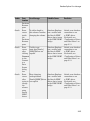
Database Connection Error Messages . . . . . . . . . . . . . . . . . .
3-9
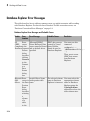
Database Explorer Error Messages . . . . . . . . . . . . . . . . . . . .
3-14
Connecting to a Database Using the Native ODBC
Interface . . . . . . . . . . . . . . . . . . . . . . . . . . . . . . . . . . . . . . . .
About the Native ODBC Interface . . . . . . . . . . . . . . . . . . . .
Native ODBC Interface Workflow . . . . . . . . . . . . . . . . . . . .
Native ODBC, JDBC/ODBC Bridge and JDBC Interface
Comparison . . . . . . . . . . . . . . . . . . . . . . . . . . . . . . . . . . .
3-17
3-17
3-17
3-19
xi
Compatibility and Limitations . . . . . . . . . . . . . . . . . . . . . .
4
5
xii
Contents
3-21
Using Database Explorer
Working with Database Explorer . . . . . . . . . . . . . . . . . . . . . .
Getting Started with Database Explorer . . . . . . . . . . . . . . . .
Migrate from VQB to Database Explorer . . . . . . . . . . . . . . .
Set Database Explorer Preferences . . . . . . . . . . . . . . . . . . . .
4-2
4-2
4-2
4-3
Configure Data Sources and Connect to Databases . . . . . . .
Configure Your Environment . . . . . . . . . . . . . . . . . . . . . . . .
Work with Multiple Databases . . . . . . . . . . . . . . . . . . . . . .
4-6
4-6
4-17
Modify and Delete Database Connections . . . . . . . . . . . . . .
ODBC Drivers . . . . . . . . . . . . . . . . . . . . . . . . . . . . . . . . . . .
JDBC Drivers . . . . . . . . . . . . . . . . . . . . . . . . . . . . . . . . . . .
4-19
4-19
4-19
Refine Results Using Query Criteria and Rules . . . . . . . . .
Define Query Criteria to Refine Results . . . . . . . . . . . . . . .
Query Rules Using the SQL Criteria Panel . . . . . . . . . . . . .
4-21
4-21
4-22
Generate SQL and MATLAB Code . . . . . . . . . . . . . . . . . . . . .
Save Queries as SQL Code . . . . . . . . . . . . . . . . . . . . . . . . .
Generate MATLAB Code . . . . . . . . . . . . . . . . . . . . . . . . . . .
4-25
4-25
4-26
Using Visual Query Builder
Getting Started with Visual Query Builder . . . . . . . . . . . . . .
What Is Visual Query Builder? . . . . . . . . . . . . . . . . . . . . . . .
Using Queries to Import Data . . . . . . . . . . . . . . . . . . . . . . . .
Using Queries to Export Data . . . . . . . . . . . . . . . . . . . . . . . .
Clearing Variables from the VQB Data Area . . . . . . . . . . . .
5-2
5-2
5-2
5-9
5-14
Working with Preferences . . . . . . . . . . . . . . . . . . . . . . . . . . .
5-15
6
Preference Settings for Large Data Import . . . . . . . . . . . . .
Will All Data (Size n) Fit in a MATLAB Variable? . . . . . . . .
Will All of This Data Fit in the JVM Heap? . . . . . . . . . . . .
How Do I Perform Batching? . . . . . . . . . . . . . . . . . . . . . . . .
5-19
5-20
5-20
5-21
Displaying Query Results . . . . . . . . . . . . . . . . . . . . . . . . . . . .
How to Display Query Results . . . . . . . . . . . . . . . . . . . . . .
Displaying Data Relationally . . . . . . . . . . . . . . . . . . . . . . . .
Charting Query Results . . . . . . . . . . . . . . . . . . . . . . . . . . .
Displaying Query Results in an HTML Report . . . . . . . . . .
Displaying Query Results with MATLAB Report Generator .
5-23
5-23
5-23
5-27
5-29
5-29
Fine-Tuning Queries Using Advanced Query Options . . . .
Retrieving All Occurrences vs. Unique Occurrences of Data .
Retrieving Data That Meets Specified Criteria . . . . . . . . . .
Grouping Statements . . . . . . . . . . . . . . . . . . . . . . . . . . . . .
Displaying Results in a Specified Order . . . . . . . . . . . . . . .
Using Having Clauses to Refine Group by Results . . . . . . .
Creating Subqueries for Values from Multiple Tables . . . . .
Creating Queries That Include Results from Multiple Tables
Additional Advanced Query Options . . . . . . . . . . . . . . . . . .
5-34
5-34
5-35
5-38
5-42
5-45
5-48
5-52
5-54
Retrieving BINARY and OTHER Data Types . . . . . . . . . . . .
5-55
Importing and Exporting Boolean Data . . . . . . . . . . . . . . . .
Import Boolean Data from Databases . . . . . . . . . . . . . . . . .
Exporting Boolean Data to Databases . . . . . . . . . . . . . . . . .
5-57
5-57
5-60
Saving Queries in Files . . . . . . . . . . . . . . . . . . . . . . . . . . . . . .
About Generated Files . . . . . . . . . . . . . . . . . . . . . . . . . . . .
VQB Query Elements in Generated Files . . . . . . . . . . . . . .
Saving Queries . . . . . . . . . . . . . . . . . . . . . . . . . . . . . . . . . .
Running Saved Queries . . . . . . . . . . . . . . . . . . . . . . . . . . . .
Editing Queries . . . . . . . . . . . . . . . . . . . . . . . . . . . . . . . . . .
5-61
5-61
5-62
5-62
5-62
5-63
Using Database Toolbox Functions
Getting Started with Database Toolbox Functions . . . . . . . .
6-3
xiii
xiv
Contents
Import Data from Databases into MATLAB . . . . . . . . . . . . . .
6-4
Create a Query Using a Date . . . . . . . . . . . . . . . . . . . . . . . . . .
6-8
Create a Query Using a String . . . . . . . . . . . . . . . . . . . . . . . .
6-10
Create a Query Using a MATLAB Variable . . . . . . . . . . . . .
6-12
Create a Query Using Special Characters . . . . . . . . . . . . . .
6-14
Delete Data from Databases . . . . . . . . . . . . . . . . . . . . . . . . . .
6-16
Exporting Data to New Record in Database . . . . . . . . . . . .
6-18
Replacing Existing Database Data with Exported Data . . .
6-21
Exporting Multiple Records from the MATLAB Workspace
6-22
Exporting Data Using Bulk Insert . . . . . . . . . . . . . . . . . . . . .
About Bulk Insert Functionality . . . . . . . . . . . . . . . . . . . . .
Bulk Insert into Oracle . . . . . . . . . . . . . . . . . . . . . . . . . . . .
Bulk Insert into Microsoft SQL Server 2005 . . . . . . . . . . . .
Bulk Insert into MySQL . . . . . . . . . . . . . . . . . . . . . . . . . . .
6-26
6-26
6-26
6-28
6-30
Retrieve Image Data Types . . . . . . . . . . . . . . . . . . . . . . . . . .
6-32
Display Database Metadata . . . . . . . . . . . . . . . . . . . . . . . . . .
6-34
Using Driver Functions . . . . . . . . . . . . . . . . . . . . . . . . . . . . .
6-37
About Database Toolbox Objects and Methods . . . . . . . . . .
6-39
Selecting Data Using the exec Function . . . . . . . . . . . . . . . .
About the exec Function . . . . . . . . . . . . . . . . . . . . . . . . . . .
Using Cursor Objects . . . . . . . . . . . . . . . . . . . . . . . . . . . . .
Working with Microsoft Excel . . . . . . . . . . . . . . . . . . . . . . .
Database Considerations . . . . . . . . . . . . . . . . . . . . . . . . . . .
6-40
6-40
6-40
6-41
6-41
Call a Stored Procedure That Returns Data . . . . . . . . . . . .
6-42
Run a Custom Database Function . . . . . . . . . . . . . . . . . . . . .
6-46
Importing Data Using the fetch Function . . . . . . . . . . . . . .
About the fetch Function . . . . . . . . . . . . . . . . . . . . . . . . . . .
fetch Workflow . . . . . . . . . . . . . . . . . . . . . . . . . . . . . . . . . .
Using fetch with a Cursor Object . . . . . . . . . . . . . . . . . . . .
Using fetch with Cursor and Database Connection Objects .
Database Consideration . . . . . . . . . . . . . . . . . . . . . . . . . . .
6-48
6-48
6-48
6-49
6-50
6-51
Fetch Data Incrementally Using the Cursor Object . . . . . .
6-52
Display Information About Imported Data . . . . . . . . . . . . .
6-55
Importing Data Using a Scrollable Cursor . . . . . . . . . . . . . .
About Scrollable Cursors . . . . . . . . . . . . . . . . . . . . . . . . . . .
Differences Between Native ODBC and JDBC Scrollable
Cursors . . . . . . . . . . . . . . . . . . . . . . . . . . . . . . . . . . . . . .
6-58
6-58
6-59
Import Data Using a Scrollable Cursor with a Relative
Position Offset . . . . . . . . . . . . . . . . . . . . . . . . . . . . . . . . . . .
6-65
Inserting Data Using the fastinsert Function . . . . . . . . . . .
About the fastinsert Function . . . . . . . . . . . . . . . . . . . . . . .
Database Considerations . . . . . . . . . . . . . . . . . . . . . . . . . . .
6-68
6-68
6-69
Retrieving Object Properties Using the get Function . . . . .
Database Connection Objects . . . . . . . . . . . . . . . . . . . . . . .
Cursor Objects . . . . . . . . . . . . . . . . . . . . . . . . . . . . . . . . . . .
Driver Objects . . . . . . . . . . . . . . . . . . . . . . . . . . . . . . . . . . .
Database Metadata Objects . . . . . . . . . . . . . . . . . . . . . . . . .
Drivermanager Objects . . . . . . . . . . . . . . . . . . . . . . . . . . . .
Resultset Objects . . . . . . . . . . . . . . . . . . . . . . . . . . . . . . . . .
Resultset Metadata Objects . . . . . . . . . . . . . . . . . . . . . . . . .
6-70
6-70
6-71
6-72
6-72
6-73
6-73
6-73
Setting Database Preferences Using the setdbprefs
Function . . . . . . . . . . . . . . . . . . . . . . . . . . . . . . . . . . . . . . . .
About the setdbprefs Function . . . . . . . . . . . . . . . . . . . . . .
Allowable Properties . . . . . . . . . . . . . . . . . . . . . . . . . . . . . .
6-75
6-75
6-75
Working with a DatabaseDatastore . . . . . . . . . . . . . . . . . . . .
About DatabaseDatastore Objects . . . . . . . . . . . . . . . . . . . .
Advantages of DatabaseDatastore Objects Over Basic
Fetching . . . . . . . . . . . . . . . . . . . . . . . . . . . . . . . . . . . . .
6-79
6-79
Import Data Using a DatabaseDatastore . . . . . . . . . . . . . . .
6-81
6-79
xv
Analyze Large Data Sets in a Database with MapReduce . .
7
xvi
Contents
6-85
Functions — Alphabetical List
1
Before You Begin
• “Database Toolbox Product Description” on page 1-2
• “Working with Databases” on page 1-3
• “Data Type Support” on page 1-6
• “Data Retrieval Restrictions” on page 1-8
• “Creating and Running SQL Queries” on page 1-9
1
Before You Begin
Database Toolbox Product Description
Exchange data with relational databases
Database Toolbox™ provides an app and functions for exchanging data between
relational databases and MATLAB®. You can use SQL commands to read and write data
or use the Database Explorer app to interact with a database without using SQL.
The toolbox supports ODBC-compliant and JDBC-compliant databases, including
Oracle®, MySQL®, Sybase®, Microsoft® SQL Server®, and Informix®. You can apply
simple and advanced conditions to database queries from MATLAB. The toolbox lets you
access multiple databases simultaneously within a single MATLAB session and enables
segmented import of large data sets.
Key Features
• Database Explorer app for working with databases interactively
• JDBC-compliant database connections
• ODBC-compliant database connections, with the option for fast access via a native
ODBC driver
• Functions for executing queries using SQL files and SQL statements
• Data import and export with multiple databases in a single session
• Large data set import via a single transaction or via multiple transactions of
segmented data
• Direct data import into numeric, cell, structure, and dataset arrays
1-2
Working with Databases
Working with Databases
In this section...
“Connecting to Databases” on page 1-3
“Platform Support” on page 1-3
“Database Support” on page 1-3
“Driver Support” on page 1-4
“Structured Query Language (SQL)” on page 1-5
Connecting to Databases
Before you can use this toolbox to connect to a database, you must set up the data
sources. For details, see “Configuring a Driver and Data Source” on page 2-13.
Platform Support
This toolbox runs on all platforms that the MATLAB software supports.
For details, see Database Toolbox system requirements at http://www.mathworks.com/
products/database/requirements.html.
Note: This toolbox does not support running MATLAB software sessions with the nojvm startup option enabled on UNIX® platforms. (UNIX is a registered trademark of
The Open Group in the United States and other countries.)
Database Support
This toolbox supports importing and exporting data from any ODBC- and/or JDBCcompliant database management system, including:
• IBM DB2®
• IBM® Informix
• Ingres®
1-3
1
Before You Begin
• Microsoft Access™
• Microsoft Excel®
• Microsoft SQL Server
• MySQL
• Oracle
• PostgreSQL (Postgres)
• Sybase SQL Anywhere®
• Sybase SQL Server®
If you are upgrading an earlier version of a database, you need not do anything special
for this toolbox. Simply configure the data sources for the new version of the database
application as you did for the original version.
Driver Support
This toolbox requires a database driver. Typically, you install a driver when you install a
database. For instructions about how to install a database driver, consult your database
administrator.
On Microsoft Windows® platforms, the toolbox supports Open Database Connectivity
(ODBC) drivers and Oracle Java® Database Connectivity (JDBC) drivers.
Note: If you receive this message:
Invalid string or buffer length.
you might be using the wrong driver.
The JDBC/ODBC bridge is known to have issues with 64-bit database systems. Use a
JDBC driver or the native ODBC interface to connect to these databases.
On UNIX platforms, the toolbox supports Java Database Connectivity (JDBC) drivers.
If your database does not ship with JDBC drivers, download drivers from the Oracle
JDBC Web site at http://www.oracle.com/technetwork/database/enterpriseedition/jdbc-112010-090769.html.
1-4
Working with Databases
Structured Query Language (SQL)
This toolbox supports American National Standards Institute (ANSI®) standard SQL
commands.
1-5
1
Before You Begin
Data Type Support
You can import the following data types into the MATLAB Workspace and export them
back to your database:
• BOOLEAN
• CHAR
• DATE
• DECIMAL
• DOUBLE
• FLOAT
• INTEGER
• LONGCHAR
• NUMERIC
• REAL
• SMALLINT
• TIME
• TIMESTAMP
Note: When importing TIMESTAMP data into MATLAB, you might get an incorrect
value near the daylight savings time change. Possible workarounds are to convert
TIMESTAMP data to strings in your SQL query, and then convert them back to your
desired type in MATLAB, or try using a different driver for your database.
• TINYINT
Note: Database Toolbox interprets the TINYINT data type as BOOLEAN and imports
it into the MATLAB workspace as logical true (1) or false (0). For details about
how Database Toolbox handles BOOLEAN data, see “Importing and Exporting Boolean
Data” on page 5-57.
• VARCHAR
• NTEXT
You can import data of types not included in this list into the MATLAB Workspace.
However, you might need to manipulate such data before you can process it in MATLAB.
1-6
Data Type Support
Note: Data types LONGCHAR and NTEXT are not supported for the native ODBC interface.
1-7
1
Before You Begin
Data Retrieval Restrictions
In this section...
“Spaces in Table Names or Column Names” on page 1-8
“Quotation Marks in Table Names or Column Names” on page 1-8
“Reserved Words in Column Names” on page 1-8
Spaces in Table Names or Column Names
Microsoft Access supports the use of spaces in table and column names, but most other
databases do not. Queries that retrieve data from tables and fields whose names contain
spaces require delimiters around table names and field names. In Access, enclose
the table names or field names in quotation marks, for example, "order id". Other
databases use different delimiters, such as brackets, [ ]. In Visual Query Builder, table
names and field names that include spaces appear in quotation marks.
Quotation Marks in Table Names or Column Names
Do not include quotation marks in table names or column names. The Database Toolbox
software does not support data retrieval from table and column names that contain
quotation marks.
Reserved Words in Column Names
You cannot use the Database Toolbox software to import or export data in columns whose
names contain database reserved words, such as DATE or TABLE.
1-8
Creating and Running SQL Queries
Creating and Running SQL Queries
You can select data from your database and import it into MATLAB by doing any of the
following:
• Use Database Explorer or the command line.
• Write queries using SQL.
• Use MATLAB to generate the SQL.
Then, if you want to repeat your tasks, then automate them by generating a MATLAB
script.
Writing a query requires knowledge of SQL and experience using the command line. Use
the exec function to write SQL if you have short or simple SQL queries that are easy
to write as a string. Also, use the exec function to add MATLAB variables to your SQL
query string. If you have a long SQL query or multiple SQL queries that you want to
run sequentially, then create an SQL script file containing your SQL queries and use the
runsqlscript function.
If you are unfamiliar with writing SQL code, then you can use Database Explorer to
create SQL queries. For details, see “Define Query Criteria to Refine Results”. After
creating the query using Database Explorer, you can generate the SQL for this query.
For details, see “Save Queries as SQL Code”. You can embed the generated SQL into
the exec function SQL string. Or, you can create an SQL script file to use with the
runsqlscript function.
If you want to automate the current task after the SQL is created, then generate a
MATLAB script. For details, see “Generate MATLAB Code”.
1-9
2
Getting Started with Database
Toolbox
• “Working with a Database and MATLAB” on page 2-3
• “Connection Options” on page 2-6
• “Initial Setup Requirements” on page 2-9
• “Choosing Between ODBC and JDBC Drivers” on page 2-10
• “Configuring a Driver and Data Source” on page 2-13
• “Microsoft Access ODBC for Windows” on page 2-15
• “Microsoft SQL Server ODBC for Windows” on page 2-23
• “Microsoft SQL Server JDBC for Windows” on page 2-33
• “Oracle ODBC for Windows” on page 2-44
• “Oracle JDBC for Windows” on page 2-48
• “MySQL ODBC for Windows” on page 2-57
• “MySQL JDBC for Windows” on page 2-63
• “PostgreSQL ODBC for Windows” on page 2-69
• “PostgreSQL JDBC for Windows” on page 2-76
• “SQLite JDBC for Windows” on page 2-82
• “Sybase ODBC for Windows” on page 2-89
• “Sybase JDBC for Windows” on page 2-97
• “Microsoft SQL Server JDBC for Mac OS X” on page 2-104
• “Microsoft SQL Server JDBC for Linux” on page 2-111
• “Oracle JDBC for Mac OS X” on page 2-118
• “Oracle JDBC for Linux” on page 2-125
• “MySQL JDBC for Mac OS X” on page 2-132
• “MySQL JDBC for Linux” on page 2-139
2
Getting Started with Database Toolbox
• “PostgreSQL JDBC for Mac OS X” on page 2-146
• “PostgreSQL JDBC for Linux” on page 2-153
• “SQLite JDBC for Mac OS X” on page 2-160
• “SQLite JDBC for Linux” on page 2-167
• “Sybase JDBC for Mac OS X” on page 2-174
• “Sybase JDBC for Linux” on page 2-181
• “Other ODBC- or JDBC-Compliant Databases” on page 2-188
• “Connecting to a Database” on page 2-191
• “Selecting Data” on page 2-195
• “Inserting Data Using the Command Line” on page 2-197
• “Working with Large Data Sets” on page 2-198
• “Deploying a Database Application with MATLAB Compiler” on page 2-200
2-2
Working with a Database and MATLAB
Working with a Database and MATLAB
This tutorial shows how to use Database Toolbox. You must make many decisions
to start using this toolbox. Use these steps and flowchart as a guide for choosing the
right options to get maximum benefit from using this toolbox and for understanding its
capabilities.
1
Install your database. For details, refer to your database administrator or your
database documentation.
2
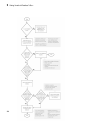
Choose whether you want to use Database Explorer or the command line using the
following flowchart.
3
Choose whether you want to use an ODBC or JDBC driver. For details, see
“Choosing Between ODBC and JDBC Drivers” on page 2-10.
4
For ODBC drivers, the driver is typically preinstalled on your computer. For JDBC
drivers, you must install the driver. For details about ODBC and JDBC drivers, see
Driver Installation. If you have questions about which driver you need, refer to your
database administrator or your database documentation.
5
Define your data source for ODBC-compliant drivers or add the full path of the
driver to the static Java class path for JDBC-compliant drivers. For details, see
“Configuring a Driver and Data Source” on page 2-13.
6
Test the connection to your database using Database Explorer or the command line.
7
Connect to your database using Database Explorer or the command line. For details,
see “Connecting to a Database” on page 2-191.
8
Select data from your database and import the data into a MATLAB variable using
Database Explorer or the command line exec and fetch functions. For details, see
“Selecting Data” on page 2-195.
9
Insert data into your database by exporting data from a MATLAB variable using
datainsert, fastinsert, and insert functions. For details, see “Inserting Data
Using the Command Line” on page 2-197.
10 Generate a MATLAB script to automate your tasks using the Database Explorer
import functionality. For details, see “Generate MATLAB Code” on page 4-26.
11 For a graphical representation of the steps and the decisions you must make, see the
following flowchart.
2-3
2
2-4
Getting Started with Database Toolbox
Working with a Database and MATLAB
More About
•
“Working with Database Explorer” on page 4-2
2-5
2
Getting Started with Database Toolbox
Connection Options
In this section...
“Creating or Connecting to a Data Source” on page 2-6
“Defining Operating System Authentication” on page 2-6
“Connection Options” on page 2-6
“Working with Multiple Databases” on page 2-8
Creating or Connecting to a Data Source
If you already have your driver installed, you can create a data source for an ODBC
driver or add the JDBC driver to the Java class path in MATLAB using the examples
in “Configuring a Driver and Data Source” on page 2-13. Otherwise, see Driver
Installation to help you install your driver. If your data sources are defined, then you
are ready to connect to your database. If you created JDBC data sources using VQB,
then see “Migrate from VQB to Database Explorer” on page 4-2. For details, see
“Connecting to a Database” on page 2-191. Once connected, you can begin to explore
your database using Database Explorer or the command line to view your data. For
details, see “Selecting Data” on page 2-195.
Defining Operating System Authentication
Operating system authentication allows you to connect to your database using your
operating system user account. The operating system performs user validation and
the database does not require a different user name and password. Operating system
authentication facilitates easy maintenance of database access credentials. For example,
Windows provides operating system authentication that can be configured to work with
a Microsoft SQL Server database. For details about Microsoft SQL Server Windows
authentication, see “Step 3. Set up the operating system authentication.” on page
2-36
Connection Options
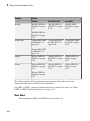
There are numerous ways to connect to your database using Database Toolbox. The
following explains each option. Use this table to choose your best option.
2-6
Connection Options
Connection Option
Why Use This Option?
Database Explorer
Use Database Explorer to:
• Visually inspect the structure, or schema, of your
database.
• View the tables and columns and rows in a table to
assess the general size of your database.
• Select the data in a table and import it into a
MATLAB variable.
• Generate a MATLAB script.
• Generate an SQL query.
For details, see “Selecting Data” on page 2-195.
Command line
Use the command line to:
• Import data from a database into MATLAB.
• Export data from MATLAB into a database.
• Work with large amounts of data.
• Run SQL queries stored in text files.
• Run stored procedures and functions.
There are multiple options to connect to your database using the command line. Use this
table to choose your best option.
Connection Option
Why Use This Option?
Native ODBC connection using Connect to your database with maximum performance.
the command line
For details about the native ODBC interface, see
“Connecting to a Database Using the Native ODBC
Interface”.
JDBC connection using the
command line
Achieve maximum platform independence. Use
functionality not supported by native ODBC.
ODBC connection using the
command line
Only use this option after trying to connect to
your database using the native ODBC and JDBC
connections.
2-7
2
Getting Started with Database Toolbox
Working with Multiple Databases
You can connect to multiple databases using Database Explorer or the command line. For
details, see “Work with Multiple Databases” on page 4-17.
More About
2-8
•
“Choosing Between ODBC and JDBC Drivers” on page 2-10
•
“Connecting to a Database Using the Native ODBC Interface” on page 3-17
•
“Selecting Data” on page 2-195
Initial Setup Requirements
Initial Setup Requirements
Refer to the setup requirements below to establish the first connection to your database.
• For ODBC drivers, ensure 32-bit or 64-bit compatibility across your driver, database,
operating system, and MATLAB. For details, see “Configuring a Driver and Data
Source” on page 2-13.
• If you use Visual Query Builder (VQB) to explore the data in your database, you
need to migrate to the Database Explorer app. For details, see “Migrate from VQB to
Database Explorer” on page 4-2.
• Ensure you know the name of your database server or machine, the name of your
database, the port number, and your user name and password. For ODBC drivers,
once you create a data source, remember the data source name. For JDBC drivers,
ensure you know the file path of where the JDBC driver is installed. For some
JDBC drivers, you might need the URL string and the driver Java class object. For
some databases, you might need to know more credentials. Contact your database
administrator for all required database credentials needed for establishing connection
to your database.
• Ensure you have access to your database and driver documentation.
• Check if your database uses operating system authentication. If you can connect to
your database from outside of MATLAB without providing a user name and password,
then your database uses operating system authentication. Exceptions to this rule
are databases set up without any operating system or database authentication
requirements, such as Microsoft Access or SQLite database files. Additional steps
might be required to set up connection to your database using operating system
authentication from MATLAB.
• Ensure you have write access to the path MATLAB displays after executing prefdir
on the command line.
2-9
2
Getting Started with Database Toolbox
Choosing Between ODBC and JDBC Drivers
In this section...
“Defining Database Drivers” on page 2-10
“Deciding Between ODBC and JDBC Drivers” on page 2-10
Defining Database Drivers
Different database vendors, such as Microsoft or Oracle, might implement their database
systems using various technologies depending on customer needs, market demands, and
several other factors. Software applications written in popular programming languages,
such as C, C++, or Java, need a way to communicate with these databases. Open
Database Connectivity (ODBC) and Java Database Connectivity (JDBC) are standards
for drivers that enable programmers to write database-agnostic software applications.
ODBC and JDBC are simply standards, or a set of rules recommended for efficient
communication with a database. The database vendor is responsible for implementing
and providing drivers that are committed to follow these rules.
Deciding Between ODBC and JDBC Drivers
ODBC is a standard Microsoft Windows interface that enables communication between
database management systems and applications typically written in C or C++.
JDBC is a standard interface that enables communication between applications based on
Oracle Java and database management systems.
The JDBC/ODBC bridge is a Java library that allows Java applications to access the
ODBC interface.
Database Toolbox has a Java library that connects directly to a pure JDBC driver or
uses the JDBC/ODBC bridge to connect to an ODBC driver. The JDBC/ODBC bridge is
automatically installed as part of the MATLAB JVM™. Database Toolbox also has a C++
library that connects natively to an ODBC driver.
The following figure illustrates how drivers interact with Database Toolbox.
2-10
Choosing Between ODBC and JDBC Drivers
Depending on your environment and what you want to accomplish, you need to decide
whether using an ODBC driver or a JDBC driver suits your needs the best. Use the
following to help you decide.
Use native ODBC for:
• Fastest performance for data imports and exports
• Memory-intensive data imports and exports
Use JDBC for:
• Platform independence allowing you to work with any operating system (including
Mac and Linux®), driver version, or bitness (32-bit or 64-bit)
• Using Database Toolbox functions not supported by native ODBC (such as
runstoredprocedure and metadata functions tables or columnnames)
• Working with complex or long data types (e.g., LONG, BLOB, text, etc.)
Tip: On Windows systems that support both ODBC and JDBC drivers, pure JDBC
drivers and the native ODBC interface provide better connectivity and performance than
the JDBC/ODBC bridge. First, use the native ODBC or JDBC drivers to connect to your
database. Use the JDBC/ODBC bridge only after trying to connect through native ODBC
or JDBC drivers.
2-11
2
Getting Started with Database Toolbox
For a list of native ODBC supported functionality and a full comparison of the JDBC/
ODBC bridge to native ODBC, see “Connecting to a Database Using the Native ODBC
Interface”.
2-12
Configuring a Driver and Data Source
Configuring a Driver and Data Source
Connect to a database and interact with the data by first installing the driver for the
database. Then, define a data source for ODBC or add the full path of the driver to
the static Java class path for JDBC so your computer can establish a connection to the
database.
A Data Source Name (DSN) is the logical name that is used by Open Database
Connectivity (ODBC) to refer to the drive and other information that is required to access
data. This name is used to connect to an ODBC data source, such as a Microsoft SQL
Server database.
Find your database environment in the following table by choosing your platform
across the top and your database on the left. The link brings you to a page where you
can find information about installing the correct driver, defining a data source for
ODBC or adding the full path of your driver to the static Java class path for JDBC, and
establishing a database connection.
Database
Platform
Windows
Mac OS X 64-bit
Linux 64-bit
Microsoft Access
“Microsoft Access
ODBC for Windows”
on page 2-15
Microsoft SQL
Server
“Microsoft SQL
Server ODBC for
Windows” on page
2-23
“Microsoft SQL
Server JDBC for
Mac OS X” on page
2-104
“Microsoft SQL
Server JDBC for
Linux” on page
2-111
“Oracle JDBC for
Mac OS X” on page
2-118
“Oracle JDBC for
Linux” on page
2-125
“Microsoft SQL
Server JDBC for
Windows” on page
2-33
Oracle
“Oracle ODBC for
Windows” on page
2-44
“Oracle JDBC for
Windows” on page
2-48
2-13
2
Getting Started with Database Toolbox
Database
MySQL
Platform
Windows
Mac OS X 64-bit
Linux 64-bit
“MySQL ODBC for
Windows” on page
2-57
“MySQL JDBC for
Mac OS X” on page
2-132
“MySQL JDBC
for Linux” on page
2-139
“PostgreSQL JDBC
for Mac OS X” on
page 2-146
“PostgreSQL JDBC
for Linux” on page
2-153
“MySQL JDBC for
Windows” on page
2-63
PostgreSQL
“PostgreSQL ODBC
for Windows” on
page 2-69
“PostgreSQL JDBC
for Windows” on
page 2-76
SQLite
“SQLite JDBC for
Windows” on page
2-82
“SQLite JDBC for
Mac OS X” on page
2-160
“SQLite JDBC for
Linux” on page
2-167
Sybase
“Sybase ODBC for
Windows” on page
2-89
“Sybase JDBC for
Mac OS X” on page
2-174
“Sybase JDBC for
Linux” on page
2-181
“Sybase JDBC for
Windows” on page
2-97
Mac 32-bit and Linux 32-bit platforms are not supported. Microsoft Access is not
supported for Mac 64-bit and Linux 64-bit platforms.
For ODBC- or JDBC- compliant databases that are not listed in the table, see “Other
ODBC- or JDBC-Compliant Databases” on page 2-188.
More About
•
2-14
“Choosing Between ODBC and JDBC Drivers” on page 2-10
Microsoft Access ODBC for Windows
Microsoft Access ODBC for Windows
This tutorial shows how to set up a data source and connect to your Microsoft Access
database. This tutorial uses the 32-bit Microsoft Access Driver (*.mdb, *accdb) Version
14.00.6015.1000 to connect to the Microsoft Access 2010 Version 14.0.6129.5000 (32-bit)
database.
In this section...
“Step 1. Check the 32-bit and 64-bit compatibility.” on page 2-15
“Step 2. Verify the driver installation.” on page 2-16
“Step 3. Set up the data source using Database Explorer.” on page 2-16
“Step 4. Connect using Database Explorer or the command line.” on page 2-19
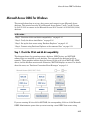
Step 1. Check the 32-bit and 64-bit compatibility.
This diagram shows the operating system, database, ODBC driver, and MATLAB
software that are installed on your machine. You can install the database locally or
remotely. These graphics indicate that the bitness (32-bit or 64-bit) of MATLAB, ODBC
driver, and the database must match. Otherwise, MATLAB displays an error. For details
about the error, see “Database Connection Error Messages” on page 3-9.
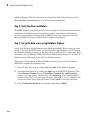
If you are running 32-bit or 64-bit MATLAB, the corresponding 32-bit or 64-bit Microsoft
ODBC Administrator opens when you start creating a new ODBC data source using
2-15
2
Getting Started with Database Toolbox
Database Explorer. The drivers listed in the Create New Data Source dialog box in the
Microsoft ODBC Administrator are also 32-bit or 64-bit respectively.
Step 2. Verify the driver installation.
The ODBC driver is typically preinstalled on your computer. For details about the driver
installation or troubleshooting the installation, contact your database administrator
or refer to your database documentation on ODBC drivers. For information about the
Microsoft ODBC Data Source Administrator, see Driver Installation.
Step 3. Set up the data source using Database Explorer.
Set up your Microsoft Access database using Database Explorer. When setting up a data
source for use with an ODBC driver, you can locate the target database on a PC running
the Windows operating system or on another system to which the PC is networked. These
instructions use the Microsoft ODBC Data Source Administrator Version 6.1 for the U.S.
English version of Microsoft Access 2010 for Windows systems.
When using a 32-bit version of Microsoft Office, you must also use a 32-bit version of
MATLAB to complete the following steps.
2-16
1
Close all open databases, including tutorial.mdb, in the database program.
2
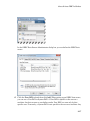
Open Database Explorer by clicking the Apps tab on the MATLAB Toolstrip. Then,
select Database Explorer from the Database Connectivity and Reporting
section in the apps gallery. Alternatively, enter dexplore at the command line. If
no data sources are set up, a message box opens. Click OK to close it. Otherwise, the
Connect to a Data Source dialog box opens. Click Cancel to close this dialog box.
3
Click the Database Explorer tab, and then select New > ODBC.
Microsoft Access ODBC for Windows
In the ODBC Data Source Administrator dialog box, you can define the ODBC data
source.
4
Click the User DSN tab and then click Add. When setting up an ODBC data source,
you can use a User DSN or System DSN. A User DSN is specific to the user on a
machine. Any data sources a user defines under User DSN are seen only by that
specific user. Conversely, a System DSN is not specific to the user on a machine. Any
2-17
2
Getting Started with Database Toolbox
data sources a user defines under System DSN on a machine can be seen by any user
who logs into that machine. Your ability to set up a User DSN or System DSN might
depend on the database and ODBC driver you are using. For details, contact your
database administrator or your database ODBC driver documentation.
2-18
5
A list of installed ODBC drivers appears in the Create New Data Source dialog box.
Select Microsoft Access Driver (*.mdb, *.accdb) and click Finish.
6
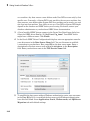
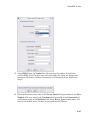
In the ODBC Microsoft Access Setup dialog box for your driver, enter
dbtoolboxdemo as the data source name. Enter tutorial database as the
description. Click Select to open the Select Database dialog box.
7
Specify the database you want to use. For the dbtoolboxdemo data source, select
tutorial.mdb. If your database is on a system to which your PC is connected:
a
Click Network.
b
In the Map Network Drive dialog box, specify the folder containing the database
that you want to use.
c
Click Finish.
8
Click OK to close the Select Database dialog box. In the ODBC Microsoft Access
Setup dialog box, click OK. The ODBC Data Source Administrator dialog box
displays the dbtoolboxdemo and any additional data sources that you added in the
User DSN tab. Click OK to close the dialog box.
9
Test the connection to the data source by using Database Explorer to connect to the
database.
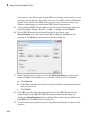
Microsoft Access ODBC for Windows
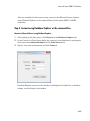
After you complete the data source setup, connect to the Microsoft Access database
using Database Explorer or the command line with the native ODBC or ODBC
connection.
Step 4. Connect using Database Explorer or the command line.
Connect to Microsoft Access using Database Explorer.
1
After setting up the data source, click Connect in the Database Explorer tab.
2
In the Connect to a Data Source dialog box, connect to your database by selecting the
data source name dbtoolboxdemo from the Data Sources list.
3
Enter a user name and password and click Connect.
Database Explorer connects to the database and displays the tables list, or database
schema, on the left side of the window.
2-19
2
Getting Started with Database Toolbox
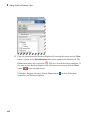
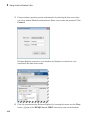
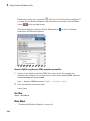
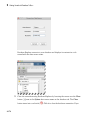
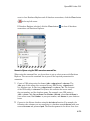
4
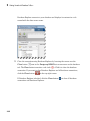
Close the connection using Database Explorer by hovering the cursor over the Close
button (
) next to the dbtoolboxdemo data source name on the database tab. The
Close button turns into a red circle ( ). Click it to close the database connection. If
you want to close Database Explorer and all database connections, click the Close
button (
) in the top-right corner.
If Database Explorer is docked, click the Close button (
connections and Database Explorer.
2-20
) to close all database
Microsoft Access ODBC for Windows
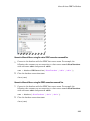
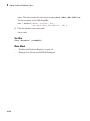
Connect to Microsoft Access using the native ODBC connection command line.
1
Connect to the database with the ODBC data source name. For example, the
following code assumes you are connecting to a data source named dbtoolboxdemo
with user name admin and password admin.
conn = database.ODBCConnection('dbtoolboxdemo','admin','admin');
2
Close the database connection conn.
close(conn)
Connect to Microsoft Access using the ODBC connection command line.
1
Connect to the database with the ODBC data source name. For example, the
following code assumes you are connecting to a data source named dbtoolboxdemo
with user name admin and password admin.
conn = database('dbtoolboxdemo','admin','admin');
2
Close the database connection conn.
close(conn)
2-21
2
Getting Started with Database Toolbox
See Also
close | database
More About
•
2-22
“Working with Database Explorer” on page 4-2
Microsoft SQL Server ODBC for Windows
Microsoft SQL Server ODBC for Windows
This tutorial shows how to set up a data source and connect to your Microsoft SQL Server
database. This tutorial uses the Microsoft SQL Server Native Client 11.0 Driver Version
2011.110.3000.00 to connect to the Microsoft SQL Server 2012 Express database.
In this section...
“Step 1. Check the 32-bit and 64-bit compatibility.” on page 2-23
“Step 2. Verify the driver installation.” on page 2-24
“Step 3. Set up the data source using Database Explorer.” on page 2-24
“Step 4. Connect using Database Explorer or the command line.” on page 2-29
Step 1. Check the 32-bit and 64-bit compatibility.
This diagram shows the operating system, database, ODBC driver, and MATLAB
software that are installed on your machine. You can install the database locally or
remotely. These graphics indicate that the bitness (32-bit or 64-bit) of MATLAB, ODBC
driver, and the database must match. Otherwise, MATLAB displays an error. For details
about the error, see “Database Connection Error Messages” on page 3-9.
2-23
2
Getting Started with Database Toolbox
If you are running 32-bit or 64-bit MATLAB, the corresponding 32-bit or 64-bit Microsoft
ODBC Data Source Administrator opens when you start creating a new ODBC data
source using Database Explorer. The drivers listed in the Create New Data Source
dialog box in the Microsoft ODBC Data Source Administrator are also 32-bit or 64-bit
respectively. The following steps use 64-bit for MATLAB, the ODBC driver, the database,
and the operating system.
Step 2. Verify the driver installation.
The ODBC driver is typically preinstalled on your computer. For details about the driver
installation or troubleshooting the installation, contact your database administrator
or refer to your database documentation on ODBC drivers. For information about the
Microsoft ODBC Data Source Administrator, see Driver Installation.
Step 3. Set up the data source using Database Explorer.
1
2-24
Open Database Explorer by clicking the Apps tab on the MATLAB Toolstrip. Then,
select Database Explorer from the Database Connectivity and Reporting
Microsoft SQL Server ODBC for Windows
section in the apps gallery. Alternatively, enter dexplore at the command line. If
no data sources are set up, a message box opens. Click OK to close it. Otherwise, the
Connect to a Data Source dialog box opens. Click Cancel to close this dialog box.
2
Click the Database Explorer tab, and then select New > ODBC.
Requirement: Ensure you use the correct 32-bit or 64-bit compatibility for MATLAB
to complete the remaining steps.
In the ODBC Data Source Administrator dialog box, you can define the ODBC data
source.
2-25
2
Getting Started with Database Toolbox
2-26
3
Click the System DSN tab and then click Add. When setting up an ODBC data
source, you can use a User DSN or System DSN. A User DSN is specific to the user
on a machine. Any data sources a user defines under User DSN are seen only by that
specific user. Conversely, a System DSN is not specific to the user on a machine. Any
data sources a user defines under System DSN on a machine can be seen by any user
who logs into that machine. Your ability to set up a User DSN or System DSN might
depend on the database and ODBC driver you are using. For details, contact your
database administrator or your database ODBC driver documentation.
4
A list of installed ODBC drivers appears in the Create New Data Source dialog box.
Select SQL Server Native Client 11.0 and click Finish.
5
In the Create a New Data Source to SQL Server dialog box, enter an appropriate
name for your data source. You use this name to establish a connection to your
database. Here, enter MS SQL Server as the data source name in the Name field.
Enter Microsoft SQL Server as the description in the Description field. Select
the database server for this data source to use in the Server field. Consult your
database administrator for the name of your database server. Click Next.
6
If you want to connect to Microsoft SQL Server using Windows authentication, click
the With Integrated Windows Authentication option button. Then click Next.
Microsoft SQL Server ODBC for Windows
Or, if you want to connect to Microsoft SQL Server without Windows authentication,
click the With SQL Server authentication using a login ID and password
entered by the user radio button. Enter your user name in the Login ID field and
your password in the Password field. Then click Next.
7
In the Create a New Data Source to SQL Server dialog box, select the Change the
default database to check box and enter the name of the default database on the
database server for connection. Here, use the database toy_store. Then click Next.
8
Here, click Finish to accept the default settings.
9
In the ODBC Microsoft SQL Server Setup dialog box, test your connection by clicking
Test Data Source.
2-27
2
Getting Started with Database Toolbox
10 If the connection establishes successfully, this message appears in the SQL Server
ODBC Data Source Test dialog box: TESTS COMPLETED SUCCESSFULLY! Click
OK to close this dialog box. Click OK to close the ODBC Microsoft SQL Server Setup
dialog box.
2-28
Microsoft SQL Server ODBC for Windows
11 The ODBC Data Source Administrator dialog box shows the new data source under
System Data Sources in the System DSN tab. Click OK to close the ODBC Data
Source Administrator dialog box.
After you complete the data source setup, connect to the Microsoft SQL Server
database using Database Explorer or the command line with the native ODBC
connection.
Step 4. Connect using Database Explorer or the command line.
Connect to Microsoft SQL Server using Database Explorer.
If you experience issues connecting using Database Explorer, use the native ODBC
interface with the command line or JDBC to connect to your database.
1
After setting up the data source, click Connect in the Database Explorer tab.
2
In the Connect to a Data Source dialog box, connect with operating system
authentication by selecting the data source that you set up with Windows
authentication from the Data Sources list. Leave the user name and password
blank. Click Connect.
2-29
2
Getting Started with Database Toolbox
3
Connect without operating system authentication by selecting the data source that
you set up without Windows authentication. Enter a user name and password. Click
Connect.
Database Explorer connects to your database and displays its contents in a tab
named with the data source name.
4
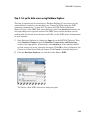
Close the connection using Database Explorer by hovering the cursor over the Close
button (
2-30
) next to the MS SQL Server ODBC data source name on the database
Microsoft SQL Server ODBC for Windows
tab. The Close button turns into a red circle ( ). Click it to close the database
connection. If you want to close Database Explorer and all database connections,
click the Close button (
) in the top-right corner.
If Database Explorer is docked, click the Close button (
connections and Database Explorer.
) to close all database
Connect to Microsoft SQL Server using the native ODBC connection command line.
1
To connect with Windows authentication, connect to the database with the
authenticated ODBC data source name and blank user name and password. For
example, the following code assumes you are connecting to a data source named MS
SQL Server Auth.
conn = database.ODBCConnection('MS SQL Server Auth','','');
Or, to connect without Windows authentication, connect to the database with
the ODBC data source name. For example, the following code assumes you are
connecting to a data source named MS SQL Server with user name username and
password pwd.
conn = database.ODBCConnection('MS SQL Server','username','pwd');
2
Close the database connection conn.
2-31
2
Getting Started with Database Toolbox
close(conn)
See Also
close | database
More About
•
2-32
“Working with Database Explorer” on page 4-2
Microsoft SQL Server JDBC for Windows
Microsoft SQL Server JDBC for Windows
This tutorial shows how to set up a data source and connect to your Microsoft SQL Server
database. This tutorial uses the Microsoft JDBC Driver 4.0 for Microsoft SQL Server to
connect to the Microsoft SQL Server 2012 Express database.
In this section...
“Step 1. Verify the driver installation.” on page 2-33
“Step 2. Verify the port number.” on page 2-33
“Step 3. Set up the operating system authentication.” on page 2-36
“Step 4. Add the JDBC driver to the MATLAB static Java class path.” on page 2-37
“Step 5. Set up the data source using Database Explorer.” on page 2-38
“Step 6. Connect using Database Explorer or the command line.” on page 2-40
Step 1. Verify the driver installation.
If the JDBC driver for Microsoft SQL Server is not installed on your computer, find
the link on the Driver Installation page to install the driver. Follow the instructions to
download and install this driver on your computer.
Step 2. Verify the port number.
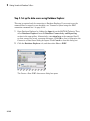
To connect to your database using a JDBC driver, you must know the port number. Use
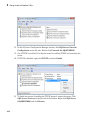
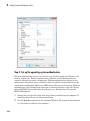
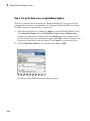
the following steps on the machine where Microsoft SQL Server is installed to find your
port number. If you experience connection issues with the port number that you find,
contact your database administrator.
1
On the machine where your Microsoft SQL Server database is installed, click Start.
Select your Microsoft SQL Server version folder and click Configuration Tools.
Then click SQL Server Configuration Manager.
2-33
2
Getting Started with Database Toolbox
2-34
2
In the Sql Server Configuration Manager window, click SQL Server Network
Configuration on the left side. Double-click Protocols for SQLEXPRESS.
3
See if TCP/IP is enabled. If so, skip the steps for enabling TCP/IP and restarting the
server.
4
If TCP/IP is disabled, right-click TCP/IP and select Enable.
5
To finish the process of enabling the TCP/IP protocol, restart the server. Click
SQL Server Services on the left side of the window. Right-click SQL Server
(SQLEXPRESS) and click Restart.
Microsoft SQL Server JDBC for Windows
6
The server restarts enabling TCP/IP. Click Protocols for SQLEXPRESS and rightclick TCP/IP. Select Properties.
7
In the TCP/IP Properties dialog box, scroll to the bottom in the IP Addresses tab
until you see IP All group. The number next to the TCP Dynamic Ports field is the
port number. Use this port number in the JDBC connection parameters for Database
Explorer or the command line. Here, the port number is 53917. If this number is 0
or you want to configure your Microsoft SQL Server database server to listen to a
specific port, delete the entry in the TCP Dynamic Ports field and enter another
port number in the TCP Port field.
2-35
2
Getting Started with Database Toolbox
Step 3. Set up the operating system authentication.
Windows authentication lets you to connect to your database using your Windows user
account. In this case, Windows performs user validation and the database does not
require a different user name and password. Windows authentication facilitates easy
maintenance of database access credentials. After you add the required libraries to the
system path, the Microsoft SQL Server JDBC driver allows connectivity using Windows
authentication. The following steps show how to add these libraries to the Java library
path in MATLAB. For details about Java libraries, see “Bringing Java Classes into
MATLAB Workspace”.
2-36
1
Ensure that you have the latest Java driver library installed on your computer. To
install the latest library, see Driver Installation.
2
Run the prefdir command in the Command Window. The output of this command
is a file path to a folder on your computer.
Microsoft SQL Server JDBC for Windows
3
Close MATLAB if it is running.
4
Navigate to the folder and create a file called javalibrarypath.txt in the folder.
5
Open javalibrarypath.txt and insert the path to the Java library file
sqljdbc_auth.dll. In the entry, include the full path to the library file. Do not
include the library file name. For example, C:\DB_Drivers\sqljdbc_4.0\enu
\auth\x64.
The sqljdbc_auth.dll file is installed in the following location:
<installation>\sqljdbc_<version>\<language>\auth\<arch>
<installation> is the installation folder of the Microsoft SQL Server JDBC driver,
<version> is the JDBC driver version, <language> is the JDBC driver language,
and <arch> is the architecture.
• For 64-bit MATLAB, use the x64 folder.
• For 32-bit MATLAB, use the x86 folder.
6
Open MATLAB.
Step 4. Add the JDBC driver to the MATLAB static Java class path.
1
Run the prefdir command in the Command Window. The output is a file path to a
folder on your computer.
2
Close MATLAB if it is running.
3
Navigate to the folder and create a file called javaclasspath.txt in the folder.
4
Open javaclasspath.txt. Add the full path to the database driver JAR file in
javaclasspath.txt. The full path includes the path to the folder where you
downloaded the JAR file from the database provider and the JAR file name. For
example, C:\DB_Drivers\sqljdbc_4.0\enu\sqljdbc4.jar. Save and close
javaclasspath.txt.
5
Restart MATLAB.
Alternatively, you can use javaaddpath to add your JDBC driver to the dynamic Java
class path. For details about static and dynamic class paths, see “Bringing Java Classes
into MATLAB Workspace”.
2-37
2
Getting Started with Database Toolbox
Step 5. Set up the data source using Database Explorer.
This step is required only for connecting to Database Explorer. If you want to use the
command line to connect to your database, see “Connect to Microsoft SQL Server using
the JDBC connection command line.” on page 2-42
1
Open Database Explorer by clicking the Apps tab on the MATLAB Toolstrip. Then,
select Database Explorer from the Database Connectivity and Reporting
section in the apps gallery. Alternatively, enter dexplore at the command line. If
no data sources are set up, a message box opens. Click OK to close it. Otherwise, the
Connect to a Data Source dialog box opens. Click Cancel to close this dialog box.
2
Click the Database Explorer tab, and then select New > JDBC.
The Create a New JDBC data source dialog box opens.
2-38
Microsoft SQL Server JDBC for Windows
3
Select MICROSOFT SQL SERVER from the Vendor list. After selecting the vendor,
if you did not add the JDBC driver file path to the Java class path, this dialog box
displays this message at the bottom. Address this message by following the steps
described in Step 4.
4
Enter the database server name in the Server Name field, port number in the Port
Number field, user name in the Username field, password in the Password field,
and database name in the Database field.
2-39
2
Getting Started with Database Toolbox
5
Create a data source without Windows authentication by setting the
Authentication Type to Server.
Or, create a data source with Windows authentication by setting the
Authentication Type to Windows and leaving Username and Password blank.
6
Click Test to test the connection. If your connection succeeded, Database Explorer
displays Connection Successful!
7
Enter a data source name in the Data Source Name field in the Create a New
JDBC data source dialog box. Use a new data source name that does not appear
in the existing list of data source names. Click Save. The new JDBC data source
appears in the list of data sources in the Connect to a Data Source dialog box.
8
If this time is the first time that you are creating a data source using Database
Explorer, the New file to store JDBC connection parameters dialog box opens.
Use this dialog box to create a MAT-file that saves your specified data source
information for future Database Explorer sessions. This MAT-file name is stored in
setdbprefs('JDBCDataSourceFile') and is valid for all MATLAB sessions.
Navigate to the folder where you want to put the MAT-file, specify a name for it that
includes a .mat extension, and click Save.
After you complete the data source setup, connect to the Microsoft SQL Server
database using Database Explorer or the command line with the JDBC connection.
Step 6. Connect using Database Explorer or the command line.
Connect to Microsoft SQL Server using Database Explorer.
2-40
1
After setting up the data source, connect with operating system authentication by
selecting the data source that you set up with Windows authentication from the
Data Sources list. Leave the user name and password blank. Click Connect.
2
Connect to your database without operating system authentication by selecting the
data source that you set up without Windows authentication. Enter a user name and
password. Click Connect.
Microsoft SQL Server JDBC for Windows
Database Explorer connects to your database and displays its contents in a tab
named with the data source name.
3
Close the connection using Database Explorer by hovering the cursor over the Close
button (
) next to the MS SQL Server JDBC data source name on the database
tab. The Close button turns into a red circle (
). Click it to close the database
2-41
2
Getting Started with Database Toolbox
connection. If you want to close Database Explorer and all database connections,
click the Close button (
) in the top-right corner.
If Database Explorer is docked, click the Close button (
connections and Database Explorer.
) to close all database
Connect to Microsoft SQL Server using the JDBC connection command line.
When using the command line, you do not have to set up a data source with Database
Explorer. You can use the command line to pass all the required parameters for
connection.
1
To connect with operating system authentication, use the Vendor name-value
pair argument of database to specify a connection to a Microsoft SQL Server
database. Use the AuthType name-value pair argument to connect with Windows
authentication. Specify a blank user name and password. For example, the following
code assumes you are connecting to a database named dbname, database server
named sname, and port number 123456.
conn = database('dbname','','','Vendor','Microsoft SQL Server',...
'Server','sname','AuthType','Windows',...
'PortNumber',123456);
Or, to connect without operating system authentication, use the AuthType namevalue pair argument of database to specify a connection to the database server
2-42
Microsoft SQL Server JDBC for Windows
Server. For example, the following code assumes you are connecting to a database
named dbname with user name username and password pwd.
conn = database('dbname','username','pwd',...
'Vendor','Microsoft SQL Server','Server','sname',...
'AuthType','Server','PortNumber',123456);
2
Close the database connection conn.
close(conn)
See Also
close | database | javaaddpath
More About
•
“Working with Database Explorer” on page 4-2
•
“Bringing Java Classes into MATLAB Workspace”
2-43
2
Getting Started with Database Toolbox
Oracle ODBC for Windows
This tutorial shows how to set up a data source and connect to your Oracle database.
This tutorial uses the OraClient11g_home1 ODBC driver version 11.02.00.01 to connect
to the Oracle 11g Enterprise Edition Release 11.2.0.1.0 database.
In this section...
“Step 1. Check the 32-bit and 64-bit compatibility.” on page 2-44
“Step 2. Verify the driver installation.” on page 2-45
“Step 3. Set up the data source using the ODBC Data Source Administrator.” on page
2-45
“Step 4. Connect using the native ODBC connection command line.” on page 2-47
Step 1. Check the 32-bit and 64-bit compatibility.
This diagram shows the operating system, database, ODBC driver, and MATLAB
software that are installed on your machine. You can install the database locally or
remotely. These graphics indicate that the bitness (32-bit or 64-bit) of MATLAB, ODBC
driver, and the database must match. Otherwise, MATLAB displays an error. For details
about the error, see “Database Connection Error Messages” on page 3-9.
2-44
Oracle ODBC for Windows
Step 2. Verify the driver installation.
The ODBC driver is typically preinstalled on your computer. For details about the driver
installation or troubleshooting the installation, contact your database administrator
or refer to your database documentation on ODBC drivers. For information about the
Microsoft ODBC Data Source Administrator, see Driver Installation.
Step 3. Set up the data source using the ODBC Data Source
Administrator.
Set up an ODBC data source using the ODBC Data Source Administrator for Oracle
with or without Windows authentication. Database Explorer cannot work with the
Oracle ODBC driver because of an issue with the JDBC/ODBC bridge. For details, see
“Database Explorer Error Messages” on page 3-14.
1
Click Start. Select Administrative Tools > Data Sources (ODBC) to define the
ODBC data source. The ODBC Data Source Administrator dialog box opens. For
details about locating this program on your computer, see Driver Installation.
2
Click the System DSN tab and then click Add. When setting up an ODBC data
source, you can use a User DSN or System DSN. A User DSN is specific to the user
2-45
2
Getting Started with Database Toolbox
on a machine. Any data sources a user defines under User DSN are seen only by that
specific user. Conversely, a System DSN is not specific to the user on a machine. Any
data sources a user defines under System DSN on a machine can be seen by any user
who logs into that machine. Your ability to set up a User DSN or System DSN might
depend on the database and ODBC driver you are using. For details, contact your
database administrator or your database ODBC driver documentation.
2-46
3
A list of installed ODBC drivers appears in the Create New Data Source dialog box.
Select the ODBC driver Oracle in OraClient11g_home1. Your ODBC driver
might have a different name. Click Finish.
4
In the Oracle ODBC Driver Configuration dialog box, enter an appropriate name for
your data source in the Data Source Name field. You use this name to establish
a connection to your database. Here, enter ORA as the data source name. Enter a
description for this data source, such as Oracle database, in the Description
field. Enter your database name in the TNS Service Name field.
5
To establish the data source without Windows authentication, enter your user name
in the User ID field. Or, to establish the data source with Windows authentication,
leave this field blank. Leave Application, Oracle, Workarounds, and SQLServer
Migration tabs with default settings.
Oracle ODBC for Windows
6
Click Test Connection to test the connection to your database. The Oracle ODBC
Driver Connect dialog box opens. If you are establishing the data source with
Windows authentication, the Testing Connection dialog box opens.
7
Your database name and user name are automatically entered in the Service Name
and User Name fields. Enter your password in the Password field. Click OK. If
your computer successfully connects to the database, this message appears in the
Testing Connection dialog box: Connection successful. Click OK.
8
Click OK in the Oracle ODBC Driver Configuration dialog box. The ODBC Data
Source Administrator dialog box shows the ODBC data source ORA.
After you complete the data source setup, connect to the Oracle database using the
command line with the native ODBC connection.
Step 4. Connect using the native ODBC connection command line.
1
To connect with Windows authentication, connect to the database with the
authenticated ODBC data source name and with a blank user name and password.
For example, the following code assumes you are connecting to a data source named
Oracle_Auth.
conn = database.ODBCConnection('Oracle_Auth','','');
Or, to connect to your database without Windows authentication, connect to the
database with the ODBC data source name. For example, the following code assumes
you are connecting to a data source named Oracle with user name username and
password pwd.
conn = database.ODBCConnection('Oracle','username','pwd');
2
Close the database connection conn.
close(conn)
See Also
close | database
2-47
2
Getting Started with Database Toolbox
Oracle JDBC for Windows
This tutorial shows how to set up a data source and connect to your Oracle database.
This tutorial uses the Oracle Database 11g Release 2 (11.2.0.3) JDBC driver for use with
JDK™ 1.6 to connect to the Oracle 11g Enterprise Edition Release 11.2.0.1.0 database.
In this section...
“Step 1. Verify the driver installation.” on page 2-48
“Step 2. Set up the operating system authentication.” on page 2-48
“Step 3. Add the JDBC driver to the MATLAB static Java class path.” on page 2-49
“Step 4. Set up the data source using Database Explorer.” on page 2-49
“Step 5. Connect using Database Explorer or the command line.” on page 2-52
Step 1. Verify the driver installation.
If the JDBC driver for Oracle is not installed on your computer, find the link on the
Driver Installation page to install the driver. Follow the instructions to download and
install this driver on your computer.
Step 2. Set up the operating system authentication.
Set up operating system authentication for Windows. Operating system authentication
allows you to connect to your database using your system or network user name
and password. In this case, the database does not require a different user name and
password. Operating system authentication facilitates connection to the database and
provides easy maintenance of database access credentials.
2-48
1
Ensure you have the latest Oracle OCI libraries installed on your computer. To
install the latest library, see Driver Installation.
2
Run the prefdir command in the Command Window. The output of this command
is a file path to a folder on your computer.
3
Close MATLAB if it is running.
4
Navigate to the folder and create a file called javalibrarypath.txt in the folder.
5
Open javalibrarypath.txt and insert the path to the Oracle OCI libraries. The
entry should include the full path to the library files. The entry should not contain
the library file names. For example, C:\DB_Libraries\instantclient_11_2.
Oracle JDBC for Windows
6
Add the Oracle OCI library full path to the Windows Path environment variable.
7
Open MATLAB.
For details about Java libraries, see “Bringing Java Classes into MATLAB Workspace”.
Step 3. Add the JDBC driver to the MATLAB static Java class path.
1
Run the prefdir command in the Command Window. The output is a file path to a
folder on your computer.
2
Close MATLAB if it is running.
3
Navigate to the folder and create a file called javaclasspath.txt in the folder.
4
Open javaclasspath.txt. Add the full path to the database driver JAR file in
javaclasspath.txt. The full path includes the path to the folder where you
downloaded the JAR file from the database provider and the JAR file name. For
example, C:\DB_Drivers\ojdbc6.jar. Save and close javaclasspath.txt.
5
Restart MATLAB.
Alternatively, you can use javaaddpath to add your JDBC driver to the dynamic Java
class path. For details about static and dynamic class paths, see “Bringing Java Classes
into MATLAB Workspace”.
Step 4. Set up the data source using Database Explorer.
This step is required only for connecting to Database Explorer. If you want to use the
command line to connect to your database, see “Connect to Oracle using the JDBC
connection command line.” on page 2-54
1
Open Database Explorer by clicking the Apps tab on the MATLAB Toolstrip. Then,
select Database Explorer from the Database Connectivity and Reporting
section in the apps gallery. Alternatively, enter dexplore at the command line. If
no data sources are set up, a message box opens. Click OK to close it. Otherwise, the
Connect to a Data Source dialog box opens. Click Cancel to close this dialog box.
2
Click the Database Explorer tab, and then select New > JDBC.
2-49
2
Getting Started with Database Toolbox
The Create a New JDBC data source dialog box opens.
2-50
Oracle JDBC for Windows
3
Select ORACLE from the Vendor list. After selecting the vendor, if you did not
add the JDBC driver file path to the Java class path, this dialog box displays this
message at the bottom. Address this message by following the steps described in
Step 3.
4
Enter the database server name in the Server Name field, port number in the Port
Number field, user name in the Username field, password in the Password field,
and database name in the Database field.
5
To establish the data source with Windows authentication, set Driver Type to oci.
2-51
2
Getting Started with Database Toolbox
6
To establish the data source without Windows authentication, set Driver Type to
thin.
7
Click Test to test the connection. If your connection succeeded, Database Explorer
displays Connection Successful!
8
Enter a data source name in the Data Source Name field in the Create a New
JDBC data source dialog box. Use a new data source name that does not appear
in the existing list of data source names. Click Save. The new JDBC data source
appears in the list of data sources in the Connect to a Data Source dialog box.
9
If this time is the first time that you are creating a data source using Database
Explorer, the New file to store JDBC connection parameters dialog box opens.
Use this dialog box to create a MAT-file that saves your specified data source
information for future Database Explorer sessions. This MAT-file name is stored in
setdbprefs('JDBCDataSourceFile') and is valid for all MATLAB sessions.
Navigate to the folder where you want to put the MAT-file, specify a name for it that
includes a .mat extension, and click Save.
After you complete the data source setup, connect to the Oracle database using
Database Explorer or the command line with the JDBC connection.
Step 5. Connect using Database Explorer or the command line.
Connect to Oracle using Database Explorer.
1
2-52
After setting up the data source, to connect without Windows authentication, select
the data source that you set up from the Data Sources list. Enter a user name and
password. Click Connect.
Oracle JDBC for Windows
Or, to connect with Windows authentication, select the data source that you set up.
Leave the user name and password blank. Click Connect.
Database Explorer connects to your database and displays its contents in a tab
named with the data source name. You might need to select your database schema to
display your database contents.
2-53
2
Getting Started with Database Toolbox
2
Close the connection using Database Explorer by hovering the cursor over the Close
button (
) next to the ORA JDBC data source name on the database tab. The
Close button turns into a red circle ( ). Click it to close the database connection. If
you want to close Database Explorer and all database connections, click the Close
button (
) in the top-right corner.
If Database Explorer is docked, click the Close button (
connections and Database Explorer.
) to close all database
Connect to Oracle using the JDBC connection command line.
When using the command line, you do not have to set up a data source with Database
Explorer. You can use the command line to pass all the required parameters for
connection.
1
2-54
To connect with Windows authentication, use the Vendor name-value pair argument
of database to specify a connection to an Oracle database. Use the DriverType
name-value pair argument to connect with Windows authentication by specifying the
oci value. Specify a blank user name and password. For example, the following code
assumes you are connecting to a database named dbname, database server named
sname, and port number 123456.
Oracle JDBC for Windows
dbname can be the service name or the Oracle system identifier (SID) depending on
your specific Oracle database setup. For details, see your tnsnames.ora file, which
is often in <ORACLE_HOME>\NETWORK\ADMIN where <ORACLE_HOME> is the folder
where the database or the Oracle client is installed.
conn = database('dbname','','',...
'Vendor','Oracle','DriverType','oci',...
'Server','sname','PortNumber',123456);
Or, to connect without Windows authentication, use the DriverType namevalue pair argument of database to specify a connection to the database server
by specifying the thin value. For example, the following code assumes you are
connecting to a database named dbname with user name username and password
pwd.
conn = database('dbname','username','pwd',...
'Vendor','Oracle','DriverType','thin',...
'Server','sname','PortNumber',123456);
If you have trouble using the database function to connect to your Oracle database,
try using the full entry in your tnsnames.ora file in the URL string as one
consecutive line. Leave the first argument blank. For example, the following code
assumes the value of the URL name-value pair argument is set to the following
tnsnames.ora file entry for an Oracle database.
conn = database('','username','pwd',...
'Vendor','Oracle',...
'URL',['jdbc:oracle:thin:@(DESCRIPTION = '...
'(ADDRESS = (PROTOCOL = TCP)(HOST = sname)'...
'(PORT = 123456)) (CONNECT_DATA = '...
'(SERVER = DEDICATED) (SERVICE_NAME = dbname) ) )']);
2
Close the database connection conn.
close(conn)
See Also
close | database | javaaddpath
More About
•
“Working with Database Explorer” on page 4-2
2-55
2
Getting Started with Database Toolbox
•
2-56
“Bringing Java Classes into MATLAB Workspace”
MySQL ODBC for Windows
MySQL ODBC for Windows
This tutorial shows how to set up a data source and connect to your MySQL database.
This tutorial uses the MySQL ODBC 5.2a Driver version 5.02.04.00 to connect to the
MySQL Version 5.5.16 database.
In this section...
“Step 1. Check the 32-bit and 64-bit compatibility.” on page 2-57
“Step 2. Verify the driver installation.” on page 2-58
“Step 3. Set up the data source using Database Explorer.” on page 2-58
“Step 4. Connect using Database Explorer or the command line.” on page 2-60
Step 1. Check the 32-bit and 64-bit compatibility.
This diagram shows the operating system, database, ODBC driver, and MATLAB
software that are installed on your machine. You can install the database locally or
remotely. These graphics indicate that the bitness (32-bit or 64-bit) of MATLAB, ODBC
driver, and the database must match. Otherwise, MATLAB displays an error. For details
about the error, see “Database Connection Error Messages” on page 3-9.
2-57
2
Getting Started with Database Toolbox
If you are running 32-bit or 64-bit MATLAB, the corresponding 32-bit or 64-bit Microsoft
ODBC Administrator opens when you start creating a new ODBC data source using
Database Explorer. The drivers listed in the Create New Data Source dialog box in the
Microsoft ODBC Administrator are also 32-bit or 64-bit respectively.
Step 2. Verify the driver installation.
The ODBC driver is typically preinstalled on your computer. For details about the driver
installation or troubleshooting the installation, contact your database administrator
or refer to your database documentation on ODBC drivers. For information about the
Microsoft ODBC Data Source Administrator, see Driver Installation.
Step 3. Set up the data source using Database Explorer.
1
Open Database Explorer by clicking the Apps tab on the MATLAB Toolstrip. Then,
select Database Explorer from the Database Connectivity and Reporting
section in the apps gallery. Alternatively, enter dexplore at the command line. If
no data sources are set up, a message box opens. Click OK to close it. Otherwise, the
Connect to a Data Source dialog box opens. Click Cancel to close this dialog box.
2
Click the Database Explorer tab, and then select New > ODBC.
The ODBC Data Source Administrator dialog box to define the ODBC data source
opens.
2-58
MySQL ODBC for Windows
3
Click the System DSN tab and then click Add. When setting up an ODBC data
source, you can use a User DSN or System DSN. A User DSN is specific to the user
on a machine. Any data sources a user defines under User DSN are seen only by that
specific user. Conversely, a System DSN is not specific to the user on a machine. Any
data sources a user defines under System DSN on a machine can be seen by any user
who logs into that machine. Your ability to set up a User DSN or System DSN might
depend on the database and ODBC driver you are using. For details, contact your
database administrator or your database ODBC driver documentation.
4
A list of installed ODBC drivers appears in the Create New Data Source dialog box.
Select the ODBC driver MySQL ODBC 5.2a Driver. Your ODBC driver might have
a different name. Click Finish.
5
In the MySQL Connector/ODBC Data Source Configuration dialog box, enter an
appropriate name for your data source in the Data Source Name field. You use
this name to establish a connection to your database. Here, enter MySQL as the data
source name. Enter a description for this data source, such as MySQL database,
in the Description field. Enter your database server name in the TCP/IP Server
field. Enter your port number in the Port field. The default port number is 3306.
Enter your user name in the User field. Enter your password in the Password field.
2-59
2
Getting Started with Database Toolbox
Enter your database name in the Database field. Leave all tabs under the Details
button with default settings.
6
Click Test to test the connection to your database. If your computer successfully
connects to the database, the Test Result dialog box displays this message:
Connection successful.
7
Click OK in the MySQL Connector/ODBC Data Source Configuration dialog box.
The ODBC Data Source Administrator dialog box shows the ODBC data source
MySQL.
After you complete the data source setup, connect to the MySQL database using
Database Explorer or the command line using the native ODBC connection.
Step 4. Connect using Database Explorer or the command line.
Connect to MySQL using Database Explorer.
1
2-60
After setting up the data source, click Connect in the Database Explorer tab.
MySQL ODBC for Windows
2
In the Connect to a Data Source dialog box, connect to your database by selecting the
data source name for the MySQL database from the Data Sources list. Enter a user
name and password. Click Connect.
Database Explorer connects to your database and displays its contents in a tab
named with the data source name.
3
Close the connection using Database Explorer by hovering the cursor over the Close
button (
) next to the MySQL ODBC data source name on the database tab. The
2-61
2
Getting Started with Database Toolbox
Close button turns into a red circle ( ). Click it to close the database connection. If
you want to close Database Explorer and all database connections, click the Close
button (
) in the top-right corner.
If Database Explorer is docked, click the Close button (
connections and Database Explorer.
) to close all database
Connect to MySQL using the native ODBC connection command line.
1
Connect to the database with the ODBC data source name. For example, the
following code assumes you are connecting to a data source named MySQL with user
name username and password pwd.
conn = database.ODBCConnection('MySQL','username','pwd');
2
Close the database connection conn.
close(conn)
See Also
close | database
More About
•
2-62
“Working with Database Explorer” on page 4-2
MySQL JDBC for Windows
MySQL JDBC for Windows
This tutorial shows how to set up a data source and connect to your MySQL database.
This tutorial uses the MySQL Connector/J 5.1.17 driver to connect to the MySQL Version
5.5.16 database.
In this section...
“Step 1. Verify the driver installation.” on page 2-63
“Step 2. Add the JDBC driver to the MATLAB static Java class path.” on page 2-63
“Step 3. Set up the data source using Database Explorer.” on page 2-64
“Step 4. Connect using Database Explorer or the command line.” on page 2-66
Step 1. Verify the driver installation.
If the JDBC driver for MySQL is not installed on your computer, find the link on the
Driver Installation page to install the driver. Follow the instructions to download and
install this driver on your computer.
Step 2. Add the JDBC driver to the MATLAB static Java class path.
1
Run the prefdir command in the Command Window. The output of this command
is a file path to a folder on your computer.
2
Close MATLAB if it is running.
3
Navigate to the folder and create a file called javaclasspath.txt in the folder.
4
Open javaclasspath.txt. Add the full path to the database driver JAR file in
javaclasspath.txt. The full path includes the path to the folder where you
downloaded the JAR file from the database provider and the JAR file name. For
example, C:\DB_Drivers\mysql-connector-java-5.1.17-bin.jar. Save and
close javaclasspath.txt.
5
Restart MATLAB.
Alternatively, you can use javaaddpath to add your JDBC driver to the dynamic Java
class path. For details about static and dynamic class paths, see “Bringing Java Classes
into MATLAB Workspace”.
2-63
2
Getting Started with Database Toolbox
Step 3. Set up the data source using Database Explorer.
This step is required only for connecting to Database Explorer. If you want to use the
command line to connect to your database, see “Connect to MySQL using the JDBC
connection command line.” on page 2-68
1
Open Database Explorer by clicking the Apps tab on the MATLAB Toolstrip. Then,
select Database Explorer from the Database Connectivity and Reporting
section in the apps gallery. Alternatively, enter dexplore at the command line. If
no data sources are set up, a message box opens. Click OK to close it. Otherwise, the
Connect to a Data Source dialog box opens. Click Cancel to close this dialog box.
2
Click the Database Explorer tab, and then select New > JDBC.
The Create a New JDBC data source dialog box opens.
2-64
MySQL JDBC for Windows
3
Select MYSQL from the Vendor list. After selecting the vendor, if you did not add the
JDBC driver file path to the Java class path, this dialog box displays this message at
the bottom. Address this message by following the steps described in Step 2.
4
Enter the database server name in the Server Name field, port number in the Port
Number field, user name in the Username field, password in the Password field,
and database name in the Database field.
5
Click Test to test the connection. If your connection succeeded, Database Explorer
displays Connection Successful!
2-65
2
Getting Started with Database Toolbox
6
Enter a data source name in the Data Source Name field in the Create a New
JDBC data source dialog box. Use a new data source name that does not appear
in the existing list of data source names. Click Save. The new JDBC data source
appears in the list of data sources in the Connect to a Data Source dialog box.
7
If this time is the first time that you are creating a data source using Database
Explorer, the New file to store JDBC connection parameters dialog box opens.
Use this dialog box to create a MAT-file that saves your specified data source
information for future Database Explorer sessions. This MAT-file name is stored in
setdbprefs('JDBCDataSourceFile') and is valid for all MATLAB sessions.
Navigate to the folder where you want to put the MAT-file, specify a name for it that
includes a .mat extension, and click Save.
After you complete the data source setup, connect to the MySQL database using
Database Explorer or the command line with the JDBC connection.
Step 4. Connect using Database Explorer or the command line.
Connect to MySQL using Database Explorer.
1
2-66
After setting up the data source, connect to your database by selecting the data
source name for the MySQL database from the Data Sources list. Enter a user
name and password. Click Connect.
MySQL JDBC for Windows
Database Explorer connects to your database and displays its contents in a tab
named with the data source name.
2
Close the connection using Database Explorer by hovering the cursor over the Close
button (
) next to the MySQL JDBC data source name on the database tab. The
Close button turns into a red circle ( ). Click it to close the database connection. If
you want to close Database Explorer and all database connections, click the Close
button (
) in the top-right corner.
If Database Explorer is docked, click the Close button (
connections and Database Explorer.
) to close all database
2-67
2
Getting Started with Database Toolbox
Connect to MySQL using the JDBC connection command line.
1
Use the Vendor name-value pair argument of database to specify a connection to
a MySQL database. For example, the following code assumes you are connecting
to a database named dbname on a database server named sname with user name
username and password pwd.
conn = database('dbname','username','pwd',...
'Vendor','MySQL',...
'Server','sname');
2
Close the database connection conn.
close(conn)
See Also
close | database | javaaddpath
More About
2-68
•
“Working with Database Explorer” on page 4-2
•
“Bringing Java Classes into MATLAB Workspace”
PostgreSQL ODBC for Windows
PostgreSQL ODBC for Windows
This tutorial shows how to set up a data source and connect to your PostgreSQL
database. This tutorial uses the PostgreSQL ANSI(x64) driver version 9.01.02.00 to
connect to the PostgreSQL 9.2 database.
In this section...
“Step 1. Check the 32-bit and 64-bit compatibility.” on page 2-69
“Step 2. Verify the driver installation.” on page 2-70
“Step 3. Set up the data source using Database Explorer.” on page 2-70
“Step 4. Connect using Database Explorer or the command line.” on page 2-73
Step 1. Check the 32-bit and 64-bit compatibility.
This diagram shows the operating system, database, ODBC driver, and MATLAB
software that are installed on your machine. You can install the database locally or
remotely. These graphics indicate that the bitness (32-bit or 64-bit) of MATLAB, ODBC
driver, and the database must match. Otherwise, MATLAB displays an error. For details
about the error, see “Database Connection Error Messages” on page 3-9.
2-69
2
Getting Started with Database Toolbox
If you are running 32-bit or 64-bit MATLAB, the corresponding 32-bit or 64-bit Microsoft
ODBC Data Source Administrator opens when you start creating a new ODBC data
source using Database Explorer. The drivers listed in the Create New Data Source
dialog box in the Microsoft ODBC Data Source Administrator are also 32-bit or 64-bit
respectively. The following steps use 64-bit for MATLAB, the ODBC driver, the database,
and the operating system.
Step 2. Verify the driver installation.
The ODBC driver is typically preinstalled on your computer. For details about the driver
installation or troubleshooting the installation, contact your database administrator
or refer to your database documentation on ODBC drivers. For information about the
Microsoft ODBC Data Source Administrator, see Driver Installation.
Step 3. Set up the data source using Database Explorer.
1
2-70
Open Database Explorer by clicking the Apps tab on the MATLAB Toolstrip. Then,
select Database Explorer from the Database Connectivity and Reporting
PostgreSQL ODBC for Windows
section in the apps gallery. Alternatively, enter dexplore at the command line. If
no data sources are set up, a message box opens. Click OK to close it. Otherwise, the
Connect to a Data Source dialog box opens. Click Cancel to close this dialog box.
2
Click the Database Explorer tab, and then select New > ODBC.
In the ODBC Data Source Administrator dialog box, you can define the ODBC data
source.
2-71
2
Getting Started with Database Toolbox
2-72
3
Click the System DSN tab and then click Add. When setting up an ODBC data
source, you can use a User DSN or System DSN. A User DSN is specific to the user
on a machine. Any data sources a user defines under User DSN are seen only by that
specific user. Conversely, a System DSN is not specific to the user on a machine. Any
data sources a user defines under System DSN on a machine can be seen by any user
who logs into that machine. Your ability to set up a User DSN or System DSN might
depend on the database and ODBC driver you are using. For details, contact your
database administrator or your database ODBC driver documentation.
4
A list of installed ODBC drivers appears in the Create New Data Source dialog box.
Select the ODBC driver PostgreSQL ANSI(x64). Your ODBC driver might have a
different name. Click Finish.
5
In the PostgreSQL ANSI ODBC Driver (psqlODBC) Setup dialog box, enter an
appropriate name for your data source in the Data Source field. You use this
name to establish a connection to your database. Here, enter PostgreSQL30 as the
data source name. Enter a description for this data source, such as PostgreSQL
database, in the Description field. Enter your database name in the Database
field. Enter your database server name in the Server field. Enter your port number
in the Port field. The default port number is 5432. Enter your user name in the
User Name field. Enter your password in the Password field. Leave all settings in
the Options section with default settings.
6
Click Test to test the connection to your database. If your computer successfully
connects to the database, the Connection Test dialog box displays this message:
Connection successful.
PostgreSQL ODBC for Windows
7
Click Save in the PostgreSQL ANSI ODBC Driver (psqlODBC) Setup dialog box.
The ODBC Data Source Administrator dialog box shows the ODBC data source
PostgreSQL30.
After you complete the data source setup, connect to the PostgreSQL database using
Database Explorer or the native ODBC connection command line.
Step 4. Connect using Database Explorer or the command line.
Connect to PostgreSQL using Database Explorer.
If you experience issues connecting using Database Explorer, use the command line with
the native ODBC interface or JDBC to connect to your database.
1
After setting up the data source, click Connect in the Database Explorer tab.
2
In the Connect to a Data Source dialog box, connect to your database by selecting the
data source name for the PostgreSQL database from the Data Sources list. Enter a
user name and password. Click Connect.
Database Explorer connects to your database and displays its contents in a tab
named with the data source name.
2-73
2
Getting Started with Database Toolbox
3
Close the connection using Database Explorer by hovering the cursor over the Close
button (
) next to the PostgreSQL30 data source name on the database tab. The
Close button turns into a red circle ( ). Click it to close the database connection. If
you want to close Database Explorer and all database connections, click the Close
button (
) in the top-right corner.
If Database Explorer is docked, click the Close button (
connections and Database Explorer.
2-74
) to close all database
PostgreSQL ODBC for Windows
Connect to PostgreSQL using the native ODBC connection command line.
1
Connect to the database with the ODBC data source name. For example, the
following code assumes you are connecting to a data source named PostgreSQL with
user name username and password pwd.
conn = database.ODBCConnection('PostgreSQL','username','pwd');
2
Close the database connection conn.
close(conn)
See Also
close | database
More About
•
“Working with Database Explorer” on page 4-2
2-75
2
Getting Started with Database Toolbox
PostgreSQL JDBC for Windows
This tutorial shows how to set up a data source and connect to your PostgreSQL
database. This tutorial uses the JDBC4 PostgreSQL Driver, Version 8.4 to connect to the
PostgreSQL 9.2 database.
In this section...
“Step 1. Verify the driver installation.” on page 2-76
“Step 2. Add the JDBC driver to the MATLAB static Java class path.” on page 2-76
“Step 3. Set up the data source using Database Explorer.” on page 2-77
“Step 4. Connect using Database Explorer or the command line.” on page 2-79
Step 1. Verify the driver installation.
If the JDBC driver for PostgreSQL is not installed on your computer, find the link on the
Driver Installation page to install the driver. Follow the instructions to download and
install this driver on your computer.
Step 2. Add the JDBC driver to the MATLAB static Java class path.
1
Run the prefdir command in the Command Window. The output is a file path to a
folder on your computer.
2
Close MATLAB if it is running.
3
Navigate to the folder and create a file called javaclasspath.txt in the folder.
4
Open javaclasspath.txt. Add the full path to the database driver JAR file in
javaclasspath.txt. The full path includes the path to the folder where you
downloaded the JAR file from the database provider and the JAR file name. For
example, C:\DB_Drivers\postgresql-8.4-702.jdbc4.jar. Save and close
javaclasspath.txt.
5
Restart MATLAB.
Alternatively, you can use javaaddpath to add your JDBC driver to the dynamic Java
class path. For details about static and dynamic class paths, see “Bringing Java Classes
into MATLAB Workspace”.
2-76
PostgreSQL JDBC for Windows
Step 3. Set up the data source using Database Explorer.
This step is required only for connecting to Database Explorer. If you want to use the
command line to connect to your database, see “Connect to PostgreSQL using the JDBC
connection command line.” on page 2-81
1
Open Database Explorer by clicking the Apps tab on the MATLAB Toolstrip. Then,
select Database Explorer from the Database Connectivity and Reporting
section in the apps gallery. Alternatively, enter dexplore at the command line. If
no data sources are set up, a message box opens. Click OK to close it. Otherwise, the
Connect to a Data Source dialog box opens. Click Cancel to close this dialog box.
2
Click the Database Explorer tab, and then select New > JDBC.
The Create a New JDBC data source dialog box opens.
2-77
2
Getting Started with Database Toolbox
2-78
3
Select POSTGRESQL from the Vendor list. After selecting the vendor, if you did not
add the JDBC driver file path to the Java class path, this dialog box displays this
message at the bottom. Address this message by following the steps described in
Step 2.
4
Enter the database server name in the Server Name field, port number in the Port
Number field, user name in the Username field, password in the Password field,
and database name in the Database field.
5
Click Test to test the connection. If your connection succeeded, Database Explorer
displays Connection Successful!
PostgreSQL JDBC for Windows
6
Enter a data source name in the Data Source Name field in the Create a New
JDBC data source dialog box. Use a new data source name that does not appear
in the existing list of data source names. Click Save. The new JDBC data source
appears in the list of data sources in the Connect to a Data Source dialog box.
7
If this time is the first time that you are creating a data source using Database
Explorer, the New file to store JDBC connection parameters dialog box opens.
Use this dialog box to create a MAT-file that saves your specified data source
information for future Database Explorer sessions. This MAT-file name is stored in
setdbprefs('JDBCDataSourceFile') and is valid for all MATLAB sessions.
Navigate to the folder where you want to put the MAT-file, specify a name for it that
includes a .mat extension, and click Save.
After you complete the data source setup, connect to the PostgreSQL database using
Database Explorer or the command line with the JDBC connection.
Step 4. Connect using Database Explorer or the command line.
Connect to PostgreSQL using Database Explorer.
1
After setting up the data source, connect to your database by selecting the data
source name for the PostgreSQL database from the Data Sources list. Enter a user
name and password. Click Connect.
2-79
2
Getting Started with Database Toolbox
Database Explorer connects to your database and displays its contents in a tab
named with the data source name.
2
Close the connection using Database Explorer by hovering the cursor over the
Close button (
) next to the Postgresql JDBC data source name on the database
tab. The Close button turns into a red circle ( ). Click it to close the database
connection. If you want to close Database Explorer and all database connections,
click the Close button (
) in the top-right corner.
If Database Explorer is docked, click the Close button (
connections and Database Explorer.
2-80
) to close all database
PostgreSQL JDBC for Windows
Connect to PostgreSQL using the JDBC connection command line.
1
Use the Vendor name-value pair argument of database to specify a connection to a
PostgreSQL database. For example, the following code assumes you are connecting
to a database named dbname on a database server named sname with user name
username and password pwd.
conn = database('dbname','username','pwd',...
'Vendor','PostgreSQL',...
'Server','sname');
2
Close the database connection conn.
close(conn)
See Also
close | database | javaaddpath
More About
•
“Working with Database Explorer” on page 4-2
•
“Bringing Java Classes into MATLAB Workspace”
2-81
2
Getting Started with Database Toolbox
SQLite JDBC for Windows
This tutorial shows how to set up a data source and connect to your SQLite database.
This tutorial uses the SQLite JDBC 3.7.2 Driver to connect to the SQLite Version 3.7.17
database.
In this section...
“Step 1. Verify the driver installation.” on page 2-82
“Step 2. Add the JDBC driver to the MATLAB static Java class path.” on page 2-82
“Step 3. Set up the data source using Database Explorer.” on page 2-83
“Step 4. Connect using Database Explorer or the command line.” on page 2-85
Step 1. Verify the driver installation.
If the JDBC driver for SQLite is not installed on your computer, find the link on the
Driver Installation page to install the driver. Follow the instructions to download and
install this driver on your computer.
Step 2. Add the JDBC driver to the MATLAB static Java class path.
1
Run the prefdir command in the Command Window. The output is a file path to a
folder on your computer.
2
Close MATLAB if it is running.
3
Navigate to the folder and create a file called javaclasspath.txt in the folder.
4
Open javaclasspath.txt. Add the full path to the database driver JAR file
in javaclasspath.txt. The full path includes the path to the folder where
you downloaded the JAR file from the database provider and the JAR file name.
For example, C:\DB_Drivers\sqlite-jdbc-3.7.2.jar. Save and close
javaclasspath.txt.
5
Restart MATLAB.
Alternatively, you can use javaaddpath to add your JDBC driver to the dynamic Java
class path. For details about static and dynamic class paths, see “Bringing Java Classes
into MATLAB Workspace”.
2-82
SQLite JDBC for Windows
Step 3. Set up the data source using Database Explorer.
This step is required only for connecting to Database Explorer. If you want to use the
command line to connect to your database, see “Connect to SQLite using the JDBC
connection command line.” on page 2-87 The driver and URL fields (in Database
Explorer Create a New JDBC data source dialog box and in the database function) can
vary depending on the type and version of the JDBC driver and the database you are
working with. For details about the driver and URL, see the JDBC driver documentation
for your database.
1
Open Database Explorer by clicking the Apps tab on the MATLAB Toolstrip. Then,
select Database Explorer from the Database Connectivity and Reporting
section in the apps gallery. Alternatively, enter dexplore at the command line. If
no data sources are set up, a message box opens. Click OK to close it. Otherwise, the
Connect to a Data Source dialog box opens. Click Cancel to close this dialog box.
2
Click the Database Explorer tab, and then select New > JDBC.
The Create a New JDBC data source dialog box opens.
2-83
2
Getting Started with Database Toolbox
2-84
3
Select OTHER from the Vendor list.
4
Enter the SQLite driver Java class object in the Driver field. Here, use
org.sqlite.JDBC. After entering the driver, if you did not add the JDBC driver
file path to the Java class path, this dialog box displays this message at the bottom.
Address this message by following the steps described in Step 2.
5
Connect to the SQLite database by creating a URL string using the format
jdbc:subprotocol:subname. The jdbc part of this string stays constant for
any JDBC driver. subprotocol is a database type. In this case, subprotocol is
sqlite. The last part of the URL string is subname. For SQLite, this contains the
location of the database. For example, your string is jdbc:sqlite:dbpath, where
SQLite JDBC for Windows
dbpath is the full path to your SQLite database on your computer. Enter your string
into the URL field.
6
Enter your user name in the Username field and your password in the Password
field, or leave them blank if your database does not need them. Click Test to test the
connection. If your connection succeeded, Database Explorer displays Connection
Successful!
7
Enter a data source name in the Data Source Name field in the Create a New
JDBC data source dialog box. Use a new data source name that does not appear
in the existing list of data source names. Click Save. The new JDBC data source
appears in the list of data sources in the Connect to a Data Source dialog box.
8
If this time is the first time that you are creating a data source using Database
Explorer, the New file to store JDBC connection parameters dialog box opens.
Use this dialog box to create a MAT-file that saves your specified data source
information for future Database Explorer sessions. This MAT-file name is stored in
setdbprefs('JDBCDataSourceFile') and is valid for all MATLAB sessions.
Navigate to the folder where you want to put the MAT-file, specify a name for it that
includes a .mat extension, and click Save.
After you complete the data source setup, connect to the SQLite database using
Database Explorer or the command line with the JDBC connection.
Step 4. Connect using Database Explorer or the command line.
Connect to SQLite using Database Explorer.
1
After setting up the data source, connect to your database by selecting the data
source name for the SQLite database from the Data Sources list. Enter a user name
and password or leave them blank if your database does not require them. Click
Connect.
2-85
2
Getting Started with Database Toolbox
Database Explorer connects to your database and displays its contents in a tab
named with the data source name.
2
Close the connection using Database Explorer by hovering the cursor over the Close
button (
) next to the SQLite data source name on the database tab. The Close
button turns into a red circle ( ). Click it to close the database connection. If you
want to close Database Explorer and all database connections, click the Close button
(
2-86
) in the top-right corner.
SQLite JDBC for Windows
If Database Explorer is docked, click the Close button (
connections and Database Explorer.
) to close all database
Connect to SQLite using the JDBC connection command line.
1
Create a URL string using the format jdbc:subprotocol:subname. The jdbc
part of this string stays constant for any JDBC driver. subprotocol is a database
type. In this case, subprotocol is sqlite. The last part of the URL string is
subname. For SQLite, this contains the location of the database. For example, your
string is jdbc:sqlite:dbpath, where dbpath is the full path to your SQLite
database on your computer.
2
Connect to the SQLite database by using the database function. Enter the full
path to your SQLite database dbpath for the first argument, or leave this argument
blank and include the full path in the URL string URL. Enter your user name
username and password pwd, or leave these blank if your database does not require
them. The fourth argument is the driver Java class object. This code assumes the
class object is org.sqlite.JDBC. The last argument is the URL string URL.
conn = database(dbpath,username,pwd,'org.sqlite.JDBC','URL');
3
Close the database connection conn.
close(conn)
2-87
2
Getting Started with Database Toolbox
See Also
close | database | javaaddpath
More About
2-88
•
“Working with Database Explorer” on page 4-2
•
“Bringing Java Classes into MATLAB Workspace”
Sybase ODBC for Windows
Sybase ODBC for Windows
This tutorial shows how to set up a data source and connect to your Sybase database.
This tutorial uses the Adaptive Server Enterprise Version 15.07.00.401 ODBC Driver to
connect to the Sybase Adaptive Server Enterprise 15.7 database.
In this section...
“Step 1. Check the 32-bit and 64-bit compatibility.” on page 2-89
“Step 2. Verify the driver installation.” on page 2-90
“Step 3. Set up the data source using Database Explorer.” on page 2-90
“Step 4. Connect using Database Explorer or the command line.” on page 2-94
Step 1. Check the 32-bit and 64-bit compatibility.
This diagram shows the operating system, database, ODBC driver, and MATLAB
software that are installed on your machine. You can install the database locally or
remotely. These graphics indicate that the bitness (32-bit or 64-bit) of MATLAB, ODBC
driver, and the database must match. Otherwise, MATLAB displays an error. For details
about the error, see “Database Connection Error Messages” on page 3-9.
2-89
2
Getting Started with Database Toolbox
If you are running 32-bit or 64-bit MATLAB, the corresponding 32-bit or 64-bit Microsoft
ODBC Administrator opens when you start creating a new ODBC data source using
Database Explorer. The drivers listed in the Create New Data Source dialog box in the
Microsoft ODBC Administrator are also 32-bit or 64-bit respectively. The following steps
use 64-bit for MATLAB, the ODBC driver, the database, and the operating system.
Step 2. Verify the driver installation.
The ODBC driver is typically preinstalled on your computer. For details about the driver
installation or troubleshooting the installation, contact your database administrator
or refer to your database documentation on ODBC drivers. For information about the
Microsoft ODBC Data Source Administrator, see Driver Installation.
Step 3. Set up the data source using Database Explorer.
1
2-90
Open Database Explorer by clicking the Apps tab on the MATLAB Toolstrip. Then,
select Database Explorer from the Database Connectivity and Reporting
Sybase ODBC for Windows
section in the apps gallery. Alternatively, enter dexplore at the command line. If
no data sources are set up, a message box opens. Click OK to close it. Otherwise, the
Connect to a Data Source dialog box opens. Click Cancel to close this dialog box.
2
Click the Database Explorer tab, and then select New > ODBC.
The ODBC Data Source Administrator dialog box to define the ODBC data source
opens.
2-91
2
Getting Started with Database Toolbox
2-92
3
Click the System DSN tab and then click Add. When setting up an ODBC data
source, you can use a User DSN or System DSN. A User DSN is specific to the user
on a machine. Any data sources a user defines under User DSN are seen only by that
specific user. Conversely, a System DSN is not specific to the user on a machine. Any
data sources a user defines under System DSN on a machine can be seen by any user
who logs into that machine. Your ability to set up a User DSN or System DSN might
depend on the database and ODBC driver you are using. For details, contact your
database administrator or your database ODBC driver documentation.
4
A list of installed ODBC drivers appears in the Create New Data Source dialog box.
Select the ODBC driver Adaptive Server Enterprise. Your ODBC driver might
have a different name. Click Finish.
5
In the Adaptive Server Enterprise dialog box, enter an appropriate name for your
data source in the Data Source Name field. You use this name to establish a
connection to your database. Here, enter Sybase as the data source name. Enter
a description for this data source, such as Sybase database, in the Description
field. Enter your database server name in the Server Name (ASE Host Name)
field. Enter your port number in the Server Port field. Enter your database name
in the Database Name field. Enter your user name in the Logon ID field. Leave all
other tabs with default settings.
Sybase ODBC for Windows
6
Click Test Connection to test the connection to your database. Another screen
appears with login information. Enter your user name in the Logon ID field and
your password in the Password field. The other three fields are prepopulated with
your specific data.
7
Click OK. If your computer successfully connects to the database, the dialog box
displays Login Succeeded.
8
Click OK in the Adaptive Server Enterprise dialog boxes to close them. The ODBC
Data Source Administrator dialog box shows the ODBC data source Sybase.
2-93
2
Getting Started with Database Toolbox
After you complete the data source setup, connect to the Sybase database using
Database Explorer or the command line using the native ODBC connection.
Step 4. Connect using Database Explorer or the command line.
Connect to Sybase using Database Explorer.
If you experience issues connecting using Database Explorer, use the native ODBC
interface with the command line or JDBC to connect to your database.
1
After setting up the data source, click Connect in the Database Explorer tab.
2
In the Connect to a Data Source dialog box, connect to your database by selecting the
data source name for the Sybase database from the Data Sources list. Enter a user
name and password. Click Connect.
Database Explorer connects to your database and displays its contents in a tab
named with the data source name.
2-94
Sybase ODBC for Windows
3
Close the connection using Database Explorer by hovering the cursor over the Close
button (
) next to the Sybase data source name on the database tab. The Close
button turns into a red circle ( ). Click it to close the database connection. If you
want to close Database Explorer and all database connections, click the Close button
(
) in the top-right corner.
If Database Explorer is docked, click the Close button (
connections and Database Explorer.
) to close all database
2-95
2
Getting Started with Database Toolbox
Connect to Sybase using the native ODBC connection command line.
1
Connect to your database with the ODBC data source name. For example, the
following code assumes you are connecting to a data source named Sybase with user
name username and password pwd.
conn = database.ODBCConnection('Sybase','username','pwd');
2
Close the database connection conn.
close(conn)
See Also
close | database
More About
•
2-96
“Working with Database Explorer” on page 4-2
Sybase JDBC for Windows
Sybase JDBC for Windows
This tutorial shows how to set up a data source and connect to your Sybase database.
This tutorial uses the jConnect 4 JDBC Driver to connect to the Sybase Adaptive Server
Enterprise 15.7 database.
In this section...
“Step 1. Verify the driver installation.” on page 2-97
“Step 2. Add the JDBC driver to the MATLAB static Java class path.” on page 2-97
“Step 3. Set up the data source using Database Explorer.” on page 2-98
“Step 4. Connect using Database Explorer or the command line.” on page 2-100
Step 1. Verify the driver installation.
If the JDBC driver for Sybase is not installed on your computer, find the link on the
Driver Installation page to install the driver. Follow the instructions to download and
install this driver on your computer.
Step 2. Add the JDBC driver to the MATLAB static Java class path.
1
Run the prefdir command in the Command Window. The output is a file path to a
folder on your computer.
2
Close MATLAB if it is running.
3
Navigate to the folder and create a file called javaclasspath.txt in the folder.
4
Open javaclasspath.txt. Add the full path to the database driver JAR file in
javaclasspath.txt. The full path includes the path to the folder where you
downloaded the JAR file from the database provider and the JAR file name. For
example, C:\DB_Drivers\jconn4.jar. Save and close javaclasspath.txt.
5
Restart MATLAB.
Alternatively, you can use javaaddpath to add your JDBC driver to the dynamic Java
class path. For details about static and dynamic class paths, see “Bringing Java Classes
into MATLAB Workspace”.
2-97
2
Getting Started with Database Toolbox
Step 3. Set up the data source using Database Explorer.
This step is required only for connecting to Database Explorer. If you want to use the
command line to connect to your database, see “Connect to Sybase using the JDBC
connection command line.” on page 2-102 The driver and URL fields (in the Database
Explorer Create a New JDBC data source dialog box and in the database function) can
vary depending on the type and version of the JDBC driver and the database you are
working with. For details about the driver and URL, see the JDBC driver documentation
for your database.
1
Open Database Explorer by clicking the Apps tab on the MATLAB Toolstrip. Then,
select Database Explorer from the Database Connectivity and Reporting
section in the apps gallery. Alternatively, enter dexplore at the command line. If
no data sources are set up, a message box opens. Click OK to close it. Otherwise, the
Connect to a Data Source dialog box opens. Click Cancel to close this dialog box.
2
Click the Database Explorer tab, and then select New > JDBC.
The Create a New JDBC data source dialog box opens.
2-98
Sybase JDBC for Windows
3
Select OTHER from the Vendor list.
4
Enter the Sybase driver Java class object in the Driver field. Here, use
com.sybase.jdbc4.jdbc.SybDriver. After entering the driver, if you did not
add the JDBC driver file path to the Java class path, this dialog box displays this
message at the bottom. Address this message by following the steps described in
Step 2.
5
Connect to the Sybase database by creating a URL string using the format
jdbc:subprotocol:subname. The jdbc part of this string stays constant for
any JDBC driver. subprotocol is a database type. In this case, subprotocol is
sybase:Tds. The last part of the URL string is subname. For Sybase, this contains
the server name, the port number, and the database name. For example, your string
is jdbc:sybase:Tds:ServerName:PortNumber/dbname, where ServerName is
2-99
2
Getting Started with Database Toolbox
your server name, PortNumber is your port number, and dbname is your database
name. Enter your full string into the URL field.
6
Enter your user name in the Username field and your password in the Password
field. Click Test to test the connection. If your connection succeeded, Database
Explorer displays Connection Successful!
7
Enter a data source name in the Data Source Name field in the Create a New
JDBC data source dialog box. Use a new data source name that does not appear
in the existing list of data source names. Click Save. The new JDBC data source
appears in the list of data sources in the Connect to a Data Source dialog box.
8
If this time is the first time that you are creating a data source using Database
Explorer, the New file to store JDBC connection parameters dialog box opens.
Use this dialog box to create a MAT-file that saves your specified data source
information for future Database Explorer sessions. This MAT-file name is stored in
setdbprefs('JDBCDataSourceFile') and is valid for all MATLAB sessions.
Navigate to the folder where you want to put the MAT-file, specify a name for it that
includes a .mat extension, and click Save.
After you complete the data source setup, connect to the Sybase database using
Database Explorer or the command line with the JDBC connection.
Step 4. Connect using Database Explorer or the command line.
Connect to Sybase using Database Explorer.
1
2-100
After setting up the data source, connect to your database by selecting the data
source name for the Sybase database from the Data Sources list. Enter a user name
and password. Click Connect.
Sybase JDBC for Windows
Database Explorer connects to your database and displays its contents in a tab
named with the data source name.
2
Close the connection using Database Explorer by hovering the cursor over the Close
button (
) next to the Sybase JDBC data source name on the database tab. The
Close button turns into a red circle (
). Click it to close the database connection. If
2-101
2
Getting Started with Database Toolbox
you want to close Database Explorer and all database connections, click the Close
button (
) in the top-right corner.
If Database Explorer is docked, click the Close button (
connections and Database Explorer.
) to close all database
Connect to Sybase using the JDBC connection command line.
1
Create a URL string using the format jdbc:subprotocol:subname. The
jdbc part of this string stays constant for any JDBC driver. subprotocol
is a database type. In this case, subprotocol is sybase:Tds. The last part
of the URL string is subname. For Sybase, this contains the server name,
the port number, and the database name. For example, your URL string is
jdbc:sybase:Tds:ServerName:PortNumber/dbname, where ServerName is
your server name, PortNumber is your port number, and dbname is your database
name.
2
Connect to the Sybase database using the database function. For example, the
following code assumes you are connecting to a database named dbname with user
name username and password pwd. The fourth argument is the driver Java class
object. This code assumes the class object is com.sybase.jdbc4.jdbc.SybDriver.
The last argument is the URL string URL.
conn = database('dbname','username','pwd',...
2-102
Sybase JDBC for Windows
'com.sybase.jdbc4.jdbc.SybDriver','URL');
3
Close the database connection conn.
close(conn)
See Also
close | database | javaaddpath
More About
•
“Working with Database Explorer” on page 4-2
•
“Bringing Java Classes into MATLAB Workspace”
2-103
2
Getting Started with Database Toolbox
Microsoft SQL Server JDBC for Mac OS X
This tutorial shows how to set up a data source and connect to your Microsoft SQL Server
database. This tutorial uses the Microsoft JDBC Driver 4.0 for Microsoft SQL Server to
connect to the Microsoft SQL Server 2012 Express database.
In this section...
“Step 1. Verify the driver installation.” on page 2-104
“Step 2. Add the JDBC driver to the MATLAB static Java class path.” on page 2-104
“Step 3. Set up the data source using Database Explorer.” on page 2-105
“Step 4. Connect using Database Explorer or the command line.” on page 2-107
Step 1. Verify the driver installation.
If the JDBC driver for Microsoft SQL Server is not installed on your computer, find
the link on the Driver Installation page to install the driver. Follow the instructions to
download and install this driver on your computer.
Step 2. Add the JDBC driver to the MATLAB static Java class path.
1
Run the prefdir command in the Command Window. The output is a file path to a
folder on your computer.
2
Close MATLAB if it is running.
3
Navigate to the folder and create a file called javaclasspath.txt in the folder.
4
Open javaclasspath.txt. Add the full path to the database driver JAR file
in javaclasspath.txt. The full path includes the path to the folder where
you downloaded the JAR file from the database provider and the JAR file name.
For example, /home/user/DB_Drivers/sqljdbc4.jar. Save and close
javaclasspath.txt.
5
Restart MATLAB.
Alternatively, you can use javaaddpath to add your JDBC driver to the dynamic Java
class path. For details about static and dynamic class paths, see “Bringing Java Classes
into MATLAB Workspace”.
2-104
Microsoft SQL Server JDBC for Mac OS X
Step 3. Set up the data source using Database Explorer.
This step is required only for connecting to Database Explorer. If you want to use the
command line to connect to your database, see “Connect to Microsoft SQL Server using
the JDBC connection command line.” on page 2-109
1
Open Database Explorer by clicking the Apps tab on the MATLAB Toolstrip. Then,
select Database Explorer from the Database Connectivity and Reporting
section in the apps gallery. Alternatively, enter dexplore at the command line. If
no data sources are set up, a message box opens. Click OK to close it. Otherwise, the
Connect to a Data Source dialog box opens. Click Cancel to close this dialog box.
2
Click the Database Explorer tab, and then select New > JDBC.
The Create a New JDBC data source dialog box opens.
2-105
2
Getting Started with Database Toolbox
2-106
3
Select MICROSOFT SQL SERVER from the Vendor list. After selecting the vendor,
if you did not add the JDBC driver file path to the Java class path, this dialog box
displays this message at the bottom. Address this message by following the steps
described in Step 2.
4
Enter the database server name in the Server Name, port number in the Port
Number field, user name in the Username field, password in the Password
Microsoft SQL Server JDBC for Mac OS X
field, and database name in the Database field. Set the Authentication Type to
Server.
5
Click Test to test the connection. If your connection succeeded, Database Explorer
displays Connection Successful!
6
Enter a data source name in the Data Source Name field in the Create a New
JDBC data source dialog box. Use a new data source name that does not appear
in the existing list of data source names. Click Save. The new JDBC data source
appears in the list of data sources in the Connect to a Data Source dialog box.
7
If this time is the first time that you are creating a data source using Database
Explorer, the New file to store JDBC connection parameters dialog box opens.
Use this dialog box to create a MAT-file that saves your specified data source
information for future Database Explorer sessions. This MAT-file name is stored in
setdbprefs('JDBCDataSourceFile') and is valid for all MATLAB sessions.
Navigate to the folder where you want to put the MAT-file, specify a name for it that
includes a .mat extension, and click Save.
After you complete the data source setup, connect to the Microsoft SQL Server
database using Database Explorer or the command line with the JDBC connection.
Step 4. Connect using Database Explorer or the command line.
Connect to Microsoft SQL Server using Database Explorer.
1
After setting up the data source, select the data source that you set up from the
Data Sources list. Enter a user name and password. Click Connect.
2-107
2
Getting Started with Database Toolbox
Database Explorer connects to your database and displays its contents in a tab
named with the data source name.
2
Close the connection using Database Explorer by hovering the cursor over the Close
button (
) next to the MS_SQL_Server data source name on the database tab. The
Close button turns into a red circle (
2-108
). Click it to close the database connection. If
Microsoft SQL Server JDBC for Mac OS X
you want to close Database Explorer and all database connections, click the Close
button (
) in the top-left corner.
If Database Explorer is docked, click the Close button (
connections and Database Explorer.
) to close all database
Connect to Microsoft SQL Server using the JDBC connection command line.
When using the command line, you do not have to set up a data source with Database
Explorer. You can use the command line to pass all the required parameters for
connection.
1
Use the Vendor name-value pair argument of database to specify a connection to
a Microsoft SQL Server database. Set the AuthType name-value pair argument to
Server. For example, the following code assumes you are connecting to a database
named dbname on a database server named sname with user name username,
password pwd, and port number as 123456.
conn = database('dbname','username','pwd',...
'Vendor','Microsoft SQL Server','Server','sname',...
'AuthType','Server','PortNumber',123456);
2
Close the database connection conn.
close(conn)
2-109
2
Getting Started with Database Toolbox
See Also
close | database | javaaddpath
More About
2-110
•
“Working with Database Explorer” on page 4-2
•
“Bringing Java Classes into MATLAB Workspace”
Microsoft SQL Server JDBC for Linux
Microsoft SQL Server JDBC for Linux
This tutorial shows how to set up a data source and connect to your Microsoft SQL Server
database. This tutorial uses the Microsoft JDBC Driver 4.0 for Microsoft SQL Server to
connect to the Microsoft SQL Server 2012 Express database.
In this section...
“Step 1. Verify the driver installation.” on page 2-111
“Step 2. Add the JDBC driver to the MATLAB static Java class path.” on page 2-111
“Step 3. Set up the data source using Database Explorer.” on page 2-112
“Step 4. Connect using Database Explorer or the command line.” on page 2-114
Step 1. Verify the driver installation.
If the JDBC driver for Microsoft SQL Server is not installed on your computer, find
the link on the Driver Installation page to install the driver. Follow the instructions to
download and install this driver on your computer.
Step 2. Add the JDBC driver to the MATLAB static Java class path.
1
Run the prefdir command in the Command Window. The output is a file path to a
folder on your computer.
2
Close MATLAB if it is running.
3
Navigate to the folder and create a file called javaclasspath.txt in the folder.
4
Open javaclasspath.txt. Add the full path to the database driver JAR file
in javaclasspath.txt. The full path includes the path to the folder where
you downloaded the JAR file from the database provider and the JAR file name.
For example, /home/user/DB_Drivers/sqljdbc4.jar. Save and close
javaclasspath.txt.
5
Restart MATLAB.
Alternatively, you can use javaaddpath to add your JDBC driver to the dynamic Java
class path. For details about static and dynamic class paths, see “Bringing Java Classes
into MATLAB Workspace”.
2-111
2
Getting Started with Database Toolbox
Step 3. Set up the data source using Database Explorer.
This step is required only for connecting to Database Explorer. If you want to use the
command line to connect to your database, see “Connect to Microsoft SQL Server using
the JDBC connection command line.” on page 2-116
1
Open Database Explorer by clicking the Apps tab on the MATLAB Toolstrip. Then,
select Database Explorer from the Database Connectivity and Reporting
section in the apps gallery. Alternatively, enter dexplore at the command line. If
no data sources are set up, a message box opens. Click OK to close it. Otherwise, the
Connect to a Data Source dialog box opens. Click Cancel to close this dialog box.
2
Click the Database Explorer tab, and then select New > JDBC.
The Create a New JDBC data source dialog box opens.
2-112
Microsoft SQL Server JDBC for Linux
3
Select MICROSOFT SQL SERVER from the Vendor list. After selecting the vendor,
if you did not add the JDBC driver file path to the Java class path, this dialog box
displays this message at the bottom. Address this message by following the steps
described in Step 2.
4
Enter the database server name in the Server Name field, port number in the
Port Number field, user name in the Username field, password in the Password
field, and database name in the Database field. Set the Authentication Type to
Server.
2-113
2
Getting Started with Database Toolbox
5
Click Test to test the connection. If your connection succeeded, Database Explorer
displays Connection Successful!
6
Enter a data source name in the Data Source Name field in the Create a New
JDBC data source dialog box. Use a new data source name that does not appear
in the existing list of data source names. Click Save. The new JDBC data source
appears in the list of data sources in the Connect to a Data Source dialog box.
7
If this time is the first time that you are creating a data source using Database
Explorer, the New file to store JDBC connection parameters dialog box opens.
Use this dialog box to create a MAT-file that saves your specified data source
information for future Database Explorer sessions. This MAT-file name is stored in
setdbprefs('JDBCDataSourceFile') and is valid for all MATLAB sessions.
Navigate to the folder where you want to put the MAT-file, specify a name for it that
includes a .mat extension, and click Save.
After you complete the data source setup, connect to the Microsoft SQL Server
database using Database Explorer or the command line with the JDBC connection.
Step 4. Connect using Database Explorer or the command line.
Connect to Microsoft SQL Server using Database Explorer.
1
2-114
After setting up the data source, select the data source that you set up from the
Data Sources list. Enter a user name and password. Click Connect.
Microsoft SQL Server JDBC for Linux
Database Explorer connects to your database and displays its contents in a tab
named with the data source name.
2
Close the connection using Database Explorer by hovering the cursor over the Close
button (
) next to the MS_SQL_Server data source name on the database tab. The
Close button turns into a red circle ( ). Click it to close the database connection. If
you want to close Database Explorer and all database connections, click the Close
button (
) in the top-right corner.
If Database Explorer is docked, click the Close button (
connections and Database Explorer.
) to close all database
2-115
2
Getting Started with Database Toolbox
Connect to Microsoft SQL Server using the JDBC connection command line.
When using the command line, you do not have to set up a data source with Database
Explorer. You can use the command line to pass all the required parameters for
connection.
1
Use the Vendor name-value pair argument of database to specify a connection to
a Microsoft SQL Server database. Set the AuthType name-value pair argument to
Server. For example, the following code assumes you are connecting to a database
named dbname on a database server named sname with user name username,
password pwd, and port number as 123456.
conn = database('dbname','username','pwd',...
'Vendor','Microsoft SQL Server','Server','sname',...
'AuthType','Server','PortNumber',123456);
2
Close the database connection conn.
close(conn)
See Also
close | database | javaaddpath
More About
•
2-116
“Working with Database Explorer” on page 4-2
Microsoft SQL Server JDBC for Linux
•
“Bringing Java Classes into MATLAB Workspace”
2-117
2
Getting Started with Database Toolbox
Oracle JDBC for Mac OS X
This tutorial shows how to set up a data source and connect to your Oracle database.
This tutorial uses the Oracle Database 11g Release 2 (11.2.0.3) JDBC driver for use with
JDK 1.6 to connect to the Oracle 11g Enterprise Edition Release 11.2.0.1.0 database.
In this section...
“Step 1. Verify the driver installation.” on page 2-118
“Step 2. Add the JDBC driver to the MATLAB static Java class path.” on page 2-118
“Step 3. Set up the data source using Database Explorer.” on page 2-119
“Step 4. Connect using Database Explorer or the command line.” on page 2-121
Step 1. Verify the driver installation.
If the JDBC driver for Oracle is not installed on your computer, find the link on the
Driver Installation page to install the driver. Follow the instructions to download and
install this driver on your computer.
Step 2. Add the JDBC driver to the MATLAB static Java class path.
1
Run the prefdir command in the Command Window. The output is a file path to a
folder on your computer.
2
Close MATLAB if it is running.
3
Navigate to the folder and create a file called javaclasspath.txt in the folder.
4
Open javaclasspath.txt. Add the full path to the database driver JAR file
in javaclasspath.txt. The full path includes the path to the folder where
you downloaded the JAR file from the database provider and the JAR file
name. For example, /home/user/DB_Drivers/ojdbc6.jar. Save and close
javaclasspath.txt.
5
Restart MATLAB.
Alternatively, you can use javaaddpath to add your JDBC driver to the dynamic Java
class path. For details about static and dynamic class paths, see “Bringing Java Classes
into MATLAB Workspace”.
2-118
Oracle JDBC for Mac OS X
Step 3. Set up the data source using Database Explorer.
This step is required only for connecting to Database Explorer. If you want to use the
command line to connect to your database, see “Connect to Oracle using the JDBC
connection command line.” on page 2-123
1
Open Database Explorer by clicking the Apps tab on the MATLAB Toolstrip. Then,
select Database Explorer from the Database Connectivity and Reporting
section in the apps gallery. Alternatively, enter dexplore at the command line. If
no data sources are set up, a message box opens. Click OK to close it. Otherwise, the
Connect to a Data Source dialog box opens. Click Cancel to close this dialog box.
2
Click the Database Explorer tab, and then select New > JDBC.
The Create a New JDBC data source dialog box opens.
2-119
2
Getting Started with Database Toolbox
2-120
3
Select ORACLE from the Vendor list. After selecting the vendor, if you did not
add the JDBC driver file path to the Java class path, this dialog box displays this
message at the bottom. Address this message by following the steps described in
Step 2.
4
Enter the database server name in the Server Name field, port number in the Port
Number field, user name in the Username field, password in the Password field,
Oracle JDBC for Mac OS X
and database name in the Database field. Select Driver Type of thin or oci. Use
thin as the default driver. Use oci if you installed an OCI driver.
5
Click Test to test the connection. If your connection succeeded, Database Explorer
displays Connection Successful!
6
Enter a data source name in the Data Source Name field in the Create a New
JDBC data source dialog box. Use a new data source name that does not appear
in the existing list of data source names. Click Save. The new JDBC data source
appears in the list of data sources in the Connect to a Data Source dialog box.
7
If this time is the first time that you are creating a data source using Database
Explorer, the New file to store JDBC connection parameters dialog box opens.
Use this dialog box to create a MAT-file that saves your specified data source
information for future Database Explorer sessions. This MAT-file name is stored in
setdbprefs('JDBCDataSourceFile') and is valid for all MATLAB sessions.
Navigate to the folder where you want to put the MAT-file, specify a name for it that
includes a .mat extension, and click Save.
After you complete the data source setup, connect to the Oracle database using
Database Explorer or the command line with the JDBC connection.
Step 4. Connect using Database Explorer or the command line.
Connect to Oracle using Database Explorer.
1
After setting up the data source, select the data source that you set up from the
Data Sources list. Enter a user name and password. Click Connect.
2-121
2
Getting Started with Database Toolbox
Database Explorer connects to your database and displays its contents in a tab
named with the data source name.
2
Close the connection using Database Explorer by hovering the cursor over the Close
button (
) next to the ORA data source name on the database tab. The Close
button turns into a red circle (
2-122
). Click it to close the database connection. If you
Oracle JDBC for Mac OS X
want to close Database Explorer and all database connections, click the Close button
(
) in the top-left corner.
If Database Explorer is docked, click the Close button (
connections and Database Explorer.
) to close all database
Connect to Oracle using the JDBC connection command line.
When using the command line, you do not have to set up a data source with Database
Explorer. You can use the command line to pass all the required parameters for
connection.
1
Use the Vendor name-value pair argument of database to specify a connection
to an Oracle database. Set the DriverType name-value pair argument to thin.
For example, the following code assumes you are connecting to a database named
dbname on a database server named sname with user name username, password
pwd, and port number as 123456.
dbname can be the service name or the Oracle system identifier (SID) depending on
your specific Oracle database setup. For details, see your tnsnames.ora file, which
is often in <ORACLE_HOME>\NETWORK\ADMIN where <ORACLE_HOME> is the folder
where the database or the Oracle client is installed.
conn = database('dbname','username','pwd',...
'Vendor','Oracle','DriverType','thin',...
2-123
2
Getting Started with Database Toolbox
'Server','sname','PortNumber',123456);
Or, if you have trouble using the database function to connect to your Oracle
database, try using the full entry in your tnsnames.ora file in the URL string as
one consecutive line. Leave the first argument blank. For example, the following
code assumes the value of the URL name-value pair argument is set to the following
tnsnames.ora file entry for an Oracle database.
conn = database('','username','pwd',...
'Vendor','Oracle',...
'URL',['jdbc:oracle:thin:@(DESCRIPTION = '...
'(ADDRESS = (PROTOCOL = TCP)(HOST = sname)'...
'(PORT = 123456)) (CONNECT_DATA = '...
'(SERVER = DEDICATED) (SERVICE_NAME = dbname) ) )']);
2
Close the database connection conn.
close(conn)
See Also
close | database | javaaddpath
More About
2-124
•
“Working with Database Explorer” on page 4-2
•
“Bringing Java Classes into MATLAB Workspace”
Oracle JDBC for Linux
Oracle JDBC for Linux
This tutorial shows how to set up a data source and connect to your Oracle database.
This tutorial uses the Oracle Database 11g Release 2 (11.2.0.3) JDBC driver for use with
JDK 1.6 to connect to the Oracle 11g Enterprise Edition Release 11.2.0.1.0 database.
In this section...
“Step 1. Verify the driver installation.” on page 2-125
“Step 2. Add the JDBC driver to the MATLAB static Java class path.” on page 2-125
“Step 3. Set up the data source using Database Explorer.” on page 2-126
“Step 4. Connect using Database Explorer or the command line.” on page 2-128
Step 1. Verify the driver installation.
If the JDBC driver for Oracle is not installed on your computer, find the link on the
Driver Installation page to install the driver. Follow the instructions to download and
install this driver on your computer.
Step 2. Add the JDBC driver to the MATLAB static Java class path.
1
Run the prefdir command in the Command Window. The output is a file path to a
folder on your computer.
2
Close MATLAB if it is running.
3
Navigate to the folder and create a file called javaclasspath.txt in the folder.
4
Open javaclasspath.txt. Add the full path to the database driver JAR file
in javaclasspath.txt. The full path includes the path to the folder where
you downloaded the JAR file from the database provider and the JAR file
name. For example, /home/user/DB_Drivers/ojdbc6.jar. Save and close
javaclasspath.txt.
5
Restart MATLAB.
Alternatively, you can use javaaddpath to add your JDBC driver to the dynamic Java
class path. For details about static and dynamic class paths, see “Bringing Java Classes
into MATLAB Workspace”.
2-125
2
Getting Started with Database Toolbox
Step 3. Set up the data source using Database Explorer.
This step is required only for connecting to Database Explorer. If you want to use the
command line to connect to your database, see “Connect to Oracle using the JDBC
connection command line.” on page 2-130
1
Open Database Explorer by clicking the Apps tab on the MATLAB Toolstrip. Then,
select Database Explorer from the Database Connectivity and Reporting
section in the apps gallery. Alternatively, enter dexplore at the command line. If
no data sources are set up, a message box opens. Click OK to close it. Otherwise, the
Connect to a Data Source dialog box opens. Click Cancel to close this dialog box.
2
Click the Database Explorer tab, and then select New > JDBC.
The Create a New JDBC data source dialog box opens.
2-126
Oracle JDBC for Linux
3
Select ORACLE from the Vendor list. After selecting the vendor, if you did not
add the JDBC driver file path to the Java class path, this dialog box displays this
message at the bottom. Address this message by following the steps described in
Step 2.
4
Enter the database server name in the Server Name field, port number in the Port
Number field, user name in the Username field, password in the Password field,
and database name in the Database field. Select Driver Type of thin or oci. Use
thin as the default driver. Use oci if you installed an OCI driver.
2-127
2
Getting Started with Database Toolbox
5
Click Test to test the connection. If your connection succeeded, Database Explorer
displays Connection Successful!
6
Enter a data source name in the Data Source Name field in the Create a New
JDBC data source dialog box. Use a new data source name that does not appear
in the existing list of data source names. Click Save. The new JDBC data source
appears in the list of data sources in the Connect to a Data Source dialog box.
7
If this time is the first time that you are creating a data source using Database
Explorer, the New file to store JDBC connection parameters dialog box opens.
Use this dialog box to create a MAT-file that saves your specified data source
information for future Database Explorer sessions. This MAT-file name is stored in
setdbprefs('JDBCDataSourceFile') and is valid for all MATLAB sessions.
Navigate to the folder where you want to put the MAT-file, specify a name for it that
includes a .mat extension, and click Save.
After you complete the data source setup, connect to the Oracle database using
Database Explorer or the command line with the JDBC connection.
Step 4. Connect using Database Explorer or the command line.
Connect to Oracle using Database Explorer.
1
2-128
After setting up the data source, select the data source that you set up from the
Data Sources list. Enter a user name and password. Click Connect.
Oracle JDBC for Linux
Database Explorer connects to your database and displays its contents in a tab
named with the data source name.
2
Close the connection using Database Explorer by hovering the cursor over the Close
button (
) next to the ORA data source name on the database tab. The Close
button turns into a red circle ( ). Click it to close the database connection. If you
want to close Database Explorer and all database connections, click the Close button
(
) in the top-right corner.
If Database Explorer is docked, click the Close button (
connections and Database Explorer.
) to close all database
2-129
2
Getting Started with Database Toolbox
Connect to Oracle using the JDBC connection command line.
When using the command line, you do not have to set up a data source with Database
Explorer. You can use the command line to pass all the required parameters for
connection.
1
Use the Vendor name-value pair argument of database to specify a connection
to an Oracle database. Set the DriverType name-value pair argument to thin.
For example, the following code assumes you are connecting to a database named
dbname on a database server named sname with user name username, password
pwd, and port number as 123456.
dbname can be the service name or the Oracle system identifier (SID) depending on
your specific Oracle database setup. For details, see your tnsnames.ora file, which
is often in <ORACLE_HOME>\NETWORK\ADMIN where <ORACLE_HOME> is the folder
where the database or the Oracle client is installed.
conn = database('dbname','username','pwd',...
'Vendor','Oracle','DriverType','thin',...
'Server','sname','PortNumber',123456);
Or, if you have trouble using the database function to connect to your Oracle
database, try using the full entry in your tnsnames.ora file in the URL string as
one consecutive line. Leave the first argument blank. For example, the following
2-130
Oracle JDBC for Linux
code assumes the value of the URL name-value pair argument is set to the following
tnsnames.ora file entry for an Oracle database.
conn = database('','username','pwd',...
'Vendor','Oracle',...
'URL',['jdbc:oracle:thin:@(DESCRIPTION = '...
'(ADDRESS = (PROTOCOL = TCP)(HOST = sname)'...
'(PORT = 123456)) (CONNECT_DATA = '...
'(SERVER = DEDICATED) (SERVICE_NAME = dbname) ) )']);
2
Close the database connection conn.
close(conn)
See Also
close | database | javaaddpath
More About
•
“Working with Database Explorer” on page 4-2
•
“Bringing Java Classes into MATLAB Workspace”
2-131
2
Getting Started with Database Toolbox
MySQL JDBC for Mac OS X
This tutorial shows how to set up a data source and connect to your MySQL database.
This tutorial uses the MySQL Connector/J 5.1.17 driver to connect to the MySQL Version
5.5.16 database.
In this section...
“Step 1. Verify the driver installation.” on page 2-132
“Step 2. Add the JDBC driver to the MATLAB static Java class path.” on page 2-132
“Step 3. Set up the data source using Database Explorer.” on page 2-133
“Step 4. Connect using Database Explorer or the command line.” on page 2-135
Step 1. Verify the driver installation.
If the JDBC driver for MySQL is not installed on your computer, find the link on the
Driver Installation page to install the driver. Follow the instructions to download and
install this driver on your computer.
Step 2. Add the JDBC driver to the MATLAB static Java class path.
1
Run the prefdir command in the Command Window. The output is a file path to a
folder on your computer.
2
Close MATLAB if it is running.
3
Navigate to the folder and create a file called javaclasspath.txt in the folder.
4
Open javaclasspath.txt. Add the full path to the database driver JAR file in
javaclasspath.txt. The full path includes the path to the folder where you
downloaded the JAR file from the database provider and the JAR file name. For
example, /home/user/DB_Drivers/mysql-connector-java-5.1.17-bin.jar.
Save and close javaclasspath.txt.
5
Restart MATLAB.
Alternatively, you can use javaaddpath to add your JDBC driver to the dynamic Java
class path. For details about static and dynamic class paths, see “Bringing Java Classes
into MATLAB Workspace”.
2-132
MySQL JDBC for Mac OS X
Step 3. Set up the data source using Database Explorer.
This step is required only for connecting to Database Explorer. If you want to use the
command line to connect to your database, see “Connect to MySQL using the JDBC
connection command line.” on page 2-137
1
Open Database Explorer by clicking the Apps tab on the MATLAB Toolstrip. Then,
select Database Explorer from the Database Connectivity and Reporting
section in the apps gallery. Alternatively, enter dexplore at the command line. If
no data sources are set up, a message box opens. Click OK to close it. Otherwise, the
Connect to a Data Source dialog box opens. Click Cancel to close this dialog box.
2
Click the Database Explorer tab, and then select New > JDBC.
The Create a New JDBC data source dialog box opens.
2-133
2
Getting Started with Database Toolbox
2-134
3
Select MYSQL from the Vendor list. After selecting the vendor, if you did not add the
JDBC driver file path to the Java class path, this dialog box displays this message at
the bottom. Address this message by following the steps described in Step 2.
4
Enter the database server name in the Server Name field, port number in the Port
Number field, user name in the Username field, password in the Password field,
and database name in the Database field.
5
Click Test to test the connection. If your connection succeeded, Database Explorer
displays Connection Successful!
MySQL JDBC for Mac OS X
6
Enter a data source name in the Data Source Name field in the Create a New
JDBC data source dialog box. Use a new data source name that does not appear
in the existing list of data source names. Click Save. The new JDBC data source
appears in the list of data sources in the Connect to a Data Source dialog box.
7
If this time is the first time that you are creating a data source using Database
Explorer, the New file to store JDBC connection parameters dialog box opens.
Use this dialog box to create a MAT-file that saves your specified data source
information for future Database Explorer sessions. This MAT-file name is stored in
setdbprefs('JDBCDataSourceFile') and is valid for all MATLAB sessions.
Navigate to the folder where you want to put the MAT-file, specify a name for it that
includes a .mat extension, and click Save.
After you complete the data source setup, connect to the MySQL database using
Database Explorer or the command line with the JDBC connection.
Step 4. Connect using Database Explorer or the command line.
Connect to MySQL using Database Explorer.
1
After setting up the data source, connect to your database by selecting the data
source name for the MySQL database from the Data Sources list. Enter a user
name and password. Click Connect.
2-135
2
Getting Started with Database Toolbox
Database Explorer connects to your database and displays its contents in a tab
named with the data source name.
2
Close the connection using Database Explorer by hovering the cursor over the Close
button (
) next to the MySQL data source name on the database tab. The Close
button turns into a red circle ( ). Click it to close the database connection. If you
want to close Database Explorer and all database connections, click the Close button
(
) in the top-left corner.
If Database Explorer is docked, click the Close button (
connections and Database Explorer.
2-136
) to close all database
MySQL JDBC for Mac OS X
Connect to MySQL using the JDBC connection command line.
When using the command line, you do not have to set up a data source with Database
Explorer. You can use the command line to pass all the required parameters for
connection.
1
Use the Vendor name-value pair argument of database to specify a connection to
a MySQL database. For example, the following code assumes you are connecting
to a database named dbname on a database server named sname with user name
username and password pwd.
conn = database('dbname','username','pwd',...
'Vendor','MySQL',...
'Server','sname');
2
Close the database connection conn.
close(conn)
See Also
close | database | javaaddpath
More About
•
“Working with Database Explorer” on page 4-2
2-137
2
Getting Started with Database Toolbox
•
2-138
“Bringing Java Classes into MATLAB Workspace”
MySQL JDBC for Linux
MySQL JDBC for Linux
This tutorial shows how to set up a data source and connect to your MySQL database.
This tutorial uses the MySQL Connector/J 5.1.17 driver to connect to the MySQL Version
5.5.16 database.
In this section...
“Step 1. Verify the driver installation.” on page 2-139
“Step 2. Add the JDBC driver to the MATLAB static Java class path.” on page 2-139
“Step 3. Set up the data source using Database Explorer.” on page 2-140
“Step 4. Connect using Database Explorer or the command line.” on page 2-142
Step 1. Verify the driver installation.
If the JDBC driver for MySQL is not installed on your computer, find the link on the
Driver Installation page to install the driver. Follow the instructions to download and
install this driver on your computer.
Step 2. Add the JDBC driver to the MATLAB static Java class path.
1
Run the prefdir command in the Command Window. The output is a file path to a
folder on your computer.
2
Close MATLAB if it is running.
3
Navigate to the folder and create a file called javaclasspath.txt in the folder.
4
Open javaclasspath.txt. Add the full path to the database driver JAR file in
javaclasspath.txt. The full path includes the path to the folder where you
downloaded the JAR file from the database provider and the JAR file name. For
example, /home/user/DB_Drivers/mysql-connector-java-5.1.17-bin.jar.
Save and close javaclasspath.txt.
5
Restart MATLAB.
Alternatively, you can use javaaddpath to add your JDBC driver to the dynamic Java
class path. For details about static and dynamic class paths, see “Bringing Java Classes
into MATLAB Workspace”.
2-139
2
Getting Started with Database Toolbox
Step 3. Set up the data source using Database Explorer.
This step is required only for connecting to Database Explorer. If you want to use the
command line to connect to your database, see “Connect to MySQL using the JDBC
connection command line.” on page 2-144
1
Open Database Explorer by clicking the Apps tab on the MATLAB Toolstrip. Then,
select Database Explorer from the Database Connectivity and Reporting
section in the apps gallery. Alternatively, enter dexplore at the command line. If
no data sources are set up, a message box opens. Click OK to close it. Otherwise, the
Connect to a Data Source dialog box opens. Click Cancel to close this dialog box.
2
Click the Database Explorer tab, and then select New > JDBC.
The Create a New JDBC data source dialog box opens.
2-140
MySQL JDBC for Linux
3
Select MYSQL from the Vendor list. After selecting the vendor, if you did not add the
JDBC driver file path to the Java class path, this dialog box displays this message at
the bottom. Address this message by following the steps described in Step 2.
4
Enter the database server name in the Server Name field, port number in the Port
Number field, user name in the Username field, password in the Password field,
and database name in the Database field.
5
Click Test to test the connection. If your connection succeeded, Database Explorer
displays Connection Successful!
6
Enter a data source name in the Data Source Name field in the Create a New
JDBC data source dialog box. Use a new data source name that does not appear
2-141
2
Getting Started with Database Toolbox
in the existing list of data source names. Click Save. The new JDBC data source
appears in the list of data sources in the Connect to a Data Source dialog box.
7
If this time is the first time that you are creating a data source using Database
Explorer, the New file to store JDBC connection parameters dialog box opens.
Use this dialog box to create a MAT-file that saves your specified data source
information for future Database Explorer sessions. This MAT-file name is stored in
setdbprefs('JDBCDataSourceFile') and is valid for all MATLAB sessions.
Navigate to the folder where you want to put the MAT-file, specify a name for it that
includes a .mat extension, and click Save.
After you complete the data source setup, connect to the MySQL database using
Database Explorer or the command line with the JDBC connection.
Step 4. Connect using Database Explorer or the command line.
Connect to MySQL using Database Explorer.
1
After setting up the data source, connect to your database by selecting the data
source name for the MySQL database from the Data Sources list. Enter a user
name and password. Click Connect.
Database Explorer connects to your database and displays its contents in a tab
named with the data source name.
2-142
MySQL JDBC for Linux
2
Close the connection using Database Explorer by hovering the cursor over the Close
button (
) next to the MySQL data source name on the database tab. The Close
button turns into a red circle ( ). Click it to close the database connection. If you
want to close Database Explorer and all database connections, click the Close button
(
) in the top-right corner.
If Database Explorer is docked, click the Close button (
connections and Database Explorer.
) to close all database
2-143
2
Getting Started with Database Toolbox
Connect to MySQL using the JDBC connection command line.
When using the command line, you do not have to set up a data source with Database
Explorer. You can use the command line to pass all the required parameters for
connection.
1
Use the Vendor name-value pair argument of database to specify a connection to
a MySQL database. For example, the following code assumes you are connecting
to a database named dbname on a database server named sname with user name
username and password pwd.
conn = database('dbname','username','pwd',...
'Vendor','MySQL',...
'Server','sname');
2
Close the database connection conn.
close(conn)
See Also
close | database | javaaddpath
More About
•
2-144
“Working with Database Explorer” on page 4-2
MySQL JDBC for Linux
•
“Bringing Java Classes into MATLAB Workspace”
2-145
2
Getting Started with Database Toolbox
PostgreSQL JDBC for Mac OS X
This tutorial shows how to set up a data source and connect to your PostgreSQL
database. This tutorial uses the JDBC4 PostgreSQL Driver, Version 8.4 to connect to the
PostgreSQL 9.2 database.
In this section...
“Step 1. Verify the driver installation.” on page 2-146
“Step 2. Add the JDBC driver to the MATLAB static Java class path.” on page 2-146
“Step 3. Set up the data source using Database Explorer.” on page 2-147
“Step 4. Connect using Database Explorer or the command line.” on page 2-149
Step 1. Verify the driver installation.
If the JDBC driver for PostgreSQL is not installed on your computer, find the link on the
Driver Installation page to install the driver. Follow the instructions to download and
install this driver on your computer.
Step 2. Add the JDBC driver to the MATLAB static Java class path.
1
Run the prefdir command in the Command Window. The output is a file path to a
folder on your computer.
2
Close MATLAB if it is running.
3
Navigate to the folder and create a file called javaclasspath.txt in the folder.
4
Open javaclasspath.txt. Add the full path to the database driver JAR file in
javaclasspath.txt. The full path includes the path to the folder where you
downloaded the JAR file from the database provider and the JAR file name. For
example, /home/user/DB_Drivers/postgresql-8.4-702.jdbc4.jar. Save and
close javaclasspath.txt.
5
Restart MATLAB.
Alternatively, you can use javaaddpath to add your JDBC driver to the dynamic Java
class path. For details about static and dynamic class paths, see “Bringing Java Classes
into MATLAB Workspace”.
2-146
PostgreSQL JDBC for Mac OS X
Step 3. Set up the data source using Database Explorer.
This step is required only for connecting to Database Explorer. If you want to use the
command line to connect to your database, see “Connect to PostgreSQL using the JDBC
connection command line.” on page 2-151
1
Open Database Explorer by clicking the Apps tab on the MATLAB Toolstrip. Then,
select Database Explorer from the Database Connectivity and Reporting
section in the apps gallery. Alternatively, enter dexplore at the command line. If
no data sources are set up, a message box opens. Click OK to close it. Otherwise, the
Connect to a Data Source dialog box opens. Click Cancel to close this dialog box.
2
Click the Database Explorer tab, and then select New > JDBC.
The Create a New JDBC data source dialog box opens.
2-147
2
Getting Started with Database Toolbox
2-148
3
Select POSTGRESQL from the Vendor list. After selecting the vendor, if you did not
add the JDBC driver file path to the Java class path, this dialog box displays this
message at the bottom. Address this message by following the steps described in
Step 2.
4
Enter the database server name in the Server Name field, port number in the Port
Number field, user name in the Username field, password in the Password field,
and database name in the Database field.
5
Click Test to test the connection. If your connection succeeded, Database Explorer
displays Connection Successful!
PostgreSQL JDBC for Mac OS X
6
Enter a data source name in the Data Source Name field in the Create a New
JDBC data source dialog box. Use a new data source name that does not appear
in the existing list of data source names. Click Save. The new JDBC data source
appears in the list of data sources in the Connect to a Data Source dialog box.
7
If this time is the first time that you are creating a data source using Database
Explorer, the New file to store JDBC connection parameters dialog box opens.
Use this dialog box to create a MAT-file that saves your specified data source
information for future Database Explorer sessions. This MAT-file name is stored in
setdbprefs('JDBCDataSourceFile') and is valid for all MATLAB sessions.
Navigate to the folder where you want to put the MAT-file, specify a name for it that
includes a .mat extension, and click Save.
After you complete the data source setup, connect to the PostgreSQL database using
Database Explorer or the command line with the JDBC connection.
Step 4. Connect using Database Explorer or the command line.
Connect to PostgreSQL using Database Explorer.
1
After setting up the data source, connect to your database by selecting the data
source name for the PostgreSQL database from the Data Sources list. Enter a user
name and password. Click Connect.
2-149
2
Getting Started with Database Toolbox
Database Explorer connects to your database and displays its contents in a tab
named with the data source name.
2
Close the connection using Database Explorer by hovering the cursor over the Close
button (
) next to the PostgreSQL data source name on the database tab. The
Close button turns into a red circle ( ). Click it to close the database connection. If
you want to close Database Explorer and all database connections, click the Close
button (
) in the top-left corner.
If Database Explorer is docked, click the Close button (
connections and Database Explorer.
2-150
) to close all database
PostgreSQL JDBC for Mac OS X
Connect to PostgreSQL using the JDBC connection command line.
When using the command line, you do not have to set up a data source with Database
Explorer. You can use the command line to pass all the required parameters for
connection.
1
Use the Vendor name-value pair argument of database to specify a connection to a
PostgreSQL database. For example, the following code assumes you are connecting
to a database named dbname on a database server named sname with user name
username and password pwd.
conn = database('dbname','username','pwd',...
'Vendor','PostgreSQL',...
'Server','sname');
2
Close the database connection conn.
close(conn)
See Also
close | database | javaaddpath
More About
•
“Working with Database Explorer” on page 4-2
2-151
2
Getting Started with Database Toolbox
•
2-152
“Bringing Java Classes into MATLAB Workspace”
PostgreSQL JDBC for Linux
PostgreSQL JDBC for Linux
This tutorial shows how to set up a data source and connect to your PostgreSQL
database. This tutorial uses the JDBC4 PostgreSQL Driver, Version 8.4 to connect to the
PostgreSQL 9.2 database.
In this section...
“Step 1. Verify the driver installation.” on page 2-153
“Step 2. Add the JDBC driver to the MATLAB static Java class path.” on page 2-153
“Step 3. Set up the data source using Database Explorer.” on page 2-154
“Step 4. Connect using Database Explorer or the command line.” on page 2-156
Step 1. Verify the driver installation.
If the JDBC driver for PostgreSQL is not installed on your computer, find the link on the
Driver Installation page to install the driver. Follow the instructions to download and
install this driver on your computer.
Step 2. Add the JDBC driver to the MATLAB static Java class path.
1
Run the prefdir command in the Command Window. The output is a file path to a
folder on your computer.
2
Close MATLAB if it is running.
3
Navigate to the folder and create a file called javaclasspath.txt in the folder.
4
Open javaclasspath.txt. Add the full path to the database driver JAR file in
javaclasspath.txt. The full path includes the path to the folder where you
downloaded the JAR file from the database provider and the JAR file name. For
example, /home/user/DB_Drivers/postgresql-8.4-702.jdbc4.jar. Save and
close javaclasspath.txt.
5
Restart MATLAB.
Alternatively, you can use javaaddpath to add your JDBC driver to the dynamic Java
class path. For details about static and dynamic class paths, see “Bringing Java Classes
into MATLAB Workspace”.
2-153
2
Getting Started with Database Toolbox
Step 3. Set up the data source using Database Explorer.
This step is required only for connecting to Database Explorer. If you want to use the
command line to connect to your database, see “Connect to PostgreSQL using the JDBC
connection command line.” on page 2-158
1
Open Database Explorer by clicking the Apps tab on the MATLAB Toolstrip. Then,
select Database Explorer from the Database Connectivity and Reporting
section in the apps gallery. Alternatively, enter dexplore at the command line. If
no data sources are set up, a message box opens. Click OK to close it. Otherwise, the
Connect to a Data Source dialog box opens. Click Cancel to close this dialog box.
2
Click the Database Explorer tab, and then select New > JDBC.
The Create a New JDBC data source dialog box opens.
2-154
PostgreSQL JDBC for Linux
3
Select POSTGRESQL from the Vendor list. After selecting the vendor, if you did not
add the JDBC driver file path to the Java class path, this dialog box displays this
message at the bottom. Address this message by following the steps described in
Step 2.
4
Enter the database server name in the Server Name field, port number in the Port
Number field, user name in the Username field, password in the Password field,
and database name in the Database field.
5
Click Test to test the connection. If your connection succeeded, Database Explorer
displays Connection Successful!
2-155
2
Getting Started with Database Toolbox
6
Enter a data source name in the Data Source Name field in the Create a New
JDBC data source dialog box. Use a new data source name that does not appear
in the existing list of data source names. Click Save. The new JDBC data source
appears in the list of data sources in the Connect to a Data Source dialog box.
7
If this time is the first time that you are creating a data source using Database
Explorer, the New file to store JDBC connection parameters dialog box opens.
Use this dialog box to create a MAT-file that saves your specified data source
information for future Database Explorer sessions. This MAT-file name is stored in
setdbprefs('JDBCDataSourceFile') and is valid for all MATLAB sessions.
Navigate to the folder where you want to put the MAT-file, specify a name for it that
includes a .mat extension, and click Save.
After you complete the data source setup, connect to the PostgreSQL database using
Database Explorer or the command line with the JDBC connection.
Step 4. Connect using Database Explorer or the command line.
Connect to PostgreSQL using Database Explorer.
1
After setting up the data source, connect to your database by selecting the data
source name for the PostgreSQL database from the Data Sources list. Enter a user
name and password. Click Connect.
Database Explorer connects to your database and displays its contents in a tab
named with the data source name.
2-156
PostgreSQL JDBC for Linux
2
Close the connection using Database Explorer by hovering the cursor over the Close
button (
) next to the PostgreSQL data source name on the database tab. The
Close button turns into a red circle ( ). Click it to close the database connection. If
you want to close Database Explorer and all database connections, click the Close
button (
) in the top-right corner.
If Database Explorer is docked, click the Close button (
connections and Database Explorer.
) to close all database
2-157
2
Getting Started with Database Toolbox
Connect to PostgreSQL using the JDBC connection command line.
When using the command line, you do not have to set up a data source with Database
Explorer. You can use the command line to pass all the required parameters for
connection.
1
Use the Vendor name-value pair argument of database to specify a connection to a
PostgreSQL database. For example, the following code assumes you are connecting
to a database named dbname on a database server named sname with user name
username and password pwd.
conn = database('dbname','username','pwd',...
'Vendor','PostgreSQL',...
'Server','sname');
2
Close the database connection conn.
close(conn)
See Also
close | database | javaaddpath
More About
•
2-158
“Working with Database Explorer” on page 4-2
PostgreSQL JDBC for Linux
•
“Bringing Java Classes into MATLAB Workspace”
2-159
2
Getting Started with Database Toolbox
SQLite JDBC for Mac OS X
This tutorial shows how to set up a data source and connect to your SQLite database.
This tutorial uses the SQLite JDBC 3.7.2 Driver to connect to the SQLite Version 3.7.17
database.
In this section...
“Step 1. Verify the driver installation.” on page 2-160
“Step 2. Add the JDBC driver to the MATLAB static Java class path.” on page 2-160
“Step 3. Set up the data source using Database Explorer.” on page 2-161
“Step 4. Connect using Database Explorer or the command line.” on page 2-163
Step 1. Verify the driver installation.
If the JDBC driver for SQLite is not installed on your computer, find the link on the
Driver Installation page to install the driver. Follow the instructions to download and
install this driver on your computer.
Step 2. Add the JDBC driver to the MATLAB static Java class path.
1
Run the prefdir command in the Command Window. The output is a file path to a
folder on your computer.
2
Close MATLAB if it is running.
3
Navigate to the folder and create a file called javaclasspath.txt in the folder.
4
Open javaclasspath.txt. Add the full path to the database driver JAR file in
javaclasspath.txt. The full path includes the path to the folder where you
downloaded the JAR file from the database provider and the JAR file name. For
example, /home/user/DB_Drivers/sqlite-jdbc-3.7.2.jar. Save and close
javaclasspath.txt.
5
Restart MATLAB.
Alternatively, you can use javaaddpath to add your JDBC driver to the dynamic Java
class path. For details about static and dynamic class paths, see “Bringing Java Classes
into MATLAB Workspace”.
2-160
SQLite JDBC for Mac OS X
Step 3. Set up the data source using Database Explorer.
This step is required only for connecting to Database Explorer. If you want to use the
command line to connect to your database, see “Connect to SQLite using the JDBC
connection command line.” on page 2-165
1
Open Database Explorer by clicking the Apps tab on the MATLAB Toolstrip. Then,
select Database Explorer from the Database Connectivity and Reporting
section in the apps gallery. Alternatively, enter dexplore at the command line. If
no data sources are set up, a message box opens. Click OK to close it. Otherwise, the
Connect to a Data Source dialog box opens. Click Cancel to close this dialog box.
2
Click the Database Explorer tab, and then select New > JDBC.
The Create a New JDBC data source dialog box opens.
2-161
2
Getting Started with Database Toolbox
2-162
3
Select OTHER from the Vendor list.
4
Enter the SQLite driver Java class object in the Driver field. Here, use
org.sqlite.JDBC. After entering the driver, if you did not add the JDBC driver
file path to the Java class path, this dialog box displays this message at the bottom.
Address this message by following the steps described in Step 2.
5
Connect to the SQLite database by creating a URL string using the format
jdbc:subprotocol:subname. The jdbc part of this string stays constant for
any JDBC driver. subprotocol is a database type. In this case, subprotocol is
sqlite. The last part of the URL string is subname. For SQLite, this contains the
location of the database. For example, your string is jdbc:sqlite:dbpath, where
SQLite JDBC for Mac OS X
dbpath is the full path to your SQLite database on your computer. Enter your string
into the URL field.
6
Enter your user name in the Username field and your password in the Password
field, or leave them blank if your database does not need them.
7
Click Test to test the connection. If your connection succeeded, Database Explorer
displays Connection Successful!
8
Enter a data source name in the Data Source Name field in the Create a New
JDBC data source dialog box. Use a new data source name that does not appear
in the existing list of data source names. Click Save. The new JDBC data source
appears in the list of data sources in the Connect to a Data Source dialog box.
9
If this time is the first time that you are creating a data source using Database
Explorer, the New file to store JDBC connection parameters dialog box opens.
Use this dialog box to create a MAT-file that saves your specified data source
information for future Database Explorer sessions. This MAT-file name is stored in
setdbprefs('JDBCDataSourceFile') and is valid for all MATLAB sessions.
Navigate to the folder where you want to put the MAT-file, specify a name for it that
includes a .mat extension, and click Save.
After you complete the data source setup, connect to the SQLite database using
Database Explorer or the command line with the JDBC connection.
Step 4. Connect using Database Explorer or the command line.
Connect to SQLite using Database Explorer.
1
After setting up the data source, connect to your database by selecting the data
source name for the SQLite database from the Data Sources list. Enter a user name
and password or leave them blank if your database does not require them. Click
Connect.
2-163
2
Getting Started with Database Toolbox
Database Explorer connects to your database and displays its contents in a tab
named with the data source name.
2
Close the connection using Database Explorer by hovering the cursor over the Close
button (
) next to the Sqlite data source name on the database tab. The Close
button turns into a red circle ( ). Click it to close the database connection. If you
want to close Database Explorer and all database connections, click the Close button
(
2-164
) in the top-left corner.
SQLite JDBC for Mac OS X
If Database Explorer is docked, click the Close button (
connections and Database Explorer.
) to close all database
Connect to SQLite using the JDBC connection command line.
When using the command line, you do not have to set up a data source with Database
Explorer. You can use the command line to pass all the required parameters for
connection.
1
Create a URL string using the format jdbc:subprotocol:subname. The jdbc
part of this string stays constant for any JDBC driver. subprotocol is a database
type. In this case, subprotocol is sqlite. The last part of the URL string is
subname. For SQLite, this contains the location of the database. For example, your
string is jdbc:sqlite:dbpath, where dbpath is the full path to your SQLite
database on your computer.
2
Connect to the SQLite database by using the database function. Enter the full
path to your SQLite database dbpath for the first argument, or leave this argument
blank and include the full path in the URL string URL. Enter your user name
username and your password pwd, or leave these blank if your database does not
require them. The fourth argument is the driver Java class object. This code assumes
the class object is org.sqlite.JDBC. The last argument is the URL string URL.
conn = database(dbpath,username,pwd,'org.sqlite.JDBC','URL');
3
Close the database connection conn.
2-165
2
Getting Started with Database Toolbox
close(conn)
See Also
close | database | javaaddpath
More About
2-166
•
“Working with Database Explorer” on page 4-2
•
“Bringing Java Classes into MATLAB Workspace”
SQLite JDBC for Linux
SQLite JDBC for Linux
This tutorial shows how to set up a data source and connect to your SQLite database.
This tutorial uses the SQLite JDBC 3.7.2 Driver to connect to the SQLite Version 3.7.17
database.
In this section...
“Step 1. Verify the driver installation.” on page 2-167
“Step 2. Add the JDBC driver to the MATLAB static Java class path.” on page 2-167
“Step 3. Set up the data source using Database Explorer.” on page 2-168
“Step 4. Connect using Database Explorer or the command line.” on page 2-170
Step 1. Verify the driver installation.
If the JDBC driver for SQLite is not installed on your computer, find the link on the
Driver Installation page to install the driver. Follow the instructions to download and
install this driver on your computer.
Step 2. Add the JDBC driver to the MATLAB static Java class path.
1
Run the prefdir command in the Command Window. The output is a file path to a
folder on your computer.
2
Close MATLAB if it is running.
3
Navigate to the folder and create a file called javaclasspath.txt in the folder.
4
Open javaclasspath.txt. Add the full path to the database driver JAR file in
javaclasspath.txt. The full path includes the path to the folder where you
downloaded the JAR file from the database provider and the JAR file name. For
example, /home/user/DB_Drivers/sqlite-jdbc-3.7.2.jar. Save and close
javaclasspath.txt.
5
Restart MATLAB.
Alternatively, you can use javaaddpath to add your JDBC driver to the dynamic Java
class path. For details about static and dynamic class paths, see “Bringing Java Classes
into MATLAB Workspace”.
2-167
2
Getting Started with Database Toolbox
Step 3. Set up the data source using Database Explorer.
This step is required only for connecting to Database Explorer. If you want to use the
command line to connect to your database, see “Connect to SQLite using the JDBC
connection command line.” on page 2-172
1
Open Database Explorer by clicking the Apps tab on the MATLAB Toolstrip. Then,
select Database Explorer from the Database Connectivity and Reporting
section in the apps gallery. Alternatively, enter dexplore at the command line. If
no data sources are set up, a message box opens. Click OK to close it. Otherwise, the
Connect to a Data Source dialog box opens. Click Cancel to close this dialog box.
2
Click the Database Explorer tab, and then select New > JDBC.
The Create a New JDBC data source dialog box opens.
2-168
SQLite JDBC for Linux
3
Select OTHER from the Vendor list.
4
Enter the SQLite driver Java class object in the Driver field. Here, use
org.sqlite.JDBC. After entering the driver, if you did not add the JDBC driver
file path to the Java class path, this dialog box displays this message at the bottom.
Address this message by following the steps described in Step 2.
5
Connect to the SQLite database by creating a URL string using the format
jdbc:subprotocol:subname. The jdbc part of this string stays constant for
any JDBC driver. subprotocol is a database type. In this case, subprotocol is
sqlite. The last part of the URL string is subname. For SQLite, this contains the
location of the database. For example, your string is jdbc:sqlite:dbpath, where
dbpath is the full path to your SQLite database on your computer. Enter your string
into the URL field.
2-169
2
Getting Started with Database Toolbox
6
Enter your user name in the Username field and your password in the Password
field, or leave them blank if your database does not need them.
7
Click Test to test the connection. If your connection succeeded, Database Explorer
displays Connection Successful!
8
Enter a data source name in the Data Source Name field in the Create a New
JDBC data source dialog box. Use a new data source name that does not appear
in the existing list of data source names. Click Save. The new JDBC data source
appears in the list of data sources in the Connect to a Data Source dialog box.
9
If this time is the first time that you are creating a data source using Database
Explorer, the New file to store JDBC connection parameters dialog box opens.
Use this dialog box to create a MAT-file that saves your specified data source
information for future Database Explorer sessions. This MAT-file name is stored in
setdbprefs('JDBCDataSourceFile') and is valid for all MATLAB sessions.
Navigate to the folder where you want to put the MAT-file, specify a name for it that
includes a .mat extension, and click Save.
After you complete the data source setup, connect to the SQLite database using
Database Explorer or the command line with the JDBC connection.
Step 4. Connect using Database Explorer or the command line.
Connect to SQLite using Database Explorer.
1
2-170
After setting up the data source, connect to your database by selecting the data
source name for the SQLite database from the Data Sources list. Enter a user name
and password or leave them blank if your database does not require them. Click
Connect.
SQLite JDBC for Linux
Database Explorer connects to your database and displays its contents in a tab
named with the data source name.
2
Close the connection using Database Explorer by hovering the cursor over the Close
button (
) next to the Sqlite data source name on the database tab. The Close
button turns into a red circle ( ). Click it to close the database connection. If you
want to close Database Explorer and all database connections, click the Close button
(
) in the top-right corner.
2-171
2
Getting Started with Database Toolbox
If Database Explorer is docked, click the Close button (
connections and Database Explorer.
) to close all database
Connect to SQLite using the JDBC connection command line.
When using the command line, you do not have to set up a data source with Database
Explorer. You can use the command line to pass all the required parameters for
connection.
1
Create a URL string using the format jdbc:subprotocol:subname. The jdbc
part of this string stays constant for any JDBC driver. subprotocol is a database
type. In this case, subprotocol is sqlite. The last part of the URL string is
subname. For SQLite, this contains the location of the database. For example, your
string is jdbc:sqlite:dbpath, where dbpath is the full path to your SQLite
database on your computer.
2
Connect to the SQLite database by using the database function. Enter the full
path to your SQLite database dbpath for the first argument, or leave this argument
blank and include the full path in the URL string URL. Enter your user name
username and your password pwd, or leave these blank if your database does not
require them. The fourth argument is the driver Java class object. This code assumes
the class object is org.sqlite.JDBC. The last argument is the URL string URL.
conn = database(dbpath,username,pwd,'org.sqlite.JDBC','URL');
3
Close the database connection conn.
close(conn)
2-172
SQLite JDBC for Linux
See Also
close | database | javaaddpath
More About
•
“Working with Database Explorer” on page 4-2
•
“Bringing Java Classes into MATLAB Workspace”
2-173
2
Getting Started with Database Toolbox
Sybase JDBC for Mac OS X
This tutorial shows how to set up a data source and connect to your Sybase database.
This tutorial uses the jConnect 4 JDBC Driver to connect to the Sybase Adaptive Server
Enterprise 15.7 database.
In this section...
“Step 1. Verify the driver installation.” on page 2-174
“Step 2. Add the JDBC driver to the MATLAB static Java class path.” on page 2-174
“Step 3. Set up the data source using Database Explorer.” on page 2-175
“Step 4. Connect using Database Explorer or the command line.” on page 2-177
Step 1. Verify the driver installation.
If the JDBC driver for Sybase is not installed on your computer, find the link on the
Driver Installation page to install the driver. Follow the instructions to download and
install this driver on your computer.
Step 2. Add the JDBC driver to the MATLAB static Java class path.
1
Run the prefdir command in the Command Window. The output is a file path to a
folder on your computer.
2
Close MATLAB if it is running.
3
Navigate to the folder and create a file called javaclasspath.txt in the folder.
4
Open javaclasspath.txt. Add the full path to the database driver JAR file
in javaclasspath.txt. The full path includes the path to the folder where
you downloaded the JAR file from the database provider and the JAR file
name. For example, /home/user/DB_Drivers/jconn4.jar. Save and close
javaclasspath.txt.
5
Restart MATLAB.
Alternatively, you can use javaaddpath to add your JDBC driver to the dynamic Java
class path. For details about static and dynamic class paths, see “Bringing Java Classes
into MATLAB Workspace”.
2-174
Sybase JDBC for Mac OS X
Step 3. Set up the data source using Database Explorer.
This step is required only for connecting to Database Explorer. If you want to use the
command line to connect to your database, see “Connect to Sybase using the JDBC
connection command line.” on page 2-179
1
Open Database Explorer by clicking the Apps tab on the MATLAB Toolstrip. Then,
select Database Explorer from the Database Connectivity and Reporting
section in the apps gallery. Alternatively, enter dexplore at the command line. If
no data sources are set up, a message box opens. Click OK to close it. Otherwise, the
Connect to a Data Source dialog box opens. Click Cancel to close this dialog box.
2
Click the Database Explorer tab, and then select New > JDBC.
The Create a New JDBC data source dialog box opens.
2-175
2
Getting Started with Database Toolbox
2-176
3
Select OTHER from the Vendor list.
4
Enter the Sybase driver Java class object in the Driver field. Here, use
com.sybase.jdbc4.jdbc.SybDriver. After entering the driver, if you did not
add the JDBC driver file path to the Java class path, this dialog box displays this
message at the bottom. Address this message by following the steps described in
Step 2.
5
Connect to the Sybase database by creating a URL string using the format
jdbc:subprotocol:subname. The jdbc part of this string stays constant for
any JDBC driver. subprotocol is a database type. In this case, subprotocol is
sybase:Tds. The last part of the URL string is subname. For Sybase, this contains
the server name, the port number, and the database name. For example, your string
Sybase JDBC for Mac OS X
is jdbc:sybase:Tds:ServerName:PortNumber/dbname, where ServerName is
your server name, PortNumber is your port number, and dbname is your database
name. Enter your full string into the URL field.
6
Enter your user name in the Username field and your password in the Password
field.
7
Click Test to test the connection. If your connection succeeded, Database Explorer
displays Connection Successful!
8
Enter a data source name in the Data Source Name field in the Create a New
JDBC data source dialog box. Use a new data source name that does not appear
in the existing list of data source names. Click Save. The new JDBC data source
appears in the list of data sources in the Connect to a Data Source dialog box.
9
If this time is the first time that you are creating a data source using Database
Explorer, the New file to store JDBC connection parameters dialog box opens.
Use this dialog box to create a MAT-file that saves your specified data source
information for future Database Explorer sessions. This MAT-file name is stored in
setdbprefs('JDBCDataSourceFile') and is valid for all MATLAB sessions.
Navigate to the folder where you want to put the MAT-file, specify a name for it that
includes a .mat extension, and click Save.
After you complete the data source setup, connect to the Sybase database using
Database Explorer or the command line with the JDBC connection.
Step 4. Connect using Database Explorer or the command line.
Connect to Sybase using Database Explorer.
1
After setting up the data source, connect to your database by selecting the data
source name for the Sybase database from the Data Sources list. Enter a user name
and password. Click Connect.
2-177
2
Getting Started with Database Toolbox
Database Explorer connects to your database and displays its contents in a tab
named with the data source name.
2
Close the connection using Database Explorer by hovering the cursor over the Close
button (
) next to the Sybase data source name on the database tab. The Close
button turns into a red circle (
2-178
). Click it to close the database connection. If you
Sybase JDBC for Mac OS X
want to close Database Explorer and all database connections, click the Close button
(
) in the top-left corner.
If Database Explorer is docked, click the Close button (
connections and Database Explorer.
) to close all database
Connect to Sybase using the JDBC connection command line.
When using the command line, you do not have to set up a data source with Database
Explorer. You can use the command line to pass all the required parameters for
connection.
1
Create a URL string using the format jdbc:subprotocol:subname. The
jdbc part of this string stays constant for any JDBC driver. subprotocol
is a database type. In this case, subprotocol is sybase:Tds. The last part
of the URL string is subname. For Sybase, this contains the server name,
the port number, and the database name. For example, your URL string is
jdbc:sybase:Tds:ServerName:PortNumber/dbname, where ServerName is
your server name, PortNumber is your port number, and dbname is your database
name.
2
Connect to the Sybase database using the database function. For example, the
following code assumes you are connecting to a database named dbname with user
name username and password pwd. The fourth argument is the driver Java class
2-179
2
Getting Started with Database Toolbox
object. This code assumes the class object is com.sybase.jdbc4.jdbc.SybDriver.
The last argument is the URL string URL.
conn = database('dbname','username','pwd',...
'com.sybase.jdbc4.jdbc.SybDriver','URL');
3
Close the database connection conn.
close(conn)
See Also
close | database | javaaddpath
More About
2-180
•
“Working with Database Explorer” on page 4-2
•
“Bringing Java Classes into MATLAB Workspace”
Sybase JDBC for Linux
Sybase JDBC for Linux
This tutorial shows how to set up a data source and connect to your Sybase database.
This tutorial uses the jConnect 4 JDBC Driver to connect to the Sybase Adaptive Server
Enterprise 15.7 database.
In this section...
“Step 1. Verify the driver installation.” on page 2-181
“Step 2. Add the JDBC driver to the MATLAB static Java class path.” on page 2-181
“Step 3. Set up the data source using Database Explorer.” on page 2-182
“Step 4. Connect using Database Explorer or the command line.” on page 2-184
Step 1. Verify the driver installation.
If the JDBC driver for Sybase is not installed on your computer, find the link on the
Driver Installation page to install the driver. Follow the instructions to download and
install this driver on your computer.
Step 2. Add the JDBC driver to the MATLAB static Java class path.
1
Run the prefdir command in the Command Window. The output is a file path to a
folder on your computer.
2
Close MATLAB if it is running.
3
Navigate to the folder and create a file called javaclasspath.txt in the folder.
4
Open javaclasspath.txt. Add the full path to the database driver JAR file
in javaclasspath.txt. The full path includes the path to the folder where
you downloaded the JAR file from the database provider and the JAR file
name. For example, /home/user/DB_Drivers/jconn4.jar. Save and close
javaclasspath.txt.
5
Restart MATLAB.
Alternatively, you can use javaaddpath to add your JDBC driver to the dynamic Java
class path. For details about static and dynamic class paths, see “Bringing Java Classes
into MATLAB Workspace”.
2-181
2
Getting Started with Database Toolbox
Step 3. Set up the data source using Database Explorer.
This step is required only for connecting to Database Explorer. If you want to use the
command line to connect to your database, see “Connect to Sybase using the JDBC
connection command line.” on page 2-186
1
Open Database Explorer by clicking the Apps tab on the MATLAB Toolstrip. Then,
select Database Explorer from the Database Connectivity and Reporting
section in the apps gallery. Alternatively, enter dexplore at the command line. If
no data sources are set up, a message box opens. Click OK to close it. Otherwise, the
Connect to a Data Source dialog box opens. Click Cancel to close this dialog box.
2
Click the Database Explorer tab, and then select New > JDBC.
The Create a New JDBC data source dialog box opens.
2-182
Sybase JDBC for Linux
3
Select OTHER from the Vendor list.
4
Enter the Sybase driver Java class object in the Driver field. Here, use
com.sybase.jdbc4.jdbc.SybDriver. After entering the driver, if you did not
add the JDBC driver file path to the Java class path, this dialog box displays this
message at the bottom. Address this message by following the steps described in
Step 2.
5
Connect to the Sybase database by creating a URL string using the format
jdbc:subprotocol:subname. The jdbc part of this string stays constant for
any JDBC driver. subprotocol is a database type. In this case, subprotocol is
sybase:Tds. The last part of the URL string is subname. For Sybase, this contains
the server name, the port number, and the database name. For example, your string
is jdbc:sybase:Tds:ServerName:PortNumber/dbname, where ServerName is
2-183
2
Getting Started with Database Toolbox
your server name, PortNumber is your port number, and dbname is your database
name. Enter your full string into the URL field.
6
Enter your user name in the Username field and your password in the Password
field.
7
Click Test to test the connection. If your connection succeeded, Database Explorer
displays Connection Successful!
8
Enter a data source name in the Data Source Name field in the Create a New
JDBC data source dialog box. Use a new data source name that does not appear
in the existing list of data source names. Click Save. The new JDBC data source
appears in the list of data sources in the Connect to a Data Source dialog box.
9
If this time is the first time that you are creating a data source using Database
Explorer, the New file to store JDBC connection parameters dialog box opens.
Use this dialog box to create a MAT-file that saves your specified data source
information for future Database Explorer sessions. This MAT-file name is stored in
setdbprefs('JDBCDataSourceFile') and is valid for all MATLAB sessions.
Navigate to the folder where you want to put the MAT-file, specify a name for it that
includes a .mat extension, and click Save.
After you complete the data source setup, connect to the Sybase database using
Database Explorer or the command line with the JDBC connection.
Step 4. Connect using Database Explorer or the command line.
Connect to Sybase using Database Explorer.
1
2-184
After setting up the data source, connect to your database by selecting the data
source name for the Sybase database from the Data Sources list. Enter a user name
and password. Click Connect.
Sybase JDBC for Linux
Database Explorer connects to your database and displays its contents in a tab
named with the data source name.
2
Close the connection using Database Explorer by hovering the cursor over the Close
button (
) next to the Sybase data source name on the database tab. The Close
button turns into a red circle ( ). Click it to close the database connection. If you
want to close Database Explorer and all database connections, click the Close button
(
) in the top-right corner.
2-185
2
Getting Started with Database Toolbox
If Database Explorer is docked, click the Close button (
connections and Database Explorer.
) to close all database
Connect to Sybase using the JDBC connection command line.
When using the command line, you do not have to set up a data source with Database
Explorer. You can use the command line to pass all the required parameters for
connection.
1
Create a URL string using the format jdbc:subprotocol:subname. The
jdbc part of this string stays constant for any JDBC driver. subprotocol
is a database type. In this case, subprotocol is sybase:Tds. The last part
of the URL string is subname. For Sybase, this contains the server name,
the port number, and the database name. For example, your URL string is
jdbc:sybase:Tds:ServerName:PortNumber/dbname, where ServerName is
your server name, PortNumber is your port number, and dbname is your database
name.
2
Connect to the Sybase database using the database function. For example, the
following code assumes you are connecting to a database named dbname with user
name username and password pwd. The fourth argument is the driver Java class
object. This code assumes the class object is com.sybase.jdbc4.jdbc.SybDriver.
The last argument is the URL string URL.
conn = database('dbname','username','pwd',...
2-186
Sybase JDBC for Linux
'com.sybase.jdbc4.jdbc.SybDriver','URL');
3
Close the database connection conn.
close(conn)
See Also
close | database | javaaddpath
More About
•
“Working with Database Explorer” on page 4-2
•
“Bringing Java Classes into MATLAB Workspace”
2-187
2
Getting Started with Database Toolbox
Other ODBC- or JDBC-Compliant Databases
This tutorial provides high-level workflows for using other ODBC- or JDBC-compliant
databases.
In this section...
“ODBC-Compliant Databases” on page 2-188
“JDBC-Compliant Databases” on page 2-188
ODBC-Compliant Databases
This tutorial shows how to configure your driver and connect to your ODBC-compliant
database with MATLAB. Database Toolbox can connect to any ODBC-compliant
database that is relational and that uses ANSI SQL. For example, if your database is
Microsoft Excel or IBM DB2, here are some basic steps to follow.
1
If your driver is not preinstalled on your computer, find a compatible driver and
install it on your computer. You can view preinstalled drivers using the Microsoft
Data Source ODBC Administrator.
2
Create a data source that uses the installed driver using the Microsoft Data
Source ODBC Administrator. For details about the Microsoft Data Source ODBC
Administrator, see Driver Installation.
3
Use Database Explorer to test your connection. For details, see “Configure ODBC
Data Sources” on page 4-8.
4
Use Database Explorer to connect to your database. For details, see “Connect to a
Data Source” on page 4-16.
5
Alternatively, you can connect to your database using the command line function
database.
6
For more in-depth assistance, contact your database administrator or database
documentation. For more in-depth instructions, see the example “MySQL ODBC for
Windows” on page 2-57.
JDBC-Compliant Databases
This tutorial shows how to configure your driver and connect to your JDBC-compliant
database with MATLAB. Database Toolbox can connect to any JDBC-compliant database
that is relational and that uses ANSI SQL. For example, if your database is Apache™
2-188
Other ODBC- or JDBC-Compliant Databases
Derby or Microsoft Windows Azure, here are some basic steps to follow. The details of
the steps below can vary depending on your database and database version. For details
about your database, contact your database administrator or refer to your database
documentation. The driver and URL fields (in Database Explorer Create a New JDBC
data source dialog box and in the database command) can vary depending on the type
and version of the JDBC driver and the database you are working with. For details about
the driver and URL, see the JDBC driver documentation for your database.
1
If your driver is not preinstalled on your computer, find a compatible driver and
install it on your computer.
2
Add the JDBC driver path to the static Java class path, or alternatively to the
dynamic Java class path. For details about static and dynamic class paths, see
“Bringing Java Classes into MATLAB Workspace”.
3
To connect to a JDBC-compliant database, you need to know your database driver
Java class object string. For example, the Java class object for a SQLite database
is org.sqlite.JDBC. Use this string for establishing a connection either with
Database Explorer in the Driver field or the command line in the driver argument.
4
To connect to a JDBC-compliant database, you need to create a URL string. The
URL string is in the form jdbc:subprotocol:subname. The jdbc part of this
string stays constant for any JDBC driver. The subprotocol is the database type.
The last part of the URL string is the subname. The subname contains the location
of the database and additional connection information such as the port number.
For example, if you are using SQLite, your string is jdbc:sqlite:dbpath, where
dbpath is the full path to your SQLite database on your computer. Use this string
for establishing a connection either with Database Explorer or the command line.
5
Use Database Explorer to test your connection. For details, see “Configure JDBC
Data Sources” on page 4-12.
6
Use Database Explorer to connect to your database. For details, see “Connect to a
Data Source” on page 4-16.
7
Alternatively, you can connect to your database using the command line function
database.
8
For more in-depth assistance, contact your database administrator or database
documentation. For more in-depth instructions, see the example “Sybase JDBC for
Windows” on page 2-97.
See Also
close | database
2-189
2
Getting Started with Database Toolbox
Related Examples
•
“MySQL ODBC for Windows” on page 2-57
•
“Sybase JDBC for Windows” on page 2-97
More About
2-190
•
“Bringing Java Classes into MATLAB Workspace”
•
“Working with Database Explorer” on page 4-2
Connecting to a Database
Connecting to a Database
To connect to your database, your ODBC or JDBC driver must be installed and your data
source must be defined. For details about driver installation and data source setup, see
“Configuring a Driver and Data Source” on page 2-13.
In this section...
“Connection Options” on page 2-191
“Microsoft Access” on page 2-191
“Microsoft SQL Server” on page 2-191
“Oracle” on page 2-192
“MySQL” on page 2-192
“PostgreSQL” on page 2-192
“SQLite” on page 2-193
“Sybase” on page 2-193
“Other ODBC- or JDBC-Compliant Databases” on page 2-193
Connection Options
You can connect to your database using Database Explorer or the command line. You can
perform different actions using Database Explorer than you can using the command line.
For details about deciding which option to use, see “Connection Options” on page 2-6.
Microsoft Access
• ODBC
• “Connect to Microsoft Access using Database Explorer.” on page 2-19
• “Connect to Microsoft Access using the native ODBC connection command line.” on
page 2-21
Microsoft SQL Server
• ODBC
• “Connect to Microsoft SQL Server using Database Explorer.” on page 2-29
2-191
2
Getting Started with Database Toolbox
• “Connect to Microsoft SQL Server using the native ODBC connection command
line.” on page 2-31
• JDBC
• “Connect to Microsoft SQL Server using Database Explorer.” on page 2-40
• “Connect to Microsoft SQL Server using the JDBC connection command line.” on
page 2-42
Oracle
• ODBC
• Database Explorer cannot work with the Oracle ODBC driver because of an issue
with the JDBC/ODBC bridge. For details, see “Database Explorer Error Messages”
on page 3-14.
• To connect using the command line, see “Step 4. Connect using the native ODBC
connection command line.” on page 2-47
• JDBC
• “Connect to Oracle using Database Explorer.” on page 2-52
• “Connect to Oracle using the JDBC connection command line.” on page 2-54
MySQL
• ODBC
• “Connect to MySQL using Database Explorer.” on page 2-60
• “Connect to MySQL using the native ODBC connection command line.” on page
2-62
• JDBC
• “Connect to MySQL using Database Explorer.” on page 2-66
• “Connect to MySQL using the JDBC connection command line.” on page 2-68
PostgreSQL
• ODBC
2-192
Connecting to a Database
• “Connect to PostgreSQL using Database Explorer.” on page 2-73
• “Connect to PostgreSQL using the native ODBC connection command line.” on
page 2-75
• JDBC
• “Connect to PostgreSQL using Database Explorer.” on page 2-79
• “Connect to PostgreSQL using the JDBC connection command line.” on page 2-81
SQLite
• JDBC
• “Connect to SQLite using Database Explorer.” on page 2-85
• “Connect to SQLite using the JDBC connection command line.” on page 2-87
Sybase
• ODBC
• “Connect to Sybase using Database Explorer.” on page 2-94
• “Connect to Sybase using the native ODBC connection command line.” on page
2-96
• JDBC
• “Connect to Sybase using Database Explorer.” on page 2-100
• “Connect to Sybase using the JDBC connection command line.” on page 2-102
Other ODBC- or JDBC-Compliant Databases
For an example of how to connect to a database that is not listed previously, see “Other
ODBC- or JDBC-Compliant Databases” on page 2-188.
See Also
close | database
More About
•
“Choosing Between ODBC and JDBC Drivers” on page 2-10
2-193
2
Getting Started with Database Toolbox
•
2-194
“Configuring a Driver and Data Source” on page 2-13
Selecting Data
Selecting Data
In this section...
“Use Database Explorer to Select Data” on page 2-195
“Use the Command Line to Select Data” on page 2-195
“Working with Custom Data Types” on page 2-195
“Running SQL Queries Saved in Scripts or Files” on page 2-196
You can open two different connections to the same database, one using Database
Explorer and another using the command line. If you are working with large data sets,
use the command line instead of Database Explorer for maximum performance.
Use Database Explorer to Select Data
If you have minimal proficiency writing SQL queries or want to quickly browse the data
in your database, use Database Explorer. To build queries using Database Explorer, see
“Refine Results Using Query Criteria and Rules”.
Use the Command Line to Select Data
Exploring your database data using the command line requires knowledge of writing
SQL queries to perform the selection. Use the exec and fetch functions to select data
from your database. The exec function executes your SQL statement and the fetch
function retrieves the data from the database into a MATLAB variable. If you are not
comfortable with writing SQL, then use Database Explorer to select data from your
database.
If you have a stored procedure you want to run using Database Toolbox, you can use the
runstoredprocedure or exec function.
Working with Custom Data Types
Database Toolbox functions return custom data types, for example Oracle ref cursors, as
Java objects. You can manually parse these objects to retrieve their data contents. Use
the methods function to access all the methods of your Java object. Use the available
methods to retrieve data from your Java object. The steps for your object are specific to
your database. For details, refer to your JDBC driver or database-specific documentation.
2-195
2
Getting Started with Database Toolbox
Running SQL Queries Saved in Scripts or Files
If you have SQL queries stored in .sql or text files that you want to run from MATLAB,
you can use the runsqlscript function.
More About
2-196
•
“Working with Large Data Sets” on page 2-198
•
“Connecting to a Database Using the Native ODBC Interface” on page 3-17
Inserting Data Using the Command Line
Inserting Data Using the Command Line
You can use datainsert, fastinsert, or insert to insert data using the command
line. To understand which function is best for your purposes and setup, see this table.
datainsert
fastinsert
insert
Methodology
Creates a single
parameterized query
and performs a batch
insert for all rows of
data at once
Creates a single
Creates an SQL
parameterized query insert query for each
and performs a batch row of data
insert for all rows of
data at once
Input data format
Matrix, cell array
Matrix, cell array,
structure, dataset
array, table
Matrix, cell array,
structure, dataset
array, table
Input data size
Large
Large
Small
Special formatting
Special formatting
is required for dates
and timestamps,
null and NaN.
Special formatting
is required for dates
and timestamps.
Special formatting
is required for dates
and timestamps.
JDBC performance
Fastest
Fast. Use if
datainsert is not
an option.
Slow. Use only if
datainsert and
fastinsert are not
options.
Native ODBC
performance
Not supported
Fast
Fast
If you still experience performance issues using these functions, then use the bulk insert
functionality of your database. For details, see “Exporting Data Using Bulk Insert”.
To fetch data in your database, use the exec and fetch functions.
2-197
2
Getting Started with Database Toolbox
Working with Large Data Sets
In this section...
“Connect to a Database with Maximum Performance” on page 2-198
“Import Large Data Sets into MATLAB” on page 2-198
“Export Large Data Sets from MATLAB” on page 2-199
“Access Data Stored in a Database Using a DatabaseDatastore” on page 2-199
Connect to a Database with Maximum Performance
When you are using MATLAB with a database containing large volumes of data, you
might experience out-of-memory issues or slow processing. To achieve the fastest
performance, connect to your database using the native ODBC interface. For details,
see “Connecting to a Database Using the Native ODBC Interface”. If the native ODBC
interface does not work, connect to your database using a JDBC driver. For details, see
“Connecting to a Database” on page 2-191.
Import Large Data Sets into MATLAB
If you are selecting large volumes of data in a database to import into MATLAB, you
might experience out-of-memory issues or slow processing. To achieve the fastest
performance, you can import the data in batches.
When working with a native ODBC connection, you might be restricted by the amount
of memory available to MATLAB. You might have to process parts of your data in
MATLAB rather than processing your whole set of data at once. Use the fetch function
to limit the number of rows your query returns by using the row limit argument. Using
a MATLAB script, you can fetch data in increments using the row limit until all data is
retrieved. For an example, see fetch.
When working with a JDBC connection, you might run into out-of-memory issues
because of JVM heap memory restrictions. To achieve the best performance with
importing large sets of data into MATLAB, you might need to fetch the data in batches
by setting database preferences. To assess your memory needs and for options on
running an SQL query that returns large amounts of data, see “Preference Settings for
Large Data Import” on page 5-19.
2-198
Working with Large Data Sets
Export Large Data Sets from MATLAB
When inserting large volumes of data into a database, you might experience slow
processing. To achieve the fastest performance, use the appropriate function to insert the
data.
If you are using native ODBC, use the fastinsert or insert function for fastest
processing. If you are using a JDBC driver, use datainsert for the fastest processing to
export your data from MATLAB.
For a comparison of these functions, see “Inserting Data Using the Command Line” on
page 2-197.
Access Data Stored in a Database Using a DatabaseDatastore
An alternative for importing large data sets in a database into MATLAB is using a
DatabaseDatastore. A DatabaseDatastore is a datastore that contains a collection
of data stored in a database. You can use MapReduce to analyze large data sets stored in
a DatabaseDatastore object. For details, see “Working with a DatabaseDatastore”.
More About
•
“Choosing Between ODBC and JDBC Drivers” on page 2-10
2-199
2
Getting Started with Database Toolbox
Deploying a Database Application with MATLAB Compiler
In this section...
“Create and Deploy a Database Application” on page 2-200
“About Driver Configurations” on page 2-200
If you want to share your MATLAB code with others in your organization, then you must
create a standalone database application using MATLAB Compiler™. After compiling
the database application, you can deploy it to the target machines. Use this procedure
and driver-specific information to create and deploy a database application.
Create and Deploy a Database Application
1
Write your database application code and save it as a MATLAB function in a file.
Do not save the code as a MATLAB script file. Write the code in function form for
database application deployment. Further, you must keep certain things in mind
as you write your database application code. For details, see “Write Deployable
MATLAB Code”.
2
Compile your database application with MATLAB Compiler using the standalone
application packaging process. For details, see “Package Standalone Application with
Application Compiler App”. The bitness of the MATLAB session used to create the
database application determines the bitness of the resulting database application.
• Compile the database application using a 32-bit MATLAB to create a 32-bit
database application.
• Compile the database application using a 64-bit MATLAB to create a 64-bit
database application.
3
The generated output from the compilation process contains a folder called
for_testing. Conduct a test on a target machine using the files found in this
folder.
4
After the test is successful, you can distribute the database application to the target
machines in your organization.
About Driver Configurations
Ensure the target machines have the correct driver configuration for your database
application. See the following driver-specific tasks to configure data sources and drivers.
2-200
Deploying a Database Application with MATLAB Compiler
Native ODBC and ODBC Drivers
After compiling your database application, you must define the data sources referenced
in your code on the target machine using the ODBC Data Source Administrator. Then,
you can run your database application on the target machine.
JDBC Drivers
For applications that use JDBC drivers, use either option to specify the JDBC driver on
the target machine:
• Use javaaddpath in your function code to add your JDBC driver JAR file. Do not
include the JAR file in the javaclasspath.txt file.
• Add the JDBC driver JAR file to your javaclasspath.txt file. Do not use
javaaddpath in your function code. For Microsoft SQL Server operating system
authentication, add the full path of the library file to the javalibrarypath.txt file.
For details, see “Microsoft SQL Server JDBC for Windows” on page 2-33.
Caution: Do not add driver JAR files using javaclasspath as this might cause issues on
the target machine. For details, see “Bringing Java Classes into MATLAB Workspace”.
See Also
javaaddpath
More About
•
“Write Deployable MATLAB Code”
•
“Create Functions in Files”
•
“Package Standalone Application with Application Compiler App”
•
“Bringing Java Classes into MATLAB Workspace”
2-201
3
Working with Data Sources
• “Setting Up ODBC Data Sources” on page 3-2
• “Setting Up JDBC Data Sources” on page 3-3
• “Accessing Existing JDBC Data Sources” on page 3-4
• “Modifying Existing JDBC Data Sources” on page 3-5
• “Removing JDBC Data Sources” on page 3-6
• “Fetching Data Common Errors” on page 3-7
• “Database Connection Error Messages” on page 3-9
• “Database Explorer Error Messages” on page 3-14
• “Connecting to a Database Using the Native ODBC Interface” on page 3-17
3
Working with Data Sources
Setting Up ODBC Data Sources
For instructions on setting up ODBC data sources, see “Configuring a Driver and Data
Source” on page 2-13.
3-2
Setting Up JDBC Data Sources
Setting Up JDBC Data Sources
For instructions on setting up JDBC data sources, see “Configuring a Driver and Data
Source” on page 2-13.
3-3
3
Working with Data Sources
Accessing Existing JDBC Data Sources
To access an existing data source from Visual Query Builder in future MATLAB sessions:
1
In Visual Query Builder, select Query > Define JDBC data source.
2
In the Define JDBC data sources dialog box, click Use Existing File.
3
In the Specify Existing JDBC data source MAT-file dialog box, select the MAT-file
that contains the data sources you want to use and click Open.
The data sources in the selected MAT-file appear in the Define JDBC data sources
dialog box.
4
3-4
Click OK to close the Define JDBC data sources dialog box. The data sources now
appear in the Visual Query Builder Data source list.
Modifying Existing JDBC Data Sources
Modifying Existing JDBC Data Sources
1
Access the existing data source as described in “Accessing Existing JDBC Data
Sources” on page 3-4.
2
Select the data source in the Define JDBC Data Sources dialog box.
3
Modify the data in the Driver and URL fields.
4
Click Add/Update.
5
Click OK to save your changes and close the Define JDBC data sources dialog box.
3-5
3
Working with Data Sources
Removing JDBC Data Sources
3-6
1
Access the existing data source as described in “Accessing Existing JDBC Data
Sources” on page 3-4.
2
Click Remove.
3
Click OK to save your changes and close the Define JDBC data sources dialog box.
Fetching Data Common Errors
Fetching Data Common Errors
This table describes how to address common errors you might encounter while working
with Database Toolbox. These errors might occur in either Database Explorer or the
command line when using exec or fetch.
Vendor
Error Message
Probable Causes
Resolution
Microsoft SQL
Server
The statement did
not return a result
set.
There are other
SQL statements in
the middle of the
stored procedure.
This error happens
after executing exec
but before executing
fetch. This error
happens only with
the command line.
Add 'SET NOCOUNT
ON' at the beginning
of your stored
procedure. For
details, see exec.
Microsoft SQL
Server
JDBC Driver 3.0
returns incorrect
date values when
used with JRE™
1.7 by a Java
application.
There is an issue
with the Microsoft
SQL Server JDBC
Driver 3.0. This
error happens after
executing fetch.
This error happens
either with Database
Explorer or the
command line.
Install a hotfix
from Microsoft
for JDBC Driver
3.0. Alternatively,
upgrade your
Microsoft SQL
Server JDBC driver
to version 4.0.
Microsoft SQL
Server
Connection is busy
with results for
another command.
You are connecting
Connect to Microsoft
to Microsoft SQL
SQL Server using
Server using a driver the JDBC driver.
that preview does
not support.
Oracle
Stored procedures
and functions return
result sets as cursor
types.
The JDBC driver
returns stored
procedure and
function result
sets as custom
Java objects. This
Write custom
MATLAB code
to process the
Java objects into
MATLAB variables.
3-7
3
Working with Data Sources
Vendor
Error Message
Probable Causes
error happens
after executing
fetch. This error
happens only with
the command line.
PostgreSQL
Java exception
The JDBC driver
occurred:
caches results in the
java.lang.OutOfMemoryError:
memory. There is
Java heap space
not enough memory
in the Java heap
to store the large
amount of data
fetched from your
database. This
error happens after
executing exec but
before executing
fetch. This error
happens either with
Database Explorer or
the command line.
Resolution
Write custom code.
Write the code for
connecting to your
database via the
command line. Then
write the following.
set(conn,'AutoCommit','off
h = conn.Handle;
stmt =
h.createStatement();
stmt.setFetchSize(50);
rs =
stmt.executeQuery(java.lan
* from
largeData where
productnumber <=
3000000'));
Modify the previous
statement to include
your SQL query
instead.
Then process the
resultset object rs in
batches.
3-8
Database Connection Error Messages
Database Connection Error Messages
This table describes how to address common errors you might encounter while connecting
to the Database Toolbox using Database Explorer or the command line.
Connection Error Messages and Probable Causes
Vendor
Error Message
Probable Causes
All
Undefined variable
• Database Toolbox
'database' or class
software is not
'database.ODBCConnection'. installed.
Resolution
• Ensure that
Database Toolbox
software is installed.
• You are connecting
using the native
ODBC interface
with MATLAB
R2013a or earlier.
• If you want to use
the native ODBC
interface, ensure that
MATLAB R2013b or
later is installed.
All
[Microsoft][ODBC Driver
ODBCManager] Data source
Compliant name not found and no
Databases default driver specified
Data source name is
not spelled correctly.
Verify your data source
name.
All
Unable to find JDBC
JDBCdriver.
Compliant
Databases
• Path to the JDBC
driver JAR file is
not on the static or
dynamic class path.
All
[Microsoft][ODBC
ODBCDriver Manager] The
Compliant specified DSN contains
Databases an architecture mismatch
between Driver and
Application
There is a difference
in the bitness (32-bit
or 64-bit) between the
database, driver, and
MATLAB.
Verify that you add
the path to your JDBC
driver to the static or
dynamic path. Ensure
that you provide the
• Incorrect driver
name provided while correct JDBC driver
using the 'driver' name for the driver
and 'url' syntax. and databaseurl
arguments.
Install the driver and
database with the
correct bitness. For
details about Windows
bitness configurations
for different databases,
see “Configuring
a Driver and Data
Source”.
3-9
3
Working with Data Sources
Vendor
3-10
Error Message
Probable Causes
Resolution
Microsoft [Microsoft][ODBC
Access
Microsoft Access Driver]
‘(unknown)’ is not a valid
path. make sure that
the path name is spelled
correctly and that you are
connected to the server on
which the file resides
Error occurs in the
Connection Failure
dialog box after clicking
Connect in the
Connect to a Data
Source dialog box.
Verify the location of the
database file. Modify
the existing file location
by selecting New >
ODBC and selecting the
existing database name
from the ODBC Data
Source Administrator
dialog box. Then select
Configure to change
the database file
location.
Microsoft The TCP/IP connection to
SQL
the host hostname, port
Server
portnumber has failed.
Error: “null. Verify the
connection properties,
check that an instance of
SQL Server is running
on the host and accepting
TCP/IP connections at
the port, and that no
firewall is blocking TCP
connections to the port.”
Incorrect server name
or port number.
Microsoft This driver is not
SQL
configured for integrated
Server
authentication.
The Microsoft SQL
Add the Microsoft
Server Windows
SQL Server Windows
authentication
authentication library to
library is not added to javalibrarypath.txt.
javalibrarypath.txt.For details about
configuring a
Microsoft SQL Server
Authenticated Database
Connection, see
“Microsoft SQL Server
JDBC for Windows” on
page 2-33.
The file location of
the Microsoft Access
database is incorrect.
Verify your database
server name and your
port number. Microsoft
SQL Server uses a
dynamic port for JDBC.
Verify the value using
Microsoft SQL Server
Configuration Manager.
For details, see “Step 2.
Verify the port number.”
on page 2-33
Database Connection Error Messages
Vendor
Error Message
Microsoft Invalid string or buffer
SQL
length.
Server or
Sybase
Probable Causes
Resolution
64-bit ODBC driver
error.
Use a JDBC driver
or the native ODBC
interface instead.
Microsoft JDBC Driver Error:
The full path to
Ensure that the path
SQL
com.microsoft.sqlserver.jdbc.SQLServerDriver.Driver
the JAR file was
to the JAR file is not
Server
Not Found/Loaded.
not added to the
misspelled. Ensure that
javaclasspath.txt you add the path to the
static class path.
file, or it was
added using the
javaaddpath
command.
Alternatively, the
path to the JAR file is
incorrect.
Microsoft com.microsoft.sqlserver.jdbc.AuthenticationJNI
The path to the folder
Add the path to the
SQL
<clinit> WARNING:
containing the file
folder containing the file
Server
Failed to load the
sqljdbc_auth.dll
sqljdbc_auth.dll
sqljdbc_auth.dll
was not added to the
to the
javalibrarypath.txt javalibrarypath.txt
file. Or, the full path
file. Verify the correct
to the file was added
bitness, 32-bit or 64instead of the path to
bit, when adding
the folder. This error
the path to the
also occurs when you
javalibrarypath.txt
add the path to the 64- file. For details
bit version of the DLL about configuring a
using a 32-bit version
Microsoft SQL Server
of MATLAB, or you
Authenticated Database
add the path to the 32- Connection, see
bit version of the DLL “Microsoft SQL Server
using a 64-bit version of JDBC for Windows” on
MATLAB.
page 2-33.
Microsoft Login failed for user
SQL
'DOMAIN\username'.
Server
Either the login
credentials you are
using are incorrect or
your user account does
Ensure that your user
name and password are
correct. Refer to your
system administrator
3-11
3
Working with Data Sources
Vendor
Error Message
Probable Causes
not have enough rights
to access the remote
machine. This error
also occurs when the
database server is not
configured to accept
Integrated Windows
Authentication login
credentials.
Resolution
for appropriate access
rights to your machines.
Contact your database
administrator to see
if your database is
set up with Windows
Authentication.
MySQL
Access denied for user
Incorrect user
'user'@'machinename' name and password
combination.
(using password: YES)
Verify your user name
and password.
MySQL
Communications link
Incorrect server name
failure.
or port number.
The last packet sent
successfully to the server
was 0 milliseconds
ago. The driver has not
received any packets from
the server.
Verify your database
server name and port
number.
MySQL
Unknown database
'databasename'.
Provided database
name is incorrect.
Verify your database
name.
Oracle
Error when connecting
to Oracle oci8 database
using JDBC driver:
MATLAB cannot find
the Oracle DLL that
the oci8 drivers need.
Add the path for
the location of
the Oracle DLLs to
javalibrarypath.txt.
Error using com.mathworks.toolbox.database.databaseConnect/makeDatabaseConnection
Java exception occurred:
For details, see “Oracle
java.lang.UnsatisfiedLinkError: no ocijdbc11 in
JDBC for Windows”.
java.library.pathat
java.lang.ClassLoader.loadLibrary(Unknown Source)at
java.lang.Runtime.loadLibrary0.......
Oracle
Invalid Oracle URL
specified:
The DriverType
parameter is not
specified.
OracleDataSource.makeURL
3-12
Specify the DriverType
parameter as either
thin for connecting
without Windows
authentication or
oci for connecting
Database Connection Error Messages
Vendor
Error Message
Probable Causes
Resolution
with Windows
authentication.
Oracle
The Network Adapter
could not establish the
connection.
Either Server or
Portnumber is not
specified or has an
incorrect value.
Verify the server name
and port number for
your Oracle database.
Oracle
TNS:listener does
not currently know of
SID given in connect
descriptor: Incorrect
database name or
incorrect URL.
The service name
for your database is
incorrect.
Verify the service
name for your Oracle
database.
See Also
database
More About
•
“Configuring a Driver and Data Source”
•
“Connecting to a Database Using the Native ODBC Interface”
3-13
3
Working with Data Sources
Database Explorer Error Messages
This table describes how to address common errors you might encounter while working
with Database Explorer. For details about Database Toolbox connection errors, see
“Database Connection Error Messages” on page 3-9.
Database Explorer Error Messages and Probable Causes
Vendor
3-14
Error
Location
Error Message
Probable Causes
Resolution
All
Error
[Microsoft][ODBC
JDBC- occurs
Driver Manager] Data
Compliantin the
source name not found
DatabasesConnection
and no default driver
Failure specified
dialog
box after
clicking
Connect
in the
Connect
to a
Data
Source
dialog
box.
JDBC data sources
created by Visual
Query Builder
cannot be used in
Database Explorer.
You must run this
command:
Microsoft Error
Invalid Object Name
SQL
occurs in catalog name.table
Server
the Data name
Preview
Error
dialog
box after
selecting
a
column
of a
table
in the
The selected schema You must select the
name in Database
appropriate schema
Explorer is incorrect. name in Database
Explorer using the
Catalog/Schema
address bar above the
table columns tree.
setdbprefs(...,
'JDBCDataSourceFile',...
'')
Then, create a new
JDBC data source
from Database
Explorer.
Database Explorer Error Messages
Vendor
Error
Error Message
Location
Database
Browser
pane.
Probable Causes
Resolution
Oracle
Error
No tables found in
occurs
this schema Consider
inside
changing the schema.
the
Database
Browser
pane.
Database Explorer
has a conflict with
the Oracle ODBC
driver due to issues
in the JDBC/ODBC
bridge.
Switch your database
connection to use
a JDBC driver.
For details, see
“Configuring a Driver
and Data Source” on
page 2-13.
Oracle
Error
Unable to get
occurs
meta data:[Oracle]
after
[ODBC]Driver not
clicking capable.
Connect
in the
Connect
to a
Data
Source
dialog
box.
Database Explorer
has a conflict with
the Oracle ODBC
driver due to issues
in the JDBC/ODBC
bridge.
Switch your database
connection to use
a JDBC driver.
For details, see
“Configuring a Driver
and Data Source” on
page 2-13.
Oracle
Error
occurs
after
trying to
change
the
schema
using
Oracle
ODBC
driver.
Database Explorer
has a conflict with
the Oracle ODBC
driver due to issues
in the JDBC/ODBC
bridge.
Switch your database
connection to use
a JDBC driver.
For details, see
“Configuring a Driver
and Data Source” on
page 2-13.
Error changing
catalog/schema:
[Oracle][ODBC]Driver
not capable
3-15
3
Working with Data Sources
More About
•
3-16
“Working with Database Explorer”
Connecting to a Database Using the Native ODBC Interface
Connecting to a Database Using the Native ODBC Interface
In this section...
“About the Native ODBC Interface” on page 3-17
“Native ODBC Interface Workflow” on page 3-17
“Native ODBC, JDBC/ODBC Bridge and JDBC Interface Comparison” on page 3-19
“Compatibility and Limitations” on page 3-21
About the Native ODBC Interface
The native ODBC interface is a C++ library that allows direct communication with the
ODBC driver instead of using the Oracle JDBC/ODBC bridge. This eliminates issues
from using the bridge and eliminates heap memory outages caused by the JVM heap
memory restrictions. Using the native ODBC interface results in an improved data
import and export experience, especially when working with large amounts of data.
Native ODBC Interface Workflow
This example shows how to connect to a database using the native ODBC interface,
execute an SQL statement and fetch the returned data, insert data, and then close the
connection.
Connect to the Database Using the Native ODBC Interface
Connect to the database with the ODBC data source name, dbtoolboxdemo, using the
user name, admin, and password, admin.
conn = database.ODBCConnection('dbtoolboxdemo','admin','admin');
database.ODBCConnection returns conn as a database.ODBCConnection object.
Import Data Using the Native ODBC Interface
Select data in column productDescription from productTable using the database
connection, conn. Assign the returned cursor object to the variable curs.
curs = exec(conn,'select productDescription from productTable');
With the native ODBC interface, exec returns curs as an ODBCCursor Object instead
of a Database Cursor Object.
3-17
3
Working with Data Sources
Note: The native ODBC interface has a default batch size of 100,000 that enables
acceptable performance. To override this value, you must use setdbprefs as follows. Set
FetchInBatches to yes and set FetchBatchSize to a specific batch size number <h>.
setdbprefs('FetchInBatches','yes')
setdbprefs('FetchBatchSize','<h>')
Use fetch to import all data into the cursor object curs, and store the data in a cell
array contained in the cursor object field curs.Data.
curs = fetch(curs);
View the contents of the Data element in the cursor object curs.
curs.Data
ans =
'Victorian Doll'
'Train Set'
'Engine Kit'
'Painting Set'
'Space Cruiser'
'Building Blocks'
'Tin Soldier'
'Sail Boat'
'Slinky'
'Teddy Bear'
Export Data Using the Native ODBC Interface
Define the columns of data to insert in the cell array colnames.
colnames = {'productNumber','stockNumber','supplierNumber',...
'unitCost','productDescription'}
colnames =
Columns 1 through 3
'productNumber'
Columns 4 through 5
3-18
'stockNumber'
'supplierNumber'
Connecting to a Database Using the Native ODBC Interface
'unitCost'
'productDescription'
Define the data for the row to insert in the cell array coldata.
coldata = {11,800999,1006,9.00,'Toy Car'}
coldata =
[11]
[800999]
[1006]
[9]
'Toy Car'
Insert the data in coldata into the productTable with the defined column names,
colnames.
insert(conn,'productTable',colnames,coldata);
Caution: The Microsoft Access ODBC driver demonstrates unexpected behavior during
large inserts. When inserting large amounts of data with Microsoft Access, insert the
data in batches. For example, if you want to insert 100,000 rows of data, insert 10,000
rows at a time.
Close the cursor object curs, and then close the database connection conn.
close(curs)
close(conn)
Caution: Leaving cursor and connection objects open or overwriting open objects can
result in unexpected behavior. Once you are finished working with these objects, you
must close them using close.
Native ODBC, JDBC/ODBC Bridge and JDBC Interface Comparison
This table highlights the differences between using the native ODBC, JDBC/ODBC
bridge, and JDBC interfaces to access and manipulate data in a database.
Item
Native ODBC
JDBC/ODBC Bridge
Connection function
Use
Use database
database.ODBCConnection
Use database
Actions
Can perform the
following actions:
Can perform the
following actions:
Can perform the
following actions:
JDBC
3-19
3
Working with Data Sources
Item
Native ODBC
• Query data
(exec)
JDBC/ODBC Bridge
• Query data
(exec)
JDBC
• Query data
(exec)
• Import data
(fetch)
• Import data
(fetch)
• Import data
(fetch)
• Run stored
• Export data
procedure (exec)
(insert,
fastinsert,
• Export data
datainsert,
(insert,
update)
fastinsert)
• Close connection
(close)
• Export data
(insert,
fastinsert,
datainsert,
update)
• Run stored
• Run stored
procedure (exec,
procedure (exec,
runstoredprocedure)
runstoredprocedure)
• Retrieve
• Retrieve
metadata
metadata
(dmd, tables,
(dmd, tables,
columns,
columns,
database.catalogs,database.catalogs,
and many others)
and many others)
• Use Database
Explorer
• Use Database
Explorer
• Close connection
(close)
• Close connection
(close)
Java
Java
Memory performance Restricted by
MATLAB memory,
but not JVM heap
memory
Restricted by both
JVM heap memory
and MATLAB
memory
Restricted by both
JVM heap memory
and MATLAB
memory
Data access
performance
Fastest
Slowest
Medium
64-bit systems
No major issues
Several known
issues with
connectivity and
data access
No major issues
Underlying
technology
3-20
C++
Connecting to a Database Using the Native ODBC Interface
Item
Native ODBC
JDBC/ODBC Bridge
JDBC
Data type support
Long data types are
not supported (e.g.
LONG, BLOB, etc.)
Long data types are
supported
Long data types are
supported
Note: For details about the database.ODBCConnection syntax, see the native ODBC
interface example in database.
Compatibility and Limitations
The native ODBC interface has the following compatibility and limitation considerations:
• Native ODBC database connections are supported on MATLAB 32-bit and 64-bit
versions using the database function. The native ODBC interface supports 64-bit
database vendors. This interface is backward compatible for 32-bit versions. The
bitness of MATLAB must always match the bitness of the database driver.
• The native ODBC interface is available only for the command line. You cannot use
Database Explorer to access the native ODBC interface.
• The native ODBC interface does not support long data types such as Oracle LONG and
SQL Server NTEXT. You are accessing an unsupported data type if one of these errors
displays:
• Driver unable to retrieve length for column number: <index of column in the
query>
• Out of memory. Type HELP MEMORY for your options.
More About
•
“Selecting Data Using the exec Function” on page 6-40
•
“Importing Data Using the fetch Function” on page 6-48
3-21
4
Using Database Explorer
• “Working with Database Explorer” on page 4-2
• “Configure Data Sources and Connect to Databases” on page 4-6
• “Modify and Delete Database Connections” on page 4-19
• “Refine Results Using Query Criteria and Rules” on page 4-21
• “Generate SQL and MATLAB Code” on page 4-25
4
Using Database Explorer
Working with Database Explorer
In this section...
“Getting Started with Database Explorer” on page 4-2
“Migrate from VQB to Database Explorer” on page 4-2
“Set Database Explorer Preferences” on page 4-3
If you are using Database Explorer for the first time, migrate from Visual Query Builder
(VQB) and set Database Explorer preferences. After performing these tasks, you are
ready to configure data sources and connect to your database.
Getting Started with Database Explorer
Database Explorer is a Database Toolbox app for connecting to a database and
interacting with database data. You can configure ODBC and JDBC data sources, modify
database connections, and work with multiple databases. You can also display data from
a database table, explore data from multiple database tables, and import data to the
MATLAB workspace for analysis. Once you create queries using Database Explorer, you
can generate code. For details, see:
• “Configure Data Sources and Connect to Databases” on page 4-6
• “Refine Results Using Query Criteria and Rules” on page 4-21
• “Generate SQL and MATLAB Code” on page 4-25
Migrate from VQB to Database Explorer
Database Explorer replaces VQB as an app for exploring the data in your database.
If you are using VQB, to help migrate from VQB to Database Explorer, refer to these
points:
• If you use VQB (querybuilder) to access a JDBC data source, before starting
Database Explorer for the first time, execute this command. You cannot use the same
JDBC data source with Database Explorer.
setdbprefs('JDBCDataSourceFile','')
Then, define your JDBC data source using Database Explorer.
4-2
Working with Database Explorer
• If you use VQB to export data from MATLAB to your database, use the command-line
functions datainsert or fastinsert.
• If you use VQB to generate reports, use MATLAB reporting and plotting functionality
to generate reports. You can also use MATLAB Report Generator™ to generate
reports.
• If you use VQB to display charts, use the MATLAB plotting tools to generate charts
and graphics.
• If you generate MATLAB files using VQB, open Database Explorer and recreate your
SQL query. Use Database Explorer to generate a script (.m file) that includes your
SQL query, preference settings, and connection.
• If you save your SQL queries using VQB, open Database Explorer and recreate your
SQL query. Use Database Explorer to generate a script with just your SQL query.
Save the SQL script file with a .sql extension in MATLAB.
Set Database Explorer Preferences
1
On the Database Explorer Toolstrip, select Preferences to open the Database
Explorer Preferences dialog box. These preference settings apply only to Database
Explorer.
4-3
4
Using Database Explorer
2
Specify the Preferences settings that apply to Database Explorer as described in
the following table.
Preference
Allowable Values Description
Data
Preview
size
5–10,000 rows
Import
batch size
1,000–1,000,000
The number of rows fetched at one time from a database. When
importing large amounts of data using Database Explorer, tune
rows
this value for optimum performance. For details, see “Preference
Settings for Large Data Import” on page 5-19.
4-4
The number of rows that you see in the Data Preview pane of
Database Explorer.
Working with Database Explorer
Select Database Toolbox to manage additional preferences for Database Toolbox.
For details, see “Working with Preferences”. Alternatively, use setdbprefs to
specify preferences for the retrieved data.
3
Click OK.
See Also
database | setdbprefs
More About
•
“Preference Settings for Large Data Import” on page 5-19
•
“Working with Preferences”
•
“Configure Data Sources and Connect to Databases” on page 4-6
•
“Refine Results Using Query Criteria and Rules” on page 4-21
•
“Generate SQL and MATLAB Code” on page 4-25
4-5
4
Using Database Explorer
Configure Data Sources and Connect to Databases
In this section...
“Configure Your Environment” on page 4-6
“Work with Multiple Databases” on page 4-17
To make connections, Database Explorer uses data sources to identify your databases.
Configure data sources to start exploring data in your databases. The data source setup
differs depending on the database drivers that you are using for connection. Once data
sources are available, you can connect to your databases, modify and delete database
connections, and work with multiple databases at once.
Configure Your Environment
Before using Database Explorer to connect to a database, set up a data source. A data
source consists of:
• Data that the toolbox accesses
• Information required to find the data, such as driver, folder, server, or network names
Data sources interact with ODBC drivers or JDBC drivers. An ODBC driver is a
standard Microsoft Windows interface that enables communication between database
management systems and SQL-based applications. A JDBC driver is a standard interface
that enables communication between applications based on Oracle Java and database
management systems.
Database Toolbox software is based on Java. It uses a JDBC/ODBC bridge to connect to
the ODBC driver of a database, which the software installs as part of the MATLAB JVM.
This figure illustrates how drivers interact with Database Toolbox software.
4-6
Windows
platforms
Database
Toolbox
JDBC/ODBC
Bridge
ODBC
Driver
UNIX and
Windows
platforms
Database
Toolbox
JDBC
Driver
Database
Database
Configure Data Sources and Connect to Databases
Tip Some Windows systems support both ODBC and JDBC drivers. On such systems,
JDBC drivers generally provide better performance than ODBC drivers because the
software does not use the JDBC/ODBC bridge to access databases.
Before You Begin
Before you can use Database Explorer with the examples, do the following:
1
Set up the data sources that are provided with Database Toolbox.
Requirement: If you use Visual Query Builder (querybuilder) to access a JDBC
data source, before starting Database Explorer for the first time, execute this
command. You cannot use the same JDBC data source with Database Explorer.
setdbprefs('JDBCDataSourceFile','')
2
Configure the data sources for use with your database driver.
• If you are using an ODBC driver, see “Configure ODBC Data Sources” on page
4-8.
• If you are using a JDBC driver, see “Configure JDBC Data Sources” on page
4-12.
Set Up the dbtoolboxdemo Data Source
The dbtoolboxdemo data source uses the tutorial database located in matlabroot/
toolbox/database/dbdemos/tutorial.mdb.
1
Copy tutorial.mdb into a folder to which you have write access.
2
Confirm that you have write access to tutorial.mdb.
3
Open tutorial.mdb from the MATLAB current folder by right-clicking the file and
selecting Open Outside MATLAB. The file opens in Microsoft Access.
Note: Depending on the Access version that you are running, you might need to
convert the database to that version. For example, beginning in Microsoft Access
2007, you see the option to save as *.accdb. For details, consult your database
administrator.
4-7
4
Using Database Explorer
Configure ODBC Data Sources
When setting up a data source for an ODBC driver, the target database can be on a
PC running the Windows operating system. Or, the target database can be on another
system to which the PC is networked. These instructions use the Microsoft ODBC
Data Source Administrator Version 6.1 for the U.S. English version of Microsoft Access
2010 for Windows systems. If you have a different configuration, consult your database
administrator for help with your data source setup.
1
Close open databases, including tutorial.mdb in the database program.
2
Open Database Explorer by clicking the Apps tab on the MATLAB Toolstrip. Select
Database Explorer from the Database Connectivity and Reporting section in
the apps gallery. Alternatively, at the command line, enter:
dexplore
If no data sources are set up, a message box opens. Click OK to close it. Otherwise,
the Connect to a Data Source dialog box opens. Click Cancel to close this dialog box.
3
Click the Database Explorer tab. Select New > ODBC to open the ODBC Data
Source Administrator dialog box to define the ODBC data source.
Requirement: When using a 32-bit version of Microsoft Office, use a 32-bit version of
MATLAB to complete the remaining steps.
4
4-8
Click the User DSN tab and click Add.
Configure Data Sources and Connect to Databases
A list of installed ODBC drivers appears in the Create New Data Source dialog box.
5
Select Microsoft Access Driver (*.mdb, *.accdb) and click Finish.
4-9
4
Using Database Explorer
The ODBC Microsoft Access Setup dialog box for your driver opens. The dialog box
for your driver can differ from the following dialog box.
4-10
Configure Data Sources and Connect to Databases
6
Enter dbtoolboxdemo as the data source name and tutorial database as the
description.
7
Select the database for this data source to use. For some drivers, you can skip
this step. If you are unsure about skipping this step, consult your database
administrator.
a
In the ODBC Microsoft Access Setup dialog box, click Select.
b
Specify the database that you want to use. For the dbtoolboxdemo data source,
select tutorial.mdb.
c
If your database is on a system to which your PC is connected:
d
i
Click Network.
ii
In the Map Network Drive dialog box, specify the folder containing the
database that you want to use. Click Finish.
Click OK to close the Select Database dialog box.
8
In the ODBC Microsoft Access Setup dialog box, click OK.
9
Repeat steps 6 through 8 with the following changes to define the data source for any
additional databases that you want to use.
The ODBC Data Source Administrator dialog box displays the dbtoolboxdemo and
any additional data sources that you have added in the User DSN tab.
4-11
4
Using Database Explorer
10 Click OK to close the dialog box.
Configure JDBC Data Sources
1
Find the name of the JDBC driver file. This file is provided by your database vendor.
The name and location of this file differ for each system. If you do not know the name
or location of this file, consult your database administrator.
Requirement: If you use Visual Query Builder (querybuilder) to access a JDBC
data source, before starting Database Explorer for the first time, execute this
command . You cannot use the same JDBC data source with Database Explorer.
setdbprefs('JDBCDataSourceFile','')
Then follow these instructions to set up the JDBC data source using Database
Explorer.
2
4-12
Specify the location of the JDBC driver file in the MATLAB Java class path by
adding the JDBC driver file path to the javaclasspath.txt file. At the start of
each session, MATLAB loads the static class path. The static path offers better class
Configure Data Sources and Connect to Databases
loading performance than the dynamic path. To add folders to the static path, create
the file javaclasspath.txt, and then restart MATLAB.
Create an ASCII file in your preferences folder. Name the file javaclasspath.txt.
To view the location of the preferences folder, type:
prefdir
Each line in the file is the path of a folder or JAR file. For example:
d:\work\javaclasses
To simplify the specification of folders in cross-platform environments, use any of
these macros: $matlabroot, $arch, or $jre_home.
Note: MATLAB reads the static class path only at startup. If you edit
javaclasspath.txt or change your .class files while MATLAB is running,
restart MATLAB to put those changes into effect.
If the drivers file is not located where javaclasspath.txt indicates, errors do not
appear, and Database Explorer does not establish a database connection.
Alternatively, you can create a javaclasspath.txt file in your MATLAB startup
folder. The classes that you specify in this file override the classes that you specify in
the javaclasspath.txt file in the preferences folder.
For details, see “Bringing Java Classes into MATLAB Workspace”.
3
Close the open database, tutorial.mdb, in the database program.
4
Open Database Explorer by clicking the Apps tab on the MATLAB Toolstrip. Select
Database Explorer from the Database Connectivity and Reporting section in
the apps gallery. Alternatively, at the command line, enter:
dexplore
5
Click the Database Explorer tab. Select New > JDBC to open the Create a New
JDBC data source dialog box.
4-13
4
Using Database Explorer
6
Use the information in the following table to set up JDBC drivers for Database
Explorer.
a
4-14
Use the Create a New JDBC data source dialog box. This table describes the
fields that you use to define your JDBC data source. For examples of syntax for
these fields, see “JDBC Driver Name and Database Connection URL”.
Configure Data Sources and Connect to Databases
Field
Description
Data Source
Name
The name that you assign to the data source. For some
databases, Name must match the name of the database as
recognized by the machine that it runs on.
Vendor
The vendor name for the data source. When using Other as a
vendor:
• Driver — The JDBC driver name (sometimes referred to
as the class that implements the Java SQL driver for your
database).
• URL — The JDBC URL object, of the form
jdbc:subprotocol:subname. subprotocol, is a
database type. subname can contain other information
that the Driver uses, such as the location of the
database or a port number. It can take the form
//hostname:port/databasename.
Note: When using Other as the Vendor, your database
driver documentation specifies the Driver and URL formats.
For help with this information, consult your database system
administrator.
Server Name
Server name.
Port Number
Server port number.
Authentication (Microsoft SQL Server only) Server or Windows
authentication.
Type
Driver Type
(Oracle only) Driver type is thin or oci.
Username
User name to access the database.
Password
Password.
Database
Database name.
b
In the Create a New JDBC data source dialog box, click Save.
c
When you are creating a data source using Database Explorer for the first time,
the New file to store JDBC connection parameters dialog box opens. Use this
4-15
4
Using Database Explorer
dialog box to create a MAT-file that saves your specified data source information
for future Database Explorer sessions.
Navigate to the folder where you want to put the MAT-file, specify a name for it
that includes a .mat extension, and click Save.
d
To test the connection, click Test.
If your database requires a user name and password, a dialog box opens
prompting you to supply them. Enter values into these fields and click OK.
A confirmation dialog box states that the database connection succeeded.
e
To add more data sources, repeat steps 5 and 6 for each new data source.
Note: You can use tabs in Database Explorer to access different data
sources. All of the data sources that you create using Database Explorer are
stored in a single MAT-file for easy access. This MAT-file name is stored in
setdbprefs('JDBCDataSourceFile') and is valid for all MATLAB sessions.
Connect to a Data Source
After configuring your OBDC or JDBC data sources, use Database Explorer to connect to
the database.
1
Open Database Explorer by clicking the Apps tab on the MATLAB Toolstrip. Select
Database Explorer from the Database Connectivity and Reporting section in
the apps gallery. Alternatively, at the command line, enter:
dexplore
4-16
2
In the Connect to a Data Source dialog box, select your data source. Or, click Cancel,
click the Database Explorer tab, and click Connect to select your data source.
3
Select your data source from the Data Sources list. Enter your user name and
password.
Configure Data Sources and Connect to Databases
For details about potential errors, see “Database Connection Error Messages”.
Work with Multiple Databases
1
If you have not defined the OBDC or JDBC connection for your new data source,
click Open and select ODBC or JDBC. Complete the fields in the associated dialog
box. For details, see “Configure ODBC Data Sources” on page 4-8 or “Configure
JDBC Data Sources” on page 4-12.
2
Select Connect > Connect to select your new data source.
3
The new data source appears in a new tab in the Database Browser pane. You can
change databases by clicking the associated tab.
You can use only Database Explorer to create SQL queries for a single database at a
time.
You can work with a different catalog and schema on the same database server as the
one that connects to your current data source. To change to a different catalog and
schema:
• From the drop-down list in the address bar of the Database Browser, select the
catalog or schema. For database systems that have a hierarchy of catalogs and
schemas, ensure that you choose the correct value for catalogs and schemas to access
data in your tables.
4-17
4
Using Database Explorer
See Also
database
More About
4-18
•
“Choosing Between ODBC and JDBC Drivers”
•
“Configuring a Driver and Data Source”
•
“Working with Database Explorer” on page 4-2
Modify and Delete Database Connections
Modify and Delete Database Connections
In this section...
“ODBC Drivers” on page 4-19
“JDBC Drivers” on page 4-19
ODBC Drivers
For data sources that you create with ODBC drivers, you can modify the data source
using the ODBC Data Source Administrator. For details, see “Configuring a Driver and
Data Source” on page 2-13.
1
Click Start. Select Administrative Tools > Data Sources (ODBC). The ODBC
Data Source Administrator dialog box opens. For details about locating ODBC Data
Source Administrator on your computer, see Driver Installation.
2
In the ODBC Data Source Administrator dialog box, select the data source that you
want to modify. Click Configure.
3
Modify the settings as needed.
For data sources that you create with ODBC drivers, you can delete the data source
using the ODBC Data Source Administrator.
1
After opening the ODBC Data Source Administrator, select the data source that you
want to delete.
2
Click Remove.
JDBC Drivers
For data sources that you create with JDBC drivers, you can modify the data source
using Database Explorer. For details, see “Configuring a Driver and Data Source” on
page 2-13.
1
Open Database Explorer and click the Database Explorer tab. Select New >
JDBC.
2
Select the data source name that you want to modify from the drop-down list.
3
Modify the settings in the Create a New JDBC data source dialog box. If you leave
the data source name as is, the data source name is overwritten with the new
4-19
4
Using Database Explorer
settings. If you do not want to overwrite the existing data source, enter a new data
source name. Click Save.
For data sources that you create with JDBC drivers, you can delete the data source using
the Database Explorer.
4-20
1
After opening Database Explorer, select New > JDBC.
2
Select the data source name that you want to delete from the drop-down list. Click
Delete.
Refine Results Using Query Criteria and Rules
Refine Results Using Query Criteria and Rules
In this section...
“Define Query Criteria to Refine Results” on page 4-21
“Query Rules Using the SQL Criteria Panel” on page 4-22
To define a query without writing SQL code, use the SQL Criteria panel in Database
Explorer. Define criteria to build your query within one table or join multiple tables in
the database. Build your query using the SQL Criteria panel rules and control options.
Define Query Criteria to Refine Results
Database Browser selections and SQL criteria work together.
Using the Database Browser pane and the SQL Criteria panel, you can define query
conditions and display the results in the Data Preview pane. Each row in the SQL
Criteria panel has a drop-down list of controls to define SQL query conditions. You can
create SQL query conditions that span multiple rows in the SQL Criteria panel.
Requirement: When you enter a custom value in the text box on the right side of a query
condition, press Enter or Tab to apply it. Alternatively, you can click the Import button
to apply the condition and import data into a MATLAB variable.
If you do not use the Enter or Tab keys to apply the query condition, selecting Import
> Import applies the condition to the Data Preview pane. Then, Database Explorer
imports the data into a MATLAB variable. If there is no data to satisfy the condition,
then the Nothing to import error message appears.
4-21
4
Using Database Explorer
Each row in the SQL Criteria panel has four columns to define your SQL query.
Column 1
Column 2
Column 3
Column 4
Column 1 defines
the SQL condition
type where the
supported values
are:
Column 2
defines the
column names
for every table
that you select
in the Database
Browser pane.
Column 3 defines the
mathematical operator
for each row of SQL
statements where the
supported values are:
Depending on the
preceding condition of
the query statement,
Column 4 displays
column names for every
table that you select in
the Database Browser
pane.
• INNER JOIN
• LEFT JOIN
• =
• !=
• RIGHT JOIN
• >
• FULL JOIN
• <
• WHERE
• <=
• ORDER BY
• >=
• AND
• LIKE
• OR
• NOT LIKE
• IS
• IN
• NOT IN
• ASC
• DES
Use multiple rows in the SQL Criteria panel to define multiple SQL query statements.
Query Rules Using the SQL Criteria Panel
The control options for the SQL Criteria panel depend on your selections in the
Database Browser pane. The SQL Criteria panel supports multiple rows for
4-22
Refine Results Using Query Criteria and Rules
specifying your query criteria. You can add more rows for these options in the SQL
Criteria panel by clicking +. You can remove a row by clicking -.
• If you select one table in the Database Browser pane, the available options for the
first query condition are WHERE and ORDER BY.
• If you select two tables in the Database Browser pane, the available options for the
first query condition are:
• INNER JOIN
• LEFT JOIN
• RIGHT JOIN
• FULL JOIN
• WHERE
• ORDER BY
• AND
• OR
• Press Enter or Tab to apply a condition for a row. The first (leftmost) column
contains query options that produce semantically correct SQL statements for each
subsequent condition that you add. For example, the leftmost column of an applied
condition contains an ORDER BY option. If you click + to add a query option in a new
row, the ORDER BY option can follow only another ORDER BY.
A Join option can follow only another JOIN or WHERE. A JOIN option cannot
follow a WHERE or ORDER BY option.
• When defining a query line for any conditions other than a JOIN, the line does not
take effect until you apply it. When you apply a condition, the software removes all
preceding and succeeding conditions that you did not apply from the SQL Criteria
panel. Similarly, if you click - to remove a query line, if you have applied that query
line, all succeeding conditions are removed. If you have not yet applied the query line,
the software removes only that line from the SQL Criteria panel.
• When using a WHERE SQL statement with a mathematical operator, to match a
string, include the string value in ' ' to apply the condition. If you use the LIKE or
NOT LIKE SQL operator to match a string, the software adds the ' ' to the string
value.
4-23
4
Using Database Explorer
Note: If you click + to add a query condition between two previously entered conditions,
the available query options do not always produce semantically correct SQL statements.
In this case, ensure that your query options are semantically correct. For best results
using the SQL Criteria panel, add and apply your conditions in sequence.
More About
•
4-24
“Working with Database Explorer” on page 4-2
Generate SQL and MATLAB Code
Generate SQL and MATLAB Code
In this section...
“Save Queries as SQL Code” on page 4-25
“Generate MATLAB Code” on page 4-26
Use Database Explorer to generate SQL or MATLAB code. Once you define a SQL query
using the SQL Criteria panel, you can generate the SQL code for running a SQL script.
You can also generate MATLAB code to automate connecting to the database, running a
SQL query, and performing data analysis on the imported data.
Save Queries as SQL Code
You can save a Database Explorer query as SQL code.
1
In the Database Browser pane, select data from a single table or multiple tables.
Use the SQL Criteria panel to create queries and display the results in the Data
Preview pane.
2
After you have created a query using the SQL Criteria panel, select Import >
Generate SQL to display the SQL code in the MATLAB Editor.
3
Save the SQL code to a .txt or .sql file. You can then use the SQL statements to
rebuild a query using the SQL Criteria panel. Alternatively, you can use the .sql
file to import data programmatically into MATLAB by using runsqlscript.
4-25
4
Using Database Explorer
Generate MATLAB Code
You can generate MATLAB code to automate accessing data that you display in the Data
Preview pane.
4-26
1
Connect to a data source. Use the SQL Criteria panel to create a query and display
the results in the Data Preview pane.
2
Select Import > Generate Script to display MATLAB code in the MATLAB Editor.
Generate SQL and MATLAB Code
3
Save the MATLAB code to a file. You can run this code file at the command line to
connect to a data source and run a query.
See Also
runsqlscript
4-27
4
Using Database Explorer
More About
•
4-28
“Working with Database Explorer” on page 4-2
5
Using Visual Query Builder
• “Getting Started with Visual Query Builder” on page 5-2
• “Working with Preferences” on page 5-15
• “Preference Settings for Large Data Import” on page 5-19
• “Displaying Query Results” on page 5-23
• “Fine-Tuning Queries Using Advanced Query Options” on page 5-34
• “Retrieving BINARY and OTHER Data Types” on page 5-55
• “Importing and Exporting Boolean Data” on page 5-57
• “Saving Queries in Files” on page 5-61
5
Using Visual Query Builder
Getting Started with Visual Query Builder
In this section...
“What Is Visual Query Builder?” on page 5-2
“Using Queries to Import Data” on page 5-2
“Using Queries to Export Data” on page 5-9
“Clearing Variables from the VQB Data Area” on page 5-14
What Is Visual Query Builder?
Visual Query Builder (VQB) is an easy-to-use graphical user interface (GUI) for
exchanging data with your database. To start VQB, use querybuilder. You can use
VQB to:
• Build queries to retrieve data by selecting information from lists instead of using
MATLAB functions.
• Store data retrieved from a database in a MATLAB cell array, structure, or numeric
matrix.
• Process the retrieved data using the MATLAB suite of functions.
• Display retrieved information in relational tables, reports, and charts.
• Export data from the MATLAB workspace into new rows in a database.
Using Queries to Import Data
The following steps summarize how to use VQB to import data.
5-2
Getting Started with Visual Query Builder
To start the Visual Query Builder, type querybuilder at the MATLAB prompt.
*Required step
1* Specify Select.
2* Select data
source.
12 View query results in table,
chart, and report formats.
4* Select
3 Select
tables.
catalog
and schema.
5* Select
fields to
retrieve.
8 Set preferences
for data retrieval.
13 Save, load,
and run queries,
and generate
M-files.
6 Refine query.
7 View SQL
statement.
9* Assign variable
for results.
11 Double-click to view query results
in MATLAB Array Editor.
10* Run query.
You can graphically construct and run SQL queries to import database data using:
5-3
5
Using Visual Query Builder
• Visual Query Builder (querybuilder)
• Database Explorer
To create and run a query using Visual Query Builder to import data from a database
into the MATLAB workspace:
1
Select data from a database by clicking the Select button under Data operation.
The data sources that you defined in “Configuring a Driver and Data Source” on page
2-13 appear.
2
Select dbtoolboxdemo as the data source from which to import data.
After you select a data source, the catalog, schema, and tables for your specified data
source appear in the Catalog, Schema, and Tables fields.
5-4
Getting Started with Visual Query Builder
3
Accept the default values <default> for the Catalog and Schema fields. Setting
these fields to the default values indicates that you have not specified a catalog or
schema.
Tip To populate the VQB Schema and Catalog fields, you must associate your user
name with schemas or catalogs before starting VQB.
• To specify a Catalog, select one from the list, and then select a schema from
within that catalog. The Schema field updates to reflect your selections.
5-5
5
Using Visual Query Builder
• Alternatively, you can select a schema without specifying a catalog; that
is, when the Catalog field set to <default>. The Tables field updates to
reflect the schema you selected.
4
In the Tables list, select salesVolume as the table that contains the data you want
to import.
The set of Fields (column names) in the table appears.
5
In the Fields list, select StockNumber, January, February, and March as the
fields that contain the data you want to import.
Tip To select more than one field, hold down the Ctrl or Shift key while selecting
multiple fields. To clear an entry, use Ctrl+click.
VQB adds each field you select to the query in the SQL statement field.
5-6
6
Enter the name A in the MATLAB workspace variable field. A is a cell array that
stores the data that the query returns.
7
Click Execute to run the query and import the data. The Data field displays
information about the query result.
Getting Started with Visual Query Builder
You supply
input to
these fields.
MATLAB
displays output
in this field.
8
Double-click A in the Data area. The contents of A appear in the Variables editor,
where you can view and edit the data. In this example, sales for item 400876 are
3000 in January, 2400 in February, and 1500 in March.
For details about using the Variables editor, see “View, Edit, and Copy Variables”.
5-7
5
Using Visual Query Builder
Alternatively, you can view the contents of A by entering A in the Command Window.
5-8
Getting Started with Visual Query Builder
Using Queries to Export Data
The following steps summarize how to use VQB to export data.
5-9
5
Using Visual Query Builder
To start the Visual Query Builder, type querybuilder at the MATLAB prompt.
*Required step
1* Specify Insert.
2* Select data
source.
3 Select
4* Select
catalog
tables.
and schema.
5* Select fields
to which to
export data.
9 Save, load, and
run queries, set
preferences for
exporting NULLs,
and generate
M-files.
7 View MATLAB
statement.
6* Specify variable
containing data
to export.
8* Run query.
To build, run, and save a query that exports data from the MATLAB workspace into new
rows in a database:
5-10
Getting Started with Visual Query Builder
1
Select Data Operation > Insert to select data to export.
2
Select dbtoolboxdemo as the data source to which to export data from the Data
source list box. The Catalog, Schema, and Tables fields for dbtoolboxdemo
appear.
3
Do not specify values for Catalog and Schema.
4
In the Tables list box, select inventoryTable as the table to which you want to
export data from the MATLAB software.
The set of Fields (column names) in your selected table appears.
5
In the Fields list box, select productNumber, Quantity, and Price as the fields to
which you want to export data from the MATLAB software.
5-11
5
Using Visual Query Builder
VQB adds each field you select to the query in the MATLAB command field.
6
In the MATLAB workspace, assign the data you want to export to a cell array,
export_data.
export_data = {14,1500,18.50};
7
In the MATLAB workspace variable field, enter the name of the variable
containing data to export, export_data. Press Enter or Return to view the
MATLAB command that exports the data.
8
Click Execute to run the query to export the data.
Information about the exported data appears in the Data area.
5-12
Getting Started with Visual Query Builder
9
View the inventoryTable table in the Microsoft Access database to verify the
query results.
5-13
5
Using Visual Query Builder
10 To save this query, select Query > Save and name it export.qry.
Clearing Variables from the VQB Data Area
Variables in the Data area include those you assigned in the Command Window and
those that contain query results. The variables do not appear in the Data area until you
execute a query. They then remain in the Data area until you clear them. To clear the
variables, run the clear function in the Command Window.
5-14
Working with Preferences
Working with Preferences
Database Toolbox preferences enable you to specify:
• How NULL data in a database is represented after you import it into the MATLAB
workspace
• The format of data retrieved from databases
• The method of error notification
• The preference for fetching in batches
1
From Visual Query Builder, select Query > Preferences. The Preferences dialog
box appears. Alternatively, from the MATLAB Toolstrip, click Preferences and
select Database Toolbox.
5-15
5
Using Visual Query Builder
2
Specify the Preferences settings as described in this table.
Preference
Acceptable Values Description
Read
NULL
strings as:
null (default)
Specifies how NULL strings appear after being fetched from a
database.
Read
NULL
Nan (default)
Specifies how NULL numbers appear after being fetched from a
database. If you accept the default value for this field, NULL data
imported from databases into the MATLAB workspace appears
5-16
Working with Preferences
Preference
numbers
as:
Acceptable Values Description
as NaN. Setting this field to 0 causes NULL data imported into the
MATLAB workspace to appear as 0s.
Write
NULL
strings as:
null (default)
Specifies how NULL strings appear after being exported to a
database. This setting does not apply to Database Explorer.
Write
NULL
numbers
as:
Nan (default)
Specifies how NULL numbers appear after being exported to a
database. This setting does not apply to Database Explorer.
Data
return
format
cell array,
numeric,
structure, or
dataset
Select a data format based on the type of data you are importing,
memory considerations, and your preferred method of working
with retrieved data.
• cellarray (default) — Imports nonnumeric data into
MATLAB cell arrays.
• numeric — Imports data into MATLAB matrix of doubles.
Nonnumeric data types are considered NULL and appear
as specified in the Read NULL numbers as: setting. Use
only when data to retrieve is in numeric format, or when
nonnumeric data to retrieve is not relevant.
• structure — Imports data into a MATLAB structure. Use for
all data types. Facilitates working with returned columns.
• dataset — Imports data into MATLAB dataset objects. This
option requires Statistics and Machine Learning Toolbox™.
This setting does not apply to Database Explorer. If you are using
Database Explorer, the data return format is specified using the
Imported Data panel in Database Explorer.
Error
handling
store, report, • Set this field to store or empty to direct errors to either a
or empty
dialog box when using Visual Query Builder or a message field
when using the Database Toolbox command line interface.
• Set this field to report to display query errors in the
Command Window.
This setting does not apply to Database Explorer.
5-17
5
Using Visual Query Builder
Preference
Acceptable Values Description
Cursor
Fetch
Fetch In
Batches and
Batch Size
Specifies if fetch retrieves data in batches with a user-defined
Batch Size. The default Batch Size is 1,000. For details, see
“Preference Settings for Large Data Import” on page 5-19.
This setting does not apply to Database Explorer. If you are
using Database Explorer, the import batch size is specified using
Preferences on the Database Explorer Toolstrip.
3
5-18
Click OK. For details about Preferences, see setdbprefs.
Preference Settings for Large Data Import
Preference Settings for Large Data Import
In this section...
“Will All Data (Size n) Fit in a MATLAB Variable?” on page 5-20
“Will All of This Data Fit in the JVM Heap?” on page 5-20
“How Do I Perform Batching?” on page 5-21
When using the setdbprefs to set 'FetchInBatches' and 'FetchBatchSize' or
the Cursor Fetch option for the Preference dialog box, use the following guidelines to
determine what batch size value to use. These guidelines are based on evaluating:
• The size of your data (n rows) to import into MATLAB
• The JVM heap requirements for the imported data
The general logic for making these evaluations are:
• If your data (n rows) will fit in a MATLAB variable, then will all your data fit in the
JVM heap?
• If yes, use the following preference setting:
setdbprefs('FetchInBatches','no')
• If no, evaluate h such that h < n and data of size h rows fits in the JVM heap. Use
the following preference setting:
setdbprefs('FetchInBatches','yes')
setdbprefs('FetchBatchSize','h')
• If your data (n rows) will not fit in a MATLAB variable, then:
• Evaluate m such that m < n and the data of size m rows fits in a MATLAB variable.
• Evaluate h such that h < m < n and data of size h rows fits in the JVM heap. Use
the following preference setting:
setdbprefs('FetchInBatches','yes')
setdbprefs('FetchBatchSize','h')
Then import data using fetch or runsqlscript by using the value 'm' to limit
the number of rows in the output:
curs = fetch(curs,m)
or
5-19
5
Using Visual Query Builder
results = runsqlscript(conn,'filename.sql','rowInc','m')
• If you are using the native ODBC interface to import large amounts of data, you do
not need to change these settings because the native ODBC interface always fetches
data in batches of 100,000 rows. You can still override the default batch size by
setting 'FetchInBatches' to 'yes' and 'FetchBatchSize' to a number of your
choice. Note that JVM heap memory restrictions do not apply in this case since the
native ODBC interface is a C++ API.
Will All Data (Size n) Fit in a MATLAB Variable?
This example shows how to estimate the size of data to import from a database.
It is important to have an idea of the size of data that you are looking to import from
a database. Finding the size of the table(s) in the database can be misleading because
MATLAB representation of the same data is most likely going to consume more memory.
For instance, say your table has one numeric column and one text column and you are
looking to import it in a cell array. Here is how you can estimate the total size.
data = {1001, 'some text here'};
whos data
Name
data
Size
1x2
Bytes
156
Class
Attributes
cell
If you are looking to import a thousand rows of the table, the approximate size in
MATLAB would be 156 * 1000 = 156 KB. You can replicate this process for a structure or
a dataset array depending on which data type you want to import the data in. Once you
know the size of data to be imported in MATLAB, you can determine whether it fits in a
MATLAB variable by executing the command memory in MATLAB.
A conservative approach is recommended here so as to take into account memory
consumed by other MATLAB tasks and other processes running on your machine. For
example, even if you have 12 GB RAM and the memory command in MATLAB shows 14
GB of longest array possible, it might still be a good idea to limit your imported data to
a reasonable 2 or 3 GB to be able to process it without issues. Note that these numbers
vary from site to site.
Will All of This Data Fit in the JVM Heap?
This example shows how to determine the size of the JVM heap.
5-20
Preference Settings for Large Data Import
The value of your JVM heap can be determined by selecting MATLAB Preferences and
General > Java Heap Memory. You can increase this value to an allowable size, but
keep in mind that increasing JVM heap reduces the total memory available to MATLAB
arrays. Instead, consider fetching data in small batches to keep a low to medium value
for heap memory.
How Do I Perform Batching?
There are three different methods based on your evaluations of the data size and the
JVM heap size. Let n be the total number of rows in the data you are looking to import, m
be the number of rows that fit in a MATLAB variable, and h be the number of rows that
fit in the JVM heap.
Method 1 — Data Does Not Fit in MATLAB Variable or JVM Heap
If your data (n) does not fit in a MATLAB variable or a JVM heap, you need to find h and
m such that h < m < n.
To use automated batching to fetch those m rows in MATLAB:
setdbprefs('FetchInBatches','yes')
setdbprefs('FetchBatchSize','h')
If using exec, fetch, and connection object conn:
curs = exec(conn,'Select….’);
curs = fetch(curs,m);
If using runsqlscript to run a query from an SQL file 'filename.sql':
results = runsqlscript(conn,'filename.sql’,'rowInc’,'m’)
Once you are done processing these m rows, you can import the next m rows using the
same commands. Keep in mind, however, that using the same cursor object curs for this
results in the first curs being overwritten, including everything in curs.Data.
Note: If 'FetchInBatches' is set to 'yes' and the total number of rows fetched is less
than 'FetchBatchSize', MATLAB shows a warning message and then fetches all the
rows. The message is: Batch size specified was larger than the number of rows fetched.
5-21
5
Using Visual Query Builder
Method 2 — Data Does Fit In MATLAB Variable But Not in JVM Heap
If your data (n) does fit in a MATLAB variable but not in a JVM heap, you need to find h
such that h < n.
To use automated batching to fetch where h rows fit in the JVM heap:
setdbprefs('FetchInBatches','yes')
setdbprefs('FetchBatchSize','h')
If using exec, fetch, and the connection object conn:
curs = exec(conn,'Select….');
curs = fetch(curs);
If using runsqlscript to run a query from an SQL file 'filename.sql':
results = runsqlscript(conn,'filename.sql')
Note that when you use automated batching and do not supply the rowLimit parameter
to fetch or the rowInc parameter to runsqlscript, a count query is executed
internally to get the total number of rows to be imported. This is done to preallocate the
output variable for better performance. In most cases, the count query overhead is not
much, but you can easily avoid it if you know or have a good idea of the value of n:
curs = fetch(curs,n)
or
results = runsqlscript(conn,'filename.sql’,'rowInc','n')
Method 3 — Data Fits in MATLAB Variable and JVM Heap
If your data (n) fits in a MATLAB variable and also in a JVM heap, then you need not
use batching at all.
setdbprefs('FetchInBatches','no')
If using fetch:
curs = fetch(curs);
If using runsqlscript to run a query from an SQL file 'filename.sql':
results = runsqlscript(conn,'filename.sql')
5-22
Displaying Query Results
Displaying Query Results
In this section...
“How to Display Query Results” on page 5-23
“Displaying Data Relationally” on page 5-23
“Charting Query Results” on page 5-27
“Displaying Query Results in an HTML Report” on page 5-29
“Displaying Query Results with MATLAB Report Generator” on page 5-29
How to Display Query Results
To display query results, perform one of the following actions:
• Enter the variable name to which to assign the query results in the Command
Window.
• Double-click the variable in the VQB Data area to view the data in the Variables
editor.
The examples in this section use the saved query basic.qry. To load and configure this
query:
1
Select Query > Preferences, and set Read NULL numbers as to 0.
2
Select Query > Load.
3
In the Load SQL Statement dialog box, select basic.qry from the File name field
and click Open.
4
In VQB, enter a value for the MATLAB workspace variable, for example, A, and
click Execute.
Displaying Data Relationally
To display the results of basic.qry:
1
Execute basic.qry.
2
Select Display > Data.
The query results appear in a figure window.
5-23
5
Using Visual Query Builder
This display shows only unique values for each field, so you should not read each
row as a single record. In this example, there are 10 entries for StockNumber,
eight entries for January and February, and 10 entries for March. The number of
entries in each field corresponds to the number of unique values in the field.
3
Click a value in the figure window, for example, StockNumber 400876, to see its
associated values.
The data associated with the selected value appears in bold font and is connected
with a dotted line. The data shows that sales for item 400876 are 3000 in January,
2400 in February, and 1500 in March.
5-24
Displaying Query Results
4
As another example, click 3000 under January. It shows three different items with
sales of 3000 units in January: 400314, 400876, and 400999.
5-25
5
Using Visual Query Builder
5-26
Displaying Query Results
Charting Query Results
To chart the results of basic.qry:
1
Select Display > Chart.
The Visual Query Builder Charting dialog box appears.
2
Select a type of chart from the Charts list. In this example, choose a pie chart by
specifying pie.
A preview of the pie chart, with each stock item displayed in a different color,
appears at the bottom of the dialog box.
3
Select the data to display in the chart from the X data, Y data, and Z data list
boxes. In this example, select March from the X data list box to display a pie chart of
March data.
5-27
5
Using Visual Query Builder
The pie chart preview now shows percentages for March data.
4
To display a legend, which maps colors to the stock numbers, select the Show
legend check box.
The Legend labels field becomes active.
5
Select StockNumber from the Legend labels list box.
A legend appears in the chart preview. Drag and move the legend in the preview as
needed.
6
5-28
Click Close to close the Charting dialog box.
Displaying Query Results
Displaying Query Results in an HTML Report
To display results for basic.qry in an HTML report, select Display > Report.
The query results appear as a table in a Web browser. Each row represents a record
from the database. In this example, sales for item 400876 are 3000 in January, 2400 in
February, and 1500 in March.
Tip Because some browsers do not start automatically, you may need to open your Web
browser before displaying the query results.
Displaying Query Results with MATLAB Report Generator
To use the MATLAB Report Generator software to customize the display of the results of
basic.qry:
5-29
5
Using Visual Query Builder
5-30
1
Select Display > Report Generator.
2
The Report Explorer opens, listing sample report templates that you can use to
create custom reports. Select the template matlabroot/toolbox/database/vqb/
databasetlbx.rpt from the Options pane in the middle of the Report Explorer
window.
3
Open the report template for editing by clicking Open a Report file or stylesheet.
Displaying Query Results
a
In the Outline pane on the left, under Report Generator > databasetlbx.rpt,
select Table.
b
In the Properties pane on the right, do the following:
c
4
i
In Table Content > Workspace Variable Name, enter the name of the
variable to which you assigned the query results in VQB, for example, 'A'.
ii
Under Header/Footer Options, set Number of header rows to 0.
Click Apply.
Select File > Report to run the report.
The report appears in a Web browser.
5
Field names do not automatically display as column headers in the report. To display
the field names:
5-31
5
Using Visual Query Builder
a
Modify the workspace variable A as follows:
A = [{'Stock Number', 'January', 'February', 'March'};A]
b
In the MATLAB Report Generator Properties pane, change Number of header
rows to 1 and regenerate the report. The report now displays field names as
headings.
Each row represents a record from the database. For example, sales for item
400876 are 3000 in January, 2400 in February, and 1500 in March.
For details about the MATLAB Report Generator product, click the Help button in the
Report Explorer.
5-32
Displaying Query Results
Tip Because some browsers are not configured to launch automatically, you may need to
open your Web browser before displaying the report.
5-33
5
Using Visual Query Builder
Fine-Tuning Queries Using Advanced Query Options
In this section...
“Retrieving All Occurrences vs. Unique Occurrences of Data” on page 5-34
“Retrieving Data That Meets Specified Criteria” on page 5-35
“Grouping Statements” on page 5-38
“Displaying Results in a Specified Order” on page 5-42
“Using Having Clauses to Refine Group by Results” on page 5-45
“Creating Subqueries for Values from Multiple Tables” on page 5-48
“Creating Queries That Include Results from Multiple Tables” on page 5-52
“Additional Advanced Query Options” on page 5-54
Note: For details about advanced query options, select Help in any of the dialog boxes for
the options.
Retrieving All Occurrences vs. Unique Occurrences of Data
To use the dbtoolboxdemo data source to demonstrate how to retrieve all versus
distinct occurrences of data:
1
Set the Data return format preference to cellarray.
2
Set Read NULL numbers as to NaN.
3
In Data operation, choose Select.
4
In Data source, select dbtoolboxdemo.
Do not specify Catalog or Schema.
5-34
5
In Tables, select SalesVolume.
6
In Fields, select January.
7
To retrieve all occurrences of January:
a
In Advanced query options, select All.
b
Assign the query results to the MATLAB workspace variable All.
c
Click Execute to run the query.
Fine-Tuning Queries Using Advanced Query Options
8
9
To retrieve only unique occurrences of data:
a
In Advanced query options, select Distinct.
b
Assign the query results to a MATLAB workspace variable Distinct.
c
Click Execute to run the query.
In the Command Window, enter All, Distinct to display the query results:
The value 3000 appears three times in All, but appears only once in Distinct.
Retrieving Data That Meets Specified Criteria
Use basic.qry and the Where field in Advanced query options to retrieve stock
numbers greater than 400000 and less than 500000:
1
Load basic.qry.
5-35
5
Using Visual Query Builder
2
Set the Data return format preference to cellarray.
3
Set Read NULL numbers as to NaN.
4
In Advanced query options, click Where.
The WHERE Clauses dialog box appears.
5
In Fields, select the field whose values you want to restrict, StockNumber.
6
In Condition, specify that StockNumber must be greater than 400000.
a
Select Relation.
b
In the drop-down list to the right of Relation, select >.
c
In the field to the right of the drop-down list, enter 400000.
The WHERE Clauses dialog box now looks as follows.
5-36
Fine-Tuning Queries Using Advanced Query Options
d
Click Apply.
The clause that you defined, StockNumber > 400000, appears in the Current
clauses area.
7
Add the condition that StockNumber must also be less than 500000.
a
In Current clauses, select StockNumber > 400000.
b
In Current clauses, click Edit or double-click the StockNumber entry.
c
For Operator, select AND.
d
Click Apply.
5-37
5
Using Visual Query Builder
The Current clauses field now displays:
StockNumber > 400000 AND
e
In Fields, select StockNumber.
f
In Condition, select Relation.
g
In the drop-down list to the right of Relation, select <.
h
In the field to the right of the drop-down list, enter 500000.
i
Click Apply.
The Current clauses field now displays:
StockNumber > 400000 AND
StockNumber < 500000
8
Click OK.
The WHERE Clauses dialog box closes. The Where field and SQL statement
display the Where Clause you specified.
9
Assign the query results to the MATLAB workspace variable A.
10 Click Execute.
11 To view the results, enter A in the Command Window:
12 Save this query as basic_where.qry.
Grouping Statements
Use the WHERE Clauses dialog box to group query statements. In this example, modify
basic_where.qry to retrieve data where sales in January, February, or March exceed
1500 units, if sales in each month exceed 1000 units.
5-38
Fine-Tuning Queries Using Advanced Query Options
To modify basic_where.qry:
1
Click Where in VQB. The WHERE Clauses dialog box appears.
2
Modify the query to retrieve data if sales in January, February, or March exceed
1500 units.
a
In Current clauses, select StockNumber < 500000 and click Edit.
b
For Operator, select OR and click Apply.
c
In Fields, select January. For Relation, select > and enter 1500 in its field.
For Operator, select OR. Click Apply.
d
Repeat step c twice, specifying February and March in Fields.
The WHERE Clauses dialog box now looks as follows.
5-39
5
Using Visual Query Builder
3
Group the criteria that require sales in each month to exceed 1500 units.
a
In Current clauses, select the statement January > 1500 OR. Press
Shift+click to select February > 1500 OR and March > 1500 also.
b
Click Group.
An opening parenthesis is added before January and a closing parenthesis is
added after March > 1500, indicating that these statements are evaluated as a
group.
4
5-40
Modify the query to retrieve data if sales in each month exceed 1000 units.
Fine-Tuning Queries Using Advanced Query Options
a
Select March > 1500 ) in Current clauses and click Edit.
b
Select AND for Operator and click Apply.
c
Select January in Fields. Select > for Relation and enter 1000 in its field.
Select AND for Operator. Click Apply.
d
Repeat step c twice, specifying February and March in Fields.
The WHERE Clauses dialog box now looks as follows.
e
Click OK.
The WHERE Clauses dialog box closes. The SQL statement dialog box displays the
modified where clause.
5
Assign the query results to the MATLAB workspace variable AA.
6
Click Execute to run the query.
7
To view the results, enter AA in the Command Window.
5-41
5
Using Visual Query Builder
Removing Grouping of Statements
To use the WHERE Clauses dialog box to remove grouping criteria from the previous
example:
1
In Current clauses, select (January > 1000 AND.
2
Press Shift+click to select February > 1000 AND and March > 1000) also.
3
Click Ungroup.
The parentheses are removed from the statements, indicating that their grouping is
removed.
Displaying Results in a Specified Order
Use Order by in Advanced query options to specify the order in which query results
display.
This example uses the basic_where.qry query you created in “Retrieving Data That
Meets Specified Criteria” on page 5-35. The results of basic_where.qry are sorted
so that January is the primary sort field, February the secondary, and March the last.
Results for January and February appear in ascending order, and results for March
appear in descending order.
To specify the order in which results appear in basic_where.qry:
5-42
1
Load basic_where.qry.
2
Set the Data return format preference to cellarray.
3
Set Read NULL numbers to NaN.
Fine-Tuning Queries Using Advanced Query Options
4
In Advanced query options, select Order by.
The ORDER BY Clauses dialog box appears.
5
Enter values for the Sort key number and Sort order fields for the appropriate
Fields.
To specify January as the primary sort field and display results in ascending order:
a
In Fields, select January.
b
For Sort key number, enter 1.
c
For Sort order, select Ascending.
d
Click Apply.
The Current clauses area now displays:
January ASC
6
To specify February as the second sort field and display results in ascending order:
a
In Fields, select February.
b
For Sort key number, enter 2.
c
For Sort order, select Ascending.
d
Click Apply.
The Current clauses area now displays:
5-43
5
Using Visual Query Builder
January ASC
February ASC
7
To specify March as the third sort field and display results in descending order:
a
In Fields, select March.
b
For Sort key number, enter 3.
c
For Sort order, select Descending.
d
Click Apply.
The Current clauses area now displays:
January ASC
February ASC
March DESC
8
Click OK.
The ORDER BY Clauses dialog box closes. The Order by field and the SQL
statement in VQB display the specified Order By clause.
9
Assign the query results to the MATLAB workspace variable B.
10 Click Execute to run the query.
11 To view the results, enter B in the Command Window. Enter A to display the
unordered query results and compare them to B. Your results look as follows:
5-44
Fine-Tuning Queries Using Advanced Query Options
For B, results are first sorted by January sales in ascending order. The lowest
value for January sales, 1200 (for item number 400455), appears first. The
highest value, 5000 (for item number for 400345), appears last.
For items 400999, 400314, and 400876, January sales were 3000. Therefore, the
second sort key February salesapplies. February sales appear in ascending order:
1500, 2400, and 2400 respectively.
For items 400314 and 400876, February sales were 2400, so the third sort key,
March sales, applies. March sales appear in descending order: 1800 and 1500,
respectively.
Using Having Clauses to Refine Group by Results
Using the HAVING Clauses Dialog Box
Use the Having function to refine the results of a Group By clause.
After specifying a group-by clause in Advanced query options, click Having. The
HAVING Clauses dialog box appears.
5-45
5
Using Visual Query Builder
1
From the Fields list box, select the entry whose value to restrict.
2
Define the Condition for the selected field, as described in “Retrieving Data That
Meets Specified Criteria” on page 5-35.
3
Select Operator to add another condition.
4
Click Apply to create the clause.
The subquery appears in the Current clauses area.
5
Repeat steps 1 through 4 to add more conditions as needed.
6
Change the clauses as needed:
• To edit a clause:
a
Select the clause from Current clauses and click Edit.
b
Modify the Fields, Condition, and Operator fields as needed.
c
Click Apply.
• To group clauses:
a
Select the clauses to group from Current clauses. Press Ctrl+click or
Shift+click to select multiple clauses.
b
Click Group. Parentheses are added around the set of clauses.
To ungroup clauses, select the clauses and then click Ungroup.
5-46
Fine-Tuning Queries Using Advanced Query Options
• To delete a clause, Select the clause from Current clauses and click Delete. Use
Ctrl+click or Shift+click to select multiple clauses.
7
Specify a subquery in the HAVING Clauses dialog box, as needed. For details, see
“Creating Subqueries for Values from Multiple Tables” on page 5-48.
8
Click OK.
The HAVING Clauses dialog box closes. The SQL statement in the Visual Query
Builder dialog box updates to reflect the specified having clause.
Example: Using Having Clauses
This example restricts the results from basic_where.qry to sales greater than 2000 for
January and February:
1
In Advanced query options, click Having. The HAVING Clauses dialog box
appears.
2
For January:
3
a
Select > as the Relation Condition.
b
Enter 2000 as the Relation value.
c
Select the AND Operator.
d
Click Apply.
For February:
a
Select > as the Relation Condition.
b
Enter 2000 as the Relation value.
c
Click Apply. The HAVING Clauses dialog box appears as follows.
5-47
5
Using Visual Query Builder
4
Click OK.
The HAVING Clauses dialog box closes. The SQL statement field in the VQB dialog
box reflects the specified Having clause.
5
Assign a MATLAB workspace variable C, and click Execute to run the query.
C =
[3000]
[5000]
[2400]
[3500]
Compare these results to those in “Displaying Results in a Specified Order” on page
5-42.
Creating Subqueries for Values from Multiple Tables
Use the Where feature in Advanced query options to create subqueries. Creating
subqueries in this way is referred to as nested SQL.
This example uses basic.qry, which you created by selecting Query > Save and saving
your query as basic.qry in the File name field.
The salesVolume table has sales volumes and stock number fields, but no product
description field. The productTable has product description and stock number fields,
but no sales volumes. This example retrieves the stock number for the product whose
description is Building Blocks from the productTable table. It then gets the sales
volume values for that stock number from the salesVolume table.
5-48
Fine-Tuning Queries Using Advanced Query Options
1
Load basic.qry.
2
Set the Data return format Preference to cellarray and Read NULL numbers
as to NaN.
3
Click Where in Advanced query options.
The WHERE Clauses dialog box appears.
4
Click Subquery.
The Subquery dialog box appears.
5
In Tables, select productTable, which includes the association between the stock
number and the product description. The fields in that table appear.
6
In Fields, select stockNumber, the field that is common to this table and the table
from which you are retrieving results.
5-49
5
Using Visual Query Builder
The statement SELECT stockNumber FROM productTable is created in the SQL
subquery statement.
7
Limit the query to product descriptions that are Building Blocks.
a
In Fields in Subquery WHERE clauses, select productDescription.
b
For Condition, select Relation.
c
In the drop-down list to the right of Relation, select =.
d
In the field to the right of the drop-down list, enter 'Building Blocks'.
e
Click Apply.
The clause appears in the Current subquery WHERE clauses field and is
added to the SQL subquery statement.
5-50
8
Click OK to close the Subquery dialog box.
9
In the WHERE Clauses dialog box, click Apply.
Fine-Tuning Queries Using Advanced Query Options
This updates the Current clauses area using the subquery criteria specified in
steps 3 through 8.
10 In the WHERE Clauses dialog box, click OK.
The WHERE Clauses dialog box closes. The SQL statement in the VQB dialog box
updates.
11 Assign the query results to the MATLAB workspace variable C.
12 Click Execute.
13 Type C at the prompt in the Command Window to see the results.
14 The results are for item 400345, which has the product description Building
Blocks, although that is not evident from the results. Create and run a query to
verify that the product description is Building Blocks:
a
For Data source, select dbtoolboxdemo.
b
In Tables, select productTable.
c
In Fields, select stockNumber and productDescription.
d
Assign the query results to the MATLAB workspace variable P.
5-51
5
Using Visual Query Builder
e
Click Execute.
f
Type P at the prompt in the Command Window to view the results.
The results show that item 400345 has the product description Building
Blocks. In the next section, you create a query that includes product
description in the results.
Note: You can include only one subquery in a query using VQB; you can include multiple
subqueries using Database Toolbox functions.
Creating Queries That Include Results from Multiple Tables
A query whose results include values from multiple tables is said to perform a join
operation in SQL.
This example retrieves sales volumes by product description. It is like the one in
“Creating Subqueries for Values from Multiple Tables” on page 5-48, but this
example creates a query that returns product description rather than stock
number.
The salesVolume table has sales volume and stock number fields, but no product
description field. The productTable table has product description and stock
number fields, but no sales volume field. To create a query that retrieves data from
both tables and equates the stock number from productTable with the stock number
from salesVolume:
5-52
Fine-Tuning Queries Using Advanced Query Options
1
Set the Data return format preference to cellarray and the Read NULL
numbers as preference to NaN.
2
For Data operation, click Select.
3
For Data source, select dbtoolboxdemo.
The Catalog, Schema, and Tables for dbtoolboxdemo appear.
Do not specify Catalog or Schema.
4
In Tables, select the tables from which you want to retrieve data. For this example,
press Ctrl+click and select both productTable and salesVolume.
The fields (columns) in those tables appear in Fields. Field names appear in the
format tableName.fieldName. Therefore, productTable.stockNumber indicates
the stock number in the product table and salesVolume.StockNumber indicates
the stock number in the sales volume table.
5
In Fields, press Ctrl+click to select the following fields:
• productTable.productDescription
• salesVolume.January
• salesVolume.February
• salesVolume.March
6
In this example, the Where clause equates the productTable.stockNumber with
the salesVolume.StockNumber, so that product description is associated with
sales volumes in the query results.
In Advanced query options, click Where to associate fields from different tables.
The WHERE Clauses dialog box appears.
7
In the WHERE clauses dialog box:
a
In Fields, select productTable.stockNumber.
b
For Condition, select Relation.
c
In the drop-down list to the right of Relation, select =.
d
In the field to the right of the drop-down list, enter
salesVolume.StockNumber.
e
Click Apply.
The clause appears in the Current clauses field.
5-53
5
Using Visual Query Builder
f
Click OK to close the WHERE Clauses dialog box. The Where field and SQL
statement in VQB display the Where clause.
8
Assign the query results to the MATLAB workspace variable P1.
9
Click Execute to run the query.
10 Type P1 in the Command Window.
P1 =
'Victorian Doll'
'Train Set'
'Engine Kit'
'Painting Set'
'Space Cruiser'
'Building Blocks'
'Tin Soldier'
'Sail Boat'
'Slinky'
'Teddy Bear'
[1400]
[2400]
[1800]
[3000]
[4300]
[5000]
[1200]
[3000]
[3000]
[ NaN]
[1100]
[1721]
[1200]
[2400]
[ NaN]
[3500]
[ 900]
[2400]
[1500]
[ 900]
[ 981]
[1414]
[ 890]
[1800]
[2600]
[2800]
[ 800]
[1500]
[1000]
[ 821]
Additional Advanced Query Options
For details about advanced query options, choose an option and click Help in its dialog
box. For example, click Group by in Advanced query options, and then click Help in
the Group by Clauses dialog box.
5-54
Retrieving BINARY and OTHER Data Types
Retrieving BINARY and OTHER Data Types
This example shows how to retrieve data of types BINARY and OTHER, which may require
manipulation before it can undergo MATLAB processing. To retrieve images using the
dbtoolboxdemo data source and a sample file that parses image data, matlabroot/
toolbox/database/vqb/parsebinary.m:
1
For Data Operation, select Select.
2
In Data source, select dbtoolboxdemo.
3
In Tables, select Invoive.
4
In Fields, select InvoiceNumber and Receipt (which contains bitmap images).
5
Select Query > Preferences.
6
In the Data return format field, specify cellarray.
7
As the MATLAB workspace variable, specify A.
8
Click Execute to run the query.
9
Type A in the Command Window to view the query results.
A =
[1]
[2]
[3]
[4]
[5]
[6]
[7]
[8]
[9]
[21626x1
[21626x1
[21722x1
[21626x1
[21626x1
[21626x1
[21626x1
[21626x1
[21626x1
int8]
int8]
int8]
int8]
int8]
int8]
int8]
int8]
int8]
10 Assign the first element in A to the variable photo.
photo = A{1,2};
11 Make sure your current folder is writable.
12 Run the sample program parsebinary, which writes the retrieved data to a file,
strips ODBC header information, and displays photo as a bitmap image.
cd I:\MATLABFiles\myfiles
parsebinary(photo, 'BMP');
5-55
5
Using Visual Query Builder
For details about parsebinary, enter help parsebinary, or view the
parsebinary file in the MATLAB Editor/Debugger by entering open
parsebinary in the Command Window.
5-56
Importing and Exporting Boolean Data
Importing and Exporting Boolean Data
In this section...
“Import Boolean Data from Databases” on page 5-57
“Exporting Boolean Data to Databases” on page 5-60
Import Boolean Data from Databases
BOOLEAN data is imported from databases into the MATLAB workspace as data type
logical. This data has a value of 0 (false) or 1 (true), and is stored in a cell array or
structure.
This example imports data from the Invoice table in the dbtoolboxdemo database into
the MATLAB workspace.
1
Set Data return format to cellarray.
2
For Data operation, choose Select.
3
In Data source, select dbtoolboxdemo.
4
In Tables, select Invoice.
5
In Fields, select Paid and InvoiceNumber.
6
Assign the query results to the MATLAB workspace variable D.
7
Click Execute to run the query.
VQB retrieves a 10-by-2 array.
8
Enter D in the Command Window. 10 records are returned:
D =
[ 2101]
[ 3546]
[33116]
[34155]
[34267]
[37197]
[37281]
[41011]
[0]
[1]
[1]
[0]
[1]
[1]
[0]
[1]
5-57
5
Using Visual Query Builder
[61178]
[62145]
9
[0]
[1]
Compare these results to the data in Microsoft Access.
10 In the VQB Data area, double-click D to view its contents in the Variables editor.
5-58
Importing and Exporting Boolean Data
5-59
5
Using Visual Query Builder
Exporting Boolean Data to Databases
Logical data is exported from the MATLAB workspace to a database as type BOOLEAN.
This example adds two rows of data to the Invoice table in the dbtoolboxdemo
database.
1
In the MATLAB workspace, create I, the structure you want to export.
I.InvoiceNumber{1,1}=456789;
I.Paid{1,1}=logical(0);
I.InvoiceNumber{2,1}=987654;
I.Paid{2,1}=logical(1);
2
For Data operation, choose Insert.
3
In Data source, select dbtoolboxdemo.
4
In Tables, select Invoice.
5
In Fields, select Paid and InvoiceNumber.
6
Assign results to the MATLAB workspace variable I.
7
Click Execute to run the query.
VQB inserts two new rows into the Invoice table.
View the table in Microsoft Access to verify that the data was correctly inserted.
5-60
Saving Queries in Files
Saving Queries in Files
In this section...
“About Generated Files” on page 5-61
“VQB Query Elements in Generated Files” on page 5-62
“Saving Queries” on page 5-62
“Running Saved Queries” on page 5-62
“Editing Queries” on page 5-63
About Generated Files
Select Query > Generate MATLAB File to create a file that contains the equivalent
Database Toolbox functions required to run an existing query that was created in VQB.
Edit the file to include MATLAB or related toolbox functions, as needed. To run the
query, execute the file.
The following is an example of a file generated by VQB:
% Set preferences with setdbprefs.
s.DataReturnFormat = 'cellarray';
s.ErrorHandling = 'store';
s.NullNumberRead = 'NaN';
s.NullNumberWrite = 'NaN';
s.NullStringRead = 'null';
s.NullStringWrite = 'null';
s.JDBCDataSourceFile = '';
s.UseRegistryForSources = 'yes';
s.TempDirForRegistryOutput = '';
s.FetchInBatches = 'yes';
s.FetchBatchSize = '10000'
setdbprefs(s)
% Make connection to database. Note that the password has been omitted.
% Using ODBC driver.
conn = database('dbtoolboxdemo','','password');
% Read data from database.
e = exec(conn,'SELECT ALL StockNumber,January,February FROM salesVolume');
e = fetch(e);
close(e)
Close database connection.
close(conn)
5-61
5
Using Visual Query Builder
VQB Query Elements in Generated Files
The following VQB query elements do not appear in generated files:
• Generated code files do not include MATLAB workspace variables to which you
assigned query results in the VQB query. The file assigns the query results to e;
access these results using the variable e.Data. For example, you can add a statement
to the file that assigns a variable name to e.Data as follows:
myVar = e.Data
• For security reasons, generated files do not include passwords required to connect to
databases. Instead, the database statement includes the string 'password' as a
placeholder. To run files to connect to databases that require passwords, substitute
your password for the string password in the database statement.
Saving Queries
1
Click Query > Save. The Save SQL Statement dialog box appears.
2
Enter a name (without spaces) for the query into the File name field and click Save.
Save the query as basic.qry.
Note: When you save a Select query (a query that imports data), MATLAB does not save
your specified preferences or the workspace variable that contains the query results.
This prevents you from inadvertently overwriting an existing variable in the MATLAB
workspace when you run a saved query.
When you save an Insert query (a query that exports data), MATLAB saves the
workspace variable whose data you exported, but does not save your preferences.
Running Saved Queries
5-62
1
Click Query > Load. The Load SQL Statement dialog box appears.
2
Select the name of the query you want to load and click Open. The VQB fields reflect
the values for the saved query.
3
Run a Select query to import data into the MATLAB workspace, or an Insert query
to export data from the MATLAB workspace.
Saving Queries in Files
• To run a Select query, use the MATLAB workspace variable field to assign a
variable to the data and click Execute.
• For an Insert query, the saved query may include a workspace variable, which
appears as part of the MATLAB command field. Type that variable name or
enter a new name in the MATLAB workspace variable field. Press Return or
Enter to see the updated MATLAB command.
4
Click Execute to run the query.
Tip You can generate a file that runs the query from the Command Window in
the future. For details, see “Saving Queries in Files” in the Database Toolbox
documentation.
Editing Queries
Edit a query using one of the following options:
• Changing your selections.
• Editing the SQL statement field.
• Editing the MATLAB command field.
5-63
6
Using Database Toolbox Functions
• “Getting Started with Database Toolbox Functions” on page 6-3
• “Import Data from Databases into MATLAB” on page 6-4
• “Create a Query Using a Date” on page 6-8
• “Create a Query Using a String” on page 6-10
• “Create a Query Using a MATLAB Variable” on page 6-12
• “Create a Query Using Special Characters” on page 6-14
• “Delete Data from Databases” on page 6-16
• “Exporting Data to New Record in Database” on page 6-18
• “Replacing Existing Database Data with Exported Data” on page 6-21
• “Exporting Multiple Records from the MATLAB Workspace” on page 6-22
• “Exporting Data Using Bulk Insert” on page 6-26
• “Retrieve Image Data Types” on page 6-32
• “Display Database Metadata” on page 6-34
• “Using Driver Functions” on page 6-37
• “About Database Toolbox Objects and Methods” on page 6-39
• “Selecting Data Using the exec Function” on page 6-40
• “Call a Stored Procedure That Returns Data” on page 6-42
• “Run a Custom Database Function” on page 6-46
• “Importing Data Using the fetch Function” on page 6-48
• “Fetch Data Incrementally Using the Cursor Object” on page 6-52
• “Display Information About Imported Data” on page 6-55
• “Importing Data Using a Scrollable Cursor” on page 6-58
• “Import Data Using a Scrollable Cursor with a Relative Position Offset” on page
6-65
• “Inserting Data Using the fastinsert Function” on page 6-68
6
Using Database Toolbox Functions
• “Retrieving Object Properties Using the get Function” on page 6-70
• “Setting Database Preferences Using the setdbprefs Function” on page 6-75
• “Working with a DatabaseDatastore” on page 6-79
• “Import Data Using a DatabaseDatastore” on page 6-81
• “Analyze Large Data Sets in a Database with MapReduce” on page 6-85
6-2
Getting Started with Database Toolbox Functions
Getting Started with Database Toolbox Functions
The following sections provide examples of how to use Database Toolbox functions.
MATLAB files that include functions used in some of these examples are available in
matlab/toolbox/database/dbdemos.
Follow these simple examples consecutively when you first start using the product. Once
you are familiar with Database Toolbox usage, refer to these examples as needed.
6-3
6
Using Database Toolbox Functions
Import Data from Databases into MATLAB
This example shows how to import data from a Microsoft Access database called
dbtoolboxdemo into the MATLAB workspace.
Connect to the Database
Connect to the Microsoft Access database with the data source name dbtoolboxdemo
using native ODBC.
conn = database.ODBCConnection('dbtoolboxdemo','','');
If you are connecting to a database using a JDBC connection, then specify a different
syntax for the database function.
Import Data Using a Simple SQL Query
Select the product number productNumber and description productDescription from
the product table productTable. Create an SQL query to select this data. Then, use the
exec function to execute the SQL query using the database connection object conn.
sqlquery = 'select productNumber,productDescription from productTable';
curs = exec(conn,sqlquery);
The data contains strings. Set the data return format to support strings. Use the
setdbprefs function to specify the format cellarray.
setdbprefs('DataReturnFormat','cellarray')
Display the data. Use the fetch function to fetch the data from the executed SQL query.
curs = fetch(curs);
curs.Data
ans =
[
[
[
[
[
[
[
[
6-4
9]
8]
7]
2]
4]
1]
5]
6]
'Victorian Doll'
'Train Set'
'Engine Kit'
'Painting Set'
'Space Cruiser'
'Building Blocks'
'Tin Soldier'
'Sail Boat'
Import Data from Databases into MATLAB
[ 3]
[10]
'Slinky'
'Teddy Bear'
Close the cursor object and database connection.
close(curs)
close(conn)
Import Data Using Multiple Joins in the SQL Query
Connect to the Microsoft Access database with the data source name dbtoolboxdemo
using the JDBC/ODBC bridge.
conn = database('dbtoolboxdemo','','');
Create an SQL script file named salesvolume.sql with this SQL query. This SQL
query uses multiple joins to join these tables in the dbtoolboxdemo database:
• producttable
• salesvolume
• suppliers
The purpose of the query is to import sales volume data for suppliers located in the
United States.
SELECT salesvolume.January
,
salesvolume.February
,
salesvolume.March
,
salesvolume.April
,
salesvolume.May
,
salesvolume.June
,
salesvolume.July
,
salesvolume.August
,
salesvolume.September
,
salesvolume.October
,
salesvolume.November
,
salesvolume.December
,
suppliers.Country
FROM
((producttable
INNER JOIN salesvolume
ON producttable.stockNumber = salesvolume.StockNumber)
INNER JOIN suppliers
ON producttable.supplierNumber = suppliers.SupplierNumber)
WHERE suppliers.Country LIKE 'United States%'
6-5
6
Using Database Toolbox Functions
Run the SQL script file named salesvolume.sql using the runsqlscript function.
results = runsqlscript(conn,'salesvolume.sql')
results =
Attributes:
Data:
DatabaseObject:
RowLimit:
SQLQuery:
Message:
Type:
ResultSet:
Cursor:
Statement:
Fetch:
[]
{6x13 cell}
[1x1 database]
0
'SELECT salesvolume.January ,
salesvolume.February ,
''
'Database Cursor Object'
[1x1 sun.jdbc.odbc.JdbcOdbcResultSet]
[1x1 com.mathworks.toolbox.database.sqlExec]
[1x1 sun.jdbc.odbc.JdbcOdbcStatement]
[1x1 com.mathworks.toolbox.database.fetchTheData]
salesvolume.March ,
salesv...'
results contains a cursor array with the returned data from running the SQL query in
the SQL script file.
Display the data in the cursor object containing the returned data.
results(1).Data
ans =
Columns 1 through 8
[5000.00]
[2400.00]
[1200.00]
...
[3500.00]
[1721.00]
[ 900.00]
[2800.00]
[1414.00]
[ 800.00]
[2300.00]
[1191.00]
[ 500.00]
[1700.00]
[ 983.00]
[ 399.00]
[1400.00]
[ 825.00]
[ 345.00]
[1000.00]
[ 731.00]
[ 300.00]
[900.00]
[653.00]
[175.00]
Columns 9 through 13
[1600.00]
[ 723.00]
[ 760.00]
...
[3300.00]
[ 790.00]
[1500.00]
[12000.00]
[ 1400.00]
[ 5500.00]
[20000.00]
[ 5000.00]
[17000.00]
'United States'
'United States'
'United States'
Display the column names for the returned data.
columnnames(results(1))
ans =
'January','February','March','April','May','June','July','August',...
'September','October','November','December','Country'
Close the Database Connection
Close the cursor array and database connection.
close(results)
6-6
Import Data from Databases into MATLAB
close(conn)
See Also
close | database | exec | fetch | runsqlscript | setdbprefs
More About
•
“Connecting to a Database Using the Native ODBC Interface” on page 3-17
6-7
6
Using Database Toolbox Functions
Create a Query Using a Date
This example shows how to format a date in an SQL query.
When you want to write an SQL statement that selects data from your database using a
date, you need to format the date according to your database specifications. Consult your
database documentation for the right formatting. This example shows date formatting for
an Oracle database.
Connect to the Database
Connect to Oracle using native ODBC. For example, the following code assumes you are
connecting to a data source named Oracle with user name username and password
pwd.
conn = database.ODBCConnection('Oracle','username','pwd');
Create and Execute a Query Using a Date
Create an SQL statement sqlquery that contains the full query. Execute the query
using the exec function. The following code uses the table test_types and the column
test_dt. The WHERE clause contains Oracle SQL code for filtering the records based
on the date. The test_dt column data type is an Oracle date type. Filter records for
the dates after June 9, 2013 using the test_dt column by entering this date in the
Oracle function to_date to convert your date string to an Oracle date type. For a string
'2013-06-09', specify the format as 'YYYY-MM-DD'. This is one way to format a date
in Oracle. Consult your Oracle documentation for alternatives.
sqlquery = ['select * from test_types '...
'where test_dt > to_date(''2013-06-09'',''YYYY-MM-DD'')'];
curs = exec(conn,sqlquery);
Display the selected data using the fetch function.
curs = fetch(curs);
curs.Data
ans =
'2013-06-10 15:11:00'
'2013-06-10 15:13:00'
'2013-06-10 15:16:00'
...
6-8
'2013-06-10 15:11:22.500000'
'2013-06-10 15:13:21.870003'
'2013-06-10 15:16:45.099998'
Create a Query Using a Date
The query returns the records where the date in the column test_dt is after June 9,
2013.
Close the Cursor and Database Connection
close(curs)
close(conn)
See Also
close | database | exec | fetch
More About
•
“Connecting to a Database Using the Native ODBC Interface”
6-9
6
Using Database Toolbox Functions
Create a Query Using a String
This example shows how to include a string in your SQL query using a Microsoft Access
database.
Connect to the Database
Connect to Microsoft Access using native ODBC. For example, the following code
assumes you are connecting to a data source named dbtoolboxdemo with a blank user
name and password.
conn = database.ODBCConnection('dbtoolboxdemo','','');
Create a Query Using a String
Select all records from the table productTable where the product description is
'Slinky'. Create an SQL query string sqlquery that embeds the product description
string into the SQL query string by using an extra pair of single quotes.
sqlquery = ['select * from productTable '...
'where productDescription = ''Slinky'''];
Or, you can write the SQL query as a concatenation of two strings using brackets.
sqlquery = ['select * from productTable '...
'where productDescription = ' '''Slinky'''];
Execute the Query
Execute the SQL query using the exec function and display the data using the fetch
function.
curs = exec(conn,sqlquery);
curs = fetch(curs);
curs.Data
ans =
[3.00]
[400999.00]
[1009.00]
Close the Cursor and Database Connection
close(curs)
6-10
[17.00]
'Slinky'
Create a Query Using a String
close(conn)
See Also
close | database | exec | fetch
More About
•
“Connecting to a Database Using the Native ODBC Interface”
6-11
6
Using Database Toolbox Functions
Create a Query Using a MATLAB Variable
This example shows how to include a MATLAB variable in your SQL query. This
example uses a Microsoft SQL Server database.
Connect to the Database
Connect to the Microsoft SQL Server database using a JDBC driver without operating
system authentication. For example, this code assumes you are connecting to a database
named dbname with the user name username, password pwd, database server name
sname, and port number 123456.
conn = database('dbname','username','pwd',...
'Vendor','Microsoft SQL Server','Server','sname',...
'AuthType','Server','portnumber',123456);
Create a Query Using a MATLAB Variable
Suppose you want to select all invoice data for the first product. Create a MATLAB
variable productID and set it to the first product number.
productId = 1;
Select all records from the table invoice where the product number is equal to the first
product. Create an SQL query string sqlquery that concatenates the SQL query with
the MATLAB variable productID by using brackets. productID is a numeric variable
but the SQL query is a string. You need convert the number to a string by using the
num2str function.
sqlquery = ['select * from invoice '...
'where ProductNumber = ' num2str(productId)];
Execute the Query
Execute the SQL query using the exec function and display the data using the fetch
function.
curs = exec(conn,sqlquery);
curs = fetch(curs);
curs.Data
ans =
6-12
Create a Query Using a MATLAB Variable
[2101.00]
'2010-08-01 00:00...'
[1.00]
[0]
[1948410x1 int8]
The fetch function returns the invoice data record for the first product.
Close the Cursor and Database Connection
close(curs)
close(conn)
See Also
close | database | exec | fetch | num2str
6-13
6
Using Database Toolbox Functions
Create a Query Using Special Characters
This example shows how to write an SQL query for table names or columns names with
special characters.
These characters require using escape characters that are specific to your database.
Consult your database documentation for the right escape characters. This example uses
a Microsoft SQL Server database.
Connect to the Database
Connect to the Microsoft SQL Server database using a JDBC driver without operating
system authentication. For example, this code assumes you are connecting to a database
named dbname with the user name username, password pwd, database server name
sname, and port number 123456.
conn = database('dbname','username','pwd',...
'Vendor','Microsoft SQL Server','Server','sname',...
'AuthType','Server','portnumber',123456);
Create a Query with Special Characters
Suppose you want to select all data in a column with a column name that contains
spaces. This column resides in a table with a table name that contains spaces. A space is
a special character that needs to be enclosed by escape characters for the SQL query to
execute. Brackets are the escape characters for a Microsoft SQL Server database. Create
an SQL query string sqlquery that contains the column name and table name enclosed
by brackets.
sqlquery = 'select [column with spaces] from [table with spaces]';
Execute the Query
Execute the SQL query using the exec function and display the data using the fetch
function.
curs = exec(conn,sqlquery);
curs = fetch(curs);
curs.Data
ans =
'some text'
6-14
Create a Query Using Special Characters
'some text'
Close the Cursor and Database Connection
close(curs)
close(conn)
See Also
close | database | exec | fetch
6-15
6
Using Database Toolbox Functions
Delete Data from Databases
This example shows how to delete data from your database using MATLAB.
Create the SQL string with your deletion SQL statement. Consult your database
documentation for the correct SQL syntax. Execute the delete operation on your database
using exec with your SQL string. This example demonstrates deleting data records in a
Microsoft Access database.
Connect to the Database
Connect to the Microsoft Access database using native ODBC and the data source name
dbtoolboxdemo. This database contains the table inventoryTable with the column
productNumber.
conn = database.ODBCConnection('dbtoolboxdemo','','');
Display the last rows in the table inventoryTable.
curs = exec(conn,'select * from inventoryTable');
curs = fetch(curs);
curs.Data
ans =
...
[11]
[12]
[13]
[ 567]
[1278]
[1700]
[
0]
[
0]
[14.5000]
'2012-09-11 00:30...'
'2010-10-29 18:17...'
'2009-05-24 10:58...'
Delete a Specific Record
Delete the data for the product number 13 from the table inventoryTable. Specify the
product number using the WHERE clause in the SQL statement.
curs = exec(conn,'delete * from inventoryTable where productNumber = 13');
Display the last rows in the table inventoryTable after the deletion.
curs = exec(conn,'select * from inventoryTable');
curs = fetch(curs);
curs.Data
ans =
6-16
Delete Data from Databases
...
[10]
[11]
[12]
[ 723]
[ 567]
[1278]
[
[
[
24]
0]
0]
'2012-03-14 13:13...'
'2012-09-11 00:30...'
'2010-10-29 18:17...'
The record with product number 13 is missing.
Delete a Record Using a MATLAB Variable
Define a MATLAB variable productID by setting it to the product number 12.
productID = 12;
Delete the data using the MATLAB variable productID. Build an SQL statement string
that combines the SQL for the delete operation with the MATLAB variable. Since the
variable is numeric and the SQL statement is a string, convert the number to a string.
Use the num2str function for the conversion. Concatenate the delete SQL statement and
the numeric conversion using the square brackets.
curs = exec(conn,['delete * from inventoryTable where '...
'productNumber = ' num2str(productID)]);
Display the last rows in the table inventoryTable after the deletion.
curs = exec(conn,'select * from inventoryTable');
curs = fetch(curs);
curs.Data
ans =
...
[ 9]
[10]
[11]
[2339]
[ 723]
[ 567]
[
[
[
13]
24]
0]
'2011-02-09 12:50...'
'2012-03-14 13:13...'
'2012-09-11 00:30...'
The record with product number 12 is missing.
Close the Cursor and Database Connection
close(curs)
close(conn)
See Also
exec | fetch | num2str
6-17
6
Using Database Toolbox Functions
Exporting Data to New Record in Database
This example does the following:
1
Retrieves sales data from a salesVolume table.
2
Calculates the sum of sales for 1 month.
3
Stores this data in a cell array.
4
Exports this data to a yearlySales table.
You learn to use the following Database Toolbox functions:
• get
• fastinsert
• setdbprefs
For details about these functions, see matlab\toolbox\database\dbdemos
\dbinsertdemo.m.
1
Connect to the data source, dbtoolboxdemo, if needed:
conn = database('dbtoolboxdemo', '', '');
Alternatively, you can use the native ODBC interface for an ODBC connection. For
details, see database.
2
Use setdbprefs to set the format for retrieved data to numeric:
setdbprefs('DataReturnFormat','numeric')
3
Import ten rows of data the March column of data from the salesVolume table.
curs = exec(conn, 'select March from salesVolume');
curs = fetch(curs);
4
Assign the data to the MATLAB workspace variable AA:
AA = curs.Data
AA =
981
1414
890
1800
2600
6-18
Exporting Data to New Record in Database
2800
800
1500
1000
821
5
Calculate the sum of the March sales and assign the result to the variable sumA:
sumA = sum(AA(:))
sumA =
14606
6
Assign the month and sum of sales to a cell array to export to a database. Put the
month in the first cell of exdata:
exdata(1,1) = {'March'}
exdata =
'March'
Put the sum in the second cell of exdata:
exdata(1,2) = {sumA}
exdata =
'March'
[14606]
7
Define the names of the columns to which to export data. In this example, the
column names are Month and salesTotal, from the yearlySales table in the
dbtoolboxdemo database. Assign the cell array containing the column names to the
variable colnames:
colnames = {'Month','salesTotal'};
8
Use the get function to determine the current status of the AutoCommit database
flag. This status determines whether the exported data is automatically committed
to the database. If the flag is off, you can undo an update; if it is on, data is
automatically committed to the database.
get(conn, 'AutoCommit')
ans =
on
The AutoCommit flag is set to on, so the exported data is automatically committed to
the database.
9
Use the fastinsert function to export the data into the yearlySales table. Pass
the following arguments to this function:
6-19
6
Using Database Toolbox Functions
• conn, the connection object for the database
• yearlySales, the name of the table to which you are exporting data
• The cell arrays colnames and exdata
fastinsert(conn, 'yearlySales', colnames, exdata)
fastinsert appends the data as a new record at the end of the yearlySales table.
10 In Microsoft Access, view the yearlySales table to verify the results.
11 Close the cursor.
close(curs)
12 Continue with the next example (“Replacing Existing Database Data with Exported
Data” on page 6-21). To stop now and resume working with the next example at a
later time, close the connection.
close(conn)
6-20
Replacing Existing Database Data with Exported Data
Replacing Existing Database Data with Exported Data
This example updates the Month field that you previously imported (“Exporting
Data to New Record in Database” on page 6-18) into the yearlySales table of the
dbtoolboxdemo data source using the following Database Toolbox functions:
• close
• update
For details about these functions, see matlab\toolbox\database\dbdemos
\dbupdatedemo.m.
1
Change the month in yearlySales table from March to March2010. Assign the
new month value to the newdata cell array.
colnames = {'Month'};
newdata = {'March2010'}
newdata =
'March2010'
2
Specify the record to update in the database by defining an SQL WHERE statement
and assigning it to the variable whereclause. The record to update is the record
whose Month is March. Because the date string is within a string, it is embedded
within two single quotation marks rather than one.
whereclause = 'where Month = ''March'''
whereclause =
where Month = 'March'
3
Export the data, replacing the record whose Month is March.
update(conn,'yearlySales',colnames,newdata,whereclause)
4
In Microsoft Access, view the yearlySales table to verify the results.
5
Disconnect from the database.
close(conn);
6-21
6
Using Database Toolbox Functions
Exporting Multiple Records from the MATLAB Workspace
This example does the following:
1
Imports monthly sales figures for all products from the dbtoolboxdemo data source
into the MATLAB workspace.
2
Computes total sales for each month.
3
Exports the totals to a new table.
You use the following Database Toolbox functions:
• fastinsert
• setdbprefs
For details about these functions, see matlab\toolbox\database\dbdemos
\dbinsert2demo.m.
1
Ensure that the dbtoolboxdemo data source is writable, that is, not read only.
2
Use the database function to connect to the data source, assigning the returned
connection object as conn. Pass the following arguments to this function:
• dbtoolboxdemo, the name of the data source
• username and password, which are passed as empty strings because no user
name or password is required to access the database
conn = database('dbtoolboxdemo', '', '');
Alternatively, you can use the native ODBC interface for an ODBC connection. For
details, see database.
3
Use the setdbprefs function to specify preferences for the retrieved data. Set the
data return format to numeric and specify that NULL values read from the database
are converted to 0 in the MATLAB workspace.
setdbprefs...
({'NullNumberRead';'DataReturnFormat'},{'0';'numeric'})
When you specify DataReturnFormat as numeric, the value for NullNumberRead
must also be numeric.
4
Import data from the salesVolume table.
curs = exec(conn, 'select * from salesVolume');
6-22
Exporting Multiple Records from the MATLAB Workspace
curs = fetch(curs);
5
Use columnnames to view the column names in the fetched data set:
columnnames(curs)
ans =
'StockNumber', 'January', 'February', 'March', 'April',
'May', 'June', 'July', 'August', 'September', 'October',
'November', 'December'
6
View the data for January (column 2).
curs.Data(:,2)
ans =
1400
2400
1800
3000
4300
5000
1200
3000
3000
0
7
Assign the dimensions of the matrix containing the fetched data set to m and n.
[m,n] = size(curs.Data)
m =
10
n =
13
8
Use m and n to compute monthly totals. The variable tmp is the sales volume for all
products in a given month c. The variable monthly is the total sales volume of all
products for that month. For example, if c is 2, row 1 of monthly is the total of all
rows in column 2 of curs.Data, where column 2 is the sales volume for January.
for c = 2:n
tmp = curs.Data(:,c);
monthly(c-1,1) = sum(tmp(:));
end
View the result.
monthly
6-23
6
Using Database Toolbox Functions
25100
15621
14606
11944
9965
8643
6525
5899
8632
13170
48345
172000
9
Create a string array containing the column names into which you want to insert the
data, and assign the array to the variable colnames.
colnames{1,1} = 'salesTotal';
10 Use fastinsert to insert the data into the yearlySales table:
fastinsert(conn, 'yearlySales', colnames, monthly)
11 To verify that the data was imported correctly, in Microsoft Access, view the
yearlySales table from the tutorial database.
6-24
Exporting Multiple Records from the MATLAB Workspace
12 Close the cursor and the database connection.
close(curs)
close(conn)
6-25
6
Using Database Toolbox Functions
Exporting Data Using Bulk Insert
In this section...
“About Bulk Insert Functionality” on page 6-26
“Bulk Insert into Oracle” on page 6-26
“Bulk Insert into Microsoft SQL Server 2005” on page 6-28
“Bulk Insert into MySQL” on page 6-30
About Bulk Insert Functionality
Many ways exist to insert data into your database using the command line. You can use
datainsert, fastinsert, or insert. For best performance with large volumes of data,
use datainsert or fastinsert.
If you still experience performance issues, create a data file with every record in your
data set. Then, you can use this data file as input into the bulk insert functionality
of your database to process the large data set. Additionally, you can insert data with
special characters such as double quotes with this file. Bulk insert provides performance
gains by using the bulk insert utilities that are native to different database systems. For
details about working with large data sets, see “Working with Large Data Sets”.
Bulk Insert into Oracle
This example shows how to export data to the Oracle server using bulk insert. For this
example, use a data file on the local machine where Oracle is installed.
1
Connect to the Oracle database.
javaaddpath 'path\ojdbc5.jar';
conn = database('databasename','user','password',...
'oracle.jdbc.driver.OracleDriver',...
'jdbc:oracle:thin:@machine:port:databasename');
2
Create a table named BULKTEST.
e = exec(conn,['create table BULKTEST (salary number, '...
'player varchar2(25), signed varchar2(25), '...
'team varchar2(25))']);
close(e)
6-26
Exporting Data Using Bulk Insert
3
Enter data records. A sample record appears as follows.
A = {100000.00,'KGreen','06/22/2011','Challengers'};
4
Expand A to a 10,000-record data set.
A = A(ones(10000,1),:);
5
Write data to a file for bulk insert.
Tip When connecting to a database on a remote machine, you must write this file
to the remote machine. Oracle has problems trying to read files that are not on the
same machine as the instance of the database.
fid = fopen('c:\temp\tmp.txt','wt');
for i = 1:size(A,1)
fprintf(fid,'%10.2f \t %s \t %s \t %s \n',A{i,1},...
A{i,2},A{i,3},A{i,4});
end
fclose(fid);
6
Set the folder location.
e = exec(conn,...
'create or replace directory ext as ''C:\\Temp''');
close(e)
7
Delete the temporary table if it exists.
e = exec(conn,'drop table testinsert');
try,close(e),end
8
Create a temporary table and bulk insert it into the table BULKTEST.
e = exec(conn,['create table testinsert (salary number, '...
'player varchar2(25), signed varchar2(25), '...
'team varchar2(25)) organization external '...
'( type oracle_loader default directory ext access '...
'parameters ( records delimited by newline fields '...
'terminated by ''\t'') location (''tmp.txt'')) '...
'reject limit 10000']);
close(e)
e = exec(conn,'insert into BULKTEST select * from testinsert');
close(e)
9
Confirm the number of rows and columns in BULKTEST.
e = exec(conn, 'select * from BULKTEST');
results = fetch(e)
6-27
6
Using Database Toolbox Functions
results =
Attributes:
Data:
DatabaseObject:
RowLimit:
SQLQuery:
Message:
Type:
ResultSet:
Cursor:
Statement:
Fetch:
[]
{10000x4 cell}
[1x1 database]
0
'select * from BULKTEST'
[]
'Database Cursor Object'
[1x1 oracle.jdbc.driver.OracleResultSetImpl]
[1x1 com.mathworks.toolbox.database.sqlExec]
[1x1 oracle.jdbc.driver.OracleStatementWrapper]
[1x1 com.mathworks.toolbox.database.fetchTheData]
columnnames(results)
ans =
'SALARY','PLAYER','SIGNED','TEAM'
10 Close the connection.
close(conn)
Bulk Insert into Microsoft SQL Server 2005
1
Connect to the Microsoft SQL Server. For JDBC driver use, add the JAR file to the
MATLAB Java class path.
javaaddpath 'path\sqljdbc4.jar';
conn = database('databasename','user','password',...
'com.microsoft.sqlserver.jdbc.SQLServerDriver',...
'jdbc:sqlserver://machine:port;
database=databasename');
2
Create a table named BULKTEST.
e = exec(conn,['create table BULKTEST (salary '...
'decimal(10,2), player varchar(25), signed_date '...
'datetime, team varchar(25))']);
close(e)
3
Enter data records. A sample record appears as follows.
A = {100000.00,'KGreen','06/22/2011','Challengers'};
4
Expand A to a 10,000-record data set.
A = A(ones(10000,1),:);
5
6-28
Write data to a file for bulk insert.
Exporting Data Using Bulk Insert
Tip When connecting to a database on a remote machine, you must write this file to
the remote machine. Microsoft SQL Server has problems trying to read files that are
not on the same machine as the instance of the database.
fid = fopen('c:\temp\tmp.txt','wt');
for i = 1:size(A,1)
fprintf(fid,'%10.2f \t %s \t %s \t %s \n',A{i,1},...
A{i,2},A{i,3},A{i,4});
end
fclose(fid);
6
Run the bulk insert.
e = exec(conn,['bulk insert BULKTEST from '...
'''c:\temp\tmp.txt''with (fieldterminator = ''\t'', '...
'rowterminator = ''\n'')']);
7
Confirm the number of rows and columns in BULKTEST.
e = exec(conn, 'select * from BULKTEST');
results = fetch(e)
results =
Attributes:
Data:
DatabaseObject:
RowLimit:
SQLQuery:
Message:
Type:
ResultSet:
Cursor:
Statement:
Fetch:
[]
{10000x4 cell}
[1x1 database]
0
'select * from BULKTEST'
[]
'Database Cursor Object'
[1x1 com.microsoft.sqlserver.jdbc.SQLServerResultSet]
[1x1 com.mathworks.toolbox.database.sqlExec]
[1x1 com.microsoft.sqlserver.jdbc.SQLServerStatement]
[1x1 com.mathworks.toolbox.database.fetchTheData]
columnnames(results)
ans =
'salary','player','signed_date','team'
8
Close the connection.
6-29
6
Using Database Toolbox Functions
close(conn)
Bulk Insert into MySQL
1
Connect to the MySQL server. For JDBC driver use, add the JAR file to the
MATLAB Java class path.
javaaddpath 'path\mysql-connector-java-5.1.13-bin.jar';
conn = database('databasename', 'user', 'password',...
'com.mysql.jdbc.Driver',...
'jdbc:mysql://machine:port/databasename');
2
Create a table named BULKTEST.
e = exec(conn,['create table BULKTEST (salary decimal, '...
'player varchar(25), signed_date varchar(25), '...
'team varchar(25))']);
close(e)
3
Create a data record, such as the one that follows.
A = {100000.00,'KGreen','06/22/2011','Challengers'};
4
Expand A to be a 10,000-record data set.
A = A(ones(10000,1),:);
5
Write data to a file for bulk insert.
Note: MySQL reads files saved locally, even if you are connecting to a remote
machine.
fid = fopen('c:\temp\tmp.txt','wt');
for i = 1:size(A,1)
fprintf(fid,'%10.2f \t %s \t %s \t %s \n',...
A{i,1},A{i,2},A{i,3},A{i,4});
end
fclose(fid);
6
Run the bulk insert. Note the use of local infile.
e = exec(conn,['load data local infile '...
' ''C:\\temp\\tmp.txt'' into table BULKTEST '...
'fields terminated by ''\t'' lines terminated '...
'by ''\n''']);
close(e)
6-30
Exporting Data Using Bulk Insert
7
Confirm the number of rows and columns in BULKTEST.
e = exec(conn, 'select * from BULKTEST');
results = fetch(e)
results =
Attributes:
Data:
DatabaseObject:
RowLimit:
SQLQuery:
Message:
Type:
ResultSet:
Cursor:
Statement:
Fetch:
[]
{10000x4 cell}
[1x1 database]
0
'select * from BULKTEST'
[]
'Database Cursor Object'
[1x1 com.mysql.jdbc.JDBC4ResultSet]
[1x1 com.mathworks.toolbox.database.sqlExec]
[1x1 com.mysql.jdbc.StatementImpl]
[1x1 com.mathworks.toolbox.database.fetchTheData]
columnnames(results)
ans =
'salary','player','signed_date','team'
8
Close the connection.
close(conn)
6-31
6
Using Database Toolbox Functions
Retrieve Image Data Types
This example retrieves images from the dbtoolboxdemo data source using a sample file
that parses image data, matlabroot/toolbox/database/vqb/parsebinary.m.
1
Connect to the dbtoolboxdemo data source.
conn = database('dbtoolboxdemo','','');
Alternatively, you can use the native ODBC interface for an ODBC connection. For
details, see database.
2
Specify cellarray as the data return format preference.
setdbprefs('DataReturnFormat','cellarray')
3
Import the InvoiceNumber and Receipt columns of data from the invoice table.
curs = exec(conn,'select InvoiceNumber, Receipt from Invoice')
curs = fetch(curs);
4
View the imported data.
curs.Data
ans =
[ 2101]
[ 3546]
[ 33116]
[ 34155]
[ 34267]
[ 37197]
[ 37281]
[ 41011]
[ 61178]
[ 62145]
[456789]
[987654]
[1948410x1
[2059994x1
[ 487034x1
[2059994x1
[2454554x1
[1926362x1
[2403674x1
[1920474x1
[2378330x1
[ 492314x1
int8]
int8]
int8]
int8]
int8]
int8]
int8]
int8]
int8]
int8]
[]
[]
Note: Some OTHER data type fields may be empty, indicating that the data could not
pass through the JDBC/ODBC bridge.
5
6-32
Assign the image element you want to the variable receipt.
Retrieve Image Data Types
receipt = curs.Data{1,2};
6
Run parsebinary. This program writes the retrieved data to a file, strips
ODBC header information from it, and displays receipt as a bitmap image in a
figure window. Ensure that your current folder is writable so that the output of
parsebinary can be written to it.
cd 'I:\MATLABFiles\myfiles'
parsebinary(receipt,'BMP');
For details about parsebinary, enter help parsebinary or view its file in the
MATLAB Editor/Debugger by entering open parsebinary.
6-33
6
Using Database Toolbox Functions
Display Database Metadata
This example shows how to display database information for database connection objects
using the command line. To view the database structure quickly, use Database Explorer
to explore the tables and column names. Here, metadata refers to the information about
the database structure and various database properties.
Create the Database Connection
Create a connection conn using the dbtoolboxdemo data source.
conn = database('dbtoolboxdemo','admin','admin');
Create the Database Metadata Object
Create a database metadata object dbmeta using conn.
dbmeta = dmd(conn)
dbmeta =
DMDHandle: [1x1 sun.jdbc.odbc.JdbcOdbcDatabaseMetaData]
Display Database Properties
Display the database properties dbprops of the database metadata object dbmeta.
dbprops = get(dbmeta)
dbprops =
AllProceduresAreCallable: 1
AllTablesAreSelectable: 1
DataDefinitionCausesTransactionCommit: 1
...
For details about the database metadata properties returned by get, see the methods of
the DatabaseMetaData object on the Oracle Java website:
http://docs.oracle.com/javase/7/docs/api/java/sql/
DatabaseMetaData.html.
Display the properties props this database supports using dbmeta.
props = supports(dbmeta)
6-34
Display Database Metadata
props =
AlterTableWithAddColumn: 1
AlterTableWithDropColumn: 1
ANSI92EntryLevelSQL: 1
...
A 1 for a given property indicates that the database supports that property. 0 means that
the database does not support the property.
For details about properties that the database supports, see the methods of the
DatabaseMetaData object on the Oracle Java website: http://docs.oracle.com/
javase/7/docs/api/java/sql/DatabaseMetaData.html.
Retrieve Catalog Metadata
Retrieve the names and types of tables in a catalog in the database using dbmeta and the
catalog name tutorial.
t = tables(dbmeta,'tutorial')
t =
'MSysAccessObjects'
'MSysIMEXColumns'
'MSysIMEXSpecs'
'MSysObjects'
'MSysQueries'
'MSysRelationships'
'inventoryTable'
'productTable'
'salesVolume'
'suppliers'
'yearlySales'
'display'
'SYSTEM
'SYSTEM
'SYSTEM
'SYSTEM
'SYSTEM
'SYSTEM
'TABLE'
'TABLE'
'TABLE'
'TABLE'
'TABLE'
'VIEW'
TABLE'
TABLE'
TABLE'
TABLE'
TABLE'
TABLE'
t contains the list of table names in the catalog in the first column and list of table types
in the second column.
Close the Database Connection
close(conn)
See Also
dmd | get | resultset | rsmd | supports | tables
6-35
6
Using Database Toolbox Functions
More About
•
6-36
“Working with Database Explorer”
Using Driver Functions
Using Driver Functions
This example uses the following Database Toolbox functions to create driver and
drivermanager objects, and to get and set their properties:
• driver
• drivermanager
• get
• isdriver
• set
Note There is no equivalent MATLAB example available because this example relies on
a specific system-to-JDBC connection and database. Your configuration is different from
the one in this example, so you cannot run these examples exactly as written. Instead,
substitute appropriate values for your own system. See your database administrator for
details.
1
Connect to the database.
c = database('orc1','scott','tiger',...
'oracle.jdbc.driver.OracleDriver',...
'jdbc:oracle:thin:@144.212.123.24:1822:');
2
Use the driver function to construct a driver object and return its handle, for a
specified database URL string of the form jdbc:subprotocol:subname.
d = driver('jdbc:oracle:thin:@144.212.123.24:1822:')
DriverHandle: [1x1 oracle.jdbc.driver.OracleDriver]
3
Use the get function to get information, such as version data, for the driver object.
v = get(d)
v =
MajorVersion: 1
MinorVersion: 0
4
Use isdriver to verify that d is a valid JDBC driver object.
isdriver(d)
ans =
1
6-37
6
Using Database Toolbox Functions
This result shows that d is a valid JDBC driver object. If it is a not valid JDBC
driver object, the returned result is 0.
5
Use the drivermanager function to create a drivermanager object dm.
dm = drivermanager
6
Get properties of the drivermanager object.
v = get(dm)
v =
Drivers: {'sun.jdbc.odbc.JdbcOdbcDriver@761630'...
[1x38 char]}
LoginTimeout: 0
LogStream: []
7
Set the LoginTimeout value to 10 for all drivers loaded during this session.
set(dm,'LoginTimeout',10)
Verify the LoginTimeout value.
v = get(dm)
v =
Drivers: {'sun.jdbc.odbc.JdbcOdbcDriver@761630'}
LoginTimeout: 10
LogStream: []
6-38
About Database Toolbox Objects and Methods
About Database Toolbox Objects and Methods
This toolbox is an object-oriented application. You do not need to be familiar with the
product's object-oriented implementation to use it; this information is provided for
reference purposes.
Database Toolbox software includes the following objects:
• Cursor
• Database
• Database metadata
• Driver
• Drivermanager
• Resultset
• Resultset metadata
Each object has its own method folder, whose name begins with an @ sign, in the
matlabroot/toolbox/database/database folder. Functions in the folder for each
object provide methods for operating on the object.
Object-oriented characteristics of the toolbox enable you to:
• Use constructor functions to create and return information about objects.
For example, to create a cursor object containing query results, run the fetch
function. The object and stored information about the object are returned. Because
objects are MATLAB structures, you can view elements of the returned object.
• Use overloaded functions.
Objects allow the use of overloaded functions, which simplify usage because you only
need to use one function to operate on objects.For example, use the get function to
view properties of an object.
• Create custom methods that operate on Database Toolbox objects and store them in
the MATLAB workspace.
6-39
6
Using Database Toolbox Functions
Selecting Data Using the exec Function
In this section...
“About the exec Function” on page 6-40
“Using Cursor Objects” on page 6-40
“Working with Microsoft Excel” on page 6-41
“Database Considerations” on page 6-41
About the exec Function
Use the exec function to execute an SQL statement and return the database cursor
object. Here are some general points about using exec:
• Use Database Explorer to query databases as an alternative to using exec.
• exec supports the native ODBC interface.
• Unless noted in this reference page, the exec function supports all valid SQL
statements, such as nested queries.
• The sqlquery argument can be a stored procedure for the database connection of the
form {call sp_name (parm1,parm2,...)}.
• Use exec when the stored procedure returns one or more result sets. For procedures
that return output parameters, use runstoredprocedure.
Using Cursor Objects
• Check curs.Message to find any error messages returned from the database after
query execution. If you would like the error messages to be thrown to the MATLAB
command prompt, use setdbprefs as follows.
setdbprefs('Errorhandling','report');
curs = exec(conn,'select * invalidtablename')
To store error messages in curs.Message instead of sending them to the MATLAB
command prompt, use setdbprefs as follows.
setdbprefs('Errorhandling','store');
• After opening a cursor, use fetch to import data from the cursor. Use resultset,
rsmd, and access the Statement property to get properties of the cursor.
• You can have multiple cursors open at one time.
6-40
Selecting Data Using the exec Function
• A cursor stays open until you close it using the close function.
Working with Microsoft Excel
For Microsoft Excel, tables in sqlquery are Excel worksheets. By default, some
worksheet names include $. To select data from a worksheet with this name format, use
an SQL statement of the form select * from "Sheet1$" (or 'Sheet1$') .
Database Considerations
• The order of records in your database is not constant. Use values in column names to
identify records. Use the SQL ORDER BY command to sort records.
• Before you modify database tables, ensure that the database is not open for editing. If
you try to edit the database while it is open, you receive this MATLAB error:
[Vendor][ODBC Driver] The database engine could not lock
table 'TableName' because it is already in use by
another person or process.
• You might experience issues with text field formats in the Microsoft SQL Server
database management system. Workarounds for these issues are as follows:
• Convert fields of format NVARCHAR, TEXT, NTEXT, and VARCHAR to CHAR in the
database.
• Use sqlquery to convert data to VARCHAR. For example, run a sqlquery
statement of the form 'select convert(varchar(20),field1) from
table1'.
• The PostgreSQL database management system supports multidimensional fields, but
SQL select statements fail when retrieving these fields unless you specify an index.
• Some databases require that you include a symbol, such as #, before and after a date
in a query as follows:
curs = exec(conn,'select * from mydb where mydate > #03/05/2005#')
• Some databases require that you include a symbol, such as #, before and after a date
in a query as follows:
curs = exec(conn,'select * from mydb where mydate > #03/05/2005#')
See Also
close | database | exec | resultset | rsmd | runstoredprocedure
6-41
6
Using Database Toolbox Functions
Call a Stored Procedure That Returns Data
This example shows how to call a stored procedure that returns data using the exec
function. Use the JDBC interface to connect to a Microsoft SQL Server database,
call a stored procedure, and return data. For this example, the stored procedure
getSupplierInfo is defined in the Microsoft SQL Server database. This stored
procedure returns the supplier information for suppliers of a given city. This code defines
the procedure.
CREATE PROCEDURE dbo.getSupplierInfo
(@cityName varchar(20))
AS
BEGIN
-- SET NOCOUNT ON added to prevent extra result sets from
-- interfering with SELECT statements.
SET NOCOUNT ON;
SELECT * from suppliers where city = @cityName
END
GO
For Microsoft SQL Server, the statement 'SET NOCOUNT ON' suppresses the results
of INSERT, UPDATE, or any non-SELECT statements that might be before the final
SELECT query so you can fetch the results of the SELECT query.
Use exec when the stored procedure returns one or more result sets. For procedures that
return output parameters, use runstoredprocedure.
Create the Database Connection
Using the JDBC interface, connect to the Microsoft SQL Server database called
'test_db' with the user name 'root' and password 'matlab' using port number
1234. This example assumes your database server is located on the machine
servername.
conn = database('test_db','root','matlab',...
'Vendor','Microsoft SQL Server',...
'Server','servername','PortNumber',1234)
conn =
Instance: 'test_db'
UserName: 'root'
6-42
Call a Stored Procedure That Returns Data
Driver:
URL:
Constructor:
Message:
Handle:
TimeOut:
AutoCommit:
Type:
[]
[]
[1x1 com.mathworks.toolbox.database.databaseConnect]
[]
[1x1 com.microsoft.sqlserver.jdbc.SQLServerConnection]
0
'on'
'Database Object'
database returns conn, a connection Database Object for the 'test_db' database.
Alternatively, you can use the native ODBC interface for an ODBC connection. For
details, see database.
Call the Stored Procedure
To return the result set in table format, use setdbprefs to set 'DataReturnFormat'
to 'table'.
setdbprefs('DataReturnFormat','table')
Call the stored procedure, getSupplierInfo, to return supplier information for the city
of New York using exec with conn.
sqlquery = '{call getSupplierInfo(''New York'')}';
curs = exec(conn,sqlquery)
curs =
Attributes:
Data:
DatabaseObject:
RowLimit:
SQLQuery:
Message:
Type:
ResultSet:
Cursor:
Statement:
Fetch:
[]
0
[1x1 database]
0
'{call getSupplierInfo('New York')}'
[]
'Database Cursor Object'
[1x1 com.microsoft.sqlserver.jdbc.SQLServerResultSet]
[1x1 com.mathworks.toolbox.database.sqlExec]
[1x1 com.microsoft.sqlserver.jdbc.SQLServerStatement]
0
exec returns a Database Cursor Object, curs, containing the supplier information.
Retrieve Output Data from the Stored Procedure
Retrieve supplier data from curs using fetch.
6-43
6
Using Database Toolbox Functions
curs = fetch(curs)
curs =
Attributes:
Data:
DatabaseObject:
RowLimit:
SQLQuery:
Message:
Type:
ResultSet:
Cursor:
Statement:
Fetch:
[]
[3x5 table]
[1x1 database]
0
'{call getSupplierInfo('New York')}'
[]
'Database Cursor Object'
[1x1 com.microsoft.sqlserver.jdbc.SQLServerResultSet]
[1x1 com.mathworks.toolbox.database.sqlExec]
[1x1 com.microsoft.sqlserver.jdbc.SQLServerStatement]
[1x1 com.mathworks.toolbox.database.fetchTheData]
curs contains the supplier data from calling the stored procedure, getSupplierInfo,
in table format.
Display the supplier data in table format by accessing the contents of the Data element
of curs.
curs.Data
ans =
SupplierNumber
-------------1001
1006
1012
Country
--------------'United States'
'United States'
'USA'
SupplierName
-----------------'Wonder Products'
'ACME Toy Company'
'Aunt Jemimas'
City
---------'New York'
'New York'
'New York'
FaxNumber
-------------'212 435 1617'
'212 435 1618'
'14678923104'
Close the Database Connection
Close the cursor object and the database connection.
close(curs)
6-44
Call a Stored Procedure That Returns Data
close(conn)
See Also
database | exec | fetch | runstoredprocedure
6-45
6
Using Database Toolbox Functions
Run a Custom Database Function
This example shows how to run a custom database function on Microsoft SQL Server.
Consider a database function get_prodCount that retrieves row counts in the table
productTable. The table productTable contains 30 rows where each row represents a
product. This code defines this database function and assumes a schema name dbo.
CREATE FUNCTION dbo.get_prodCount()
RETURNS int
AS
BEGIN
DECLARE @PROD_COUNT int
SELECT @PROD_COUNT = count(*) from productTable
RETURN(@PROD_COUNT)
END
GO
Create the Database Connection
Connect to Microsoft SQL Server. For example, this code assumes you are connecting to a
data source named MS SQL Server with user name username and password pwd.
conn = database.ODBCConnection('MS SQL Server','username','pwd');
Execute the Custom Function
Construct an SQL query string sqlquery that executes the custom function code.
Execute the custom function by running exec.
sqlquery = 'SELECT dbo.get_prodCount() as num_products';
curs = exec(conn,sqlquery);
curs = fetch(curs);
Display the result.
curs = fetch(curs);
curs.Data
ans =
[30.00]
The custom function get_prodCount returns the product count 30.
6-46
Run a Custom Database Function
Close the Database Connection
Close the cursor and database connection.
close(curs)
close(conn)
See Also
close | database | exec | fetch
6-47
6
Using Database Toolbox Functions
Importing Data Using the fetch Function
In this section...
“About the fetch Function” on page 6-48
“fetch Workflow” on page 6-48
“Using fetch with a Cursor Object” on page 6-49
“Using fetch with Cursor and Database Connection Objects” on page 6-50
“Database Consideration” on page 6-51
About the fetch Function
Use the fetch function to import data into the MATLAB workspace. Here are general
points about using fetch:
• Use Database Explorer to retrieve data as an alternative to using fetch.
• fetch supports the native ODBC interface.
fetch Workflow
The fetch function runs the appropriate processes to retrieve data depending on what
object you provide to it as an input argument. This function works with cursor objects
and database connection objects for JDBC/ODBC bridge and JDBC interfaces. This
function works with cursor objects only for the native ODBC interface.
For the JDBC database driver, use the database function to establish a database
connection.
conn = database(...)
fetch then runs when you pass a cursor object, curs, to retrieve as an argument.
curs = exec(conn,sqlquery)
curs = fetch(curs)
The fetch function runs when you pass a database object, conn, to retrieve as an
argument.
fetch(conn,sqlquery)
6-48
Importing Data Using the fetch Function
Note: You can pass conn as an input argument to fetch when using an JDBC/ODBC
bridge or a JDBC interface. For the native ODBC interface, use curs as the input
argument.
To create a database connection using the native ODBC interface, use
database.ODBCConnection.
conn = database.ODBCConnection(...)
fetch then runs when you pass a native ODBC cursor object, curs, to retrieve as an
argument.
curs = exec(conn,sqlquery)
curs = fetch(curs)
When fetch returns a cursor object, you can run many other functions, such as get and
rows. To import data into the MATLAB workspace without metadata, use fetch with a
database connection object as the input argument.
Using fetch with a Cursor Object
• fetch returns data stored in a MATLAB cell array, table, dataset array, structure, or
numeric matrix. You can specify the data output format by using setdbprefs.
• When working with a JDBC or JDBC/ODBC bridge connection established using
database, running fetch on the cursor object returns a new object of type cursor
that points to the same underlying Java objects as the input cursor. It is therefore
best practice to overwrite the input cursor object. This practice results in only one
open cursor object, which consumes less memory than multiple open cursor objects.
curs = fetch(curs)
After this, you simply need to close this one object. Creating a different variable for
the output cursor object will unnecessarily create two objects pointing to the same
underlying Java statement and result set objects.
With a native ODBC connection established using database.ODBCConnection,
running fetch on the cursor object updates the input cursor object itself. Depending
on whether or not you provide an output argument, the same object gets copied over
to the output. Thus, there is always only one cursor object created in memory for any
of the following usages:
curs = fetch(curs)
6-49
6
Using Database Toolbox Functions
fetch(curs)
curs2 = fetch(curs)
• The next time fetch is run, records are imported starting with the row following the
specified number of rows in rowlimit. If you specify a row limit of 0, all the rows of
data are fetched.
• Fetching large amounts of data can result in memory or speed issues. Use rowlimit
to limit how much data you retrieve at once.
• If 'FetchInBatches' is set to 'yes' in the preferences using setdbprefs, fetch
incrementally fetches the number of rows specified in the 'FetchBatchSize' setting
until all the rows returned by the query are fetched, or until the limited number of
rows are fetched, if rowlimit is specified. Use this method when fetching many rows
from the database.
Caution: Leaving cursor and connection objects open or overwriting open objects can
result in unexpected behavior. Once you finish working with these objects, you must close
them using close.
Using fetch with Cursor and Database Connection Objects
fetch behaves differently when you specify a cursor object or a database connection
object as the first argument. This table explains these differences.
6-50
Difference
Cursor Object
Database Connection Object
Syntax
For details, see fetch.
For details, see fetch.
Driver
This syntax works with
native ODBC, JDBC, and
the JDBC/ODBC bridge.
This syntax works with
JDBC and the JDBC/ODBC
bridge.
Output
Returns a cursor object with Returns a MATLAB variable
properties.
with the output data.
Initialization
You must run exec to
create the cursor object.
You can run fetch
immediately.
Row limit
You can limit the number
of total rows returned by
using the row limit input
argument.
fetch returns all rows in
the MATLAB variable.
Importing Data Using the fetch Function
Difference
Cursor Object
Database Connection Object
Fetching in batches
You can fetch data
in batches by using
setdbprefs.
This syntax always fetches
data in batches despite
the value of the database
preference property
'FetchInBatches'. This
syntax uses the value of the
database preference property
'FetchBatchSize' as the
default number of records to
fetch in a single batch.
Batch size
You can change the batch
size by using setdbprefs.
You can change the batch
size immediately by
using the batch size input
argument.
Database Consideration
The order of records in your database does not remain constant. Sort data using the SQL
ORDER BY command in your sqlquery statement.
See Also
database | exec | fetch | setdbprefs
6-51
6
Using Database Toolbox Functions
Fetch Data Incrementally Using the Cursor Object
This example shows how to work with large data sets by retrieving data incrementally to
avoid Java heap errors.
Create the Database Connection
Create a connection conn using the native ODBC interface and the dbtoolboxdemo
data source.
conn = database.ODBCConnection('dbtoolboxdemo','admin','admin');
Retrieve Data in Batches
Use fetch with the setdbprefs properties for FetchInBatches and
FetchBatchSize to fetch large data sets. Select data from the productTable table.
setdbprefs('FetchInBatches’,'yes')
setdbprefs('FetchBatchSize’,'2')
curs = exec(conn,'select * from productTable');
curs = fetch(curs);
A = curs.Data
A =
[ 9]
[ 8]
[ 7]
[ 2]
[ 4]
[ 1]
[ 5]
[ 6]
[ 3]
[10]
[125970]
[212569]
[389123]
[400314]
[400339]
[400345]
[400455]
[400876]
[400999]
[888652]
[1003]
[1001]
[1007]
[1002]
[1008]
[1001]
[1005]
[1004]
[1009]
[1006]
[13]
[ 5]
[16]
[ 9]
[21]
[14]
[ 3]
[ 8]
[17]
[24]
'Victorian Doll'
'Train Set'
'Engine Kit'
'Painting Set'
'Space Cruiser'
'Building Blocks'
'Tin Soldier'
'Sail Boat'
'Slinky'
'Teddy Bear'
fetch internally retrieves data in increments of two rows at a time. Tune the
FetchBatchSize setting depending on the size of the resultset you expect to fetch. For
example, if you expect about 100,000 rows in the output, a batch size of 10,000 is a good
starting point. The larger the FetchBatchSize value, the fewer trips between Java and
MATLAB, and the memory consumption is greater for each batch. The optimal value for
FetchBatchSize is based on factors such as the:
6-52
Fetch Data Incrementally Using the Cursor Object
• Size per row being retrieved
• Java heap memory value
• Driver’s default fetch size
• System architecture
Hence, the optimal value can vary across sites.
If 'FetchInBatches' is set to 'yes' and the total number of rows fetched is less than
'FetchBatchSize', MATLAB shows a warning message and then fetches all the rows.
The message is: Batch size specified was larger than the number of rows
fetched.
Retrieve Data Using a Row Limit
You can set a row limit on the final output even when the FetchInBatches setting is
'yes'.
setdbprefs('FetchInBatches’,'yes')
setdbprefs('FetchBatchSize’,'2')
curs = exec(conn,'select * from productTable');
curs = fetch(curs,3);
A = curs.Data
A =
[9]
[8]
[7]
[125970]
[212569]
[389123]
[1003]
[1001]
[1007]
[13]
[ 5]
[16]
'Victorian Doll'
'Train Set'
'Engine Kit'
In this case, fetch retrieves the first three rows of productTable, two rows at a time.
Close the Cursor Object
After finishing with the cursor object, close it.
close(curs)
See Also
database | exec | fetch | setdbprefs
More About
•
“Importing Data Using the fetch Function” on page 6-48
6-53
6
Using Database Toolbox Functions
6-54
•
“Connecting to a Database Using the Native ODBC Interface”
•
“Preference Settings for Large Data Import”
Display Information About Imported Data
Display Information About Imported Data
This example shows how to import data and display information about the imported data
using a cursor object.
Alternatively, you can retrieve metadata of cursor objects by creating resultset objects
using resultset. Display information about resultset objects using rsmd. Here,
metadata refers to the information about the cursor object that contains the imported
data after running exec.
Create the Database Connection and Import Data
Create a connection conn using the dbtoolboxdemo data source.
conn = database('dbtoolboxdemo','admin','admin');
Import the first 10 rows of product description data in the column
productDescription from the table productTable.
sqlquery = 'select productDescription from productTable';
curs = exec(conn,sqlquery);
curs = fetch(curs,10);
fetch returns the imported data in the MATLAB variable curs.
Retrieve the Number of Rows in the Imported Data
Retrieve the number of rows numrows using curs.
numrows = rows(curs)
numrows =
10
Retrieve the Number of Columns in the Imported Data
Retrieve the number of columns numcols using curs.
numcols = cols(curs)
numcols =
6-55
6
Using Database Toolbox Functions
1
Retrieve the Column Name in the Imported Data
Retrieve the column name colname using curs.
colname = columnnames(curs)
colname =
'productDescription'
Retrieve the Column Width in the Imported Data
Retrieve the column width colsize, or size of the field, for the first column using curs.
colsize = width(curs,1)
colsize =
50
Display Attributes in the Imported Data
Display the attributes for the product description column using curs.
attributes = attr(curs)
attributes =
fieldName:
typeName:
typeValue:
columnWidth:
precision:
scale:
currency:
readOnly:
nullable:
Message:
'productDescription'
'VARCHAR'
12
50
[]
[]
'false'
'false'
'true'
[]
Close the Cursor Object
After finishing with the cursor object, close it.
6-56
Display Information About Imported Data
close(curs)
See Also
attr | cols | columnnames | database | fetch | rows | setdbprefs | width
6-57
6
Using Database Toolbox Functions
Importing Data Using a Scrollable Cursor
In this section...
“About Scrollable Cursors” on page 6-58
“Differences Between Native ODBC and JDBC Scrollable Cursors” on page 6-59
About Scrollable Cursors
A basic cursor lets you fetch the data in your SQL query sequentially. With a scrollable
cursor, you can fetch data sequentially or scroll up or down in the data without rerunning
the query. The cursor changes position based on an absolute or relative offset value.
Scrolling within the data offers advantages when you are working with a large data set.
This diagram shows the differences between the basic and scrollable cursors. Each
example in the diagram shows fetching data in the same table that contains 20,000
records.
As shown in Example 1, the basic cursor lets you fetch data sequentially. As shown
by Examples 2 through 6, the scrollable cursor lets you do this and fetch data from an
absolute or relative cursor position. Examples 3 and 4 use an absolute position offset and
Examples 5 and 6 use a relative position offset.
Scrollable cursors let you fetch data from a specific position. Example 3 fetches all
records starting from the absolute cursor position of 5000. Example 4 fetches 5000
records starting from the absolute cursor position of 5000.
Further, scrollable cursors let you fetch data relative to your current cursor position.
Assuming your current cursor position is 10,000, Example 5 fetches 3000 records using
a relative cursor position offset of -8000. A negative position offset moves the scrollable
cursor backwards in the data set. The fetch function adds -8000 to the current cursor
position of 10,000 to start fetching data from 2000. Assuming your cursor stays at the
6-58
Importing Data Using a Scrollable Cursor
position of 5000 after fetching data in Example 5, Example 6 fetches 3000 records using
a relative cursor position offset of 7000. A positive position offset moves the scrollable
cursor forward in the data set. The fetch function adds 7000 to the current cursor
position of 5000 to start fetching data from 12,000.
To use a scrollable cursor, first you need to create it by using the exec function. This
code creates a scrollable cursor curs using a database connection conn and an SQL
query sqlquery.
curs = exec(conn,sqlquery,'cursorType','scrollable');
Then, you can use fetch to retrieve data in the cursor with an offset. The offset lets you
retrieve data starting from the middle of the data set. You cannot retrieve data with
an offset using a basic cursor object. As you continue to fetch, the position of the cursor
changes. You can enter curs.Position to see the current position of the cursor object
curs, or you can use get.
The database driver for your database determines if scrollable cursor functionality is
available. Consult your database documentation to ensure your database driver supports
scrollable cursors.
Differences Between Native ODBC and JDBC Scrollable Cursors
Native ODBC and JDBC drivers implement scrollable cursor functionality differently.
Further, database drivers implement scrollable cursor functionality differently. Both
tables illustrate the differences in scrollable cursor behavior across drivers. The rows
depict examples of using a scrollable cursor with native ODBC and JDBC connections.
For each row, the full data set has 15 records. Each table row shows the values for the
input arguments in a specific call of the fetch function. The column descriptions show
that:
• The Initial Scrollable Cursor Position column captures the value of the cursor position
before calling fetch.
• The Row Limit column shows values for the rowlimit input argument in fetch.
• The Scrollable Cursor Position Type column specifies the name in the name-value
pair argument for the cursor position offset.
• The Offset column specifies the value in the name-value pair argument for the cursor
position offset.
• The Ending Scrollable Cursor Position column captures the value of the cursor
position after calling fetch.
6-59
6
Using Database Toolbox Functions
• The fetch Action column describes the rows of data to retrieve based on the specified
input arguments.
For example, this code demonstrates the syntax for calling fetch shown in the second
row of either table.
curs = fetch(curs,2,'absolutePosition',1);
Native ODBC
6-60
Initial
Scrollable
Cursor
Position
Row Limit
Scrollable
Offset
Cursor Position
Type
Ending
fetch Action
Scrollable
Cursor Position
Any
Not specified
'absolutePosition'
1
After the
result set
Retrieves
all rows in
the cursor
starting from
the first row
in the data
set
Any
2
'absolutePosition'
1
1
Retrieves
two rows in
the cursor
starting from
the first row
in the data
set
Any
2
'absolutePosition'
5
5
Retrieves
two rows in
the cursor
starting from
the fifth row
in the data
set
Any
3
'absolutePosition'
-5
11
Retrieves
three rows
in the cursor
starting from
the fifth row
Importing Data Using a Scrollable Cursor
Initial
Scrollable
Cursor
Position
Row Limit
Scrollable
Offset
Cursor Position
Type
Ending
fetch Action
Scrollable
Cursor Position
from the end
of the data
set
Before result Not specified
set
'relativePosition'
1
After the
result set
Retrieves
all rows in
the cursor
starting from
the first row
in the data
set
Before result Any
set
'relativePosition'
Any
Varies
Retrieving
with a
relative
position that
starts before
the result
set causes
behavior to
vary based on
the driver
5
2
'relativePosition'
5
10
Retrieves
two rows in
the cursor
starting from
the tenth row
in the data
set
11
3
'relativePosition'
-5
6
Retrieves
three rows
in the cursor
starting from
the sixth row
in the data
set
6-61
6
Using Database Toolbox Functions
JDBC
6-62
Initial
Scrollable
Cursor
Position
Row Limit
Scrollable
Offset
Cursor Position
Type
Ending
fetch Action
Scrollable
Cursor Position
Any
Not specified
'absolutePosition'
1
0
Retrieves
all rows in
the cursor
starting from
the first row
in the data
set
Any
2
'absolutePosition'
1
2
Retrieves
two rows in
the cursor
starting from
the first row
in the data
set
Any
2
'absolutePosition'
5
6
Retrieves
two rows in
the cursor
starting from
the fifth row
in the data
set
Any
3
'absolutePosition'
-5
13
Retrieves
three rows
in the cursor
starting with
the fifth row
from the end
of the data
set. This
assumes
there are 15
Importing Data Using a Scrollable Cursor
Initial
Scrollable
Cursor
Position
Row Limit
Scrollable
Offset
Cursor Position
Type
Ending
fetch Action
Scrollable
Cursor Position
0
Not specified
'relativePosition'
1
0
Retrieves
all rows in
the cursor
starting from
the first row
in the data
set
0
2
'relativePosition'
1
2
Retrieves the
first two rows
in the data
set
5
2
'relativePosition'
5
11
Retrieves
two rows in
the data set
starting from
five rows from
the initial
position of
five, which is
nine
11
3
'relativePosition'
-5
8
Retrieves
three rows
in the cursor
starting from
five rows
before the
eleventh row
in the data
set
records in the
data set.
6-63
6
Using Database Toolbox Functions
See Also
exec | fetch | get
6-64
Import Data Using a Scrollable Cursor with a Relative Position Offset
Import Data Using a Scrollable Cursor with a Relative Position
Offset
This example shows how to use a scrollable cursor to import data using both absolute and
relative position offsets. This example assumes you are connecting to a MySQL database
that contains a table called productTable. This table contains 15 records, where each
record represents one product. The scrollable cursor functionality behaves differently
depending on your database driver. For details about the scrollable cursor functionality
in your database, consult your database documentation.
Connect to the Database
Connect to the MySQL database using the native ODBC interface. This code assumes
you are connecting to a data source named MySQL with user name username and
password pwd.
conn = database.ODBCConnection('MySQL','username','pwd');
Create a Scrollable Cursor
Select all products from the productTable table and sort them in ascending order
by product number. Create a scrollable cursor using the name-value pair argument
'cursorType'.
curs = exec(conn,'select * from productTable order by productNumber',...
'cursorType','scrollable');
Retrieve Data Using an Absolute Position Offset
Import the data for two products in the middle of the data set. Use the row limit 2 to
import data for two products. Use the absolute position offset 5 to import data starting
from the fifth product in the data set.
curs = fetch(curs,2,'absolutePosition',5);
Display the data for the two products.
curs.Data
ans =
[5]
[6]
[400455]
[400876]
[1005]
[1004]
[3]
[8]
'Tin Soldier'
'Sail Boat'
6-65
6
Using Database Toolbox Functions
The columns in curs.Data are:
• Product number
• Stock number
• Supplier number
• Unit cost
• Product description
Display the position of the cursor.
curs.Position
ans =
5
The position of the cursor stays at the absolute position offset 5.
Retrieve Data Using a Relative Position Offset
Import the data for three products in the data set using the relative position offset 5. A
scrollable cursor adds the current position offset 5 to the specified relative position offset
5. The scrollable cursor advances to cursor position 10 and imports data.
curs = fetch(curs,3,'relativePosition',5);
Display the data for the three products.
curs.Data
ans =
[10]
[11]
[12]
[888652]
[408143]
[210456]
[1006]
[1004]
[1010]
Display the position of the cursor.
curs.Position
ans =
10
6-66
[24]
[11]
[22]
'Teddy Bear'
'Convertible'
'Hugsy'
Import Data Using a Scrollable Cursor with a Relative Position Offset
Close the Cursor Object
After finishing with the cursor object, close it.
close(curs)
See Also
close | database | exec | fetch
More About
•
“Importing Data Using a Scrollable Cursor” on page 6-58
6-67
6
Using Database Toolbox Functions
Inserting Data Using the fastinsert Function
In this section...
“About the fastinsert Function” on page 6-68
“Database Considerations” on page 6-69
About the fastinsert Function
• When working with a JDBC driver connection or a JDBC/ODBC bridge connection
established using the database function, fastinsert offers improved performance
over insert. insert creates and executes an SQL insert query for each row of
data. fastinsert creates the insert query only once and then allows for the data
values to be plugged in. All rows of data get inserted as a batch resulting in an overall
faster performance over insert. However, since fastinsert relies more on driver
functions compared to insert, it is possible in some edge case scenarios that the
driver functions do not work as expected. In such cases, insert might be preferred,
especially if the data to be inserted is small. datainsert is faster than fastinsert
but needs data to be formatted in a specific way and accepts cell arrays and numeric
matrices as input data.
• When working with a native ODBC connection established using the
database.ODBCConnection function, fastinsert and insert are identical.
datainsert is not supported for native ODBC connections.
• To insert dates and timestamps with the native ODBC interface, use the format
'YYYY-MM-DD HH:MM:SS.MS'.
• fastinsert provides up to millisecond precision for timestamps. For greater
precision, use datainsert.
• To reduce conversion time, convert dates to serial date numbers using datenum before
calling fastinsert.
• To insert data into a structure, table, or dataset array, use the following special
formatting. Each field or variable in a structure, table or dataset array must be a cell
array or double vector of size m-by-1, where m is the number of rows to be inserted.
• The status of the AutoCommit flag determines whether fastinsert automatically
commits the data to the database. Use get to view the AutoCommit flag status
for the connection and use set to change it. Use commit or issue an SQL commit
statement using exec to commit the data to the database. Use rollback or issue an
SQL rollback statement using exec to roll back the data.
6-68
Inserting Data Using the fastinsert Function
• Use update to replace existing data in a database.
Database Considerations
• The order of records in your database is not constant. Use values in column names to
identify records.
• If an error message like the following appears when you run fastinsert, the table
might be open in edit mode.
[Vendor][ODBC Product Driver] The database engine could
not lock table 'TableName' because it is already in use
by another person or process.
In this case, close the table in the database and rerun the fastinsert function.
6-69
6
Using Database Toolbox Functions
Retrieving Object Properties Using the get Function
In this section...
“Database Connection Objects” on page 6-70
“Cursor Objects” on page 6-71
“Driver Objects” on page 6-72
“Database Metadata Objects” on page 6-72
“Drivermanager Objects” on page 6-73
“Resultset Objects” on page 6-73
“Resultset Metadata Objects” on page 6-73
Database Connection Objects
Allowable property names and returned values for database connection objects appear in
the following table.
Property
Value
'AutoCommit'
Status of the AutoCommit flag. It is either on or off, as
specified by set.
'Catalog'
Name of the catalog in the data source. You might need
to extract a single catalog name from 'Catalog' for
functions such as columns, which accept only a single
catalog.
'Driver'
Driver used for a JDBC connection, as specified by
database.
'Handle'
Identifies a JDBC connection object.
'Instance'
Name of the data source for an ODBC connection or the
name of a database for a JDBC connection, as specified by
database.
'Message'
Error message returned by database.
'ReadOnly'
1 if the database is read only; 0 if the database is writable.
'TimeOut'
Value for LoginTimeout.
'TransactionIsolation'
Value of the current transaction isolation mode.
6-70
Retrieving Object Properties Using the get Function
Property
Value
'Type'
Object type, specifically Database Object.
'URL'
For JDBC connections only, the JDBC URL object
jdbc:subprotocol:subname, as specified by database.
'UserName'
User name required to connect to a given database, as
specified by database.
'Warnings'
Warnings returned by database.
You cannot use the get function to retrieve the password property.
Cursor Objects
Allowable property names and returned values for cursor objects appear in the following
table.
Property
Value
'Attributes'
Cursor attributes. This field is always empty. Use the
attr function to retrieve cursor attributes.
'Data'
Data in the cursor object data element (the query
results).
'DatabaseObject'
Information about a given database object.
'RowLimit'
Maximum number of rows returned by fetch, as
specified by set.
'SQLQuery'
SQL statement for a cursor, as specified by exec.
'Message'
Error message returned from exec or fetch.
'Type'
Object type, specifically Database Cursor Object.
'ResultSet'
Resultset object identifier.
'Cursor'
Cursor object identifier.
'Statement'
Statement object identifier.
Note: If you specify a value (in seconds) for the timeout
argument, queries time out after the time exceeds the
given value.
6-71
6
Using Database Toolbox Functions
Property
Value
'Fetch'
0 for the cursor created using exec; fetchTheData for
the cursor created using fetch.
'Scrollable'
Contains a logical value to identify the cursor object
as scrollable or basic. This property is set to 1 for a
scrollable cursor and 0 otherwise. This property is
hidden and read-only.
'Position'
Contains a number that specifies the current position of
the cursor in the data set. This property is only available
for a scrollable cursor. This property behaves differently
for native ODBC, JDBC, and different database drivers.
This property is read-only.
Driver Objects
Allowable property names and examples of values for driver objects appear in the
following table.
Property
Example of Value
'MajorVersion'
1
'MinorVersion'
1001
Database Metadata Objects
Database metadata objects have many properties. Some allowable property names and
examples of their values appear in the following table.
6-72
Property
Example of Value
'Catalogs'
{4x1 cell}
'DatabaseProductName'
'ACCESS'
'DatabaseProductVersion'
'03.50.0000'
'DriverName'
'JDBC-ODBC Bridge (odbcjt32.dll)'
'MaxColumnNameLength'
64
'MaxColumnsInOrderBy'
10
Retrieving Object Properties Using the get Function
Property
Example of Value
'URL'
'jdbc:odbc:dbtoolboxdemo'
'NullsAreSortedLow'
1
Drivermanager Objects
Allowable property names and examples of values for drivermanager objects appear in
the following table.
Property
Example of Value
'Drivers'
{'oracle.jdbc.driver.OracleDriver@1d8e09ef'
[1x37 char]}
'LoginTimeout'
0
'LogStream'
[]
Resultset Objects
Allowable property names and examples of values for resultset objects appear in the
following table.
Property
Example of Value
'CursorName'
{'SQL_CUR92535700x' 'SQL_CUR92535700x'}
'MetaData'
{1x2 cell}
'Warnings'
{[] []}
Resultset Metadata Objects
Allowable property names and examples of values for a resultset metadata objects appear
in the following table.
Property
Example of Value
'CatalogName'
{'' ''}
'ColumnCount'
2
'ColumnName'
{'Calc_Date' 'Avg_Cost'}
6-73
6
Using Database Toolbox Functions
Property
Example of Value
'ColumnTypeName'
{'TEXT' 'LONG'}
'isNullable'
{[1] [1]}
'isReadOnly'
{[0] [0]}
'TableName'
{'' ''}
The empty strings for CatalogName and TableName indicate that databases do not
return these values.
6-74
Setting Database Preferences Using the setdbprefs Function
Setting Database Preferences Using the setdbprefs Function
In this section...
“About the setdbprefs Function” on page 6-75
“Allowable Properties” on page 6-75
About the setdbprefs Function
• From the Database Explorer Toolstrip, select Preferences to open the Database
Toolbox Preferences dialog box.
• Preferences are retained across MATLAB sessions.
• Regardless of the value of 'NullNumberWrite', a NULL value is always written to
the database when you input [] or NaN for a numeric data type.
• For string inputs, a NULL value is written to the database only when the input value
matches the value of 'NullStringWrite'.
Allowable Properties
DataReturnFormat and ErrorHandling Properties and Values for setdbprefs
Property
Allowable Values
'DataReturnFormat' 'cellarray'
(default), 'table',
'dataset',
'numeric', or
'structure'
Description
Format for data to import into the MATLAB
workspace. Set the format based on the type of
data being retrieved, memory considerations, and
your preferred method of working with retrieved
data.
'cellarray' (default) Import nonnumeric data into MATLAB cell
arrays.
'table'
Import data into MATLAB table objects. Use for
all data types. Facilitates working with returned
columns.
'dataset'
Import data into MATLAB dataset objects.
Use for all data types. Facilitates working with
returned columns. This option requires Statistics
and Machine Learning Toolbox.
6-75
6
Using Database Toolbox Functions
Property
'ErrorHandling'
Allowable Values
Description
'numeric'
Import data into MATLAB matrix of doubles.
Nonnumeric data types are considered NULL
and appear as specified in the NullNumberRead
property. Use only when data to retrieve is in
numeric format, or when nonnumeric data to
retrieve is not relevant.
'structure'
Import data into a MATLAB structure. Use for
all data types. Facilitates working with returned
columns.
'store' (default),
Specify how to handle errors when importing
'report', or 'empty' data. Set this parameter before you run exec.
'store' (default)
Errors from running database are stored in
the Message field of the returned connection
object. Errors from running exec are stored in
the Message field of the returned cursor object.
'report'
Errors from running database or exec appear
immediately in the Command Window.
'empty'
Errors from running database are stored in
the Message field of the returned connection
object. Errors from running exec are stored in
the Message field of the returned cursor object.
Objects that cannot be created are returned as
empty handles ([ ]).
Null Data Handling Properties and Values for setdbprefs
Property
Allowable Values
Description
'NullNumberRead' Input value, for
example, '0'
Specify how NULL numbers appear after
being imported from a database into the
MATLAB workspace. NaN is the default value.
String values such as 'NULL' cannot be set if
'DataReturnFormat' is set to 'numeric'. Set
this parameter before running fetch.
'NullNumberWrite' Input value, for
example, 'NaN'
(default)
Numbers in the specified format, for example,
NaN appears as NULL after being exported from
the MATLAB workspace to a database.
6-76
Setting Database Preferences Using the setdbprefs Function
Property
Allowable Values
Description
'NullStringRead' Input value, for
example, 'null'
(default)
Specify how NULL strings appear after being
imported from a database into the MATLAB
workspace. Set this parameter before running
fetch.
'NullStringWrite' Input value, for
example, 'null'
(default)
Strings in the specified format, for example,
'NULL', appear as NULL after being exported
from the MATLAB workspace to a database.
Additional Properties and Values for setdbprefs
Property
Allowable Values
Description
'JDBCDataSourceFile'
Input value, for
example, 'D:/
file.mat'
Path to MAT-file containing JDBC data
sources.
'UseRegistryForSources'
'yes' (default) or When set to yes, VQB searches the
'no'
Microsoft Windows registry for ODBC data
sources that are not uncovered in the system
ODBC.INI file. This message might appear:
Registry editing has been disabled
by your administrator. You can ignore
this harmless message.
'TempDirForRegistryOutput'Input value, for
example, 'D:/
work'
Folder where VQB writes ODBC registry
settings when you run getdatasources.
Use when you add data sources and do
not have write access to the MATLAB
Current Folder. The default is the Windows
temporary folder, which is returned by the
command getenv('temp').
If you specify a folder to which you do not
have write access or which does not exist,
this error appears:
Cannot export
<folder-name>\ODBC.INI:
Error opening the file.
There may be a disk
or file system error.
6-77
6
Using Database Toolbox Functions
Property
Allowable Values
Description
'DefaultRowPreFetch'
Input numeric
value, default
value is '10000'
Number of rows fetched from the Database
server at a time for any query. The higher
the number, the fewer the number of trips to
the server.
Caution This property is applicable only for
databases that allow setting this number,
such as Oracle.
'FetchInBatches'
'yes' or 'no'
(default)
Automates fetching in batches for large
data sets where you might run into Java
heap memory errors in MATLAB. When the
value is 'yes', fetch and runsqlscript
import the data in batches in size of
'FetchBatchSize'. For an example, see
fetch.
'FetchBatchSize'
Input numeric
value, default
value is '1000'.
Supported values
are 1000 through
1000000.
Automates fetching in batches for large data
sets when used with 'FetchInBatches'.
When the value of 'FetchInBatches'
is 'yes', fetch and runsqlscript
import the data in batches in size of
'FetchBatchSize'.
For an example, see fetch. For details
about estimating a 'FetchBatchSize'
value, see “Preference Settings for Large
Data Import”.
6-78
Working with a DatabaseDatastore
Working with a DatabaseDatastore
In this section...
“About DatabaseDatastore Objects” on page 6-79
“Advantages of DatabaseDatastore Objects Over Basic Fetching” on page 6-79
About DatabaseDatastore Objects
A DatabaseDatastore object is a type of datastore in MATLAB. DatabaseDatastore
objects let you import data into MATLAB from relational databases.
You can connect to your database using native ODBC or JDBC interfaces and create
a DatabaseDatastore object. This object creates a data set from the SQL query you
specify in datastore. Using a DatabaseDatastore object, you can perform these
tasks:
• Preview data.
• Read data in chunks.
• Read every record in the data set.
• Reset the cursor position to the start of the data set.
• Continue reading data until the cursor position reaches the end of the data set.
• Analyze a large data set stored in a database using MapReduce.
Tip: Running MapReduce using a DatabaseDatastore object with Parallel Computing
Toolbox™ installed does not support using a parallel pool. For details about controlling
parallel resources, see “Run mapreduce on a Parallel Pool”.
Advantages of DatabaseDatastore Objects Over Basic Fetching
Reading data from DatabaseDatastore objects is the same as executing exec and
fetch on the data set. Here are the advantages of using DatabaseDatastore objects:
• Work with databases containing large amounts of data.
• Write custom functions to implement MapReduce to analyze large amounts of data
using mapreduce. For an example, see “Analyze Large Data Sets in a Database with
6-79
6
Using Database Toolbox Functions
MapReduce” on page 6-85. For more MapReduce examples, see Building Effective
Algorithms with MapReduce.
See Also
close | datastore | hasdata | mapreduce | preview | read | readall | reset
Related Examples
•
“Import Data Using a DatabaseDatastore” on page 6-81
•
“Analyze Large Data Sets in a Database with MapReduce” on page 6-85
•
Building Effective Algorithms with MapReduce
More About
•
6-80
“Getting Started with Datastore”
Import Data Using a DatabaseDatastore
Import Data Using a DatabaseDatastore
This example shows how to import data into MATLAB using a DatabaseDatastore.
You can use a DatabaseDatastore to access collections of data stored in a relational
database. After creating a DatabaseDatastore object, you can preview data, read data
in chunks, and read every record in the data set.
After importing data from a DatabaseDatastore object, you can run calculations on
the data using MapReduce. For an example, see “Analyze Large Data Sets in a Database
with MapReduce” on page 6-85. For more MapReduce examples, see Building
Effective Algorithms with MapReduce.
Create the DatabaseDatastore
The default output data type of any datastore is a table. Set the database preference
for the data return format 'DataReturnFormat' to table for consistency across data
types.
setdbprefs('DataReturnFormat','table')
Create a database connection conn using the native ODBC interface. This code assumes
you are connecting to a MySQL database with the data source named MySQL, user name
username, and password pwd. MySQL contains the table named productTable with 15
product records.
conn = database.ODBCConnection('MySQL','username','pwd');
Create a DatabaseDatastore object dbds using the database connection conn and
SQL query sqlquery. This SQL query retrieves all products from the product table
productTable ordered by product number.
sqlquery = 'select * from productTable order by productNumber';
dbds = datastore(conn,sqlquery);
Preview Data in the DatabaseDatastore
Preview the first eight records in the data set returned by executing sqlquery.
preview(dbds)
ans =
productNumber
stockNumber
supplierNumber
unitCost
productDescription
6-81
6
Using Database Toolbox Functions
_____________
___________
______________
________
__________________
1.00
2.00
3.00
4.00
5.00
6.00
7.00
8.00
400345.00
400314.00
400999.00
400339.00
400455.00
400876.00
389123.00
212569.00
1001.00
1002.00
1009.00
1008.00
1005.00
1004.00
1007.00
1001.00
14.00
9.00
17.00
21.00
3.00
8.00
16.00
5.00
'Building Blocks'
'Painting Set'
'Slinky'
'Space Cruiser'
'Tin Soldier'
'Sail Boat'
'Engine Kit'
'Train Set'
Read Data in the DatabaseDatastore
Read the first five records.
read(dbds,5)
ans =
productNumber
_____________
stockNumber
___________
supplierNumber
______________
unitCost
________
productDescription
__________________
1.00
2.00
3.00
4.00
5.00
400345.00
400314.00
400999.00
400339.00
400455.00
1001.00
1002.00
1009.00
1008.00
1005.00
14.00
9.00
17.00
21.00
3.00
'Building Blocks'
'Painting Set'
'Slinky'
'Space Cruiser'
'Tin Soldier'
Read the remaining data in the DatabaseDatastore object dbds five records at a time.
while(hasdata(dbds))
read(dbds,5)
end
ans =
productNumber
_____________
stockNumber
___________
supplierNumber
______________
unitCost
________
productDescription
__________________
6.00
7.00
8.00
9.00
10.00
400876.00
389123.00
212569.00
125970.00
888652.00
1004.00
1007.00
1001.00
1003.00
1006.00
8.00
16.00
5.00
13.00
24.00
'Sail Boat'
'Engine Kit'
'Train Set'
'Victorian Doll'
'Teddy Bear'
productNumber
_____________
stockNumber
___________
supplierNumber
______________
unitCost
________
productDescription
__________________
11.00
12.00
13.00
14.00
15.00
408143.00
210456.00
470816.00
510099.00
899752.00
1004.00
1010.00
1012.00
1011.00
1011.00
11.00
22.00
16.50
19.00
20.00
'Convertible'
'Hugsy'
'Pancakes'
'Shawl'
'Snacks'
ans =
ans =
6-82
Import Data Using a DatabaseDatastore
'No Data'
read returns the cell array containing the string 'No Data' when you connect to the
database using the native ODBC interface.
Reset the Cursor Position in the DatabaseDatastore
Reset the cursor position to the start of the data set.
reset(dbds)
Read Every Record in the DatabaseDatastore
Read every record in the DatabaseDatastore object dbds.
readall(dbds)
ans =
productNumber
_____________
stockNumber
___________
supplierNumber
______________
unitCost
________
productDescription
__________________
1.00
2.00
3.00
4.00
5.00
6.00
7.00
8.00
9.00
10.00
11.00
12.00
13.00
14.00
15.00
400345.00
400314.00
400999.00
400339.00
400455.00
400876.00
389123.00
212569.00
125970.00
888652.00
408143.00
210456.00
470816.00
510099.00
899752.00
1001.00
1002.00
1009.00
1008.00
1005.00
1004.00
1007.00
1001.00
1003.00
1006.00
1004.00
1010.00
1012.00
1011.00
1011.00
14.00
9.00
17.00
21.00
3.00
8.00
16.00
5.00
13.00
24.00
11.00
22.00
16.50
19.00
20.00
'Building Blocks'
'Painting Set'
'Slinky'
'Space Cruiser'
'Tin Soldier'
'Sail Boat'
'Engine Kit'
'Train Set'
'Victorian Doll'
'Teddy Bear'
'Convertible'
'Hugsy'
'Pancakes'
'Shawl'
'Snacks'
Close the DatabaseDatastore
Close the DatabaseDatastore, cursor, and database connection.
close(dbds)
See Also
close | database | datastore | hasdata | preview | read | readall | reset
Related Examples
•
“Analyze Large Data Sets in a Database with MapReduce” on page 6-85
6-83
6
Using Database Toolbox Functions
•
Building Effective Algorithms with MapReduce
More About
•
6-84
“Working with a DatabaseDatastore” on page 6-79
Analyze Large Data Sets in a Database with MapReduce
Analyze Large Data Sets in a Database with MapReduce
This example shows how to analyze large data sets that are stored in a database. You
can access large data sets using a DatabaseDatastore object with Database Toolbox.
After creating a DatabaseDatastore, you can run algorithms on large data sets by
integrating with MapReduce.
This example uses MapReduce to calculate the mean arrival delay of a large flight
data set that is stored in a database. This example modifies the “Compute Mean
Value with MapReduce” example to use a DatabaseDatastore instead of a
TabularTextDatastore. You can similarly modify other MATLAB examples that
analyze data using MapReduce as described in Building Effective Algorithms with
MapReduce.
Create the DatabaseDatastore
The default output data type of any datastore is a table. Set the database preference
for the data return format 'DataReturnFormat' to table for consistency across data
types.
setdbprefs('DataReturnFormat','table')
The file airlinesmall.csv contains the large flight data set. Load this file into a
MySQL database table named flightdelay. This table contains 123,523 records.
Create a database connection conn using the JDBC driver. Use the Vendor namevalue pair argument of database to specify a connection to a MySQL database. This
code assumes you are connecting to a database named dbname on a database server
named sname with user name username and password pwd. dbname contains the table
flightdelay.
conn = database('dbname','username','pwd',...
'Vendor','MySQL',...
'Server','sname');
Create a DatabaseDatastore object dbds using the database connection conn and SQL
query sqlquery. This SQL query retrieves flight arrival delay data ArrDelay from the
table flightdelay.
sqlquery = 'select ArrDelay from flightdelay';
dbds = datastore(conn,sqlquery);
6-85
6
Using Database Toolbox Functions
Define the Mapper and Reducer Functions
You can write your own mapper function to process large data sets in chunks. This
example uses the mapper function meanArrivalDelayMapper.m. This mapper
function reads in arrival delay data from the DatabaseDatastore object, calculates
the number of delays and the total arrival delay in the chunk, and stores both values in
KeyValueStore. Display the code for this function using the command type.
type meanArrivalDelayMapper.m
function meanArrivalDelayMapper (data, info, intermKVStore)
% Mapper function for the MeanMapReduceExample.
% Copyright 2014 The MathWorks, Inc.
% Data is an n-by-1 table of the ArrDelay. Remove missing value first:
data(isnan(data.ArrDelay),:) = [];
% Record the partial counts and sums and the reducer will accumulate them.
partCountSum = [length(data.ArrDelay), sum(data.ArrDelay)];
add(intermKVStore, 'PartialCountSumDelay',partCountSum);
Add this code at the beginning of the mapper function if you are using the native ODBC
interface to connect to the database.
if iscell(data)
return
end
This code skips the final output of the read function. The final output is a cell array
containing the string 'No Data'.
You can write your own reducer function to process large data sets in chunks. This
example uses the reducer function meanArrivalDelayReducer.m. This reducer
function reads in intermediate values for the number of delays and the total arrival
delay. Then, this function calculates the overall mean arrival delay. mapreduce calls this
reducer function once since the mapper function only adds one key to KeyValueStore.
Display the code for this function by using the command type.
type meanArrivalDelayReducer.m
function meanArrivalDelayReducer(intermKey, intermValIter, outKVStore)
% Reducer function for the MeanMapReduceExample.
% Copyright 2014 The MathWorks, Inc.
6-86
Analyze Large Data Sets in a Database with MapReduce
% intermKey is 'PartialCountSumDelay'
count = 0;
sum = 0;
while hasnext(intermValIter)
countSum = getnext(intermValIter);
count = count + countSum(1);
sum = sum + countSum(2);
end
meanDelay = sum/count;
% The key-value pair added to outKVStore will become the output of mapreduce
add(outKVStore,'MeanArrivalDelay',meanDelay);
Run MapReduce Using the Mapper and Reducer Functions
Run MapReduce with the DatabaseDatastore object dbds, mapper function
meanArrivalDelayMapper, and reducer function meanArrivalDelayReducer to
calculate the mean arrival delay in the flight data.
outds = mapreduce(dbds,@meanArrivalDelayMapper,@meanArrivalDelayReducer);
Display the Output from MapReduce
Read the table outtab from the output datastore outds using readall.
outtab = readall(outds)
outtab =
Key
______
'MeanArrivalDelay'
Value
________
[7.12]
The table has only one row containing one key-value pair.
Display the mean arrival delay meanArrDelay from the table outtab.
meanArrDelay = outtab.Value{1}
meanArrDelay =
7.12
Close the DatabaseDatastore
Close the DatabaseDatastore, cursor, and database connection.
6-87
6
Using Database Toolbox Functions
close(dbds)
See Also
close | database | datastore | mapreduce | readall | setdbprefs
Related Examples
•
“Import Data Using a DatabaseDatastore” on page 6-81
•
Building Effective Algorithms with MapReduce
More About
6-88
•
“Working with a DatabaseDatastore” on page 6-79
•
“Getting Started with MapReduce”
7
Functions — Alphabetical List
7
Functions — Alphabetical List
attr
Retrieve attributes of columns in fetched data set
Syntax
attributes = attr(curs)
attributes = attr(curs,colnum)
Description
attributes = attr(curs) retrieves attribute information for all columns in the
fetched data set curs.
attributes = attr(curs,colnum) retrieves attribute information for the column
number colnum in the fetched data set curs.
Examples
Retrieve Attribute Data for a Fetched Data Set
Connect to an Oracle database using an ODBC connection. This code assumes that
you are connecting a data source named dbname with user name username and
password pwd. The data source identifies an Oracle database that contains the table
inventoryTable with these columns: productNumber, Quantity, Price, and
inventoryDate.
conn = database(dbname,username,pwd);
Fetch all the data from the table inventoryTable into a fetched data set curs.
curs = exec(conn,'select * from inventoryTable');
curs = fetch(curs);
Retrieve attribute information for all the fetched data curs.
attributes = attr(curs)
7-2
attr
attributes =
1x4 struct array with fields:
fieldName
typeName
typeValue
columnWidth
precision
scale
currency
readOnly
nullable
Message
attributes contains a structure array for three columns in the table inventoryTable.
Display the attribute data for the first column in the table inventoryTable.
attributes(1)
ans =
fieldName:
typeName:
typeValue:
columnWidth:
precision:
scale:
currency:
readOnly:
nullable:
Message:
'PRODUCTNUMBER'
'NUMBER'
2.00
39.00
38.00
0
'true'
'false'
'true'
[]
Close the cursor and connection.
close(curs)
close(conn)
Retrieve Attribute Data for a Specific Column
Connect to an Oracle database using an ODBC connection. This code assumes that
you are connecting a data source named dbname with user name username and
password pwd. The data source identifies an Oracle database that contains the table
7-3
7
Functions — Alphabetical List
inventoryTable with these columns: productNumber, Quantity, Price, and
inventoryDate.
conn = database(dbname,username,pwd);
Fetch all the data from the table inventoryTable into a fetched data set curs.
curs = exec(conn,'select * from inventoryTable');
curs = fetch(curs);
Retrieve attribute information for the third column in the table inventoryTable in the
fetched data curs.
attributes = attr(curs,3)
attributes =
fieldName:
typeName:
typeValue:
columnWidth:
precision:
scale:
currency:
readOnly:
nullable:
Message:
'PRICE'
'NUMBER'
2.00
39.00
126.00
-127.00
'true'
'false'
'true'
[]
attributes contains a structure with the attribute data for the third column PRICE in
the table inventoryTable.
Close the cursor and connection.
close(curs)
close(conn)
Input Arguments
curs — Database cursor
database cursor object
Database cursor, specified as an open SQL database cursor object created using exec.
7-4
attr
colnum — Column number
scalar
Column number, specified as a scalar to denote the column in the fetched data set curs
for retrieving attribute information.
Data Types: double
Output Arguments
attributes — Attribute data
structure array
Attribute data, returned as a structure array containing attribute information for each
column in the fetch data set curs. The following attributes are available.
Attribute
Description
fieldName
Name of the column.
typeName
Data type.
typeValue
Numerical representation of the data type.
columnWidth
Size of the field.
precision
Precision value for floating and double data types; an
empty value is returned for strings.
scale
Precision value for real and numeric data types; an empty
value is returned for strings.
currency
If this equals true, the data format is currency.
readOnly
If this equals true, the data cannot be overwritten.
nullable
If this equals true, the data can be NULL.
Message
Error message returned by fetch.
See Also
close | cols | columnnames | columns | database | dmd | fetch | get | tables
| width
7-5
7
Functions — Alphabetical List
bestrowid
Unique identifier for row in database table
Syntax
b = bestrowid(dbmeta,'cata','sch')
b = bestrowid(dbmeta,'cata','sch','tab')
Description
b = bestrowid(dbmeta,'cata','sch') returns the optimal set of columns in a table
that uniquely identifies a row in the schema sch, in the catalog cata, for the database
whose database metadata object is dbmeta.
b = bestrowid(dbmeta,'cata','sch','tab') returns the optimal set of columns
that uniquely identifies a row in table tab, in the schema sch, in the catalog cata, for
the database whose database metadata object is dbmeta.
Examples
Run bestrowid, passing it the following arguments:
• dbmeta, the database metadata object
• msdb, the catalog
• geck, the schema
• builds, the table
b = bestrowid(dbmeta, 'msdb', 'geck', 'builds')
b =
'build_id'
The result indicates that each entry in the build_id column is unique and identifies the
row.
7-6
bestrowid
See Also
columns | dmd | get | tables
7-7
7
Functions — Alphabetical List
clearwarnings
Clear warnings for database connection or resultset
Syntax
clearwarnings(conn)
clearwarnings(rset)
Description
clearwarnings(conn) clears warnings reported for the database connection object
conn.
clearwarnings(rset) clears warnings reported for the resultset object rset.
Tip For command-line help on clearwarnings, use the overloaded methods:
help database/clearwarnings
help resultset/clearwarnings
See Also
database | get | resultset
7-8
close
close
Close database connection, DatabaseDatastore, cursor, or resultset object
Syntax
close(object)
Description
close(object) closes the database and driver resource utilizer object to free up
database and driver resources.
Examples
Close the Database Connection Object
Using the native ODBC interface, connect to the database with the ODBC data source
name dbtoolboxdemo with the user name admin and password admin.
conn = database.ODBCConnection('dbtoolboxdemo','admin','admin');
Close the database connection conn.
close(conn)
Close the DatabaseDatastore Object
Using the native ODBC interface, connect to the database with the ODBC data source
name dbtoolboxdemo with the user name admin and password admin.
conn = database.ODBCConnection('dbtoolboxdemo','admin','admin');
Create a DatabaseDatastore object dbds using the database connection conn and
SQL query sqlquery. This SQL query retrieves all products from the product table
productTable ordered by product number.
sqlquery = 'select * from productTable order by productNumber';
7-9
7
Functions — Alphabetical List
dbds = datastore(conn,sqlquery);
Close the DatabaseDatastore object dbds.
close(dbds)
Close the Cursor Object
Using the native ODBC interface, connect to the database with the ODBC data source
name dbtoolboxdemo with the user name admin and password admin.
conn = database.ODBCConnection('dbtoolboxdemo','admin','admin');
Select data from productTable that you access using the database.ODBCConnection
object conn. Assign the returned cursor object to the variable curs.
sqlquery = 'select * from productTable';
curs = exec(conn,sqlquery);
Close the cursor object curs before closing the database connection.
close(curs)
Close the database connection conn.
close(conn)
Close the Resultset Object
Connect to the database with the ODBC data source name dbtoolboxdemo with the
user name admin and password admin.
conn = database('dbtoolboxdemo','admin','admin');
Select data from productTable that you access using the database connection object
conn. Assign the returned cursor object to the variable curs.
sqlquery = 'select * from productTable';
curs = exec(conn,sqlquery);
Construct a resultset object rset.
rset = resultset(curs);
Close the resultset object rset.
7-10
close
close(rset)
Close the cursor object curs before closing the database connection.
close(curs)
Close the database connection conn.
close(conn)
Input Arguments
object — Database and driver resource utilizer
database connection object | DatabaseDatastore object | cursor object | resultset
object
Database and driver resource utilizer, specified as a database connection object created
using database, a DatabaseDatastore object created using datastore, a cursor
object created using exec, or a resultset object created using resultset. This table
describes the allowable objects for close.
Object
Description
conn
Database connection object or native ODBC database
connection object
dbds
DatabaseDatastore object
curs
Cursor object or native ODBC cursor object
rset
Resultset object
Database connections, DatabaseDatastore objects, cursors, and resultset objects
remain open until you close them using the close function. Always close a cursor,
DatabaseDatastore, connection, or resultset object when you finish using it. Close
a cursor before closing the connection used for that cursor. Executing close with a
DatabaseDatastore object releases the MATLAB resources associated with database
connection and cursor objects.
Note: The MATLAB session closes open cursors, DatabaseDatastore objects, and
connections when exiting, however, the database might not free up the cursors and
connections.
7-11
7
Functions — Alphabetical List
See Also
database | datastore | exec | fetch | resultset
7-12
cols
cols
Retrieve number of columns in fetched data set
Syntax
numcols = cols(curs)
Description
numcols = cols(curs) returns the number of columns in the fetched data set curs.
Examples
Display the Number of Columns in a Data Set
Create a database connection conn using the dbtoolboxdemo data source.
conn = database('dbtoolboxdemo','','');
Working with the dbtoolboxdemo data source, use fetch to import all data into
Database Cursor Object curs. Store the data in a cell array contained in the cursor
object field curs.Data.
curs = exec(conn,'select * from productTable');
curs = fetch(curs);
View the contents of the Data element in the cursor object.
curs.Data
ans =
[
[
[
[
[
[
[
9]
8]
7]
2]
4]
1]
5]
[125970]
[212569]
[389123]
[400314]
[400339]
[400345]
[400455]
[1003]
[1001]
[1007]
[1002]
[1008]
[1001]
[1005]
[13]
[ 5]
[16]
[ 9]
[21]
[14]
[ 3]
'Victorian Doll'
'Train Set'
'Engine Kit'
'Painting Set'
'Space Cruiser'
'Building Blocks'
'Tin Soldier'
7-13
7
Functions — Alphabetical List
[ 6]
[ 3]
[10]
[400876]
[400999]
[888652]
[1004]
[1009]
[1006]
[ 8]
[17]
[24]
'Sail Boat'
'Slinky'
'Teddy Bear'
Data contains the productTable data.
Display the number of columns in the Data element in the cursor object.
numcols = cols(curs)
numcols =
5
The data in the cursor object contains five columns.
After finishing with the cursor object, close it.
close(curs)
Close the database connection.
close(conn)
Input Arguments
curs — Database cursor
database cursor object
Database cursor, specified as an open SQL database cursor object created using exec.
Output Arguments
numcols — Number of columns
scalar
Number of columns in a data set, returned as a scalar.
More About
•
7-14
“Connecting to a Database Using the Native ODBC Interface”
cols
See Also
attr | close | columnnames | columnprivileges | columns | database | fetch
| get | rows | width
7-15
7
Functions — Alphabetical List
columnnames
Retrieve names of columns in fetched data set
Syntax
columnlist = columnnames(curs)
columnlist = columnnames(curs,returnCellArray)
Description
columnlist = columnnames(curs) returns the column names of the data selected
from a database table in the cursor object curs. The columnnames function is not
supported for a cursor object returned by the fetchmulti function.
columnlist = columnnames(curs,returnCellArray) returns the column names
as a cell array of strings when returnCellArray is set to true.
Examples
Return Column Names from the Selected Data
Create a database connection conn using the dbtoolboxdemo data source.
conn = database('dbtoolboxdemo','','');
Working with the dbtoolboxdemo data source, use fetch to import all data into
Database Cursor Object curs.
curs = exec(conn,'select * from suppliers');
curs = fetch(curs);
Return the column names in the suppliers table.
columnlist = columnnames(curs)
columnlist =
7-16
columnnames
'SupplierNumber','SupplierName','City','Country','FaxNumber'
columnlist contains one long string with the column names in the suppliers table in
quotes and separated by commas.
After finishing with the cursor object, close it.
close(curs)
Close the database connection.
close(conn)
Return Column Names as a Cell Array
Create a database connection conn using the dbtoolboxdemo data source.
conn = database('dbtoolboxdemo','','');
Working with the dbtoolboxdemo data source, use fetch to import all data into
Database Cursor Object curs. Store the data in a cell array contained in the cursor
object field curs.Data.
curs = exec(conn,'select * from productTable');
curs = fetch(curs);
Return the column names in the suppliers table as a cell array.
columnlist = columnnames(curs,true)
columnlist =
'SupplierNumber'
'SupplierName'
'City'
'Country'
'FaxNumber'
columnlist contains a cell array of the column names in the suppliers table. The cell
array has five rows for each column name.
After finishing with the cursor object, close it.
close(curs)
Close the database connection.
7-17
7
Functions — Alphabetical List
close(conn)
Input Arguments
curs — Database cursor
database cursor object
Database cursor, specified as an open SQL database cursor object created using exec.
returnCellArray — Return format
true | false
Return format, specified as Boolean values true or false. When set to true,
columnnames returns the column names as a cell array. When set to false,
columnnames returns the column names as a long string.
Data Types: logical
Output Arguments
columnlist — Column name list
string | cell array
Column name list of columns in the selected data, returned as a string or a cell array.
Without the argument returnCellArray, columnnames returns the list of column names
as a long string. The string encloses the column names in quotes and separates the
column names by commas. If you use the argument returnCellArray and set it to true,
then columnnames returns the column names as a cell array.
See Also
attr | close | cols | columnprivileges | columns | database | fetch | get |
width
7-18
columnprivileges
columnprivileges
List database column privileges
Syntax
lp = columnprivileges(dbmeta,'cata','sch','tab')
lp = columnprivileges(dbmeta,'cata','sch','tab','l')
Description
lp = columnprivileges(dbmeta,'cata','sch','tab') returns a list of privileges
for all columns in the table tab, in the schema sch, in the catalog cata for the database
whose database metadata object is dbmeta.
lp = columnprivileges(dbmeta,'cata','sch','tab','l') returns a list of
privileges for column l in the table tab, in the schema sch, in the catalog cata for the
database whose database metadata object is dbmeta.
Examples
Return a list of privileges for the given database, catalog, schema, table, and column
name:
lp = columnprivileges(dbmeta,'msdb','geck','builds',...
'build_id')
lp =
'builds'
'build_id'
{1x4 cell}
View the contents of the third column in lp:
lp{1,3}
ans =
'INSERT'
'REFERENCES'
'SELECT'
'UPDATE'
See Also
cols | columnnames | columns | dmd | get
7-19
7
Functions — Alphabetical List
columns
Return database table column names
Syntax
columnlist = columns(conn,catalog)
columnlist = columns(conn,catalog,schema)
columnlist = columns(conn,catalog,schema,tablename)
columnlist = columns(dbmeta,catalog)
columnlist = columns(dbmeta,catalog,schema)
columnlist = columns(dbmeta,catalog,schema,tablename)
Description
columnlist = columns(conn,catalog) returns a list of all column names in the
catalog catalog for the database with the database connection conn.
columnlist = columns(conn,catalog,schema) returns a list of all column names
in the schema schema.
columnlist = columns(conn,catalog,schema,tablename) returns a list of all
column names for the table tablename.
columnlist = columns(dbmeta,catalog) returns a list of all column names in the
catalog catalog for the database whose database metadata object is dbmeta.
columnlist = columns(dbmeta,catalog,schema) returns a list of all column
names in the schema schema.
columnlist = columns(dbmeta,catalog,schema,tablename) returns a list of all
column names for the table tablename.
7-20
columns
Examples
Retrieve the Column List for a Catalog Using the Database Connection
Create a database connection conn. This code uses database name dbname, user name
username, password pwd, database server name sname, and port number 123456 to
connect to a Microsoft SQL Server database.
conn = database('dbname','username','pwd',...
'Vendor','Microsoft SQL Server',...
'Server','sname',...
'portnumber',123456);
Retrieve the column names for each table in a catalog. Here, this code assumes that the
database contains the catalog name toy_store.
columnlist = columns(conn,'toy_store')
columnlist =
'salesVolume'
'suppliers'
'yearlySales'
...
{1x13
{1x5
{1x3
cell}
cell}
cell}
columns returns a cell array. The first column contains the table names as strings. The
second column contains the corresponding column name lists as cell arrays.
Display the column names for the suppliers table.
columnlist{2,2}
ans =
'SupplierNumber'
'SupplierName'
'City'
'Country'
'FaxNumber'
Close the database connection.
close(conn)
Retrieve the Column List for a Catalog and Schema Using the Database Connection
Create a database connection conn. This code uses database name dbname, user name
username, password pwd, database server name sname, and port number 123456 to
connect to a Microsoft SQL Server database.
7-21
7
Functions — Alphabetical List
conn = database('dbname','username','pwd',...
'Vendor','Microsoft SQL Server',...
'Server','sname',...
'portnumber',123456);
Retrieve the column names for each table in a schema. Here, this code assumes that the
database contains the catalog name toy_store and the schema name schema.
columnlist = columns(conn,'toy_store','schema')
columnlist =
'inserttest'
'inventoryTable'
'largedata'
...
{1x3
{1x4
{1x9
cell}
cell}
cell}
columns returns a cell array. The first column contains the table names as strings. The
second column contains the corresponding column name lists as cell arrays.
Display the column names for the inventoryTable table.
columnlist{2,2}
ans =
'productNumber'
'Quantity'
'Price'
'inventoryDate'
Close the database connection.
close(conn)
Retrieve the Column List for a Catalog, Schema, and Table Name Using the Database
Connection
Create a database connection conn. This code uses database name dbname, user name
username, password pwd, database server name sname, and port number 123456 to
connect to a Microsoft SQL Server database.
conn = database('dbname','username','pwd',...
'Vendor','Microsoft SQL Server',...
'Server','sname',...
'portnumber',123456);
7-22
columns
Retrieve the column names in a database table. Here, this code assumes that the
database contains the catalog name toy_store, the schema name schema, and the table
name inventoryTable.
columnlist = columns(conn,'toy_store','schema','inventoryTable')
columnlist =
'productNumber'
'Quantity'
'Price'
'inventoryDate'
columns returns a cell array with the column names as strings.
Close the database connection.
close(conn)
Retrieve the Column List for a Catalog Using the Database Metadata Object
Create a database connection conn. This code uses database name dbname, user name
username, password pwd, database server name sname, and port number 123456 to
connect to a Microsoft SQL Server database.
conn = database('dbname','username','pwd',...
'Vendor','Microsoft SQL Server',...
'Server','sname',...
'portnumber',123456);
Create the database metadata object dbmeta.
dbmeta = dmd(conn);
Retrieve the column names for each table in a catalog. Here, this code assumes that the
database contains the catalog name toy_store.
columnlist = columns(dbmeta,'toy_store')
columnlist =
'salesVolume'
'suppliers'
'yearlySales'
...
{1x13
{1x5
{1x3
cell}
cell}
cell}
columns returns a cell array. The first column contains the table names as strings. The
second column contains the corresponding column name lists as cell arrays.
7-23
7
Functions — Alphabetical List
Display the column names for the suppliers table.
columnlist{2,2}
ans =
'SupplierNumber'
'SupplierName'
'City'
'Country'
'FaxNumber'
Close the database connection.
close(conn)
Retrieve the Column List for a Catalog and Schema Using the Database Metadata Object
Create a database connection conn. This code uses database name dbname, user name
username, password pwd, database server name sname, and port number 123456 to
connect to a Microsoft SQL Server database.
conn = database('dbname','username','pwd',...
'Vendor','Microsoft SQL Server',...
'Server','sname',...
'portnumber',123456);
Create the database metadata object dbmeta.
dbmeta = dmd(conn);
Retrieve the column names for each table in a schema. Here, this code assumes that the
database contains the catalog name toy_store and the schema name schema.
columnlist = columns(dbmeta,'toy_store','schema')
columnlist =
'inventoryTable'
'invoice'
'productTable'
...
{1x4
{1x5
{1x5
cell}
cell}
cell}
columns returns a cell array. The first column contains the table names as strings. The
second column contains the corresponding column name lists as cell arrays.
Display the column names for the inventoryTable table.
columnlist{1,2}
ans =
7-24
columns
'productNumber'
'Quantity'
'Price'
'inventoryDate'
Close the database connection.
close(conn)
Retrieve the Column List for a Catalog, Schema, and Table Name Using the Database Metadata
Object
Create a database connection conn. This code uses database name dbname, user name
username, password pwd, database server name sname, and port number 123456 to
connect to a Microsoft SQL Server database.
conn = database('dbname','username','pwd',...
'Vendor','Microsoft SQL Server',...
'Server','sname',...
'portnumber',123456);
Create the database metadata object dbmeta.
dbmeta = dmd(conn);
Retrieve the column names in a database table. Here, this code assumes that the
database contains the catalog name toy_store, the schema name schema, and the table
name inventoryTable.
columnlist = columns(dbmeta,'toy_store','schema','inventoryTable')
columnlist =
'productNumber'
'Quantity'
'Price'
'inventoryDate'
columns returns a cell array with the column names as strings.
Close the database connection.
close(conn)
Input Arguments
conn — Database connection
database connection object
7-25
7
Functions — Alphabetical List
Database connection, specified as a database connection object created using database.
dbmeta — Database metadata
object
Database metadata, specified as a database metadata object created using dmd.
catalog — Database catalog name
string
Database catalog name, specified as a string.
Data Types: char
schema — Database schema name
string
Database schema name, specified as a string.
Data Types: char
tablename — Database table name
string
Database table name, specified as a string denoting the name of a table in your database.
Data Types: char
Output Arguments
columnlist — List of columns
cell array
List of columns, returned as a cell array.
See Also
attr | bestrowid | close | cols | columnnames | columnprivileges | database
| dmd | get | versioncolumns
7-26
commit
commit
Make database changes permanent
Syntax
commit(conn)
Description
commit(conn) makes permanent changes made to the database connection conn since
the last commit or rollback function was run. To run this function, the AutoCommit
flag for conn must be off.
Examples
Example 1 — Check the Status of the Autocommit Flag
Check that the status of the AutoCommit flag for connection conn is off.
get(conn,'AutoCommit')
ans =
off
Example 2 — Commit Data to a Database
1
Insert exdata into the columns DEPTNO, DNAME, and LOC in the table DEPT, for the
data source conn.
fastinsert(conn, 'DEPT', {'DEPTNO';'DNAME';'LOC'},...
exdata)
2
Commit this data.
commit(conn)
7-27
7
Functions — Alphabetical List
See Also
database | exec | fastinsert | get | rollback | update
7-28
confds
confds
Configure JDBC data source for Visual Query Builder
Alternatives
Select Define JDBC data sources from the Visual Query Builder Query menu.
Syntax
confds
Description
confds displays the VQB Define JDBC data sources dialog box. Use confds only to
build and run queries using Visual Query Builder with JDBC drivers.
For information about how to use the Define JDBC data sources dialog box to configure
JDBC drivers, see “Configuring a Driver and Data Source” on page 2-13.
7-29
7
Functions — Alphabetical List
Tip Use the database function to define JDBC data sources programmatically.
See Also
database | querybuilder
7-30
crossreference
crossreference
Retrieve information about primary and foreign keys
Syntax
f = crossreference(dbmeta, 'pcata', 'psch', 'ptab', 'fcata', 'fsch',
'ftab')
Description
f = crossreference(dbmeta, 'pcata', 'psch', 'ptab', 'fcata', 'fsch',
'ftab') returns information about the relationship between foreign keys and primary
keys for the database whose database metadata object is dbmeta. The primary key
information is for the table ptab in the primary schema psch. The primary catalog is
pcata. The foreign key information is for the foreign table ftab in the foreign schema
fsch. The foreign catalog is fcata.
Examples
Run crossreference to get primary and foreign key information. The database
metadata object is dbmeta, the primary and foreign catalog is orcl, the primary and
foreign schema is SCOTT, the table that contains the referenced primary key is DEPT, and
the table that contains the foreign key is EMP.
f = crossreference(dbmeta,'orcl','SCOTT','DEPT',...
'orcl','SCOTT','EMP')
f = Columns 1 through 7
'orcl'
'SCOTT'
'DEPT'
'DEPTNO'
'orcl'...
'SCOTT'
'EMP'
Columns 8 through 13
'DEPTNO'
'1'
'null'
'1'
'FK_DEPTNO'...
'PK_DEPT'
The results show the following primary and foreign key information.
7-31
7
Functions — Alphabetical List
Column
Description
Value
1
Catalog that contains primary key, referenced by orcl
foreign imported key
2
Schema that contains primary key, referenced by SCOTT
foreign imported key
3
Table that contains primary key, referenced by
foreign imported key
DEPT
4
Column name of primary key, referenced by
foreign imported key
DEPTNO
5
Catalog that has foreign key
orcl
6
Schema that has foreign key
SCOTT
7
Table that has foreign key
EMP
8
Foreign key column name that references the
primary key in another table
DEPTNO
9
Sequence number within foreign key
1
10
Update rule, that is, what happens to the foreign null
key when the primary key updates
11
Delete rule, that is, what happens to the foreign
key when the primary key is deleted
1
12
Foreign imported key name
FK_DEPTNO
13
Primary key name in referenced table
PK_DEPT
There is only one foreign key in the schema SCOTT. The table DEPT contains a primary
key DEPTNO that is referenced by the field DEPTNO in the table EMP. The field DEPTNO in
the EMP table is a foreign key.
Tip For a description of the codes for update and delete rules, see the
getCrossReference property on the Oracle Java Web site:
http://docs.oracle.com/javase/7/docs/api/java/sql/
DatabaseMetaData.html.
7-32
crossreference
See Also
dmd | exportedkeys | get | importedkeys | primarykeys
7-33
7
Functions — Alphabetical List
cursor.fetch
Import data into MATLAB Workspace from cursor object created by exec
Alternatives
Retrieve data using Database Explorer.
Syntax
curs = fetch(curs,rowLimit)
curs = fetch(curs)
Description
curs = fetch(curs,rowLimit) imports rows of data into the object curs from the
open SQL cursor curs, up to the maximum rowLimit.
curs = fetch(curs) imports rows of data from the open SQL cursor curs into the
object curs, up to rowLimit. Use the set function to specify rowLimit.
Data is stored in a MATLAB cell array, table, dataset array, structure, or numeric
matrix. It is a best practice to assign the object returned by fetch to the variable curs
from the open SQL cursor. This practice results in only one open cursor object, which
consumes less memory than multiple open cursor objects.
The next time fetch is run, records are imported starting with the row following the
specified rowLimit. If you specify a rowLimit of 0, all the rows in the resultset are
fetched.
If 'FetchInBatches' is set to 'yes' in the preferences using setdbprefs,
cursor.fetch incrementally fetches the number of rows specified in the
'FetchBatchSize' setting until all the rows returned by the query are fetched, or until
rowLimit number of rows are fetched, if rowLimit is specified. Use this method when
fetching a large number of rows from the database.
7-34
cursor.fetch
Fetching large amounts of data can result in memory or speed issues. In this case, use
rowLimit to limit how much data you retrieve at once.
Caution: Leaving cursor and connection objects open or overwriting open objects can
result in unexpected behavior. Once you are finished working with these objects, you
must close them using close.
Examples
Import All Rows of Data Using the Native ODBC Interface
Create a connection conn using the native ODBC interface and the dbtoolboxdemo
data source.
conn = database.ODBCConnection('dbtoolboxdemo','admin','admin')
conn =
ODBCConnection with properties:
Instance:
UserName:
Message:
Handle:
TimeOut:
AutoCommit:
Type:
'dbtoolboxdemo'
'admin'
[]
[1x1 database.internal.ODBCConnectHandle]
0
0
'ODBCConnection Object'
conn has an empty Message property, which means a successful connection.
Use fetch to import all data into the database.ODBCCursor object, curs, and store
the data in a cell array contained in the cursor object field curs.Data.
curs = exec(conn,'select productDescription from productTable');
curs = fetch(curs)
curs =
ODBCCursor with properties:
Data:
RowLimit:
SQLQuery:
Message:
Type:
{10x1 cell}
0
'select productDescription from productTable'
[]
'ODBCCursor Object'
7-35
7
Functions — Alphabetical List
Statement: [1x1 database.internal.ODBCStatementHandle]
With the native ODBC interface, curs returns an ODBCCursor Object instead of a
Database Cursor Object.
View the contents of the Data element in the cursor object.
curs.Data
ans =
'Victorian Doll'
'Train Set'
'Engine Kit'
'Painting Set'
'Space Cruiser'
'Building Blocks'
'Tin Soldier'
'Sail Boat'
'Slinky'
'Teddy Bear'
Close the cursor object.
close(curs)
Import All Rows of Data
Working with the dbtoolboxdemo data source, use exec to select data in column City,
for example, in table suppliers. Then, use fetch to import all data from the SQL
statement into the cursor object curs, and store the data in a cell array contained in the
cursor object field curs.Data.
curs = exec(conn,'select City from suppliers');
curs = fetch(curs)
curs =
Attributes:
Data:
DatabaseObject:
RowLimit:
SQLQuery:
Message:
Type:
ResultSet:
Cursor:
Statement:
Fetch:
7-36
[]
{10x1 cell}
[1x1 database]
0
'select City from suppliers'
[]
'Database Cursor Object'
[1x1 sun.jdbc.odbc.JdbcOdbcResultSet]
[1x1 com.mathworks.toolbox.database.sqlExec]
[1x1 sun.jdbc.odbc.JdbcOdbcStatement]
[1x1 com.mathworks.toolbox.database.fetchTheData]
cursor.fetch
View the contents of the Data element in the cursor object.
curs.Data
ans =
'New York'
'London'
'Adelaide'
'Dublin'
'Boston'
'New York'
'Wellesley'
'Nashua'
'London'
'Belfast'
Close the cursor object.
close(curs)
Import a Specified Number of Rows
Working with the dbtoolboxdemo data source, use the rowLimit argument to retrieve
only the first three rows of data.
curs = exec(conn,'select productdescription from producttable');
curs = fetch(curs,3)
curs =
Attributes:
Data:
DatabaseObject:
RowLimit:
SQLQuery:
Message:
Type:
ResultSet:
Cursor:
Statement:
Fetch:
[]
{3x1 cell}
[1x1 database]
0
'select productdescription from producttable'
[]
'Database Cursor Object'
[1x1 sun.jdbc.odbc.JdbcOdbcResultSet]
[1x1 com.mathworks.toolbox.database.sqlExec]
[1x1 sun.jdbc.odbc.JdbcOdbcStatement]
[1x1 com.mathworks.toolbox.database.fetchTheData]
View the data.
curs.Data
7-37
7
Functions — Alphabetical List
ans =
'Victorian Doll'
'Train Set'
'Engine Kit'
Rerun the fetch function to return the second three rows of data.
curs = fetch(curs,3);
View the data.
curs.Data
ans =
'Painting Set'
'Space Cruiser'
'Building Blocks'
Close the cursor object.
close(curs)
Import Rows Iteratively Until You Retrieve All Data
Working with the dbtoolboxdemo data source, use the rowLimit argument to retrieve
the first two rows of data, and then rerun the import using a while loop, retrieving
two rows at a time. Continue until you have retrieved all data, which occurs when
curs.Data is 'No Data'.
curs = exec(conn,'select productdescription from producttable');
% Initialize rowLimit
rowLimit = 2
% Check for more data. Retrieve and display all data.
while ~strcmp(curs.Data,'No Data')
curs = fetch(curs,rowLimit);
curs.Data(:)
end
rowLimit =
2
7-38
cursor.fetch
ans =
'Victorian Doll'
'Train Set'
ans =
'Engine Kit'
'Painting Set'
ans =
'Space Cruiser'
'Building Blocks'
ans =
'Tin Soldier'
'Sail Boat'
ans =
'Slinky'
'Teddy Bear'
ans =
'No Data'
Close the cursor object.
close(curs)
Import Numeric Data
Working with the dbtoolboxdemo data source, import a column of numeric data, using
the setdbprefs function to specify numeric as the format for the retrieved data.
curs = exec(conn,'select unitCost from productTable');
setdbprefs('DataReturnFormat','numeric')
curs = fetch(curs,3);
curs.Data
7-39
7
Functions — Alphabetical List
ans =
13
5
16
Close the cursor object.
close(curs)
Import Boolean Data
Import data that includes a BOOLEAN field, using the setdbprefs function to specify
cellarray as the format for the retrieved data.
curs = exec(conn,['select InvoiceNumber, '...
'Paid from Invoice']);
setdbprefs('DataReturnFormat','cellarray')
curs = fetch(curs,5);
A = curs.Data
A =
[ 2101]
[ 3546]
[33116]
[34155]
[34267]
[0]
[1]
[1]
[0]
[1]
View the class of the second column of A.
class(A{1,2})
ans =
logical
Close the cursor object.
close(curs)
Perform Incremental Fetch
Working with the dbtoolboxdemo data source, retrieve data incrementally to
avoid Java heap errors. Use cursor.fetch with the setdbprefs properties for
FetchInBatches and FetchBatchSize to fetch large data sets.
7-40
cursor.fetch
setdbprefs('FetchInBatches’,'yes')
setdbprefs('FetchBatchSize’,'2')
conn = database('dbtoolboxdemo','','');
curs = exec(conn,'select * from productTable');
curs = fetch(curs);
A = curs.Data
A =
[ 9]
[ 8]
[ 7]
[ 2]
[ 4]
[ 1]
[ 5]
[ 6]
[ 3]
[10]
[125970]
[212569]
[389123]
[400314]
[400339]
[400345]
[400455]
[400876]
[400999]
[888652]
[1003]
[1001]
[1007]
[1002]
[1008]
[1001]
[1005]
[1004]
[1009]
[1006]
[13]
[ 5]
[16]
[ 9]
[21]
[14]
[ 3]
[ 8]
[17]
[24]
'Victorian Doll'
'Train Set'
'Engine Kit'
'Painting Set'
'Space Cruiser'
'Building Blocks'
'Tin Soldier'
'Sail Boat'
'Slinky'
'Teddy Bear'
cursor.fetch internally retrieves data in increments of two rows at a time. Tune the
FetchBatchSize setting depending on the size of the result set you expect to fetch.
For example, if you expect about a 100,000 rows in the output, a batch size of 10,000 is
a good starting point. The larger the FetchBatchSize value, the fewer trips between
Java and MATLAB, and the memory consumption is greater for each batch. The optimal
value for FetchBatchSize is decided based on several factors like the size per row
being retrieved, the Java heap memory value, the driver’s default fetch size, and system
architecture, and hence, can vary from site to site.
If 'FetchInBatches' is set to 'yes' and the total number of rows fetched is less than
'FetchBatchSize', MATLAB shows a warning message and then fetches all the rows.
The message is: Batch size specified was larger than the number of rows fetched.
You can exercise a row limit on the final output even when the FetchInBatches setting
is 'yes'.
setdbprefs('FetchInBatches’,'yes')
setdbprefs('FetchBatchSize’,'2')
curs = exec(conn,'select * from productTable');
curs = fetch(curs,3);
A = curs.Data
A =
7-41
7
Functions — Alphabetical List
[9]
[8]
[7]
[125970]
[212569]
[389123]
[1003]
[1001]
[1007]
[13]
[ 5]
[16]
'Victorian Doll'
'Train Set'
'Engine Kit'
In this case, cursor.fetch retrieves the first three rows of productTable, two rows at
a time.
Close the cursor object.
close(curs)
•
“Retrieving BINARY and OTHER Data Types”
•
“Connecting to a Database Using the Native ODBC Interface”
More About
Tips
• This page documents fetch for a cursor object. For details about using fetch,
cursor.fetch, and database.fetch, see fetch. Unless otherwise noted, fetch in
this documentation refers to cursor.fetch, rather than database.fetch.
• cursor.fetch now supports the native ODBC interface.
•
“Getting Started with Visual Query Builder” on page 5-2
•
“Preference Settings for Large Data Import”
See Also
database | database.fetch | exec | fetch | fetchmulti | setdbprefs
7-42
database
database
Connect to database
Syntax
conn = database(instance,username,password)
conn = database.ODBCConnection(instance,username,password)
conn = database(instance,username,password,driver,databaseurl)
conn = database(instance,username,password,Name,Value)
Description
conn = database(instance,username,password) returns a database connection
object for the connection to the ODBC data source setup instance using an ODBC
driver.
conn = database.ODBCConnection(instance,username,password) returns a
database connection object for the connection to the ODBC data source setup instance
using a native ODBC interface.
conn = database(instance,username,password,driver,databaseurl)
connects to the database instance using a JDBC driver.
conn = database(instance,username,password,Name,Value) connects to the
database instance using a JDBC driver with connection properties specified by one or
more Name,Value pair arguments.
Examples
Connect to Microsoft Access Using the Native ODBC Interface
Connect to the database with the ODBC data source name dbtoolboxdemo using the
user name username and password pwd.
7-43
7
Functions — Alphabetical List
conn = database.ODBCConnection('dbtoolboxdemo','username','pwd')
conn =
ODBCConnection with properties:
Instance:
UserName:
Message:
Handle:
TimeOut:
AutoCommit:
Type:
'dbtoolboxdemo'
'username'
[]
[1x1 database.internal.ODBCConnectHandle]
0
0
'ODBCConnection Object'
database.ODBCConnection returns conn as database.ODBCConnection object.
conn has an empty Message property, which indicates a successful connection.
Close the database connection conn.
close(conn)
Connect to Microsoft Access Using the JDBC/ODBC Bridge
Connect to the database with the ODBC data source name dbtoolboxdemo using the
user name username and password pwd.
conn = database('dbtoolboxdemo','username','pwd')
conn =
Instance:
UserName:
Driver:
URL:
Constructor:
Message:
Handle:
TimeOut:
AutoCommit:
Type:
'dbtoolboxdemo'
'username'
[]
[]
[1x1 com.mathworks.toolbox.database.databaseConnect]
[]
[1x1 sun.jdbc.odbc.JdbcOdbcConnection]
0
'on'
'Database Object'
database returns conn as a Database Object. conn has an empty Message property,
which indicates a successful connection.
Close the database connection conn.
7-44
database
close(conn)
Connect to Microsoft SQL Server Using Windows Authentication
Connect to a Microsoft SQL Server database with integrated Windows Authentication
using a JDBC driver.
Use the AuthType parameter to establish a Windows Authentication connection. For
details about how to set up Windows Authentication and find your port number, see
“Microsoft SQL Server JDBC for Windows” on page 2-33.
conn = database('test_db','','',...
'Vendor','Microsoft SQL Server','Server','servername',...
'AuthType','Windows','portnumber',123456)
conn =
Instance:
UserName:
Driver:
URL:
Constructor:
Message:
Handle:
TimeOut:
AutoCommit:
Type:
'test_db'
''
[]
[]
[1x1 com.mathworks.toolbox.database.databaseConnect]
[]
[1x1 com.microsoft.sqlserver.jdbc.SQLServerConnection]
0
'on'
'Database Object'
conn has an empty Message property, which indicates a successful connection.
Close the database connection conn.
close(conn)
Connect to Sybase Using a JDBC Driver URL
Connect to the database dbname using the user name username and password pwd. Use
the JDBC driver com.sybase.jdbc4.jdbc.SybDriver to make the connection. Use
the URL defined by the driver vendor including your server name, port number, and
database name. For details, see “Sybase JDBC for Windows” on page 2-97.
conn = database('dbname','username','pwd',...
'com.sybase.jdbc4.jdbc.SybDriver','URL')
conn =
7-45
7
Functions — Alphabetical List
Instance:
UserName:
Driver:
URL:
Constructor:
Message:
Handle:
TimeOut:
AutoCommit:
Type:
'dbname'
'username'
'com.sybase.jdbc4.jdbc.SybDriver'
'URL'
[1x1 com.mathworks.toolbox.database.databaseConnect]
[]
[1x1 com.sybase.jdbc4.jdbc.SybConnection]
0
'on'
'Database Object'
conn has an empty Message property, which indicates a successful connection.
Close the database connection conn.
close(conn)
Connect to Oracle Using a JDBC Driver
Connect to an Oracle database using name-value pair arguments to specify the vendor
and connection options.
Connect to the database test_db using the user name username and password
pwd. Enter the driver type as thin for a default connection to Oracle. To connect to
Oracle with Windows authentication use oci. The database server machine name is
remotehost and the port number that the server is listening on is 1234. For details, see
“Oracle JDBC for Windows” on page 2-48.
conn = database('test_db','username','pwd','Vendor','Oracle',...
'DriverType','thin','Server','remotehost','PortNumber',1234)
conn =
Instance:
UserName:
Driver:
URL:
Constructor:
Message:
Handle:
TimeOut:
AutoCommit:
Type:
'test_db'
'username'
[]
[]
[1x1 com.mathworks.toolbox.database.databaseConnect]
[]
[1x1 oracle.jdbc.driver.T4CConnection]
0
'on'
'Database Object'
conn has an empty Message property, which indicates a successful connection.
7-46
database
Close the database connection conn.
close(conn)
Connect to MySQL Using a JDBC Driver
Connect to a MySQL database using name-value pair arguments to specify the vendor
and connection options.
Connect to the database test_db on the machine remotehost. Use the user name
username and password pwd. For details, see “MySQL JDBC for Windows” on page 2-63.
conn = database('test_db','username','pwd','Vendor','MySQL',...
'Server','remotehost')
conn =
Instance:
UserName:
Driver:
URL:
Constructor:
Message:
Handle:
TimeOut:
AutoCommit:
Type:
'test_db'
'username'
[]
[]
[1x1 com.mathworks.toolbox.database.databaseConnect]
[]
[1x1 com.mysql.jdbc.JDBC4Connection]
0
'on'
'Database Object'
conn has an empty Message property, which indicates a successful connection.
Close the database connection conn.
close(conn)
Connect to Microsoft Access Using a File DSN
Connect to a Microsoft Access database with .accdb format using an OBDC driver.
Specify the location of the database on the disk.
dbpath = ['C:\Data\Matlab\MyDatabase.accdb'];
Create the connection URL.
url = [['jdbc:odbc:Driver={Microsoft Access Driver (*.mdb, *.accdb)};DSN='';DBQ='] dbpath];
Connect to the database MyDatabase.accdb using dpath and url.
conn = database('','','','sun.jdbc.odbc.JdbcOdbcDriver',url);
7-47
7
Functions — Alphabetical List
Fetch data from the database.
curs = exec(conn,'SELECT ALL January FROM salesVolume');
curs = fetch(curs);
data = curs.Data;
Close the database connection conn.
close(conn)
Connect to PostgreSQL Using a JDBC Driver
Connect to a PostgreSQL database using name-value pair arguments to specify the
vendor and connection options.
Connect to the database test_db using the user name username and password pwd
on the machine remotehost. For details, see “PostgreSQL JDBC for Windows” on page
2-76.
conn = database('test_db','username','pwd','Vendor','PostgreSQL',...
'Server','remotehost')
conn =
Instance:
UserName:
Driver:
URL:
Constructor:
Message:
Handle:
TimeOut:
AutoCommit:
Type:
'test_db'
'username'
[]
[]
[1x1 com.mathworks.toolbox.database.databaseConnect]
[]
[1x1 org.postgresql.jdbc4.Jdbc4Connection]
0
'on'
'Database Object'
conn has an empty Message property, which indicates a successful connection.
Close the database connection conn.
close(conn)
Input Arguments
instance — Data source setup or database name
string
7-48
database
Data source setup or database name, specified as a string. Specify a data source for
ODBC connection, and the database name for JDBC connection. For an ODBC driver,
instance is the name you provide for your data source when you create a data source
using the Microsoft ODBC Administrator. For a JDBC driver, instance is the name
of your database. The name might differ for different database systems. For example,
instance might be the SID or the service name when you are connecting to an Oracle
database. Or, instance might be the catalog name when you are connecting to a MySQL
database. For details about your database name, contact your database administrator or
refer to your database documentation.
username — User name
string
User name required to access the database, specified as a string. If no user name is
required, specify empty strings, ''.
password — Password
string
Password required to access the database, specified as a string. If no password is
required, specify empty strings, ''.
driver — JDBC driver name
string
JDBC driver name, specified as a string that refers to the name of the Java driver
that implements the java.sql.Driver interface. For details, see JDBC driver name and
database connection URL.
databaseurl — Database connection URL
string
Database connection URL, specified as a string for the vendor-specific URL. This URL
is typically constructed using connection properties such as server name, port number,
and database name. For details, see JDBC driver name and database connection URL. If
you do not know the driver name or the URL, you can use name-value pair arguments to
specify individual connection properties.
Name-Value Pair Arguments
Specify optional comma-separated pairs of Name,Value arguments. Name is the
argument name and Value is the corresponding value. Name must appear inside single
7-49
7
Functions — Alphabetical List
quotes (' '). You can specify several name and value pair arguments in any order as
Name1,Value1,...,NameN,ValueN.
Example: 'Vendor','MySQL','Server','remotehost' connects to a MySQL
database on a machine named remotehost.
'Vendor' — Database vendor
'MySQL' | 'Oracle' | 'Microsoft SQL Server' | 'PostgreSQL'
Database vendor, specified as the comma-separated pair consisting of 'Vendor' and one
of the following strings:
• 'MySQL'
• 'Oracle'
• 'Microsoft SQL Server'
• 'PostgreSQL'
If connecting to a database system not listed here, use the driver and databaseurl syntax.
Example: 'Vendor','Oracle'
'Server' — Database server
'localhost' (default) | string
Database server name or address, specified as the comma-separated pair consisting of
'Server' and a string value.
Example: 'Server','remotehost'
'PortNumber' — Server port
scalar
Server port number that the server is listening on, specified as the comma-separated pair
consisting of 'PortNumber' and a scalar value.
Example: 'PortNumber',1234
Data Types: double
'AuthType' — Authentication
'Server' (default) | 'Windows'
Authentication type (valid only for Microsoft SQL Server), specified as the commaseparated pair consisting of 'AuthType' and one of the following strings:
7-50
database
• 'Server'
• 'Windows'
Specify 'Windows' for Windows Authentication.
Example: 'AuthType','Windows'
'DriverType' — Driver type
'thin' | 'oci'
Driver type (required only for Oracle), specified as the comma-separated pair consisting
of 'DriverType' and one of the following strings:
• 'thin'
• 'oci'
Specify 'oci' for Windows Authentication.
Example: 'DriverType','thin'
'URL' — Connection URL
string
Connection URL, specified as the comma-separated pair consisting of 'URL' and a string
value. If you specify URL, you might not need to specify any other properties.
Output Arguments
conn — Database connection
database connection object
Database connection, returned as a database connection object. The database connection
object has the following properties.
Property
Description
Instance
Data source name when using ODBC or database name when
using JDBC
UserName
User name used for database login
Driver
JDBC or JDBC/ODBC driver object used for database
connection
URL
Driver vendor-specific string for database connection
7-51
7
Functions — Alphabetical List
Property
Description
Constructor
Internal Java or C++ representation of database connection
object
Message
Database connection status message that is empty when a
successful connection is established
Handle
Internal Java or C++ representation of database connection
object
TimeOut
Number of seconds that the driver waits while trying to
establish a database connection before throwing an error
AutoCommit
Set to on to apply updates to the database automatically and
set to off to commit updates to the database manually
Type
Database connection object or database.ODBCConnection
object
The native ODBC database connection object, database.ODBCConnection, excludes
Driver, URL, and Constructor properties. For database.ODBCConnection, the Type
property is equal to database.ODBCConnection object. The Handle property for a
database.ODBCConnection object is database.internal.ODBCConnectHandle,
and for JDBC/ODBC bridge connection, it is sun.jdbc.odbc.JdbcOdbcConnection.
For ODBC, the Instance property contains the data source name, and, for JDBC, the
Instance property contains the database name.
More About
JDBC Driver Name and Database Connection URL
The JDBC driver name and database connection URL take different forms for different
databases, as shown in the following table.
Database
JDBC Driver Name and Database URL Example Syntax
IBM Informix
JDBC driver: com.informix.jdbc.IfxDriver
Database URL: jdbc:informix-sqli://161.144.202.206:3000:
INFORMIXSERVER=stars
Microsoft SQL
Server 2005
7-52
JDBC driver: com.microsoft.sqlserver.jdbc.SQLServerDriver
database
Database
JDBC Driver Name and Database URL Example Syntax
Database URL: jdbc:sqlserver://
localhost:port;database=databasename
MySQL
JDBC driver: twz1.jdbc.mysql.jdbcMysqlDriver
Database URL: jdbc:z1MySQL://natasha:3306/metrics
JDBC driver: com.mysql.jdbc.Driver
Database URL: jdbc:mysql://devmetrics.mrkps.com/testing
To insert or select characters with encodings that are not default,
append the string useUnicode=true&characterEncoding=... to the
URL, where ... is any valid MySQL character encoding. For example,
useUnicode=true&characterEncoding=utf8.
Oracle oci7 drivers JDBC driver: oracle.jdbc.driver.OracleDriver
Database URL: jdbc:oracle:oci7:@rex
Oracle oci8 drivers JDBC driver: oracle.jdbc.driver.OracleDriver
Database URL: jdbc:oracle:oci8:@111.222.333.44:1521:
Database URL: jdbc:oracle:oci8:@frug
Oracle 10
Connections
with JDBC (Thin
drivers)
JDBC driver: oracle.jdbc.driver.OracleDriver
Oracle
Thin drivers
JDBC driver: oracle.jdbc.driver.OracleDriver
Database URL: jdbc:oracle:thin:
Database URL: jdbc:oracle:thin:@144.212.123.24:1822:
Database URL: jdbc:oracle:thin:@(DESCRIPTION = (ADDRESS
= (PROTOCOL = TCP)(HOST = ServerName)(PORT = 1234))
(CONNECT_DATA = (SERVER = DEDICATED) (SERVICE_NAME =
dbname) ) )
PostgreSQL
JDBC driver: org.postgresql.Driver
Database URL: jdbc:postgresql://host:port/database
7-53
7
Functions — Alphabetical List
Database
JDBC Driver Name and Database URL Example Syntax
PostgreSQL with
SSL Connection
JDBC driver: org.postgresql.Driver
Database URL: jdbc:postgresql:servername:dbname:ssl=
true&sslfactory=org.postgresql.ssl.NonValidatingFactory&
The trailing & is required.
Sybase SQL
JDBC driver: com.sybase.jdbc4.jdbc.SybDriver
Server and Sybase
Database URL: jdbc:sybase:Tds:yourhostname:yourportnumber/
SQL Anywhere
Tips
• Use logintimeout before database to set the maximum time for a connection
attempt.
• Alternatively use Database Explorer to connect to databases.
• When making a JDBC connection using name-value connection properties:
• You can skip the Server parameter when connecting to a database locally.
• You can skip the PortNumber parameter when connecting to a database server
listening on the default port (except for Oracle connections).
•
“Database Connection Error Messages”
•
“Bringing Java Classes into MATLAB Workspace”
•
“Connecting to a Database Using the Native ODBC Interface”
See Also
Functions
close | dmd | exec | fastinsert | get | getdatasources | isconnection |
isreadonly | logintimeout | ping | querybuilder | supports | update
Apps
Database Explorer
7-54
database.catalogs
database.catalogs
Get database catalog names
Syntax
P = catalogs(conn)
Description
P = catalogs(conn) returns the catalogs for the database connection conn.
See Also
get | database.columns | database.schemas | database.tables
7-55
7
Functions — Alphabetical List
database.columns
Get database table column names
Syntax
P
P
P
P
=
=
=
=
columns(conn)
columns(conn,C)
columns(conn,C,S)
columns(conn,C,S,T)
Description
P = columns(conn) returns all columns for all tables given the database connection
conn.
P = columns(conn,C) returns all columns for all tables of all schemas for the given
catalog C.
P = columns(conn,C,S) returns the columns for all tables for the given catalog C and
schema S.
P = columns(conn,C,S,T) returns the columns for the given database connection
conn, the catalog C, the schema S, and the table T.
See Also
get | database.schemas | database.tables
7-56
database.fetch
database.fetch
Execute SQL statement to import data into MATLAB workspace
Syntax
results = fetch(conn,sqlquery)
results = fetch(conn,sqlquery,fetchbatchsize)
Description
results = fetch(conn,sqlquery) executes the SQL statement sqlquery, imports
data for the open connection object conn, and returns the data to results. (For details
about SQL statements, see exec.)
results = fetch(conn,sqlquery,fetchbatchsize) imports fetchbatchsize
rows of data at a time.
Input Arguments
conn
A database connection object.
sqlquery
An SQL statement.
fetchbatchsize
Specifies the number of rows of data to import at a time. Use fetchbatchsize
when importing large amounts of data. Retrieving data in increments, as specified
by fetchbatchsize, helps reduce overall retrieval time. If fetchbatchsize is not
provided, a default value of FetchBatchSize is used. FetchBatchSize is set using
setdbprefs.
7-57
7
Functions — Alphabetical List
Output Arguments
results
A cell array, table, dataset array, structure, or numeric matrix depending on
specifications set by setdbprefs.
Examples
Import Data
Import the productDescription column from the productTable table in the
dbtoolboxdemo database.
conn = database('dbtoolboxdemo','','');
setdbprefs('DataReturnFormat','cellarray')
results = fetch(conn,'select productdescription from producttable')
results =
'Victorian Doll'
'Train Set'
'Engine Kit'
'Painting Set'
'Space Cruiser'
'Building Blocks'
'Tin Soldier'
'Sail Boat'
'Slinky'
'Teddy Bear'
If you experience speed and memory issues, use the fetchbatchsize argument.
View the size of the cell array into which the results were returned.
size(results)
ans =
7-58
database.fetch
10
1
Import Two Columns of Data and View Information About the Data
Import the InvoiceNumber and Paid columns from the Invoice table in the
dbtoolboxdemo database.
conn = database('dbtoolboxdemo','','');
setdbprefs('DataReturnFormat','cellarray')
results = fetch(conn,['select InvoiceNumber, '...
'Paid from Invoice']);
View the size of the cell array into which the results were returned.
size(results)
ans =
12
2
View the results for the first row of data.
results(1,:)
ans =
[2101]
[0]
View the data type of the second element in the first row of data.
class(results{1,2})
ans =
logical
•
“ Retrieve Image Data Types”
More About
Tips
• You call the database.fetch function with fetch rather than database.fetch.
You implicitly call database.fetch by passing a database object, conn, to fetch.
The fetch function also works with a cursor object. See cursor.fetch.
7-59
7
Functions — Alphabetical List
• The order of records in your database does not remain constant. Use the SQL ORDER
BY command in your sqlquery statement to sort data.
•
“Preference Settings for Large Data Import”
See Also
cursor.fetch | database | exec | fetch | logical
7-60
database.schemas
database.schemas
Get database schema names
Syntax
P = schemas(conn)
Description
P = schemas(conn) returns the schema names for the database connection conn.
See Also
get | database.catalogs | database.columns | database.tables
7-61
7
Functions — Alphabetical List
database.tables
Get database table names
Syntax
T = tables(conn)
T = tables(conn,C)
T = tables(conn,C,S)
Description
T = tables(conn) returns all tables and table types for the database connection object
conn.
T = tables(conn,C) returns all tables and table types for all schemas of the given
catalog name C.
T = tables(conn,C,S) returns the list of tables and table types for the database with
the catalog name C and schema name S.
See Also
get | database.catalogs | database.schemas
7-62
datastore
datastore
Create datastore to access collection of data in a database
This datastore function creates a DatabaseDatastore object. You can use this object
to read large volumes of data in a relational database.
A DatabaseDatastore is one of the available datastore types. You can create other
types of datastores using the MATLAB function datastore. After creating any
datastore, you can analyze data by writing custom functions to run MapReduce using the
mapreduce function. For details, see “Getting Started with MapReduce”.
Syntax
dbds = datastore(conn,sqlquery)
Description
dbds = datastore(conn,sqlquery) creates a DatabaseDatastore object dbds
using the database connection conn. This datastore contains query results from the
executed SQL query sqlquery.
Examples
Create a DatabaseDatastore
Create a database connection conn using the native ODBC interface. This code assumes
you are connecting to a MySQL database with the data source named MySQL, user name
username, and password pwd. MySQL contains the table named productTable with 15
product records.
conn = database.ODBCConnection('MySQL','username','pwd');
Create a DatabaseDatastore object dbds using the database connection conn and
SQL query sqlquery. This SQL query retrieves all products from the product table
productTable.
7-63
7
Functions — Alphabetical List
sqlquery = 'select * from productTable';
dbds = datastore(conn,sqlquery)
dbds =
DatabaseDatastore with properties:
Connection: [1x1 database.ODBCConnection]
Cursor: [1x1 database.ODBCCursor]
Query: 'select * from productTable'
datastore executes the SQL query sqlquery and creates a cursor object with the
resulting data. dbds contains these properties:
• Database connection object
• Database cursor object
• Executed SQL query
Display the database connection property Connection.
dbds.Connection
ans =
ODBCConnection with properties:
Instance:
UserName:
Message:
Handle:
TimeOut:
AutoCommit:
Type:
'MySQL'
'username'
[]
[1x1 database.internal.ODBCConnectHandle]
0
0
'ODBCConnection Object'
The Message property is blank when the database connection is successful.
Display the database cursor property Cursor.
dbds.Cursor
ans =
ODBCCursor with properties:
7-64
datastore
Data:
RowLimit:
SQLQuery:
Message:
Type:
Statement:
0
0
'select * from productTable'
[]
'ODBCCursor Object'
[1x1 database.internal.ODBCStatementHandle]
The Message property is blank when the SQL query executes successfully.
Close the DatabaseDatastore, cursor, and database connection.
close(dbds)
•
“Import Data Using a DatabaseDatastore”
Input Arguments
conn — Database connection
database connection object
Database connection, specified as a database connection object created using database.
sqlquery — SQL statement
SQL string
SQL statement, specified as an SQL string to execute.
Data Types: char
Output Arguments
dbds — Datastore containing data in database
DatabaseDatastore object
Datastore containing data in database, returned as a DatabaseDatastore object.
More About
•
Using DatabaseDatastore Objects
7-65
7
Functions — Alphabetical List
•
“Working with a DatabaseDatastore”
•
“Getting Started with Datastore”
See Also
close | database | datastore | exec | preview | read | reset
7-66
hasdata
hasdata
Determine if cursor in DatabaseDatastore contains more data
Syntax
tf = hasdata(dbds)
Description
tf = hasdata(dbds) returns logical 1 (true) if additional data exists in the cursor
object of the DatabaseDatastore object dbds. Otherwise, it returns logical 0 (false).
For JDBC drivers, hasdata uses the driver to check if the cursor position is located at
the end of the data set. For the native ODBC interface, hasdata checks the Data field in
the cursor object for remaining data in the data set.
Examples
Determine the Presence of More Data in DatabaseDatastore
The default output data type of any datastore is a table. Set the database preference
for the data return format 'DataReturnFormat' to table for consistency across data
types.
setdbprefs('DataReturnFormat','table')
Create a database connection conn using the native ODBC interface with Windows
Authentication. This code assumes you are connecting to a Microsoft SQL Server
database with the data source named MS SQL Server Auth. MS SQL Server Auth
contains the table named productTable with 15 product records.
conn = database.ODBCConnection('MS SQL Server Auth','','');
Create a DatabaseDatastore object dbds using the database connection conn and
SQL query sqlquery. This SQL query retrieves all products from the product table
productTable ordered by product number.
7-67
7
Functions — Alphabetical List
sqlquery = ['select * from [toy_store].[dbo].[productTable] '...
'order by productNumber'];
dbds = datastore(conn,sqlquery);
Read the first five records.
read(dbds,5)
ans =
productNumber
_____________
stockNumber
___________
supplierNumber
______________
unitCost
________
productDescription
__________________
1.00
2.00
3.00
4.00
5.00
400345.00
400314.00
400999.00
400339.00
400455.00
1001.00
1002.00
1009.00
1008.00
1005.00
14.00
9.00
17.00
21.00
3.00
'Building Blocks'
'Painting Set'
'Slinky'
'Space Cruiser'
'Tin Soldier'
Determine if the DatabaseDatastore has additional data.
hasdata(dbds)
ans =
1
hasdata returns 1. There is more data to read in the cursor object of the
DatabaseDatastore object dbds.
Read the rest of the data in the DatabaseDatastore object dbds five records at a time.
while(hasdata(dbds))
read(dbds,5)
end
ans =
productNumber
_____________
stockNumber
___________
supplierNumber
______________
unitCost
________
productDescription
__________________
6.00
7.00
8.00
9.00
10.00
400876.00
389123.00
212569.00
125970.00
888652.00
1004.00
1007.00
1001.00
1003.00
1006.00
8.00
16.00
5.00
13.00
24.00
'Sail Boat'
'Engine Kit'
'Train Set'
'Victorian Doll'
'Teddy Bear'
stockNumber
___________
supplierNumber
______________
unitCost
________
productDescription
__________________
ans =
productNumber
_____________
7-68
hasdata
11.00
12.00
13.00
14.00
15.00
408143.00
210456.00
470816.00
510099.00
899752.00
1004.00
1010.00
1012.00
1011.00
1011.00
11.00
22.00
16.50
19.00
20.00
'Convertible'
'Hugsy'
'Pancakes'
'Shawl'
'Snacks'
ans =
'No Data'
read returns the cell array containing the string 'No Data' when you connect to the
database using the native ODBC interface.
Close the DatabaseDatastore, cursor, and database connection.
close(dbds)
•
“Import Data Using a DatabaseDatastore”
•
“Analyze Large Data Sets in a Database with MapReduce”
Input Arguments
dbds — Datastore containing data in database
DatabaseDatastore object
Datastore containing data in database, specified as a DatabaseDatastore object
created using datastore.
More About
•
Using DatabaseDatastore Objects
•
“Working with a DatabaseDatastore”
See Also
close | database | datastore | read | setdbprefs
7-69
7
Functions — Alphabetical List
preview
Display first eight records of data in DatabaseDatastore
Syntax
data = preview(dbds)
Description
data = preview(dbds) displays the first eight records of data in the
DatabaseDatastore object dbds.
Examples
Preview Data in a DatabaseDatastore
The default output data type of any datastore is a table. Set the database preference
for the data return format 'DataReturnFormat' to table for consistency across data
types.
setdbprefs('DataReturnFormat','table')
Create a database connection conn using the native ODBC interface. This code assumes
you are connecting to a MySQL database with the data source named MySQL, user name
username, and password pwd. MySQL contains the table named productTable with 15
product records.
conn = database.ODBCConnection('MySQL','username','pwd');
Create a DatabaseDatastore object dbds using the database connection conn and
SQL query sqlquery. This SQL query retrieves all products from the product table
productTable ordered by product number.
sqlquery = 'select * from productTable order by productNumber';
dbds = datastore(conn,sqlquery);
7-70
preview
Preview the first eight records in the data set returned by executing the SQL query
sqlquery.
preview(dbds)
ans =
productNumber
_____________
stockNumber
___________
supplierNumber
______________
unitCost
________
productDescription
__________________
1.00
2.00
3.00
4.00
5.00
6.00
7.00
8.00
400345.00
400314.00
400999.00
400339.00
400455.00
400876.00
389123.00
212569.00
1001.00
1002.00
1009.00
1008.00
1005.00
1004.00
1007.00
1001.00
14.00
9.00
17.00
21.00
3.00
8.00
16.00
5.00
'Building Blocks'
'Painting Set'
'Slinky'
'Space Cruiser'
'Tin Soldier'
'Sail Boat'
'Engine Kit'
'Train Set'
Close the DatabaseDatastore, cursor, and database connection.
close(dbds)
•
“Import Data Using a DatabaseDatastore”
•
“Analyze Large Data Sets in a Database with MapReduce”
Input Arguments
dbds — Datastore containing data in database
DatabaseDatastore object
Datastore containing data in database, specified as a DatabaseDatastore object
created using datastore.
Output Arguments
data — Query results
cell array | matrix | table | structure | dataset
Query results, returned as a cell array, matrix, table, structure, or dataset array of
the first eight records in the data set. Executing the SQL statement specified in the
DatabaseDatastore object creates the data set. The format of the data is specified by
the preference setting 'DataReturnFormat' in setdbprefs.
7-71
7
Functions — Alphabetical List
More About
•
Using DatabaseDatastore Objects
•
“Working with a DatabaseDatastore”
See Also
close | database | datastore | read | readall | reset
7-72
read
read
Read data in DatabaseDatastore
Syntax
data = read(dbds)
data = read(dbds,rowcount)
[data,info] = read( ___ )
Description
data = read(dbds) retrieves data from the DatabaseDatastore object in increments
specified using setdbprefs and in the format specified using setdbprefs.
data = read(dbds,rowcount) retrieves data from the DatabaseDatastore object in
increments specified by rowcount and in the format specified using setdbprefs.
[data,info] = read( ___ ) retrieves data from the DatabaseDatastore object
using the input arguments in the previous syntaxes.
Examples
Retrieve Data
The default output data type of any datastore is a table. Set the database preference
for the data return format 'DataReturnFormat' to table for consistency across data
types.
setdbprefs('DataReturnFormat','table')
Create a database connection conn using the native ODBC interface with Windows
Authentication. This code assumes you are connecting to a Microsoft SQL Server
database with the data source named MS SQL Server Auth. MS SQL Server Auth
contains the table named productTable with 15 product records.
conn = database.ODBCConnection('MS SQL Server Auth','','');
7-73
7
Functions — Alphabetical List
Create a DatabaseDatastore object dbds using the database connection conn and
SQL query sqlquery. This SQL query retrieves all products from the product table
productTable ordered by product number.
sqlquery = ['select * from [toy_store].[dbo].[productTable] '...
'order by productNumber'];
dbds = datastore(conn,sqlquery);
Read the data in the DatabaseDatastore object dbds.
data = read(dbds)
data =
productNumber
_____________
stockNumber
___________
supplierNumber
______________
unitCost
________
productDescription
__________________
1.00
2.00
3.00
4.00
5.00
6.00
7.00
8.00
9.00
10.00
11.00
12.00
13.00
14.00
15.00
400345.00
400314.00
400999.00
400339.00
400455.00
400876.00
389123.00
212569.00
125970.00
888652.00
408143.00
210456.00
470816.00
510099.00
899752.00
1001.00
1002.00
1009.00
1008.00
1005.00
1004.00
1007.00
1001.00
1003.00
1006.00
1004.00
1010.00
1012.00
1011.00
1011.00
14.00
9.00
17.00
21.00
3.00
8.00
16.00
5.00
13.00
24.00
11.00
22.00
16.50
19.00
20.00
'Building Blocks'
'Painting Set'
'Slinky'
'Space Cruiser'
'Tin Soldier'
'Sail Boat'
'Engine Kit'
'Train Set'
'Victorian Doll'
'Teddy Bear'
'Convertible'
'Hugsy'
'Pancakes'
'Shawl'
'Snacks'
data contains the query results. The preference setting 'FetchBatchSize' in
setdbprefs determines the maximum number of records read returns.
Close the DatabaseDatastore, cursor, and database connection.
close(dbds)
Retrieve Data Using a Row Count
The default output data type of any datastore is a table. Set the database preference
for the data return format 'DataReturnFormat' to table for consistency across data
types.
setdbprefs('DataReturnFormat','table')
Create a database connection conn using the native ODBC interface with Windows
Authentication. This code assumes you are connecting to a Microsoft SQL Server
7-74
read
database with the data source named MS SQL Server Auth. MS SQL Server Auth
contains the table named productTable with 15 product records.
conn = database.ODBCConnection('MS SQL Server Auth','','');
Create a DatabaseDatastore object dbds using the database connection conn and
SQL query sqlquery. This SQL query retrieves all products from the product table
productTable ordered by product number.
sqlquery = ['select * from [toy_store].[dbo].[productTable] '...
'order by productNumber'];
dbds = datastore(conn,sqlquery);
Read the first five records in the DatabaseDatastore object dbds.
data = read(dbds,5)
data =
productNumber
_____________
stockNumber
___________
supplierNumber
______________
unitCost
________
productDescription
__________________
1.00
2.00
3.00
4.00
5.00
400345.00
400314.00
400999.00
400339.00
400455.00
1001.00
1002.00
1009.00
1008.00
1005.00
14.00
9.00
17.00
21.00
3.00
'Building Blocks'
'Painting Set'
'Slinky'
'Space Cruiser'
'Tin Soldier'
data contains the query results. The row count argument 5 determines the number of
records read returns.
Close the DatabaseDatastore, cursor, and database connection.
close(dbds)
Retrieve Data and Database Information
The default output data type of any datastore is a table. Set the database preference
for the data return format 'DataReturnFormat' to table for consistency across data
types.
setdbprefs('DataReturnFormat','table')
Create a database connection conn using the native ODBC interface with Windows
Authentication. This code assumes you are connecting to a Microsoft SQL Server
7-75
7
Functions — Alphabetical List
database with the data source named MS SQL Server Auth. MS SQL Server Auth
contains the table named productTable with 15 product records.
conn = database.ODBCConnection('MS SQL Server Auth','','');
Create a DatabaseDatastore object dbds using the database connection conn and
SQL query sqlquery. This SQL query retrieves all products from the product table
productTable ordered by product number.
sqlquery = ['select * from [toy_store].[dbo].[productTable] '...
'order by productNumber'];
dbds = datastore(conn,sqlquery);
Read the data in the DatabaseDatastore object dbds and retrieve information info
about the database.
[data,info] = read(dbds)
data =
productNumber
_____________
stockNumber
___________
supplierNumber
______________
unitCost
________
productDescription
__________________
1.00
2.00
3.00
4.00
5.00
6.00
7.00
8.00
9.00
10.00
11.00
12.00
13.00
14.00
15.00
400345.00
400314.00
400999.00
400339.00
400455.00
400876.00
389123.00
212569.00
125970.00
888652.00
408143.00
210456.00
470816.00
510099.00
899752.00
1001.00
1002.00
1009.00
1008.00
1005.00
1004.00
1007.00
1001.00
1003.00
1006.00
1004.00
1010.00
1012.00
1011.00
1011.00
14.00
9.00
17.00
21.00
3.00
8.00
16.00
5.00
13.00
24.00
11.00
22.00
16.50
19.00
20.00
'Building Blocks'
'Painting Set'
'Slinky'
'Space Cruiser'
'Tin Soldier'
'Sail Boat'
'Engine Kit'
'Train Set'
'Victorian Doll'
'Teddy Bear'
'Convertible'
'Hugsy'
'Pancakes'
'Shawl'
'Snacks'
info =
datasource: 'MS SQL Server Auth'
offset: 0
data contains the query results. The structure info contains the data source name
datasource and current cursor position offset.
The preference setting 'FetchBatchSize' in setdbprefs determines the maximum
number of records read returns.
Close the DatabaseDatastore, cursor, and database connection.
7-76
read
close(dbds)
Retrieve Data and Database Information Using a Row Count
The default output data type of any datastore is a table. Set the database preference
for the data return format 'DataReturnFormat' to table for consistency across data
types.
setdbprefs('DataReturnFormat','table')
Create a database connection conn using the native ODBC interface with Windows
Authentication. This code assumes you are connecting to a Microsoft SQL Server
database with the data source named MS SQL Server Auth. MS SQL Server Auth
contains the table named productTable with 15 product records.
conn = database.ODBCConnection('MS SQL Server Auth','','');
Create a DatabaseDatastore object dbds using the database connection conn and
SQL query sqlquery. This SQL query retrieves all products from the product table
productTable ordered by product number.
sqlquery = ['select * from [toy_store].[dbo].[productTable] '...
'order by productNumber'];
dbds = datastore(conn,sqlquery);
Read the first five records in the DatabaseDatastore object dbds and retrieve
information info about the database.
[data,info] = read(dbds,5)
data =
productNumber
_____________
stockNumber
___________
supplierNumber
______________
unitCost
________
productDescription
__________________
1.00
2.00
3.00
4.00
5.00
400345.00
400314.00
400999.00
400339.00
400455.00
1001.00
1002.00
1009.00
1008.00
1005.00
14.00
9.00
17.00
21.00
3.00
'Building Blocks'
'Painting Set'
'Slinky'
'Space Cruiser'
'Tin Soldier'
info =
datasource: 'MS SQL Server Auth'
offset: 0
data contains the query results. The row count argument 5 determines the number of
records read returns. The structure info contains the data source name datasource
and current cursor position offset.
7-77
7
Functions — Alphabetical List
Close the DatabaseDatastore, cursor, and database connection.
close(dbds)
•
“Import Data Using a DatabaseDatastore”
•
“Analyze Large Data Sets in a Database with MapReduce”
Input Arguments
dbds — Datastore containing data in database
DatabaseDatastore object
Datastore containing data in database, specified as a DatabaseDatastore object
created using datastore.
rowcount — Record count
scalar
Record count, specified as a scalar to denote the number of records to retrieve from the
DatabaseDatastore object dbds.
Data Types: double
Output Arguments
data — Query results
cell array | matrix | table | structure | dataset
Query results, returned as a cell array, matrix, table, structure, or dataset array
of the records in the data set. Executing the SQL statement specified in the
DatabaseDatastore object creates the data set. The number of records returned is
specified by the preference setting 'FetchBatchSize' in setdbprefs or the input
argument rowcount. The format of the data is specified by the preference setting
'DataReturnFormat' in setdbprefs.
info — Database information
structure
Database information, returned as a structure with these fields.
7-78
read
Field
Description
datasource
Data source name for ODBC drivers or a
database name for JDBC drivers
offset
Current cursor position in the returned
data set
More About
•
Using DatabaseDatastore Objects
•
“Working with a DatabaseDatastore”
See Also
close | database | datastore | hasdata | preview | readall | reset |
setdbprefs
7-79
7
Functions — Alphabetical List
readall
Read every record in DatabaseDatastore
Syntax
data = readall(dbds)
Description
data = readall(dbds) retrieves data from the DatabaseDatastore object dbds in
the format specified using setdbprefs.
Examples
Read Every Record in a DatabaseDatastore
The default output data type of any datastore is a table. Set the database preference
for the data return format 'DataReturnFormat' to table for consistency across data
types.
setdbprefs('DataReturnFormat','table')
Create a database connection conn using the native ODBC interface with Windows
Authentication. This code assumes you are connecting to a Microsoft SQL Server
database with the data source named MS SQL Server Auth. MS SQL Server Auth
contains the table named productTable with 15 product records.
conn = database.ODBCConnection('MS SQL Server Auth','','');
Create a DatabaseDatastore object dbds using the database connection conn and
SQL query sqlquery. This SQL query retrieves all products from the product table
productTable ordered by product number.
sqlquery = ['select * from [toy_store].[dbo].[productTable] '...
'order by productNumber'];
dbds = datastore(conn,sqlquery);
7-80
readall
Read every record in the DatabaseDatastore object dbds.
data = readall(dbds)
data =
productNumber
_____________
stockNumber
___________
supplierNumber
______________
unitCost
________
productDescription
__________________
1.00
2.00
3.00
4.00
5.00
6.00
7.00
8.00
9.00
10.00
11.00
12.00
13.00
14.00
15.00
400345.00
400314.00
400999.00
400339.00
400455.00
400876.00
389123.00
212569.00
125970.00
888652.00
408143.00
210456.00
470816.00
510099.00
899752.00
1001.00
1002.00
1009.00
1008.00
1005.00
1004.00
1007.00
1001.00
1003.00
1006.00
1004.00
1010.00
1012.00
1011.00
1011.00
14.00
9.00
17.00
21.00
3.00
8.00
16.00
5.00
13.00
24.00
11.00
22.00
16.50
19.00
20.00
'Building Blocks'
'Painting Set'
'Slinky'
'Space Cruiser'
'Tin Soldier'
'Sail Boat'
'Engine Kit'
'Train Set'
'Victorian Doll'
'Teddy Bear'
'Convertible'
'Hugsy'
'Pancakes'
'Shawl'
'Snacks'
To change the output data format, see the preference setting 'DataReturnFormat' in
setdbprefs.
Close the DatabaseDatastore, cursor, and database connection.
close(dbds)
•
“Import Data Using a DatabaseDatastore”
•
“Analyze Large Data Sets in a Database with MapReduce”
Input Arguments
dbds — Datastore containing data in database
DatabaseDatastore object
Datastore containing data in database, specified as a DatabaseDatastore object
created using datastore.
Output Arguments
data — Query results
cell array | matrix | table | structure | dataset
7-81
7
Functions — Alphabetical List
Query results, returned as a cell array, matrix, table, structure, or dataset array
of the records in the data set. Executing the SQL statement specified in the
DatabaseDatastore object creates the data set. The format of the data is specified by
the preference setting 'DataReturnFormat' in setdbprefs.
More About
•
Using DatabaseDatastore Objects
•
“Working with a DatabaseDatastore”
See Also
close | database | datastore | preview | read | reset | setdbprefs
7-82
reset
reset
Reset cursor position in DatabaseDatastore
Syntax
reset(dbds)
Description
reset(dbds) repositions the cursor object in the DatabaseDatastore object dbds to
the start of the data set by executing the SQL query again.
Examples
Reset the Cursor Position
The default output data type of any datastore is a table. Set the database preference
for the data return format 'DataReturnFormat' to table for consistency across data
types.
setdbprefs('DataReturnFormat','table')
Create a database connection conn using the native ODBC interface with Windows
Authentication. This code assumes you are connecting to a Microsoft SQL Server
database with the data source named MS SQL Server Auth. MS SQL Server Auth
contains the table named productTable with 15 product records.
conn = database.ODBCConnection('MS SQL Server Auth','','');
Create a DatabaseDatastore object dbds using the database connection conn and
SQL query sqlquery. This SQL query retrieves all products from the product table
productTable ordered by product number.
sqlquery = ['select * from [toy_store].[dbo].[productTable] '...
'order by productNumber'];
7-83
7
Functions — Alphabetical List
dbds = datastore(conn,sqlquery);
Read the data in the data set.
readall(dbds)
ans =
productNumber
_____________
stockNumber
___________
supplierNumber
______________
unitCost
________
productDescription
__________________
1.00
2.00
3.00
4.00
5.00
6.00
7.00
8.00
9.00
10.00
11.00
12.00
13.00
14.00
15.00
400345.00
400314.00
400999.00
400339.00
400455.00
400876.00
389123.00
212569.00
125970.00
888652.00
408143.00
210456.00
470816.00
510099.00
899752.00
1001.00
1002.00
1009.00
1008.00
1005.00
1004.00
1007.00
1001.00
1003.00
1006.00
1004.00
1010.00
1012.00
1011.00
1011.00
14.00
9.00
17.00
21.00
3.00
8.00
16.00
5.00
13.00
24.00
11.00
22.00
16.50
19.00
20.00
'Building Blocks'
'Painting Set'
'Slinky'
'Space Cruiser'
'Tin Soldier'
'Sail Boat'
'Engine Kit'
'Train Set'
'Victorian Doll'
'Teddy Bear'
'Convertible'
'Hugsy'
'Pancakes'
'Shawl'
'Snacks'
readall displays every record in the data set. The cursor position is at the end of the
data set.
Reposition the cursor object to the start of the data set.
reset(dbds)
Read data from the start of the data set.
readall(dbds)
ans =
7-84
productNumber
_____________
stockNumber
___________
supplierNumber
______________
unitCost
________
productDescription
__________________
1.00
2.00
3.00
4.00
5.00
6.00
7.00
8.00
9.00
10.00
11.00
12.00
13.00
14.00
400345.00
400314.00
400999.00
400339.00
400455.00
400876.00
389123.00
212569.00
125970.00
888652.00
408143.00
210456.00
470816.00
510099.00
1001.00
1002.00
1009.00
1008.00
1005.00
1004.00
1007.00
1001.00
1003.00
1006.00
1004.00
1010.00
1012.00
1011.00
14.00
9.00
17.00
21.00
3.00
8.00
16.00
5.00
13.00
24.00
11.00
22.00
16.50
19.00
'Building Blocks'
'Painting Set'
'Slinky'
'Space Cruiser'
'Tin Soldier'
'Sail Boat'
'Engine Kit'
'Train Set'
'Victorian Doll'
'Teddy Bear'
'Convertible'
'Hugsy'
'Pancakes'
'Shawl'
reset
15.00
899752.00
1011.00
20.00
'Snacks'
Close the DatabaseDatastore, cursor, and database connection.
close(dbds)
•
“Import Data Using a DatabaseDatastore”
•
“Analyze Large Data Sets in a Database with MapReduce”
Input Arguments
dbds — Datastore containing data in database
DatabaseDatastore object
Datastore containing data in database, specified as a DatabaseDatastore object
created using datastore.
More About
•
Using DatabaseDatastore Objects
•
“Working with a DatabaseDatastore”
See Also
close | database | datastore | exec | read
7-85
7
Functions — Alphabetical List
Using DatabaseDatastore Objects
Access collection of data stored in database
MATLAB has various datastores that let you import large data sets into MATLAB for
analysis. A DatabaseDatastore object is a type of datastore that contains the resulting
data from executing an SQL query in a relational database.
With a DatabaseDatastore object, you can perform these tasks:
• Preview data.
• Read data in chunks.
• Read every record in the data set.
• Reset the cursor position to the start of the data set.
• Continue reading data until the cursor position reaches the end of the data set.
• Analyze a large data set stored in a database using MapReduce.
After creating a DatabaseDatastore object, you can write custom functions to run
MapReduce. For details, see “Getting Started with MapReduce”.
Examples
Create a DatabaseDatastore Object
Connect to a Microsoft SQL Server database with Windows Authentication. This code
assumes you are creating a database connection conn using the native ODBC interface
with the authenticated ODBC data source name MS SQL Server Auth and blank user
name and password.
conn = database.ODBCConnection('MS SQL Server Auth','','');
Create a DatabaseDatastore object dbds using the database connection conn and
SQL query sqlquery. This SQL query retrieves all products from the product table
productTable ordered by product number.
sqlquery = ['select * from [toy_store].[dbo].[productTable] '...
'order by productNumber'];
7-86
Using DatabaseDatastore Objects
dbds = datastore(conn,sqlquery)
dbds =
DatabaseDatastore with properties:
Connection: [1x1 database.ODBCConnection]
Cursor: [1x1 database.ODBCCursor]
Query: 'select * from [toy_store].[dbo].[productTable] order by productNumber'
datastore executes the SQL query sqlquery and creates a cursor object with the
resulting data. dbds contains these properties:
• Database connection object
• Database cursor object
• Executed SQL query
Close the DatabaseDatastore, cursor, and database connection.
close(dbds)
•
“Import Data Using a DatabaseDatastore”
•
“Analyze Large Data Sets in a Database with MapReduce”
Properties
Connection — Database connection
connection object
Database connection, specified as a connection object created using database.
Cursor — Database cursor
database cursor object
Database cursor, specified as a database cursor object created using exec with the SQL
query query.
Query — SQL query
string
SQL query, specified as a string to denote the SQL query to execute in the database.
Data Types: char
7-87
7
Functions — Alphabetical List
Object Functions
hasdata previewreadreadall resetclose
Create Object
Create a DatabaseDatastore object using datastore.
More About
7-88
•
“Getting Started with Datastore”
•
“Working with a DatabaseDatastore”
•
“Getting Started with MapReduce”
datainsert
datainsert
Export MATLAB data into database table
To export MATLAB data into a database, use these functions: datainsert,
fastinsert, and insert. For maximum performance, use datainsert. To use
datainsert, ensure that your input data is a cell array or numeric matrix with a
specific format. When your input data is a structure, dataset array, or table, or you
are using a native ODBC database connection, use fastinsert. If datainsert or
fastinsert do not work for you and you want to insert a small set of data, use insert.
For other differences among these functions, see “Inserting Data Using the Command
Line”.
Syntax
datainsert(conn,tablename,colnames,data)
Description
datainsert(conn,tablename,colnames,data) inserts data from the MATLAB
workspace into a database table.
Examples
Export MATLAB Cell Array Data
Establish the connection conn to a MySQL database with the user name username and
password pwd. This database contains the table inventoryTable with these columns:
• productNumber
• Quantity
• Price
• inventoryDate
7-89
7
Functions — Alphabetical List
conn = database('MySQL','username','pwd');
Display the last rows in inventoryTable before insertion of data.
curs = exec(conn,'select * from inventoryTable');
curs = fetch(curs);
curs.Data
ans =
...
[14]
[15]
[16]
[2000]
[1200]
[1400]
[19.1000]
[20.3000]
[34.3000]
'2014-10-22 10:52...'
'2014-10-22 10:52...'
'1999-12-31 00:00...'
Create cell array of column names for the database table inventoryTable.
colnames = {'productNumber','Quantity','Price','inventoryDate'};
Define the cell array of input data to insert.
data = {50 100 15.50 datestr(now,'yyyy-mm-dd HH:MM:SS')};
Insert the input data into the table inventoryTable using database connection conn.
tablename = 'inventoryTable';
datainsert(conn,tablename,colnames,data)
Display inserted data in inventoryTable.
curs = exec(conn,'select * from inventoryTable');
curs = fetch(curs);
curs.Data
ans =
...
[15]
[16]
[50]
[1200]
[1400]
[ 100]
[20.3000]
[34.3000]
[15.5000]
The last row contains the inserted data.
Close the connection.
7-90
'2014-10-22 10:52...'
'1999-12-31 00:00...'
'2014-10-22 11:29...'
datainsert
close(conn)
Export MATLAB Numeric Matrix Data
Establish connection conn to a MySQL database with user name username and
password pwd. This database contains the table salesVolume with the column
stockNumber and columns for each month of the year.
conn = database('MySQL','username','pwd');
Display the last rows in salesVolume before inserting data.
curs = exec(conn,'select * from salesVolume');
curs = fetch(curs);
curs.Data
ans =
Columns 1 through 8
...
[470816]
[510099]
[899752]
[3100]
[ 235]
[ 123]
[9400]
[1800]
[1700]
[1540]
[1040]
[ 823]
[1500]
[ 900]
[ 701]
[1350]
[ 750]
[ 689]
[1190]
[ 700]
[ 621]
[ 900]
[ 400]
[ 545]
Columns 9 through 13
...
[867]
[350]
[421]
[ 923]
[ 500]
[ 495]
[1400]
[ 100]
[ 650]
[ 3000]
[ 3000]
[ 4200]
[35000]
[18000]
[11000]
Create a cell array of column names for the database table salesVolume.
colnames = {'stockNumber','January','February'...
'March','April','May',...
'June','July','August',...
'September','October','November',...
'December'};
Define the numeric matrix data that contains the sales volume data.
data = [777666,0,350,400,450,250,450,500,515,...
235,100,300,600];
Insert the contents of data into the table salesVolume using database connection conn.
7-91
7
Functions — Alphabetical List
tablename = 'salesVolume';
datainsert(conn,tablename,colnames,data)
Display inserted data in salesVolume.
curs = exec(conn,'select * from salesVolume');
curs = fetch(curs);
curs.Data
ans =
Columns 1 through 8
...
[510099]
[899752]
[777666]
[ 235]
[ 123]
[
0]
[1800]
[1700]
[ 350]
[1040]
[ 823]
[ 400]
[ 900]
[ 701]
[ 450]
[ 750]
[ 689]
[ 250]
[ 700]
[ 621]
[ 450]
[ 400]
[ 545]
[ 500]
Columns 9 through 13
...
[350]
[421]
[515]
[ 500]
[ 495]
[ 235]
[ 100]
[ 650]
[ 100]
[ 3000]
[ 4200]
[ 300]
[18000]
[11000]
[ 600]
The last row contains the inserted data.
Close the connection.
close(conn)
Input Arguments
conn — Database connection
database connection object
Database connection, specified as a database connection object created using database.
tablename — Database table name
string
Database table name, specified as a string denoting the name of a table in your database.
7-92
datainsert
Data Types: char
colnames — Database table column names
cell array of strings
Database table column names, specified as a cell array of one or more strings to denote
the columns in the existing database table tablename.
Example: {'col1','col2','col3'}
Data Types: cell
data — Insert data
cell array | numeric matrix
Insert data, specified as a MATLAB cell array or numeric matrix. If data is a cell array
containing MATLAB dates, times, or timestamps, use this formatting:
• Dates must be date strings of the form yyyy-mm-dd.
• Times must be time strings of the form HH:MM:SS.
• Timestamps must be strings of the form yyyy-mm-dd HH:MM:SS.FFF.
Any null entries and any NaNs in the cell array must be converted to empty strings
before calling datainsert. MATLAB date numbers and NaNs are supported for insert
when data is a numeric matrix. Date numbers inserted into database date and time
columns convert to java.sql.Date. Any converted date and time data is accurately
converted back to the native database format in the target database upon insertion.
Data Types: double | cell
More About
•
“Inserting Data Using the Command Line” on page 2-197
See Also
close | database | fastinsert | insert | update
7-93
7
Functions — Alphabetical List
Database Explorer
Configure, explore, and import database data
Description
Using the Database Explorer app, you can quickly connect to a database, explore
the database data, and import data from the database to the MATLAB workspace. If
you have minimal proficiency writing SQL queries or want to browse the data in your
database quickly, use this app to interact with your database.
You can:
• Create and configure JDBC and ODBC data sources.
• Establish multiple connections to databases.
• Select tables and columns of interest.
• Fine-tune selection using SQL query criteria.
• Preview selected data.
• Import selected data into MATLAB workspace.
• Save generated SQL queries.
• Generate MATLAB code.
To use Database Explorer for the first time, migrate from Visual Query Builder and
set Database Explorer preferences to initialize the app. For details, see “Working with
Database Explorer”.
Open the Database Explorer App
• MATLAB Toolstrip: On the Apps tab, under Database Connectivity and
Reporting, click the app icon.
• MATLAB command prompt: Enter dexplore.
7-94
Database Explorer
Examples
Display Data from a Single Database Table
Set up the data source for the tutorial.mdb database and connect to this database. For
details, see “Microsoft Access ODBC for Windows”.
Display data in the Data Preview pane by opening the database table of interest in
the Database Browser pane on the Database Explorer Toolstrip. When you select
a database table in the Database Browser pane, the table is highlighted and a
corresponding entry displays in the SQL Criteria panel. Enter query conditions for the
selected table in the SQL Criteria panel.
For any given table, you can select the table information in these ways:
• Click to highlight the database table name. Clicking the database table name does not
display data in the Data Preview pane but does update the SQL Criteria panel.
• Select (All) to choose all table columns and display them in the Data Preview pane.
• Select specific check boxes to choose individual table columns and display them in the
Data Preview pane.
Note: The order of the columns in the Data Preview pane matches the order in
which you select them in the Database Browser pane.
7-95
7
Functions — Alphabetical List
Select (All) to choose all database columns or select check boxes for specific table
columns.
7-96
Database Explorer
To change your display, select or clear check boxes in the Database Browser pane. The
data updates in the Data Preview pane.
The Data Preview pane displays a limited number of rows. The total number of rows
selected in the database appears at the right of the display. You can change the display
size by clicking Preferences and adjusting the Data Preview size.
Close the database connection. For details, see “Configuring a Driver and Data Source”.
Join Data from Multiple Database Tables
Set up the data source for the tutorial.mdb database and connect to this database. For
details, see “Microsoft Access ODBC for Windows”.
Display data in the Data Preview pane by opening the desired database table in the
Database Browser pane. The SQL Criteria panel updates in the Database Explorer
Toolstrip.
7-97
7
Functions — Alphabetical List
When you select additional tables in the Database Browser pane, the SQL Criteria
panel updates.
7-98
Database Explorer
Display the contents for the selected tables using the SQL Criteria panel to define a join
of the selected tables. Click the drop-down lists to specify the table column for joining the
selected tables. The join results appear in the Data Preview pane.
7-99
7
Functions — Alphabetical List
7-100
Database Explorer
Close the database connection. For details, see “Microsoft Access ODBC for Windows”
Query Data Using a Left Outer Join
Set up the data source for the tutorial.mdb database and connect to this database. For
details, see “Microsoft Access ODBC for Windows”
Expand the table suppliers and select the fields SupplierName, City, and Country.
Expand the table producttable and select the fields productDescription and
unitCost. The Data Preview pane displays a message prompting you to enter a join
7-101
7
Functions — Alphabetical List
condition. There are two empty conditions in the SQL Criteria panel on the Database
Explorer Toolstrip.
From the SQL Criteria panel, in the first condition at the top, change
the first combo box for condition type to LEFT JOIN. Change the second
combo box to suppliers.SupplierNumber. Change the last combo box to
producttable.SupplierNumber. A left join, with the suppliers table on the left,
implies that all the rows in the suppliers table are included in the final result. The
7-102
Database Explorer
rows in suppliers that do not have a match with any row in producttable are padded
with null values in the final result.
In the Data Preview, there are 11 rows that match the query conditions. There is a
null in productDescription and a NaN in unitCost because the supplier The Great
Teddy Bear Company supplies no products. If the condition type is set to INNER JOIN
instead of LEFT JOIN, this row does not appear in the final result.
From the SQL Criteria pane, click + at the end of the LEFT JOIN condition
to add a query condition. Change the first combo box to WHERE, the second to
7-103
7
Functions — Alphabetical List
suppliers.Country, and the third to NOT LIKE. In the last text box, enter United
States and then enter the new condition using the Enter or Tab keys. The query
results appear in the Data Preview pane.
Enter the variable name as data in the text box untitled located above the table
preview. Select Import > Import to import the data displayed in the Data Preview
pane into MATLAB as a variable named data. For details about using the MATLAB
Variables editor, see “View, Edit, and Copy Variables”.
7-104
Database Explorer
Close the database connection. For details, see “Microsoft Access ODBC for Windows”
Import Data to the MATLAB Workspace
Set up the data source for the tutorial.mdb database and connect to this database. For
details, see “Microsoft Access ODBC for Windows”.
Select data using the Database Browser pane from a single table. Or, create a query
using the SQL Criteria panel. Display the results in the Data Preview pane.
Name the MATLAB variable by entering it in the untitled text box in the Data
Preview pane.
7-105
7
Functions — Alphabetical List
Define the data type for a MATLAB variable in the Imported Data panel to store the
data displayed in the Data Preview pane. Supported data types are:
• Cell Array
• Numeric
• Structure
• Table
• Dataset (requires Statistics and Machine Learning Toolbox)
Select Import > Import to import the data displayed in the Data Preview pane.
7-106
Database Explorer
Note: When importing large amounts of data, Database Explorer imports data in
batches. The batch size is set to 1,000 rows by default. To change the batch size, click
Preferences and adjust Import batch size.
Optionally, display the imported data in the MATLAB workspace using the Variables
editor. For details about using the Variables editor, see “View, Edit, and Copy Variables”.
7-107
7
Functions — Alphabetical List
Optionally, manipulate the data using MATLAB functions.
Close the database connection. For details, see “Microsoft Access ODBC for Windows”.
•
“Configuring a Driver and Data Source”
More About
7-108
•
“Configure Environment”
•
“Open and Close Database Connection”
•
“View Information About Database”
•
“Run SQL Query”
•
“View Information About Imported Data”
Database Explorer
See Also
Functions
close | database | exec | fetch
7-109
7
Functions — Alphabetical List
dmd
Construct database metadata object
Syntax
dbmeta = dmd(conn)
Description
dbmeta = dmd(conn) constructs a database metadata object for the database
connection conn. Use get and supports to obtain properties of dbmeta. Use dmd and
get(dbmeta) to obtain information you need about a database, such as table names
required to retrieve data.
For a list of functions that operate on database metadata objects, enter:
help dmd/Contents
Examples
Create a database metadata object dbmeta for the database connection conn and list its
properties:
dbmeta = dmd(conn);
v = get(dbmeta)
See Also
columns | database | get | supports | tables
7-110
driver
driver
Construct database driver object
Syntax
d = driver('s')
Description
d = driver('s') constructs a database driver object d from s, where s is a database
URL string of the form jdbc:odbc:name or name. The driver object d is the first driver
that recognizes s.
Examples
d = driver('jdbc:odbc:thin:@144.212.123.24:1822:') creates driver object d.
See Also
get | isdriver | isurl | isjdbc | register
7-111
7
Functions — Alphabetical List
drivermanager
Construct database drivermanager object
Syntax
dm = drivermanager
Description
dm = drivermanager constructs a database drivermanager object which comprises the
properties for all loaded database drivers. Use get and set to obtain and change the
properties of dm.
Examples
Create a database drivermanager object and return its properties.
dm = drivermanager
get(dm)
See Also
get | register | set
7-112
exec
exec
Execute SQL statement and open cursor
Syntax
curs = exec(conn,sqlquery)
curs = exec(conn,sqlquery,qTimeOut)
curs = exec(conn,sqlquery,Name,Value)
Description
curs = exec(conn,sqlquery) executes the SQL statement sqlquery for the database
connection conn and returns the cursor object curs.
curs = exec(conn,sqlquery,qTimeOut) executes the SQL statement with a
timeout value qTimeOut.
curs = exec(conn,sqlquery,Name,Value) executes the SQL statement and creates
a scrollable cursor.
Examples
Select Data from a Database Table Using the Native ODBC Interface
Create a connection conn using the native ODBC interface and the dbtoolboxdemo
data source.
conn = database.ODBCConnection('dbtoolboxdemo','admin','admin');
Select data from productTable that you access using the database.ODBCConnection
object, conn. Assign the SQL statement to the variable sqlquery. Assign the returned
cursor object to the variable curs.
sqlquery = 'select * from productTable';
curs = exec(conn,sqlquery)
curs =
ODBCCursor with properties:
7-113
7
Functions — Alphabetical List
Data:
RowLimit:
SQLQuery:
Message:
Type:
Statement:
0
0
'select * from productTable'
[]
'ODBCCursor Object'
[1x1 database.internal.ODBCStatementHandle]
With the native ODBC interface, exec returns curs a database.ODBCCursor object
instead of a Database Cursor Object.
After finishing with the cursor object, close it.
close(curs)
Select Data from a Database Table
Using the dbtoolboxdemo data source, select data from the suppliers table that you
access using the database connection, conn. Assign the SQL statement to the variable
sqlquery. Assign the returned cursor object to the variable curs.
sqlquery = 'select City from suppliers';
curs = exec(conn,sqlquery)
curs =
Attributes:
Data:
DatabaseObject:
RowLimit:
SQLQuery:
Message:
Type:
ResultSet:
Cursor:
Statement:
Fetch:
[]
0
[1x1 database]
0
'select City from suppliers'
[]
'Database Cursor Object'
[1x1 sun.jdbc.odbc.JdbcOdbcResultSet]
[1x1 com.mathworks.toolbox.database.sqlExec]
[1x1 sun.jdbc.odbc.JdbcOdbcStatement]
0
After finishing with the cursor object, close it.
close(curs)
Select Data from a Database Table Using a Scrollable Cursor
Using a MySQL database, select data from a table that you access using the native
ODBC database connection conn and create a scrollable cursor.
7-114
exec
Connect to the MySQL database. This code assumes you are connecting to a data source
named MySQL with user name username and password pwd.
conn = database.ODBCConnection('MySQL','username','pwd');
Select all rows from the productTable table and create a scrollable cursor. Assign
the SQL statement to the variable sqlquery. Assign the returned cursor object to the
variable curs.
sqlquery = 'select * from productTable';
curs = exec(conn,sqlquery,'cursorType','scrollable')
curs =
ODBCCursor with properties:
Data:
RowLimit:
SQLQuery:
Message:
Type:
Statement:
0
0
'select * from productTable'
[]
'ODBCCursor Object'
[1x1 database.internal.ODBCStatementHandle]
To verify that exec creates a scrollable cursor, display the hidden Scrollable property.
curs.Scrollable
ans =
1
The Scrollable property equals 1 when the cursor is scrollable.
After finishing with the cursor object, close it.
close(curs)
Select Data from a Database Table with a Timeout Value
Using the dbtoolboxdemo data source, select data from productTable that you access
using the database connection conn with a timeout of 10 seconds. The timeout value
specifies the maximum amount of time exec tries to execute the SQL statement. Assign
the SQL statement to the variable sqlquery. Assign the returned cursor object to the
variable curs.
7-115
7
Functions — Alphabetical List
sqlquery = 'select * from productTable';
curs = exec(conn,sqlquery,10)
curs =
Attributes:
Data:
DatabaseObject:
RowLimit:
SQLQuery:
Message:
Type:
ResultSet:
Cursor:
Statement:
Fetch:
[]
0
[1x1 database]
0
'select * from productTable'
[]
'Database Cursor Object'
[1x1 sun.jdbc.odbc.JdbcOdbcResultSet]
[1x1 com.mathworks.toolbox.database.sqlExec]
[1x1 sun.jdbc.odbc.JdbcOdbcStatement]
0
After finishing with the cursor object, close it.
close(curs)
Use a Variable in a Query
Using the dbtoolboxdemo data source, select data from the productTable table that
you access using the database connection conn, where productdesc is a variable. In
this example, you are prompted to specify the product description. Your input is assigned
to the variable productdesc.
productdesc = input('Enter your product description: ', 's')
The following prompt appears.
Enter your product description:
Type the following into the Command Window.
Train Set
To perform the query using your input, run the following code.
sqlquery = ['select * from productTable'...
'where productDescription = ' '''' productdesc ''''];
curs = exec(conn,sqlquery);
curs = fetch(curs);
7-116
exec
curs.Data
ans =
[8]
[212569]
[1001]
[5]
'Train Set'
The select statement is created by using square brackets to concatenate the two
strings select * from productTable where productDescription = and
'productdesc'. The pairs of four quotation marks are needed to create the pair of
single quotation marks that appears in the SQL statement around productdesc. The
outer two marks delineate the next string to concatenate, and two marks are required
inside them to denote a quotation mark inside a string.
Perform the query without a variable.
sqlquery = ['select * from productTable'...
'where productDescription = ' '''Engine Kit'''];
curs = exec(conn,sqlquery);
curs = fetch(curs);
curs.Data
ans =
[7]
[389123]
[1007]
[16]
'Engine Kit'
After finishing with the cursor object, close it.
close(curs)
Roll Back and Commit Data in a Database
Use exec to roll back and commit data after running fastinsert, insert, or update
for which the AutoCommit flag is off.
Roll back data for the database connection conn.
sqlquery = 'rollback';
exec(conn,sqlquery);
When you do not specify an output argument, MATLAB returns the results of calling
exec into cursor object ans. Assign ans to variable curs so that MATLAB does not
overwrite the cursor object. After finishing with the cursor object, close it.
curs = ans;
close(curs)
7-117
7
Functions — Alphabetical List
Commit the data.
sqlquery = 'commit';
exec(conn,sqlquery);
After finishing with the cursor object, close it.
curs = ans;
close(curs)
Change the Database Connection Catalog
Change the catalog for the database connection conn to intlprice.
sqlquery = 'Use intlprice';
curs = exec(conn,sqlquery);
After finishing with the cursor object, close it.
close(curs)
Create a Table and Add a New Column
Use the SQL CREATE command to create the table.
sqlquery = ['CREATE TABLE Person(LastName varchar, '...
'FirstName varchar,Address varchar,Age int)'];
Create the table for the database connection object conn.
exec(conn,sqlquery);
Use the SQL ALTER command to add a new column, City, to the table.
sqlquery = 'ALTER TABLE Person ADD City varchar(30)';
curs = exec(conn,sqlquery);
After finishing with the cursor object, close it.
close(curs)
Call a Stored Procedure Without Input and Output Arguments
Using a Microsoft SQL Server database, run a stored procedure using the native ODBC
database connection conn.
7-118
exec
Define a stored procedure named create_table that creates a table named
test_table by executing this code. This procedure has no input or output arguments.
This code assumes you are using a Microsoft SQL Server database.
CREATE PROCEDURE create_table
AS
BEGIN
-- SET NOCOUNT ON added to prevent extra result sets from
-- interfering with SELECT statements.
SET NOCOUNT ON;
create table test_table
(
CATEGORY_ID
INTEGER
CATEGORY_DESC
CHAR(50)
);
IDENTITY PRIMARY KEY,
NOT NULL
END
GO
Connect to the Microsoft SQL Server database. This code assumes you are connecting to
a data source named MS SQL Server with user name username and password pwd.
conn = database.ODBCConnection('MS SQL Server','username','pwd');
Call the stored procedure create_table. Assign the returned cursor object to the
variable curs.
curs = exec(conn,'create_table')
curs =
ODBCCursor with properties:
Data:
RowLimit:
SQLQuery:
Message:
Type:
Statement:
0
0
'create_table'
[]
'ODBCCursor Object'
[1x1 database.internal.ODBCStatementHandle]
The empty Message property means the stored procedure completed successfully.
After finishing with the cursor object, close it.
7-119
7
Functions — Alphabetical List
close(curs)
•
“Call a Stored Procedure That Returns Data”
•
“Run a Custom Database Function”
Input Arguments
conn — Database connection
database connection object
Database connection, specified as a database connection object created using database.
sqlquery — SQL statement
SQL string
SQL statement, specified as an SQL string to execute.
Data Types: char
qTimeOut — Timeout value
scalar
Timeout value, specified as a scalar denoting the maximum amount of time in seconds
exec tries to execute the SQL statement, sqlquery.
Data Types: double
Name-Value Pair Arguments
Specify optional comma-separated pairs of Name,Value arguments. Name is the
argument name and Value is the corresponding value. Name must appear inside single
quotes (' '). You can specify several name and value pair arguments in any order as
Name1,Value1,...,NameN,ValueN.
Example: 'cursorType','scrollable'
'cursorType' — Cursor type
'scrollable'
Cursor type, specified as an enumerated string 'scrollable' that creates a scrollable
cursor. For details, see “Importing Data Using a Scrollable Cursor”.
Data Types: char
7-120
exec
Output Arguments
curs — Database cursor
database cursor object
Database cursor, returned as a database cursor object. The properties of this object are
different based on the database connection object.
For a JDBC/ODBC bridge or a JDBC driver database connection, the cursor object has
the following properties.
Property
Description
Attributes
Not used.
Data
Contains the resulting data after executing fetch.
DatabaseObject
Database connection object or database.ODBCConnection
object that opened the cursor object.
RowLimit
Number of rows to fetch at a time.
SQLQuery
SQL statement to execute.
Message
Contains the error messages generated from executing the
SQL statement. If this property is empty, then the SQL
statement executed successfully.
Type
Database cursor object or database.ODBCCursor object type.
ResultSet
Java result set object.
Cursor
Internal Java representation of a cursor object.
Statement
Java statement object.
Fetch
Internal Java representation of the fetched data.
Scrollable
Contains a logical value to identify the cursor object as
scrollable or basic. This property is set to 1 for a scrollable
cursor and 0 otherwise. This property is hidden and read only.
Position
Contains a number that specifies the current position of the
cursor in the data set. This property is only available for a
scrollable cursor. This property behaves differently for native
ODBC, JDBC, and different database drivers. This property is
read only.
7-121
7
Functions — Alphabetical List
For a native ODBC connection, the cursor object has only these properties from the
previous list: Data, RowLimit, SQLQuery, Message, Type, Statement, Scrollable,
and Position.
More About
•
“Selecting Data Using the exec Function” on page 6-40
•
“Importing Data Using a Scrollable Cursor”
•
“Connecting to a Database Using the Native ODBC Interface”
•
“Data Retrieval Restrictions” on page 1-8
See Also
close | database | fastinsert | fetch | procedures | querybuilder |
querytimeout | resultset | rsmd | set | update
7-122
exportedkeys
exportedkeys
Retrieve information about exported foreign keys
Syntax
e = exportedkeys(dbmeta, 'cata', 'sch')
e = exportedkeys(dbmeta, 'cata', 'sch', 'tab')
Description
e = exportedkeys(dbmeta, 'cata', 'sch') returns foreign exported key
information (that is, information about primary keys that are referenced by other tables)
for the schema sch, of the catalog cata, for the database whose database metadata
object is dbmeta.
e = exportedkeys(dbmeta, 'cata', 'sch', 'tab') returns exported foreign key
information for the table tab, in the schema sch, of the catalog cata, for the database
whose database metadata object is dbmeta.
Examples
Get foreign exported key information for the schema SCOTT for the database metadata
object dbmeta.
e = exportedkeys(dbmeta,'orcl','SCOTT')
e =
Columns 1 through 7
'orcl'
'SCOTT'
'DEPT'
'DEPTNO'
'orcl'...
'SCOTT'
'EMP'
Columns 8 through 13
'DEPTNO'
'1'
'null'
'1'
'FK_DEPTNO'...
'PK_DEPT'
The results show the foreign exported key information.
Column
Description
Value
1
Catalog containing primary key that is exported
null
7-123
7
Functions — Alphabetical List
Column
Description
Value
2
Schema containing primary key that is exported
SCOTT
3
Table containing primary key that is exported
DEPT
4
Column name of primary key that is exported
DEPTNO
5
Catalog that has foreign key
null
6
Schema that has foreign key
SCOTT
7
Table that has foreign key
EMP
8
Foreign key column name, that is the column name that DEPTNO
references the primary key in another table
9
Sequence number within the foreign key
1
10
Update rule, that is, what happens to the foreign key
when the primary key updates
null
11
Delete rule, that is, what happens to the foreign key
when the primary key is deleted
1
12
Foreign key name
FK_DEPTNO
13
Primary key name that is referenced by foreign key
PK_DEPT
In the schema SCOTT, only one primary key is exported to (referenced by) another table.
DEPTNO, the primary key of the table DEPT, is referenced by the field DEPTNO in the table
EMP. The referenced table is DEPT and the referencing table is EMP. In the DEPT table,
DEPTNO is an exported key. Reciprocally, the DEPTNO field in the table EMP is an imported
key.
For a description of codes for update and delete rules, see the getExportedKeys
property on the Oracle Java Web site:
http://docs.oracle.com/javase/7/docs/api/java/sql/
DatabaseMetaData.html.
See Also
crossreference | dmd | get | importedkeys | primarykeys
7-124
fastinsert
fastinsert
Add MATLAB data to database table
To export MATLAB data into a database, use these functions: fastinsert,
datainsert, and insert. For maximum performance, use datainsert. To use
datainsert, ensure that your input data is a cell array or numeric matrix with a
specific format. When your input data is a structure, dataset array, or table, or you
are using a native ODBC database connection, use fastinsert. If datainsert or
fastinsert do not work for you and you want to insert a small set of data, use insert.
For other differences among these functions, see “Inserting Data Using the Command
Line”.
Syntax
fastinsert(conn,tablename,colnames,data)
Description
fastinsert(conn,tablename,colnames,data) exports records from the MATLAB
variable data into new rows in an existing database table tablename and in existing
columns colnames using the connection conn. You do not specify the type of data you
are exporting; the data is exported in its current MATLAB format.
Examples
Insert a Table Record Using Native ODBC
Create a connection conn using the native ODBC interface and the dbtoolboxdemo
data source. This data source identifies a Microsoft Access database. This database
contains the table productTable with these columns:
• productNumber
• stockNumber
7-125
7
Functions — Alphabetical List
• supplierNumber
• unitCost
• productDescription
conn = database.ODBCConnection('dbtoolboxdemo','admin','admin')
conn =
ODBCConnection with properties:
Instance:
UserName:
Message:
Handle:
TimeOut:
AutoCommit:
Type:
'dbtoolboxdemo'
'admin'
[]
[1x1 database.internal.ODBCConnectHandle]
0
0
'ODBCConnection Object'
conn has an empty Message property, which means a successful connection.
Select and display the data from the productTable.
curs = exec(conn,'select * from productTable');
curs = fetch(curs);
curs.Data
ans =
productNumber
------------...
6
3
10
stockNumber
-----------
supplierNumber
--------------
unitCost
--------
productDescription
------------------
400876
400999
888652
1004
1009
1006
8
17
24
'Sail Boat'
'Slinky'
'Teddy Bear'
Store the column names of productTable in a cell array.
tablename = 'productTable';
colnames = {'productNumber','stockNumber','supplierNumber',...
'unitCost','productDescription'};
Store the data for the insert in the cell array data that contains these values:
• productNumber equal to 11
• stockNumber equal to 500565
• supplierNumber equal to 1010
7-126
fastinsert
• unitCost equal to $20
• productDescription equal to 'Cooking Set'
Then, convert the cell array to the table data_table.
data = {11,500565,1010,20,'Cooking Set'};
data_table = cell2table(data,'VariableNames',colnames)
data_table =
productNumber
------------11
stockNumber
----------500565
supplierNumber
-------------1010
unitCost
-------20
productDescription
-----------------'Cooking Set'
Insert the table data into the productTable.
fastinsert(conn,tablename,colnames,data_table)
Display the data from the productTable again.
curs = exec(conn,'select * from productTable');
curs = fetch(curs);
curs.Data
ans =
productNumber
------------...
3
10
11
stockNumber
-----------
supplierNumber
--------------
unitCost
--------
productDescription
------------------
400999
888652
500565
1009
1006
1010
17
24
20
'Slinky'
'Teddy Bear'
'Cooking Set'
A new row appears in the productTable with the data from data_table.
Close the cursor and database connection.
close(curs)
close(conn)
Insert a Record
Connect to the data source dbtoolboxdemo. This data source identifies a Microsoft
Access database. This database contains the table inventoryTable with these columns:
• productNumber
• Quantity
7-127
7
Functions — Alphabetical List
• Price
• inventoryDate
conn = database('dbtoolboxdemo','admin','admin');
Alternatively, you can use the native ODBC interface for an ODBC connection. For
details, see database.
Display the data in the inventoryTable table before insertion.
curs = exec(conn,'select * from inventoryTable');
curs = fetch(curs);
curs.Data
ans =
...
[11]
[12]
[13]
[ 567]
[ 1278]
[ 1700]
[
0]
[
0]
[14.5000]
'2012-09-11 00:30...'
'2010-10-29 18:17...'
'2009-05-24 10:58...'
Assign the data for insertion to the cell array data. The data is:
• productNumber is 7777
• Quantity is 100
• Price is 50.00
• inventoryDate is the date of the current moment
data = {7777,100,50.00,datestr(now,'yyyy-mm-dd HH:MM:SS')};
Create a cell array containing these column names: productNumber, Quantity, Price,
inventoryDate.
tablename = 'inventoryTable';
colnames = {'productNumber','Quantity','Price','inventoryDate'};
Insert the data into the inventoryTable.
fastinsert(conn,tablename,colnames,data)
Display the data in the inventoryTable table after insertion.
curs = exec(conn,'select * from inventoryTable');
7-128
fastinsert
curs = fetch(curs);
curs.Data
ans =
...
[ 12]
[ 13]
[7777]
[ 1278]
[ 1700]
[ 100]
[
0]
[14.5000]
[
50]
'2010-10-29 18:17...'
'2009-05-24 10:58...'
'2014-10-23 10:01...'
The last row contains the inserted data.
Close the cursor and database connection.
close(curs)
close(conn)
Insert Multiple Records
Connect to the data source dbtoolboxdemo. This data source identifies a Microsoft
Access database. This database contains the table inventoryTable with these columns:
• productNumber
• Quantity
• Price
• inventoryDate
conn = database('dbtoolboxdemo','admin','admin');
Alternatively, you can use the native ODBC interface for an ODBC connection. For
details, see database.
Display the data in the inventoryTable table before insertion.
curs = exec(conn,'select * from inventoryTable');
curs = fetch(curs);
curs.Data
ans =
...
[11]
[12]
[ 567]
[ 1278]
[
[
0]
0]
'2012-09-11 00:30...'
'2010-10-29 18:17...'
7-129
7
Functions — Alphabetical List
[13]
[ 1700]
[14.5000]
'2009-05-24 10:58...'
Assign multiple rows of data to the cell array data. Each row contains data
for productNumber, Quantity, and Price. The first row data for insertion is
productNumber equals 7778, Quantity equals 125, and Price equals 23.00.
data = {7778,125,23.00,datestr(now,'yyyy-mm-dd HH:MM:SS');...
7779,1160,14.7,datestr(now,'yyyy-mm-dd HH:MM:SS');...
7780,150,54.5,datestr(now,'yyyy-mm-dd HH:MM:SS')};
Create a cell array containing these column names:
• productNumber
• Quantity
• Price
• inventoryDate
tablename = 'inventoryTable';
colnames = {'productNumber','Quantity','Price','inventoryDate'};
Insert the data into the inventoryTable.
fastinsert(conn,tablename,colnames,data)
For details about inserting data in bulk, see these sample files for different database
vendors that demonstrate bulk insert:
• matlabroot/toolbox/database/dbdemos/mssqlserverbulkinsert.m
• matlabroot/toolbox/database/dbdemos/mysqlbulkinsert.m
• matlabroot/toolbox/database/dbdemos/oraclebulkinsert.m
Display the data in the inventoryTable table after insertion.
curs = exec(conn,'select * from inventoryTable');
curs = fetch(curs);
curs.Data
ans =
...
[ 13]
[7778]
7-130
[ 1700]
[ 125]
[14.5000]
[
23]
'2009-05-24 10:58...'
'2014-10-23 10:21...'
fastinsert
[7779]
[7780]
[ 1160]
[ 150]
[14.7000]
[54.5000]
'2014-10-23 10:21...'
'2014-10-23 10:21...'
The last three rows contain the inserted data.
Close the cursor and database connection.
close(curs)
close(conn)
Import Records, Perform Calculations, and Export Data
Connect to the data source dbtoolboxdemo. This data source identifies a Microsoft
Access database. This database contains the tables salesVolume and yearlySales.
conn = database('dbtoolboxdemo','admin','admin');
Alternatively, you can use the native ODBC interface for an ODBC connection. For
details, see database.
Use setdbprefs to set the format for retrieved data to numeric.
setdbprefs('DataReturnFormat','numeric')
Import 10 rows of data from the March column in the salesVolume table.
curs = exec(conn,'select March from salesVolume');
curs = fetch(curs);
Assign the data to the MATLAB workspace variable AA.
AA = curs.Data
AA =
981
1414
890
1800
2600
2800
800
1500
1000
7-131
7
Functions — Alphabetical List
821
Calculate the sum of the March sales and assign the result to the variable sumA.
sumA = sum(AA(:))
sumA =
14606
Assign the month and sum of sales to a cell array to export to a database. Put the month
in the first cell of data.
data(1,1) = {'March'}
data =
'March'
Put the sum in the second cell of data.
data(1,2) = {sumA}
data =
'March'
[14606]
Define the names of the columns to which to export data. In this example, the
column names are Month and salesTotal, from the yearlySales table in the
dbtoolboxdemo database. Assign the cell array containing the column names to the
variable colnames.
tablename = 'yearlySales';
colnames = {'Month','salesTotal'};
Access the status of the AutoCommit database flag. This status determines whether the
exported data is automatically committed to the database. If the flag is off, you can
undo an update; if it is on, data is automatically committed to the database.
conn.AutoCommit
ans =
on
The AutoCommit flag is set to on, so the exported data is automatically committed to the
database.
7-132
fastinsert
Use fastinsert to export the data into the yearlySales table.
fastinsert(conn,tablename,colnames,data)
fastinsert appends the data as a new record at the end of the yearlySales table.
In Microsoft Access, view the yearlySales table to verify the results.
Close the cursor and database connection.
close(curs)
close(conn)
Insert Numeric Data
Connect to the data source dbtoolboxdemo. This data source identifies a Microsoft
Access database. This database contains the table salesVolume. This table contains the
column stockNumber and columns for the months of the year.
conn = database('dbtoolboxdemo','admin','admin');
Alternatively, you can use the native ODBC interface for an ODBC connection. For
details, see database.
Define the numeric matrix data that contains the sales volume data.
data = [777666,0,350,400,450,250,450,500,515,...
235,100,300,600];
Display the data in the salesVolume table before insertion.
curs = exec(conn,'select * from salesVolume');
curs = fetch(curs);
curs.Data
ans =
Columns 1 through 8
7-133
7
Functions — Alphabetical List
...
[400876]
[400999]
[888652]
[3000]
[3000]
[ NaN]
[2400]
[1500]
[ 900]
[1500]
[1000]
[ 821]
[1500]
[ 900]
[ 701]
[1300]
[ 750]
[ 689]
[1100]
[ 700]
[ 621]
[ 900]
[ 400]
[ 545]
Columns 9 through 13
...
[867]
[350]
[421]
[ 923]
[ 500]
[ 495]
[1100]
[1100]
[ 550]
[ 4000]
[ 3000]
[ 4200]
[32000]
[12000]
[12000]
Insert data using the columns denoted by colnames into the salesVolume table.
tablename = 'salesVolume';
colnames = {'stockNumber','January','February'...
'March','April','May',...
'June','July','August',...
'September','October','November',...
'December'};
fastinsert(conn,tablename,colnames,data)
Display the data in the salesVolume table after insertion.
curs = exec(conn,'select * from salesVolume');
curs = fetch(curs);
curs.Data
ans =
Columns 1 through 8
...
[400999]
[888652]
[777666]
[3000]
[ NaN]
[
0]
[1500]
[ 900]
[ 350]
[1000]
[ 821]
[ 400]
[ 900]
[ 701]
[ 450]
Columns 9 through 13
...
[350]
[421]
[515]
7-134
[ 500]
[ 495]
[ 235]
[1100]
[ 550]
[ 100]
[ 3000]
[ 4200]
[ 300]
[12000]
[12000]
[ 600]
[ 750]
[ 689]
[ 250]
[ 700]
[ 621]
[ 450]
[ 400]
[ 545]
[ 500]
fastinsert
The last row contains the inserted data.
Close the cursor and database connection.
close(curs)
close(conn)
Insert and Commit Data
Connect to the data source dbtoolboxdemo. This data source identifies a Microsoft
Access database. This database contains the table inventoryTable with these columns:
• productNumber
• Quantity
• Price
• inventoryDate
conn = database('dbtoolboxdemo','admin','admin');
Alternatively, you can use the native ODBC interface for an ODBC connection. For
details, see database.
Set the AutoCommit flag to off.
set(conn,'AutoCommit','off')
Insert the cell array data into the inventoryTable with column names colnames.
data = {157,358,740.00,datestr(now,'yyyy-mm-dd HH:MM:SS')};
colnames = {'productNumber','Quantity','Price','inventoryDate'};
tablename = 'inventoryTable';
fastinsert(conn,tablename,colnames,data)
Commit the inserted data.
commit(conn)
Alternatively, commit the data using an SQL commit statement with the exec function.
curs = exec(conn,'commit');
Close the cursor and database connection.
7-135
7
Functions — Alphabetical List
close(curs)
close(conn)
Insert Boolean Data
Connect to the data source dbtoolboxdemo. This data source identifies a Microsoft
Access database. This database contains the table invoice with these columns:
• InvoiceNumber
• InvoiceDate
• productNumber
• Paid
• Receipt
conn = database('dbtoolboxdemo','admin','admin');
Alternatively, you can use the native ODBC interface for an ODBC connection. For
details, see database.
Display the data in the invoice table before insertion.
curs = exec(conn,'select * from invoice');
curs = fetch(curs);
curs.Data
ans =
...
[41011]
[61178]
[62145]
'2011-12-12 00:00...'
'2012-01-15 00:00...'
'2012-01-23 00:00...'
[ 8]
[ 9]
[10]
[1]
[0]
[1]
[1920474x1 int8]
[2378330x1 int8]
[ 492314x1 int8]
Create data as a structure containing the invoice number 2101 and the Boolean data
1 to signify paid. Boolean data is represented as the MATLAB type logical. Here,
assume that the receipt image is missing.
data.InvoiceNumber{1} = 2101;
data.InvoiceDate{1} = datestr(now,'yyyy-mm-dd HH:MM:SS');
data.productNumber{1} = 11;
data.Paid{1} = logical(1);
Insert the paid invoice data into the invoice table with column names colnames.
7-136
fastinsert
colnames = {'InvoiceNumber';'InvoiceDate';'productNumber';'Paid'};
tablename = 'invoice';
fastinsert(conn,tablename,colnames,data)
View the new record in the database to verify that the Paid field is Boolean. In some
databases, the MATLAB logical value 0 shows as a Boolean false, No, or a cleared check
box.
curs = exec(conn,'select * from invoice');
curs = fetch(curs);
curs.Data
ans =
...
[61178]
[62145]
[ 2101]
'2012-01-15 00:00...'
'2012-01-23 00:00...'
'2014-10-23 11:14...'
[ 9]
[10]
[11]
[0]
[1]
[1]
[2378330x1 int8]
[ 492314x1 int8]
[]
The last row contains the Boolean data 1.
Close the database connection.
close(conn)
Input Arguments
conn — Database connection
database connection object
Database connection, specified as a database connection object created using database.
tablename — Database table name
string
Database table name, specified as a string denoting the name of a table in your database.
Data Types: char
colnames — Database table column names
cell array of strings
7-137
7
Functions — Alphabetical List
Database table column names, specified as a cell array of one or more strings to denote
the columns in the existing database table tablename.
Example: {'col1','col2','col3'}
Data Types: cell
data — Insert data
numeric matrix | cell array | table | dataset | structure
Insert data, specified as a numeric matrix, cell array, table, dataset array, or structure,
that contains all data for insertion into the existing database table tablename. If data
is a structure, field names in the structure must match colnames. If data is a table or a
dataset array, the variable names in the table or dataset array must match colnames.
Data Types: double | cell | table | struct
More About
•
“Inserting Data Using the fastinsert Function” on page 6-68
•
“Connecting to a Database Using the Native ODBC Interface”
•
“Getting Started with Visual Query Builder” on page 5-2
See Also
close | commit | database | exec | get | insert | logical | querybuilder |
rollback | set | update
7-138
fetch
fetch
Import data into MATLAB workspace from cursor object or from execution of SQL
statement
Syntax
curs
curs
curs
curs
=
=
=
=
fetch(curs)
fetch(curs,rowlimit)
fetch(curs,Name,Value)
fetch(curs,rowlimit,Name,Value)
results = fetch(conn,sqlquery)
results = fetch(conn,sqlquery,fetchbatchsize)
Description
curs = fetch(curs) imports all rows of data into the cursor object curs from the
open SQL cursor object curs.
curs = fetch(curs,rowlimit) imports rows of data up to the maximum number of
rows rowlimit.
curs = fetch(curs,Name,Value) imports rows of data using a scrollable cursor.
curs = fetch(curs,rowlimit,Name,Value) imports rows of data up to the
maximum number of rows rowlimit using a scrollable cursor.
results = fetch(conn,sqlquery) executes the SQL statement sqlquery, imports all
rows of data in batches for the open database connection conn, and returns the resulting
data results.
results = fetch(conn,sqlquery,fetchbatchsize) imports all rows of data in
batches of a specified number of rows fetchbatchsize at a time.
7-139
7
Functions — Alphabetical List
Examples
Import All Data Using the Native ODBC Interface and Cursor Object
Create a connection conn using the native ODBC interface and the dbtoolboxdemo
data source.
conn = database.ODBCConnection('dbtoolboxdemo','admin','admin')
conn =
ODBCConnection with properties:
Instance:
UserName:
Message:
Handle:
TimeOut:
AutoCommit:
Type:
'dbtoolboxdemo'
'admin'
[]
[1x1 database.internal.ODBCConnectHandle]
0
0
'ODBCConnection Object'
conn has an empty Message property, which means a successful connection.
Working with the dbtoolboxdemo data source, use fetch to import all data into the
database.ODBCCursor object, curs, and store the data in a cell array contained in the
cursor object property curs.Data.
curs = exec(conn,'select productDescription from productTable');
curs = fetch(curs)
curs =
ODBCCursor with properties:
Data:
RowLimit:
SQLQuery:
Message:
Type:
Statement:
{10x1 cell}
0
'select productDescription from productTable'
[]
'ODBCCursor Object'
[1x1 database.internal.ODBCStatementHandle]
With the native ODBC interface, curs returns an ODBCCursor Object instead of a
Database Cursor Object.
View the contents of the Data element in the cursor object.
curs.Data
7-140
fetch
ans =
'Victorian Doll'
'Train Set'
'Engine Kit'
'Painting Set'
'Space Cruiser'
'Building Blocks'
'Tin Soldier'
'Sail Boat'
'Slinky'
'Teddy Bear'
After finishing with the cursor object, close it.
close(curs)
Import All Data Using the Cursor Object
Working with the dbtoolboxdemo data source, use exec to select data in column City
in the table suppliers. Then, use fetch to import all data from the SQL statement into
the cursor object curs, and store the data in a cell array contained in the cursor object
property curs.Data.
curs = exec(conn,'select City from suppliers');
curs = fetch(curs)
curs =
Attributes:
Data:
DatabaseObject:
RowLimit:
SQLQuery:
Message:
Type:
ResultSet:
Cursor:
Statement:
Fetch:
[]
{10x1 cell}
[1x1 database]
0
'select City from suppliers'
[]
'Database Cursor Object'
[1x1 sun.jdbc.odbc.JdbcOdbcResultSet]
[1x1 com.mathworks.toolbox.database.sqlExec]
[1x1 sun.jdbc.odbc.JdbcOdbcStatement]
[1x1 com.mathworks.toolbox.database.fetchTheData]
View the contents of the Data element in the cursor object.
curs.Data
ans =
'New York'
7-141
7
Functions — Alphabetical List
'London'
'Adelaide'
'Dublin'
'Boston'
'New York'
'Wellesley'
'Nashua'
'London'
'Belfast'
After finishing with the cursor object, close it.
close(curs)
Import Specified Rows Using the Cursor Object
Working with the dbtoolboxdemo data source, use the rowlimit argument to retrieve
only the first three rows of data.
curs = exec(conn,'select productdescription from producttable');
curs = fetch(curs,3)
curs =
Attributes:
Data:
DatabaseObject:
RowLimit:
SQLQuery:
Message:
Type:
ResultSet:
Cursor:
Statement:
Fetch:
View the data.
[]
{3x1 cell}
[1x1 database]
0
'select productdescription from producttable'
[]
'Database Cursor Object'
[1x1 sun.jdbc.odbc.JdbcOdbcResultSet]
[1x1 com.mathworks.toolbox.database.sqlExec]
[1x1 sun.jdbc.odbc.JdbcOdbcStatement]
[1x1 com.mathworks.toolbox.database.fetchTheData]
curs.Data
ans =
'Victorian Doll'
'Train Set'
'Engine Kit'
7-142
fetch
Rerun the fetch function to return the second three rows of data.
curs = fetch(curs, 3);
View the data.
curs.Data
ans =
'Painting Set'
'Space Cruiser'
'Building Blocks'
After finishing with the cursor object, close it.
close(curs)
Import Data Iteratively Using the Cursor Object
Working with the dbtoolboxdemo data source, use the rowlimit argument to retrieve
the first two rows of data, and then rerun the import using a while loop, retrieving
two rows at a time. Continue until you have retrieved all data, which occurs when
curs.Data is 'No Data'.
curs = exec(conn,'select productdescription from producttable');
% Initialize rowlimit
rowlimit = 2
% Check for more data. Retrieve and display all data.
while ~strcmp(curs.Data,'No Data')
curs = fetch(curs,rowlimit);
curs.Data(:)
end
rowlimit =
2
ans =
'Victorian Doll'
'Train Set'
ans =
7-143
7
Functions — Alphabetical List
'Engine Kit'
'Painting Set'
ans =
'Space Cruiser'
'Building Blocks'
ans =
'Tin Soldier'
'Sail Boat'
ans =
'Slinky'
'Teddy Bear'
ans =
'No Data'
After finishing with the cursor object, close it.
close(curs)
Import Data with an Absolute Position Offset Using the Scrollable Cursor
This example assumes you are connecting to a MySQL database that contains a table
called productTable. This table contains 15 records, where each record represents one
product.
Connect to the MySQL database using the native ODBC interface. This code assumes
you are connecting to a data source named MySQL with user name username and
password pwd.
conn = database.ODBCConnection('MySQL','username','pwd');
Select all products from the productTable table and sort them in ascending order
by product number. Create a scrollable cursor using the name-value pair argument
'cursorType'.
7-144
fetch
curs = exec(conn,'select * from productTable order by productNumber',...
'cursorType','scrollable');
Import the last five products in the data set using the absolute position offset 11.
curs = fetch(curs,'absolutePosition',11);
Display the data for the five products.
curs.Data
ans =
[11]
[12]
[13]
[14]
[15]
[408143]
[210456]
[470816]
[510099]
[899752]
[1004]
[1010]
[1012]
[1011]
[1011]
[
11]
[
22]
[16.5000]
[
19]
[
20]
'Convertible'
'Hugsy'
'Pancakes'
'Shawl'
'Snacks'
The columns in curs.Data are:
• Product number
• Stock number
• Supplier number
• Unit cost
• Product description
After calling fetch, the position of the cursor is located after the data set.
After finishing with the cursor object, close it.
close(curs)
Import Data with a Row Limit Using the Scrollable Cursor
This example assumes you are connecting to a MySQL database that contains a table
called productTable. This table contains 15 records, where each record represents one
product.
Connect to the MySQL database using the native ODBC interface. This code assumes
you are connecting to a data source named MySQL with user name username and
password pwd.
7-145
7
Functions — Alphabetical List
conn = database.ODBCConnection('MySQL','username','pwd');
Select all products from the productTable table and sort them in ascending order
by product number. Create a scrollable cursor using the name-value pair argument
'cursorType'.
curs = exec(conn,'select * from productTable order by productNumber',...
'cursorType','scrollable');
Import the data for two products in the middle of the data set. Use the row limit 2 to
import data for two products. Use the absolute position offset 3 to import data starting
from the third product in the data set.
curs = fetch(curs,2,'absolutePosition',3);
Display the data for the two products.
curs.Data
ans =
[3]
[4]
[400999]
[400339]
[1009]
[1008]
[17]
[21]
'Slinky'
'Space Cruiser'
The columns in curs.Data are:
• Product number
• Stock number
• Supplier number
• Unit cost
• Product description
Display the position of the cursor.
curs.Position
ans =
3
The position of the cursor stays at the absolute position offset 3.
After finishing with the cursor object, close it.
7-146
fetch
close(curs)
Import Data with Different Formats Using the Cursor Object
Import data that includes a BOOLEAN field, using the setdbprefs function to specify
cellarray as the format for the retrieved data.
curs = exec(conn,['select InvoiceNumber, '...
'Paid from Invoice']);
setdbprefs('DataReturnFormat','cellarray')
curs = fetch(curs,5);
A = curs.Data
A =
[ 2101]
[ 3546]
[33116]
[34155]
[34267]
[0]
[1]
[1]
[0]
[1]
View the class of the second column of A.
class(A{1,2})
ans =
logical
After finishing with the cursor object, close it.
close(curs)
Import Data Using the Database Connection Object
fetch imports data from the specified SQL statement when you pass a database object,
conn, as the first argument. Use this example when using a JDBC/ODBC bridge or a
JDBC interface. For the native ODBC interface, use curs as the input argument.
Using the dbtoolboxdemo data source that you access using the database connection
object, conn, import the productDescription column from productTable. Set the
data return format to 'cellarray' using setdbprefs.
setdbprefs('DataReturnFormat','cellarray')
7-147
7
Functions — Alphabetical List
sqlquery = 'select productdescription from productTable';
results = fetch(conn, sqlquery)
results =
'Victorian Doll'
'Train Set'
'Engine Kit'
'Painting Set'
'Space Cruiser'
'Building Blocks'
'Tin Soldier'
'Sail Boat'
'Slinky'
'Teddy Bear'
View the size of the cell array into which the results were returned.
size(results)
ans =
10
1
Close the database connection.
close(conn)
Import Data with fetchbatchsize Using the Database Connection Object
fetch imports data from the specified SQL statement when you pass a database object,
conn, as the first argument. Use this example when using a JDBC/ODBC bridge or a
JDBC interface. For the native ODBC interface, use curs as the input argument.
Using the dbtoolboxdemo data source that you access using the database connection
object, conn, import the productDescription column from the productTable by
using the fetchbatchsize argument.
setdbprefs('DataReturnFormat','cellarray')
sqlquery = 'select productdescription from productTable';
fetchbatchsize = 5;
results = fetch(conn,sqlquery,fetchbatchsize);
7-148
fetch
fetch returns all the data by importing it in batches of five rows at a time.
Close the database connection.
close(conn)
•
“Fetch Data Incrementally Using the Cursor Object”
•
“Display Information About Imported Data”
•
“Import Data Using a Scrollable Cursor with a Relative Position Offset”
•
“ Retrieve Image Data Types”
Input Arguments
curs — Database cursor
database cursor object
Database cursor, specified as an open SQL database cursor object created using exec.
conn — Database connection
connection object
Database connection, specified as a database connection object created using database.
sqlquery — SQL statement
SQL string
SQL statement, specified as an SQL string to execute.
Data Types: char
rowlimit — Row limit
scalar
Row limit, specified as a scalar denoting the number of rows of data to import from the
open SQL cursor object, curs.
Data Types: double
fetchbatchsize — Fetch batch size
scalar
7-149
7
Functions — Alphabetical List
Fetch batch size, specified as a scalar denoting the number of rows of data to batch at
a time. Use fetchbatchsize when importing large amounts of data. Retrieving data
in batches reduces overall retrieval time. If fetchbatchsize is not provided, a default
value of 'FetchBatchSize' is used. 'FetchBatchSize' is set using setdbprefs.
Data Types: double
Name-Value Pair Arguments
Specify optional comma-separated pairs of Name,Value arguments. Name is the
argument name and Value is the corresponding value. Name must appear inside single
quotes (' '). You can specify several name and value pair arguments in any order as
Name1,Value1,...,NameN,ValueN.
Example: 'absolutePosition',5
'absolutePosition' — Absolute position offset
scalar
Absolute position offset, specified as a scalar to denote the absolute position offset value.
When you specify an absolute position offset value, fetch imports data starting from the
cursor position equal to this value regardless of the current cursor location. The scalar
can be a positive number to signify fetching data from the start of the data set. Or, the
scalar can be a negative number to signify fetching data from the end of the data set.
This name-value pair argument is only available when you create a scrollable cursor
object using exec. For details, see “Importing Data Using a Scrollable Cursor”.
Data Types: double
'relativePosition' — Relative position offset
scalar
Relative position offset, specified as a scalar to denote the relative position offset value.
When you specify a relative position offset value, fetch adds the current cursor position
value to the relative position offset value. Then, fetch imports data starting from the
resulting value. The scalar can be a positive number to signify importing data after the
current cursor position in the data set. Or, the scalar can be a negative number to signify
importing data before the current cursor position in the data set. This name-value pair
argument is only available when you create a scrollable cursor object using exec. For
details, see “Importing Data Using a Scrollable Cursor”.
Data Types: double
7-150
fetch
Output Arguments
curs — Database cursor
database cursor object
Database cursor, returned as a database cursor object populated with fetched data in the
Data property. You can specify the output data format in the Data property by using
setdbprefs.
results — Result data
cell array | table | dataset | structure | numeric matrix
Result data, returned as a cell array, table, dataset array, structure, or numeric matrix
as specified by 'DataReturnFormat' in setdbprefs.
More About
•
“Importing Data Using the fetch Function” on page 6-48
•
“Importing Data Using a Scrollable Cursor”
•
“Connecting to a Database Using the Native ODBC Interface”
•
“Preference Settings for Large Data Import”
•
“Data Retrieval Restrictions” on page 1-8
See Also
close | database | exec | logical | setdbprefs
7-151
7
Functions — Alphabetical List
fetchmulti
Import data from multiple resultsets
Syntax
curs = fetchmulti(curs)
Description
curs = fetchmulti(curs) imports data from the open SQL cursor object curs into
the object curs, where the open SQL cursor object contains multiple resultsets.
Multiple resultsets are retrieved via exec with a sqlquery statement that runs a stored
procedure consisting of two select statements.
cursmulti.Data contains data from each resultset associated with
cursmulti.Statement. cursmulti.Data is a cell array consisting of cell arrays,
structures, or numeric matrices as specified in setdbprefs; the data type is the same
for all resultsets.
Examples
Use exec to run a stored procedure that includes multiple select statements and
fetchmulti to retrieve the resulting multiple resultsets.
conn = database(...)
setdbprefs('DataReturnFormat','cellarray')
curs = exec(conn, '{call sp_1}');
curs = fetchmulti(curs)
Attributes: []
Data: {{10x1 cell} {12x4 cell}}
DatabaseObject: [1x1 database]
RowLimit: 0
SQLQuery: '{call sp_1}'
Message: []
Type: 'Database Cursor Object'
7-152
fetchmulti
ResultSet: [1x1 sun.jdbc.odbc.JdbcOdbcResultSet]
[1x1 sun.jdbc.odbc.JdbcOdbcResultSet]
Cursor: ...
[1x1 com.mathworks.toolbox.database.sqlExec]
Statement: [1x1 sun.jdbc.odbc.JdbcOdbcStatement]
[1x1 sun.jdbc.odbc.JdbcOdbcStatement]
Fetch: ...
[1x1 com.mathworks.toolbox.database.fetchTheData]
Alternatively, you can use the native ODBC interface for an ODBC connection. For
details, see database.
See Also
database | exec | fetch | setdbprefs
7-153
7
Functions — Alphabetical List
get
Retrieve object properties
Syntax
s = get(object)
v = get(object,property)
Description
s = get(object) returns a structure that contains object and its corresponding
properties, and assigns the structure to s.
v = get(object,property) retrieves the value of property for object and assigns
the value to v.
Examples
Get Database Metadata Object Properties
Retrieve the properties of a database metadata object created using a database
connection object.
Establish connection conn to a MySQL database with user name username and
password pwd.
conn = database('MySQL','username','pwd');
Construct a database metadata object dbmeta using the database connection object
conn.
dbmeta = dmd(conn);
Retrieve the properties of dbmeta and assign them to MATLAB variable v.
7-154
get
v = get(dbmeta)
v =
AllProceduresAreCallable:
AllTablesAreSelectable:
DataDefinitionCausesTransactionCommit:
DataDefinitionIgnoredInTransactions:
DoesMaxRowSizeIncludeBlobs:
Catalogs:
CatalogSeparator:
CatalogTerm:
DatabaseProductName:
DatabaseProductVersion:
DefaultTransactionIsolation:
DriverMajorVersion:
DriverMinorVersion:
DriverName:
DriverVersion:
ExtraNameCharacters:
IdentifierQuoteString:
IsCatalogAtStart:
MaxBinaryLiteralLength:
MaxCatalogNameLength:
MaxCharLiteralLength:
MaxColumnNameLength:
MaxColumnsInGroupBy:
MaxColumnsInIndex:
MaxColumnsInOrderBy:
MaxColumnsInSelect:
MaxColumnsInTable:
MaxConnections:
MaxCursorNameLength:
MaxIndexLength:
MaxProcedureNameLength:
MaxRowSize:
MaxSchemaNameLength:
MaxStatementLength:
MaxStatements:
MaxTableNameLength:
MaxTablesInSelect:
MaxUserNameLength:
NumericFunctions:
ProcedureTerm:
Schemas:
SchemaTerm:
SearchStringEscape:
SQLKeywords:
StringFunctions:
StoresLowerCaseIdentifiers:
StoresLowerCaseQuotedIdentifiers:
StoresMixedCaseIdentifiers:
StoresMixedCaseQuotedIdentifiers:
StoresUpperCaseIdentifiers:
StoresUpperCaseQuotedIdentifiers:
SystemFunctions:
TableTypes:
TimeDateFunctions:
TypeInfo:
URL:
UserName:
NullPlusNonNullIsNull:
1
1
1
0
0
{8x1 cell}
'.'
'DATABASE'
'ACCESS'
'04.00.0000'
2
2
1
'JDBC-ODBC Bridge (ACEODBC.DLL)'
'2.0001 (Microsoft Access database engine)'
'~@#$%^&*_-+=\}{"';:?/><,.![]|'
'`'
1
255
260
255
64
10
10
10
255
255
64
64
255
64
4052
0
65000
0
64
16
0
[1x73 char]
'QUERY'
{}
''
'\'
[1x255 char]
[1x91 char]
0
0
0
1
0
0
''
{18x1 cell}
[1x111 char]
{16x1 cell}
'jdbc:odbc:tutorial2'
'admin'
0
7-155
7
Functions — Alphabetical List
NullsAreSortedAtEnd:
NullsAreSortedAtStart:
NullsAreSortedHigh:
NullsAreSortedLow:
UsesLocalFilePerTable:
UsesLocalFiles:
0
0
0
1
0
1
Display the contents of the Catalogs property of v.
v.Catalogs
ans =
'D:\matlab\toolbox\database\dbdemos\db1'
'D:\matlab\toolbox\database\dbdemos\origtutorial'
'D:\matlab\toolbox\database\dbdemos\tutorial'
'D:\matlab\toolbox\database\dbdemos\tutorial1'
Close the connection.
close(conn)
Get the AutoCommit Flag Status
Retrieve the 'AutoCommit' property of the database connection object.
Establish connection conn to a MySQL database with user name username and
password pwd.
conn = database('MySQL','username','pwd');
Check the status of the 'AutoCommit' property for the database connection conn.
v = get(conn,'AutoCommit')
v =
on
Close the connection.
close(conn)
Input Arguments
object — Database Toolbox object
database connection object | cursor object | driver object | ...
Database Toolbox object, specified as the following allowable objects:
7-156
get
• Database connection object, which is created using database
• Cursor object, which is created using exec or fetch
• Driver object, which is created using driver
• Database metadata object, which is created using dmd
• Drivermanager object, which is created using drivermanager
• Resultset object, which is created using resultset
• Resultset metadata object, which is created using rsmd
For a list of properties for each object, see “Retrieving Object Properties Using the get
Function” on page 6-70.
property — Property of Database Toolbox object
string
Property of the Database Toolbox object, specified as a string.
Data Types: char
Output Arguments
s — Object properties
structure
Object properties, returned as a structure that contains the object and its corresponding
properties.
v — Object property value
string | numeric | cell array | object
Object property value, returned as a string, numeric value, cell array, or object.
More About
•
“Retrieving Object Properties Using the get Function” on page 6-70
See Also
close | columns | database | dmd | driver | drivermanager | exec | fetch |
getdatasources | resultset | rows | rsmd | set
7-157
7
Functions — Alphabetical List
getdatasources
Return names of ODBC and JDBC data sources on system
Syntax
d = getdatasources
Description
d = getdatasources returns the names of valid ODBC and JDBC data sources on the
system as a cell array d of strings. The function gets the names of ODBC data sources
from the ODBC.INI file located in the folder returned by running:
myODBCdir = getenv('WINDIR')
d is empty when the ODBC.INI file is valid, but no data sources are defined. d equals -1
when the ODBC.INI file cannot be opened.
The function also retrieves the names of data sources that are in the system registry but
not in the ODBC.INI file.
If you do not have write access to myODBCdir, the results of getdatasources may not
include data sources that you recently added. In this case, specify a temporary, writable,
output folder via the preference TempDirForRegistryOutput. For details about this
preference, see setdbprefs.
getdatasources gets the names of JDBC data sources from the file that you define
using setdbprefs or the Define JDBC data sources dialog box.
Examples
Get the names of databases on your system.
d = getdatasources
d =
'MS Access Database'
7-158
'dbtoolboxdemo'
getdatasources
See Also
database | get | setdbprefs
7-159
7
Functions — Alphabetical List
importedkeys
Return information about imported foreign keys
Syntax
i = importedkeys(dbmeta, 'cata', 'sch')
i = importedkeys(dbmeta, 'cata', 'sch', 'tab')
Description
i = importedkeys(dbmeta, 'cata', 'sch') returns foreign imported key
information, that is, information about fields that reference primary keys in other tables,
in the schema sch, of the catalog cata, for the database whose database metadata object
is dbmeta.
i = importedkeys(dbmeta, 'cata', 'sch', 'tab') returns foreign imported key
information in the table tab. In turn, fields in tab reference primary keys in other tables
in the schema sch, of the catalog cata, for the database whose database metadata object
is dbmeta.
Examples
Get foreign key information for the schema SCOTT in the catalog orcl, for dbmeta.
i = importedkeys(dbmeta,'orcl','SCOTT')
i =
Columns 1 through 7
'orcl'
'SCOTT'
'DEPT'
'DEPTNO'
'orcl'...
'SCOTT'
'EMP'
Columns 8 through 13
'DEPTNO'
'1'
'null'
'1'
'FK_DEPTNO'...
'PK_DEPT'
The results show foreign imported key information as described in the following table.
7-160
importedkeys
Column
Description
Value
1
Catalog containing primary key, referenced by foreign
imported key
orcl
2
Schema containing primary key, referenced by foreign
imported key
SCOTT
3
Table containing primary key, referenced by foreign
imported key
DEPT
4
Column name of primary key, referenced by foreign
imported key
DEPTNO
5
Catalog that has foreign imported key
orcl
6
Schema that has foreign imported key
SCOTT
7
Table that has foreign imported key
EMP
8
Foreign key column name, that is the column name that
references the primary key in another table
DEPTNO
9
Sequence number within foreign key
1
10
Update rule, that is, what happens to the foreign key
when the primary key updates
null
11
Delete rule, that is, what happens to the foreign key when 1
the primary key is deleted
12
Foreign imported key name
FK_DEPTNO
13
Primary key name in referenced table
PK_DEPT
In the schema SCOTT, there is only one foreign imported key. The table EMP contains a
field, DEPTNO, that references the primary key in the DEPT table, the DEPTNO field.
EMP is the referencing table and DEPT is the referenced table.
DEPTNO is a foreign imported key in the EMP table. Reciprocally, the DEPTNO field in the
table DEPT is an exported foreign key and the primary key.
For a description of the codes for update and delete rules, see the getImportedKeys
property on the Oracle Java Web site:
http://docs.oracle.com/javase/7/docs/api/java/sql/
DatabaseMetaData.html.
7-161
7
Functions — Alphabetical List
See Also
crossreference | dmd | exportedkeys | get | primarykeys
7-162
indexinfo
indexinfo
Return indices and statistics for database tables
Syntax
x = indexinfo(dbmeta, 'cata', 'sch', 'tab')
Description
x = indexinfo(dbmeta, 'cata', 'sch', 'tab') returns indices and statistics for
the table tab, in the schema sch, of the catalog cata, for the database whose database
metadata object is dbmeta.
Examples
Get index and statistics information for the table DEPT in the schema SCOTT of the
catalog orcl, for dbmeta.
x = indexinfo(dbmeta,'','SCOTT','DEPT')
x =
Columns 1 through 8
'orcl' 'SCOTT' 'DEPT' '0' 'null' 'null'
'0'
'orcl' 'SCOTT' 'DEPT' '0' 'null' 'PK_DEPT' '1'
Columns 9 through 13
'null'
'null' '4'
'DEPTNO' 'null' '4'
'1'
'1'
'0'
'1'
'null'
'null'
The results contain two rows, meaning there are two index columns. The statistics for the
first index column appear in the following table.
Column
Description
Value
1
Catalog
orcl
2
Schema
SCOTT
3
Table
DEPT
7-163
7
Functions — Alphabetical List
Column
Description
Value
4
Not unique: 0 if index values can be not unique,
1 otherwise
0
5
Index catalog
null
6
Index name
null
7
Index type
0
8
Column sequence number within index
0
9
Column name
null
10
Column sort sequence
null
11
Number of rows in the index table or number of
unique values in the index
4
12
Number of pages used for the table or number of 1
pages used for the current index
13
Filter condition
null
For details about the index information, see the getIndexInfo property on the Oracle
Java Web site:
http://docs.oracle.com/javase/7/docs/api/java/sql/
DatabaseMetaData.html.
See Also
dmd | get | tables
7-164
insert
insert
Add MATLAB data to database tables
To export MATLAB data into a database, use these functions: insert, datainsert,
and fastinsert. For maximum performance, use datainsert. To use datainsert,
ensure that your input data is a cell array or numeric matrix with a specific format.
When your input data is a structure, dataset array, or table, or you are using a native
ODBC database connection, use fastinsert. If datainsert or fastinsert do not
work for you and you want to insert a small set of data, use insert.
For other differences among these functions, see “Inserting Data Using the Command
Line”.
insert supports the native ODBC interface. To insert dates and timestamps with the
native ODBC interface, use the format 'YYYY-MM-DD HH:MM:SS.MS'.
Syntax
insert(conn,tablename,colnames,data)
Description
insert(conn,tablename,colnames,data) exports records from the MATLAB
variable data into new rows in an existing database table tablename using the
connection conn.
Examples
Insert a Table Record Using Native ODBC
Create a connection conn using the native ODBC interface and the dbtoolboxdemo
data source. This data source identifies a Microsoft Access database. This database
contains the table productTable with these columns:
• productNumber
7-165
7
Functions — Alphabetical List
• stockNumber
• supplierNumber
• unitCost
• productDescription
conn = database.ODBCConnection('dbtoolboxdemo','admin','admin');
Select and display the data from the productTable table.
curs = exec(conn,'select * from productTable');
curs = fetch(curs);
curs.Data
ans =
productNumber
------------9
8
7
2
4
1
5
6
3
10
stockNumber
----------125970
212569
389123
400314
400339
400345
400455
400876
400999
888652
supplierNumber
-------------1003
1001
1007
1002
1008
1001
1005
1004
1009
1006
unitCost
-------13
5
16
9
21
14
3
8
17
24
productDescription
-----------------'Victorian Doll'
'Train Set'
'Engine Kit'
'Painting Set'
'Space Cruiser'
'Building Blocks'
'Tin Soldier'
'Sail Boat'
'Slinky'
'Teddy Bear'
Store the column names of productTable in a cell array.
colnames = {'productNumber','stockNumber','supplierNumber',...
'unitCost','productDescription'};
Store the data for the insert in the cell array data that contains these values:
• productNumber equal to 11
• stockNumber equal to 400565
• supplierNumber equal to 1010
• unitCost equal to $10
• productDescription equal to 'Rubik''s Cube'
Then, convert the cell array to the table data_table.
data = {11,400565,1010,10,'Rubik''s Cube'};
data_table = cell2table(data,'VariableNames',colnames)
7-166
insert
data_table =
productNumber
------------11
stockNumber
----------400565
supplierNumber
-------------1010
unitCost
-------10
productDescription
-----------------'Rubik's Cube'
Insert the table data into productTable.
tablename = 'productTable';
insert(conn,tablename,colnames,data_table)
Display the data from productTable again.
curs = exec(conn,'select * from productTable');
curs = fetch(curs);
curs.Data
ans =
productNumber
------------9
8
7
2
4
1
5
6
3
10
11
stockNumber
----------125970
212569
389123
400314
400339
400345
400455
400876
400999
888652
400565
supplierNumber
-------------1003
1001
1007
1002
1008
1001
1005
1004
1009
1006
1010
unitCost
-------13
5
16
9
21
14
3
8
17
24
10
productDescription
-----------------'Victorian Doll'
'Train Set'
'Engine Kit'
'Painting Set'
'Space Cruiser'
'Building Blocks'
'Tin Soldier'
'Sail Boat'
'Slinky'
'Teddy Bear'
'Rubik's Cube'
A new row appears in productTable with the data from data_table.
After finishing with the cursor object, close it.
close(curs)
Close the database connection.
close(conn)
Insert the Contents of a Cell Array
Create a database connection conn using the dbtoolboxdemo data source. This
data source identifies a Microsoft Access database. This database contains the table
yearlySales that contains these columns: Month, salesTotal, and Revenue.
conn = database('dbtoolboxdemo','','');
7-167
7
Functions — Alphabetical List
Select and display the data from the yearlySales table.
curs = exec(conn,'select * from yearlySales');
curs = fetch(curs);
curs.Data
ans =
Month
--------'January'
'Feb'
salesTotal
---------130
25
Revenue
------1200
250
Store the column names of yearlySales in a cell array.
colnames = {'Month','salesTotal','Revenue'};
Store the data for the insert in a cell array, data. The data contains Month equal to
'March', salesTotal equal to $50, and Revenue equal to $2000.
data = {'March',50,2000};
Insert the data into yearlySales.
tablename = 'yearlySales';
insert(conn,tablename,colnames,data)
Display the data from yearlySales again.
curs = exec(conn,'select * from yearlySales');
curs = fetch(curs);
curs.Data
ans =
Month
--------'January'
'Feb'
'March'
salesTotal
---------130
25
50
Revenue
------1200
250
2000
A new row appears in yearlySales with the data from data.
After finishing with the cursor object, close it.
close(curs)
7-168
insert
Close the database connection.
close(conn)
Input Arguments
conn — Database connection
database connection object
Database connection, specified as a database connection object created using database.
tablename — Database table name
string
Database table name, specified as a string denoting the name of a table in your database.
Data Types: char
colnames — Database table column names
cell array of strings
Database table column names, specified as a cell array of one or more strings to denote
the columns in the existing database table tablename.
Example: {'col1','col2','col3'}
Data Types: cell
data — Insert data
cell array | numeric matrix | table | dataset | structure
Insert data, specified as a cell array, numeric matrix, table, dataset array, or structure.
You do not specify the type of data that you are exporting. The data is exported in its
current MATLAB format. If data is a structure, field names in the structure must
match colnames. If data is a table or a dataset array, the variable names in the table
or dataset array must match colnames. If data is a structure, table, or dataset array,
specify each field or variable as a:
• Cell array
• Double vector of size m-by-1, where m is the number of rows to insert
Data Types: double | struct | table | cell
7-169
7
Functions — Alphabetical List
More About
Tips
• When working with a JDBC driver connection or a JDBC/ODBC bridge connection
established using database, fastinsert offers improved performance over insert.
insert creates and executes an SQL insert query for each row of data. fastinsert
creates the insert query only once and then allows for the data values to be plugged
in. All rows of data get inserted as a batch resulting in an overall faster performance
over insert. However, since fastinsert relies more on driver functions compared
to insert, it is possible in some edge case scenarios that the driver functions do not
work as expected. In such cases, use insert especially if the data to insert is small.
datainsert is faster than fastinsert but needs data to be formatted in a specific
way and accepts cell arrays and numeric matrices as input data.
• When working with a native ODBC connection established using the
database.ODBCConnection function, fastinsert and insert are identical.
datainsert is not supported for native ODBC connections.
• insert uses the same syntax as fastinsert.
•
“Connecting to a Database Using the Native ODBC Interface”
See Also
close | commit | database | fastinsert | rollback
7-170
isconnection
isconnection
Determine if database connections are valid
Syntax
a = isconnection(conn)
Description
a = isconnection(conn) returns 1 if the database connection conn is valid, or
returns 0 otherwise.
Examples
Check if the database connection conn is valid.
a = isconnection(conn)
a =
1
See Also
database | isreadonly | ping
7-171
7
Functions — Alphabetical List
isdriver
Detect whether driver is valid JDBC driver object
Syntax
a = isdriver(d)
Description
a = isdriver(d) returns 1 if d is a valid JDBC driver object. It returns 0 otherwise.
Examples
Check if d is a valid JDBC driver object.
a = isdriver(d)
a =
1
See Also
driver | isurl | get | isjdbc
7-172
isjdbc
isjdbc
Detect whether driver is JDBC compliant
Syntax
a = isjdbc(d)
Description
a = isjdbc(d) returns 1 if the driver object d is JDBC compliant. It returns 0
otherwise.
Examples
Verify whether the database driver object d is JDBC compliant.
a = isjdbc(d)
a =
1
See Also
driver | isurl | get | isdriver
7-173
7
Functions — Alphabetical List
isnullcolumn
Determine if last record read in resultset is NULL
Syntax
a = isnullcolumn(rset)
Description
a = isnullcolumn(rset) returns 1 if the last record read in the resultset rset is
NULL. It returns 0 otherwise.
Examples
Example 1 — Result Is Not NULL
isnullcolumn returns not null.
1
Run:
curs = fetch(curs,1);
rset = resultset(curs);
isnullcolumn(rset)
ans =
0
2
Verify this result.
curs.Data
ans =
[1400]
Example 2 — Result Is NULL
isnullcolumn returns null.
7-174
isnullcolumn
1
Run:
curs = fetch(curs,1);
rset = resultset(curs);
isnullcolumn(rset)
ans =
1
2
Verify this result.
curs.Data
ans =
[NaN]
See Also
fetch | get | resultset
7-175
7
Functions — Alphabetical List
isreadonly
Determine if database connection is read only
Syntax
a = isreadonly(conn)
Description
a = isreadonly(conn) returns 1 if the database connection conn is read only. It
returns 0 otherwise.
Examples
Check whether conn is read only.
a = isreadonly(conn)
The result indicates that the database connection conn is read only:
a =
1
Therefore, you cannot run fastinsert, insert, or update functions on this database.
See Also
database | isconnection
7-176
isurl
isurl
Detect whether database URL is valid
Syntax
a = isurl(d, 's')
Description
a = isurl(d, 's') returns 1 if the database URL s for the driver object d is valid. It
returns 0 otherwise.
The URL s is of the form jdbc:odbc:name or name.
Examples
Check whether the database URL jdbc:odbc:thin:@144.212.123.24:1822: is valid
for driver object d.
a = isurl(d, 'jdbc:odbc:thin:@144.212.123.24:1822:')
a =
1
This indicates that the database URL is valid for d.
See Also
driver | get | isdriver | isjdbc
7-177
7
Functions — Alphabetical List
logintimeout
Set or get time allowed to establish database connection
Syntax
timeout
timeout
timeout
timeout
=
=
=
=
logintimeout('driver', time)
logintimeout(time)
logintimeout('driver')
logintimeout
Description
timeout = logintimeout('driver', time) sets the amount of time, in seconds,
for a MATLAB session to connect to a database via a given JDBC driver. Use
logintimeout before running the database function. If the MATLAB session cannot
connect to the database within the specified time, it stops trying.
timeout = logintimeout(time) sets the amount of time, in seconds, allowed
for a MATLAB session to try to connect to a database via an ODBC connection. Use
logintimeout before running the database function. If the MATLAB session cannot
connect within the allowed time, it stops trying.
timeout = logintimeout('driver') returns the time, in seconds, that was
previously specified for the JDBC driver. A returned value of 0 means that the timeout
value was not previously set. The MATLAB session stops trying to connect to the
database if it is not immediately successful.
timeout = logintimeout returns the time, in seconds, that you previously specified
for an ODBC connection. A returned value of 0 means that the timeout value was not
previously set; the MATLAB software session stops trying to make a connection if it is
not immediately successful.
Note: If you do not specify a value for logintimeout and the MATLAB session cannot
establish a database connection, your MATLAB session may freeze.
7-178
logintimeout
Note: Apple Mac OS platforms do not support logintimeout.
Examples
Example 1 — Get Timeout Value for ODBC Connection
View the current connection timeout value.
logintimeout
ans =
0
This indicates that you have not specified a timeout value.
Example 2 — Set Timeout Value for ODBC Connection
Set the timeout value to 5 seconds.
logintimeout(5)
ans =
5
Example 3 — Get and Set Timeout Value for JDBC Connection
1
Check the timeout value for a database connection that is established using an
Oracle JDBC driver.
logintimeout('oracle.jdbc.driver.OracleDriver')
ans =
0
This indicates that the timeout value is currently 0.
2
Set the timeout to 5 seconds.
timeout = ...
logintimeout('oracle.jdbc.driver.OracleDriver', 5)
timeout =
5
3
Verify the timeout value.
7-179
7
Functions — Alphabetical List
logintimeout('oracle.jdbc.driver.OracleDriver')
ans =
5
See Also
database | get | set
7-180
namecolumn
namecolumn
Map resultset column name to resultset column index
Syntax
x = namecolumn(rset, n)
Description
x = namecolumn(rset, n) maps a resultset column name n to its resultset column
index. rset is the resultset and n is a string or cell array of strings containing the
column names.
Examples
1
Get the indices for the column names DNAME and LOC resultset object rset.
x =
x =
namecolumn(rset, {'DNAME';'LOC'})
2
3
The results show that DNAME is column 2 and LOC is column 3.
2
Get the index only for the LOC column.
x
=
namecolumn(rset, 'LOC')
See Also
columnnames | resultset
7-181
7
Functions — Alphabetical List
ping
Retrieve status information about database connection
Syntax
ping(conn)
Description
ping(conn) retrieves the status of the database connection conn.
Examples
Retrieve Status of an ODBC Connection
Create an Oracle connection using an ODBC driver. For example, the following code
assumes you are connecting a data source named dbname with user name username and
password pwd.
conn = database(dbname,username,pwd);
Retrieve the status of the Oracle connection.
ping(conn)
ans =
DatabaseProductName:
DatabaseProductVersion:
JDBCDriverName:
JDBCDriverVersion:
MaxDatabaseConnections:
CurrentUserName:
DatabaseURL:
AutoCommitTransactions:
7-182
'Oracle'
'11.02.0010'
'JDBC-ODBC Bridge (SQORA32.DLL)'
'2.0001 (11.02.0001)'
0
'username'
'jdbc:odbc:dbname'
'True'
ping
ping returns the database name, database version, JDBC driver name, JDBC driver
version, maximum number of database connection allowed, user name for the current
connection, and the database URL. The last field denotes if the current database
connection allows automatic commit of transactions.
Close the connection.
close(conn)
Retrieve Status of an JDBC Connection
Create a Microsoft SQL Server connection using a JDBC driver. For example, the
following code assumes you are connecting a data source named dbname with user name
username, password pwd, database server name sname, and port number 123456.
conn = database('dbname','username','pwd',...
'Vendor','Microsoft SQL Server','Server','sname',...
'AuthType','Server','portnumber',123456);
Retrieve the status of the Microsoft SQL Server connection.
ping(conn)
ans =
DatabaseProductName:
DatabaseProductVersion:
JDBCDriverName:
JDBCDriverVersion:
MaxDatabaseConnections:
CurrentUserName:
DatabaseURL:
AutoCommitTransactions:
'Microsoft SQL Server'
'11.00.3000'
'Microsoft JDBC Driver 4.0 for SQL Server'
'4.0.2206.100'
0
'username'
'jdbc:sqlserver:...'
'True'
ping returns the database name, database version, JDBC driver name, JDBC driver
version, maximum number of database connection allowed, user name for the current
connection, and the database URL. The last field denotes if the current database
connection allows automatic commit of transactions.
Close the connection.
7-183
7
Functions — Alphabetical List
close(conn)
Input Arguments
conn — Database connection
database connection object
Database connection, specified as a database connection object created using database.
More About
Tips
• When you use a connection object that is already closed in the ping function, the
function returns the following error: Invalid connection. Create another connection to
your database and try the ping function again.
See Also
close | database | dmd | get | isconnection | set | supports
7-184
primarykeys
primarykeys
Get primary key information for database table or schema
Syntax
k = primarykeys(dbmeta, 'cata', 'sch')
k = primarykeys(dbmeta, 'cata', 'sch', 'tab')
Description
k = primarykeys(dbmeta, 'cata', 'sch') returns primary key information for all
tables in the schema sch, of the catalog cata, for the database whose database metadata
object is dbmeta.
k = primarykeys(dbmeta, 'cata', 'sch', 'tab') returns primary key
information for the table tab, in the schema sch, of the catalog cata, for the database
whose database metadata object is dbmeta.
Examples
Get primary key information for the DEPT table:
k = primarykeys(dbmeta,'orcl','SCOTT','DEPT')
k =
'orcl'
'SCOTT'
'DEPT'
'DEPTNO'
'1'
'PK_DEPT'
7-185
7
Functions — Alphabetical List
The results show the primary key information as described in the following table.
Column
Description
Value
1
Catalog
orcl
2
Schema
SCOTT
3
Table
DEPT
4
Column name of primary key
DEPTNO
5
Sequence number within primary
key
1
6
Primary key name
PK_DEPT
See Also
crossreference | dmd | exportedkeys | get | importedkeys
7-186
procedurecolumns
procedurecolumns
Get stored procedure parameters and result columns of catalogs
Syntax
pc = procedurecolumns(dbmeta, 'cata', 'sch')
pc = procedurecolumns(dbmeta, 'cata')
Description
pc = procedurecolumns(dbmeta, 'cata', 'sch') returns the stored procedure
parameters and result columns for the schema sch, of the catalog cata, for the database
whose database metadata object is dbmeta.
pc = procedurecolumns(dbmeta, 'cata') returns stored procedure parameters
and result columns for the catalog cata, for the database whose database metadata
object is dbmeta.
Running the stored procedure generates results. One row is returned for each column.
Examples
Get stored procedure parameters for the schema ORG, in the catalog tutorial, for the
database metadata object dbmeta:
pc = procedurecolumns(dbmeta,'tutorial', 'ORG')
pc =
Columns 1 through 7
[1x19 char]
'ORG'
'display' 'Month'
'3'...
'12' 'TEXT'
[1x19 char]
'ORG'
'display' 'Day'
'3'...
'4' 'INTEGER'
Columns 8 through 13
'50'
'50'
'null'
'50'
'4'
'null'
'null'
'null'
'1'
'1'
'null'
'null'
7-187
7
Functions — Alphabetical List
The results show stored procedure parameter and result information. Because two rows
of data are returned, there are two columns of data in the results. The results show that
running the stored procedure display returns the Month and Day columns.
7-188
procedurecolumns
Following is a full description of the procedurecolumns results for the first row
(Month).
Column
Description
Value for First Row
1
Catalog
'D:\orgdatabase\orcl'
2
Schema
'ORG'
3
Procedure name
'display'
4
Column/parameter name
'MONTH'
5
Column/parameter type
'3'
6
SQL data type
'12'
7
SQL data type name
'TEXT'
8
Precision
'50'
9
Length
'50'
10
Scale
'null'
11
Radix
'null'
12
Nullable
'1'
13
Remarks
'null'
For details about the procedurecolumns results, see the getProcedureColumns
property on the Oracle Java Web site:
http://docs.oracle.com/javase/7/docs/api/java/sql/
DatabaseMetaData.html.
See Also
dmd | get | procedures
7-189
7
Functions — Alphabetical List
procedures
Get stored procedures for catalogs
Syntax
p = procedures(dbmeta, 'cata')
p = procedures(dbmeta, 'cata', 'sch')
Description
p = procedures(dbmeta, 'cata') returns stored procedures in the catalog cata for
the database whose database metadata object is dbmeta.
p = procedures(dbmeta, 'cata', 'sch') returns the stored procedures in the
schema sch, of the catalog cata, for the database whose database metadata object is
dbmeta.
Stored procedures are SQL statements that are saved with the database. Use the exec
function to run a stored procedure. Specify the stored procedure as the sqlquery
argument instead of explicitly entering the sqlquery statement as the argument.
Examples
Get the names of stored procedures for the catalog DBA for the database metadata object
dbmeta:
p = procedures(dbmeta,'DBA')
p =
'sp_contacts'
'sp_customer_list'
'sp_customer_products'
'sp_product_info'
'sp_retrieve_contacts'
'sp_sales_order'
Execute the stored procedure sp_customer_list for the database connection conn, and
fetch all data:
7-190
procedures
curs = exec(conn,'sp_customer_list');
curs = fetch(curs)
curs =
Attributes: []
Data: {10x2 cell}
DatabaseObject: [1x1 database]
RowLimit: 0
SQLQuery: 'sp_customer_list'
Message: []
Type: 'Database Cursor Object'
ResultSet: [1x1 sun.jdbc.odbc.JdbcOdbcResultSet]
Cursor: ...
[1x1 com.mathworks.toolbox.database.sqlExec]
Statement: [1x1 sun.jdbc.odbc.JdbcOdbcStatement]
Fetch: ...
[1x1 com.mathworks.toolbox.database.fetchTheData]
View the results:
curs.Data
ans =
[101]
[102]
[103]
[104]
[105]
[106]
[107]
[108]
[109]
[110]
'The Power Group'
'AMF Corp.'
'Darling Associates'
'P.S.C.'
'Amo & Sons'
'Ralston Inc.'
'The Home Club'
'Raleigh Co.'
'Newton Ent.'
'The Pep Squad'
See Also
dmd | exec | get | procedurecolumns
7-191
7
Functions — Alphabetical List
querybuilder
Start Visual Query Builder GUI to import and export data
Compatibility
The querybuilder function will be removed in a future release. Use Database Explorer
instead.
Syntax
querybuilder
Description
querybuilder starts Visual Query Builder (VQB), which is the Database Toolbox GUI.
Tip To populate the VQB Schema and Catalog fields, you must associate your user
name with schemas or catalogs before starting VQB.
Examples
For details about Visual Query Builder, including examples, see the VQB Help menu or
“Getting Started with Visual Query Builder” on page 5-2.
7-192
querytimeout
querytimeout
Get time specified for SQL queries to succeed
Syntax
timeout = querytimeout(curs)
Description
timeout = querytimeout(curs) returns the amount of time, in seconds, allowed for
SQL queries of the open cursor curs to succeed. If a given query cannot complete in the
specified time, the toolbox stops trying to perform the query.
The database administrator defines timeout values. If the timeout value is zero, queries
must complete immediately.
Examples
Get the current database timeout setting for curs.
querytimeout(curs)
ans =
10
Limitations
• This error message displays if a given database does not have a database timeout
feature:
[Driver]Optional feature not implemented
• ODBC drivers for Microsoft Access and Oracle do not support querytimeout.
See Also
exec
7-193
7
Functions — Alphabetical List
register
Load database driver
Syntax
register(d)
Description
register(d) loads the database driver object d. Use unregister to unload the driver.
Although database automatically loads a driver, register allows you to use get to
view properties of the driver before connecting to the database. The register function
also allows you to run drivermanager with set and get on properties for loaded
drivers.
Examples
1
register(d) loads the database driver object d.
2
get(d) returns properties of the driver object.
See Also
driver | drivermanager | get | set | unregister
7-194
resultset
resultset
Construct resultset object
Syntax
rset = resultset(curs)
Description
rset = resultset(curs) creates a resultset object rset for the cursor curs. To get
properties of rset, create a resultset metadata object using rsmd, or make calls to rset
using applications based on Oracle Java.
Run clearwarnings, isnullcolumn, and namecolumn on rset. Use close to close
the resultset, which frees up resources.
Examples
Construct a resultset object rset.
rset = resultset(curs)
rset =
Handle: [1x1 sun.jdbc.odbc.JdbcOdbcResultSet]
See Also
clearwarnings | close | exec | isnullcolumn | namecolumn | rsmd
7-195
7
Functions — Alphabetical List
rollback
Undo database changes
Syntax
rollback(conn)
Description
rollback(conn) reverses changes made to a database using fastinsert, insert, or
update via the database connection conn. The rollback function reverses all changes
made since the last commit or rollback operation. To use rollback, the AutoCommit
flag for conn must be off.
Note: rollback does not roll back data in MySQL databases if the database engine is
not InnoDB.
Examples
1
Ensure that the AutoCommit flag for connection conn is off by running:
get(conn,'AutoCommit')
ans =
off
2
Insert data contained in exdata into the columns DEPTNO, DNAME, and LOC, in the
table DEPT, for the data source conn.
fastinsert(conn, 'DEPT',...
{'DEPTNO';'DNAME';'LOC'}, exdata)
3
Roll back the data that you inserted into the database by running:
rollback(conn)
The data in exdata is removed from the database. The database now contains the
data it had before you ran the fastinsert function.
7-196
rollback
See Also
commit | database | fastinsert | get | insert | update
7-197
7
Functions — Alphabetical List
rows
Return number of rows in fetched data set
Syntax
numrows = rows(curs)
Description
numrows = rows(curs) returns the number of rows in the fetched data set curs.
Examples
Return the Number of Rows in the Cursor
After executing an SQL statement, return the number of rows in the database cursor
object generated by fetch.
Establish connection conn to a MySQL database with user name username and
password pwd.
conn = database('MySQL','username','pwd');
Execute a SELECT query on the productTable for product numbers 1 through 5
inclusive.
curs = exec(conn,['select * from productTable'...
' where productNumber >= 1 and productNumber <= 5']);
exec returns the database cursor object curs.
Fetch the data in curs.
curs = fetch(curs);
The Data property of curs contains the fetched data from the SELECT query.
7-198
rows
Return the number of rows in the Data property of curs.
numrows = rows(curs)
numrows =
5
Display the rows of data in the Data property of curs.
curs.Data
ans =
[2]
[4]
[1]
[5]
[3]
[400314]
[400339]
[400345]
[400455]
[400999]
[1002]
[1008]
[1001]
[1005]
[1009]
[ 9]
[21]
[14]
[ 3]
[17]
'Painting Set'
'Space Cruiser'
'Building Blocks'
'Tin Soldier'
'Slinky'
Close the connection.
close(conn)
Input Arguments
curs — Database cursor
database cursor object
Database cursor, specified as an open SQL database cursor object generated using
fetch.
Output Arguments
numrows — Number of rows in database cursor object
scalar
Number of rows in the database cursor object, returned as a scalar.
See Also
close | cols | database | exec | fetch | get | rsmd
7-199
7
Functions — Alphabetical List
rsmd
Construct resultset metadata object
Syntax
rsmeta = rsmd(rset)
Description
rsmeta = rsmd(rset) creates a resultset metadata object rsmeta, for the resultset
object rset. Get properties of rsmeta using get or make calls to rsmeta using
applications that are based on Oracle Java.
Examples
Create a resultset metadata object rsmeta.
rsmeta=rsmd(rset)
rsmeta =
Handle: [1x1 sun.jdbc.odbc.JdbcOdbcResultSetMetaData]
Use v = get(rsmeta) and v.property to view properties of the resultset metadata
object.
See Also
exec | get | resultset
7-200
runsqlscript
runsqlscript
Run SQL script on database
Syntax
results = runsqlscript(connect,sqlfilename)
results = runsqlscript(connect,sqlfilename,Name,Value)
Description
results = runsqlscript(connect,sqlfilename) runs the SQL commands in the
file sqlfilename on the connected database, and returns a cursor array.
results = runsqlscript(connect,sqlfilename,Name,Value) uses additional
options specified by one or more Name,Value pairs.
Examples
Run SQL Script
Run SQL commands from a file on a connected data source.
To get the file of SQL commands, navigate to \toolbox\database\dbdemos
\compare_sales.sql in your MATLAB root folder, or copy and paste the path into
your current working folder.
Create the connection object to the data source, dbtoolboxdemo.
conn = database('dbtoolboxdemo','','');
User names and passwords are not required for this connection.
Run the SQL script, compare_sales.sql.
results = runsqlscript(conn,'compare_sales.sql')
results =
7-201
7
Functions — Alphabetical List
1x2 array of cursor objects
The SQL script has two queries, and returns two results when executed.
Display the results for the second query.
results(2)
ans =
Attributes:
Data:
DatabaseObject:
RowLimit:
SQLQuery:
Message:
Type:
ResultSet:
Cursor:
Statement:
Fetch:
[]
{4x6 cell}
[1x1 database]
0
[1x309 char]
''
'Database Cursor Object'
[1x1 sun.jdbc.odbc.JdbcOdbcResultSet]
[1x1 com.mathworks.toolbox.database.sqlExec]
[1x1 sun.jdbc.odbc.JdbcOdbcStatement]
[1x1 com.mathworks.toolbox.database.fetchTheData]
Display the resultset returned for the second query.
results(2).Data
ans =
'Painting Set'
'Victorian Doll'
'Sail Boat'
'Slinky'
'Terrific Toys'
'Wacky Widgets'
'Incredible Machines'
'Doll's Galore'
'London'
'Adelaide'
'Dublin'
'London'
[3000]
[1400]
[3000]
[3000]
[2400]
[1100]
[2400]
[1500]
[1800]
[ 981]
[1500]
[1000]
Get the column names for the data returned by the second query.
names = columnnames(results(2))
names =
'productDescription','supplierName','city','Jan_Sales','Feb_Sales','Mar_Sales'
Close the cursor array and connection.
close(results)
close(conn)
Run SQL Script in Row Increments
Run SQL commands from a file on a connected data source in two-row increments.
7-202
runsqlscript
To get the file of SQL commands, navigate to \toolbox\database\dbdemos
\compare_sales.sql in your MATLAB root folder, or copy and paste the path into
your current working folder.
Create the connection object to the data source, dbtoolboxdemo.
conn = database('dbtoolboxdemo','','');
User names and passwords are not required for this connection.
Alternatively, you can use the native ODBC interface for an ODBC connection. For
details, see database.
Run the SQL script, compare_sales.sql, specifying two-row increments.
results = runsqlscript(conn,'compare_sales.sql','rowInc',2)
results =
1x2 array of cursor objects
The SQL script has two queries, and returns two results when executed.
Display the resultset returned for the second query.
results(2).Data
ans =
'Painting Set'
'Victorian Doll'
'Terrific Toys'
'Wacky Widgets'
'London'
'Adelaide'
[3000]
[1400]
[2400]
[1100]
[1800]
[ 981]
Only the first two rows of the results are returned.
Fetch the next increment of two rows.
res2 = fetch(results(2),2);
res2.Data
ans =
'Sail Boat'
'Slinky'
'Incredible Machines'
'Doll's Galore'
'Dublin'
'London'
[3000]
[3000]
[2400]
[1500]
[1500]
[1000]
Close the cursor arrays and connection.
close(results)
7-203
7
Functions — Alphabetical List
close(res2)
close(conn)
Run SQL Script to Fetch Data in Batches
Run SQL commands from a file on a connected data source with automated batching.
Use this method to avoid Java heap memory issues when the SQL script returns a large
amount of data.
To get the file of SQL commands, navigate to \toolbox\database\dbdemos
\compare_sales.sql in your MATLAB root folder, or copy and paste the path into
your current working folder.
Create the connection object to the data source, dbtoolboxdemo.
conn = database('dbtoolboxdemo','','');
Alternatively, you can use the native ODBC interface for an ODBC connection. For
details, see database.
Turn on batching for fetch.
setdbprefs('FetchInBatches', 'yes')
Set appropriate batch size depending on the size of the resultset you expect to fetch. For
example, if you expect about a 100,000 rows in the output, a batch size of 10,000 is a good
starting point. The larger the FetchBatchSize value, the fewer trips between Java
and MATLAB, and the memory consumption is greater for each batch. There are several
factors that determine the optimal value for FetchBatchSize. These factors are some
examples:
• Size per row being retrieved
• Java heap memory value
• Default fetch size of the driver
• System architecture
Hence, the FetchBatchSize might vary from site to site. For details about estimating a
value for FetchBatchSize, see “Preference Settings for Large Data Import”.
setdbprefs('FetchBatchSize', '2')
Run the SQL script, compare_sales.sql.
7-204
runsqlscript
results = runsqlscript(conn, 'compare_sales.sql')
results =
1x2 array of cursor objects
Batching occurs internally within fetch, in that it fetches in increments of two rows at a
time. The batching preferences are applied to all the queries in the SQL script.
•
“Configuring a Driver and Data Source” on page 2-13
Input Arguments
connect — Database connection
connection object
Database connection, specified as a connection object.
sqlfilename — File name of SQL commands
string
File name of SQL commands to run, specified as a string. The file must be a text file,
and can contain comments along with SQL queries. Start single-line comments with --.
Enclose multiline comments in /*...*/.
Example: 'C:\work\sql_file.sql'
Name-Value Pair Arguments
Specify optional comma-separated pairs of Name,Value arguments. Name is the
argument name and Value is the corresponding value. Name must appear inside single
quotes (' '). You can specify several name and value pair arguments in any order as
Name1,Value1,...,NameN,ValueN.
Example: 'RowInc',3,'QTimeOut',60 specifies that results be returned in increments
of three rows and the query time out in 60 seconds
'rowInc' — Row limit
0 implies all rows (default) | positive scalar
Row limit indicating the number of rows to retrieve at a time, specified as the commaseparated pair consisting of 'rowInc' and a positive scalar value. Use rowInc when
7-205
7
Functions — Alphabetical List
importing large amounts of data. Retrieving data in increments helps reduce overall
retrieval time.
Example: 'rowInc',5
Data Types: double
'QTimeOut' — Query timeout
0 implies unlimited time (default) | positive scalar
Query timeout (in seconds), specified as the comma-separated pair consisting of
'QTimeOut' and a positive scalar value.
Example: 'QTimeOut',180
Data Types: double
Output Arguments
results — Query results
cursor array
Query results from executing the SQL commands, returned as a cursor array. The
number of elements in results is equal to the number of batches in the file sqlfilename.
results(M) contains the results from executing the Mth SQL batch in the SQL script. If
the batch returns a resultset, it is stored in results(M).Data.
Limitations
• Use runsqlscript to import data into MATLAB, especially if you have long
and complex SQL queries that are difficult to convert into MATLAB strings.
runsqlscript is not designed to handle SQL scripts containing continuous PL/
SQL blocks with BEGIN and END, such as stored procedure definitions or trigger
definitions. However, table definitions do work.
• An SQL script containing any of the following can produce unexpected results:
• Apostrophes that are not escaped, including the ones in comments. For example,
write the string 'Here's the code' as 'Here''s the code'.
• Nested comments.
7-206
runsqlscript
• An SQL script containing more than 25,000 characters causes runsqlscript to
return an error.
More About
Batch
One or more SQL statements terminated by either a semicolon or the keyword GO.
Tips
• Any values assigned to rowInc or QTimeOut apply to all queries in the SQL script.
For example, if rowInc is set to 5, then all queries in the script return at most five
rows in their respective resultsets.
• You can set preferences for the resultsets using setdbprefs. Preference settings
apply to all queries in the SQL script. For example, if the DataReturnFormat is set
to numeric, all the resultsets return as numeric matrices.
•
“Preference Settings for Large Data Import”
See Also
close | database | fetch | resultset | setdbprefs
7-207
7
Functions — Alphabetical List
runstoredprocedure
Call stored procedure with and without input and output arguments
This function calls a stored procedure that has no input arguments, no output
arguments, or any combination of input and output arguments. Define and instantiate
this stored procedure in your database.
You can use this function if you connect to your database using a JDBC driver or the
ODBC/JDBC bridge. For details, see “Connecting to a Database”. If you are using the
native ODBC interface to connect to your database, use exec to call the stored procedure.
Syntax
results = runstoredprocedure(conn,spname)
results = runstoredprocedure(conn,spname,inputargs)
results = runstoredprocedure(conn,spname,inputargs,outputtypes)
Description
results = runstoredprocedure(conn,spname) calls the stored procedure spname
using the database connection conn. results is a logical 1 if the stored procedure
returns a data set. Otherwise, results is a logical 0.
results = runstoredprocedure(conn,spname,inputargs) calls the stored
procedure that accepts one or more input arguments inputargs.
results = runstoredprocedure(conn,spname,inputargs,outputtypes) calls
the stored procedure that returns output arguments by specifying the output argument
data types outputtypes. results is a cell array that contains one or more output
arguments.
7-208
runstoredprocedure
Examples
Call a Stored Procedure Without Input and Output Arguments
Define a stored procedure named create_table that creates a table named
test_table by executing this code. This procedure has no input or output arguments.
This code assumes you are using a Microsoft SQL Server database.
CREATE PROCEDURE create_table
AS
BEGIN
-- SET NOCOUNT ON added to prevent extra result sets from
-- interfering with SELECT statements.
SET NOCOUNT ON;
create table test_table
(
CATEGORY_ID
INTEGER
CATEGORY_DESC
CHAR(50)
);
IDENTITY PRIMARY KEY,
NOT NULL
END
GO
Create a Microsoft SQL Server database connection conn using the JDBC driver. For
details, see “Connecting to a Database”. Then, call the stored procedure create_table
using the database connection conn.
results = runstoredprocedure(conn,'create_table')
results =
0
results returns 0 because calling create_table does not return a data set.
Check your database for a new table named test_table.
Close the database connection conn.
7-209
7
Functions — Alphabetical List
close(conn)
Call a Stored Procedure with Input Arguments
Define a stored procedure named insert_data that inserts a category description
into a table named test_create by executing this code. This procedure has one input
argument data. This code assumes you are using a Microsoft SQL Server database.
CREATE PROCEDURE insert_data
@data varchar(50)
AS
BEGIN
-- SET NOCOUNT ON added to prevent extra result sets from
-- interfering with SELECT statements.
SET NOCOUNT ON;
INSERT INTO test_create (CATEGORY_DESC)
VALUES (@data)
END
GO
Create a Microsoft SQL Server database connection conn using the JDBC driver. For
details, see “Connecting to a Database”. Then, call the stored procedure insert_data
using the database connection conn with the category description Apples as the input
argument.
inputarg = {'Apples'};
results = runstoredprocedure(conn,'insert_data',inputarg)
results =
0
results returns 0 because calling insert_data does not return a data set.
The table test_create adds a row where the column CATEGORY_ID equals 1 and the
column CATEGORY_DESCRIPTION equals Apples.
CATEGORY_ID is the primary key of the table test_create. This primary key
increments automatically. CATEGORY_ID equals 1 when calling insert_data for the
first time.
7-210
runstoredprocedure
Close the database connection conn.
close(conn)
Call a Stored Procedure with Output Arguments
Define a stored procedure named maxDecVolume that selects the maximum sales volume
in December by executing this code. This procedure has one output argument data and
no input arguments. This code assumes you are using a Microsoft SQL Server database.
CREATE PROCEDURE maxDecVolume
@data int OUTPUT
AS
BEGIN
-- SET NOCOUNT ON added to prevent extra result sets from
-- interfering with SELECT statements.
SET NOCOUNT ON;
SELECT @data = max(December) from salesVolume
END
GO
Create a Microsoft SQL Server database connection conn using the JDBC driver. For
details, see “Connecting to a Database”. Then, call the stored procedure using:
• Database connection conn
• Stored procedure maxDecVolume
• Empty brackets to denote no input arguments
• Numeric Java data type outputtype
outputtype = {java.sql.Types.NUMERIC};
results = runstoredprocedure(conn,'maxDecVolume',[],outputtype)
results =
[1x1 java.math.BigDecimal]
results returns a cell array that contains the maximum sales volume as a Java decimal
data type.
Display the value in results.
7-211
7
Functions — Alphabetical List
results{1}
ans =
35000
The maximum sales volume in December is 35,000.
Close the database connection conn.
close(conn)
Call a Stored Procedure with Input and Output Arguments
Define a stored procedure named getSuppCount that counts the number of suppliers for
a specified city by executing this code. This procedure has one input argument cityName
and one output argument suppCount. This code assumes you are using a Microsoft SQL
Server database.
CREATE PROCEDURE getSuppCount
(@cityName varchar(20),
@suppCount int OUTPUT)
AS
BEGIN
-- SET NOCOUNT ON added to prevent extra result sets from
-- interfering with SELECT statements.
SET NOCOUNT ON;
SELECT @suppCount = count(supplierNumber)
from suppliers where City = @cityName;
END
GO
Create a Microsoft SQL Server database connection conn using the JDBC driver. For
details, see “Connecting to a Database”. Then, call the stored procedure getSuppCount
using the database connection conn. The input argument inputarg is a cell array
containing the string 'New York'. The output Java data type outputtype is numeric.
inputarg = {'New York'};
outputtype = {java.sql.Types.NUMERIC};
results = runstoredprocedure(conn,'getSuppCount',inputarg,outputtype)
results =
7-212
runstoredprocedure
[1x1 java.math.BigDecimal]
results is a cell array that contains the supplier count as a Java decimal data type.
Display the value in results.
results{1}
ans =
6.0000
There are six suppliers in New York.
Close the database connection conn.
close(conn)
Call a Stored Procedure with Multiple Input and Output Arguments
Define a stored procedure named productsWithinUnitCost that returns the
product number and description for products that have a unit cost in a specified
range by executing this code. This procedure has two input arguments minUnitCost
and maxUnitCost. This procedure has two output arguments productno and
productdesc. This code assumes you are using a Microsoft SQL Server database.
CREATE PROCEDURE productsWithinUnitCost
(@minUnitCost INT,
@maxUnitCost INT,
@productno INT OUTPUT,
@productdesc VARCHAR(50) OUTPUT)
AS
BEGIN
-- SET NOCOUNT ON added to prevent extra result sets from
-- interfering with SELECT statements.
SET NOCOUNT ON;
select @productno = productNumber, @productdesc = productDescription
from productTable
where unitCost > @minUnitCost and unitCost < @maxUnitCost
END
7-213
7
Functions — Alphabetical List
GO
Create a Microsoft SQL Server database connection conn using the JDBC driver. For
details, see “Connecting to a Database”. Then, call the stored procedure using:
• Database connection conn
• Stored procedure productsWithinUnitCost
• Input arguments inputargs to specify a unit cost between 19 and 21
• Output Java data types outputtypes to specify numeric and string data types for
product number and description
inputargs = {19,21};
outputtypes = {java.sql.Types.NUMERIC,java.sql.Types.VARCHAR};
results = runstoredprocedure(conn,'productsWithinUnitCost',...
inputargs,outputtypes)
results =
[1x1 java.math.BigDecimal]
'Snacks'
results returns a cell array that contains the product number as a Java decimal data
type and the product description as a string.
Display the product number in results.
results{1}
ans =
15
The product with product number 15 has a unit cost between 19 and 21.
Display the product description in results.
results{2}
ans =
Snacks
The product with product number 15 has the product description Snacks.
7-214
runstoredprocedure
Here, the narrow unit cost range returns only one product. If the unit cost range is
wider, then more than one product might satisfy this condition. To return a data set
with numerous products, use exec and fetch to call this stored procedure. Otherwise,
runstoredprocedure returns only the last row in the data set.
Close the database connection conn.
close(conn)
•
“Call a Stored Procedure That Returns Data”
Input Arguments
conn — Database connection
database connection object
Database connection, specified as a database connection object created using database.
spname — Stored procedure name
string
Stored procedure name, specified as a string that contains the name of the stored
procedure that is defined and instantiated in your database.
Data Types: char
inputargs — Input arguments
cell array
Input arguments, specified as a cell array of one or more values for each input argument
of the stored procedure. Input arguments can be only basic data types such as double,
string, logical, and so on.
Data Types: cell
outputtypes — Output types
cell array
Output types, specified as a cell array of one or more Java data types for the
output arguments of the stored procedure. Some JDBC drivers do not support all
java.sql.Types. Consult your JDBC driver documentation to find the supported types.
Match them to the data types found in your stored procedure.
7-215
7
Functions — Alphabetical List
Example: {java.sql.Types.NUMERIC}
Data Types: cell
Output Arguments
results — Stored procedure results
logical | cell array
Stored procedure results, returned as a logical or cell array.
runstoredprocedure returns a logical 1 when calling the stored procedure returns a
data set. Otherwise, runstoredprocedure returns a logical 0. If the stored procedure
returns a data set, use exec and fetch to call the stored procedure and retrieve the data
set. For details, see “Call a Stored Procedure That Returns Data”.
runstoredprocedure returns a cell array when you specify one or more output Java
data types for the output arguments of the stored procedure. Use cell array indexing to
retrieve the output argument values.
More About
•
“Connecting to a Database”
See Also
close | database | exec | fetch
7-216
set
set
Set properties for database, cursor, or drivermanager object
Syntax
set(object, 'property', value)
set(object)
Description
set(object, 'property', value) sets the value of property to value for the
specified object.
set(object) displays all properties for object.
Allowable values for object are:
• “Database Connection Objects” on page 7-218, created using database
• “Cursor Objects” on page 7-218, created using exec or fetch
• “Drivermanager Objects” on page 7-219, created using drivermanager
You cannot set all of these properties for all databases. You receive an error message
when you try to set a property that the database does not support.
7-217
7
Functions — Alphabetical List
Database Connection Objects
The allowable values for property and value for a database connection object appear in
the following table.
Property
Value
Description
'AutoCommit'
'on'
Database data is written and
automatically committed when you run
fastinsert, insert, or exec. You
cannot use rollback to reverse this
process.
'off'
Database data is not committed
automatically when you run
fastinsert, insert, or update.
Use rollback to reverse this process.
When you are sure that your data is
correct, use the commit function to
commit it to the database.
0
Not read only; that is, writable
1
Read only
positive
integer
Current transaction isolation level
'ReadOnly'
'TransactionIsolation'
Note: For some databases, if you insert data and then close the database connection
without committing the data to the database, the data gets committed automatically.
Your database administrator can tell you whether your database behaves this way.
Cursor Objects
The allowable property and value for a cursor object appear in the following table.
7-218
Property
Value
Description
'RowLimit'
positive integer
Sets the RowLimit for fetch. Specify this
property instead of passing RowLimit as
an argument to the fetch function. When
you define RowLimit for fetch by using
set
Property
Value
Description
set, fetch behaves differently depending
on what type of database you are using.
Drivermanager Objects
The allowable property and value for a drivermanager object appear in the following
table.
Property
Value
Description
'LoginTimeout'
positive integer
Sets the logintimeout value
for all loaded database drivers.
For command-line help on set, use the overloaded methods:
help cursor/set
help database/set
help drivermanager/set
Examples
Example 1 — Set RowLimit for Cursor
This example does the following:
• Establishes a JDBC connection to a data source.
• Runs fetch to retrieve data from the table EMP.
• Sets RowLimit to 5.
conn = database('orcl','scott','tiger',...
'oracle.jdbc.driver.OracleDriver',...
'jdbc:oracle:thin:@144.212.123.24:1822:');
curs = exec(conn,'select * from EMP');
set(curs,'RowLimit',5)
curs = fetch(curs)
curs =
Attributes: []
Data: {5x8 cell}
DatabaseObject: [1x1 database]
RowLimit: 5
7-219
7
Functions — Alphabetical List
SQLQuery:
Message:
Type:
ResultSet:
Cursor:
Statement:
Fetch:
'select * from EMP'
[]
'Database Cursor Object'
[1x1 oracle.jdbc.driver.OracleResultSet]
[1x1 com.mathworks.toolbox.database.sqlExec]
[1x1 oracle.jdbc.driver.OracleStatement]
[1x1 com.mathworks.toolbox.database.fetchTheData]
The RowLimit property of curs is 5 and the Data property is 5x8 cell, indicating that
fetch returned five rows of data.
In this example, RowLimit limits the maximum number of rows you can retrieve.
Therefore, rerunning the fetch function returns no data.
7-220
set
Example 2 — Set the AutoCommit Flag to On
This example shows what happens when you run a database update function on a
database whose AutoCommit flag is set to on.
1
Determine the status of the AutoCommit flag for the database connection conn.
get(conn, 'AutoCommit')
ans =
off
The flag is off.
2
Set the flag status to on and verify its value.
set(conn, 'AutoCommit', 'on');
get(conn, 'AutoCommit')
ans =
on
3
Insert a cell array exdata into column names colnames in the table Growth.
fastinsert(conn, 'Growth', colnames, exdata)
The data is inserted and committed to the database.
Example 3 — Set the AutoCommit Flag to Off and Commit Data
This example shows the results of running fastinsert and commit to insert and
commit data into a database whose AutoCommit flag is off.
1
First set the AutoCommit flag to off for database connection conn.
set(conn, 'AutoCommit', 'off');
2
Insert a cell array exdata into the column names colnames in the table
Avg_Freight_Cost.
fastinsert(conn, 'Avg_Freight_Cost', colnames, exdata)
3
Commit the data to the database.
commit(conn)
7-221
7
Functions — Alphabetical List
Example 4 — Set the AutoCommit Flag to Off and Roll Back Data
This example runs update to insert data into a database whose AutoCommit flag is off.
It then uses rollback to roll back the data.
1
Set the AutoCommit flag to off for database connection conn.
set(conn, 'AutoCommit', 'off');
2
Update the data in colnames in the Avg_Freight_Weight table, for the record
selected by whereclause, with data from the cell array exdata.
update(conn, 'Avg_Freight_Weight', colnames, exdata,
whereclause)
3
Roll back the data.
rollback(conn)
The data in the table is now as it was before you ran update.
Example 5 — Set the LoginTimeout for a Drivermanager Object
1
Create a drivermanager object dm using drivermanager. Set the LoginTimeout
value to 3 seconds.
dm = drivermanager;
set(dm,'LoginTimeout',3);
2
Verify this result.
logintimeout
ans =
3
See Also
database | exec | fastinsert | fetch | get | logintimeout | update
7-222
setdbprefs
setdbprefs
Set preferences for retrieval format, errors, NULLs, and more
Syntax
setdbprefs
v = setdbprefs
setdbprefs(property)
setdbprefs(property,value)
setdbprefs(s)
Description
setdbprefs returns current values for database preferences.
v = setdbprefs returns current values for database preferences to the structure v.
setdbprefs(property) returns the current value for the specified property.
setdbprefs(property,value) sets the specified property to value.
setdbprefs(s) sets preferences specified in the structure s to values that you specify.
Examples
Display Current Values
View the current values of all database preferences
Display all database preference properties and their current values.
setdbprefs
DataReturnFormat: 'cellarray'
ErrorHandling: 'store'
7-223
7
Functions — Alphabetical List
NullNumberRead:
NullNumberWrite:
NullStringRead:
NullStringWrite:
JDBCDataSourceFile:
UseRegistryForSources:
TempDirForRegistryOutput:
DefaultRowPreFetch:
FetchInBatches:
FetchBatchSize:
'0'
'NaN'
'null'
'null'
'C:\hold_x\jdbcConfig_test.mat'
'yes'
'C:\Work'
'10000'
'no'
'1000'
For details about what each property and value mean, see “Setting Database Preferences
Using the setdbprefs Function” on page 6-75.
Change a Preference
Set a database preference to another value.
Display the current value of the NullNumberRead database preference.
setdbprefs('NullNumberRead')
NullNumberRead: 'NaN'
Each NULL number in the database is read into the MATLAB workspace as NaN.
Change the value of this preference to 0.
setdbprefs('NullNumberRead','0')
Each NULL number in the database is read into the MATLAB workspace as 0.
Change the DataReturnFormat Preference
Changing the database preference DataReturnFormat affects the way data is returned
to the MATLAB workspace.
Specify that database data be imported into MATLAB cell arrays.
setdbprefs('DataReturnFormat','cellarray')
Establish connection conn to a MySQL database with user name username and
password pwd. This database contains the table producttable with these columns:
productnumber and productdescription.
7-224
setdbprefs
conn = database('MySQL','username','pwd');
Alternatively, you can use the native ODBC interface for an ODBC connection. For
details, see the database function.
Import data into the MATLAB workspace.
curs = exec(conn,...
'select productnumber,productdescription from producttable');
curs = fetch(curs,3);
curs.Data
ans =
[9]
[8]
[7]
'Victorian Doll'
'Train Set'
'Engine Kit'
Resulting data displays as a cell array.
Change the data return format from cellarray to numeric.
setdbprefs('DataReturnFormat','numeric')
Import data into the MATLAB workspace.
curs = exec(conn,...
'select productnumber,productdescription from producttable');
curs = fetch(curs,3);
curs.Data
ans =
9
8
7
NaN
NaN
NaN
In the database, the values for productDescription are character strings, as seen in
the previous example when DataReturnFormat was set to cellarray. Therefore, the
productDescription values cannot be read when they are imported into the MATLAB
workspace using the numeric format. Therefore, MATLAB treats them as NULL numbers
and assigns them the current value for the NullNumberRead property of NaN.
Change the data return format to structure.
7-225
7
Functions — Alphabetical List
setdbprefs('DataReturnFormat','structure')
Import data into the MATLAB workspace.
curs = exec(conn,...
'select productnumber,productdescription from producttable');
curs = fetch(curs,3);
curs.Data
ans =
productnumber: [3x1 double]
productdescription: {3x1 cell}
Resulting data displays as a structure.
View the contents of the structure curs.Data to see the data.
curs.Data.productdescription
curs.Data.productnumber
ans =
'Victorian Doll'
'Train Set'
'Engine Kit'
ans =
9
8
7
Close the connection.
close(conn)
Change the Write Format for NULL Numbers
Changing the write format for NULL numbers allows the insertion of a NaN as a NULL in
the database.
Establish connection conn to a MySQL database with user name username and
password pwd. This database contains the table inventoryTable with these columns:
productNumber, Quantity, Price, and inventoryDate.
7-226
setdbprefs
conn = database('MySQL','username','pwd');
Specify NaN for the NullNumberWrite format.
setdbprefs('NullNumberWrite','NaN')
Numbers represented as NaN in the MATLAB workspace are exported to databases as
NULL.
Select data in the table inventoryTable.
curs = exec(conn,'select * from inventoryTable');
curs = fetch(curs);
curs.Data
ans =
...
[14]
[15]
[16]
[2000]
[1200]
[1400]
[19.1000]
[20.3000]
[34.3000]
'2014-10-22 10:52...'
'2014-10-22 10:52...'
'1999-12-31 00:00...'
Specify data ex_data to export into inventoryTable. ex_data contains a NaN. For the
inventory date, specify the date as the current moment.
ex_data = {24,NaN,30.00,datestr(now,'yyyy-mm-dd HH:MM:SS')};
Insert ex_data into the database using fastinsert with column names:
productNumber, Quantity, Price, and inventoryDate.
colnames = {'productNumber','Quantity','Price','inventoryDate'};
fastinsert(conn,'inventoryTable',colnames,ex_data)
Select data in the table inventoryTable to see the last row with NaN data.
curs = exec(conn,'select * from inventoryTable');
curs = fetch(curs);
curs.Data
ans =
...
[15]
[16]
[1200]
[1400]
[20.3000]
[34.3000]
'2014-10-22 10:52...'
'1999-12-31 00:00...'
7-227
7
Functions — Alphabetical List
[24]
[ NaN]
[
30]
'2014-10-22 11:19...'
Close the connection.
close(conn)
Specify Error Handling Settings
Changing the error handling database preferences affects the display of errors in
MATLAB.
Specify the store format for the ErrorHandling preference.
setdbprefs('ErrorHandling','store')
With the ErrorHandling property set to store, errors generated by running database
or exec are stored in the Message field of the returned connection or cursor object.
Establish connection conn to a MySQL database with user name username and
password pwd. This database contains the table producttable with the column
productdescription.
conn = database('MySQL','username','pwd');
Fetch data from a closed cursor.
curs = exec(conn,'select productdescription from producttable');
close(curs)
curs = fetch(curs,3)
curs =
Attributes:
Data:
DatabaseObject:
RowLimit:
SQLQuery:
Message:
Type:
ResultSet:
Cursor:
Statement:
Fetch:
[]
0
[1x1 database]
0
'select productdescription from producttable'
'Invalid fetch cursor.'
'Database Cursor Object'
0
0
[1x1 sun.jdbc.odbc.JdbcOdbcStatement]
[1x1 com.mathworks.toolbox.database.fetchTheData]
The error generated by this operation appears in the Message field.
7-228
setdbprefs
Specify the report format for the ErrorHandling preference.
setdbprefs('ErrorHandling','report')
With the ErrorHandling property set to report, errors generated by running
database or exec appear immediately in the Command Window.
Fetch data from a closed cursor.
curs = exec(conn,'select productdescription from producttable');
close(curs)
curs = fetch(curs,3);
Error using cursor/fetch>errorhandling (line 491)
Invalid fetch cursor.
Error in cursor/fetch (line 460)
errorhandling(outCursor.Message);
The error generated by this operation appears immediately in the Command Window.
Specify the empty format for the ErrorHandling preference.
setdbprefs('ErrorHandling','empty')
With the ErrorHandling property set to empty, errors generated while running
database or exec are stored in the Message field of the returned connection or cursor
object. In addition, objects that cannot be created are returned as empty handles, [].
Fetch data from a cursor from an invalid table invalidTable.
curs = exec(conn, 'select * from invalidTable')
curs = fetch(curs)
curs =
Attributes:
Data:
DatabaseObject:
RowLimit:
SQLQuery:
Message:
Type:
ResultSet:
Cursor:
[]
[]
[1x1 database]
0
'select * from invalidTable'
[1x10² char]
'Database Cursor Object'
0
0
7-229
7
Functions — Alphabetical List
Statement: 0
Fetch: 0
The error appears in the cursor object Message field. Furthermore, the Data field
contains empty handles because no attributes could be created. If the ErrorHandling
property is set to store, the Data field contains 0.
Close the connection.
close(conn)
Change Multiple Settings
Change multiple database preference simultaneously using setdbprefs.
Specify that NULL strings are read from the database into a MATLAB matrix of doubles
as 'NaN'.
setdbprefs({'NullStringRead';'DataReturnFormat'},...
{'NaN';'numeric'})
For details about another way to change multiple settings, see “Assign Values to a
Structure” on page 7-230.
Assign Values to a Structure
Assign values for specific preferences in a structure to let you change multiple database
preferences simultaneously.
Assign values for preferences to fields in the structure s.
s.DataReturnFormat = 'numeric';
s.NullNumberRead = '0';
s.TempDirForRegistryOutput = 'C:\Work'
s =
DataReturnFormat: 'numeric'
NullNumberRead: '0'
TempDirForRegistryOutput: 'C:\Work'
Set preferences using the values in s.
setdbprefs(s)
Run setdbprefs to check your preferences settings.
7-230
setdbprefs
setdbprefs
DataReturnFormat:
ErrorHandling:
NullNumberRead:
NullNumberWrite:
NullStringRead:
NullStringWrite:
JDBCDataSourceFile:
UseRegistryForSources:
TempDirForRegistryOutput:
DefaultRowPreFetch:
FetchInBatches:
FetchBatchSize:
'numeric'
'store'
'0'
'NaN'
'null'
'null'
''
'yes'
'C:\Work'
'10000'
'no'
'1000'
Return Values to a Structure
Capture all preferences and their values in a structure.
Assign values for all preferences to s.
s = setdbprefs
s =
DataReturnFormat:
ErrorHandling:
NullNumberRead:
NullNumberWrite:
NullStringRead:
NullStringWrite:
JDBCDataSourceFile:
UseRegistryForSources:
TempDirForRegistryOutput:
DefaultRowPreFetch:
FetchInBatches:
FetchBatchSize:
'cellarray'
'store'
'NaN'
'NaN'
'null'
'null'
''
'yes'
'C:\Work'
'10000'
'no'
'1000'
Use the MATLAB tab completion feature when obtaining the value for a preference.
s.U
Press the Tab key, and then Enter. MATLAB completes the field and displays the value.
s.UseRegistryForSources
7-231
7
Functions — Alphabetical List
ans =
yes
Save Preferences
You can save your preferences to a MAT-file to use them in future MATLAB sessions.
Suppose you want to reuse preferences that you set for fetching large data. Assign
the preferences to the variable FetchLargeData and save them to a MAT-file
FetchLargeDataPrefs in your current folder.
FetchLargeData = setdbprefs;
save FetchLargeDataPrefs.mat FetchLargeData
Later, load the data and restore the preferences.
load FetchLargeDataPrefs.mat
setdbprefs(FetchLargeData)
•
“Preference Settings for Large Data Import”
•
“Working with Preferences”
Input Arguments
property — Database preference
string | cell array
Database preference, specified as a string to denote a preference associated with data
return formatting, error handling, null data handling, or other properties. To set
multiple database preferences, enter the preference strings in a cell array and match
the order with the corresponding values in the value argument. For the complete list
of properties, see “Setting Database Preferences Using the setdbprefs Function” on page
6-75.
Example: 'DataReturnFormat'
Example: {'DataReturnFormat';'NullStringRead'}
Data Types: char
value — Database preference value
string | cell array
7-232
setdbprefs
Database preference value, specified as a string to denote a value for a particular
database preference property. To set multiple database preferences, enter the preference
values in a cell array and match the order with the corresponding preferences in the
property argument. For the complete list of allowable values, see “Setting Database
Preferences Using the setdbprefs Function” on page 6-75.
Example: 'NaN'
Example: {'numeric';'NaN'}
Data Types: char
s — Database preferences
structure
Database preferences, specified as a structure to include all the database preferences you
specify.
Data Types: struct
Output Arguments
v — Database preferences
structure
Database preferences, returned as a structure containing the database preference
properties and the property values.
More About
•
“Setting Database Preferences Using the setdbprefs Function” on page 6-75
See Also
clear | close | database | exec | fastinsert | fetch | getdatasources
7-233
7
Functions — Alphabetical List
sql2native
Convert JDBC SQL grammar to SQL grammar native to system
Syntax
n = sql2native(conn, 'sqlquery')
Description
n = sql2native(conn, 'sqlquery') converts the SQL statement string sqlquery
from JDBC SQL grammar into the database system's native SQL grammar for the
connection conn. The native SQL statement is assigned to n.
See Also
database
7-234
supports
supports
Detect whether property is supported by database metadata object
Syntax
a = supports(dbmeta)
a = supports(dbmeta, 'property')
Description
a = supports(dbmeta) returns a structure that contains the properties of dbmeta
and its property values, 1 or 0. A value of 1 indicates that the property is supported, and
0 indicates that the property is not supported.
a = supports(dbmeta, 'property') returns 1 or 0 for the property field of
dbmeta. A value of 1 indicates that the property is supported, and 0 indicates that the
property is not supported.
Examples
1
Check if dbmeta supports group-by clauses.
a = supports(dbmeta, 'GroupBy')
a =
1
2
View the value of all properties of dbmeta.
a = supports(dbmeta)
The returned result is a list of properties and their values.
3
After creating a using the supports function, you can access the value of any
property in a. Display the GroupBy property by running:
a.GroupBy
a =
1
7-235
7
Functions — Alphabetical List
See Also
database | dmd | get | ping
7-236
tableprivileges
tableprivileges
Return database table privileges
Syntax
tp = tableprivileges(dbmeta, 'cata')
tp = tableprivileges(dbmeta, 'cata', 'sch')
tp = tableprivileges(dbmeta, 'cata', 'sch', 'tab')
Description
tp = tableprivileges(dbmeta, 'cata') returns a list of table privileges for all
tables in the catalog cata for the database whose database metadata object is dbmeta
resulting from a database connection object.
tp = tableprivileges(dbmeta, 'cata', 'sch') returns a list of table privileges
for all tables in the schema sch, of the catalog cata, for the database whose database
metadata object is dbmeta resulting from a database connection object.
tp = tableprivileges(dbmeta, 'cata', 'sch', 'tab') returns a list of
privileges for the table tab, in the schema sch, of the catalog cata, for the database
whose database metadata object is dbmeta resulting from a database connection object.
Examples
Get table privileges for the builds table in the schema geck for the catalog msdb, for
the database metadata object dbmeta.
tp = tableprivileges(dbmeta,'msdb','geck', 'builds')
tp =
'DELETE'
'INSERT'
'REFERENCES'...
'SELECT'
'UPDATE'
See Also
dmd | get | tables
7-237
7
Functions — Alphabetical List
tables
Return database table names
Syntax
t = tables(dbmeta, 'cata')
t = tables(dbmeta, 'cata', 'sch')
Description
t = tables(dbmeta, 'cata') returns a list of tables and table types in the catalog
cata for the database whose database metadata object is dbmeta resulting from a
database connection object.
t = tables(dbmeta, 'cata', 'sch') returns a list of tables and table types in the
schema sch, of the catalog cata, for the database whose database metadata object is
dbmeta resulting from a database connection object.
Tip For command-line help on tables, use the overloaded method:
help dmd/tables
Examples
Get the table names and types for the schema SCOTT in the catalog orcl, for the
database metadata object dbmeta.
t = tables(dbmeta,'orcl', 'SCOTT')
t =
'BONUS'
'TABLE'
'DEPT'
'TABLE'
'EMP'
'TABLE'
'SALGRADE'
'TABLE'
'TRIAL'
'TABLE'
7-238
tables
See Also
attr | bestrowid | dmd | indexinfo | tableprivileges
7-239
7
Functions — Alphabetical List
unregister
Unload database driver
Syntax
unregister(d)
Description
unregister(d) unloads the database driver object d, freeing up system resources.
If you do not unload a registered driver, it automatically unloads when you end your
MATLAB session.
Examples
unregister(d) unloads the database driver object d.
See Also
register
7-240
update
update
Replace data in database table with MATLAB data
Syntax
update(conn,tablename,colnames,data,whereclause)
Description
update(conn,tablename,colnames,data,whereclause) exports the MATLAB
variable data in its current format into the database table tablename using the
database connection conn. Existing records in the database table are replaced as
specified by the SQL whereclause command.
Examples
Update an Existing Record
Create a database connection conn using the dbtoolboxdemo data source. This
database contains the table inventoryTable that contains these columns:
• productNumber
• Quantity
• Price
• inventoryDate
conn = database('dbtoolboxdemo','','');
Import all data from the inventoryTable using conn. Store the data in a cell
array contained in the cursor object property curs.Data. Display the data from
inventoryTable in this property.
curs = exec(conn,'select * from inventoryTable');
curs = fetch(curs);
7-241
7
Functions — Alphabetical List
curs.Data
ans =
[ 1]
[ 2]
[ 3]
...
[1700]
[1200]
[ 356]
[14.5000]
[
9]
[
17]
'2014-09-23 09:38...'
'2014-07-08 22:50...'
'2014-05-14 07:14...'
Define a cell array containing the column name that you are updating called Quantity.
colnames = {'Quantity'};
Define a cell array containing the new data 2000.
data = {2000};
Update the column Quantity in the inventoryTable for the product with
productNumber equal to 1.
tablename = 'inventoryTable';
whereclause = 'where productNumber = 1';
update(conn,tablename,colnames,data,whereclause)
Fetch the data again and view the updated contents in the inventoryTable.
curs = exec(conn,'select * from inventoryTable');
curs = fetch(curs);
curs.Data
ans =
[ 1]
[ 2]
[ 3]
...
[2000]
[1200]
[ 356]
[14.5000]
[
9]
[
17]
'2014-09-23 09:38...'
'2014-07-08 22:50...'
'2014-05-14 07:14...'
In the inventoryTable data, the product with the product number equal to 1 has an
updated quantity of 2000 units.
After finishing with the cursor object, close it.
close(curs)
7-242
update
Close the database connection.
close(conn)
Update Multiple Records with Multiple Conditions
Create a database connection conn using the dbtoolboxdemo data source. This
database contains the table inventoryTable that contains these columns:
• productNumber
• Quantity
• Price
• inventoryDate
conn = database('dbtoolboxdemo','','');
Import all data from the inventoryTable using conn. Store the data in a cell
array contained in the cursor object property curs.Data. Display the data from
inventoryTable in this property.
curs = exec(conn,'select * from inventoryTable');
curs = fetch(curs);
curs.Data
ans =
...
[ 5]
[ 6]
[ 7]
[ 8]
...
[9000]
[4540]
[6034]
[8350]
[
[
[
[
3]
8]
16]
5]
'2012-09-14
'2013-12-25
'2014-08-06
'2011-06-18
15:00...'
19:45...'
08:38...'
11:45...'
Define a cell array containing the column name that you are updating called Quantity.
colnames = {'Quantity'};
Define a cell array containing the new data.
A = 10000;
B = 5000;
% new quantity for product number 5
% new quantity for product number 8
data = {A;B}; % cell array with the new quantities
7-243
7
Functions — Alphabetical List
Update the column Quantity in the inventoryTable for the products with product
numbers equal to 5 and 8. Create a cell array whereclause that contains two WHERE
clauses for both products.
tablename = 'inventoryTable';
whereclause = {'where productNumber = 5';'where productNumber = 8'};
update(conn,tablename,colnames,data,whereclause)
Fetch the data again and view the updated contents in inventoryTable.
curs = exec(conn,'select * from inventoryTable');
curs = fetch(curs);
curs.Data
ans =
...
[ 5]
[ 6]
[ 7]
[ 8]
...
[10000]
[ 4540]
[ 6034]
[ 5000]
[
[
[
[
3]
8]
16]
5]
'2012-09-14
'2013-12-25
'2014-08-06
'2011-06-18
15:00...'
19:45...'
08:38...'
11:45...'
The product with the product number equal to 5 has an updated quantity of 10000 units.
The product with the product number equal to 8 has an updated quantity of 5000 units.
After finishing with the cursor object, close it.
close(curs)
Close the database connection.
close(conn)
Update Multiple Columns with Multiple Conditions
Create a database connection conn using the dbtoolboxdemo data source. This
database contains the table inventoryTable that contains these columns:
• productNumber
• Quantity
• Price
7-244
update
• inventoryDate
conn = database('dbtoolboxdemo','','');
Import all data from inventoryTable using conn. Store the data in a cell
array contained in the cursor object property curs.Data. Display the data from
inventoryTable in this property.
curs = exec(conn,'select * from inventoryTable');
curs = fetch(curs);
curs.Data
ans =
...
[ 5]
[ 6]
[ 7]
[ 8]
...
[9000]
[4540]
[6034]
[8350]
[
[
[
[
3]
8]
16]
5]
'2012-09-14
'2013-12-25
'2014-08-06
'2011-06-18
15:00...'
19:45...'
08:38...'
11:45...'
Define a cell array containing the column names that you are updating called Quantity
and Price.
colnames = {'Quantity','Price'};
Define a cell array containing the new data.
% new quantities and prices for product numbers 5 and 8
% are separated by a semicolon in the cell array
data = {10000,5.5;9000,10};
Update the columns Quantity and Price in the inventoryTable for the products with
product numbers equal to 5 and 8. Create a cell array whereclause that contains two
WHERE clauses for both products.
tablename = 'inventoryTable';
whereclause = {'where productNumber = 5';'where productNumber = 8'};
update(conn,tablename,colnames,data,whereclause)
Fetch the data again and view the updated contents in the inventoryTable.
curs = exec(conn,'select * from inventoryTable');
curs = fetch(curs);
7-245
7
Functions — Alphabetical List
curs.Data
ans =
...
[ 5]
[ 6]
[ 7]
[ 8]
...
[10000]
[ 4540]
[ 6034]
[ 9000]
[ 5.5000]
[
8]
[
16]
[
10]
'2012-09-14
'2013-12-25
'2014-08-06
'2011-06-18
15:00...'
19:45...'
08:38...'
11:45...'
The product with the product number equal to 5 has an updated quantity of 10000 units
and price equal to 5.50. The product with the product number equal to 8 has an updated
quantity of 9000 units and price equal to 10.
After finishing with the cursor object, close it.
close(curs)
Close the database connection.
close(conn)
Roll Back Data After Updating a Record
Create a database connection conn. For example, the following code uses the database
toy_store, user name username, password pwd, server name sname, and port number
123456 to connect to a Microsoft SQL Server database. This database contains the table
inventoryTable that contains these columns: productNumber, Quantity, and Price.
conn = database('toy_store','username','pwd',...
'Vendor','Microsoft SQL Server',...
'Server','sname',...
'portnumber',123456);
Set the AutoCommit flag to off. Any updates you make after turning off this flag do not
commit to the database automatically.
set(conn,'AutoCommit','off')
Display the data in the inventoryTable table before making updates.
curs = exec(conn,'select * from inventoryTable');
curs = fetch(curs);
curs.Data
7-246
update
ans =
[ 1]
[ 2]
[ 3]
...
[ 1700]
[ 1200]
[ 356]
[14.5000]
[ 9.3000]
[17.2000]
'2014-10-20 00:00...'
'2014-10-20 00:00...'
'2014-10-20 00:00...'
Define a cell array for the new price of the first product.
data(1,1) = {30.00};
Define the WHERE clause for the first product.
whereclause = 'where productNumber = 1';
Update the Price column in the inventoryTable for the first product.
tablename = 'inventoryTable';
colname = {'Price'};
update(conn,tablename,colname,data,whereclause)
Display the data in the inventoryTable table after making the update.
curs = exec(conn,'select * from inventoryTable');
curs = fetch(curs);
curs.Data
ans =
[ 1]
[ 2]
[ 3]
...
[ 1700]
[ 1200]
[ 356]
[
30]
[ 9.3000]
[17.2000]
'2014-10-20 00:00...'
'2014-10-20 00:00...'
'2014-10-20 00:00...'
The first product has an updated price of 30. Though the data is updated, the change has
not committed to the database.
Roll back the update.
rollback(conn)
Display the data in the inventoryTable table after rolling back the update.
curs = exec(conn,'select * from inventoryTable');
7-247
7
Functions — Alphabetical List
curs = fetch(curs);
curs.Data
ans =
[ 1]
[ 2]
[ 3]
...
[ 1700]
[ 1200]
[ 356]
[14.5000]
[ 9.3000]
[17.2000]
'2014-10-20 00:00...'
'2014-10-20 00:00...'
'2014-10-20 00:00...'
The first product has the old price of 14.50.
After finishing with the cursor object, close it.
close(curs)
Close the database connection.
close(conn)
Input Arguments
conn — Database connection
database connection object
Database connection, specified as a database connection object created using database.
tablename — Database table name
string
Database table name, specified as a string denoting the name of a table in your database.
Data Types: char
colnames — Database table column names
cell array of strings
Database table column names, specified as a cell array of one or more strings to denote
the columns in the existing database table tablename.
Example: {'col1','col2','col3'}
Data Types: cell
7-248
update
data — Update data
cell array | numeric matrix | structure
Update data, specified as a MATLAB variable with cell array, numeric matrix, or
structure format. If data is a structure, field names in the structure must match field
names in colnames.
Data Types: double | struct | cell
whereclause — SQL WHERE clause
string | cell array
SQL WHERE clause, specified as a string for one condition or a cell array of strings for
multiple conditions.
Example: 'WHERE productTable.productNumber = 1'
Data Types: char
More About
Tips
• The status of the AutoCommit flag determines whether update automatically
commits the data to the database. View the AutoCommit flag status for the
connection using get and change it using set. Commit the data by running commit
or an SQL commit statement using the exec function. Roll back the data by running
rollback or an SQL rollback statement using the exec function.
• To add new rows instead of replacing existing data, use fastinsert.
• To update multiple records, the number of SQL WHERE clauses in whereclause
must match the number of records in data.
• The order of records in your database is not constant. Use values of column names to
identify records.
• This error message can appear when your database table is open in edit mode.
[Vendor][ODBC Product Driver] The database engine could
not lock table 'TableName' because it is already in use
by another person or process.
In this case, close the table and rerun the update function.
7-249
7
Functions — Alphabetical List
• Running an update operation that matches the one that you just ran can cause this
error message to appear.
??? Error using ==> database.update
Error:Commit/Rollback Problems
See Also
close | commit | database | fastinsert | get | rollback | set
7-250
versioncolumns
versioncolumns
Automatically update table columns
Syntax
vl = versioncolumns(dbmeta, 'cata')
vl = versioncolumns(dbmeta, 'cata', 'sch')
vl = versioncolumns(dbmeta, 'cata', 'sch', 'tab')
Description
vl = versioncolumns(dbmeta, 'cata') returns a list of columns that
automatically update when a row value updates in the catalog cata, in the database
whose database metadata object is dbmeta resulting from a database connection object.
vl = versioncolumns(dbmeta, 'cata', 'sch') returns a list of all columns that
automatically update when a row value updates in the schema sch, in the catalog cata,
for the database whose database metadata object is dbmeta resulting from a database
connection object.
vl = versioncolumns(dbmeta, 'cata', 'sch', 'tab') returns a list of
columns that automatically update when a row value updates in the table tab, the
schema sch, in the catalog cata, for the database whose database metadata object is
dbmeta resulting from a database connection object.
Examples
Get a list of which columns automatically update when a row in the table BONUS updates,
in the schema SCOTT, in the catalog orcl, for the database metadata object dbmeta.
vl = versioncolumns(dbmeta,'orcl','SCOTT','BONUS')
vl =
{}
The results are an empty set, indicating that no columns in the database automatically
update when a row value updates.
7-251
7
Functions — Alphabetical List
See Also
columns | dmd | get
7-252
width
width
Return field size of column in fetched data set
Syntax
colsize = width(cursor, colnum)
Description
colsize = width(cursor, colnum) returns the field size of the specified column
number colnum in the fetched data set curs.
Examples
Get the width of the first column of the fetched data set, curs:
colsize = width(curs, 1)
colsize =
11
The field size of column one is 11 characters (bytes).
See Also
attr | cols | columnnames | fetch | get
7-253