1
•
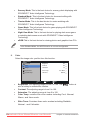
Scenery Mode: This is the best choice for scenery photo displaying with
SPLENDID™ Video Intelligence Technology.
•
Standard Mode: This is the best choice for document editing with
SPLENDID™ Video Intelligence Technology.
•
Theater Mode: This is the best choice for movie watching with
SPLENDID™ Video Intelligence Technology.
•
Game Mode: This is the best choice for game playing with SPLENDID™
Video Intelligence Technology.
•
Night View Mode: This is the best choice for playing dark-scene game
or watching dark-scene movie with SPLENDID™ Video Intelligence
Technology.
•
sRGB:This is the best choice for viewing photos and graphics from PCs.
In the Standard Mode, the ASCR function is not user-configurable.
2.
Color
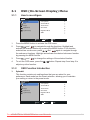
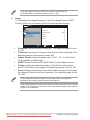
Select the image color you like from this function.
ML229
Splendid
Brightness
100
Color
Contrast
100
Image
Saturation
Input Select
Color Temp
System Setup
Skin Tone
Move
Menu
50
User Mode
Natural
Exit
•
Brightness: The adjusting range is from 0 to 100. The
also a hotkey to activate this function.
button is
•
Contrast: The adjusting range is from 0 to 100.
•
•
Saturation: The adjusting range is from 0 to 100.
Color Temp.: contains four color modes including Cool, Normal,
Warm, and User mode.
•
Skin Tone: Contains three color modes including Reddish ,
Natural , and Yellowish.
3-2
Downloaded
from ManualMonitor.com Manuals
Chapter 3: General Instruction