1
Turning On and Off
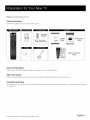
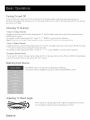
Connect the AC cord to power the LCD TV. At this time the TV will enter standby mode and power indicator shows red.
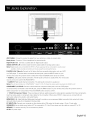
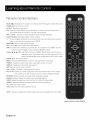
Use Power button (_)
on the side panel of TV or on the remote control to turn on the TV. After switching
off the TV for 5 seconds,
you can turn on TV again.
Choosing TV Channel
Tuning To Analog Channels
An analog channel has a channel number beginning with "A". Input the digital number with numeric buttons directly and press
ENTER button to confirm.
For example, to watch analog channel "A51 ", press "5", "1 ", "ENTER" on remote control in sequence.
Note; Although there is no analog TV signal available in America, we reserve ATe! functions for some expansible use.
Tuning To Digital Channels
A digital channel has a channel number beginning with "D". Input the main digital number with numeric buttons directly, then press
" --"
button on remote control, and input the sub number at last.
For example, to watch analog channel "D31-1 ", press "3", "1 ", .....
Changing
Channels
Directly
You can use CHA button to increase channel number and CHv
is used, the up/down
button. "ENTER" on remote control in sequence.
arrows can also work as CHA/CHv
to decrease channel number. When no OSD (On Screen Display)
buttons.
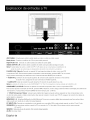
Selecting Input Source
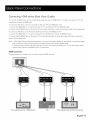
Press INPUT button on remote control to display Source Select list.
Use up/down
arrows to highlight the source you need and press ENTER to confirm.
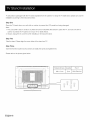
Adjusting TV Stand Angle
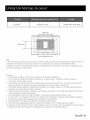
The TV cabinet can manually adjust to left or right for 30 degrees from the centre.
You can adjust the angle for the best viewing effect and comfort.
English-20