1
Preparation
8
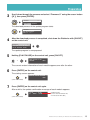
Press [PLAY/PAUSE] to start the update.
Important: • DO NOT turn off this unit during update.
• Be sure to update all the modules.
The update process of the first module takes approximately 3 minutes.
MC v3.30 v3.50
DO NOT REMOVE DISK!
When the update of the first module completes, the following confirmation message
appears.
Confirmation message of the second module
v3.50
v3.30
CTRL-SURE? (PLAY,STOP)
Updated version
(v3.50 or later for Disklavier E3;
v3.52 or later for DKC-850)
Press [PLAY/PAUSE] to start the update of the second module.
The update process of the second module takes approximately 3 minutes.
A total of four modules needs to be updated. Repeat this step to complete the update.
Confirmation message of the third module
v3.50
v3.20
APE -SURE? (PLAY,STOP)
Updated version
(v3.50 or later for Disklavier E3;
v3.52 or later for DKC-850)
The update process of the third module takes approximately 2 minutes.
Confirmation message of the fourth module (Disklavier E3 only)
v3.10
v2.10
CSP -SURE? (PLAY,STOP)
Updated version (v3.10 or later)
The update process of the fourth module takes approximately 2 minutes.
The closing screen appears when the update for all modules is completed.
COMPLETE
Turn OFF,Turn ON again!
9
Shut down the Disklavier, then turn it on again.
DisklavierTV User’s Guide (For Disklavier E3 and DKC-850 Users)
16