1
Connection Diagram (Basic)
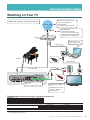
Connecting the Disklavier to the Internet
You can connect the Disklavier to a full-time online Internet connection (ADSL, optical fiber,
cable Internet, etc.) via a router or a modem equipped with a router.
■■Preparation
•To use the Internet connection, you will first need to subscribe to an Internet service or
provider.
•Use a computer to obtain and configure Internet service. You cannot obtain Internet service
or configure router settings on a local area network using the Disklavier itself.
•Use a standard LAN cable to connect the control unit and a router.
•Before connecting the LAN cable, make sure to turn off (or shut down) the Disklavier.
■■Connecting the Control Unit to the Internet
Connection example 1:
Using a modem with router function
Connection example 2:
Using a modem without router function
Modem
(without router function)
Modem
(with router function)
Router
Other device
(such as computer)
Other device
(such as computer)
LAN cable
LAN cable
Control unit (rear panel)
Note:
Control unit (rear panel)
• Depending on the contract with your Internet provider, you may not be able to connect two or
more devices (for example, a computer and the Disklavier) to the Internet. Please check your
contract or contact your Internet provider for further information.
• Some types of modems (such as ADSL modems or cable modems) have multiple ports for
connecting two or more devices (such as computer, musical instrument, etc.). If your modem
has only one port, an optional router or hub is required in order to connect several devices
simultaneously.
DisklavierTV User’s Guide (For Disklavier E3 and DKC-850 Users)
8