1
BOXLIGHT CD-725c User’s Guide
INSTALLATION
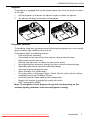
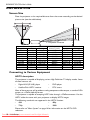
Screen Size
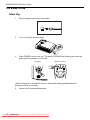
Place the projector at the required distance from the screen according to the desired
picture size (see the table below).
L Projection Distance
Screen Size (Max.) cm/in
Diagonal
A. Width
C. Height
30.4/12
61.8/24
46.3/18
60.8/24
123.65/49
92.7/36
91.2/36
185.3/73
138.9/55
121.5/48
247.0/97
185.2/73
151.9/60
308.7/122
231.6/91
182.3/72
370.5/146
277.9/109
213.1/84
432.2/170
324.18/128
243.1/96
494.0/194
370.5/146
273.5108
555.7/219
416.7/164
303.9/120
617.5/243
463.11/182
L. Projection
distance (cm/in)
100/39
200/79
300/118
400/157
500/197
600/236
700/276
800/315
900/354
1000/394
Screen Size (Min.) cm/in
B. Width
D. Height
50.7/20
38.0/15
101.3/40
76.0/30
151.9/60
113.9/45
202.5/80
151.9/60
253.2/100
189.9/75
303.8/120
227.9/90
354.4/140
266.2/105
405.1/160
303.8/120
455.7/180
341.8/135
506.3/200
379.8/150
Connecting to Various Equipment
HDTV description
The projector is capable of displaying various High Definition TV display modes. Some
of these sources are:
•
•
Digital-VHS (D-VHS) player
Satellite Dish HDTV receiver
•
•
DVD player
DTV tuners
Most of these sources will provide an analog component video output, a standard VGA
output, or a YPBPR (default) format.
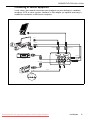
The projector is capable of accepting HDTV data through a YPBPR connector. Use the
HDTV cable that came with your projector to display HDTV images.
The following standards are supported in the HDTV function:
•
•
480i
720p
•
•
480p
1080i
Please refer to "Menu System" on page 14 for information on the HDTV OSD
selections.
10 Installation
Downloaded
From projector-manual.com Boxlight Manuals