1
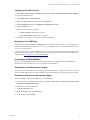
vCenter Configuration Manager Hardware and
Software Requirements Guide
vCenter Configuration Manager 5.3
This document supports the version of each product listed and supports all
subsequent versions until the document is replaced by a new edition. To
check for more recent editions of this document, see
http://www.vmware.com/support/pubs.
EN-000439-01
vCenter Configuration Manager Hardware and Software Requirements Guide
You can find the most up-to-date technical documentation on the VMware Web site at:
http://www.vmware.com/support/
The VMware Web site also provides the latest product updates.
If you have comments about this documentation, submit your feedback to:
[email protected]
© 2006-2010 VMware, Inc. All rights reserved. This product is protected by U.S. and international copyright and
intellectual property laws. VMware products are covered by one or more patents listed at
http://www.vmware.com/go/patents.
VMware is a registered trademark or trademark of VMware, Inc. in the United States and/or other jurisdictions. All
other marks and names mentioned herein may be trademarks of their respective companies.
VMware, Inc.
3401 Hillview Ave.
Palo Alto, CA 94304
www.vmware.com
2
VMware, Inc.
Contents
About This Book
5
Overview
7
Agent and Collector Host OS Platform Support
Understanding the VCM Installation Manager
Understanding VCM Installation Configurations
Hardware Requirements -- Collector Machines
Determining the Size of Your Environment
Identifying Your Specific Hardware Requirements
Hardware and Operating System Requirements -- Agent Machines
VCM Agent Requirements
Windows Custom Information supports PowerShell version 2.0
Software Provisioning Requirements
Software Provisioning Component Software Requirements
Software Provisioning on Guests
UNIX/Linux Patch Assessment and Deployment Requirements
Agent Proxy Requirements for Use with VMware vSphere/ESX/ESXi
Minimum Operating System Requirements
Minimum Hardware Requirements
Supported vCenter Server Collections
FIPS Requirements
FIPS for Windows
FIPS Used by VCM Agent Proxies
Software and Operating System Requirements -- Collector Machines
Sizing Impacts on Software Requirements
Software Installation and Configuration Overview
32-bit and 64-bit Operating Systems
Upgrade Considerations
Configuring a 32-bit Operating System for a VCM Installation
Configuring Windows 2003 SP2 Operating System
Uninstalling Internet Explorer Enhanced Security Configuration
Installing and Configuring IIS
Installing .NET Frameworks
Configuring the WCF ISAPI Extensions
Installing and Verifying SQL XML 3.0 SP3
Installing and Configuring SQL Server
Configuring SQL Server Reporting Service (SSRS)-Related Settings
Preparing for VCM Installation
Configuring a 64-bit Operating System for a VCM Installation
Configuring Windows 2003 SP2 Operating System
Uninstalling Internet Explorer Enhanced Security Configuration
Installing and Configuring IIS
Installing .NET Frameworks
Configuring the WCF ISAPI Extensions
Installing and Verifying SQL XML 3.0 SP3
Installing and Configuring SQL Server
VMware, Inc.
8
8
8
11
11
12
15
15
17
17
17
17
17
18
19
19
20
20
20
20
21
21
22
22
22
22
22
23
24
25
27
29
29
35
39
42
42
43
44
46
47
49
49
3
vCenter Configuration Manager Hardware and Software Requirements Guide
Configuring SQL Server Reporting Service (SSRS)-Related Settings
Preparing for VCM Installation
Agent Sizing Information
69
UNIX/Linux Machines
Mac OS X Machines
70
71
Configuring SQL Server 2005 for VCM
SQL Server Database Settings
SQL Server Processor Settings
Configuring SQL Server Processor Settings
SQL Server IO Configuration
Using SQLIO to Determine IO Channel Throughput
4
60
65
73
73
74
75
76
78
VMware, Inc.
About This Book
This guide, VCM Hardware and Software Requirements Guide, describes the hardware and software
requirements that must be met in order to ensure a successful VMware vCenter Configuration Manager
(VCM) installation. This document contains the following information:
n
Hardware requirements for VCM Collector machines
n
Hardware requirements for VCM Agent machines
n
Software requirements and procedures for verifying or installing required components
n
Supplemental reference information
Read this document and complete the associated procedures to prepare for a successful installation.
VCM Hardware and Software Requirements Guide covers
VCM 5.3, Foundation Checker 3.0, and Service Desk Connector 1.3.0.
Intended Audience
The information presented in this manual is written for system administrators who are experienced
Windows or UNIX/Linux system administrators and who are familiar with managing network users and
resources, and performing system maintenance.
To use the information in this guide effectively, you must have a basic understanding of how to configure
network resources, install software, and administer operating systems. You also need to fully understand
your network’s topology and resource naming conventions.
Document Feedback
VMware welcomes your suggestions for improving our documentation. If you have comments, send
your feedback to [email protected].
VMware, Inc.
5
vCenter Configuration Manager Hardware and Software Requirements Guide
Technical Support and Education Resources
The following technical support resources are available to you. To access the current version of this book
and other books, go to http://www.vmware.com/support/pubs.
Online and Telephone
Support
To use online support to submit technical support requests, view your product
and contract information, and register your products, go to
http://www.vmware.com/support.
Customers with appropriate support contracts should use telephone support for
priority 1 issues. Go to http://www.vmware.com/support/phone_support.html.
6
Support Offerings
To find out how VMware support offerings can help meet your business needs,
go to http://www.vmware.com/support/services.
VMware Professional
Services
VMware Education Services courses offer extensive hands-on labs, case study
examples, and course materials designed to be used as on-the-job reference tools.
Courses are available onsite, in the classroom, and live online. For onsite pilot
programs and implementation best practices, VMware Consulting Services
provides offerings to help you assess, plan, build, and manage your virtual
environment. To access information about education classes, certification
programs, and consulting services, go to http://www.vmware.com/services.
VMware, Inc.
Overview
1
The purpose of this manual is to help you determine your specific hardware and software requirements,
and then to install and configure the prerequisites necessary for a successful installation of VMware
vCenter Configuration Manager (VCM).
Before proceeding through this manual, consider the following questions. The answers that you provide
will help you to determine your hardware and software requirements throughout the course of this
document.
n
How many Windows (Servers and Workstations) and UNIX/Linux machines do you plan to license?
n
How often do you intend to collect data?
n
How much data do you intend to collect?
n
How long do you plan to retain the data that you collect?
n
What additional VCM components do you intend to license? See Download VMware vCenter
Configuration Manager for more information about VCM components.
n
Will you be required to run a split installation due to corporate policies?
A split installation across two machines should be used only when your corporate policy requires you
to have your SQL Server data stored on a centralized database server. Split installations are
implemented and supported only by VMware Customer Support. Installation instructions are not
provided in this manual.
n
Do you fully understand your VCM security requirements? See the VCM Security Environment
Requirements (Technical White Paper) on the Download VMware vCenter Configuration Manager site.
To use this document effectively, begin by determining the hardware requirements for the VCMCollector
machine (See “Chapter 2: Hardware Requirements — Collector Machine”). Next, determine the supported
hardware and operating systems for your VCM Agent machines (See “Chapter 3: Hardware and
Operating Systems Requirements — Agent Machines”). After you are confident that you have determined
your hardware requirements, you must then install and configure the software and settings required by
the Collector machine (See “Chapter 4: Software and Operating System Requirements — Collector
Machine”).
As you work through each chapter, complete each of the activities and procedures in the order in which
they appear. When you are finished, you should be able to run the Foundation Checker application
successfully, thereby ensuring an efficient and successful VCM installation. The Foundation Checker is a
VCM application that scans the Collector machine for the necessary prerequisites.
Refer to the following table for an overview of each chapter and the tasks associated with that chapter.
VMware, Inc.
7
vCenter Configuration Manager Hardware and Software Requirements Guide
Table 1-1. Chapter Outline
Read this chapter:
To do the following:
1 -- Overview
2 -- Hardware Requirements—
Collector
3 -- Hardware and Operating
System Requirements — Agent
Machines
4 -- Software and Operating
System Requirements —
Collector Machine
Appendices
Understand how VCM and its related components are installed.
Determine your specific VCM Collector hardware requirements, based on the number
of machines in your enterprise and the VCM components that you plan to license.
Determine your specific VCM Agent hardware requirements, based on the VCM
components that you plan to license. This chapter includes a detailed list of the
supported operating systems,
Prepare the Windows® server for VCM installation by installing and configuring the
necessary software prerequisites.
Access reference material to supplement the hardware and software requirements
information.
If you have questions about the Windows® server/workstation or UNIX® machine configuration or
requirements not answered in this document, contact your VMware account representative or VMware
Customer Support.
Agent and Collector Host OS Platform Support
All Agent and Collector host OS platform support is specific to versions and editions indicated in the
supported platforms table. All installations tested, except as noted, utilize the vendor’s default
configuration. A variety of vendor-supplied, 3rd-party, and custom lock downs, endpoint security
products, policies, and restricted system configurations can reduce or block the performance or
functionality of VCM’s components. Troubleshooting and support of VCM components in such lockeddown or reconfigured environments is not included under the standard product maintenance agreement.
Support in such environments is available through an additional Professional Services engagement.
Understanding the VCM Installation Manager
All VCM components and tools are installed with the VCM Installation Manager, which is a single tool that
steps you through the process for installing components and tools.
The Installation Manager installs all VCM components on your machine, even if you have not purchased
licenses for all of the components. Only the VCM components that are included in your VCM license file
are activated during the installation process. This installation method allows you the flexibility to purchase
more licenses and activate additional VCM components as needed. The components are already installed
on the machine and need only be activated with additional licenses.
When preparing your system for a VCM installation, determine your requirements based on which
components you plan to license within your configuration. Use the hardware requirement worksheet and
associated tables in “Chapter 2: Hardware Requirements — Collector Machine” to assess your
requirements based on your individual licensing plan. In addition, consider whether you will have a singleserver or a multiple-server installation configuration.
Understanding VCM Installation Configurations
VCM supports one installation configuration: the single server installation in which the Collector and the
VCM Databases (SQL Server databases) are installed on a single machine.
A split installation across two machines should be used only when your corporate policy requires you to
have your SQL Server data stored on a centralized database server. Split installations are implemented and
supported only by VMware Customer Support. Installation instructions are not provided in this manual.
The following diagram illustrates a typical VCM Enterprise-wide, single-server installation as installed by
the Installation Manager.
8
VMware, Inc.
Overview
VMware, Inc.
9
vCenter Configuration Manager Hardware and Software Requirements Guide
10
VMware, Inc.
Hardware Requirements -- Collector
Machines
2
Your VCM hardware requirements are directly dependent on the number of physical and virtual
machines within your enterprise you plan to license for use with VCM. Use the information in this chapter
to determine how many machines you plan to manage and what VCM components you plan to license.
Once you have this information, you will be able to continue using this chapter to determine the individual
hardware requirements that you must satisfy in order to ensure a successful VCM installation.
Disk space requirements vary based on:
n
Number of machines from which you are collecting data
n
Type of data collected and filters used
n
Frequency of collections
n
Data retention
Determining the Size of Your Environment
VCM hardware requirements are recommended based on whether your enterprise contains 1 to 1,000,
1,000 to 2,000, 2,000 to 5,000, or more managed machines. To determine the number of managed machines
on which to base your collector size, consider the number of Windows (servers and workstations),
UNIX/Linux, and virtual machines that you are licensing. In addition, identify any other VCM components
that you are licensing. Populate the worksheet in this section with your enterprise-specific data to
determine your total number of managed machines.
The following charts are designed to help you determine your sizing requirements for installing VCM.
Within VCM, the term “managed machines” is used to identify the servers and workstations from which
VCM collects data and manages. However, for the purposes of sizing your environment, it is necessary to
expand this definition to account for the Microsoft Active Directory (AD) objects (if you are licensing VCM
for AD) that you anticipate having in your environment within the next 12 to 24 months. Use the formulas
within the following worksheets to determine how your AD objects will increase your ’managed machine’
count, and thereby affect your final sizing requirements. By taking these considerations into account now,
you will be sure to have adequate disk space to accommodate VCM both now and in the future.
Once you have completed the following worksheet and determined the number of managed machines,
you will need to size your Collector machine. See "Identifying Your Specific Hardware Requirements" on
page 12 for more information.
VMware, Inc.
11
vCenter Configuration Manager Hardware and Software Requirements Guide
Example: Determining Managed Machine Count for a Typical Enterprise
In this example, an enterprise containing the following machines and objects represents 1177 managed
machines, and therefore falls into the 1000 to 2000 managed machines category.
Table 2-1. Example of Sizing Worksheet with Sample Data
Product Description
VCM
VCM
for AD
Anticipated Number of Managed Machines
within the Next 12-24 Months
Windows Servers
92
vSphere/ESX/ESXi Servers
5
Virtual Machines (VM)
50
Windows Workstations
920
Divide total number of AD objects by 100 to get the
10,000 AD Objects/100 = 100 managed machines
approximate ’machine count’ for your AD environment.
to accommodate VCM for AD
TOTAL 1177 managed machines
Table 2-2. Sizing Worksheet: Populate with data specific to your enterprise
Product Description
Anticipated Number of Managed Machines within
the Next 12-24 Months (See Note)
VCM
Windows Servers
ESX Servers
Virtual Machines (VM)
Windows Workstations
VCM Divide total number of AD objects by 100 to get the
for AD approximate ’machine count’ for your AD environment.
TOTAL MANAGED MACHINES
NOTE Enter the number you expect to manage in the next 12-24 months. While this number may not
reflect your current licensing plan, planning for the future will ensure that you have enough disk space
available when the need arises.
Identifying Your Specific Hardware Requirements
Refer to the following tables to determine your specific hardware and disk configuration requirements.
Use the total number of managed machines that you identified in the previous section to locate your
environment size (1 to 1,000, 1,000 to 2,000, 2,000 to 5,000, or more). If you have over 2000 machines in
your environment, contact VMware Customer Support to assist you in determining your specific
hardware requirements.
Assumptions:
The requirements listed in this table are based on the following considerations:
12
n
Daily collections using the default filter set with additional Microsoft AD security descriptors collected
using VCM for AD
n
15 days retention of data
n
Simple recovery mode only
n
Daily VCM Patching collections
n
VCM is the only application running on your server. If you intend to run other applications, contact
VMware Customer Support to prevent conflicts
VMware, Inc.
Hardware Requirements -- Collector Machines
VCM for AD collections cause the TempDB database to grow significantly. Plan to increase your hardware
requirements if you have a fully populated Microsoft Active Directory and plan to perform frequent AD
collections.
Longer data retention, additional WMI, registry filters, and custom information collections will also add to
the requirements listed below. For questions about how your specific requirements are affected, contact
VMware Customer Support.
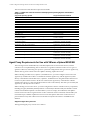
Table 2-1. Minimum Hardware Requirements by Number of Managed Machines
Requirements
Processors
RAM
Number of Separate
Disk Channels
Number of VCM Managed Machines
1-1000
Dual Xeon or single Dual Core
2 GHz minimum
4 GB+ minimum
2
1000-2000
Quad Xeon or two Dual Core
2 GHz minimum
6 GB+ minimum
3
2000+ (See Note)
Eight-way Xeon or four Dual
Core 2 GHz minimum
12 GB+ minimum
4
NOTE If you are managing over 2000 machines on one collector, based on your calculations using
"Determining the Size of Your Environment" on page 11, contact VMware Customer Support for your
specific hardware requirements.
VMware, Inc.
13
vCenter Configuration Manager Hardware and Software Requirements Guide
Table 2-2. Minimum Disk Configuration Requirements by Number of Managed Machines
Number of VCM Managed
Machines
RAID Channel and RAID Level
1-500
Channel 0 -- RAID 1
501-1000
1001-2000
Partitions
OS
Collector Data
Files
TempDB
SQL Log Files
Channel 1 -- RAID 0+1 (recommended) or RAID SQL Data Files
10
Channel 0 -- RAID 1
OS
Collector Data
Files
Channel 1 -- RAID 1
TempDB
SQL Log Files
Channel 2 -- RAID 0+1 (recommended) or RAID SQL Data Files
10
Channel 0 -- RAID 1
OS
Collector Data
Files
Channel 1 -- RAID 1
TempDB
Channel 2 -- RAID 1
SQL Log Files
Channel 3 -- RAID 0+1 (recommended) or RAID SQL Data Files
10
Usable
Space
36 GB
36 GB
36 GB
28 GB
56 GB
36 GB
36 GB
56 GB
56 GB
113 GB
36 GB
54 GB
113 GB
113 GB
227 GB
NOTE The space allocations in this table do not include space for backups. Backup space should be
allocated equal to the size of the VCM data for a single full backup, or larger if you want to keep multiple
partial backups.
14
VMware, Inc.
3
Hardware and Operating System Requirements -- Agent Machines
The Agent machines are the managed machines from which VCM collects data. The Agent is supported
many different machine and operating system types.
VCM Agent Requirements
The amount of additional disk space required on a managed machine running an Agent (Windows,
UNIX/Linux, Mac OS X,or AD) is fairly constant. Each machine requires no more than 200 MB in order to
run an Agent. However, the recommended memory to run the HP-UX Agent is 1 GB.
The following table provides the list of hardware platforms and operating systems supported by VCM.
While it may be possible to install Agents on platforms/operating system versions other than those listed
below, such configurations will not be supported. From time to time VMware introduces support for
additional platforms/operating systems. Please contact VMware Customer Support to confirm if a
particular platforms/operating system combination is supported by a later version of VCM if it is not listed
below.
Table 3-1. Agent Operating System and Hardware Requirements
Agent
Supported Operating System
Windows
Microsoft Windows 2000 (up to 5.2.1 Agent only)
Microsoft Windows 2003
Microsoft Windows 2003 R2
Microsoft XP Professional (including SP3)
Microsoft XP Professional (SP2 and earlier up to 5.2.1 Agent only)
Microsoft Vista Business (including SP1) *
Microsoft Vista Ultimate (including SP1) *
Microsoft Vista Enterprise (including SP1) *
Microsoft Windows Server 2008 *
Microsoft Windows Server 2008 R2 *
Microsoft Windows 7 *
AIX 4.3.3 (up to 5.1.3 Agent only) See Note.
AIX 5L 5.1
AIX 5L 5.2
AIX 5L 5.3
AIX 6L 6.1 (5.2 Agent or later)
Debian 4.0 (Package LSB-Release is required)
HP-UX 11i v1.0 (11.11)
(If you are installing on HPUX 11.11, Patch PHSS_30966 is required.)
Supported in trusted mode.
HP-UX 11i v2.0 (11.23)
HP-UX 11i v2.0 (11.23)
HP-UX 11i v3.0 (11.31)
HP-UX 11i v3.0 (11.31)
UNIX/Linux
VMware, Inc.
Supported
Hardware Platform
x86
x86 and x64
x86 and x64
x86 and x64
x86 and x64
x86 and x64
x86 and x64
x86 and x64
x86 and x64
x86 and x64
x86 and x64
RISC
RISC
RISC
RISC
RISC and PowerPC
x86 and x64
PA-RISC
Itanium
PA-RISC
Itanium
PA-RISC
15
vCenter Configuration Manager Hardware and Software Requirements Guide
Agent
Supported Operating System
Red Hat Enterprise Linux 2.1 (ES/AS) (up to 5.1.3 Agent only) See
Note.
Red Hat Enterprise Linux 3 (ES/AS) including Desktop with
Workstation edition
Red Hat Enterprise Linux 4 (ES/AS) including Desktop with
Workstation edition
Red Hat Enterprise Linux 5.0, 5.1, 5.2, 5.3, 5.4 Server, Desktop with
Workstation, and Advanced Platform
Solaris 2.5 (up to 5.1.3 Agent only) See Note.
Solaris 2.6 (up to 5.2.1 Agent only) See Note.
Solaris 8
Solaris 9
Solaris 10
(certified and verified on Solaris 10 zfs and custom information data
class collections on both zfs and vxfs)
SUSE Linux Enterprise Server (SLES) 9
SUSE Linux Enterprise Server (SLES) 10
SUSE Linux Enterprise Server (SLES) 10.2
SUSE Linux Enterprise Server (SLES) 10.3
SUSE Linux Enterprise Server (SLES) 11
Mac OS X(servers and Mac OS X 10.4
workstations)
Mac OS X 10.5
Oracle 9i
Solaris 9
Solaris 10
Oracle 10g
Solaris 9
Solaris 10
Active Directory
VCM Remote
Microsoft Windows 2000
Microsoft Windows 2003
Microsoft Windows 2003 R2
Microsoft Windows 2008
VCM Remote supports the same platforms as the Windows Agent
Supported
Hardware Platform
x86
x86
x86 and x64
x86 and x64
Sparc
Sparc
Sparc and Sparc-V9
Sparc and Sparc-V9
Sparc, Sparc-V9, x86,
and x64
x86 and x64
x86 and x64
x86 and x64
x86 and x64
x86 and x64
Intel and PowerPC
Intel and PowerPC
Sparc and Sparc-V9
Sparc and Sparc-V9
Sparc-V9
Sparc-V9, x86, and
x64
x86
x86 and x64
x86 and x64
x86 and x64
* The platforms indicated above with an asterisk (*) with agents prior to the 5.2.1 agent may not correctly
report the name of the operating system. We recommend upgrading these platform agents as soon as
possible.
NOTE The platforms above indicated with the "(up to 5.1.3 Agent only)" note are supported only to the
Agent version specified. You can install the 5.1.3 version of the Agent on the platforms specified, but you
cannot install newer or the current Agent. This means that you will not be able to use the new features in
this release on those platforms.
The platforms above indicated with the "(up to 5.2.1 Agent only)" note are supported only to the Agent
version specified. You can install the 5.2.1 version of the Agent on the platforms specified, but you cannot
install newer or the current Agent. This means that you will not be able to use the new features in this
release on those platforms.
Contact VMware Customer Support for the earlier supported Agents.
The following x64 Platforms have been tested.
16
n
For Windows: Intel64 and AMD64
n
For Linux: Intel64 and AMD64
n
For Solaris: Intel64
VMware, Inc.
Hardware and Operating System Requirements -- Agent Machines
Itanium is not supported for either Windows or UNIX/Linux.
Windows Custom Information supports PowerShell version 2.0
PowerShell version 2.0 is required for Windows Custom Information (WCI). VMware recommends that
you upgrade from PowerShell 1.0 to PowerShell 2.0, which introduced a number of useful functions.
Because of the additional ability to have the execution policy set at the process level, PowerShell 2.0 is the
base requirement for WCI in VCM. The default script type command line used for script based filters in
WCI includes options to set the process-level execution policy to Remote Signed. This allows WCI to
execute collection scripts against systems whose machine and user level signing policies may be anything,
without having to change the setting. Out-of-the-box, VCM’s Windows Custom Information non-in-line
collection filters will fail if executed against PowerShell 1.0 client systems.
PowerShell 2.0 is supported on all platforms that support PowerShell 1.0. For more information, see the
online Help.
Software Provisioning Requirements
VCM Software Provisioning provides the components to create software provisioning packages, publish
the packages to repositories, and then install and remove software packages on target machines.
The following operating systems are supported platforms:
Table 3-1. Software Provisioning Operating System and Hardware Requirements
Supported Operating System
Supported Hardware Platform
Microsoft Windows 7
x86, x64
Microsoft Windows Server 2008 R2
x64
Microsoft Windows Server 2008 SP2
x86, x64
Windows Vista SP2
x86, x64
Microsoft Windows XP SP3
x86
Microsoft Windows XP SP2
x64
Microsoft Windows Server 2003 R2 SP2
x86, x64
Microsoft Windows Server 2003 SP2
x86, x64
Software Provisioning Component Software Requirements
The following are the VCM Software Provisioning components and their software requirements:
n
VMware vCenter Configuration Manager Package Studio: The application used to the create the
software packages. Requires .NET 3.5.1.
n
Software Repositories: The file system used to store the shared software packages. Requires .NET 3.5.1
and IIS 6, 7, or 7.5.
n
Package Manager: The application on each managed machine that downloads packages from
repositories, and then installs and removes the software contained in the packages. Requires .NET 3.5.1.
Software Provisioning on Guests
Any virtual machine guest on VMware ESX 3.5 and vSphere 4 (both i and non-i versions) meeting the
above requirements can be used for any of the VCM Software Provisioning components.
UNIX/Linux Patch Assessment and Deployment Requirements
UNIX patch assessments and deployments are currently supported for the following platforms.
VMware, Inc.
17
vCenter Configuration Manager Hardware and Software Requirements Guide
The associated assessment PLS files require at least 20 MB.
Table 3-1. UNIX/Linux Patch Assessment and Deployment Operating System and Hardware
Requirements
Supported Operating System
Supported Hardware Platform
AIX 5L 5.1
AIX 5L 5.2
AIX 5L 5.3
AIX 6.1
HP-UX 11iV1 (11.11)
HP-UX 11iv2.0
HP-UX 11i v2.0
HP-UX 11i v3.0 (11.31)
HP-UX 11i v3.0 (11.31)
Mac OS X 10.4
Mac OS X 10.5
Red Hat Enterprise Linux 3 (ES/AS) including Desktop with
Workstation edition
Red Hat Enterprise Linux 4 (ES/AS) including Desktop with
Workstation edition
Red Hat Enterprise Linux 5.0, 5.1, 5.2, 5.3, 5.4 Server, Desktop with
Workstation, and Advanced Platform
Solaris 8
Solaris 9
Solaris 10
SUSE Linux Enterprise Server (SLES) 9
RISC and PowerPC
RISC and PowerPC
RISC and PowerPC
RISC and PowerPC
PA-RISC
Itanium
PA-RISC
Itanium
PA-RISC
Intel and PowerPC
Intel and PowerPC
x86 (includes Intel and AMD architectures,
excludes Itanium)
x86 and x64 (includes Intel and AMD
architectures, excludes Itanium)
x86 and x64 (includes Intel and AMD
architectures, excludes Itanium)
Sparc and Sparc-V9
Sparc and Sparc-V9
Sparc, Sparc-V9, x86, and x64
x86 and x64 (includes Intel and AMD
architectures, excludes Itanium)
x86 and x64 (includes Intel and AMD
architectures, excludes Itanium)
x86 and x64 (includes Intel and AMD
architectures, excludes Itanium)
SUSE Linux Enterprise Server (SLES) 10
SUSE Linux Enterprise Server (SLES) 11
Agent Proxy Requirements for Use with VMware vSphere/ESX/ESXi
The VCM Agent is not installed directly on the ESX/vSphere Servers and vCenter Servers; instead
collections are accomplished using what is referred to as "agentless collections". There are two types of
agentless collections, and each type is specific to a particular configuration. One type uses an Agent Proxy,
and the other type uses a direct call to the vSphere API using vSphere PowerCLI.
When collecting from ESX 2.5/3.x, vSphere 4, and ESXi Servers, you must configure at least one VCM
Agent Proxy machine. The Collector communicates with the Agent Proxy, and the Agent Proxy then
directly communicates with the ESX 2.5/3.x, vSphere 4, and ESXi Servers using SSH and/or Web Services
for necessary data collection actions. In the case of ESX 2.5, the Agent Proxy communicates with the
VirtualCenter Servers to collect certain ESX 2.5 data it cannot collect directly. The data is processed by the
Agent Proxy and relayed to the Collector.
When collecting from vCenter Server, you must configure the Collector with the necessary components,
including an Agent (installed by default), Remote Commands (VCM functionality that includes vCenter
Collection PowerShell templates to be the model for your local scripts), PowerShell 2.0, and vSphere
PowerCLI 2.0. The Collector Agent runs the vCenter Collection remote commands, which include your
Powershell scripts, and then vSphere PowerCLI accesses the vSphere API on the vCenter Servers to
perform the necessary data collection actions. The data is relayed to the Collector and added to the
database.
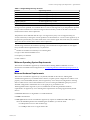
Supported Agent Proxy Versions
The supported agent proxy versions are as follows:
18
VMware, Inc.
Hardware and Operating System Requirements -- Agent Machines
Table 3-1. Supported Agent Proxy Versions
Platform
Agent Proxy Version
ESX 2.5
Up to 5.1.3 Agent Proxy only
ESX 3.0
Up to 5.2.1 Agent Proxy only
ESX 3.5
Up to 5.2.1 Agent Proxy only
ESXi 3.5
Up to 5.2.1 Agent Proxy only
vSphere (ESX) 4.0
VCM 5.0 Agent Proxy or later
vSphere (ESX) 4.1
VCM 5.0 Agent Proxy or later
NOTE The platforms above indicated with the "Up to 5.1.3 Agent Proxy only" note are supported only to
the Agent version specified. You can install the 5.1.3 version of the Agent Proxy on the platforms specified,
but you cannot install newer or the current Agent. This means that you will not be able to use the new
features in this release on those platforms.
The platforms above indicated with the "Up to 5.2.1 Agent Proxy only" note are supported only (for
vCenter Collections) to the Agent version specified. You can install the 5.2.1 version of the Agent Proxy on
the platforms specified, but you cannot install newer or the current Agent. This means that you will not be
able to use the new features in this release on those platforms.
The following sections list the minimum operating system and hardware requirements for each Agent
Proxy machine. These requirements may vary based on:
n
Number of machines from which you are collecting data
n
Type of data collected and filters used
n
Frequency of collections
n
Data retention
Minimum Operating System Requirements
The VCM for Virtualization Agent Proxy machine must be running Windows 2003 SP2. For more
information on installation and configuration, see "Configuring Windows 2003 SP2 Operating System" on
page 42.
Minimum Hardware Requirements
The VCM for Virtualization Agent Proxy is, by default, installed on the Collector. Although the
Virtualization Agent Proxy is available on the Collector, it requires special configuration to make it work
properly. It is recommended, therefore, that an Agent Proxy server always be configured for collecting
data from ESX servers. If more than 50 ESX servers are to be managed, additional agent proxy servers
should be configured to maintain the ratio of one agent proxy per 50 ESX servers.
The designated VCM for Agent Proxy servers should meet the following minimum hardware
requirements. An Agent Proxy server meeting these requirements can manage approximately 50 ESX
Servers.
n
Processor: Dual Xeon or single Dual Core 2 GHz minimum
n
RAM: 4 GB minimum
n
Disk Space: Each VCM for Virtualization Agent Proxy requires an additional 93 MB of disk space,
above the 200 MB required for the standard Agent. In addition, you will also need:
VMware, Inc.
n
4 MB per ESX server for data model storage
n
150 MB per ESX server for Agent master files
19
vCenter Configuration Manager Hardware and Software Requirements Guide
Supported vCenter Server Collections
VCM supports collecting data from vCenter Server 4, 4.0.x, and 4.1, and have tested collections on 4.0.1
and 4.1.0.
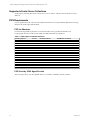
FIPS Requirements
If your organization must conform to the Federal Information Processing Standards (FIPS), the following
tables list the VCM-supported standards.
FIPS for Windows
For the following Windows platforms, VCM uses the Microsoft CryptoAPI and the Microsoft
Cryptographic Service Providers (CSP), which is included with Microsoft Windows.
Table 3-1. FIPS Support for Windows Machines
Operating System
Version
Hardware Platform
FIPS Module Certificate
.NET
Windows
Windows
Windows
Windows
Windows
Windows
Windows
Windows
Windows
Windows
Windows
Windows
Windows
Windows
Windows
Windows
3
1
1
1
1
SP2
SP1
SP1
Gold
Gold
SP2
SP2
SP1
Gold
Gold
All
2000
cil
x86
x86 and
x86 and
x86 and
x86 and
x86 and
x86 and
x86 and
x86 and
x86
x86
x86
x86
x86
x86
x86
894
899
894
893
892
875
382
381
382
381
240
238
240
240
238
103
76
Vista
Vista
Vista
Vista
2003
2003
2003
2003
2003
XP
XP
XP
XP
XP
2000
All
64-bit
64-bit
64-bit
64-bit
64-bit
64-bit
64-bit
64-bit
FIPS Used by VCM Agent Proxies
The VCM Agent Proxy uses the OpenSSL FIPS v1.1.2, which is validated to the 918 certificate.
20
VMware, Inc.
Software and Operating System Requirements -- Collector Machines
4
The VCM software requirements that must be met before you install the program are specified in this
chapter. The requirements are divided into steps, with several requirements consolidated under a general
step. Each step must be performed in the order specified to ensure a smooth and efficient VCM
installation. You will notice that the final step in preparing your Collector machine for VCM is to
download and run the Foundation Checker tool. Running Foundation Checker will help you to verify that
you have satisfied all of the software requirements necessary to install VCM.
If you install and run the Foundation Checker before installation, it is important to uninstall the
Foundation Checker before running the Installation Manager. If you do not uninstall, the Installation
Manager will generate errors or consider the installation an upgrade and fail.
All software requirements apply to your single server. For more information about installation
configurations, see "Understanding VCM Installation Configurations" on page 8.
Sizing Impacts on Software Requirements
Refer to the following table to determine your specific software requirements. Use the total number of
managed machines that you identified in "Determining the Size of Your Environment" on page 11 to locate
your environment size (1 to 1,000, 1,000 to 2,000, 2,000 to 5,000, or more). If you have more than 2000
managed machines on a single Collector, contact VMware Customer Support for your specific
requirements.
Table 4-1. Minimum Software Requirements by Number of VCM Managed Machines
Software Component 1-1,000
Operating System
SQL Version
SSRS Version
Number of Managed Machines
1,000-2,000
2,000-5,000 (See Note)
Windows 2003 SP2 Windows 2003 SP2 Standard Edition Windows 2003 SP2
Standard Edition
Enterprise Edition (64-bit)
SQL 2005 SP3
SQL 2005 SP3 Standard Edition
SQL 2005 SP3
Standard Edition
Standard Edition (64-bit)
SQL 2005 SP3
SQL 2005 SP3 Standard Edition
SQL 2005 SP3
Standard Edition
Standard Edition
NOTE If you are deploying VCM in an environment with more than 5,000 managed machines, contact
VMware for software component recommendations.
NOTE SQL Server 2005 SP3 Enterprise Edition is needed only if your Collector will be installed on a
machine with more than four CPU packages, with up to 16 cores on a quad core machine.
VMware, Inc.
21
vCenter Configuration Manager Hardware and Software Requirements Guide
Software Installation and Configuration Overview
The following sections list the steps that you must take in order to prepare your machine for a successful
VCM installation. Follow the precise configuration procedures noted in each section. When you have
completed these steps successfully, Foundation Checker should also run without error, indicating that you
have met the requirements necessary to install VCM.
32-bit and 64-bit Operating Systems
VCM supports a Collector running on either a 32-bit or 64-bit version of Windows 2003 SP2 operating
system. Depending on your operating system, the configuration procedures are different but fully
documented in this guide. Based on your operating system, select one of the following procedures:
n
Configuring a 32-bit Operation System for Installation
n
Configuring a 64-bit Operation System for Installation
Upgrade Considerations
To upgrade to the current version of VCM, you must have version 4.11.1 or later installed and running.
Detailed upgrade procedures are provided in the VCM Installation and Getting Started Guide.
Configuring a 32-bit Operating System for a VCM Installation
To prepare your 32-bit system for a successful VCM installation, follow the procedures in this section in
the order they are presented.
The procedures are very detailed, but checking each one against your system will help to ensure that all
necessary components are properly installed and configured.
Configuring Windows 2003 SP2 Operating System
NOTE
VCM is supported on Windows 2003 Service Pack 2, with or without Release 2 (R2).
Use the following procedure to install the correct operating system on your Collector, and to verify that
the settings are configured for VCM operation. Refer to "Sizing Impacts on Software Requirements" on
page 21 to determine whether you require the Enterprise or Standard Edition.
1. After installing the operating system, confirm that the computer name settings for your Collector
machine meet the following VCM-required naming convention: The computer name must be a valid
DNS machine name with no underscores. Verify that the name is correct before you proceed.
Attempting to change the machine name once the machine is identified as a Collector may cause
problems with VCM, SQL Server, and SSRS.
2. Verify that the person performing the remainder of these procedures is using a domain account with
local administrator rights.
3. Install Windows 2003 SP2 (with or without Release 2), available from Microsoft.
22
VMware, Inc.
Software and Operating System Requirements -- Collector Machines
Configuring the Operating System Locale Settings
Use the following procedures to verify that your Windows Server Locale Setting is configured correctly
for a VCM installation.
1. Click Start | Control Panel | Regional and Language Options.
2. On the Regional Options tab, verify that English (United States) is selected. If it is not selected, click
the drop-down to select the option.
NOTE If the locale is not English (United States), the locale changes must also be applied to the system
accounts.
Setting the Terminal Services Mode to Remote Desktop
If Terminal Services are enabled, use the following procedure to verify that your Windows Terminal
Services setting is configured correctly for a VCM installation.
1. Select Start | Control Panel | Administrative Tools | Terminal Services Configuration. The
Terminal Services Configuration\Connection window appears.
2. Click Server Settings. The Settings appear in the right pane.
3. Verify that the Licensing setting is Remote Desktop for Administration. If it is not, right-click
Licensing and select Properties. In the drop-down list, select Remote Desktop for Administration.
Uninstalling Internet Explorer Enhanced Security Configuration
If Internet Explorer Enhanced Security is installed, you will not be able to install or run VCM. Uninstall the
application using the following steps.
1. Click Start | Control Panel | Add or Remove Programs. The Add or Remove Programs window
appears.
2. Click Add/Remove Windows Components. The Windows Components Wizard appears.
VMware, Inc.
23
vCenter Configuration Manager Hardware and Software Requirements Guide
3. In the Components list, locate Internet Explorer Enhanced Security Configuration. Clear the check
box.
4. Click Next. The Configuring Components page displays the status of the update process. When the
process is completed, the Completing the Windows Components Wizard page appears.
5. Click Finish.
Installing and Configuring IIS
Use the following procedure to install IIS 6.0 on your Collector and to correctly configure the settings.
Installing IIS 6.0
Internet Information Services (IIS) 6.0 is available in Windows Server 2003. If not installed, install IIS 6.0.
1. To install IIS, select Start | Control Panel | Add or Remove Programs. The Add or Remove
Programs window appears.
2. Click Add/Remove Windows Components. The Windows Component Wizard appears.
3. In the Components list, double-click Application Server. The Application Server window appears.
4. The Internet Information Services (IIS) check box should be selected. If it is not, select the IIS check
box, and then click OK.
5. Click Next. The Configuring Components page appears, followed by the File Needed dialog box.
6. Click Browse to locate the specified image and file on the image.
7. Click OK. The installation begins. You are then instructed to locate a file on disk 2. Continue as
instructed by the installation process.
8. When the process is completed, the Completing the Windows Components Wizard page appears.
9. Click Finish.
Configuring IIS Settings
Use the procedures provided in this section to configure or verify the settings for the IIS Default Web Site
and for Web Sites.
1. Select Start | Control Panel | Administrative Tools | Internet Information Services (IIS) Manager.
The Internet Information Services (IIS) Manager window appears.
2. Expand the server node, and then the Web Sites node.
3. Right-click Default Web Site and select Properties. The Default Web Site Properties dialog box
appears.
4. Select the Web Site tab and configure the following:
24
n
IP address: (All Unassigned).
n
TCP port: 80.
n
Connection timeout: 3,600 seconds or greater.
VMware, Inc.
Software and Operating System Requirements -- Collector Machines
5. Click OK to save your settings and close the Default Web Site Properties dialog box.
6. In the Internet Information Services (IIS) Manager window, right-click Web Sites node and select
Properties. The Web Sites Properties dialog box appears.
7. On the Service tab, in the Isolation mode area, clear the Run WWW service in IIS 5.0 isolation
mode check box. When working with a new operating system installation, this option is not selected
by default. However, if you are retasking a server, you must verify that the check box is not selected
to avoid problems with VCM functionality.
8. Click OK to save your settings and close the dialog box.
Verifying and Enabling the IWAM Account Name
1. Right-click My Computer and select Manage. The Computer Management window appears.
2. Expand System Tools | Local Users and Groups.
3. Select Users.
4. In the right pane, verify that the IWAM_<ServerName> is listed as a built-in account. If it does not
exist, you must reinstall IIS.
5. To enable the account, right-click the account name in the right pane and select Properties. The
IWAM_<ServerName> Properties dialog box appears.
6. On the General tab, if the Account is disabled check box is selected, clear the check box to enable the
account.
Installing .NET Frameworks
The Collector requires .NET 3.5 Services Pack 1, which also installs .NET 2.0 and .NET 3.0. Use the
following procedures to verify that the required versions of .NET are installed on your Collector. If you
are missing a version and need to install it, the .NET versions are available for download from Microsoft.
Installing ASP.NET
1. To verify that ASP.NET is installed with IIS, click Start | Control Panel | Add or Remove Programs.
2. Click Add/Remove Windows Components. The Windows Component Wizard appears.
3. In the Components list, double-click Application Server. The Application Server window appears.
4. The ASP.NET check box should be selected. If it is not, select the ASP.NET check box, and then click
OK.
5. Click Next. ASP.NET is installed.
Verifying the .NET Installed Versions and Installing Missing Versions
1. To determine if .NET Framework versions 2.0 and 3.5 SP1 are installed, go to Add/Remove Programs
and review the installed programs list for all of the following:
n
Microsoft .NET Framework 2.0 (Microsoft .NET Framework 3.0 is usually installed when you
install .NET 3.5 SP1)
n
Microsoft .NET Framework 3.5 SP1
2. If one or more of the .NET Frameworks are not installed, download and install .NET 3.5 Service Pack 1.
Installing .NET 3.5 SP1 will also install .NET 2.0 and .NET 3.0, along with their cumulative service packs.
VMware, Inc.
25
vCenter Configuration Manager Hardware and Software Requirements Guide
NOTE If, due to the requirements of another application, an individual .NET version is installed after
3.5 SP1, the installation will corrupt the existing later versions. You must then reinstall .NET 3.5 SP1 to
repair the corrupted applications.
3. Repeat step 1 to verify installation. Once you have confirmed the .NET Framework programs are
installed, you should verify the status of ASP.NET 2.0.50727. See "Verifying the .NET 2.0 Status" on
page 26
Verifying the .NET 2.0 Status
1. To determine and modify the status of .NET 2.0, select Start | Control Panel | Administrative Tools
| Internet Information Services (IIS) Manager. The Internet Information Services (IIS) Manager
window appears.
2. Expand the server node. Click on Web Service Extensions. The extensions are listed in the right pane.
3. The Web Service Extensions list should display the following and the value of the Status column for
each is Allowed:
n
ASP.NET v2.0.50727
4. If the value is Prohibit, right-click on the item, and then click Allow.
5. If one or both versions are not in the Web Services Extensions list, they must be registered or
reregistered. In a Command window, run
%windir%\Microsoft.NET\Framework\v2.0.50727\aspnet_regiis -ir
Once registered, confirm the Allowed status as specified above.
6. Continue to the next section to verify other Web Services Extension settings.
Verifying Web Service Extensions
1. To configure other related Web Service Extensions settings,click Start | Control Panel |
Administrative Tools | Internet Information Services (IIS) Manager. The Internet Information
Services (IIS) Manager window appears.
2. Expand the server node. Click on Web Service Extensions. The extensions are listed in the right pane.
3. In addition to the ASP.NET extensions specified in the previous section, the Web Service Extensions list
should display the following and the value of the Status column for each is Allowed:
n
Active Server Pages
n
Server Side Includes
4. If the value is Prohibit, right-click on the item, and then click Allow.
5. It is recommended that you restart the machine to apply the new settings.
Verifying v2.0.50727 is the Default ASP.NET
1. Select Start | Control Panel | Administrative Tools | Internet Information Services (IIS) Manager.
The Internet Information Services (IIS) Manager window appears.
2. Expand the server node and the Web Sites node.
26
VMware, Inc.
Software and Operating System Requirements -- Collector Machines
3. Right-click Default Web Site and select Properties. The Default Web Site Properties dialog box
appears
4. Select the ASP .NET tab.
5. The ASP .NET version text box should display 2.0.50727. If this is not value displayed, click the dropdown and select the correct version.
Configuring the WCF ISAPI Extensions
Use the following procedure to configure the WCF ISAPI Extension on your Collector. The executable,
specified in Step 3 below, is installed with .NET Framework version 3.5 SP1.
1. Click Start | Run. The Run dialog box appears.
2. Type cmd in the text box. A Command window appears.
3. Run the following command at the Command window:
"%windir%\Microsoft.NET\Framework\v3.0\Windows Communication
Foundation\ServiceModelReg.exe" /r /y
4. Press Enter.
5. After script completes, type IISRESET.
6. Press Enter.
7. After the reset is completed, close the Command window.
8. To verify that the extension was applied successfully, click Start | Administrative Tools | Internet
Information Services (IIS) Manager. The Internet Information Services (IIS) Manager appears
9. Expand the server node and the Web Sites node.
10. Right-click Default Web Site and select Properties. The Default Web Site Properties dialog box
appears.
11. On the Home Directory tab, in the Application Settings area, click Configuration. The Application
Configuration page appears.
VMware, Inc.
27
vCenter Configuration Manager Hardware and Software Requirements Guide
12. On the Mappings tab, scroll through the Application extensions list to ensure that *.svc exists. If the
*.svc extension does not exist, refer to the following procedure to troubleshoot and resolve the
problem.
Troubleshooting the WCF ISAPI Installation
In some scenarios, the metabase security settings may become corrupted. If you have followed the
previous procedure and are unable to verify the correct configuration of the “.svc” extension, it may be
necessary to reset the settings.
NOTE The following series of commands should only be used if you encountered difficulties with the
VCM installation and you are returning to this guide to resolve installation problems.
1. To open a command prompt window, select Start | Run. Type cmd and click OK.
2. The following series of commands are used to remediate WCF configuration problems:
28
VMware, Inc.
Software and Operating System Requirements -- Collector Machines
"%windir%\Microsoft.NET\Framework\v3.0\Windows Communication
Foundation\ServiceModelReg.exe" /k:W3SVC /y
"%windir%\Microsoft.NET\Framework\v3.0\Windows Communication
Foundation\ServiceModelReg.exe" /k:W3SVC/1/root /y
"%windir%\Microsoft.NET\Framework\v2.0.50727\aspnet_regiis.exe" /i
"%windir%\Microsoft.NET\Framework\v3.0\Windows Communication
Foundation\ServiceModelReg.exe" /s:W3SVC /y
"%windir%\Microsoft.NET\Framework\v3.0\Windows Communication
Foundation\ServiceModelReg.exe" /s:W3SVC/1/root /y
IISRESET
3. Return to the previous procedure for instructions on how to verify that the *.svc extension now
appears.
For more information, refer to the following documents:
n
Troubleshooting Setup Issues: http://msdn2.microsoft.com/en-us/library/aa751852.aspx
n
Service Model Registration Tool (ServiceModelReg.exe): http://msdn2.microscopy.com/enus/library/ms732012.aspx
n
IIS stops handling *.svc requests after installing .NET 3.0 RC1:
http://blogs.msdn.com/martinv/archive/2006/09/11/749388.aspx
Installing and Verifying SQL XML 3.0 SP3
SQL Server 2005, which you are instructed to install in the next section, installs SQLXML4; however,
SQLXML 3.0 SP3 is also required.
1. Download and install SQLXML 3.0 Service Pack 3. The application is available as a download from
Microsoft.
2. To verify the version, select Start | Control Panel | Add or Remove Programs. The Add or Remove
Programs window appears.
3. In the Currently installed programs list, verify that SQLXML 3.0 SP3 is displayed.
4. To verify the exact version number, select the application name in the list, and then click Click here for
support information. In the Support Info dialog box, the version value should be at least 3.30.3457.0.
5. If the list displays only SQLXML 3.0, or the version number is not at least 3.30.3457.0, the correct
version is not installed. Download and install SQL XML 3.0 SP3.
Installing and Configuring SQL Server
Use the following procedures to install SQL Server 2005 (English (United States) version) and Service Pack
3 or later on your designated Collector, and to verify that the settings are configured correctly for a VCM
installation. VCM works with a Standard or Enterprise edition of SQL Server.
If you are planning to change the communication port used by SQL from the default port (1433) to a nonstandard port number, make the changes during the installation of SQL Server and the SQL Server
Reporting Services (SSRS). Changing the port after installing SSRS will disable SSRS communication with
SQL Server and you will encounter an SSRS validation error during the VCM installation process. If you
do change the port after installation, additional configuration changes will need to be made to SSRS to
repair the configuration. Contact VMware Customer Support if you need assistance.
SQL Server 2005 SP3 is the version documented in this guide.
VMware, Inc.
29
vCenter Configuration Manager Hardware and Software Requirements Guide
Installing SQL Server
The steps in this section are not intended to be a detailed SQL Server installation guide. The information
provided details only the VCM-specific installation options. For detailed SQL Server installation
information, see the SQL Server documentation.
When installing SQL Server, use the default settings in the Microsoft SQL Server 2005 Setup wizard except
where specified in the following procedures. Only if you are familiar with the SQL Server installation
settings should you select anything other than the default settings and the settings specified in these
procedures.
1. Start the SQL Server 2005 installation. The End User License Agreement page appears.
2. Review the agreement. To continue, click I accept the licensing terms and conditions, and then click
Next. The Installing Prerequisites page appears.
3. When the installation is completed, click Next. The Welcome to the Microsoft SQL Server
Installation Wizard page appears.
4. Click Next. The System Configuration Check page appears.
5. Review the Details list of verify the Status of the requirements.
6. Click Next. The Registration Information page appears.
7. Type your company-specific information in the Name text box. Company information is optional.
8. Click Next. The Components to Install page appears.
30
VMware, Inc.
Software and Operating System Requirements -- Collector Machines
9. On the Components to Install page, select the following options:
n
SQL Server Database Services: Select the check box.
n
Reporting Services: Select the check box.
n
Workstation components, Books Online and development tools: (Optional, but
recommended) Select the check box.
10. Click Next. The Instance Name page appears.
11. Select Default instance. This is the default option.
12. Click Next. The Service Account page appears.
13. Select the following options:
n
Use the built-in System account option, and then select Local system in the associated dropdown list.
n
SQL Server
n
SQL Server Agent
n
Reporting Services
14. Click Next. The Authentication Mode page appears.
15. Select Windows Authentication (recommended) or Mixed Mode.
16. Click Next. The Collation Settings page appears.
17. Select the following options:
n
VMware, Inc.
SQL Collations
31
vCenter Configuration Manager Hardware and Software Requirements Guide
n
Dictionary order, case-insensitive, for use with 1252 Character Set: Highlight the option in the
list.
18. Click Next. The Report Server Installation Options page appears.
19. Select Install the default configuration.
20. Click Next. The Error and Usage Report Settings page appears.
21. Do not select any options on this page.
22. Click Next. The Ready to Install page appears.
23. Click Install. The Setup Progress page displays the installation status.
24. When the process is completed, Click Next. The Completing Microsoft SQL Server 2005 Setup page
appears.
25. Click Finish.
26. Restart the machine to apply the changes.
32
VMware, Inc.
Software and Operating System Requirements -- Collector Machines
Installing the SQL Server 2005 Service Pack 3
1. Download and run the SQL Server 2005 Service Pack 3. Take care to download the 32-bit version.
2. The Welcome page of the Microsoft SQL Server 2005 Service Pack 3 Setup wizard appears.
3. Click Next. The License Terms page appears.
4. Review the agreement as needed. To continue, select I accept the agreement, and then click Next. The
Feature Selection page appears.
5. Select all the options.
6. Click Next. The Authentication page appears.
7. Select Apply selection to all instances.
8. In the Authentication drop-down list, select your method. The default and recommended method is
Windows Authentication.
9. Click Next. The Error and Usage Reporting Settings page appears.
10. Do not select any options on this page.
11. Click Next. The Running Processes page appears, displaying the processes you need to turn off before
you can proceed.
12. To shut down running services, click Start | Administrative Tools | Services. The Services window
appears.
13. In the Services list locate the processes referenced on the Running Processes page. Right-click on the
process and click Stop. The processes to stop may include, but are not limited to SQL Server Reporting
Services (MSSQLSERVER), SQL Server Agent (MSSQLSERVER), SQL Server (MSSQLSERVER), and SQL
Server FullText Search (MSSQLSERVER).
14. When the processes are stopped, return to the Running Processes page. Click Refresh. The list should
not display any running processes.
VMware, Inc.
33
vCenter Configuration Manager Hardware and Software Requirements Guide
15. Click Next. The Ready to Install page appears.
16. Click Install. The Installation Progress page appears.
17. When the installation is completed, click Next. The Installation Complete page appears, displaying the
completed installations. The Status value for the installed products should display Success.
18. Click Next. The Additional Information page appears.
19. Clear the Launch the User Provisioning Tool check box.
20. Click Finish.
21. Restart the machine to apply the changes.
Verifying and Configuring the SQL Server Properties
Some of the information in this section requires verifying the settings configured during installation and
some of the configuration settings are new. Use the following procedure to set the server-wide SQL
database settings in preparation for installing VCM. For more information on server-wide and databasespecific SQL Server database settings, see VCM Installation and Getting Started Guide.
1. Click Start | All Programs | Microsoft SQL Server 2005 | SQL Server Management Studio.
2. Right-click on the SQL instance, and then select Properties. The Server Properties dialog box appears.
3. In the left pane, select each of the following and confirm the settings:
n
n
n
General (These options are display only.)
n
Version: Version 9.00.4035.00 indicates SP3. If the version number is lower than the ones
listed, you need to install SP3.
n
Language: English (United States). If this information is not correct, you may not have
installed the English (United States) version of SQL Server 2005. You may need to uninstall
and install the correct version.
n
Server Collation: SQL_Latin1_General_CP1_CI_AS. If this information is not correct, you
did not select the SQL Collations setting Dictionary order, case-insensitive, for use with
1252 Character Set. Uninstall and reinstall SQL Server.
Security (These options may be configured.)
n
Windows Authentication mode: Either of these options works with VCM. The Mixed
Mode is recommended
n
SQL Server and Windows Authentication mode: (Mixed Mode) This option is
recommended.
Database Settings (These options may be configured.)
n
Default index fill factor: Type or select a percentage value. This value specifies the
amount of free space within each index page when it is rebuilt. Assign a value of at least
20% free space in an index (setting the fill factor to 80% means there is 20% free space
available).
n
Recovery interval (minutes): Type or select 5.
4. To save your changes, click OK.
34
VMware, Inc.
Software and Operating System Requirements -- Collector Machines
Verifying Matching SQL Server and Computer Names
The information provided in this section should not be necessary if you just installed SQL Server; however,
if you were provided with a machine that was renamed after the operating system and SQL Server 2005
were already installed, use the following sections to verify and reset the server name.
1. Select Start | All Programs | Microsoft SQL Server 2005 | SQL Server Management Studio.
2. Click the Database Engine Query button.
3. In the SQL Query pane, type the following command:
SELECT @@Servername
4. Click the Execute button, located on the toolbar.
5. Verify that the resulting server name matches the machine name. If the server name does not match
the machine name, use the following procedure (Resetting the SQL Server Name) to reconfigure your
machine so that the machine name matches the server name.
Resetting the SQL Server Name
Perform the following steps only if the SQL Server server name does note match the Collector machine
name. This step cannot be performed after VCM installation.
NOTE If you reset the SQL Server name, you must reconfigure SSRS to connect to the new SQL Server
instance.
1. Select Start | All Programs | Microsoft SQL Server 2005 | SQL Server Management Studio.
2. Click the Database Engine Query button.
3. In the SQL Query pane, type the following command, replacing NewServerName with the desired
server name:
exec sp_dropserver @@SERVERNAME
exec sp_addserver 'NewServerName', 'local'
NOTE VCM cannot be installed on a machine where the machine name or SQL Server server name has
an underscore in the name.
4. You must now restart the SQL Server service. Select Start | Programs | Microsoft SQL Server 2005 |
Configuration Tools | SQL Server Configuration Manager.
5. In the left pane, select SQL Server 2005 Services.
6. In the right pane, right-click on SQL Server (MSSQLSERVER or your named instance) and select
Restart.
Configuring SQL Server Reporting Service (SSRS)-Related Settings
Follow the steps provided in this section based on the type of operating system you are using:
After you configure SSRS, you should back up your configurations. Instructions are provided at the end of
this section.
VMware, Inc.
35
vCenter Configuration Manager Hardware and Software Requirements Guide
Configuring the ASP Timeouts
1. Select Start | Control Panel | Administrative Tools | Internet Information Services (IIS) Manager.
2. Expand the machine node.
3. Expand Web Sites | Default Web Site.
4. Right-click Reports (default name), then select Properties.
5. Click Configuration to open the Application Configuration window.
6. Click the Options tab.
7. Enter the following timeout settings:
n
Session timeout: 120 minutes or greater.
n
ASP script timeout: 7200 seconds or greater.
8. Click OK on each page to save the settings and close the page.
Validating the SSRS Installation
Before installing VCM, you must verify the installation of SSRS.
1. In an Internet browser window, go to http://<machine_name>/reports.
2. The Web page should load without any errors.If it does not load, verify that the service is running.
3. Use the following to verify the SSRS version number:
n
Go to the Registry Editor and browse to HKEY_LOCAL_MACHINE | SOFTWARE |
Microsoft | Microsoft SQL Server | Reporting Services. The right-hand pane Version should
display 9.00.4035.00. If the version is number is lower than the numbers specified, apply SQL
2005 SP3 or later.
Verifying the SSRS Directories
The following steps are recommended for 32-bit SQL Server. The steps assist you in verifying the
directories were properly created and are running.
1. Select Start | All Programs | Microsoft SQL Server 2005 | Configuration Tools | Reporting
Services Configuration. The Report Server Installation Instance Selection dialog box appears.
2. In the Machine Name text box, type the name of the machine running SQL Server. You may also click
Find to browse for the machine name.
3. After specifying the Machine Name, select the SQL instance in the Instance Name drop-down list. The
default value is MSSQLSERVER. If you used a named instance, your instance name will vary.
4. Click Connect. The Reporting Services Configuration Manager window appears.
5. In the left pane, select Report Server Virtual Directory. Although a green check mark may display
beside the directory even before you configure the settings, the settings still need to be configured.
The right pane displays the Report Server Virtual Directory Settings.
6. In the right pane, click New. The Create a New Virtual Directory dialog box appears. In the Website
drop-down, select Default Web Site. In the Virtual Directory text box, type the name of the virtual
directory. The default value is ReportServer.
7. To save the settings and close the dialog box, click OK. The Report Server directory is created.
36
VMware, Inc.
Software and Operating System Requirements -- Collector Machines
8. In the left pane, select Report Manager Virtual Directory. A green checkmark may display beside the
directory even before you configure the settings. The right pane displays the Report Manger Virtual
Directory Settings.
9. In the right pane, select New. The Create a New Virtual Directory dialog box appears. In the Website
drop-down list, select Default Web Site. In the Virtual Directory text box, type the name of the
virtual directory. The default value is Reports.
10. To save the settings and close the dialog box, click OK. The Report Manager directory is created.
11. In the left pane, select Database Setup. The right pane displays the Database Connection settings.
12. In the right pane, configure the following:
n
Server Name: Select the SQL Server name in the drop-down list.
n
Database Name: Select ReportServer in the drop-down list.
If ReportServer does not appear in the list, click New. The SQL Server Connection Dialog
dialog box appears. In the Database Name text box, type the name of the new Reporting
Services database. The default value is ReportServer. Click OK.
13. Click Apply. The SQL Server Connection Dialog dialog box appears.
14. Select the Credentials Type. The default value is Current User - Integrated Security.
15. Click OK. When the connection is configured,go to the next step.
16. In the left-hand pane, select Web Service Identity.
17. In the right-hand pane, configure the following:
n
Report Server: Select ReportServer in the drop-down list.
If ReportServer does not appear in the drop-down list, click New. The New Application Pool
dialog box appears. In the Application Pool Name text box, type ReportServer. Select Build-in
Account and then select Network Service in the drop-down list. Click OK.
n
Report Manager: Select ReportServer in the drop-down list.
If ReportServer does not appear in the drop-down list, click New. The New Application Pool
dialog box appears. Type ReportServer in the Application Pool Name text box. Select Build-in
Account and then select Network Service in the drop-down list. Click OK.
18. Click Apply. The SQL Server Connection Dialog dialog box appears.
19. Select the Credentials Type. The default value is Current User - Integrated Security.
20. Click OK. When the connection is configured,go to the next step.
21. Verify that you can access the reports. In a browser window, type http://<machine
name>/reports. The SQL Server Reporting Services page should open without error. Example
below.
VMware, Inc.
37
vCenter Configuration Manager Hardware and Software Requirements Guide
Troubleshooting the SSRS Configuration
If you receive an error when testing your connection to the SQL Reporting Services Reports Web site, try
the following troubleshooting options:
Are the SQL Server Services running?
1. To start the services, click Start | Administrative Tools | Services. The Services window appears.
2. In the Services list, right-click on the process and click Start. The processes to start may include, but are
not limited to SQL Server Reporting Services (MSSQLSERVER), SQL Server Agent (MSSQLSERVER),
SQL Server (MSSQLSERVER), and SQL Server FullText Search (MSSQLSERVER).
Apply any changes to the Services
1. To restart the services, click Start | Administrative Tools | Services. The Services window appears.
2. In the Services list, right-click on the SQL Server Reporting Services (MSSQLSERVER) process and click
Start.
3. Repeat the steps in "Verifying the SSRS Directories" on page 36.
Delete and recreate the virtual directories (most common solution to Report Server connection issues)
1. Click Start | Administrative Tools | Internet Information Services (IIS) Manager.The IIS Manger
window appears.
2. Expand <server name> | Web Sites | Default Web Site.
3. Right-click the ReportServer virtual directory, and then click Delete.
4. If the Reports virtual director exists, right-click the directory name, and then click Delete.
5. Return to Reporting Services Configuration Manager and repeat steps 4-7 for creating the Report
Server Virtual Directory, and then continue with these steps to create the Report Manager Virtual
Directory. The directories should be added with no errors.
6. Repeat the steps in "Verifying the SSRS Directories" on page 36.
38
VMware, Inc.
Software and Operating System Requirements -- Collector Machines
Delete and recreate the reporting databases and the reporting virtual directories
1. Go to Services and stop the SQL Server Reporting Services (MSSQLSERVER).
2. To to the Microsoft SQL Server Management Studio and delete the following databases:
n
ReportServer
n
ReportServerTempDB
3. Go to Internet Information Services (IIS) Manager and delete the following virtual directories:
n
Reports
n
ReportServer
4. Go to to the Reporting Services Configuration Manager and perform the steps specified in
"Configuring SSRS Directories" on page 60.
Verify all the configurations up to the point you installed SQL Server and SSRS
1. Go to the "Configuring a 32-bit Operating System for a VCM Installation" on page 22 and begin
reviewing the settings for proper configuration. For example, you may have configured the WCF
ISAPI to add the .svc extension, but it may have been removed in the course of the SQL installation.
Re-apply the steps, including troubleshooting to reinstall the .svc extension.
Uninstall and reinstall the Reporting Services. Do not forget to reapply the Service Pack
1. Go to "Installing SQL Server" on page 30 for general installation information.
Backing Up Your SSRS Key
Use Microsoft’s command line utility rskeymgmt.exe to back up the symmetric key to an encrypted file.
VMware recommends that you use this tool to copy your SSRS key set to a removable media device and
store it in a secure location.
If the key cannot be recovered or applied, this tool provides a way to delete encrypted content that can no
longer be used. For more information about how to use rskeymgmt.exe, see Microsoft Knowledge Base
article 842425 (http://support.microsoft.com/kb/842425).
Preparing for VCM Installation
Before you begin installing VCM use the following procedures to verify that you have established or
identified all of the accounts necessary for a successful VCM installation.
Establishing Local Administration Rights
Verify that the User ID of the person performing your VCM installation or upgrade is a domain account in
the Local Administrators group on the machine on which the installation or upgrade is being performed.
Establishing SQL Server Administration Rights
The user installing VCM must have SQL Server sysadmin rights.
1. To grant SQL Server administration rights, select Start | All Programs | Microsoft SQL Server 2005
| SQL Server Management Studio.
2. Expand the server named instance.
3. Expand the Security node.
4. Right-click Logins and select New Login.
5. In the left pane, select General.
VMware, Inc.
39
vCenter Configuration Manager Hardware and Software Requirements Guide
6. In the Login name text box, type the domain name\user name or click Search to locate the valid user
name.
7. Select Window authentication.
8. In the left pane, select Server Roles.
9. In the right pane, select sysadmin.
10. Click OK to save the settings and close the window.
Verifying your Browser Compatibility
Verify that you have installed a VCM-compatible web browser on both the Collector and any other
machines that will be accessing the Web Console. VCM currently supports the following browsers:
n
Internet Explorer version 6.0 or later. If you are using IE 7, turn off the status bar for better results.
n
Mozilla Firefox version 2.0 or later with the Internet Explorer add-on: IE Tab. (The add-on requires
Internet Explorer 6.0 to be installed on the machine.)
Identifying Secure Communications Certificates
VCM uses Transport Layer Security (TLS) to communicate securely over HTTP connections. TLS uses
certificates to authenticate the Collector and Agents to each other. You must specify certificates for the
Collector and for the Enterprise during the installation process. You can let the Installation Manager
generate the certificates or you can use your existing certificates. If you plan to use your own certificates,
familiarize yourself with the certificate names so that you can select them from your certificate store
during installation.
To be valid, a Collector certificate must meet the following criteria:
n
The Collector certificate must be located in the local machine personal certificate store.
n
The Collector certificate must be valid for Server Authentication. If any Enhanced Key Usage extension
or property is present, it must include the Server Authentication OID 1.3.6.1.5.5.7.3.1. If the Key Usage
extension is present, it must include DIGITAL_SIGNATURE.
n
The Collector certificate must not be expired.
If you want the Installation Manager to generate the Collector and Enterprise certificates for you, select
the Generate option during installation.
NOTE If you are providing your own certificates, please refer to Transport Layer Security (TLS)
Implementation for VCM white paper.
Identifying Default Network Authority Account
The Installation Manager requires that you specify the default network authority account during the
installation process. This account, which is often the system administrator’s account, must be set up in the
local administrators group on each machine prior to installation and should have administrator rights on
the Agent machines. VCM uses the default network authority account to collect data from Windows
Agent machines.
NOTE The network authority account can be changed later in VCM at Administration | Settings |
Network Authority.
40
VMware, Inc.
Software and Operating System Requirements -- Collector Machines
1. Right-click My Computer and select Manage. The Computer Management window appears.
2. Expand System Tools | Local Users and Groups.
3. Click Groups. In the right pane, double-click Administrators. The Administrator Propertiesdialog box
appears.
4. The network authority account should be listed as a member of the administrator’s group. If the user
or administrator’s group is not listed, add the user or group to the list. The user must also have
Windows administrator rights issued by the network administrator.
Identifying VMware Application Services Account
The VMware Application Services Account must be a domain user. Because this account will have full
administrative authority to the CSI_DOMAIN database, it should never be used as a VCM login or for any
other purpose.
1. Right-click My Computer and select Manage. The Computer Management window appears.
2. Expand System Tools | Local Users and Groups.
3. Click Groups. In the right-hand pane, double-click Administrators. The Administrator Properties
dialog box appears.
4. The application services account should be listed as a member of the administrator’s group. If the user
or administrator’s group is not listed, add the user or group to the list. The user must also have
Windows administrator rights issued by the network administrator.
Assigning ASP.NET Permissions to the VMware Application Services Account
Because the VMware Application Services Account is a custom service account, it requires appropriate
permissions to access the IIS metabase and file system folders that are used by ASP.NET. Use the Aspnet_
regiis.exe utility as follows to grant these permissions:
1. Click Start | Run, and enter cmd.
2. Enter the following two commands at the command prompt:
cd %windir%\Microsoft.NET\Framework\v2.0.50727\
aspnet_regiis -ga <DomainName>\<AccountName>
where <DomainName> is the domain name, and <AccountName> is the name of your user account.
Setting Virtual Directory Permissions for Installation
Virtual directories are used by several VCM functions. Before launching Installation Manager, ensure that
you have local administration rights for the Default Web Site.
1. Select Start | Administrative Tools | Internet Information Services (IIS) Manager. The Internet
Information Services (IIS) Manager window appears.
2. Expand the server node and the Web Sites node.
3. Right-click Default Web Site and select Permissions.
4. Verify that the user is listed with full rights or is a member of the Administrators group.
Verify No Agent is Currently Installed
The target Collector machine must not have an Agent installed.
VMware, Inc.
41
vCenter Configuration Manager Hardware and Software Requirements Guide
To determine if an Agent is installed, look for the following folder: %systemroot%\CMAgent (default
location, your location may vary). If the folder exists, use the following steps to uninstall the Agent
components.
If you know the Agent was not installed using the .msi installer, you can uninstall using the following
command. In a Command Prompt window, run
%systemroot%\CMAgent\Uninstall\Packages\EcmAgentInstall\UnEcmAgentInstall.exe /S
INSTALL.LOG
If the Agent was installed using the .msi installer, or if you do not know how it was installed, contact
Support for alternate instructions.
Running Foundation Checker
Foundation Checker performs an automatic check on your system to verify that you have satisfied all of
the prerequisites necessary for a successful installation. You have two options for running the Foundation
Checker: using the Installation Manager or using a standalone version of Foundation Checker.
During the installation process, the Installation Manager always runs the Foundation Checker. For more
information about the Installation Manager, see the VCM Installation and Getting Started Guide.
The standalone application is available for download on the Download VMware vCenter Configuration
Manager. If you want to run the Foundation Checker before you receive the installation package, you can
download the program using the following procedure:
1. Download the files from the Download VMware vCenter Configuration Manager Web site (
http://downloads.vmware.com/d/info/datacenter_downloads/vmware_vcenter_configuration_
manager/5_0).
2. Review the Foundation Checker User’s Guide included in the self-extracting zip (.exe). The guide
provides instructions for running the standalone Foundation Checker in a command window.
3. Run Foundation Checker on your Collector machine. Follow the instructions provided by the
application to resolve any problems that may arise.
IMPORTANT If you install and run the Foundation Checker before installation, it is important to uninstall
the Foundation Checker before running the Installation Manager. If you do not uninstall, the Installation
Manager will generate errors or consider the installation an upgrade and fail.
Configuring a 64-bit Operating System for a VCM Installation
To prepare your 64-bit system for a successful VCM installation, follow the procedures in this section in
the order they are presented.
The procedures are very detailed, but checking each one against your system will help to ensure that all
necessary components are properly installed and configured.
IMPORTANT Before beginning the configuration of the 64-bit operating system, you must have both a 32bit and 64-bit version of SQL Server 2005 available.
Configuring Windows 2003 SP2 Operating System
NOTE
42
VCM is supported on Windows 2003 Service Pack 2, with or without Release 2 (R2).
VMware, Inc.
Software and Operating System Requirements -- Collector Machines
Use the following procedure to install the correct operating system on your Collector, and to verify that
the settings are configured for VCM operation. Refer to "Sizing Impacts on Software Requirements" on
page 21 to determine whether you require the Enterprise or Standard Edition.
1. After installing the operating system, confirm that the computer name settings for your Collector
machine meet the following VCM-required naming convention: The computer name must be a valid
DNS machine name with no underscores. Verify that the name is correct before you proceed.
Attempting to change the machine name once the machine is identified as a Collector may cause
problems with VCM, SQL Server, and SSRS.
2. Verify that the person performing the remainder of these procedures is using a domain account with
local administrator rights.
3. Install Windows 2003 SP2 (with or without Release 2), available from Microsoft.
Configuring the Operating System Locale Settings
Use the following procedures to verify that your Windows Server Locale Setting is configured correctly
for a VCM installation.
1. Click Start | Control Panel | Regional and Language Options.
2. On the Regional Options tab, verify that English (United States) is selected. If it is not selected, click
the drop-down to select the option.
NOTE If the locale is not English (United States), the locale changes must also be applied to the system
accounts.
Setting the Terminal Services Mode to Remote Desktop
If Terminal Services are enabled, use the following procedure to verify that your Windows Terminal
Services setting is configured correctly for a VCM installation.
1. Select Start | Control Panel | Administrative Tools | Terminal Services Configuration. The
Terminal Services Configuration\Connection window appears.
2. Click Server Settings. The Settings appear in the right pane.
3. Verify that the Licensing setting is Remote Desktop for Administration. If it is not, right-click
Licensing and select Properties. In the drop-down list, select Remote Desktop for Administration.
Uninstalling Internet Explorer Enhanced Security Configuration
If Internet Explorer Enhanced Security is installed, you will not be able to install or run VCM. Uninstall the
application using the following steps.
1. Click Start | Control Panel | Add or Remove Programs. The Add or Remove Programs window
appears.
2. Click Add/Remove Windows Components. The Windows Components Wizard appears.
VMware, Inc.
43
vCenter Configuration Manager Hardware and Software Requirements Guide
3. In the Components list, locate Internet Explorer Enhanced Security Configuration. Clear the check
box.
4. Click Next. The Configuring Components page displays the status of the update process. When the
process is completed, the Completing the Windows Components Wizard page appears.
5. Click Finish.
Installing and Configuring IIS
Use the following procedure to install IIS 6.0 on your Collector and to correctly configure the settings.
As you are installing on a 64-bit operating system, this section includes instructions for enabling 32-bit
applications on a 64-bit operating system. You must enable 32-bit applications in order to run the required
32-bit version of the SQL Server Reporting Services (SSRS).
Installing IIS 6.0
Internet Information Services (IIS) 6.0 is available in Windows Server 2003. If not installed, install IIS 6.0.
1. To install IIS, select Start | Control Panel | Add or Remove Programs. The Add or Remove
Programs window appears.
2. Click Add/Remove Windows Components. The Windows Component Wizard appears.
3. In the Components list, double-click Application Server. The Application Server window appears.
4. The Internet Information Services (IIS) check box should be selected. If it is not, select the IIS check
box, and then click OK.
5. Click Next. The Configuring Components page appears, followed by the File Needed dialog box.
6. Click Browse to locate the specified image and file on the image.
7. Click OK. The installation begins. You are then instructed to locate a file on disk 2. Continue as
instructed by the installation process.
8. When the process is completed, the Completing the Windows Components Wizard page appears.
9. Click Finish.
44
VMware, Inc.
Software and Operating System Requirements -- Collector Machines
Configuring IIS Settings
Use the procedures provided in this section to configure or verify the settings for the IIS Default Web Site
and for Web Sites.
1. Select Start | Control Panel | Administrative Tools | Internet Information Services (IIS) Manager.
The Internet Information Services (IIS) Manager window appears.
2. Expand the server node, and then the Web Sites node.
3. Right-click Default Web Site and select Properties. The Default Web Site Properties dialog box
appears.
4. Select the Web Site tab and configure the following:
n
IP address: (All Unassigned).
n
TCP port: 80.
n
Connection timeout: 3,600 seconds or greater.
5. Click OK to save your settings and close the Default Web Site Properties dialog box.
6. In the Internet Information Services (IIS) Manager window, right-click Web Sites node and select
Properties. The Web Sites Properties dialog box appears.
7. On the Service tab, in the Isolation mode area, clear the Run WWW service in IIS 5.0 isolation
mode check box. When working with a new operating system installation, this option is not selected
by default. However, if you are retasking a server, you must verify that the check box is not selected
to avoid problems with VCM functionality.
8. Click OK to save your settings and close the dialog box.
Verifying and Enabling the IWAM Account Name
1. Right-click My Computer and select Manage. The Computer Management window appears.
2. Expand System Tools | Local Users and Groups.
3. Select Users.
4. In the right pane, verify that the IWAM_<ServerName> is listed as a built-in account. If it does not
exist, you must reinstall IIS.
5. To enable the account, right-click the account name in the right pane and select Properties. The
IWAM_<ServerName> Properties dialog box appears.
6. On the General tab, if the Account is disabled check box is selected, clear the check box to enable the
account.
Enabling 32-bit Applications on 64-bit IIS
In addition to installing 64-bit SQL Server on your 64-bit operating system, you will also be required to
install the 32-bit version of SSRS. The following steps set the flag required to install and run 32-bit
applications on 64-bit operating systems.
To verify that 32-bit applications are enabled on 64-bit Windows
VMware, Inc.
45
vCenter Configuration Manager Hardware and Software Requirements Guide
1. Select Start | Run and type cmd. In command window, enter the following command to check the
setting:
cscript %SystemDrive%\Inetpub\AdminScripts\adsutil.vbs get
w3svc/AppPools/Enable32bitAppOnWin64
2. Expected results: Enable32bitAppOnWin64: (BOOLEAN) True
To run 32-bit applications on 64-bit Windows
1. Select Start | Run and type cmd. In command window, enter the following command to enable the
setting:
cscript %SystemDrive%\Inetpub\AdminScripts\adsutil.vbs set
W3SVC/AppPools/Enable32BitAppOnWin64 1
Installing .NET Frameworks
The Collector requires .NET 3.5 Services Pack 1, which also installs .NET 2.0 and .NET 3.0. Use the
following procedures to verify that the required versions of .NET are installed on your Collector. If you
are missing a version and need to install it, the .NET versions are available for download from Microsoft.
Verifying the .NET Installed Versions and Installing Missing Versions
1. To determine if .NET Framework versions 2.0 and 3.5 SP1 are installed, go to Add/Remove Programs
and review the installed programs list for all of the following:
n
Microsoft .NET Framework 2.0 (Microsoft .NET Framework 3.0 is usually installed when you
install .NET 3.5 SP1)
n
Microsoft .NET Framework 3.5 SP1
2. If one or more of the .NET Frameworks are not installed, download and install .NET 3.5 Service Pack 1.
Installing .NET 3.5 SP1 will also install .NET 2.0 and .NET 3.0, along with their cumulative service packs.
NOTE If, due to the requirements of another application, an individual .NET version is installed after
3.5 SP1, the installation will corrupt the existing later versions. You must then reinstall .NET 3.5 SP1 to
repair the corrupted applications.
3. Repeat step 1 to verify installation. Once you have confirmed the .NET Framework programs are
installed, you should verify the status of ASP.NET 2.0.50727 (32-bit). See "Verifying the .NET 2.0 Status"
on page 26
Verifying the .NET 2.0 Status
1. To determine and modify the status of .NET 2.0, select Start | Control Panel | Administrative Tools
| Internet Information Services (IIS) Manager. The Internet Information Services (IIS) Manager
window appears.
2. Expand the server node. Click on Web Service Extensions. The extensions are listed in the right pane.
3. The Web Service Extensions list should display the following and the value of the Status column for
each is Allowed:
n
46
ASP.NET v2.0.50727 (32-bit)
VMware, Inc.
Software and Operating System Requirements -- Collector Machines
NOTE Although you installed only the 64-bit version of .NET 2.0, running the script specified in
Enabling 32-bit Applications on 64-bit IIS flags it in the Web Service Extensions as 32-bit. The
ASP.NET v.2.0.50727 (32-bit) is required for VCM.
4. If the value is Prohibit, right-click on the item, and then click Allow.
5. If one or both versions are not in the Web Services Extensions list, they must be registered or
reregistered. In a Command window, run
%windir%\Microsoft.NET\Framework\v2.0.50727\aspnet_regiis -ir
Once registered, confirm the Allowed status as specified above.
6. Continue to the next section to verify other Web Services Extension settings.
Verifying Web Service Extensions
1. To configure other related Web Service Extensions settings,click Start | Control Panel |
Administrative Tools | Internet Information Services (IIS) Manager. The Internet Information
Services (IIS) Manager window appears.
2. Expand the server node. Click on Web Service Extensions. The extensions are listed in the right pane.
3. In addition to the ASP.NET extensions specified in the previous section, the Web Service Extensions list
should display the following and the value of the Status column for each is Allowed:
n
Active Server Pages
n
Server Side Includes
4. If the value is Prohibit, right-click on the item, and then click Allow.
5. It is recommended that you restart the machine to apply the new settings.
Configuring the WCF ISAPI Extensions
Use the following procedure to configure the WCF ISAPI Extension on your Collector. The executable,
specified in Step 3 below, is installed with .NET Framework version 3.5 SP1.
1. Click Start | Run. The Run dialog box appears.
2. Type cmd in the text box. A Command window appears.
3. Run the following command at the Command window:
"%windir%\Microsoft.NET\Framework\v3.0\Windows Communication
Foundation\ServiceModelReg.exe" /r /y
4. Press Enter.
5. After script completes, type IISRESET.
6. Press Enter.
7. After the reset is completed, close the Command window.
8. To verify that the extension was applied successfully, click Start | Administrative Tools | Internet
Information Services (IIS) Manager. The Internet Information Services (IIS) Manager appears
VMware, Inc.
47
vCenter Configuration Manager Hardware and Software Requirements Guide
10. Right-click Default Web Site and select Properties. The Default Web Site Properties dialog box
appears.
10. Right-click Default Web Site and select Properties. The Default Web Site Properties dialog box
appears.
11. On the Home Directory tab, in the Application Settings area, click Configuration. The Application
Configuration page appears.
12. On the Mappings tab, scroll through the Application extensions list to ensure that *.svc exists. If the
*.svc extension does not exist, refer to the following procedure to troubleshoot and resolve the
problem.
Troubleshooting the WCF ISAPI Installation
In some scenarios, the metabase security settings may become corrupted. If you have followed the
previous procedure and are unable to verify the correct configuration of the “.svc” extension, it may be
necessary to reset the settings.
NOTE The following series of commands should only be used if you encountered difficulties with the
VCM installation and you are returning to this guide to resolve installation problems.
1. To open a command prompt window, select Start | Run. Type cmd and click OK.
2. The following series of commands are used to remediate WCF configuration problems:
48
VMware, Inc.
Software and Operating System Requirements -- Collector Machines
"%windir%\Microsoft.NET\Framework\v3.0\Windows Communication
Foundation\ServiceModelReg.exe" /k:W3SVC /y
"%windir%\Microsoft.NET\Framework\v3.0\Windows Communication
Foundation\ServiceModelReg.exe" /k:W3SVC/1/root /y
"%windir%\Microsoft.NET\Framework\v2.0.50727\aspnet_regiis.exe" /i
"%windir%\Microsoft.NET\Framework\v3.0\Windows Communication
Foundation\ServiceModelReg.exe" /s:W3SVC /y
"%windir%\Microsoft.NET\Framework\v3.0\Windows Communication
Foundation\ServiceModelReg.exe" /s:W3SVC/1/root /y
IISRESET
3. Return to the previous procedure for instructions on how to verify that the *.svc extension now
appears.
For more information, refer to the following documents:
n
Troubleshooting Setup Issues: http://msdn2.microsoft.com/en-us/library/aa751852.aspx
n
Service Model Registration Tool (ServiceModelReg.exe): http://msdn2.microscopy.com/enus/library/ms732012.aspx
n
IIS stops handling *.svc requests after installing .NET 3.0 RC1:
http://blogs.msdn.com/martinv/archive/2006/09/11/749388.aspx
Installing and Verifying SQL XML 3.0 SP3
SQL Server 2005, which you are instructed to install in the next section, installs SQLXML4; however,
SQLXML 3.0 SP3 is also required.
1. Download and install SQLXML 3.0 Service Pack 3. The application is available as a download from
Microsoft.
2. To verify the version, select Start | Control Panel | Add or Remove Programs. The Add or Remove
Programs window appears.
3. In the Currently installed programs list, verify that SQLXML 3.0 SP3 is displayed.
4. To verify the exact version number, select the application name in the list, and then click Click here for
support information. In the Support Info dialog box, the version value should be at least 3.30.3457.0.
5. If the list displays only SQLXML 3.0, or the version number is not at least 3.30.3457.0, the correct
version is not installed. Download and install SQL XML 3.0 SP3.
Installing and Configuring SQL Server
Use the following procedures to install SQL Server 2005 (English (United States) version) and Service Pack
3 or later on your designated Collector, and to verify that the settings are configured correctly for a VCM
installation. VCM works with a Standard or Enterprise edition of SQL Server.
If you are planning to change the communication port used by SQL from the default port (1433) to a nonstandard port number, make the changes during the installation of SQL Server and the SQL Server
Reporting Services (SSRS). Changing the port after installing SSRS will disable SSRS communication with
SQL Server and you will encounter an SSRS validation error during the VCM installation process. If you
do change the port after installation, additional configuration changes will need to be made to SSRS to
repair the configuration. Contact VMware Customer Support if you need assistance.
SQL Server 2005 SP3 is the version documented in this guide.
VMware, Inc.
49
vCenter Configuration Manager Hardware and Software Requirements Guide
It is important to understand that VCM works with 32-bit (x86) or 64-bit SQL Server Database Services,
but will work only with 32-bit Reporting Services due to the interaction of SSRS with IIS in 32-bit mode. If
you are installing SQL Server and VCM on a 64-bit machine, specific instructions are provided regarding
the installation of 32-bit SSRS with 64-bit SQL Server.
Installing SQL Server
The steps in this section are not intended to be a detailed SQL Server installation guide. The information
provided details only the VCM-specific installation options. For detailed SQL Server installation
information, see the SQL Server documentation.
When installing SQL Server, use the default settings in the Microsoft SQL Server 2005 Setup wizard except
where specified in the following procedures. Only if you are familiar with the SQL Server installation
settings should you select anything other than the default settings and the settings specified in these
procedures.
1. Start the 64-bit (x64) SQL Server 2005 installation. The End User License Agreement page appears.
2. Review the agreement. To continue, click I accept the licensing terms and conditions, and then click
Next. The Installing Prerequisites page appears.
3. When the installation is completed, click Next. The Welcome to the Microsoft SQL Server
Installation Wizard page appears.
4. Click Next. The System Configuration Check page appears.
5. Review the Details list of verify the Status of the requirements. When installing on a 64-bit machine,
the ASP.NET Version Registration Requirement displays a warning. Click Messages for more
information. The View Report dialog box appears.
50
VMware, Inc.
Software and Operating System Requirements -- Collector Machines
6. The message indicates that the 32-bit ASP.NET is currently registered. This is as expected and required.
You will not be installing 64-bit Reporting Services. Close the dialog box, returning to the System
Configuration Check page.
7. Click Next. The Registration Information page appears.
8. Type your company-specific information in the Name text box. Company information is optional.
9. Click Next. The Components to Install page appears.
10. On the Components to Install page, select the following options:
n
SQL Server Database Services: Select the check box.
IMPORTANT If the Reporting Services option is available, there is an error in your
configuration. Go back to "Configuring Windows 2003 SP2 Operating System" on page 42 in this
guide and begin again, following the steps precisely.
n
VMware, Inc.
Workstation components, Books Online and development tools: (Optional, but
51
vCenter Configuration Manager Hardware and Software Requirements Guide
recommended) Select the check box.
11. Click Next. The Instance Name page appears.
12. Select Default instance. This is the default option.
13. Click Next. The Service Account page appears.
14. Select the following options:
n
Use the built-in System account option, and then select Local system in the associated dropdown list.
n
SQL Server
n
SQL Server Agent
15. Click Next. The Authentication Mode page appears.
16. Select Windows Authentication (recommended) or Mixed Mode.
17. Click Next. The Collation Settings page appears.
18. Select the following options:
n
SQL Collations
n
Dictionary order, case-insensitive, for use with 1252 Character Set: Highlight the option in the
list.
19. Click Next. The Error and Usage Report Settings page appears.
20. Do not select any options on this page.
21. Click Next. The Ready to Install page appears.
52
VMware, Inc.
Software and Operating System Requirements -- Collector Machines
22. Click Install. The Setup Progress page displays the installation status.
23. When the process is completed, Click Next. The Completing Microsoft SQL Server 2005 Setup page
appears.
24. Click Finish.
25. Restart the machine to apply the changes.
Installing 32-bit Reporting Services on 64-bit Operating Systems
As specified in the previous section, you should not have been able to select the Reporting Services check
box when in stalling your 64-bit SQL Server. In this section, you are provided with the procedures to install
the 32-bit Reporting Services on a 64-bit operating system.
The steps in this section are not intended to be a detailed SQL Server installation guide. The information
provided details only the VCM-specific installation options. For detailed SQL Server installation
information, see the SQL Server documentation.
When installing SQL Server, use the default settings in the Microsoft SQL Server 2005 Setup wizard except
where specified in the following procedures. Only if you are familiar with the SQL Server installation
settings should you select anything other than the default settings and the settings specified in these
procedures.
1. Start the SQL Server 2005 installation. The End User License Agreement page appears.
2. Review the agreement. To continue, click I accept the licensing terms and conditions, and then click
Next. The Installing Prerequisites page appears.
3. When the installation is completed, click Next. The Welcome to the Microsoft SQL Server
Installation Wizard page appears.
4. Click Next. The System Configuration Check page appears.
5. Review the Details list of verify the Status of the requirements.
VMware, Inc.
53
vCenter Configuration Manager Hardware and Software Requirements Guide
6. Click Next. The Registration Information page appears.
7. Type your company-specific information in the Name text box. Company information is optional.
8. Click Next. The Components to Install page appears.
9. On the Components to Install page, select the following option:
n
Reporting Services: Select the check box.
10. Click Next. The Instance Name page appears.
11. Select Default instance. This is the default option.
12. Click Next. The Service Account page appears.
13. Select the following options:
n
Use the built-in System account option, and then select Local system in the associated dropdown list.
n
Reporting Services
14. Click Next. The Report Server Installation Options page appears.
15. None of the options should be available.
16. Click Next. The Report Server Installation Options page appears.
17. None of the options should be available.
18. Click Next. The Error and Usage Report Settings page appears.
19. Do not select any options on this page.
20. Click Next. The Ready to Install page appears.
54
VMware, Inc.
Software and Operating System Requirements -- Collector Machines
21. Click Install. The Setup Progress page displays the installation status.
22. When the process is completed, Click Next. The Completing Microsoft SQL Server 2005 Setup page
appears.
23. Click Finish.
24. Restart the machine to apply the changes.
Installing the 64-bit SQL Server 2005 Service Pack
Running the SQL Server 2005 SP3 on a 64-bit system requires that you run the 64-bit service pack to
update everything except the Reporting Services, and then run the same version of the 32-bit service pack
to update the Reporting Services. SP3 is the only supported option.
1. Download and run the SQL Server 2005 Service Pack 3. Take care to download the 64-bit version.
2. The Welcome page of the Microsoft SQL Server 2005 Service Pack 3 Setup wizard appears.
3. Click Next. The License Terms page appears.
4. Review the agreement as needed. To continue, select I accept the agreement, and then click Next. The
Feature Selection page appears.
VMware, Inc.
55
vCenter Configuration Manager Hardware and Software Requirements Guide
5. Select all the options EXCEPT Reporting Services.
IMPORTANT Do not select Reporting Services. The Reporting Service is installed as a 32-bit application and
must be updated using the 32-bit (x86) SQL Server 2005 Service Pack 3. The procedures follow the 64-bit
section.
6. Click Next. The Authentication page appears.
7. Select Apply selection to all instances.
8. In the Authentication drop-down list, select your method. The default and recommended method is
Windows Authentication.
9. Click Next. The Error and Usage Reporting Settings page appears.
10. Do not select any options on this page.
11. Click Next. The Running Processes page appears, displaying the processes you need to turn off before
you can proceed.
12. To shut down running services, click Start | Administrative Tools | Services. The Services window
appears.
13. In the Services list locate the processes referenced on the Running Processes page. Right-click on the
process and click Stop. The processes to stop may include, but are not limited to SQL Server Reporting
Services (MSSQLSERVER), SQL Server Agent (MSSQLSERVER), SQL Server (MSSQLSERVER), and SQL
Server FullText Search (MSSQLSERVER).
14. When the processes are stopped, return to the Running Processes page. Click Refresh. The list should
not display any running processes.
15. Click Next. The Ready to Install page appears.
16. Click Install. The Installation Progress page appears.
56
VMware, Inc.
Software and Operating System Requirements -- Collector Machines
17. When the installation is completed, click Next. The Installation Complete page appears, displaying the
completed installations. The Status value for the should display Success, with the exception of
Reporting Services. The Reporting Services should display a Status value of NA.
18. Click Next. The Additional Information page appears.
19. Clear the Launch the User Provisioning Tool check box.
20. Click Finish.
21. Restart the machine to apply the changes.
Installing the 32-bit SQL Server 2005 Service Pack for the Reporting Services
After applying the 64-bit SQL Server 2005 SP3 or later, you must then apply the 32-bit version to update
the Reporting Services.
1. Download and run the SQL Server 2005 Service Pack 3. Take care to download the 32-bit version.
2. The Welcome page of the Microsoft SQL Server 2005 Service Pack 3 Setup wizard appears.
3. Click Next. The License Terms page appears.
4. Review the agreement as needed. To continue, select I accept the agreement, and then click Next. The
Feature Selection page appears.
5. Select ONLY Reporting Services. Do not select any other options.
6. Click Next. The Authentication page appears.
7. Select Apply selection to all instances.
8. In the Authentication drop-down list, select your method. The default and recommended method is
Windows Authentication.
9. Click Next. The Error and Usage Reporting Settings page appears.
10. Do not select any options on this page.
VMware, Inc.
57
vCenter Configuration Manager Hardware and Software Requirements Guide
11. Click Next. The Running Processes page appears, displaying the processes you need to turn off before
you can proceed.
12. To shut down running services, click Start | Administrative Tools | Services. The Services window
appears.
13. In the Services list locate the processes referenced on the Running Processes page. Right-click on the
process and click Stop. The processes to stop may include, but are not limited to SQL Server Reporting
Services (MSSQLSERVER), SQL Server Agent (MSSQLSERVER), SQL Server (MSSQLSERVER), and SQL
Server FullText Search (MSSQLSERVER).
14. When the processes are stopped, return to the Running Processes page. Click Refresh. The list should
not display any running processes.
15. Click Next. The Ready to Install page appears.
16. Click Install. The Installation Progress page appears.
17. When the installation is completed, click Next. The Installation Complete page appears, displaying the
completed installations. The Status value for the Reporting Services should display Success
18. Click Next. The Additional Information page appears.
19. Clear the Launch the User Provisioning Tool check box.
20. Click Finish.
21. Restart the machine to apply the changes.
Verifying and Configuring the SQL Server Properties
Some of the information in this section requires verifying the settings configured during installation and
some of the configuration settings are new. Use the following procedure to set the server-wide SQL
database settings in preparation for installing VCM. For more information on server-wide and databasespecific SQL Server database settings, see VCM Installation and Getting Started Guide.
1. Click Start | All Programs | Microsoft SQL Server 2005 | SQL Server Management Studio.
2. Right-click on the SQL instance, and then select Properties. The Server Properties dialog box appears.
3. In the left pane, select each of the following and confirm the settings:
n
n
58
General (These options are display only.)
n
Version: Version 9.00.4035.00 indicates SP3. If the version number is lower than the ones
listed, you need to install SP3.
n
Language: English (United States). If this information is not correct, you may not have
installed the English (United States) version of SQL Server 2005. You may need to uninstall
and install the correct version.
n
Server Collation: SQL_Latin1_General_CP1_CI_AS. If this information is not correct, you
did not select the SQL Collations setting Dictionary order, case-insensitive, for use with
1252 Character Set. Uninstall and reinstall SQL Server.
Security (These options may be configured.)
n
Windows Authentication mode: Either of these options works with VCM. The Mixed
Mode is recommended
n
SQL Server and Windows Authentication mode: (Mixed Mode) This option is
recommended.
VMware, Inc.
Software and Operating System Requirements -- Collector Machines
n
Database Settings (These options may be configured.)
n
Default index fill factor: Type or select a percentage value. This value specifies the
amount of free space within each index page when it is rebuilt. Assign a value of at least
20% free space in an index (setting the fill factor to 80% means there is 20% free space
available).
n
Recovery interval (minutes): Type or select 5.
4. To save your changes, click OK.
Verifying Matching SQL Server and Computer Names
The information provided in this section should not be necessary if you just installed SQL Server; however,
if you were provided with a machine that was renamed after the operating system and SQL Server 2005
were already installed, use the following sections to verify and reset the server name.
1. Select Start | All Programs | Microsoft SQL Server 2005 | SQL Server Management Studio.
2. Click the Database Engine Query button.
3. In the SQL Query pane, type the following command:
SELECT @@Servername
4. Click the Execute button, located on the toolbar.
5. Verify that the resulting server name matches the machine name. If the server name does not match
the machine name, use the following procedure (Resetting the SQL Server Name) to reconfigure your
machine so that the machine name matches the server name.
Resetting the SQL Server Name
Perform the following steps only if the SQL Server server name does note match the Collector machine
name. This step cannot be performed after VCM installation.
NOTE If you reset the SQL Server name, you must reconfigure SSRS to connect to the new SQL Server
instance.
1. Select Start | All Programs | Microsoft SQL Server 2005 | SQL Server Management Studio.
2. Click the Database Engine Query button.
3. In the SQL Query pane, type the following command, replacing NewServerName with the desired
server name:
exec sp_dropserver @@SERVERNAME
exec sp_addserver 'NewServerName', 'local'
NOTE VCM cannot be installed on a machine where the machine name or SQL Server server name has
an underscore in the name.
4. You must now restart the SQL Server service. Select Start | Programs | Microsoft SQL Server 2005 |
Configuration Tools | SQL Server Configuration Manager.
5. In the left pane, select SQL Server 2005 Services.
6. In the right pane, right-click on SQL Server (MSSQLSERVER or your named instance) and select
Restart.
VMware, Inc.
59
vCenter Configuration Manager Hardware and Software Requirements Guide
Configuring SQL Server Reporting Service (SSRS)-Related Settings
Follow the steps provided in this section based on the type of operating system you are using:
After you configure SSRS, you should back up your configurations. Instructions are provided at the end of
this section.
Configuring SSRS Directories
The following steps are required with when installing the 64-bit SQL Server. The information provided
below assists you in configuring SSRS on a 64-bit operating systems and SQL Server. You must manually
configure the specified SSRS settings after installing the 32-bit Reporting Service.
1. Select Start | All Programs | Microsoft SQL Server 2005 | Configuration Tools | Reporting
Services Configuration. The Report Server Installation Instance Selection dialog box appears.
2. In the Machine Name text box, type the name of the machine running SQL Server. You may also click
Find to browse for the machine name.
3. After specifying the Machine Name, select the SQL instance in the Instance Name drop-down list. The
default value is MSSQLSERVER. If you used a named instance, your instance name will vary.
4. Click Connect. The Reporting Services Configuration Manager window appears.
5. In the left pane, select Report Server Virtual Directory. Although a green check mark may display
beside the directory even before you configure the settings, the settings still need to be configured.
The right pane displays the Report Server Virtual Directory Settings.
6. In the right pane, click New. The Create a New Virtual Directory dialog box appears. In the Website
drop-down, select Default Web Site. In the Virtual Directory text box, type the name of the virtual
directory. The default value is ReportServer.
7. To save the settings and close the dialog box, click OK. Due to a SQL Server issue with 32-bit SSRS on a
64-bit operating system, you may receive the following error when creating this and the following
virtual directory: “The virtual directory could not be created. The previously set virtual directory will
still be used.”
60
VMware, Inc.
Software and Operating System Requirements -- Collector Machines
8. To resolve the error and the one likely to occur when you create the Reports directory, you must
delete the virtual directories in IIS and then recreate them in the Reporting Services Configuration
Manager.
9. Click Start | Administrative Tools | Internet Information Services (IIS) Manager.The IIS Manger
window appears.
10. Expand <server name> | Web Sites | Default Web Site.
11. Right-click the ReportServer virtual directory, and then click Delete.
12. If the Reports virtual directory exists, right-click the directory name, and then click Delete.
13. Return to Reporting Services Configuration Manager and repeat steps 4-7 for creating the Report
Server Virtual Directory, and then continue with these steps to create the Report Manager Virtual
Directory. The directories should be added with no errors.
14. In the left pane, select Report Manager Virtual Directory. A green checkmark may display beside the
directory even before you configure the settings. The right pane displays the Report Manger Virtual
Directory Settings.
15. In the right pane, select New. The Create a New Virtual Directory dialog box appears. In the Website
drop-down list, select Default Web Site. In the Virtual Directory text box, type the name of the
virtual directory. The default value is Reports.
16. To save the settings and close the dialog box, click OK. The Report Manager directory should be
created without error. If you receive the same error, repeat the steps to delete the Reports folder in IIS.
17. In the left pane, select Database Setup. The right pane displays the Database Connection settings.
18. In the right pane, configure the following:
VMware, Inc.
61
vCenter Configuration Manager Hardware and Software Requirements Guide
n
Server Name: Select the SQL Server name in the drop-down list.
n
Database Name: Select ReportServer in the drop-down list.
If ReportServer does not appear in the list, click New. The SQL Server Connection Dialog
dialog box appears. In the Database Name text box, type the name of the new Reporting
Services database. The default value is ReportServer. Click OK.
19. Click Apply. The SQL Server Connection Dialog dialog box appears.
20. Select the Credentials Type. The default value is Current User - Integrated Security.
21. Click OK. When the connection is configured,go to the next step.
22. In the left-hand pane, select Web Service Identity.
23. In the right-hand pane, configure the following:
n
Report Server: Select ReportServer in the drop-down list.
If ReportServer does not appear in the drop-down list, click New. The New Application Pool
dialog box appears. In the Application Pool Name text box, type ReportServer. Select Build-in
Account and then select Network Service in the drop-down list. Click OK.
n
Report Manager: Select ReportServer in the drop-down list.
If ReportServer does not appear in the drop-down list, click New. The New Application Pool
dialog box appears. Type ReportServer in the Application Pool Name text box. Select Build-in
Account and then select Network Service in the drop-down list. Click OK.
24. Click Apply. The SQL Server Connection Dialog dialog box appears.
25. Select the Credentials Type. The default value is Current User - Integrated Security.
26. Click OK. When the connection is configured,go to the next step.
27. Verify that you can access the reports. In a browser window, type http://<machine
name>/reports. The SQL Server Reporting Services page should open without error. Example
below.
62
VMware, Inc.
Software and Operating System Requirements -- Collector Machines
Validating the SSRS Installation
Before installing VCM, you must verify the installation of SSRS.
1. In an Internet browser window, go to http://<machine_name>/reports.
2. The Web page should load without any errors.If it does not load, verify that the service is running.
3. Use the following to verify the SSRS version number:
n
Go to the Registry Editor and browse to HKEY_LOCAL_MACHINE | SOFTWARE |
Wow6432Node | Microsoft | Microsoft SQL Server | Reporting Services. The right-hand
pane Version should display 9.00.4035.00 (SP3) or later. Service Pack 3 is indicated by the version
number 9.00.4035.00. If the version is number is lower than the numbers specified, apply SQL
2005 SP3 or later.
NOTE A 64-bit key may exist for other 64-bit components of SQL Server, or the Reporting Services key
may exist if a 64-bit SSRS instance was installed.
Troubleshooting the SSRS Configuration
If you receive an error when testing your connection to the SQL Reporting Services Reports Web site, try
the following troubleshooting options:
Are the SQL Server Services running?
1. To start the services, click Start | Administrative Tools | Services. The Services window appears.
2. In the Services list, right-click on the process and click Start. The processes to start may include, but are
not limited to SQL Server Reporting Services (MSSQLSERVER), SQL Server Agent (MSSQLSERVER),
SQL Server (MSSQLSERVER), and SQL Server FullText Search (MSSQLSERVER).
Apply any changes to the Services
1. To restart the services, click Start | Administrative Tools | Services. The Services window appears.
2. In the Services list, right-click on the SQL Server Reporting Services (MSSQLSERVER) process and click
Start.
3. Repeat the steps in "Configuring SSRS Directories" on page 60.
VMware, Inc.
63
vCenter Configuration Manager Hardware and Software Requirements Guide
Delete and recreate the virtual directories (most common solution to Report Server connection issues)
1. Click Start | Administrative Tools | Internet Information Services (IIS) Manager.The IIS Manger
window appears.
2. Expand <server name> | Web Sites | Default Web Site.
3. Right-click the ReportServer virtual directory, and then click Delete.
4. If the Reports virtual director exists, right-click the directory name, and then click Delete.
5. Return to Reporting Services Configuration Manager and repeat steps 4-7 for creating the Report
Server Virtual Directory, and then continue with these steps to create the Report Manager Virtual
Directory. The directories should be added with no errors.
6. Repeat the steps in "Configuring SSRS Directories" on page 60.
Delete and recreate the reporting databases and the reporting virtual directories
1. Go to Services and stop the SQL Server Reporting Services (MSSQLSERVER).
2. To to the Microsoft SQL Server Management Studio and delete the following databases:
n
ReportServer
n
ReportServerTempDB
3. Go to Internet Information Services (IIS) Manager and delete the following virtual directories:
n
Reports
n
ReportServer
4. Go to to the Reporting Services Configuration Manager and perform the steps specified in
"Configuring SSRS Directories" on page 60.
Verify all the configurations up to the point you installed SQL Server and SSRS
1. Go to the "Configuring a 64-bit Operating System for a VCM Installation" on page 42 and begin
reviewing the settings for proper configuration. For example, you may have configured the WCF
ISAPI to add the .svc extension, but it may have been removed in the course of the SQL installation.
Re-apply the steps, including troubleshooting to reinstall the .svc extension.
Verify that you installed the 32-bit SQL Server Service Pack
1. Go to Add/Remove Programs.
2. In the Currently installed programs and updates list, expand Microsoft SQL Server 2005 and verity
that Service Pack 3 for SQL Server Reporting Services 2005 ENU is installed.
3. If it is not installed, download and install the 32-bit SQL Server SP3. "Installing the 32-bit SQL Server
2005 Service Pack for the Reporting Services" on page 57
Uninstall and reinstall the Reporting Services. Do not forget to reapply the Service Pack
1. Go to Systems "Installing 32-bit Reporting Services on 64-bit Operating Systems" on page 53 for
installation information. Then continue with the configuration steps.
64
VMware, Inc.
Software and Operating System Requirements -- Collector Machines
Configuring the ASP Timeouts
1. Select Start | Control Panel | Administrative Tools | Internet Information Services (IIS) Manager.
2. Expand the machine node.
3. Expand Web Sites | Default Web Site.
4. Right-click Reports (default name), then select Properties.
5. Click Configuration to open the Application Configuration window.
6. Click the Options tab.
7. Enter the following timeout settings:
n
Session timeout: 120 minutes or greater.
n
ASP script timeout: 7200 seconds or greater.
8. Click OK on each page to save the settings and close the page.
Backing Up Your SSRS Key
Use Microsoft’s command line utility rskeymgmt.exe to back up the symmetric key to an encrypted file.
VMware recommends that you use this tool to copy your SSRS key set to a removable media device and
store it in a secure location.
If the key cannot be recovered or applied, this tool provides a way to delete encrypted content that can no
longer be used. For more information about how to use rskeymgmt.exe, see Microsoft Knowledge Base
article 842425 (http://support.microsoft.com/kb/842425).
Preparing for VCM Installation
Before you begin installing VCM use the following procedures to verify that you have established or
identified all of the accounts necessary for a successful VCM installation.
Establishing Local Administration Rights
Verify that the User ID of the person performing your VCM installation or upgrade is a domain account in
the Local Administrators group on the machine on which the installation or upgrade is being performed.
Establishing SQL Server Administration Rights
The user installing VCM must have SQL Server sysadmin rights.
1. To grant SQL Server administration rights, select Start | All Programs | Microsoft SQL Server 2005
| SQL Server Management Studio.
2. Expand the server named instance.
3. Expand the Security node.
4. Right-click Logins and select New Login.
5. In the left pane, select General.
VMware, Inc.
65
vCenter Configuration Manager Hardware and Software Requirements Guide
6. In the Login name text box, type the domain name\user name or click Search to locate the valid user
name.
7. Select Window authentication.
8. In the left pane, select Server Roles.
9. In the right pane, select sysadmin.
10. Click OK to save the settings and close the window.
Verifying your Browser Compatibility
Verify that you have installed a VCM-compatible web browser on both the Collector and any other
machines that will be accessing the Web Console. VCM currently supports the following browsers:
n
Internet Explorer version 6.0 or later. If you are using IE 7, turn off the status bar for better results.
n
Mozilla Firefox version 2.0 or later with the Internet Explorer add-on: IE Tab. (The add-on requires
Internet Explorer 6.0 to be installed on the machine.)
Identifying Secure Communications Certificates
VCM uses Transport Layer Security (TLS) to communicate securely over HTTP connections. TLS uses
certificates to authenticate the Collector and Agents to each other. You must specify certificates for the
Collector and for the Enterprise during the installation process. You can let the Installation Manager
generate the certificates or you can use your existing certificates. If you plan to use your own certificates,
familiarize yourself with the certificate names so that you can select them from your certificate store
during installation.
To be valid, a Collector certificate must meet the following criteria:
n
The Collector certificate must be located in the local machine personal certificate store.
n
The Collector certificate must be valid for Server Authentication. If any Enhanced Key Usage extension
or property is present, it must include the Server Authentication OID 1.3.6.1.5.5.7.3.1. If the Key Usage
extension is present, it must include DIGITAL_SIGNATURE.
n
The Collector certificate must not be expired.
If you want the Installation Manager to generate the Collector and Enterprise certificates for you, select
the Generate option during installation.
NOTE If you are providing your own certificates, please refer to Transport Layer Security (TLS)
Implementation for VCM white paper.
Identifying Default Network Authority Account
The Installation Manager requires that you specify the default network authority account during the
installation process. This account, which is often the system administrator’s account, must be set up in the
local administrators group on each machine prior to installation and should have administrator rights on
the Agent machines. VCM uses the default network authority account to collect data from Windows
Agent machines.
NOTE The network authority account can be changed later in VCM at Administration | Settings |
Network Authority.
66
VMware, Inc.
Software and Operating System Requirements -- Collector Machines
1. Right-click My Computer and select Manage. The Computer Management window appears.
2. Expand System Tools | Local Users and Groups.
3. Click Groups. In the right pane, double-click Administrators. The Administrator Propertiesdialog box
appears.
4. The network authority account should be listed as a member of the administrator’s group. If the user
or administrator’s group is not listed, add the user or group to the list. The user must also have
Windows administrator rights issued by the network administrator.
Identifying VMware Application Services Account
The VMware Application Services Account must be a domain user. Because this account will have full
administrative authority to the CSI_DOMAIN database, it should never be used as a VCM login or for any
other purpose.
1. Right-click My Computer and select Manage. The Computer Management window appears.
2. Expand System Tools | Local Users and Groups.
3. Click Groups. In the right-hand pane, double-click Administrators. The Administrator Properties
dialog box appears.
4. The application services account should be listed as a member of the administrator’s group. If the user
or administrator’s group is not listed, add the user or group to the list. The user must also have
Windows administrator rights issued by the network administrator.
Assigning ASP.NET Permissions to the VMware Application Services Account
Because the VMware Application Services Account is a custom service account, it requires appropriate
permissions to access the IIS metabase and file system folders that are used by ASP.NET. Use the Aspnet_
regiis.exe utility as follows to grant these permissions:
1. Click Start | Run, and enter cmd.
2. Enter the following two commands at the command prompt:
cd %windir%\Microsoft.NET\Framework\v2.0.50727\
aspnet_regiis -ga <DomainName>\<AccountName>
where <DomainName> is the domain name, and <AccountName> is the name of your user account.
Setting Virtual Directory Permissions for Installation
Virtual directories are used by several VCM functions. Before launching Installation Manager, ensure that
you have local administration rights for the Default Web Site.
1. Select Start | Administrative Tools | Internet Information Services (IIS) Manager. The Internet
Information Services (IIS) Manager window appears.
2. Expand the server node and the Web Sites node.
3. Right-click Default Web Site and select Permissions.
4. Verify that the user is listed with full rights or is a member of the Administrators group.
Verify No Agent is Currently Installed
The target Collector machine must not have an Agent installed.
VMware, Inc.
67
vCenter Configuration Manager Hardware and Software Requirements Guide
To determine if an Agent is installed, look for the following folder: %systemroot%\CMAgent (default
location, your location may vary). If the folder exists, use the following steps to uninstall the Agent
components.
If you know the Agent was not installed using the .msi installer, you can uninstall using the following
command. In a Command Prompt window, run
%systemroot%\CMAgent\Uninstall\Packages\EcmAgentInstall\UnEcmAgentInstall.exe /S
INSTALL.LOG
If the Agent was installed using the .msi installer, or if you do not know how it was installed, contact
Support for alternate instructions.
Running Foundation Checker
Foundation Checker performs an automatic check on your system to verify that you have satisfied all of
the prerequisites necessary for a successful installation. You have two options for running the Foundation
Checker: using the Installation Manager or using a standalone version of Foundation Checker.
During the installation process, the Installation Manager always runs the Foundation Checker. For more
information about the Installation Manager, see the VCM Installation and Getting Started Guide.
The standalone application is available for download on the Download VMware vCenter Configuration
Manager. If you want to run the Foundation Checker before you receive the installation package, you can
download the program using the following procedure:
1. Download the files from the Download VMware vCenter Configuration Manager Web site (
http://downloads.vmware.com/d/info/datacenter_downloads/vmware_vcenter_configuration_
manager/5_0).
2. Review the Foundation Checker User’s Guide included in the self-extracting zip (.exe). The guide
provides instructions for running the standalone Foundation Checker in a command window.
3. Run Foundation Checker on your Collector machine. Follow the instructions provided by the
application to resolve any problems that may arise.
IMPORTANT If you install and run the Foundation Checker before installation, it is important to uninstall
the Foundation Checker before running the Installation Manager. If you do not uninstall, the Installation
Manager will generate errors or consider the installation an upgrade and fail.
68
VMware, Inc.
A
Agent Sizing Information
The VCM-related file size on the disk varies depending on the platform and the actual data collected. The
following tables include data files for default collections only. The sizes are listed in megabytes and are
approximate.
NOTE While VMware makes every effort to validate the numbers, quoted factors such as the types of
data collected will affect the sizing. VMware cannot guarantee that the sizing information quoted in this
document will be accurate for all installations. The information provided in this document should be
treated as a general guideline.
Table A-1. Windows Agents and Components File Sizes
Agent Type
Data File Size
(after collecting Projected Data File Size (determined by collected
Installed file size
data using
data types and actions)
default filter set)
VCM Agent with 130-135 MB
Extension for
Provisioning
(default Agent)
10-20 MB
The projected data file sizing information can
vary greatly depending on your collection filter
set. The size can vary from 10-20 MB to 100+ MB.
The most likely data types to cause large data
growth are File System-File Structure, and
System Logs.
VCM Agent
without
Extension for
Provisioning
10-20 MB
See above information
70-76 MB
Agent Proxy for VCM Agent +40 See VCM Agent See above information
Virtualization
MB
data file sizes
Active Directory VCM Agent +30 See VCM Agent See above information
Agent
MB
data file sizes
VCM Remote
Client
VCM Agent +2 See VCM Agent See above information
MB (installs or
data file sizes
upgrades Agent)
Patching Agent
VCM Agent +2
MB
See VCM Agent See above information
data file sizes
Package
Manager
Package
Manager 4 MB
n/a
Database 140 KB
Cratecache 0 MB
VMware, Inc.
Package Manager: The application that installs
and removes packages. Size remains fixed.
Database: Metadata about packages. Increased
size based on number of installed packages. For
example, installing one package increased the
size from 140 KB to 141 KB.
69
vCenter Configuration Manager Hardware and Software Requirements Guide
Agent Type
Data File Size
(after collecting Projected Data File Size (determined by collected
Installed file size
data using
data types and actions)
default filter set)
(installed with
VCM Agent
Extension for
Provisioning),
which includes
the database and
cratecache
Cratecache: Packages downloaded to machine
from Software Repository. Increased sized based
on number of installed packages and the size of
the packages. The size of cratecache changes if
packages are "cleaned" from the cratecache after
package installation or removal.
Package Studio
5 MB
n/a
Increased size of the files depends on what *.prj
and *.crate files are saved locally.
Software
Repository
5 KB
n/a
Increased size of files based on the number of
packages published to the repository from
Package Studio.
UNIX/Linux Machines
Table A-2. UNIX/Linux Agents File Sizes
70
Agent Type
Data File Size
Projected Data File Size (determined
Installed file (after collecting
by collected data types and
size
data using
actions)
default filter set)
CMAgent.5.1.0.AIX.4
76 MB
5-15 MB
The projected data file sizing
information can vary greatly
depending on your collection filter
set. The size can vary from 10-20
MB to 100+ MB. The most likely
data types to cause large data
growth are File System-File
Structure, and System Logs.
CMAgent.5.1.0.Linux.2.1
41 MB
5-70 MB
See above information
CMAgent.5.3.0.AIX.5
60-80 MB
5-20 MB
See above information
CMAgent.5.3.0.HP-UX.11.ia64
80 MB
5-16 MB
See above information
CMAgent.5.3.0.HP-UX.11.pa
80 MB
5-16 MB
See above information
CMAgent.5.3.0.Linux
30-50 MB
5-70 MB
See above information
CMAgent.5.3.0.SunOS
40-50 MB
5-30 MB
See above information
CMAgent.5.3.0.SunOS.x86.5.10
40-50 MB
5-30 MB
See above information
VMware, Inc.
Agent Sizing Information
Mac OS X Machines
Table A-3. Mac OS X Agent File Sizes
Agent Type
Installed file
size
CMAgent.5.3.0.Darwin 97 MB
VMware, Inc.
Data File Size
(after
collecting
Projected Data File Size (determined by
data using
collected data types and actions)
default filter
set)
5-30 MB
The projected data file sizing information can
vary greatly depending on your collection
filter set. The size can vary from 10-20 MB to
100+ MB. The most likely data types to cause
large data growth are File System-File
Structure, and System Logs.
71
vCenter Configuration Manager Hardware and Software Requirements Guide
72
VMware, Inc.
Configuring SQL Server 2005 for VCM
B
As Relational Database Management Systems (RDBMS) go, SQL Server 2005 is very user friendly and has
been designed such that even the novice Database Administrator (DBA) can setup and operate a high
performing database system. However, because VCM places such a heavy load on the database, we
require changes to the “Default” settings in order to optimize SQL Server performance. Understanding
exactly what SQL Server is doing “behind the scenes” will go a long way in helping a DBA tune SQL Server
for use with VCM.
The information provided in this section helps you tune your SQL Server server settings. For details about
the SQL Server setting related to the VCM databases, see VCM Installation and Getting Started Guide.
SQL Server Database Settings
1. Select Start | All Programs | Microsoft SQL Server 2005 | SQL Server Management Studio.
Connect to the Microsoft SQL Server Management Studio.
2. Right-click the SQL instance that you installed, then select Properties.
3. In the left pane, select Database Settings.
4. In the right pane, configure the following:
n
VMware, Inc.
Default index fill factor: Type or select a percentage value. This value specifies the amount of
free space within each index page when it is rebuilt. Leave at least 20% free space in an index
(setting the fill factor to 80% means there is 20% free space available). Normally this setting is
73
vCenter Configuration Manager Hardware and Software Requirements Guide
specified as part of the maintenance plan wizard. By configuring the default fill factor using this
setting, do not forget to leave free space in an index when running a maintenance plan.
n
Recovery interval (minutes): Type or select 5. This setting configures the approximate amount
of time that it will take SQL Server to run the recovery process when it starts. The default setting
is 0, which means that the system automatically adjusts this value. The problem with allowing
SQL Server to automatically adjust the recovery interval is that it bases the values on historical
operation of the server. Because VCM is constantly changing the way it interacts with SQL
Server (for example, activities are very different between an inspection request and a compliance
run), the server spends a lot of time constantly adjusting this value. By setting it at 5 minutes, we
are essentially allowing SQL Server to forget about tuning this value. In large environments, this
setting can have a huge effect on the overall performance of VCM.
5. Click OK to save the settings.
SQL Server Processor Settings
In multi-processor environments, it is very important to configure SQL Servers use of the processors
correctly. It is important to reserve a processor (remove it from SQL Server) for other functions on the
system, such as the collector service and IIS.
NOTE IIS has some issues with multiprocessor machines in that it cannot make use of processor
“affinity”, so it uses them all equally.
The main disadvantage to Hyper-threading is that the two threads that are running concurrently in one
core share the same cache. If these threads are doing calculations, then they will not interfere with each
other and will really run significantly faster than a single thread. If, however, they are each working with a
relatively large block of data, as would be the case when processing a SQL query, then their activities will
“step” on each other’s cache, which can easily lead to the two threads getting less work done than one
thread could accomplish by itself. Hyper-threading is a machine-level setting that must be controlled via
BIOS settings.
74
VMware, Inc.
Configuring SQL Server 2005 for VCM
Configuring SQL Server Processor Settings
1. Select Start | All Programs | Microsoft SQL Server 2005 | SQL Server Management Studio.
Connect to the Microsoft SQL Server Management Studio.
2. Right-click the SQL instance that you installed, then select Properties.
3. In the left pane, select Processors.
4. Select the Automatically set I/O affinity mask for all processors check box, located below the
processor list, and then select all I/O Affinity check boxes for all processors in the Enable processors
list.
5. In the right pane, configure the following, as needed:
n
To remove a processor from SQL Server, simply clear the check box next to the processor you
want to reserve for the OS. It is best if you remove the processor that the network card will
utilize so network communication will not affect SQL Server. Most cards use the first processor,
although some Intel cards do use the last processor. It is important to remember that the SQL
Server service must be restarted for the changes to take effect.
n
If Hyper-threading is enabled, then the list of processors will normally start at 0 through the
number of physical cores and repeat to cover the Hyper-thread-created “processors.” So, to
unlink the first core from SQL in a four-CPU Hyper-threaded system (eight processors according
to the OS), clear the check boxes next to CPU 0 and CPU 4.
NOTE This is the preferred logical processor enumeration sequence recommended to BIOS
vendors by Intel as part of it’s Netburst architecture. There are, however, some BIOSes that do
utilize this preferred sequence, and instead would show the two threads of the first Hyperthreaded CPU as logical CPU’s 0 and 1. To be absolutely sure which algorithm is used may
require checking with the BIOS vendor, or comparing SQL Server processor affinity options with
and without Hyper-threading enabled.
6. Click OK to save the settings.
VMware, Inc.
75
vCenter Configuration Manager Hardware and Software Requirements Guide
SQL Server IO Configuration
When it comes to Disk IO subsystems, many IT organizations tend to “paint with a broad brush” and do
not analyze the individual technical drivers behind a given system. Unfortunately this tends to result in
many SQL Server installations that are configured with RAID (Redundant Array of Inexpensive Disks) 5
arrays, which, from a SQL Server standpoint, is not preferred. RAID 5 is generally a compromise between
write performance and data redundancy. The more redundant you make a system, the more work you
have to do in order to write data. SQL Server is extremely disk-write intensive, which means performance
suffers when SQL is configured with RAID 5. Knowing how each of the RAID levels work can help the
SQL DBA to configure the disk IO subsystem in the most efficient manner.
RAID configuration levels are as follows:
n
RAID 0: RAID level 0 is also known as “Striping Without Parity”. In this configuration, each block of
data is written to each disk in the array in a “round robin” fashion. This means that each disk in the
array only holds a portion of the total data written. Depending on the array configuration, this
drastically improves read performance, as data can be read in small parallel chunks. This method also
provides improved write performance, as data can be written in parallel (However, some time is spent
breaking the data into the “stripe” that will be written). Unfortunately there is no fault-tolerance in this
model, so anytime a drive fails in the array, the entire array fails. A minimum of 2 drives is required for
RAID 0, and the resulting size of the array is calculated by adding the sizes of the drives together.
n
RAID 1: RAID level 1 is also known as “Disk Mirroring” or “Disk Duplexing” (Mirroring on a single
channel, Duplexing when multiple channels are used). In this configuration, each bit of data that is
written to a single disk is duplicated on the second disk in the array (RAID 1 is limited to 2 physical
disks). This means that the array is capable of increasing the read performance (In a duplexed
environment, the performance is theoretically doubled), while at the same time provide fault tolerance
in the event that a drive fails. Write performance is not affected by RAID 1. Only 2 drives can participate
in a RAID 1 array, and the size of the array is the same as a single disk.
n
RAID 5: RAID level 5 is also known as “Disk Striping with Parity”. Like RAID 1, data is written to each
disk in the array in a “round robin” fashion, but there is also an additional block of data written as
“parity”. This parity information can be used to rebuild the array in the event of a disk failure. RAID 5
is by far the most popular RAID configuration in data centers, and represents an effective compromise
between read performance and fault tolerance. Since time must be spent calculating the parity stripe,
write performance isn’t as good as RAID 0. A minimum of 3 disks is required for RAID 5. The size of
the array is calculated by taking the added size of the total disks and then subtracting the size of 1 disk
(e.g. 80GB + 80GB + 80GB = total array size of 160GB).
n
RAID 0+1: RAID 0+1 is also known as a “Mirror of Stripes”. In this configuration, 2 RAID 0 arrays are
also mirrored with RAID 1. This gives you the fast read/write performance of RAID 0 as well as the
fault tolerant features of RAID 1. Think of this configuration as “Performance First, then Fault
Tolerance”.
n
RAID 10: RAID 10 is also known as a “Stripe of Mirrors”. In this configuration, multiple RAID 1 arrays
are also striped. Think of this configuration as “Fault Tolerance First, then Performance”.
When examining the various RAID levels for use with SQL Server, some easy guidelines can be followed:
76
VMware, Inc.
Configuring SQL Server 2005 for VCM
1. SQL Server Log Files work best on RAID 10, and should never be used on RAID 5. If RAID 10 is not
available, RAID 1 should be used.
2. SQL Server Data Files work best on RAID 0+1, but CAN be used on RAID 5 with little degradation in
performance.
3. Multiple Disk channels are preferred. At the very minimum, SQL Server Log files should be on a
separate physical channel from the SQL Server Data files, and if at all possible, neither should be mixed
with OS or Application files (i.e., at a minimum SQL Server would like to see 3 separate disk channels).
Besides selecting the appropriate RAID configuration, disk interface and disk drive performance are also
considerations. Usually, VCM data storage needs are low enough, relative to commonly available drives,
that the smallest drives will be sufficient. The larger concerns are to have fast drives, with fast interfaces,
and to have a good number of “spindles” (drives) per RAID in order to distribute read/write/seek activity
across devices. Most high-end drives are available in 10,000 RPM or 15,000 RPM spin rates. The faster
spinning drives generally seek faster and can achieve higher sustained data throughput because more of
the platters’ surface area passes under the heads in each second. Currently there are two main interface
technologies that are suitable for use in high throughput RAIDS:
n
Ultra 320 SCSI, or U320, is the older of the two. It supports up to 320 MB/s throughput per channel.
Better controllers, such as the HP SmartArray 6404, support multiple U320 channels (four in the case of
the SA6404) and on-board, battery backed up, cache. The cache provides for much better read and
write performance, because it allows the controller to batch requests to the drives.
n
Serial Attached SCSI, or SAS, is the newer of the two and uses special 2.5” drives. The data rate for the
SAS interface is higher than U320 (up to 600 MB/s for newer controllers), and SAS controllers typically
have more ports than U320 controllers have channels (ports and channels are similar in that they
provide parallel data paths through the controller). An HP P600, for example, provides 8 ports each
capable of 300 MB/s (assuming the drives could keep up).
In reality, for U320 the interface capacity is often the bottleneck, while with SAS it’s generally the drives
themselves. Dollar for dollar SAS currently seems to provide better performance, flexibility, and scalability
than U320 for VCM installations. Besides being faster and generally less expensive, SAS drives, being
smaller, allow for more spindles in the same rack space.
Regardless of the technology used, one thing to consider when designing RAIDs is it is generally best to
utilize multiple channels/ports for high throughput logical drives. For example, an 8-drive RAID 1+0 on a
single U320 channel will only be able to provide 320 MB/s of sustained throughput, while the same drives
laid out in a RAID with four on each channel of a two-channel U320 controller (striped within the channels
and mirrored between channels) will give 640 MB/s sustained throughput and will also offer additional
fault tolerance to controller channel or cable problems. If each quad of drives is in a different cabinet, then
this setup also provides fault tolerance for cabinet failures.
An alternative to local storage for VCM is to use SAN storage. The common problem with SANs and
VCMin the past has been that a lot of SANs are designed for file server or mailbox use, and not well-suited
to high throughput OLTP-type activities. For a SAN to provide good performance with VCM requires
that it be properly configured internally, and that all devices between the SAN and the Collector be up to
the task as well. Note that a 4Gb HBA will be capable of slightly higher throughput than single Ultra 320
SCSI channel. On the other hand, for write activities, since mirroring and striping will be handled internally
at the SAN, the throughput of that 4Gb HBA is really more comparable to two and a half U320 channels.
Actually getting that throughput, though, depends also on the switches and links between the Collector
and the SAN, and, of course, on the drives and controllers in the SAN itself.
VMware, Inc.
77
vCenter Configuration Manager Hardware and Software Requirements Guide
When considering SAN storage for VCM, not only should throughput (read and write speed) be
considered, but access latency should also be a concern. This is because VCM does a lot of relatively small
reads and writes. If the latency is too high, performance will be impacted as SQL Server waits for
responses to these small queries before it can move on to its next task.
Once a Collector has been installed, performance of the disk subsystem can be analyzed with Performance
Monitor. The main counters of interest will be the Physical Disk object’s Disk Bytes/sec and Avg. Disk
Queue Length counters. Both of these counters can be monitored on a per-instance basis, to see what the
throughput is and how many threads are queued for each logical drive that is associated with VCM
activity.
The Disk Queue Length value is the best initial indicator about whether a logical drive has sufficient
throughput and access speed for the tasks of which it is being demanded. A good rule of thumb is that the
Disk Queue Length should not be above two times the number of processors in the system for more than
very short periods of time. There are other factors when viewing this counter, for instance, a logical drive
that is also used by the page file may show high queuing due to insufficient RAM in the system, but, for
the most part, this counter can be very useful in determining whether disk subsystem resources are
appropriate and also whether they are optimally arranged (disks per channel, RAID type, etc).
Using SQLIO to Determine IO Channel Throughput
In response to customer demand for more information on SQL Server IO requirements, Microsoft
developed a tool called SQLIO. It can be downloaded directly from Microsoft at the following URL:
http://www.microsoft.com/downloads/details.aspx?FamilyId=9A8B005B-84E4-4F24-8D65CB53442D9E19&displaying=en.
In order to accurately predict how well VCM will function on a given IO configuration, SQLIO should be
run prior to the installation of VCM to obtain a baseline of how well the IO subsystem functions.
Configure SQLIO with the following options to ensure an accurate report of IO throughput:
n
64K Block Size
n
4 Threads
n
2GB File Size minimum
n
Sequential IO
When executing SQLIO, ensure that you create baseline information for each IO channel (logical disk) that
will be used for VCM data as well testing both Read and Write operations.
78
VMware, Inc.
Index
D
.
.NET
ASP.NET
.NET 2.0
status
64-bit
.NET versions
64-bit
25, 46
25
26
46
25
46
database settings
SQL Server
diagram
configuration
disk IO
SQL Server
73
8
76
E
enabling 32-bit IIS on 64-bit operating systems45
3
32-bit
prerequisites
F
22
A
about this book
administrator rights
agent
hardware
disk sizing
software provisioning
software
PowerShell
software provisioning
agent proxy
FIPS
virtualization
application services account
ASP.NET
ASP timeouts
SQL Server Reporting Service (SSRS)
ASP.NET
application services account
ASP.NET v2.0.50727
5
39, 65
41, 67
15
69
17
15
17
17
20
18
41, 67
41, 67
36,
65
25
41, 67
27
C
certificates
collector
hardware
sizing
software
sizing
communication certificates
computer names
SQL Server
configuration
diagram
configuring
32-bit
64-bit
VMware, Inc.
40, 66
11
11, 13
21
21
40, 66
35, 59
8
FIPS
agent proxy
Windows
hardware
Foundation Checker
20
20
20
42, 68
H
hardware
agent
patch assessment
collector
size
software provisioning
virtualization
Windows
FIPS
15
17
11
17
19
20
I
IIS
32-bit
32-bit on 64-bit
64-bit
configuring
installing
installation
prerequisites
installing
SQL Server
32-bit
64-bit
service pack
32-bit
64-bit
Internet Explorer
settings
IWAM user account
24
45
44
24, 45
24, 44
22
29
30
49
33
55
40, 66
23, 43
25, 45
21
42
79
vCenter Configuration Manager Hardware and Software Requirements Guide
K
keys
SQL Server Reporting Service (SSRS)
39,
65
L
locale settings
23, 43
N
name
SQL Server
reset
35, 59
P
patch assessment
hardware
PowerShell
agent
prerequisites
32-bit
installation
processor settings
SQL Server
properties
SQL Server
17
17
22
22
74
34, 58
R
reset name
SQL Server
35, 59
S
service pack
SQL Server
64-bit
services account
software
agent
collector
sizing
software provisioning
vCenter
software provisioning
SQL Server
computer names
configuring
database settings
disk IO configuration
installing
32-bit
64-bit
processor settings
properties
reset name
service pack
installing
32-bit
64-bit
SQL Server administrator rights
80
55
40, 66
15
21
21
17
20
17
35, 59
73
73
76
29
30
49-50
74
34, 58
35, 59
SQL Server Reporting Service
version
SQL Server Reporting Service (SSRS)
32-bit
32-bit on 64-bit operating system
ASP timeouts
configuring
directories
64-bit
keys
backup
troubleshooting
64-bit
SQL XML
SQLIO
SSRS
version
36, 63
63
36
53, 57
36, 65
35, 60
36
60
39, 65
38
63
29, 49
78
36, 63
T
terminal services
23, 43
troubleshooting
SQL Server Reporting Service (SSRS)
38
WCF ISAPI
28, 48
U
uninstall agent
upgrading
41, 67
22
V
vCenter
software
version
SQL Server Reporting Service
SSRS
virtual directory permissions
virtualization
agent proxy
hardware
20
36, 63
36, 63
41, 67
18
19
W
WCF ISAPI
troubleshooting
WCF ISAPI extensions
web services extensions
Windows 2003
28, 48
27, 47
26, 47
22, 42
33
55
39, 65
VMware, Inc.