1
vCenter Configuration Manager Hardware and Software Requirements Guide
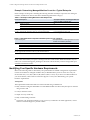
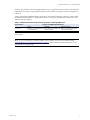
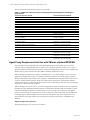
Example: Determining Managed Machine Count for a Typical Enterprise
In this example, an enterprise containing the following machines and objects represents 1177 managed
machines, and therefore falls into the 1000 to 2000 managed machines category.
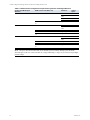
Table 2-1. Example of Sizing Worksheet with Sample Data
Product Description
VCM
VCM
for AD
Anticipated Number of Managed Machines
within the Next 12-24 Months
Windows Servers
92
vSphere/ESX/ESXi Servers
5
Virtual Machines (VM)
50
Windows Workstations
920
Divide total number of AD objects by 100 to get the
10,000 AD Objects/100 = 100 managed machines
approximate ’machine count’ for your AD environment.
to accommodate VCM for AD
TOTAL 1177 managed machines
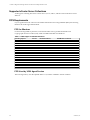
Table 2-2. Sizing Worksheet: Populate with data specific to your enterprise
Product Description
Anticipated Number of Managed Machines within
the Next 12-24 Months (See Note)
VCM
Windows Servers
ESX Servers
Virtual Machines (VM)
Windows Workstations
VCM Divide total number of AD objects by 100 to get the
for AD approximate ’machine count’ for your AD environment.
TOTAL MANAGED MACHINES
NOTE Enter the number you expect to manage in the next 12-24 months. While this number may not
reflect your current licensing plan, planning for the future will ensure that you have enough disk space
available when the need arises.
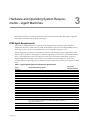
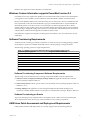
Identifying Your Specific Hardware Requirements
Refer to the following tables to determine your specific hardware and disk configuration requirements.
Use the total number of managed machines that you identified in the previous section to locate your
environment size (1 to 1,000, 1,000 to 2,000, 2,000 to 5,000, or more). If you have over 2000 machines in
your environment, contact VMware Customer Support to assist you in determining your specific
hardware requirements.
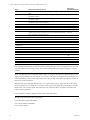
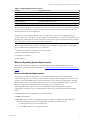
Assumptions:
The requirements listed in this table are based on the following considerations:
12
n
Daily collections using the default filter set with additional Microsoft AD security descriptors collected
using VCM for AD
n
15 days retention of data
n
Simple recovery mode only
n
Daily VCM Patching collections
n
VCM is the only application running on your server. If you intend to run other applications, contact
VMware Customer Support to prevent conflicts
VMware, Inc.