1
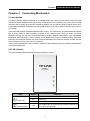
TL-PA211
AV200 Mini Powerline Adapter
Use the Push buttons
2.4 Hardware Connection – Computer
For those computers you wish to be networked by Mini Powerline Adapter, each of the computers must
be properly connected with a Mini Powerline Adapter through an Ethernet (RJ-45) cable.
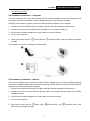
Following are the steps to properly connect the Mini Powerline Adapter to your computer:
1. Connect the provided Ethernet (RJ-45) cable to the Mini Powerline Adapter‟s Ethernet port.
2. Connect the other end of the Ethernet (RJ-45) cable to you computer‟s LAN port.
3. Plug the Mini Powerline Adapter into a wall socket next to the computer.
4. Turn on your computer.
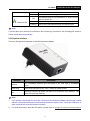
5. Check and confirm that the
are ON.
Power LED and
Ethernet LED on the Mini Powerline Adapter
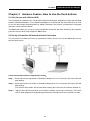
The hardware connection mechanism is shown below:
2.5 Hardware Connection – Internet
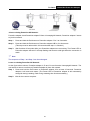
This section describes how to connect the Mini Powerline Adapter into your existing ADSL broadband
connection via ADSL Ethernet port. Follow the procedures describe below to connect the Mini Powerline
Adapter to your ADSL broadband connection:
1. Connect the provided Ethernet (RJ-45) cable to the Mini Powerline Adapter‟s Ethernet port.
2. Connect the other end of the Ethernet (RJ-45) cable to an available Ethernet port of your ADSL
broadband Router.
3. Plug the Mini Powerline Adapter into a wall socket next to the computer.
4. Turn on your computer.
5. Check and confirm that the
Power LED,
Mini Powerline Adapter are ON.
Ethernet LED, and
4
Powerline LED on the