1
2.2
Driver Installation
We recommend you to install the driver before you install the
PCI-1780 card into your system, since this will guarantee a smooth
installation process.
The Advantech Device Drivers Setup program for the PCI-1780 card is
included on the companion CD-ROM that is shipped with your DA&C
card package. Please follow the steps below to install the driver
software:
Step 1: Insert the companion CD-ROM into your CD-ROM drive.
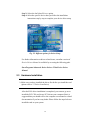
Step 2: The Setup program will be launched automatically if you have
the autoplay function enabled on your system. When the Setup
Program is launched, you’ll see the following Setup Screen.
Note:
✎ If the autoplay function is not enabled on your computer, use Windows
Explorer or the Windows Run command to execute SETUP.EXE on the
companion CD-ROM.
Fig. 2-1 The Setup Screen of Advantech Automation Software
11