1
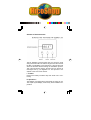
2 Locate and identify the two option Links 1 and 2. Use a pair
of small wire cutters to cut the appropriate links to give the
required configuration.
3 Cutting Link 1 will give a minimum temperature set point
of 16°C (factory default is 5°C). Cut link 2 to display cooling
symbol instead of heating symbol.
4 Replace batteries being sure to observe the correct
polarities. Re-fit to plastic base and tighten retaining screw.
Check unit is functioning as required.
VII Battery replacement
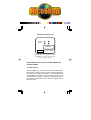
A “flashing” battery low symbol will appear at the bottom left
of the display when the batteries start to approach the end of
their life. This indicates that they should be replaced within
the next month. Ultimately, the display will start flashing and
the thermostat will shut down until the batteries are replaced.
To replace the batteries, the following procedure should be
carried out. The thermostat should be isolated from the mains
before proceeding.
1 Slacken the retaining screw on the unit and open by hinging upwards the top edge.
2 Remove batteries and fit two new “AA” alkaline cells taking
care to observe the correct battery polarities. Check unit is
functioning
3 Re-fit it to the plastic base and check that the RF link still
operates. This can be easily done by adjusting the
requested temperature under or over the level of the
ambient temperature, in order to activate and disactivate
several times the boiler while watching the green LED on
the RF-Max receiver.