1
GL408e / GL412e Barcode printer
Table of contents
2006-11-28
1
General....................................................................................4
1.1 Information on this quick guide ......................................4
1.2 Limitation of liability........................................................4
1.3 Copyright........................................................................5
1.4 Customer Service ..........................................................5
1.5 Explanation of symbols..................................................6
2
Safety ......................................................................................7
2.1 Intended use ..................................................................7
2.2 Incorrect use ..................................................................8
2.3 Special dangers .............................................................8
3
Transport and storage...........................................................9
3.1 Transport information.....................................................9
3.2 Storage ..........................................................................9
4
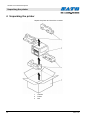
Unpacking the printer..........................................................10
5
Installation ............................................................................11
6
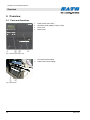
Overview ...............................................................................12
6.1 Parts and functions ......................................................12
7
Setup and initial operation..................................................15
7.1 Connecting the device .................................................15
7.1.1
Connecting the interface cable.....................15
7.1.2
Turning on the device...................................15
7.1.3
Turning off the device...................................15
7.1.4
Removing the power cable...........................16
7.2 Inserting media ............................................................16
7.3 Inserting ribbon ............................................................17
8
Operation ..............................................................................18
8.1 Printing.........................................................................18
8.2 Changing settings ........................................................18
8.3 Cutting the media.........................................................20
9
Disposal ................................................................................21
10
Technical data ......................................................................22
10.1 General information .....................................................22
10.2 Connection values .......................................................22
10.3 Operating conditions....................................................22
10.4 Other specifications .....................................................22
11
Index......................................................................................24
3