1
KIDAtalk Hardware and Software Documentation
KIDAtalk Soft phone
Minimum System Requirements
A PC running Windows ME/2000sp4/XPSP2/Vista:
Hardware requirement:
At least Intel Celeron 300 CPU with 32MB for Windows ME, 128MB for Windows 2000,
256 for Windows XP.
A full-duplex sound card with a microphone and speakers, or any USB phones. Installed
latest DirectX (9.0 at least) is strongly recommended; you can check it by dxdiag.exe. Please
use the latest drivers for your soundcards and USB phones.
Any kind of broadband TCP/IP connection like wired or wireless (802.11x, 802.16x)
Ethernet or wide area connections (WAN) like DSL, E1/T1, etc are recommended. You will
get a good sound quality with a wideband connection.
Setup and Installation
You can download the softphone client from http://www.kidatalk.com.fj. After downloading
the client from the website, doubleclick the .exe file. The file will auto run and guide you
through the rest of the installation process. Be sure that you have the Administrator
priviledge to install applications on your laoptop/PC, else please consult your IT Admin to
have the priviledge included in your laptop/PC. Meanwhile, turn off all music applications.
How to make a Call?
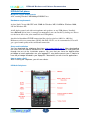
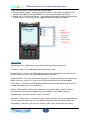
After installing the softphone, you will see a dialer.
KIDAtalk Softphone
2