1
Online Help
TEXTCRUNCHER XTRA HELP: INSTALLATION: MACINTOSH - DIRECTOR
11
INSTALLING THE XTRA ON MAC OSX - Director 11
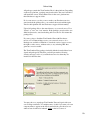
Double-click the installation .dmg file. This will mount a disk named
"TextCruncher" on your desktop.
The first step is to copy the Universal binary version of the Xtra, which will be used
in the authoring environment and also when creating Mac OSX projectors, for both
Intel and PPC machines. This file is located in the install disk image, at:
TextCruncher/Mac Universal/TextCruncher.xtra
This file needs to be copied to the Director 11 Xtras folder. The final pathname for
the Xtra in a default installation of Director 11 will be:
OSX Volume Name/Applications/Adobe Director
11/Configuration/Xtras/TextCruncher.xtra
Windows projectors can also be created directly on Director 11 running on Mac
OSX after installation of the Windows version of the Xtra. It is located on the install
disk, at:
TextCruncher/Windows/TxtCrnch.x32
Copy this file to the Cross Platform resources directory in Director 11, so that it will
be available at:
OSX Volume Name/Applications/Adobe Director 11/Configuration/Cross Platform
Resources/Windows/Xtras/TxtCrnch.x32
3