1
INTRODUCTION
Congratulations! You have purchased
one of the most sophisticated cordless
telephones on the market! The VTech
VT 1930c has been designed to offer
a new standard in cordless telephone
technology.
The VTech VT 1930c also provides
a two-way Intercom/Handset locator
function.
The VTech VT 1930c uses special
memory in both the base and handset
which is not susceptible to power
failures. This provides permanent
storage of all memory dial numbers,
Caller ID (CID) information as well as
the base and handset security codes.
Unlike most other cordless phones, the
VTech VT 1930c digitizes your voice
using advanced ADPCM digital voice
coding to provide noise and distortion
free performance. In most conditions,
you will not be able to tell you are using
a cordless phone. Gone are the
annoyances of static, interference and
having to listen to other peopleÕs
conversations on your cordless phone.
When an optional battery pack is
installed in the base unit, the VTech
VT 1930c uses this battery pack to
provide operational backup in case of
power failure. In this way you have
access to Handset functions during a
total power outage. Calls can still be
placed and received on the Handset
without interruption. Up to 5 hours
backup will be possible with a fully
charged battery pack in the base unit.
The VTech VT 1930c scrambles your
voice before it transmits it. This allows
you the security of knowing that no one
can tune in and eavesdrop on your
conversations.
The VTech VT 1930c decodes and
displays name and/or number Caller
ID (CID) information where available
and when subscribed to. The alphanumeric display can show both the
name and number of the calling party.
Up to 24 name characters or 11 phone
number digits can be displayed.
The VTech VT 1930c informs you
when another extension is currently
in use on the same phone line. The
phone will also alert you when you are
Out of Range, even when you're not
using the phone!
With the VTech VT 1930c, the user can
easily answer a call by pressing any
key other than the OFF, MUTE or
VOLUME Keys. In addition, the handset
keypad and display illuminate while
the handset rings to signal an incoming
call. This is very useful in a dark
environment.
1
INTRODUCTION
¥ Easy answer - When the phone
rings, simply press any key other
than OFF, MUTE, or the Volume
Keys on the handset to answer.
¥ Auto hang up when returning the
handset to the base cradle.
¥ Extension in use indicator.
¥ Message waiting indicator for use
with voicemail service.
¥ Auto line drop from HOLD when an
extension phone is picked up.
¥ Multi-level REDIAL; stores last 5
numbers dialed.
¥ 24 Bit Digital Security Code.
¥ Tone and Pulse Dialling.
¥ Low Battery Detect and Warning
indicator.
¥ Up to 7 hours continuous talk time
or 7 days standby time.
¥ Volume Adjust on Handset and
Base Unit.
¥ HOLD, FLASH and MUTE.
¥ Hearing-Aid Compatible Receiver.
¥ Detachable power supply.
¥ Non-volatile storage of security
code, Caller ID and memory dial
records.
This manual is designed to make you
familiar with the VTech VT 1930c. We
strongly recommend you read the
manual before using your phone.
Special Features
¥ 900 MHz Operation.
¥ Fully Digital Link between Handset
and Base .
¥ Digitally-Scrambled Voice Communication.
¥ Alphanumeric Call Waiting Caller
ID.
¥ 2 row by 12 character 5x7 dot
matrix alphanumeric display.
¥ 50 Caller ID (CID) memory locations.
¥ Speakerphone with second keypad
in Base Unit.
¥ Backlit display on the handset.
¥ Backlit handset keypad.
¥ 21 location Programmable Memory
for 20 Digit Phone Number.
¥ 10 Channel Operation with auto
channel selection.
¥ Out-of-Range indication while the
handset is in use or in standby
mode.
¥ Removable handset battery pack.
¥ Spare battery charger in the base
unit.
¥ Battery back-up in case of power
failure (with optional spare battery
pack installed in base).
¥ Face up or Face down Handset
charging.
2
INTRODUCTION
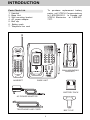
Parts Check List
1. Handset
2. Base Unit
3. Wall mounting bracket
4. AC power adapter
5. Belt clip
6. Battery pack
7. Telephone line cord
To purchase replacement battery
packs, call VTECH Communications
at 1-800-595-9511. In Canada, call
VTECH Electronics at 1-800-2677377.
VT 1930c
FLASH
PHONE
1
2 ABC
4 GHI
5 JKL
6 MNO
7 PQRS
8 TUV
9 WXYZ
PAUSE
HOLD
OFF
2
3
SPARE BATT
abc
4
5
CHARGING
HS IN-USE
6
POWER
mno
ghi
jkl
7
8
9
pqrs
tuv
wxyz
0
#
MEM
Q.MEM
HOLD
*
#
0 oper
*
TONE
1
3 DEF
tone
oper
MEM/PGM
CID
REDIAL
INT.COM
CLR/DEL
MUTE
FLASH
INT.COM
REDIAL
MUTE
SP.PHONE
VOL
DIGITAL
CORDLESS
HANDSET
WALL MOUNTING
BRACKET
900MHz
BASE UNIT
BATTERY PACK
AC POWER ADAPTOR
TELEPHONE LINE CORD
BELT CLIP
3
FCC and IC Regulations
This equipment complies with Parts 15
and 68 of the Federal Communications
Commission (FCC) rules for the United
States. It also complies with regulations RSS210 and CS-03 of Industry
and Science Canada. Operation is
subject to the following two conditions:
(1) this device may not cause interference, and (2) this device must accept
any interference, including interference that may cause undesired operation of the device.
FCC Part 15
Warning: Changes or modifications to
this unit not expressly approved by the
party responsible for compliances could
void the userÕs authority to operate
the equipment.
The equipment has been tested and
found to comply with part 15 of the FCC
rules. These limits are designed to
provide reasonable protection against
harmful interference in a residential
installation. This equipment generates, uses and can radiate radio
frequency energy and, if not installed
and used in accordance with the
instructions, may cause harmful interference to radio communications.
However, there is no guarantee that
interference will not occur in a particular installation. If this equipment does
cause harmful interference to radio or
television reception, which can be
determined by turning the equipment
off and on, the user is encouraged to
try and correct the interference by one
or more of the following measures:
A label is located on the underside of
the base unit containing either the FCC
registration number and Ringer Equivalence Number (REN) or the Industry
Canada (IC) registration number and
Load Number.
You must, upon
request, provide this information to
your local telephone company.
This equipment is compatible with
inductively coupled hearing aids.
Should you experience trouble with
this telephone equipment, please
contact:
VTECH COMMUNICATIONS
SERVICE DEPT. at 1-800-595-9511.
In Canada, call VTECH Electronics at
1-800-267-7377.
-
For repair/warranty information. The
telephone company may ask you to
disconnect this equipment from the
line network until the problem has been
corrected.
-
4
Reorient or relocate the receiving
antenna.
Increase the separation between
the equipment and receiver.
Connect the equipment into an
outlet or on a circuit different from
that to which the receiver is connected.
Consult the dealer or an experienced radio/TV technician for help.
FCC and IC Regulations
This equipment may not be used on
coin service provided by the phone
company or Party Lines.
FCC Part 68
The FCC requires that you connect
your cordless telephone to the nationwide telephone network through a
modular telephone jack (USOC RJ11C,
RJ11W or RJ14).
The REN is useful in determining the
number of devices you may connect
to your telephone line and still enable
the devices to ring when you receive
a call. The general rule is that the REN
value should not exceed 5.0A total;
however, contact your local telephone
company for the specific number in
your area.
Your telephone company may discontinue your service if your equipment
causes harm to the telephone network.
They will notify you in advance of
disconnection, if possible. During
notification, you will be informed of
your right to file a complaint with the
FCC.
IC (Industry Canada)
This telephone is registered for use in
Canada.
Occasionally, your telephone company may make changes in its facilities, equipment, operation, or procedures that could affect the operation
of your equipment. If so, you will be
given advance notice of the change to
give you an opportunity to maintain
uninterrupted service.
Notice:The REN assigned to this
device denotes the number of
devices you may connect to
the telephone loop, which is
used by the device to prevent
overloading, The termination
on a loop may consist of any
combination of devices
subjected only to the
requirement that the sum of
the REN does not exceed five
(5.0)
The base unit contains no user serviceable parts. The handset contains
a user replaceable battery pack.
If it is determined that your telephone
equipment is malfunctioning, the FCC
requires that it not be used and that
it be unplugged from the modular jack
until the problem has been corrected.
Repairs to this telephone equipment
can only be made by the manufacturer
or its authorized agents or by others
who may be authorized by the FCC.
For repair procedures, follow the
instructions outlined under the VTECH
Limited Warranty.
Notice:The Industry Canada label
identifies certified equipment.
This certification means that
the equipment meets certain
telecommunications network
protective, operational and
safety requirements. The
Department
does
not
guarantee the equipment will
operate to the user's
satisfaction.
5
FCC and IC Regulations
Before installing this equipment, users
should ensure that it is permissible to
be connected to the facilities of the
local telecommunications company.
The equipment must also be installed
using an acceptable method of
connection. The customer should be
aware that compliance with the above
conditions may not prevent degradation
of services in some situations.
Caution: Users should not attempt to
make such connections
themselves, but should
contact the appropriate
electrical
inspection
authority, or electrician, as
appropriate.
Your VTech VT 1930c is designed to
operate at the maximum power allowed by the FCC and IC. This means
your handset and base unit can
communicate only over a certain
distance - which will depend on the
location of the base unit and handset,
weather, and the construction and
layout of your home or office.
Repairs to certified equipment should
be made by an authorized Canadian
maintenance facility designated by the
supplier. Any repairs or alterations
made by the user to this equipment,
or equipment malfunctions, may give
the telecommunications company
cause to request the user to disconnect
the equipment.
Users should ensure for their own
protection that the electrical ground
connections of the power utility,
telephone lines and internal metallic
water pipe system, if present, are
connected together. This precaution
may be particularly important in rural
areas.
6
IMPORTANT SAFETY INSTRUCTIONS
When using your telephone equipment,
basic safety precautions should always
be followed to reduce the risk of fire,
electric shock and injury to persons,
including the following:
1. Read and
instructions.
understand
7. This product should be operated
only from the type of power source
indicated on the marking label. If
you are not sure of the type of
power supply to your home, consult
your dealer or local power company.
all
8. Do not allow anything to rest on the
power cord. Do not locate this
product where the cord will be
abused by persons walking on it.
2. Follow all warnings and instructions
marked on the product.
3. Unplug this product from the wall
outlet before cleaning. Do not use
liquid cleaners or aerosol cleaners.
Use a damp cloth for cleaning.
9. Never push objects of any kind into
this product through cabinet slots
as they may touch dangerous
voltage points or short out parts
that could result in a risk of fire or
electric shock. Never spill liquid of
any kind on the product.
4. Do not use this product near water
(for example, near a bath tub,
kitchen sink, or swimming pool).
10.To reduce the risk of electric
shock, do not disassemble this
product, but take it to a VTech
authorized service facility. Opening
or removing cabinet parts other
than specified access doors may
expose you to dangerous voltages
or other risks.
Incorrect
reassembling can cause electric
shock when the appliance is
subsequently used.
5. Do not place this product on an
unstable cart, stand, or table. The
product may fall, causing serious
damage to the product.
6. Slots and openings in the cabinet
and the back or bottom are provided
for ventilation. To protect it from
overheating, these openings must
not be blocked by placing the
product on the bed, sofa, rug, or
other similar surface. This product
should never be placed near or
over a radiator or heat register.
This product should not be placed
in a built-in installation where proper
ventilation is not provided.
11.Do not overload wall outlets and
extension cords as this can result
in the risk of fire or electric shock.
7
IMPORTANT SAFETY INSTRUCTIONS
E. If the product has been dropped
and the cabinet has been
damaged.
12.Unplug this product from the wall
outlet and refer servicing to a
VTech authorized service facility
under the following conditions:
F. If the product exhibits a distinct
change in performance.
A. When the power supply cord or
plug is damaged or frayed.
13.Avoid using a telephone (other
than a cordless type) during an
electrical storm. There may be a
remote risk of electric shock from
lighting.
B. If liquid has been spilled into
the product.
C. If the product has been exposed
to rain or water.
14.Do not use the telephone to report
a gas leak in the vicinity of the
leak.
D. If the product does not operate
normally by following the
operating instructions. Adjust
only those controls that are
covered by the operating
instructions, because improper
adjustment of other controls
may result in damage and will
often require extensive work by
a VTech authorized technician
to restore the product to normal
operation.
VTECH COMMUNICATIONS
SERVICE DEPT. at 1-800-595-9511.
In Canada, call VTECH Electronics at
1-800-267-7377.
SAVE THESE INSTRUCTIONS
8
REPLACING THE BATTERY PACK
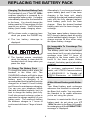
Charging The Handset Battery Pack
The handset of your VTech VT 1930c
cordless telephone is powered by a
rechargeable battery pack. It charges
automatically whenever the handset is
in the base. You should charge the
battery pack for 16 hours when you first
receive your phone. YouÕll know the
battery pack needs charging when:
Alternatively, if you have purchased a
spare battery pack and it has been
charging in the base unit, simply
exchange the drained handset battery
pack with the fully charged replacement battery pack from the base
charger. Place the drained handset
battery pack into the base charger to
recharge.
¥Ê The phone emits a warning tone
when you press the PHONE key.
¥ The low battery message is
displayed:
The base spare battery charger does
NOT charge a battery pack as quickly
as the handset battery charger. A full
charge requires 24 hour when using
the spare battery charger.
¥ The handset seems completely
dead, the display is clear and the
handset does not beep when you
press the keys.
It's Impossible To Overcharge The
Battery Pack
The battery pack can be recharged
many times, but if you get a low battery
message even after 16 hours of
charging in the base cradle (or 24
hours in the base spare battery
charger), the battery pack(s) should be
replaced.
To Charge The Battery Pack
To charge the battery pack, place the
handset in the base unit. The
CHARGING indicator will light to show
the handset is seated properly and the
battery pack is charging. It is
recommended that the battery pack be
charged for at least 16 hours initially
and 8 hours for maintenance charging.
You can use your telephone before
that with diminished capacity, but it is
best to charge the battery pack fully.
It will take several recharge cycles to
maximize the charge capacity of your
battery pack. The maximum battery
life between charges is 7 hours of
continuous talk time or 7 days of standby.
To purchase replacement battery
packs, call VTECH Communications
at 1-800-595-9511. In Canada, call
VTECH Electronics at 1-800-2677377.
A Word About Rechargeable Batteries
Your Nicad battery pack recharges
whenever the Handset is returned to
the Base Unit cradle. You may return
the Handset to its cradle whenever
you're not using the phone.
However, to maximize the life of your
battery pack, do not return your VT
1930c Handset to the Base Unit cradle
for recharging until the LOW BATTERY
message is displayed.
9
REPLACING THE BATTERY PACK
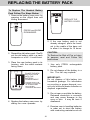
To Replace The Handset Battery
Pack Follow The Steps Below:
1. Remove the battery case cover by
pressing on the ridged lines and
sliding downward.
REPLACE THE
BATTERY COVER
PRESS and SLIDE
DOWNWARD
5. If the new battery pack is not
already charged, place the handset in the cradle of the base unit
to allow it to charge for 16 hours.
2. Discard the old battery pack. DonÕt
put the old battery pack in a trash
compactor or a fire - it could burst.
CAUTION:
To Reduce the Risk of Fire or Injury
to parsons, read and Follow the
Instructions
3. Place the new battery pack in its
housing with the metal contacts
facing down.
1. Use only VTECH rechargeable
battery pack.
2. Do not dispose of the battery in a
fire. The cell may explode.
PLACE THE NEW
BATTERY PACK
INTO THE
BATTERY
COMPARTMENT
IMPORTANT:
Do not dispose of this battery into
household garbage. For information
on recycling or proper disposal, consult your local solid waste collection or
disposal organization.
PLEASE NOTE THE
CORRECT POSITION
OF THE BATTERY
PACK WHEN
CHANGING BATTERY
3. Do not open or mutilate the battery.
Released electrolyte is corrosive
and may cause damage to the
eyes or skin. It may be toxic if
swallowed.
4. Replace the battery case cover by
sliding the cover upwards.
4. Exercise care in handling batteries
in order not to short the battery
with conducting materials such as
10
REPLACING THE BATTERY PACK
rings, bracelets, and keys. The
battery or conductor may overheat
and cause burns.
To purchase replacement battery
packs, call VTECH Communication
at1-800-595-9511. In Canada, call
VTECH Electronics at 1-800-2677377.
VT 1930c
1
2 ABC
4 GHI
5 JKL
6 MNO
7 PQRS
8 TUV
9 WXYZ
3 DEF
#
0 oper
*
TONE
SPARE BATT
CHARGING
HS IN-USE
POWER
MEM
Q.MEM
HOLD
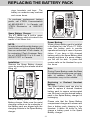
Spare Battery Charger
The VT 1930c has a built-in spare
Battery Charger, which is located in the
cradle of the Base Unit.
REDIAL
FLASH
INT.COM
MUTE
SP.PHONE
VOL
DIGITAL
CORDLESS
900MHz
Power Backup
When a Spare Battery pack is installed
in the Base Unit, the VTech VT 1930c
uses this battery pack to provide
operational backup in case of a power
failure. If you have a fully charged
battery pack in the Spare Battery pack
charger and there is a power outage,
you will still be able to place and
receive calls on the Handset for up to
five hours.
NOTE:
In order to benefit from this feature, you
must obtain an optional Spare Battery
from an authorized VTech dealer, or
by contacting VTech Customer Service at 1-800-595-9511 in U.S. and 1800-267-7277 in Canada.
Installation
Remove the Spare Battery charger
cover by pressing the release tab and
lifting up.
Note:
During Power Backup mode the Base
Unit telephone functions are not operable. In addition, Caller ID (CID)
information may not be reliable.
VT 1930c
1
2 ABC
4 GHI
5 JKL
6 MNO
7 PQRS
8 TUV
9 WXYZ
*
0 oper
#
TONE
3 DEF
Replacing a Drained Handset
battery
The Spare battery pack can also be
used to replace a drained Handset
battery pack to ensure uninterrupted
use. Be sure to put the drained battery
pack in the Spare Battery charger for
recharging.
SPARE BATT
CHARGING
HS IN-USE
POWER
MEM
Q.MEM
HOLD
REDIAL
FLASH
INT.COM
MUTE
SP.PHONE
VOL
DIGITAL
CORDLESS
900MHz
Place a battery pack in the Spare
Battery charger. Make sure the metal
charging contacts on the underside of
the battery pack are aligned with the
charging contacts in the Spare Battery
charger.
Please note that the Spare Battery
compartment charges at a slower rate
than a battery pack charging in the
Handset. It takes 24 hours to fully
charge a battery pack in the Spare
Battery charger.
11
GETTING STARTED
Setting Up Your VTech VT 1930 c
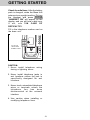
Choose an area near an electrical
outlet and a telephone wall jack.
AC Power Adapter
Plug the AC power adapter into an
electrical outlet and the DC connecter
to the back of the base unit.
PULSE
TONE
ON
OFF
RINGER
TONE PULSE
SWITCH
BASE RINGER
ON/OFF
SWITCH
TELEPHONE
WALL JACK
AC
OUTLET
9V DC
Charge the handset battery pack
before use. The battery pack recharges
automatically whenever the handset is
in the base unit. The batteries must
be charged for 16 hours before using
your phone for the first time.
TEL. LINE
1
4 GHI
7 PQRS
*
TONE
CAUTION:
Use only CLASS 2 9V DC POWER
SUPPLY included with your phone.
POWER
HS IN-U
MEM
CHARGE THE
HANDSET
BATTERY PACK
FOR 16 HOURS
BEFORE USING
Handset Ringer
The handset ringer is programmed ON
as the factory default setting. Refer
to PROGRAMMING THE RINGER for
more information.
HOLD
INT.COM
DIGITAL
CORDLESS
Setting the Tone/Pulse Switch
The TONE/PULSE switch is located
on the bottom of the base unit and is
factory set to TONE. If you have touch
tone service, do not change the switch
setting. If you have rotary (Pulse)
service, set the switch to PULSE.
90
Connect Telephone Line Cord
Plug one end of the telephone cord into
a wall jack and the other end into the
back of the Base Unit.
12
GETTING STARTED
Check for a dial tone. After the battery
pack is charged, rotate the Base Unit
antenna to an upright position. Pick up
the Handset and press PHONE
"HANDSET ON" will appear on the
display, and you will hear a dial tone.
If not, see ÔIN CASE OF
DIFFICULTYÕ.
Fill in the telephone number card on
the base unit.
VT 1930c
1
4 GHI
7 PQRS
*
TONE
FILL IN THE
TELEPHONE
NUMBER CARD
HS
POWER
MEM
HOLD
INT.COM
DIGITAL
CORDLESS
9
CAUTION:
1. Never install telephone wiring
during a lightning storm.
2. Never install telephone jacks in
wet locations unless the jack is
specifically designed for wet
locations.
3. Never touch uninsulated telephone
wires or terminals unless the
telephone line has been
disconnected at the network
interface.
4. Use caution when installing or
modifying telephone lines.
13
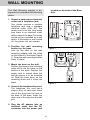
WALL MOUNTING
The Wall Mounting bracket is designed to fit on standard Wall Mounting
plates.
located on the back of the Base
Unit .
1. Choose a spot near an electrical
outlet and a telephone jack.
Your phone requires a modular
telephone jack and a standard
electrical outlet (120v AC). The
power cord is six feet long; make
sure there is an electrical outlet
within reach of the base. The outlet
should not be controlled by a wall
switch. If the switch is ever turned
off, the phone will not operate.
PULSE
TONE
ON
OFF
RINGER
2. Position the wall mounting
bracket on the base.
Line up the tabs on the wall
mounting adapter with the holes
on the bottom of the base (Figure
1). Snap the wall mounting bracket
firmly in place.
Figure 1
7 PQRS
8 TUV
*
0 oper
TONE
9 WXYZ
#
SPARE BATT
POWER
HS IN-USE
MEM
CHARGING
Q.MEM
HOLD
FLASH
INT.COM
REDIAL
MUTE
SP.PHONE
VOL
3. Mount the base on the wall.
Position the base so the mounting
studs will fit into the holes on the
bottom of the base. Position the
power cord to extend down the
wall the phone is to be mounted
on. Slide the base down on the
mounting studs until it locks into
place.
DIGITAL
CORDLESS
Figure 2
4. Connect the telephone line cord.
The telephone line cord has a
snap-in plug at each end. Insert
one of the plugs into the jack on
the back of the base. Insert the
other end of the plug into the wall
jack.
5. Plug the AC adapter into an
electrical outlet and the DC
connecter into the power jack
14
900MHz
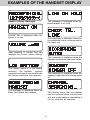
EXAMPLES OF THE HANDSET DISPLAY
Handset Display Messages
This message is displayed when the
base/handset is on hold.
PHONE ON is displayed when the
phone is in use.
This message is displayed when the
live telephone line is not connected to
the base unit.
After pressing a volume key, this
displays the current volume setting.
This message is displayed when the
handset microphone has been muted.
This display warns of a low battery
condition. The handset
typically
operates for at least 5 minutes after the
low battery indication first appears.
This message is displayed when the
handset ringer has been programmed
off.
This message is displayed when the
Base Unit pages the handset.
This display warns that the handset
has lost communication with the base
unit and is attempting to reestablish a
link by scanning all channels.
15
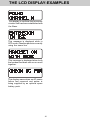
THE LCD DISPLAY-EXAMPLES
This display is confirms that a communication link has been established with
the Base.
This message is displayed while in
OFF mode, if another phone is currently
using the same line.
This message is displayed when both
the handset and base unit are on a call
together.
This display warns when an AC power
failure has occurred and power is
being supplied by an optional spare
battery pack.
16
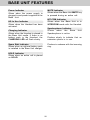
BASE UNIT FUNCTION KEYS
Speakerphone Key
Press this key to either initiate or
answer a call from the Base Unit
Speaker. Press it again to terminate
your call.
HOLD Key
Press this key to place your
Speakerphone call on hold. Press
either HOLD or SPEAKER PHONE
to return to the call.
Volume Key
Press the appropriate key to raise or
lower the Speakerphone volume level.
Holding down the key will continuously
raise or lower the volume. There are
a total of 8 volume levels.
With a Speakerphone call on HOLD,
picking up an extension phone, or
activating the VT 1930c Handset will
turn the Speakerphone OFF.
FLASH Key
During a Speakerphone call, press this
key to flash the line. The feature is
commonly used in conjunction with
Call Waiting.
Base Ringer ON/OFF Switch
Located on the bottom of the Base
Unit, this switch controls the Base Unit
ringer. It has no effect on the Handset
ringer.
MUTE Key
Press this key to mute the Base Unit
microphone during a Speakerphone
call. Press MUTE again to return to
the 2-way conversation.
TONE/PULSE Switch
Located on the bottom of the Base
Unit, set this switch consistent with
your local phone system. In most
cases, the appropriate setting is
TONE(TT).
Intercom (INT.COM) Key
Press this key to Page the Handset.
The Handset will ring 5 times. The
Handset user can respond by pressing
INT.COM . The Handset and Base
Unit have now entered 2-way
INTERCOM mode.
MEM Key
Press this key to enter Memory (Speed)
Dialing Mode.
QUICK MEM (Q.MEM) Key
Press this key to dial the contents of
memory location #00. The Base
speakerphone can be either ON or
OFF to use this feature.
Press INT.COM to terminate INTERCOM mode.
This feature is also useful as a Handset
locator in the event it is misplaced.
REDIAL Key
Press this key to redial the last number
you dialed from the Base Unit. This
feature is independent of the Handset
redial feature.
17
THE HANDSET LAYOUT
ANTENNA
VOLUME UP & DOWN
BATTERY COMPARTMENT
DISPLAY
FLASH
PAUSE
PHONE
OFF
HOLD
1
2
3
HOLD
OFF KEY
PHONE KEY
abc
4
5
6
ghi
jkl
mno
7
8
9
tuv
wxyz
0
#
pqrs
*
tone
MEM/PGM
INT.COM
oper
CID
REDIAL
CLR/DEL
MUTE
DIALING KEYS (0-9)
TONE (Temporary Tone)
REDIAL
CALLER ID (CID)
MUTE
CLEAR/DELETE (CLR/DEL) KEY
INTERCOM (INT.COM) KEY
MEMORY/PROGRAM
(MEM/PGM) KEY
CHARGING CONTACTS
18
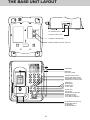
THE BASE UNIT LAYOUT
9V DC
PULSE
TONE
TEL. LINE
AC POWER JACK
ON
PHONE CORD JACK
OFF
RINGER
TONE/PULSE SWITCH
BASE RINGER ON/OFF SWITCH
ANTENNA
MEMORY
DIALING CARD
VT 1930c
1
2 ABC
3 DEF
4 GHI
5 JKL
6 MNO
7 PQRS
8 TUV
9 WXYZ
*
0 oper
TONE
POWER INDICATOR
HS IN-USE INDICATOR
CHARGING INDICATOR
SPARE BATT INDICATOR
#
MEM KEY
Q.MEM KEY
REDIAL KEY
FLASH KEY
SPARE BATT
POWER
HS IN-USE
MEM
CHARGING
Q.MEM
HOLD
FLASH
INT.COM
REDIAL
MUTE
MUTE KEY
HOLD KEY
SPEAKERPHONE KEY
INTERCOM KEY
VOLUME UP KEY
VOLUME DOWN KEY
SP.PHONE
VOL
DIGITAL
CORDLESS
900MHz
CHARGING CONTACTS
SPARE BATTERY
CHARGING
COMPARTMENT
19
BASE UNIT FEATURES
MUTE Indicator
Glows when the Base Unit MUTE key
is pressed during an active call.
Power Indicator
Glows when the power supply is
plugged in and power is applied to the
Base Unit.
INT.COM Indicator
Glows when the Base Unit is in
INTERCOM mode with the Handset.
HS In Use Indicator
Glows when the Handset has been
activated.
Speakerphone Indicator
Glows when the Base
Speakerphone is active.
Charging Indicator
Glows when the Handset is placed in
the Base Unit cradle. If there is no
battery pack in the Handset, the
CHARGING LED will flash slowly.
Unit
Flashes slowly to indicate that an
extension phone is in use.
Flashes in cadence with the incoming
ring.
Spare Batt Indicator
Glows when an optional battery pack
is installed in the Base Unit charger.
HOLD Indicator
Glows when an active call is placed
on HOLD.
20
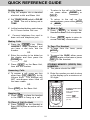
QUICK REFERENCE GUIDE
Set-Up Adapter
¥ Plug AC adapter into a standard
electrical outlet and Base Unit.
.
To return to the call on the Handset, press either PHONE or
HOLD .
¥ Set TONE/PULSE switch to PULSE
or TONE. The unit is factory set to
TONE.
.
To return to the call on the
speakerphone, press either HOLD
or SPKP .
¥ Let the handset battery pack charge
for 16 hours before first use.
To Mute A Call
¥ Press
MUTE
to disable the
Handset or Base Unit microphone.
¥
Connect telephone line cord to
base unit and telephone jack.
¥ Press MUTE again to return to
normal two way conversation.
Making Calls
¥ Press the PHONE key. When
HANDSET ONis displayed and
you hear a dial tone, dial the
number.
OR
¥ Enter the number to be dialed on
the display and then press the
PHONE key.
OR
¥ Press SPKP on the Base Unit,
then dial the number.
To Page The Handset
¥ To page from the base, press
INT.CO .
¥ To cancel the PAGE either press
INT.CO again on the base or press
OFF on the handset.
STORING MEMORY (SPEED) DIAL
NUMBERS:
¥ The phone should be OFF .
Answering Calls
¥ To answer a call, press any key
other than OFF , MUTE , or the
Volume Keys. The handset will
NOT auto-answer when lifted off
the base cradle.
OR
.
Press SPKP on the Base Unit.
¥ Enter the number you wish to store
on the display up to a maximum of
20 digits.
FLASH
PAUSE
PHONE
PHONE
OFF
HOLD
1
2
3
STORING SPEED DIAL
NUMBERS
abc
4
Hanging Up
¥ Press OFF or place the handset
in the cradle to hang up a call.
9
tuv
wxyz
*
tone
INT.COM
21
6
mno
jkl
8
MEM/PGM
To Place A Call On Hold
¥ Press HOLD on the Handset or
Base Unit to place an active call on
HOLD.
5
ghi
7
pqrs
0
#
DIAL YOUR PHONE
NUMBER
PRESS
MEM/PGM
oper
CID
REDIAL
CLR/DEL
MUTE
PRESS LOCATION
(00..20)
QUICK REFERENCE GUIDE
¥ Press and hold MEM/PROG . The
handset will display PROGRAM
LOCATION.
in memory location 00 can also be
dialed simply by pressing the
Q.MEM key on the Base Unit.
¥ Enter a two digit memory location
(00..20). The unit will store the
number, emit a warbled tone to
confirm successful programming
and exit program mode.
Caller ID (CID)
¥ To view information stored in Caller
ID (CID) memory, press CID on
the handset.
¥ The display will show the most
recent call received.
Memory Dialing (speed Dialing):
FLASH
PAUSE
MEMORY DIALING
FLASH
PAUSE
PHONE
OFF
PRESS
PHONE
1
PHONE
HOLD
2
OFF
CID - CALLER ID
3
abc
HOLD
3
1
2
4
5
6
ghi
jkl
mno
7
8
9
tuv
wxyz
0
#
abc
pqrs
PRESS MEM/PGM
YOU WILL SEE
4
5
6
ghi
jkl
mno
7
pqrs
*
tone
MEM/PGM
*
tone
MEM/PGM
INT.COM
oper
CID
REDIAL
CLR/DEL
MUTE
INT.COM
8
9
tuv
wxyz
0
#
PRESS CID
YOU WILL SEE
oper
CID
CID
REDIAL
CLR/DEL
MUTE
ENTER MEMORY
LOCATION (00..20)
¥ To view the time and date of the
call press and hold the 7
key.
The time and date will be shown
along with the phone number. For
example :
From the Handset
¥ Press the PHONE key.
¥ Press MEM/PROG .
¥ Enter the memory location of the
phone number you wish to dial
(01..20). The number will be dialed.
¥ To view other calls, scroll
backwards and forwards by using
the
( ) and
(# ) keys.
From the Base Unit
.
Press the SPEAKER PHONE key.
.
Press MEM .
.
Enter the memory location of the
phone number you wish to dial
(00..20). The number will be dialed
automatically. The number stored
*
¥ To view additional name characters not shown on the display,
press and hold the
(9) key.
¥ To exit press OFF .
22
QUICK REFERENCE GUIDE
Using REDIAL
From the Handset:
¥ Press the
PHONE key, then
REDIAL to automatically redial
the last number you dialed.
Or
¥ Press
REDIAL so that the
number is shown on the display
and then press the PHONE key.
From the Base Unit :
¥ Press the
SPKP
REDIAL .
key, then
HOLD
From the Handset :
¥ Press HOLD to put a call on hold.
¥ To return to the call, press HOLD
or the PHONE key.
From the Base Unit :
¥ Press HOLD to put a call on hold.
.
To return to the call, press HOLD
or the SPKP key.
23
BASIC OPERATION
to increase or decrease the volume.
Holding either key down will
continuously change the volume setting.
The earpiece volume level indicator on
the display will change accordingly.
There are four volume levels.
Making Calls
From the Handset:
Press the PHONE key and wait for
dial tone. Then dial the number you
want.
FLASH
You can use your VTech VT 1930c
cordless phone with services such as
Call Waiting. Simply press the PHONE
key to FLASH the line.
Or
Enter the number onto the display first,
then press the PHONE key. This
will dial the number that is displayed
on the display after 2 seconds. See
ADVANCED DIALING.
REDIAL
To REDIAL the last number you dialed,
press the PHONE key, then press
REDIAL . The phone will automatically
dial the number. The number will be
shown on the display.
If you make a mistake when dialing,
press OFF to hang up, then press
the PHONE key to get the dial tone
again.
Clearing The Display
The display can be cleared by pressing
and holding the CLR/DEL key down
until the display clears.
From the Base Unit:
¥ Press the SPKP key and wait for
dial tone. Then dial the number you
want.
MUTE
¥ Press MUTE during an active call
to disable the microphone.
Disconnecting
To end a call, either place the handset
back in the base, press OFF on the
handset, or press SPKP on the Base
Unit (for speakerphone calls).
¥ Press MUTE again to return to
normal operation.
Ringer MUTE
¥ Press MUTE during incoming
ringing to disable the ringer for the
duration of the call.
Answering Calls
From the Handset:
Press any key other than OFF , MUTE
or the VOLUME keys to answer your
call.
HOLD
¥ Press HOLD on the Handset or
Base Unit to place an active call on
hold.
¥ To return to the call on the Handset,
press either PHONE or HOLD .
¥ To return to the call on the
Speakerphone, press either HOLD
or SPKP .
From the Base:
Press the SPKP key.
VOLUME Controls-Handset
The volume controls for the handset
are located on the side of the unit.
Press the
(up) or
(down) keys
24
BASIC OPERATION
With a Handset call an hold, picking
up an extension phone, or activating
the VT 1930c Speakerphone will turn
the Handset OFF.
With a Speakerphone call on hold,
picking up an extension phone, or
activating the VT 1930c Handset will
turn the Speakerphone OFF.
To transfer a call from the Handset to
Base Unit Speakerphone first place
the Handset call on hold, then press
SPKP on the Base Unit.
To transfer a call from the Base Unit
Speakerphone to the Handset, first
place the Speakerphone call on hold,
then press PHONE on the Handset.
25
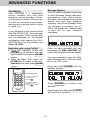
ADVANCED FUNCTIONS
Message Waiting
Your VT 1930c is capable of detecting
a Visual Message Waiting Indication,
generated by many phone service
providers. If you subscribe to Voicemail
service from your local telephone
company, and Visual Message Waiting Indication is provided, the VT
1930c will display the following data
to alert you to new, unplayed
messages:
Call Waiting
CALL WAITING is a subscription
service, available from most local
telephone service providers. Contact
your provider for details. While you are
on a call, you will hear an alert signal,
warning that a second caller is trying
to reach you.
If you subscribe to this service linked
with CALLER ID (CID), the name and/
or phone number of the second caller
can be displayed on the handset
immediately after hearing the CALL
WAITING alert. For more details, see
Caller ID (CID).
Switching calls using FLASH
¥ From the Handset: press the
PHONE key to switch to the new
call. To switch back press PHONE
again.
¥ From the Base Unit: press the
FLASH key to switch to the new
call. To switch back press FLASH
again.
Once you have reviewed your new
messages, the MSG. WAITING indication will be cleared from the display.
You can temporarily clear the Message Waiting screen. With the Handset in the OFF mode.
Press and Hold CLR/DEL until the
handset displays :
FLASH
PAUSE
PHONE
PHONE
OFF
HOLD
1
2
5
6
ghi
jkl
mno
7
8
9
tuv
wxyz
4
pqrs
*
tone
MEM/PGM
INT.COM
0
SWITCHING CALLS
3
abc
#
oper
CID
REDIAL
CLR/DEL
MUTE
TO SWITCH OVER TO
THE NEW CALL
PRESS PHONE
TO SWITCH BACK TO
THE FIRST CALL
PRESS PHONE
AGAIN
Press CLR/DEL to confirm your
decision.
Pressing any key other than CLR/DEL
will cancel the operation.
26
ADVANCED FUNCTIONS
The MSG. WAITING alert may reappear, as long as unplayed messages
remain in your Voicemail box.
Programming The Ringer
The Handset and Base Unit ringers are
capable of four different types of ringer
tones. The following section detail how
to select different ringer types and how
to turn off the ringer.
NOTE:
Message Waiting works in conjunction
with Voicemail service from many local
phone companies. This is an optional
service. You are not required to
subscribe to it.
Changing Ringer Types
To program, the Handset must be OFF.
To select a different ringer type for the
Handset Ringer do the following:
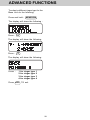
Temporary TONE
If you have rotary (PULSE) telephone
service switch is set to PULSE), this
feature allows you to temporarily
switch to TONE dialing for such
purposes as remote access to
answering machines, bank-by-phone
services, use of calling cards and other
special services.
Press and hold: MEM/PGM
The display will show the following:
Press :
First, dial the call normally. Then
activate the Temporary Tone feature
by pressing TONE (the
* key). You
can then press the numbers or symbols
you need, and your phone will send the
proper signals.
The display will show the following:
To end the call, press OFF or place
the handset back in the base. If
using the speakerphone, press SPKP
to end the call. The phone will automatically go back to rotary (PULSE)
service.
Press :
PAUSE
OFF
OFF
HOLD
3
1
2
4
5
6
ghi
jkl
mno
7
8
9
pqrs
tuv
wxyz
abc
Press :
**
tone
tone
MEM/PGM
INT.COM
0
#
oper
CID
REDIAL
CLR/DEL
MUTE
TEMPORARY TONE
DIAL YOUR
NUMBER
PRESS
*
tone
PRESS THE NUMBERS
OR SYMBOLS
PRESS
1
The display will show the following:
FLASH
PHONE
#
OFF
1
2
3
4
0
for
for
for
for
for
ringer
ringer
ringer
ringer
ringer
Press OFF TO exit.
27
type
type
type
type
type
1
2
3
4
OFF
ADVANCED FUNCTIONS
To select a different ringer type for the
Base Unit do the following:
Press and hold : MEM/PGM
The display will show the following :
Press :
#
The display will show the following:
Press :
2
The display will show the following:
Press :
1
2
3
4
for
for
for
for
ringer
ringer
ringer
ringer
type
type
type
type
1
2
3
4
Press OFF TO exit.
28
ADVANCED FUNCTIONS
NOTE:
The phone will dial any number
which is shown on the display. If you
do not want to dial the number shown
on the display, it can be changed by:
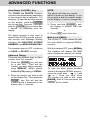
Clear/Delete (CLR/DEL) Key
The CLEAR and DELETE functions
can be accessed separately depending
on how long the key is held down. For
example, to clear the last digit entered
on the display, press the CLR/DEL
key for less than 1 second. Press and
hold the CLR/DEL key for more than
1 second to completely clear the
display.
¥ Press and hold CLR/DEL until
the display is cleared, then dial
normally.
or
¥ Press OFF and start over.
The delete function is also used to
delete Caller ID (CID) records, memory
dial records, and Message Waiting
indication. See DELETING STORED
NUMBERS, and MESSAGE WAITING.
Multi Level REDIAL
The VTech VT 1930c stores the last
five calls dialed in a special REDIAL
memory.
With the Handset OFF, press REDIAL
The Handset will display the most
recent telephone number you dialed:
The handset must be OFF to perform
a CLEAR or DELETE function.
Advanced Dialing
There are two different ways to dial a
number from the Handset.
1. Press the PHONE key and wait
for a dial tone. Then dial the
number you want either manually,
using MEMORY (MEM) dialing,
Caller ID (CID) dialing or REDIAL.
To view the other phone numbers
stored in the special REDIAL memory,
press the scroll keys
( ) and
*
aaa ( # )a. Once you have found
the number you wish to dial, press
PHONE . After a 2 second pause, the
number will be dialed.
2. Enter the number you wish to dial
on the display first. Then press the
PHONE key. This will dial the
number which is displayed on the
display after 2 seconds.
29
MEMORY DIALING
Storing Memory (Speed) Dial
numbers
To program a speed dial location, do
the following:
¥ With the Handset OFF, enter the
telephone number you wish to
store (20 Digits Maximum).
Unsuccessful programming can result
from not correctly completing the
programming sequence. If this
message appears, simply repeat the
programming sequence.
¥ Enter program mode by pressing
and holding MEM/PGM . The
display will show the following:
¥ The number stored in memory
location 00 can be accessed by
pressing the one touch speed dial
Q.MEM key on the Base Unit.
Dialing From Memory
From the Handset
¥ Press PHONE to get a line.
¥ Enter the memory location (00..20)
you wish to store the number in.
After the second memory location
digit is entered, the unit will emit a
warbled tone (a short series of
beeps) to confirm successful
programming and exit program
mode.
¥ Press MEM/PGM ; you're prompted
to enter a speed dial location
number:
FLASH
PAUSE
PHONE
PHONE
¥ Enter a 2 digit location number
(00..20).
OFF
HOLD
1
2
3
STORING SPEED DIAL
NUMBERS
abc
5
6
ghi
jkl
mno
7
8
9
tuv
wxyz
0
#
4
pqrs
*
tone
MEM/PGM
INT.COM
DIAL YOUR PHONE
NUMBER
PRESS
¥ The number stored in that location
will be displayed and immediately
dialed.
Or
¥ Beginning from the OFF mode,
press MEM/PGM followed by a
2 digit location number (00..20).
MEM/PGM
oper
CID
REDIAL
CLR/DEL
MUTE
PRESS LOCATION
(00..20)
If programming is unsuccessful the
unit will display:
30
MEMORY DIALING
¥ Press MEM/PGM again to exit
memory dial mode and leave the
number on the display.
¥ Press PHONE . The number on
the display will be dialed after a 2
second pause.
¥ Press OFF to exit.
NOTE:
Stored numbers are retained in memory
even if the base loses its power or the
handset battery is removed.
¥ Note that if digits were on the
display prior to entering memory
dial mode, the contents of the
speed dial memory will be
appended to those digits. For
example, if 1503 was on the
display and the contents of the
memory location is 6438981, then
the display would show the
following upon exiting memory dial
mode:
Storing Special Codes
To insert a pause in a phone number,
press HOLD at the appropriate point
when entering the number . This
inserts a 2 second pause. A " P "
appears in the display to show the
pause. For longer pauses, press HOLD
two or more times. Each press makes
the pause 2 seconds longer and is
treated as a stored digit.
If your phone is connected to a PBX,
you can store the PBX access number
and a pause before the phone
number. For example, to store 9PAUSE-555-1234 in memory location
08, do the following:
1. Press
9
2. Press HOLD
3. Dial 5551234
4. Press and hold MEM/PGM
5. Enter 08
Changing Stored Numbers
To change or replace a stored number
simply enter the new number on the
display and store it in the memory
location you wish to change.
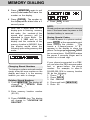
Deleting Stored Numbers
¥ Press MEM/PGM . The display will
change to "SPEED DIAL
LOCATION_ _".
¥ Enter memory location number
(00..20).
¥ Press CLR/DEL key. The display
will change to "LOCATION XX
DELETED".
31
CALLER ID (CID)
Caller ID (CID)
Your VTech VT 1930c cordless phone
is capable of displaying the name and/
or phone number of the person calling,
before you answer the phone.
Subscription to Caller ID service
through your local phone company is
required to utilize this feature.
NOTE:
You must be in an area where Caller
ID (CID) service is available and you
must subscribe to it to use this feature.
If you do not subscribe to the Caller
ID (CID) service, the phone will still
operate normally, except that the
Caller ID (CID) information is not
received or displayed.
If you subscribe to alphanumeric
(name and number) Caller ID service,
the calling party's name and phone
number (when available) will be
displayed on the handset screen while
the phone is ringing.
Receiving and Storing Calls
This unit receives and displays all
Caller ID (CID) information: the callerÕs
telephone number, the caller's name
and the exact date and time of the call.
If you subscribe to numeric (number
only) Caller ID service, the calling
party's phone number (when available)
will be displayed on the handset
screen while the phone is ringing.
The phone sequentially numbers these
call records and retains them in the
unitÕs memory for later review. The
unit can store up to 50 numbers in its
memory.
Call Waiting Caller ID (Type II CID)
Your VTech 1930c cordless phone is
also capable of displaying Caller ID
information in connection with a Call
Waiting signal. If you are on a call, and
receive a Call Waiting alert signal, the
handset will display the name and/or
number (when available) of the party
trying to reach you. As above,
subscription to Call Waiting ID service
through your local phone company is
required in order to utilize this feature.
Once the Caller ID (CID) memory is
full, any new call forces a deletion of
the oldest call record.
Dialing From Caller ID (CID) Memory
NOTE:
Only the last 7 digits of any number are
displayed when dialing from Caller ID
(CID) memory.
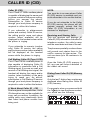
For example, when you press and hold
the 7 key to view the phone number,
you would see the following:
A Word About Caller ID - CID
Due to regional incompatibilities, Caller
ID information may not be available for
every call you receive. In addition, the
calling party may intentionally block
their name and phone number from
being sent.
32
CALLER ID (CID)
However, when you dial directly from
Caller ID (CID) memory, only the last
7 digits of the received telephone
number will be used. Consequently,
you would actually dial this:
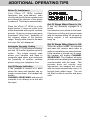
Special Message Indicators
Out of Area Calls
If for any reason the telephone number
of the caller is unavailable, or if the
caller is outside the Caller ID (CID)
service area, the message UNAVAILABLE is displayed.
The VTech VT 1930c was designed to
accommodate this situation. If you
need to temporarily add a long dlstance
prefix and /or area code (such as 1503)
before the Caller ID (CID) number, do
the following:
¥ Beginning from the standby mode,
key in the necessary digits. Your
display will look like this:
ÒPrivateÓ Calls
If the caller has exercised the option
to block his or her number from being
sent, then the display will show
PRIVATE.
¥ Then, to temporarily add the last 7
digits only from a Caller ID (CID)
memory, press CID .
Transmission Error
If an error is detected, then the Caller
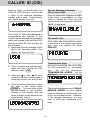
ID (CID) information is incomplete
and
will not be displayed.
TRANSMISSION ERROR will be
displayed.
¥ Using the
( ) and
(#) keys,
*
scroll through the received calls to
locate the number you wish to dial.
¥ Once you have located the number
you wish to dial, simply press
PHONE . The last seven digits
will be added to the numbers
already in the display, and the
whole number shown below will be
automatically dialed.
The occasional appearance of TRANSMISSION ERROR on your display
does not indicate a problem with your
unit or your telephone line. However,
if this appears frequently, you may
want to notify your telephone company.
33
CALLER ID (CID)
Reviewing Numbers
Calls stored in memory can be
reviewed by pressing CID . The
display will show the number of the
most recent (Call #01). The top line
of the display is used to indicate
the memory location number and the
bottom line of the display shows the
name, see below:
Pressing the
( ) key displays the
*
next lower in sequence call record.
Likewise, pressing the
(#) key
displays the next higher in sequence)
call record. The higher the call number,
the older the call.
To save you time in reviewing call
records, you can Òwrap-aroundÓ the
call history log. For example, if you
press the
( ) key enough to scroll
*
back to the first record, pressing it
again will force the display to go to the
very end of the call record.
There may be additional characters
in the name which can not be
shown on the current display. Press
the
( 9 ) key. This will overwrite
the Caller ID (CID) memory location on
the top line to show up to a maximum
of 15 alpha characters for the
duration of the key press. The first
12 alpha characters will be on the top
line with up to 3 additional characters
on the second line.
REVIEWING NUMBER
FLASH
PAUSE
OFF
OFF
PHONE
HOLD
1
2
3
abc
4
5
6
ghi
jkl
mno
8
9
pqrs
tuv
wxyz
*
0
#
7
onee
tton
oper
MEM/PGM
CID
REDIAL
CLR/DEL
MUTE
INT.COM
To find out the corresponding phone
number as well as the date and
time of the call, press and hold
the 7
key. The date and time will
be shown. Releasing the key will again
show the caller's name.
34
PRESS
CID
PRESS THE
TO SCROLL
AND
KEYS
PRESS AND HOLD THE 7
KEY TO VERIFY NUMBER
PRESS
OFF
TO EXIT
CALLER ID (CID)
¥ Press and hold the CLR/DEL key
for more than 2 seconds to delete
the entire contents of Caller ID
(CID) memory. The display will
show the following for a final
confirmation, before the entire
Caller ID (CID) memory is erased:
Deleting Numbers
Pressing the CLR/DEL button deletes
the Caller ID (CID) number displayed.
¥ While the phone is in Caller ID
(CID) mode, press the CLR/DEL
key once to delete the current call
and the display will show:
¥ Pressing CLR/DEL will confirm
the operation and the display will
then show:
¥ The older Caller ID (CID) records
will be moved forward by one
location .
¥ The message will remain on the
display for 2 seconds.
¥ Pressing any key other than
CLR/DEL will cancel the operation.
35
ADDITIONAL OPERATING TIPS
Noise Or Interference
Your VTech VT 1930c cordless
telephone has auto-channel scan
circuitry which will detect excess noise
and change the channel of the phone
to reduce it. This is done automatically.
Out Of Range When Phone Is On
If you are presently engaged in a
phone
conversation move closer to the base.
If the base unit does not communicate
with the handset within 25 seconds of
losing contact, it will automatically
hang up.
Since the VTech VT 1930c is a fully
digital phone, it does not suffer from
noise associated with regular cordless
phones. At times you may experience
occasional "drop outs", especially at
the extreme edges of the phone's
range. Simply move closer to the base
unit and this will disappear.
Out Of Range When Phone Is Off
When the phone is OFF, the handset
and base still monitor each other to
make sure that they can communicate.
If the handset is moved out of range,
the handset will display CHANNEL
SEARCHING. The Handset will scan
all channels in an attempt to reestablish
communication with the base. This
process does not require user
intervention; the handset will re-link
with the base automatically once it is
brought back within range. The unit
will then be able to receive and place
calls.
Automatic Security Coding
Your VTech VT 1930c phone is factory
set with 16.8 million possible security
codes. This unique security code
allows your handset and base to
recognize each other, and minimizes
the possibility of another cordless
phone using your telephone line.
Out Of Range indication
If the handset is moved to a point
where the base and handset can no
longer communicate, the handset will
display
CHANNEL SEARCHING and scan all
channels in an attempt to re-link with
the base.
36
MAINTENANCE
Taking Care Of Your Telephone
Your VTech VT 1930c cordless
telephone contains sophisticated
electronic parts, so it must be treated
with care.
Cleaning your telephone
Your telephone has a durable plastic
casing that should retain its luster for
many years. Clean it only with a soft
cloth slightly dampened with water or
a mild soap. Do not use excess water
or cleaning solvents of any kind.
Avoid rough treatment
Place the handset down gently. Save
the original packing materials to protect
your telephone if you ever need
to ship it.
Remember that electrical appliances
can cause serious injury if used when
you are wet or standing in water. If
your base unit should fall into water,
DO NOT RETRIEVE IT UNTIL YOU
UNPLUG THE POWER CORD AND
TELEPHONE LINE CORDS FROM
THE WALL. Then pull the unit out by
the unplugged cords.
Avoid water
Your telephone can be damaged if it
gets wet. Do not use the handset
outdoors in the rain, or handle it with
wet hands. Do not install your base
unit near a sink, bathtub or shower.
Electrical storms
Electrical storms can sometimes cause
power surges harmful to electronic
equipment.
For your own safety, use caution when
using electric appliances during storms.
37
IN CASE OF DIFFICULTY
If you have difficulty operating your
phone, the suggestions below should
solve the problem. If you still have
difficulty
after
trying
these
suggestions, call
VTECH
Communications at 1-800-595-9511.
In Canada, call VTECH Electronics at
1-800-267-7377.
YOU GET NOISE, STATIC, OR A
WEAK SIGNAL WHEN YOUÕRE
AWAY FROM THE BASE UNIT.
¥ You may be out of range. Either
move close to the base, or relocate
the base unit.
¥ The layout of your home may be
limiting the range. Try moving the
base unit to another position.
THE PHONE DOESNÕT WORK AT
ALL.
¥ Make sure the Power Cord is
pugged in.
¥ Make sure the telephone line cord
is plugged firmly into the base unit
and the telephone wall jack.
¥ Make sure the batteries are
properly charged. If the 'LOW
BATTERY' message is shown, the
battery pack needs charging.
THE HANDSET DOES NOT RING
WHEN YOU RECEIVE A CALL.
¥ Make sure you have the handset
ringer activated. To set the ringer,
see "PROGRAMMING THE
RINGER".
¥ Make sure the telephone line cord
is plugged firmly into the base unit
and the telephone jack. Make sure
the power cord is plugged in.
¥ You may be too far from the base
unit.
¥ You may have too many extension
phones on your telephone line to
allow all of them to ring. Try
unplugging some of the other
phones.
NO DIAL TONE.
¥ First check all the suggestions
above.
¥ If you still donÕt hear a dial tone,
disconnect the base unit from the
telephone jack and connect a
different phone. If there is no dial
tone on that phone either, the
problem is in your wiring or local
service. Call your local telephone
company.
YOU HEAR OTHER CALLS WHILE
USING YOUR PHONE.
¥ Disconnect your base unit from the
telephone jack, and plug in a
regular telephone. If you still hear
other calls, the problem is probably
in your wiring or local service. Call
your local telephone company.
YOU GET NOISE, STATIC, OR A
WEAK SIGNAL EVEN WHEN
YOUÕRE NEAR THE BASE UNIT.
¥ Household appliances plugged into
the same circuit as the base unit
can sometimes cause interference.
Try moving the appliance or the
base unit to another outlet.
YOU HEAR NOISE IN THE HANDSET,
AND NONE OF THE KEYS OR
BUTTONS WORK.
Make sure the power cord is plugged
in.
38
IN CASE OF DIFFICULTY
COMMON CURE FOR ELECTRONIC
EQUIPMENT
Electronics, like people, can sometimes
get confused. If the unit does not seem
to be responding normally, then try
putting the handset in the cradle. If
it does not seem to respond after trying
this a few times, do the following (in
the order listed):
1. Disconnect the power to the base.
2. Disconnect the handset battery.
3. Wait a few minutes.
4. Connect power to the base.
5. Connect the handset battery.
6. Put the handset in the base.
39
WARRANTY STATEMENT
WARRANTY STATEMENT
WHAT DOES OUR WARRANTY COVER?
¥
Any defect in material or workmanship.
FOR HOW LONG AFTER THE ORIGINAL PURCHASE?
¥
To the original purchaser only - ONE YEAR.
WHAT WILL VTECH DO?
¥
At our option, repair or replace your unit.
HOW DO I SEND MY UNIT, IN OR OUT OF WARRANTY?
¥
Call VTECH Communications customer service for Return Authorization at:
1-800-595-9511
in Canada, call VTECH Electronics at:
1-800-267-7377.
¥ Properly pack your unit. lnclude any cables & accessories which were originally
provided with the product. We recommend using the original carton and
packing materials.
¥
Include in the package a copy of the sales receipt or other evidence of date
of original purchase (if the unit was purchased within the lase twelve months).
¥
Print your name and address, along with a description of the defect, and
include this in the package.
¥ Include payment for any service or repair not covered by warranty, as determined
by VTECH Communications.
¥
Ship the unit via UPS Insured, or equivalent to:
VTECH COMMUNICATIONS
8770 SW NIMBUS AVENUE
BEAVERTON, OREGON 97008
in Canada, ship the unit via UPS Insured, or equivalent to:
VTECH ELECTRONICS
Suite 200- 7671 Alderbridge Way
Richmond, B.C. V6X 1Z9
VTECH Communications assumes no responsibility for units sent without prior Return Authorizatlon.
WHAT DOES OUR WARRANTY NOT COVER?
¥
Batteries
¥ Damage from misuse, neglect, or acts of nature (lightning, floods, power surges,
etc.)
¥
Products which may have been modified or incorporated into other products
¥ Products purchased and/or operated outside the USA, its territories, or Canada.
¥
Products serviced by the owner or a service facility not expressly authorized
by VTECH Communications
¥
Products purchased more than 12 months form current date
¥
Units purchased in "AS IS" condition, or units purchased as "Distressed
Merchandise".
HOW DOES STATE LAW OR PROVINCE LAW RELATE TO THIS WARRANTY?
¥ This warranty gives you specific rights. You may also have other rights which
vary from state to state or from province to province.
40
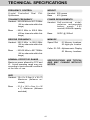
TECHNICAL SPECIFICATIONS
FREQUENCY CONTROL
Crystal Controlled Dual
Synthesizer
WEIGHT
Handset : 250 grams
Base
: 415 grams
PLL
TRANSMIT FREQUENCY
Handset : 925.05 MHz to 927.75 MHz
( All ten channels within this
range)
Base
POWER REQUIREMENTS
Handset : Self-contained nickelcadmium rechargeable
battery supply, 3.6V
nominal, 600mAh capacity.
: 902.3 MHz to 905.0 MHz
(All ten channels within this
range)
Base:
RECEIVE FREQUENCY
Handset : 902.3 MHz to 905.0 MHz
( All ten channels within this
range)
Base
MEMORY
Speed Dial
: 21 Memory locations,
20 digits per location.
Caller ID CID : Alphanumeric Display
50 Memory locations
: 925.05 MHz to 927.75MHz
( All ten channels within this
range)
NOMINAL EFFECTIVE RANGE
Maximum power allowed by FCC and
IC. Actual operating range may vary
according to environmental conditions
at the time of use.
SPECIFICATIONS ARE TYPICAL
AND MAY CHANGE WITHOUT
NOTICE.
SIZE
Handset : 19 x 6 x 3.5cm (L x W xT)
Maximum (Antenna excluded)
Base
9VDC @ 500mA
: 21.5 x 14.5 x 5cm (L x W
x T) Maximum (Antenna
excluded)
41
TABLE OF CONTENTS
Page
INTRODUCTION ............................................................................................................. 1
Special Features ............................................................................................................. 2
Parts Check List .............................................................................................................. 3
FCC AND IC REGULATIONS ......................................................................................... 4
IMPORTANT SAFETY INSTRUCTIONS ......................................................................... 7
REPLACING THE BATTERY PACK .............................................................................. 9
GETTING STARTED
WALL MOUNTING
...................................................................................................... 12
........................................................................................................ 14
EXAMPLES OF THE HANDSET DISPLAY .................................................................. 16
BASE UNIT FUNCTION KEYS ....................................................................................... 17
THE HANDSET LAYOUT ............................................................................................... 18
THE BASE UNIT LAYOUT ............................................................................................. 19
BASE UNIT FEATURES ................................................................................................. 20
QUICK REFERENCE GUIDE ......................................................................................... 21
BASIC OPERATION
...................................................................................................... 24
ADVANCED FUNCTIONS ..............................................................................................
Call Waiting ....................................................................................................................
Temporary Tone ..............................................................................................................
Switching Calls ...............................................................................................................
Message Waiting ............................................................................................................
Programming The Ringer ...............................................................................................
Changing Ringer Types
................................................................................................
Clear/Delete (CLR/DEL) Key
........................................................................................
Advanced Dialing ...........................................................................................................
Multi Level REDIAL ........................................................................................................
26
26
26
26
26
27
27
29
29
29
MEMORY DIALING .......................................................................................................
Storing Memory Speed Dial Numbers ...........................................................................
Dialing From Memory .....................................................................................................
Changing Stored Numbers .............................................................................................
Deleting Stored Numbers ...............................................................................................
Storing Special Codes ....................................................................................................
30
30
30
31
31
31
CALLER ID (CID) ...........................................................................................................
Call Waiting Caller ID (Type ll CID) ...............................................................................
A Word About Caller ID - CID .......................................................................................
Receiving and Storing Calls ...........................................................................................
Dialing From CALLER ID (CID) Memory ......................................................................
Special Message Indicators/Out Of Area Calls .............................................................
"Private" Calls .................................................................................................................
Transmission Error .........................................................................................................
Reviewing Numbers
......................................................................................................
Deleting Numbers ..........................................................................................................
32
32
32
32
32
33
33
33
34
35
ADDITIONAL OPERATING TIPS .................................................................................... 36
MAINTENACE
............................................................................................................... 37
IN CASE OF DIFFICULTY .............................................................................................. 38
WARRANTY ..................................................................................................................... 40
TECHNICAL SPECIFICATIONS ..................................................................................... 41
VTECH COMMUNICATIONS LTD.
Is a trademark of VTECH COMMUNICATIONS LTD.., a member
of THE VTECH GROUP OF COMPANIES.
Distributed in the U.S.A. by VTECH Communications, 8770 SW Nimbus Avenue /
Beaverton, Oregon, 97008.
Distributed in Canada by VTECH Electronics Canada Ltd., Suite 200 - 7671 Alderbridge
Way Richmond, B.C. V6X 1Z9.
Copyright 1998 for VTECH COMMUNICATIONS LTD..
91-4049-12-00
ISSUE 0