1
Serial port Control
If your projector is controlled by a serial port, please select “the Serial Port” button. Next you have to
define Baudrate, Data Bit, Verification Mode, Power-on command, Power-down command, Projection
VGA command, Projection Video Command etc.
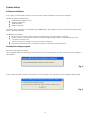
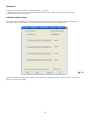
First select “USER-DEFINED PROJECTOR”. Now the window shown in Figure 8 on the next page will appear.
Fig. 8
Click “serial Port Control” after confirmation. Now the communication parameters will be identified in
advance.
Baudrate
Data number of bits: 7 bits or 8 bits.
Stop Bit: 1 bit.
Verification Mode: none, even, odd, space, mark.
Please look up the projectors parameters carefully in the projectors manual. If you’re not sure contact
your dealer.
10