1
Attaching and Removing the
Battery Pack
4
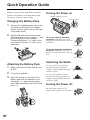
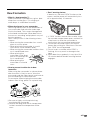
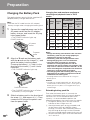
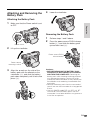
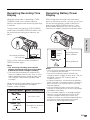
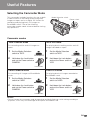
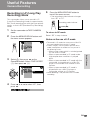
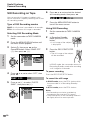
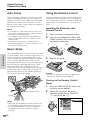
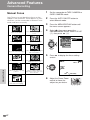
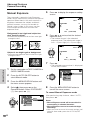
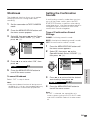
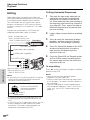
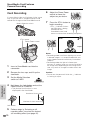
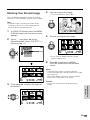
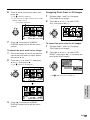
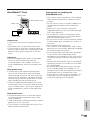
Lower the viewfinder.
Attaching the Battery Pack
1
Preparation
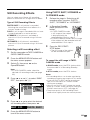
Make sure that the Power switch is set
to OFF.
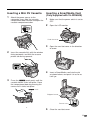
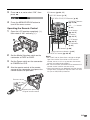
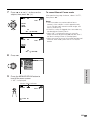
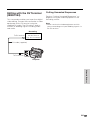
Removing the Battery Pack
Power switch
2
1
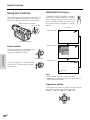
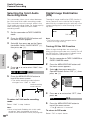
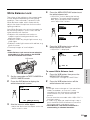
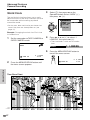
Perform steps 1 and 2 above.
2
Press the power source PUSH release
button (1), and slide the battery pack
up and take it out (2).
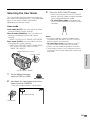
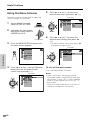
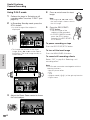
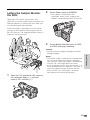
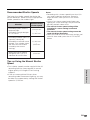
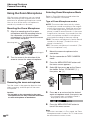
Lift up the viewfinder.
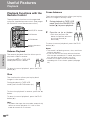
Power source PUSH
release button
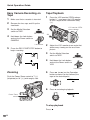
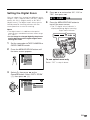
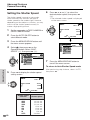
Power source
mounting surface
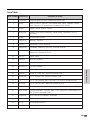
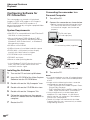
3
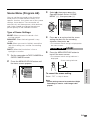
Align the - mark on the side of the
battery pack with the q mark on the
camcorder (1), and slide the battery
pack down completely until it locks into
place (2).
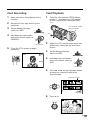
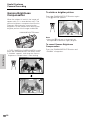
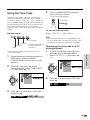
Cautions:
• BEFORE REMOVING THE BATTERY PACK,
ALWAYS STOP RECORDING OR PLAYBACK
AND TURN THE POWER OFF. Removing the
battery pack while shooting or during playback
may damage the tape by causing it to wrap
around the video head drum or may destroy the
SmartMedia card, rendering it unreadable and
unwritable.
• Remove the battery pack from the camcorder if
you will not use the camcorder for a long period
of time.
• Use only SHARP model BT-L221, BT-L441, BTLS222 or BT-LS442A battery packs with this
camcorder. Use of other batteries may present a
risk of fire or explosion.
10