1
Publication Information
Toshiba America Information Systems, Inc., Digtal Solutions
Division, reserves the right, without prior notice, to revise this
information publication for any reason, including, but not
limited to, utilization of new advances in the state of technical
arts or to simply change the design of this document.
Further, Toshiba America Information Systems, Inc., Digital
Solutions Division, also reserves the right, without prior
notice, to make such changes in equipment design or
components as engineering or manufacturing methods may
warrant.
CIX-UG-DKIPT-VC
Version C.1, August 2005
CAUTION!
© Copyright 2005
Toshiba America Information Systems, Inc.
Digital Solutions Division
All rights reserved. No part of this manual, covered by the
copyrights hereon, may be reproduced in any form or by any
means—graphic, electronic, or mechanical, including
recording, taping, photocopying, or information retrieval
systems—without express written permission of the publisher
of this material.
Strata is a registered trademark of Toshiba Corporation.
Stratagy is a registered trademark of Toshiba America
Information Systems, Inc.
Trademarks, registered trademarks, and service marks are the
property of their respective owners.
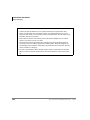
Do not use cleansers that contain benzene, paint thinner, alcohol or other solvents on the telephone's
rubber feet. The color of the rubber may transfer to the desk or mounting surface.