1
INSTALLATION INSTRUCTIONS: Viewline 85 mm
Tachometer
TU00-0752-5807102
Safety information
• The product was developed, manufactured and inspected
according to the basic safety requirements of
EC Guidelines and state-of-the-art technology.
• The unit is designed for use in grounded vehicles and machines
as well as in nautical sports, including non-classified commercial
shipping.
02/11
GB
1-10
No Smoking! No open fire or lights!
• The electrical indicator outputs and cables connected to them must
be protected from direct contact and damage. The cables in use
must have sufficient insulation and electric strength and the contact
points must be safe from touch.
• Use our product only as intended. Use of the product for reasons
• Use appropriate measures to also protect the electrically conductive
other than its intended use may lead to personal injury, property
damage or environmental damage. Before installation, check the
vehicle documentation for vehicle type and any possible special
features!
parts on the connected consumer from direct contact. Laying metallic, uninsulated cables and contacts is prohibited.
• Use the assembly plan to learn the location of the fuel/hydraulic/
compressed air and electrical lines!
Safety after installation:
• Connect the ground cable tightly to the negative terminal of the
battery.
• Note possible modification to the vehicle, which must be considered
during installation!
• To prevent personal injury, property damage or environmental
damage, basic knowledge of motor vehicle/shipbuilding electronics
and mechanics is required.
• Make sure that the engine cannot start unintentionally during
installation!
• Modifications or manipulations to the VDO product can affect safety.
Consequently, you may not modify or manipulate
the product!
• When removing/installing seats, covers, etc., ensure that lines are
not damaged and plug-in connections are not loosened!
• Note all data from other installed units with volatile electronic
Safety during installation:
• During installation, ensure that the product’s components do not
affect or limit vehicle functions. Avoid damaging these components!
• Only install undamaged parts in a vehicle!
• During installation, ensure that the product does not impair the field
of vision and that it cannot impact the driver’s or passenger’s head!
• A specialized technician should install the product. If you install the
product yourself, wear appropriate work clothing. Do not wear loose
clothing, as it may get caught in moving parts. Protect long hair with
a hair net.
• When working on the on-board electronics, do not wear metallic or
conductive jewelry such as necklaces, bracelets, rings, etc.
• If work on a running engine is required, exercise extreme caution.
Wear only appropriate work clothing as you are at risk of personal
injury, resulting from being crushed or burned.
• Before taking any action, disconnect the negative terminal on the
battery, otherwise you risk a short circuit. If the vehicle is supplied by
auxiliary batteries, you must also disconnect the negative terminals
on these batteries! Short circuits can cause fires, battery explosions
and damages to other electronic systems. Please note that when
you disconnect the battery, all volatile electronic memories lose their
input values and must be reprogrammed.
• If working on gasoline boat motors, let the motor compartment fan
run before beginning work.
• Pay attention to how lines and cable harnesses are laid so that you
• Reenter/reprogram the volatile electronic memory values.
• Check all functions.
• Use only clean water to clean the components. Note the Ingress
Protection (IP) ratings (IEC 60529).
Electrical connection:
• Note cable cross-sectional area!
• Reducing the cable cross-sectional area leads to higher current
density, which can cause the cable cross-sectional area in question
to heat up!
• When installing electrical cable, use the provided cable ducts and
harnesses, however, do not run cables parallel to ignition cables or
to cables that lead to large electricity consumers.
• Fasten cables with cable ties or adhesive tape. Do not run cables
over moving parts. Do not attach cables to the steering column!
• Ensure that cables are not subject to tensile, compressive or
shearing forces.
• If cables are run through drill holes, protect them using rubber
sleeves or the like.
• Use only one cable stripper to strip the cable. Adjust the stripper
so that stranded wires are not damaged or separated.
• Only use a soft soldering process or commercially available crimp
connector to solder new cable connections!
• Only make crimp connections with cable crimping pliers. Follow the
safety instructions of the tool manufacturer.
• Insulate exposed stranded wires to prevent short circuits.
• Caution: Risk of short circuit if junctions are faulty or cables are
damaged.
• Short circuits in the vehicle network can cause fires, battery explosions and damages to other electronic systems. Consequently,
all power supply cable connections must be provided with weldable
connectors and be sufficiently insulated.
• Ensure ground connections are sound.
• Faulty connections can cause short circuits. Only connect cables
according to the electrical wiring diagram.
• If operating the instrument on power supply units, note that the
power supply unit must be stabilized and it must comply with the
following standard: DIN EN 61000, Parts 6-1 to 6-4.
do not drill or saw through them!
• Do not choose to install the product in the mechanical and electrical
airbag area!
• Do not drill holes or ports in load-bearing or stabilizing stays or tie
bars!
• When working underneath the vehicle, secure it according to the
specifications from the vehicle manufacturer.
• Note the necessary clearance behind the drill hole or port at the
TU00-0752-5807102
installation location. Required mounting depth: 65 mm.
• Drill small ports; enlarge and complete them, if necessary using
taper milling tools, saber saw, keyhole saw or file. Debur edges.
Follow the safety instructions of the tool manufacturer.
• Use only insulated tools, if work is necessary on live parts.
• Use only the multimeter or diode test lamps provided, to measure
voltages and currents in the vehicle/machine or ship. Use of conventional test lamps can cause damage to control units or other electronic systems.
Technische Änderungen vorbehalten - Technical details subject to change
1
INSTALLATION INSTRUCTIONS: Viewline 85 mm
Tachometer
TU00-0752-5807102
02/11
GB
1-10
2
Procedures for installing VDO Viewline instruments
1
Before beginning, turn off the ignition and remove
the ignition key. If necessary, remove the main circuit
switch.
2
Disconnect the negative terminal on the battery.
Make sure the battery cannot unintentionally restart.
• Before taking any action, disconnect the negative terminal on the battery, otherwise you risk a short
circuit. If the vehicle is supplied by auxiliary batteries, you must also disconnect the negative terminals
on these batteries! Short circuits can cause fires, battery explosions and damages to other electronic
systems. Please note that when you disconnect the battery, all volatile electronic memories lose their
input values and must be reprogrammed.
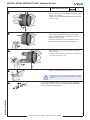
If installing the instrument near a magnetic compass,
note the magnetic safe distance to the compass.
3
0.3 m
The following rings may be installed as alternatives to
the supplied front ring:
4
Front
Front
Front
Front
Front
Front
Front
Front
Front
ring,
ring,
ring,
ring,
ring,
ring,
ring,
ring,
ring,
flat; black
flat; white
flat; chrome
triangular; black
triangular; white
triangular; chrome
round; black
round; white
round; chrome
A2C53192911
A2C53192912
A2C53192910
A2C53192917
A2C53192920
A2C53192918
A2C53192913
A2C53192916
A2C53192914
Place the new front ring on the instrument, rotate it
until the ring’s lip locks into the slots in the housing
and press the front ring until it is flush with the instrument glass.
5
2
1
Conventional assembly. (Instrument is put into the
drill hole from the front).
The panel width may be within a range of 2 to 20 mm.
The drill hole must have a diameter of 86 mm.
Ø 86 mm
6
• Do not drill holes or ports in load-bearing or stabilizing stays or tie bars!
• Note the necessary clearance behind the drill hole or port at the installation location. Required mounting depth:
65 mm.
• Drill small ports; enlarge and complete them, if necessary using taper milling tools, saber saw, keyhole saw or
2 ... 20 mm
file. Debur edges. Follow the safety instructions of the tool manufacturer.
7
TU00-0752-5807102
B
A
or
For 85 mm instruments, the fastening nut can be
mounted at position A or B. This allows you to fixe the
gauge in different panel bores.
Version A
Version B
Panel bore 80.5 - 81 mm
Circumferential lip away from instrument
Panel bore 85.5 - 86 mm
Circumferential lip next to instrument
Technische Änderungen vorbehalten - Technical details subject to change
INSTALLATION INSTRUCTIONS: Viewline 85 mm
Tachometer
TU00-0752-5807102
02/11
GB
1-10
3
If the instrument is mounted flush (i. e., from the back
so that the instrument glass and the panel form one
plane), the front ring must be removed. Press the
instrument glass with both thumbs, while at the same
time pressing the front ring forward from the instrument with both index fingers. Note the use of a tool
in the adjacent figure.
8
1
2
Flush assembly.
9
ø 75.4 mm
The recommended panel thickness is 1.5 to 3 mm.
The drill hole must have a diameter of 75.4 mm.
Ensure that the installation location is level and has
no sharp edges.
• Do not drill holes or ports in load-bearing or stabilizing stays or tie bars!
• Note the necessary clearance behind the drill hole or port at the installation location. Required mounting depth:
65 mm.
• Drill small ports; enlarge and complete them, if necessary using taper milling tools, saber saw, keyhole saw or
1.5...3 mm
file. Debur edges. Follow the safety instructions of the tool manufacturer.
Place the flush mount seal A2C53215641 on the
instrument glass.
Put the instrument into the drill hole from the back.
Adjust the instrument so that the gauge is level and
fasten it to the stud bolts on the rear side of the panel,
using the flush mount fixing bracket A2C59510864.
10
11
Depending on the configuration, insert the cable into the 8-pin and 14-pin
contact housing according to the following pin assignment. The contacts must
audibly lock into place.
1
7
14
8
4
8
TU00-0752-5807102
5
8-pin contact housing
Pin 1 - Term. 30 - battery 12/24 V
Pin 2 - Term. 31 - ground
Pin 3 - signal ground
Pin 4 - Term. 15 - ignition plus
Pin 5 - sensor signal
Pin 6 - Term. 58 - lighting
Pin 7 - warning LED ground
Pin 8 - warning LED plus
1
Now insert the plug into the gauge. Note the inverse
polarity protection nose in the process.
14-pin contact housing
Pin 1 - unassigned
Pin 2 - unassigned
Pin 3 - unassigned
Pin 4 - unassigned
Pin 5 - unassigned
Pin 6 - unassigned
Pin 7 - unassigned
Pin 8 - unassigned
Pin 9 - unassigned
Pin 10 - unassigned
Pin 11 - Configuration key
Pin 12 - Mode key
Pin 13 - Alarm output (max 100 mA)*
Pin 14 - unassigned
* optional, please contact your VDO
partner for more information.
Technische Änderungen vorbehalten - Technical details subject to change
INSTALLATION INSTRUCTIONS: Viewline 85 mm
Tachometer
TU00-0752-5807102
12
Connector set, 14-pin A2C59510851
Electrical connection:
• Electrical connection:
• Note cable cross-sectional area!
• Reducing the cable cross-sectional area leads to higher current
density, which can cause the cable cross-sectional area in question
to heat up!
• When installing electrical cable, use the provided cable ducts and
harnesses, however, do not run cables parallel to ignition cables
or to cables that lead to large electricity consumers.
moving parts. Do not attach cables to the steering column!
safety instructions of the tool manufacturer.
• Insulate exposed stranded wires to prevent short circuits.
• Caution: Risk of short circuit if junctions are faulty or cables are
• Short circuits in the vehicle network can cause fires, battery explosions and damages to other electronic systems. Consequently,
all power supply cable connections must be provided with weldable
connectors and sufficiently insulated.
forces.
• If cables are run through drill holes, protect them using rubber sleeves
or the like.
• Ensure ground connections are sound.
• Faulty connections can cause short circuits. Only connect cables
• Use only one cable stripper to strip the cable. Adjust the stripper so
that stranded wires are not damaged or separated.
according to the electrical wiring diagram.
• If operating the instrument on power supply units, note that
• Only use a soft soldering process or commercially available crimp
connector to solder new cable connections!
terminal
terminal
terminal
terminal
30
15
58
31
-
steady-state plus 12 V
connected (ignition) plus
lighting
ground
4
• Only make crimp connections with cable crimping pliers. Follow the
• Ensure that cables are not subject to tensile, compressive or shearing
-
1-10
damaged.
• Fasten cables with cable ties or adhesive tape. Do not run cables over
30
15
58
31
GB
Use the following connector to connect the instrument:
Connector set, 8-pin - A2C59510850
Connector set, 14-pin - A2C59510851
The connector set is designed for a cable cross-section
of 0.25 - 0.5 mm2.
For other cross-sections, please use contacts made by Tyco.
Single contacts:
Tyco No. 1355718-1 for 0.14 – 0.22 mm2
Tyco No. 963729-1 for 0.5 – 0.75 mm2
Strip:
Tyco No. 1355717-1 for 0.14 – 0.22 mm2
Tyco No. 963715-1 for 0.5 – 0.75 mm2
Create a crimp connection using the contacts and the corresponding cables. Follow the instructions of the hand pliers
manufacturer. Use the following for this:
Hand pliers
Tyco No. 539635-1
And the tool
Tyco No. 539682-2 for these hand pliers.
Pay special attention to whether the crimp barrel clutches all
individual wires in the cable, otherwise you risk a short circuit!
Connector set, 8-pin A2C59510850
13 Designations in the wiring diagram:
02/11
the power supply unit must be stabilized and it must comply with
the following standard: DIN EN 61000, Parts 6-1 to 6-4.
F1 - fuse 5A quick-response
C1 - 8-pin MQS connector
C2 - 14-pin MQS connector
8-pin connection
Config - Configuration key
Mode - Mode key
W1 - Alarm output (max. 100 mA)
You must comply with the wiring diagram.
14-pin connection
Sensor
TU00-0752-5807102
To PC Interface7
Sensor
minus
Technische Änderungen vorbehalten - Technical details subject to change
INSTALLATION INSTRUCTIONS: Viewline 85 mm
Tachometer
14
TU00-0752-5807102
*
02/11
GB
1-10
5
Align the instrument and hand-tighten the fastening
nut. Ensure that the nut is not tightened with a torque
greater than 400 Ncm.
* Make sure the seal lays flat between the panel and
the front ring.
15
If you would like to omit the fastening nut, you may
use the part set A2C59510854 as an alternative.
This is recommended if the installation location is
subject to vibratory loads.
Screw the stud bolts into the provided drill holes in
the enclosure. Max. stud bolt torque is 1.5 Nm
16
Place the bracket on the stud bolt and hand-tighten
the knurled nut.
* Make sure the seal lays flat between the panel and
the front ring (see Fig. 14).
17
Reconnect the battery after inspecting the connection.
• Please note that when you disconnect the battery, all volatile
electronic memories lose their input values and must be reprogrammed.
18
If necessary, replace the main circuit switch. Turn on the ignition
and conduct a functional test. Reprogram other instruments that
may have lost their saved settings.
TU00-0752-5807102
Technische Änderungen vorbehalten - Technical details subject to change
INSTALLATION INSTRUCTIONS: Viewline 85 mm
Tachometer
TU00-0752-5807102
02/11
GB
1-10
6
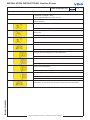
19 Operation
Basics:
Press the key briefly (< 2sec.) to change the currently displayed value.
Press the key longer (> 2sec.) to change to the next value.
The display returns to normal operating mode if a key is not pressed for 30 seconds.
Any settings you have made are not saved.
Startup
1. Setting the impulse number
1. Activate T. 30 (8-pin - Pin1)
2. Deactivate T. 15 (8-pin - Pin4)
3. Press and hold Config key (14-pin - Pin 11)
Activate T. 15
Release Config key
Press and hold Config key
Set impulse number is displayed, the first digit flashes.
Press Config key briefly
The flashing digit increases by 1. If the flashing digit is “9”, the display returns to
“0”
Press and hold Config key
The next lower digit flashes
Press Config key briefly
The flashing digit increases by 1. If the flashing digit is “9”, the display returns to
“0”
Continue until the complete impulse number is set
Press and hold Config key
Deactivate T. 15. This saves the impulse number in the display.
TU00-0752-5807102
Technische Änderungen vorbehalten - Technical details subject to change
INSTALLATION INSTRUCTIONS: Viewline 85 mm
Tachometer
TU00-0752-5807102
02/11
GB
1-10
7
2. Setting the unit (UNIT) and alarm threshold (Warn)
1. Activate T. 30 (8-pin - Pin1)
2. Deactivate T. 15 (8-pin - Pin4)
3. Press and hold Mode key (14-pin - Pin 12)
Activate T. 15
Release Mode key
Press and hold Mode key
By briefly pressing the Mode key, you can switch between 24h and 12h (AM/PM)
clock format.
Press and hold Mode key
Press Mode key briefly
Press and hold Mode key
Set alarm threshold is displayed; the first digit flashes.
Press Mode key briefly
The flashing digit increases by 1. If the flashing digit is “9”, the display returns to
“0”
Press and hold Mode key
The next lower digit flashes.
Press Mode key briefly
The flashing digit increases by 1. If the flashing digit is “9”, the display returns to
“0”
Continue until the complete alarm threshold is set.
Press and hold Mode key
Deactivate T. 15. This saves the unit and the alarm threshold in the display.
TU00-0752-5807102
Technische Änderungen vorbehalten - Technical details subject to change
INSTALLATION INSTRUCTIONS: Viewline 85 mm
Tachometer
TU00-0752-5807102
02/11
GB
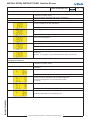
In operation
1. Display indicator selection
1. Activate T. 30 (8-pin - Pin1)
2. Activate T. 15 (8-pin - Pin4)
Total operating
hours
Press Mode key briefly
Trip hours
Press Mode key briefly
Time
Press Mode key briefly
On-board
voltage
2. Resetting the day counter
1. Activate T. 30 (8-pin - Pin1)
2. Activate T. 15 (8-pin - Pin4)
Press the Mode key repeatedly until the trip hours are displayed
Press and hold Mode key
Trip is now deleted.
TU00-0752-5807102
Technische Änderungen vorbehalten - Technical details subject to change
1-10
8
INSTALLATION INSTRUCTIONS: Viewline 85 mm
Tachometer
TU00-0752-5807102
02/11
GB
1-10
9
3. Setting the clock
1. Activate T. 30 (8-pin - Pin1)
2. Activate T. 15 (8-pin - Pin4)
Press the Mode key repeatedly until the time is displayed
Press and hold Mode key
Set time is displayed; the first digit flashes.
Press Mode key briefly
The flashing digit increases by 1. If the flashing digit is “9”, the display returns to
“0”
Press and hold Mode key
The next lower digit flashes.
Press Mode key briefly
The flashing digit increases by 1. If the flashing digit is “9”, the display returns to
“0”
Continue until the correct time is set
Press and hold Mode key
Clock is set.
Important: If T. 30 (8-pin - Pin1) is deactivated, the clock no longer runs.
4. Setting the brightness
1. Activate T. 30 (8-pin - Pin1)
2. Activate T. 15 (8-pin - Pin4)
Press the Mode key repeatedly until the on-board voltage
is displayed
Press and hold Mode key
Press the Mode key repeatedly until the desired brightness
is reached The brightness can be set between 0 (OFF)
to 10 (max).
Press and hold Mode key
The desired brightness is now permanently set.
TU00-0752-5807102
Technische Änderungen vorbehalten - Technical details subject to change
INSTALLATION INSTRUCTIONS: Viewline 85 mm
Tachometer
TU00-0752-5807102
02/11
GB
1-10
10
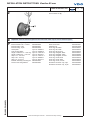
To remove the connector, press the latch (1) and pull
the connector out (2).
20
1
2
21
Important: Clean the instrument glass and front frame with water only. Do not use chemical agents.
22
Accessories / Spare parts
Bush contacts 0.25 – 0.5 mm2
Bush housing, 8-pin
Bush housing, 14-pin
Hand pliers
Tool for hand pliers
Single contacts 0.14 – 0.22 mm2
Single contacts 0.5 – 0.75 mm2
Strip 0.14 – 0.22 mm2
Strip 0.25 – 0.5 mm2
Strip 0.5 – 0.75 mm2
Bracket assembly mounting set
Flush mount fixing bracket
A2C59510846
A2C59510847
A2C59510848
Tyco No. 539635-1
Tyco No. 539682-2.
Tyco No. 1355718-1
Tyco No. 963729-1
Tyco No. 1355717-1
Tyco No. 928999-1
Tyco No. 963715-1
A2C59510854
A2C59510864
Flush mount seal
Fastening nut
Front ring, flat; black
Front ring, flat; white
Front ring, flat; chrome
Front ring, triangular; black
Front ring, triangular; white
Front ring, triangular; chrome
Front ring, round; black
Front ring, round; white
Front ring, round; chrome
Protective connector cap, 8-pin
Protective connector cap, 14-pin
TU00-0752-5807102
Technische Änderungen vorbehalten - Technical details subject to change
A2C53215641
A2C53212238
A2C53192911
A2C53192912
A2C53192910
A2C53192917
A2C53192920
A2C53192918
A2C53192913
A2C53192916
A2C53192914
A2C53324664
A2C53324671