1
Media Gateway Hardware
Manage the features and configuration of your Media Gateway.
Your Media Gateway is not only the central hard drive for recorded content enabling Whole
Home DVR, it is also an advanced cable modem and wireless router supporting WOW! Internet
and WOW! Phone. Your Media Gateway will be installed by a WOW! technician but should you
decide to change the configuration of your home network, or need to troubleshoot your
services, this section will help guide you through working with your Media Gateway.
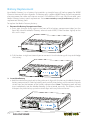
Getting to Know Your Media Gateway
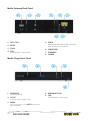
Media Gateway Front Panel
2
4
8
6
10
11
12
1
1. USB
The USB port is not active.
2. Power LED
Illuminates when the Media Gateway is
powered on.
3. Downstream LED
Illuminates when your Media Gateway is
downloading.
4. Upstream LED
Illuminates when your Media Gateway is
downloading.
5. Online LED
Illuminates when your Media Gateway is
online.
6. Link LED
Illuminates when a computer is
connected directly via the Ethernet to
the Media Gateway.
3
5
7
9
7. MOCA LED
Illuminates when the Media Gateway is
connected to a Media Player.
8. Recording
Glows red when the Media Gateway is
recording.
9. WiFi LED
Illuminates when the Wi-Fi is on and
connected.
10.Tel1 LED
Illuminates when the first telephone line
is provisioned and functioning.
11. Tel2 LED
Illuminates when the second telephone
line is provisioned and functioning.
12. Battery LED
Illuminates when the battery is present
and charged.
MEDIA GATEWAY HARDWARE
E-1