1
Operating Instructions
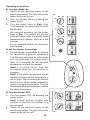
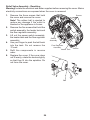
To turn the shower on
1. Switch on the electrical supply at the
double pole switch. The light around the
power button will turn on.
2.Turn the shower ON by pressing the
power button.
3.Turn the power knob to High. Wait
15‑20 seconds for warm water to reach
the handset.
For electrical economy, set the power
knob to Eco. This setting will provide
sufficient power when the supply water
temperature is warmer, such as in the
summer.
For an unheated shower, set the power
knob to Low.
To set the shower temperature
1. Set the shower temperature by rotating
the temperature knob as necessary.
Turn the knob clockwise for hotter water
and anticlockwise for cooler water.
Wait 10‑15 seconds for the adjusted
temperature to reach the handset.
Note! It is normal for the flow rate
to change when the temperature is
changed.
Note! If the water temperature cycles
between hot and cold, the temperature is
set too high. This is causing the thermal
switch to turn off the heating element to
reduce the water temperature. Turn the
temperature knob anticlockwise to reduce
the water temperature.
To turn the shower OFF
1.Turn the shower OFF by pressing the
power button.
Note! A small amount of water may
continue to flow from the handset for a
few moments.
2. Switch off the electrical supply at the
double pole switch. The light around the
power button will turn off.
18