1
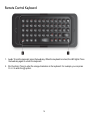
Remote Control Keyboard 1. Lock. To lock the keyboard, press the Lock key. When the keyboard is locked, the LED lights. Press the Lock key again to unlock the keyboard. 2. Fn (Function). Press to enter the orange characters on the keyboard. For example, you can press Fn + 2 to enter the @ symbol. 14