1
Pico DAB+ Manual.qxd
25/9/08
16:37
Page 3
English
Welcome to Revo DAB
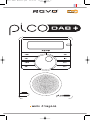
Thank you for buying our Pico Digital Radio, we feel sure that it will provide
you with years of enjoyment and reliable service.
This guide has been designed to quickly get you up-and-running and listening
to DAB and DAB+ digital radio, offer guidance on the more complex features
of this product and provide information on safety, warranty and registration.
Benefits of Digital Radio
Warranty
Clear, interference free digital sound
Many more stations, much more choice
No frequencies, select by station name
No re-tuning
Text information via LCD screen
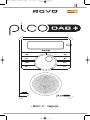
Pico Overview
Pico is capable of receiving both standard
DAB and new DAB+ digital radio
broadcasts, without the need for any
software upgrades or modification, all in a
splashproof casing, with the convenience of
internal battery power.
Revo Technologies Ltd warrants to the
purchaser that this product will be free
from parts and manufacturing defects in
the course of normal use for a period of
one year from the date of purchase.
This warranty does not apply in cases of
accidental damage, where the case has
been removed, wear and tear, negligence,
modification or inappropriate use.
Should you encounter problems with this
product, please contact your supplier or
alternatively see page 2 of this guide for
technical support contact details.
Pico can also be used as a high quality
speaker system for your iPod™ (or other
MP3 player or external sound source).
Warranty Registration
It is a warranty condition that you register
your purchase by either completing the
warranty card enclosed with your radio or
alternatively registering online at
www.revo.co.uk/register
Simply connect your device to Pico’s
M-Port using the audio lead supplied.
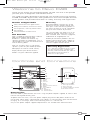
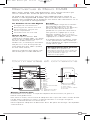
Controls and Connectors
D A B / D A B +
1.
D I G I T A L
R A D I O
7.
8.
2.
3.
4.
5.
6.
9.
10.
11.
3.
4.
2.
12.
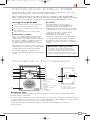
1. LCD Screen
2. Power
1.
3. Menu
4. Presets
5. Back
6. M-Port
7. Remote Control Sensor
8. Mode
9. Scroll Wheel
10. Info
11. Volume Up
12. Volume Down
1.
2.
3.
4.
Telescopic Antenna
Stereo Line-Out
3.5mm Headphone Socket
DC Power Socket
Powering Pico
Your Pico radio is powered from the mains using the power adaptor supplied, or from its own
internal rechargeable battery pack.
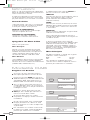
To power from the mains, insert the power adaptor plug into the DC power socket on the
rear of Pico. When Pico is connected to mains power, its internal battery pack will commence
charging. On a full charge, Pico’s internal battery pack has a 12 hour life.
Only use the power adaptor supplied. Replacements are available from www.revo.co.uk
3