1
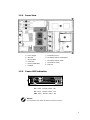
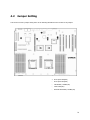
1.1.4 Inner View
a. Power Supply
g. CPU/Memory Duct
b. Silm FDD
h. PCI-Express Add-on Card(Option)
c. Silm CD-ROM
i.
d. Center Fan
j. PCI-X Add-on Cards
e. Memory DIMM Slots
k. Rear Fan
PCI-Express Add-on Cards
f. HeatSink
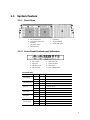
1.1.5
Power LED Indication
AC : Green – Normal / Yellow - Fail
DC : Green – Normal / Yellow – Fail
FAN : Green – Normal / Yellow - Fail
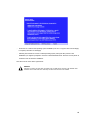
NOTICE
You can check the power status LED after the front bezel is removed.
5