1
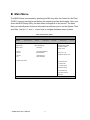
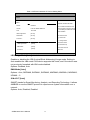
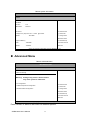
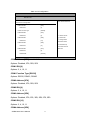
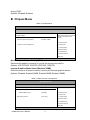
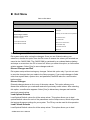
during POST. Options: Disabled, Enabled Chipset Menu Table 14 Chipset Menu BIOS SETUP UTILITY Main Advanced Boot Chipset Power [IDG] Internal Graphics Mode Select [Enabled, 32MB] Exit Select which graphics controller to use as the primary boot device. Chipset Settings Boot Graphics Adapter Priority Security Å Select Screen > Video Function Configuration ↑↓ Select Item +- Change Field Tab Select Field F1 General Help F10 Save and Exit ESC Exit V02.67 (C)Copyright 1985-2006, American Megatrends, Inc. Boots Graphic Adapter Priority [IGD] Select which graphics controller to use as the primary boot device. Options: IGD, PCI/IGD, PCI/PEG, PEG/IGD , PEG/PCI Internal Graphics Mode Select [Enabled 32MB] Select the amount of system memory used by the Internal graphics device. Options: Disabled, Enabled 32MB, Enabled 64MB, Enabled 128MB Table 15 Video Function Configuration BIOS SETUP UTILITY Main Advanced Boot Chipset Power Security DVMT Mode Video Function Configuration [DVMT Mode] DVMT Mode Select DVMT/FIXED memory [256 MB] Å Select Screen ↑↓ Select Item [CRT+DVI] Boot Display Device +- Change Field Tab Select Field F1 General Help F10 Save and Exit ESC Exit V02.67 (C)Copyright 1985-2006, American Megatrends, Inc. KUBE-8040 User’s Manual 34 Exit